How to integrate Decodo proxies with Postman
Configure Postman to route requests through Decodo's 115M+ residential IPs. Verify API responses, check regional latency, and debug geo-restricted endpoints effortlessly.
14-day money-back option

115M+
ethically-sourced IPs
<0.5s
average response time
99.92%
success rate
7-day
free trial
99.99%
uptime
What is Postman?
Postman is the industry-standard platform for building and testing APIs. Developers use it to send requests (GET, POST, PUT) to servers and analyze the responses. By integrating a residential proxy, you can originate these API calls from different global IP addresses. This is critical for testing geo-blocking logic, validating CDN performance in different regions, and ensuring your API handles traffic correctly from diverse ISPs.
Configuration requirements
Before you start, ensure you have:
- Postman desktop app installed (Windows, macOS, or Linux)
- A valid Decodo account
- Your proxy credentials (host, port, username, password)
Step-by-step Postman proxy setup
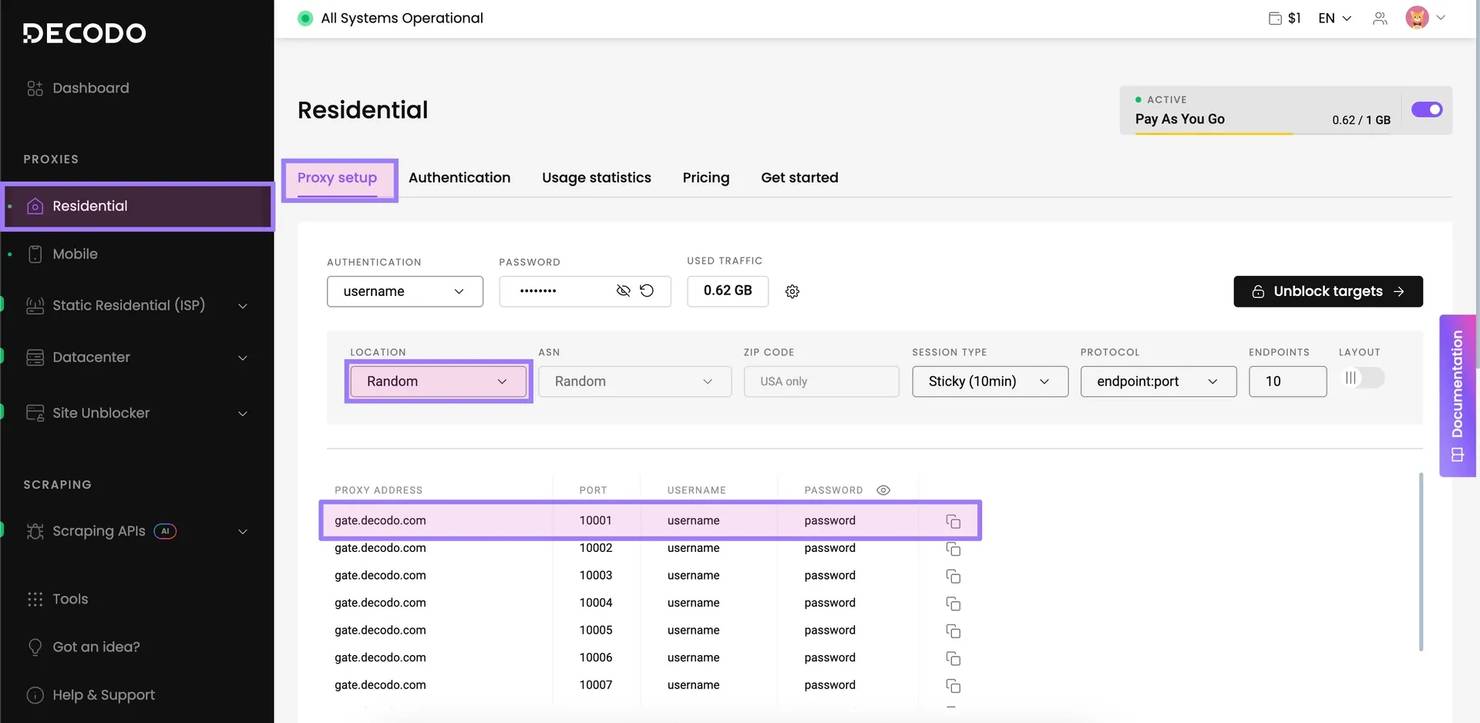
Step 1: Get your proxy credentials
- Log in to the Decodo dashboard.
- Choose Residential under Proxies.
- Navigate to Proxy setup.
- Choose your target country (e.g., Japan).
- Copy the Proxy address (gate.decodo.com), port (10001), username, and password.
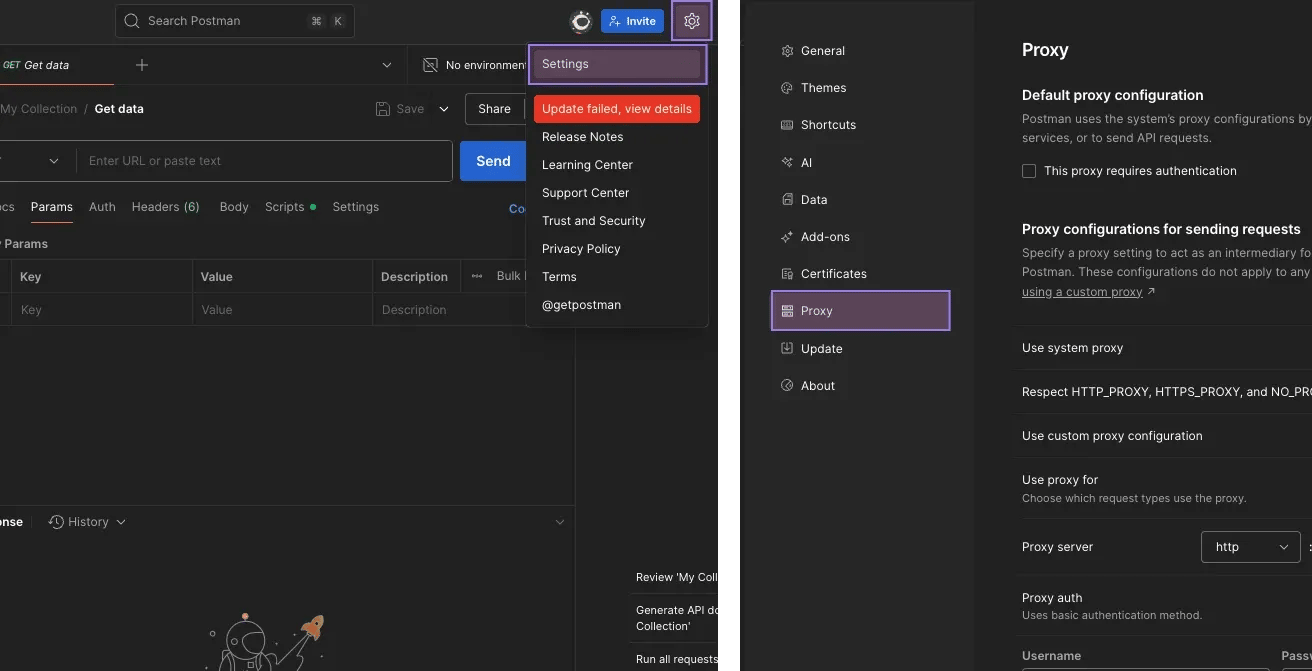
Step 2: Access proxy settings
- Open Postman.
- Click the Settings icon in the top-right header.
- Select Settings from the dropdown menu.
- Navigate to the Proxy tab.
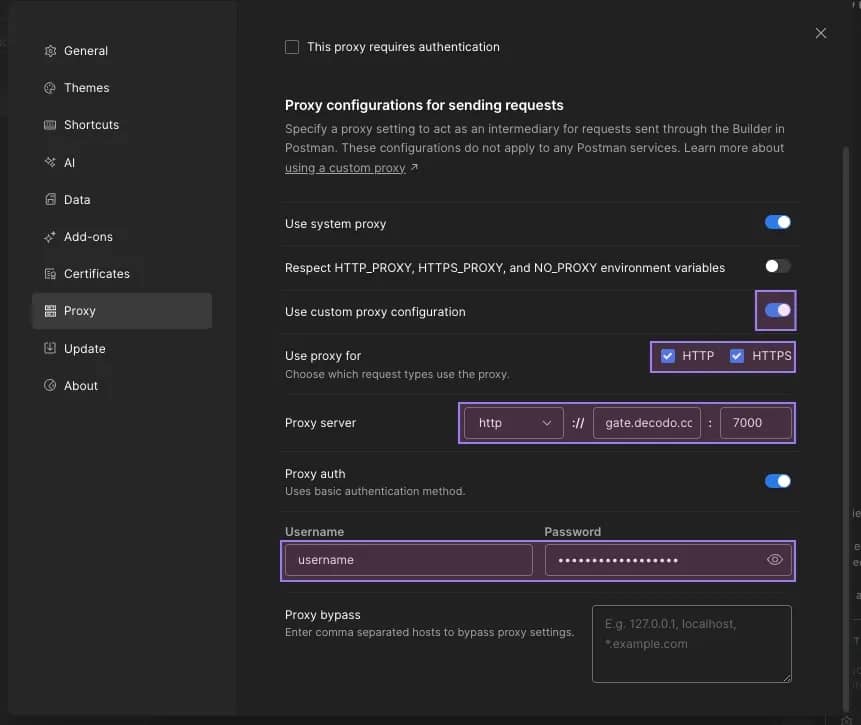
Step 3: Configure custom proxy
- Toggle on Use custom proxy configuration.
- Use proxy for – check both HTTP and HTTPS.
- Proxy server – enter the host name (gate.decodo.com) and port (7000).
- Toggle on Proxy auth.
- Username. Enter your username.
- Password. Enter your password.
- Close the Settings window (it will save automatically).
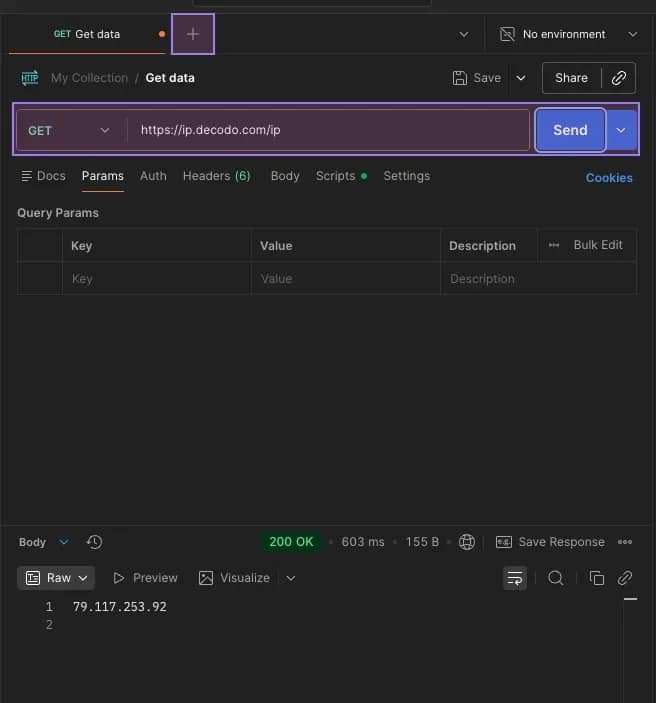
Step 4: Verify connection
- Click the + icon to create a new request.
- Set the method to GET.
- Enter URL: https://ip.decodo.com/ip (This endpoint returns the caller's IP).
- Click Send.
- The JSON response should display your Decodo proxy IP, confirming the traffic is routed correctly.
Troubleshooting Postman connection issues

"Error: connect ETIMEDOUT"
This usually means the proxy host or port is incorrect. Double-check for spaces. Also, ensure your corporate firewall allows outbound connections on port 7000.
SSL verification errors
If developing with self-signed certificates or proxying HTTPS, you may need to disable SSL certificate verification in the General tab of Postman Settings.
System proxy conflict
Ensure the Use System Proxy toggle in the Proxy settings is turned off. If it's on, Postman might ignore your custom configuration and use your OS settings instead.
Why use Decodo residential proxies with Postman

Test geo-dependent logic
Ensure your API returns the correct currency, language, or content based on the user's location. Switch your proxy IP to the UK, Germany, or Brazil to validate your backend's localization logic instantly.

Verify rate limiting
Test how your API handles traffic spikes. By rotating your residential IP with every request, you can simulate multiple unique users hitting your endpoint simultaneously to verify your rate-limiting rules.

Debug CDN latency
Check the performance of your API from a "real user" perspective. Connect via a residential IP in a specific city to measure the actual latency your users experience when hitting your CDN edge servers.
Affordable plans for API testing
Pick a plan that best suits your needs. Get the highest quality IPs for your integrations.
With each residential proxy plan, you access:

115M+ ethically-sourced IPs in 195+ locations
HTTP(S) & SOCKS5 support
Continent, country, state, city, ZIP code, and ASN-level targeting
Rotating and sticky session options
<0.5s avg. response time
99.92% success rate
99.99% uptime
Seamless integration with scraping tools and bots
24/7 tech support
14-day money-back
SSL Secure Payment
Your information is protected by 256-bit SSL

Other developer tool integrations
Explore guides for automation and coding.


Find out what people are saying about us
We're thrilled to have the support of our 135K+ clients and the industry's best.

Attentive service
The professional expertise of the Decodo solution has significantly boosted our business growth while enhancing overall efficiency and effectiveness.
N
Novabeyond
Easy to get things done
Decodo provides great service with a simple setup and friendly support team.
R
RoiDynamic
A key to our work
Decodo enables us to develop and test applications in varied environments while supporting precise data collection for research and audience profiling.
C
Cybereg






Featured in:





Frequently asked questions
Can I set a proxy for a single request only?
Postman's global settings apply to all requests. However, you can write a "pre-request script" to dynamically set proxy environment variables. For scoped testing, developers often use Postman environments to toggle proxy variables.
Does Postman support SOCKS5?
Postman currently has limited native support for SOCKS5 proxies in its GUI settings (it focuses on HTTP/HTTPS). If you strictly need SOCKS5, use a system-level proxy or simply use the HTTP protocol for your API tests, as it covers REST/GraphQL/SOAP perfectly.
Can I use this for Newman (CLI)?
Yes. When running collections via Newman command line, simply pass the proxy flag: newman run collection.json --proxy-url http://user:pass@gate.decodo.com:7000.
Be aware that any tools mentioned in this article belong to a third party, not Decodo. Therefore, Decodo will not be responsible for any of the services offered by the third-party. Make sure to thoroughly review the third-party’s policies and practices, or do your due diligence, before using or accessing any of their services.
Start Global API Testing
Validate your endpoints worldwide with the most reliable residential proxy network.
14-day money-back option