What Is SERP Analysis and How To Do It in 2026?
SERP analysis means examining a search engine results page (SERP) for a keyword to understand what ranks, which features appear, and whether your content has a realistic chance of earning visibility and clicks. This guide walks through what SERP analysis is, the six steps to run one, and how to pull SERP data at scale.

Justinas Tamasevicius
Last updated: Oct 26, 2026
9 min read

TL;DR
- SERP analysis helps you understand who ranks for a keyword, what type of content performs well, and whether you have a realistic chance of competing.
- Google's AI Overviews have changed how search rankings translate into traffic. An Ahrefs study of 300,000 keywords found that AI Overviews were associated with a 58% lower click-through rate for the top organic result.
- Google removed support for the num=100 parameter in September 2025, making it more expensive to collect rankings beyond the first 10 results.
- Manual SERP analysis works well for a small number of keywords. For larger projects or searches across multiple locations, an API makes data collection easier to manage.
- Decodo's Web Data API lets you collect search results, extract competitor content, and gather website data through a single API.
What is SERP analysis?
A SERP (Search Engine Results Page) is the page Google or another search engine displays after someone enters a query. It can contain organic listings, advertisements, video results, local packs, featured snippets, People Also Ask questions, and AI-generated answers.
For example, when you search Google for "what are static residential proxies?", the results page begins with an AI Overview that explains what these proxies are and how they work.
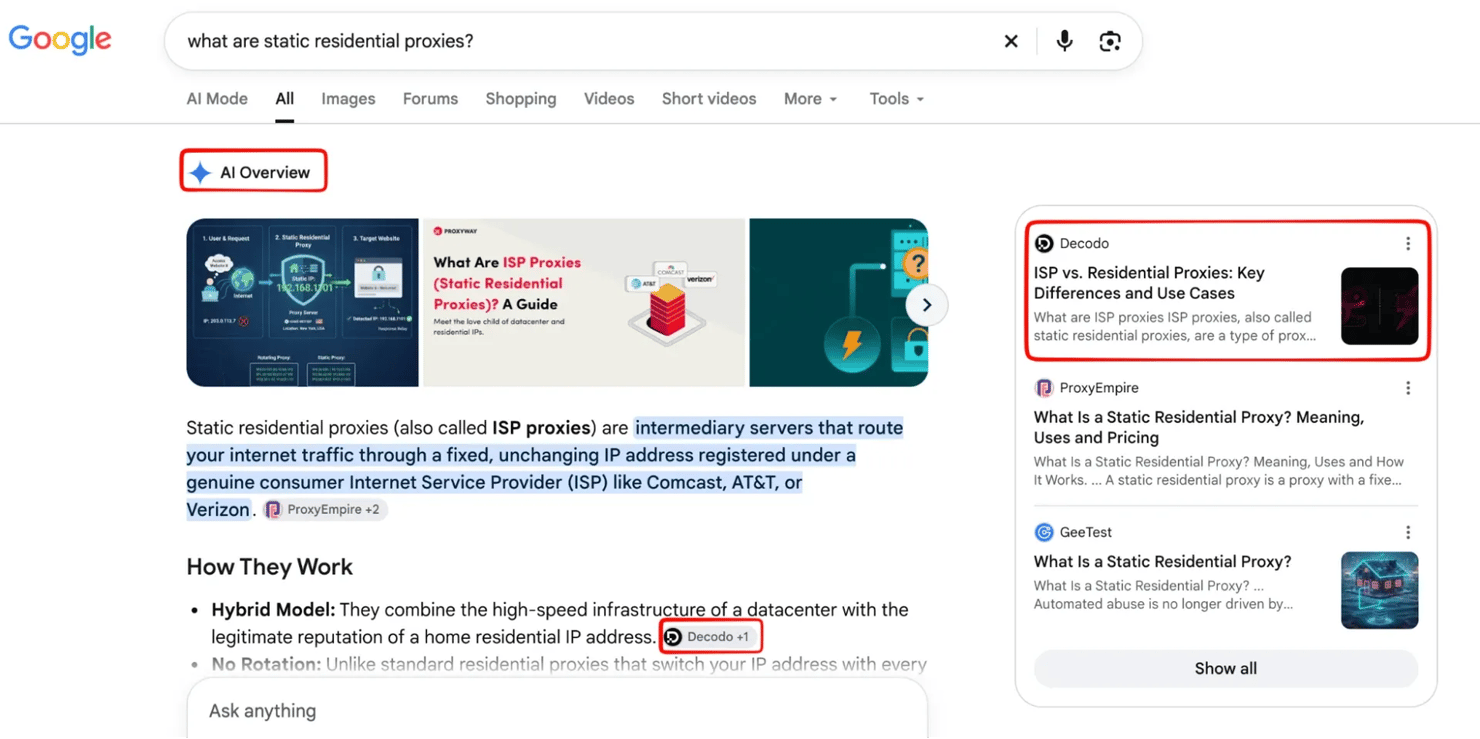
It also cites several sources, including Decodo's article on ISP vs. residential proxies.
Further down the page, you'll find a People Also Ask section with related questions about pricing, legality, and how static residential proxies differ from other proxy types.
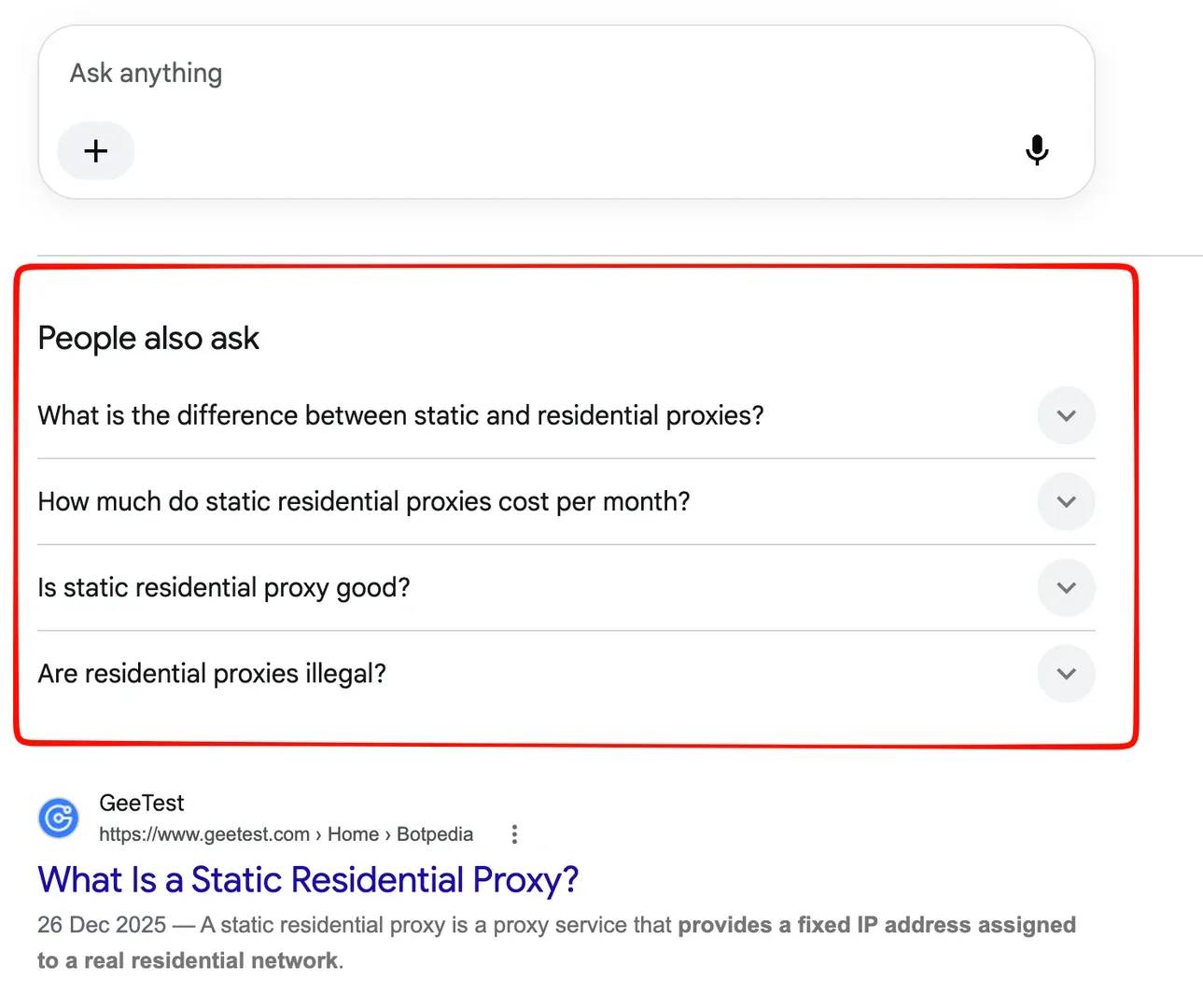
There's also a video section featuring tutorials from Decodo and other providers, followed by regular organic listings and related searches.
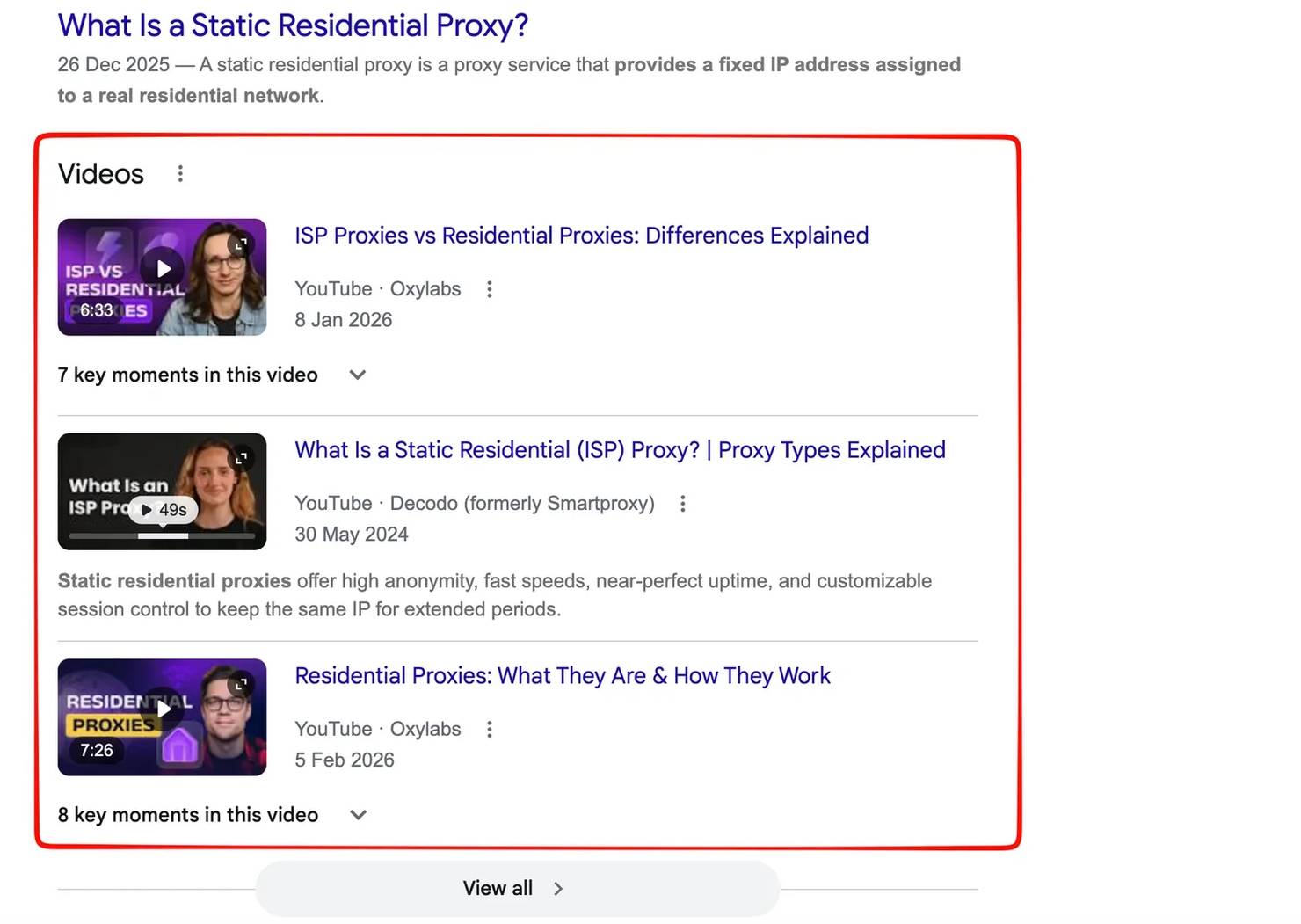
All these elements compete for attention, and they give us clues about what Google considers relevant to the query. For instance, the AI Overview suggests that searchers want a quick explanation, while the video results indicate that visual demonstrations may also be useful.
SERP analysis helps you make sense of these results by identifying which content performs well, what competitors are doing, and where opportunities for visibility exist. This gives you a clearer picture of your chances of ranking than keyword metrics alone.
What SERP analysis can reveal
Beyond rankings, SERP analysis helps you understand several factors that influence whether a keyword is worth targeting:
- Search intent and content format. Whether the top results are definitions, tutorials, comparisons, tools, or product pages, and what that tells you about what searchers want.
- SERP features. Whether AI Overviews, featured snippets, People Also Ask, or other features appear, how much space they occupy, and whether they offer additional opportunities for visibility.
- Competitor strength. Which websites rank, how thoroughly they cover the topic, and whether weaker or outdated pages leave room for competition.
- Content gaps. What the existing results fail to explain, demonstrate, or address, and how your content could offer something more useful.
What changed: SERP analysis in the AI search era
Google's evolving search features have changed how websites earn visibility, how users interact with results, and how SERP data is collected.
AI Overviews are changing organic click-through rates
Google's AI Overviews provide AI-generated answers directly on the search results page, often citing multiple sources. As we saw in the earlier example, these summaries can appear above traditional organic listings, giving users answers before they visit a website.
This affects how much traffic a top ranking can generate. In February 2026, Ahrefs reported that the presence of AI Overviews was associated with a 58% lower click-through rate for the top organic result, based on an analysis of 300,000 keywords.
For SERP analysis, this means checking whether an AI Overview appears for your target keyword, which websites it cites, and how much space remains for organic results. A page might rank highly but receive fewer clicks than expected if Google already answers the query.
Google removed the num=100 parameter
In September 2025, Google stopped supporting the num=100 parameter, which previously allowed SEO tools and scrapers to retrieve up to 100 search results in a single request.
Without it, collecting the same number of results generally requires multiple paginated requests. This increases the time and resources needed for large-scale rank tracking and SERP analysis.
For most keyword evaluations, examining the first 10-20 organic results is a reasonable starting point. You can go deeper when tracking lower-ranking pages or conducting more extensive competitive research.
Search results vary by location
Google also adjusts search results based on factors such as location, language, and device. This means someone searching for the same keyword in London and New York may see different competitors, local listings, advertisements, and even AI-generated answers.
These differences matter when you're evaluating keywords for multiple markets. A competitor that ranks highly in one country may barely appear in another, while local search features can occupy more space depending on the query.
How to do SERP analysis in 6 steps
SERP analysis starts with choosing the right keywords and examining the results to understand what it would take to compete.
1. Define your keywords and target location
Start by selecting the keywords you want to analyze. These might be terms your website already ranks for, keywords your competitors target, or new opportunities you've identified through keyword research.
Rather than analyzing a large list immediately, begin with a primary keyword and 5-10 related variations. For example, if you're targeting "residential proxies," you might also examine "best residential proxies," "rotating residential proxies," and "residential proxies for web scraping."
Next, decide which location you want to analyze. Google adjusts results based on geographic location, so rankings in the US may differ from those in the UK or Germany. Record each keyword alongside its target country, language, and current ranking, if available. This gives you a consistent starting point for comparing results and tracking changes later.
2. Identify search intent
Search intent describes what someone wants to accomplish when entering a query. Understanding it helps you determine what type of content is most likely to satisfy the search.
There are 4 common categories:
- Informational. The user wants to learn something, such as "what is a residential proxy?"
- Navigational. The user wants to find a particular website or brand, such as "Decodo login."
- Commercial. The user is researching options, such as "best residential proxy providers."
- Transactional. The user is ready to take action, such as "buy residential proxies."
However, a keyword's wording doesn't always tell you its intent. Examine the first 10 results and note whether Google favors tutorials, comparisons, product pages, free tools, or videos.
For example, if most results are comparison articles, publishing a basic definition probably won't satisfy the same intent. You may need a comparison that helps readers evaluate their options.
3. Examine SERP features
Once you've identified search intent, look at how Google organizes the results page. Pay attention to everything that appears before and between traditional organic listings. Check for AI Overviews, advertisements, featured snippets, People Also Ask questions, video results, image packs, and local listings.
These features can affect both visibility and traffic. For example, an AI Overview might answer a question before users reach the organic results, while a video carousel could create another opportunity to appear on the page.
Record which features appear and where they're positioned. If you're analyzing several keywords, a simple spreadsheet can help you compare how much space each SERP gives to traditional organic results.
4. Analyze your competitors
Next, examine the websites occupying the top organic positions. The goal is to understand why their pages perform well and whether you can realistically compete. Look at the content format, depth of coverage, freshness, backlinks, and authority of the ranking websites.
Pay particular attention to weaker results. For example, a page that hasn't been updated in several years, contains outdated information, or barely addresses the search query might present an opportunity. However, don't assume a high-authority website is impossible to outrank. Relevance, search intent, and the usefulness of individual pages also matter.
5. Find content gaps and ranking opportunities
After reviewing the leading pages, identify what they're missing. This could be an unanswered question, an outdated explanation, an incomplete tutorial, or a practical example that nobody has provided.
For instance, several pages might explain how residential proxies work without demonstrating how to configure one in Python. A tutorial with working code and actual output could provide something more useful.
You should also examine related long-tail keywords. These often reveal specific questions or use cases that broader articles don't address thoroughly. Before creating content, try to answer one question: What will your page offer that the existing results don't? If you can't identify a meaningful improvement, the keyword may not be worth pursuing.
6. Monitor changes and update your analysis
SERP analysis shouldn't end when you publish your content. Continuous SERP monitoring is equally significant. Rankings, competitors, and search features can change as Google updates its results. Revisit important keywords regularly to see whether new competitors have appeared, existing pages have been updated, or AI Overviews and other features have changed the layout.
For high-priority keywords, monthly reviews are a reasonable starting point. Less competitive or lower-priority terms may only need quarterly checks. Compare each new set of results with your earlier findings. This helps you distinguish between a competitor overtaking your page and a broader SERP change that affects how much organic traffic is available.
Ways to get SERP data
You can collect SERP data manually, through SEO tools, or using an API. The right method depends on how many keywords you're analyzing, the level of detail you need, and how often you want to collect results.
Method
Best for
Limitations
Manual Google searches
Small keyword sets and one-off analysis
Time-consuming and affected by location and search settings
SEO tools (Ahrefs, Semrush, Moz)
Keyword research, competitor analysis, and rank tracking
Data freshness and available features vary by platform
SERP scraping APIs
Collecting large volumes of SERP data across locations
Requires technical setup and API usage costs
For larger projects, an API lets you automate data collection instead of checking each keyword individually.

Skip the manual SERP checks
Get structured Google search results, track organic rankings, and analyze SERP features with Decodo's Web Data API.
How to collect and analyze SERP data using Decodo's Web Data API
Decodo's Web Data API lets you collect Google search results without manually opening each page. We'll use its /search endpoint to retrieve organic rankings and the Google Search template to examine additional SERP features, including AI Overviews.
1. Set up your Web Data API account
First, sign in to your Decodo dashboard and activate a Web Data API subscription. Once it's active, open the API Playground and get your API key.
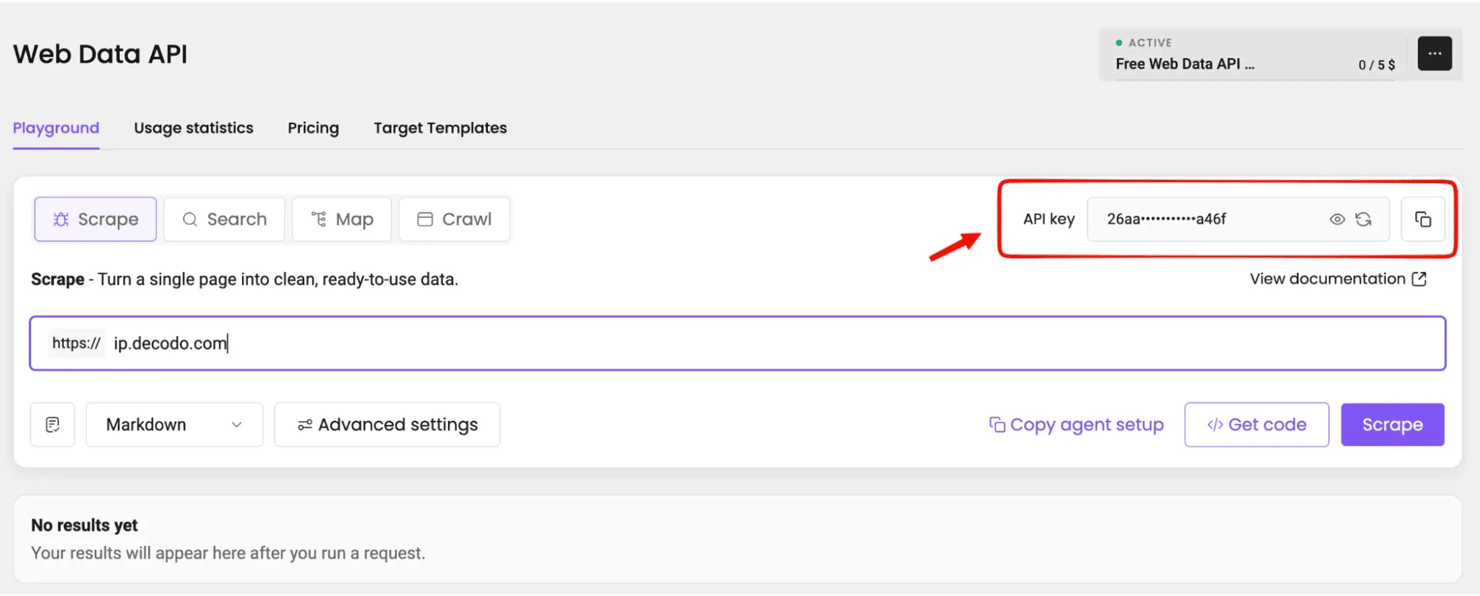
Keep this key private, as you'll use it to authenticate your requests. Before writing the script, make sure you have Python installed. Create a project folder, open your terminal, and set up a virtual environment:
On Windows, activate the environment with venv\Scripts\activate. If your system uses python3 instead of python, use that command throughout.
Next, save your API key as an environment variable. On macOS or Linux, run:
For Windows PowerShell, use:
Replace YOUR_API_KEY with the key from your dashboard. This keeps your credentials out of the Python script.
2. Collect organic search rankings
We'll start by collecting Google results for "serp analysis" in the United States. The /search endpoint returns structured data that includes each organic result's ranking position, title, and URL.
Create a file called serp_check.py and add the following code:
Run it from your terminal:
The script sends a request using the keyword, location, and language we've specified. It then prints the organic rankings and saves the complete API response to a JSON file.
During the test, the API returned Status: done, followed by results from different websites.
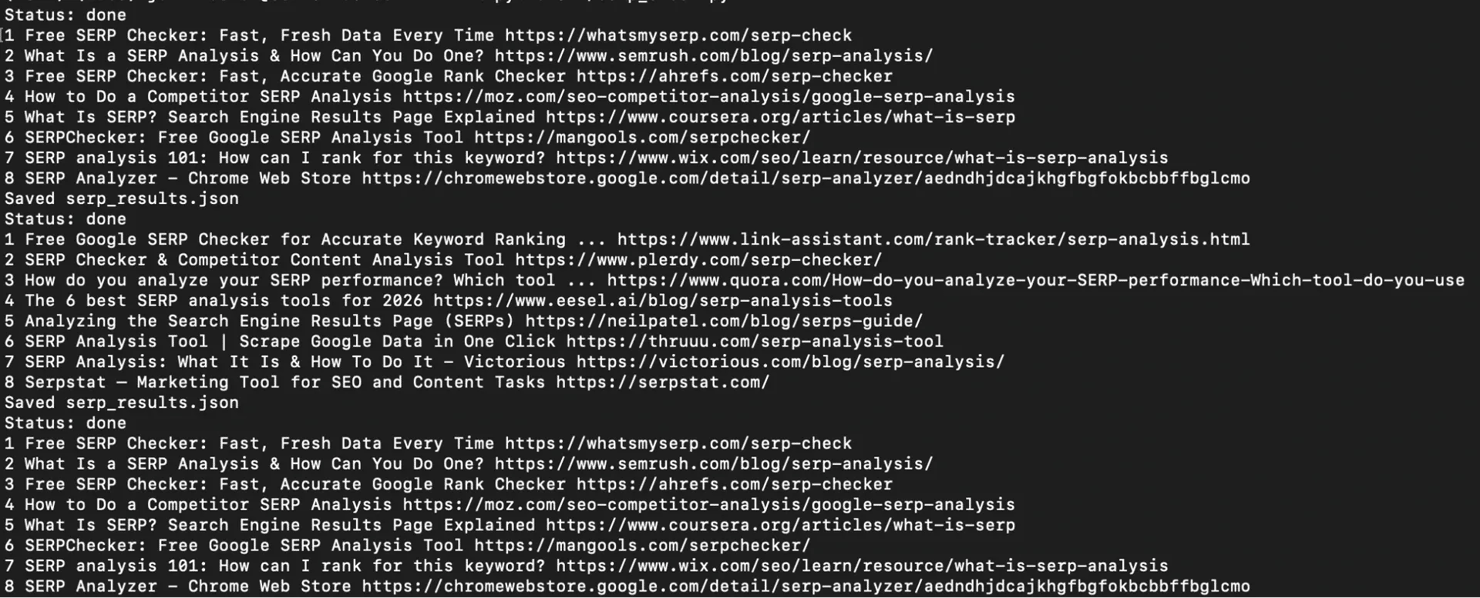
The script also creates serp_results.json in your working directory. You can open it to inspect additional information or keep the results for comparison with future searches.
3. Collect SERP features and AI Overview data
Organic rankings tell us which pages appear in search results, but they don't show everything competing for attention.
To examine AI Overviews, videos, and other SERP features, we'll use the Google Search template through the /scrape endpoint.
Create another file named full_serp.py:
The target parameter selects Google's search results, while parse=True requests structured output. The page_from and page_count parameters specify which results page to collect and how many pages to retrieve.
Run the script:
Once the request completes, open serp_full.json to inspect the collected results.
4. Use the collected data for SERP analysis
Now that we have the results, we can apply the same principles covered earlier in the article.
Start by examining the organic listings to identify leading competitors and common content formats. Next, review the available SERP features to see whether AI Overviews, videos, or other elements might affect how users interact with the page.
You can also inspect the sources cited in AI Overviews and compare them with the organic results. A website doesn't necessarily need to hold the top organic position to appear as a cited source.
For deeper competitor research, Web Data API also supports individual page extraction through /scrape. Its /map and /crawl endpoints can help with broader website audits, but you don't need them for a basic SERP analysis.
Common SERP analysis mistakes
Even with the right data, a few common mistakes can lead to poor keyword decisions:
- Assuming high rankings guarantee traffic. AI Overviews, ads, and other SERP features can reduce clicks to organic results, even when a page ranks first.
- Ignoring location differences. Google results vary by country, language, and device. Always use consistent settings when comparing rankings across different markets or periods.
- Relying entirely on keyword difficulty. Difficulty scores are useful starting points, but they don't tell you whether the ranking pages satisfy search intent or leave room for better content.
- Overlooking SERP features. Focusing only on organic listings means missing opportunities to appear in featured snippets, video results, and AI-generated answers.
- Analyzing results only once. Competitors update their content, search intent can shift, and Google regularly changes which features appear. Revisit important keywords to keep your analysis relevant.
Final thoughts
SERP analysis helps you make better content decisions by showing what ranks, what searchers expect, and where opportunities exist. Examining search intent, competitors, and SERP features before creating content can save you from targeting keywords that offer little potential for visibility or traffic.
For smaller keyword sets, manual analysis may be enough. When you need to collect results regularly or compare rankings across multiple locations, Decodo's Web Data API can automate the process and provide structured SERP data for further analysis.

Ready to automate SERP analysis?
Collect Google search results and AI Overview data across your target markets using Decodo's Web Data API.
About the author

Justinas Tamasevicius
Director of Engineering
Justinas Tamaševičius is Director of Engineering with over two decades of expertise in software development. What started as a self-taught passion during his school years has evolved into a distinguished career spanning backend engineering, system architecture, and infrastructure development.
Connect with Justinas via LinkedIn.
All information on Decodo Blog is provided on an as is basis and for informational purposes only. We make no representation and disclaim all liability with respect to your use of any information contained on Decodo Blog or any third-party websites that may belinked therein.