How to Scrape Google News With Python
Keeping up with everything happening around the world can feel overwhelming. With countless news sites competing for your attention using catchy headlines, it’s hard to find what you need among celebrity tea and what the Kardashians were up to this week. Fortunately, there’s a handy tool called Google News that makes it easier to stay informed by helping you filter out the noise and focus on essential information. Let’s explore how you can use Google News together with Python to get the key updates delivered right to you.

Zilvinas Tamulis
Last updated: Oct 21, 2026
10 min read

TL;DR
- Use Requests and BeautifulSoup to fetch and parse Google News category and subcategory pages without browser automation.
- Select a Google News topic URL under /topics/. Subcategories use /topics/.../sections/....
- Extract article titles, Google News links, publishers, publication dates, authors, and related-story information when available.
- Customize the maximum number of articles, publication-date range, and whether to include multiple articles covering the same story.
- Save scraped data to CSV for cleaner output and easier analysis outside the terminal.
- Check Google News' robots.txt and Terms of Service. As reviewed on October 21, 2026, /topics/ paths were allowed, while search and RSS search endpoints were disallowed.
What is Google News?
Google News is a powerful news aggregator that collects and organizes news articles from various news sources worldwide. It provides users with data tailored to their interests, location, and trending topics. By curating top stories and categorizing news results, Google News makes it easy to stay updated on current events. You can browse articles directly on the Google News web page or access specific categories, like business, technology, or sports, based on your interests.
What is Google News scraping?
Google News scraping is the process of extracting data from Google News using automated tools or scripts. This can involve collecting headlines, publishers, publication dates, and other relevant news data from Google News pages. Businesses and researchers use Google News scrapers for market research, competitor analysis, and brand monitoring by tracking media coverage and industry trends.
Scraping can be done using Python libraries like Requests and BeautifulSoup to parse Google News URLs or with headless browsers like Playwright or Selenium to extract data from dynamic pages. Google discontinued its official News Search API in 2016, but you can still retrieve structured results using solutions like Decodo's Google News Scraper API.
Get the Latest AI News, Features, and Deals First
Get updates that matter – product releases, special offers, great reads, and early access to new features delivered right to your inbox.
Scraping Google News with Python
Let's put what we've learned into practice by scraping Google News with Python. We'll select a category or subcategory, extract news listings, and save the results to a CSV file.
We'll use a Google News topic page under /topics/ to retrieve article listings directly from its HTML, without requiring browser automation or JavaScript execution. We'll also integrate residential proxies to manage our requests.
By the end of this tutorial, you'll have a working scraper that collects news titles, URLs, sources, publication dates, authors, and related-story information when available.
Step 1: Setting up the environment
Before getting started, you'll need Python and a few libraries to retrieve and process the data.
- Install Python. Download Python from the official website if you haven't already.
- Install the required libraries. Open your terminal and run the command: pip install requests beautifulsoup4 python-dotenv
- Set up your code editor. You can use VS Code, PyCharm, or another IDE of your choice.
Here's what each library does:
- requests sends HTTP requests to Google News.
- beautifulsoup4 parses the HTML to find articles and their metadata.
- python-dotenv loads proxy credentials from a .env file.
We'll also use Python's built-in csv module to export the results and datetime to filter articles by publication date.
Step 2: Understanding Google News topic URLs
Google News organizes articles into categories such as Technology, Business, and Sports. Some categories also have subcategories. For example, the Technology page has sections such as Artificial intelligence, Mobile, and Computing.
To choose what to scrape, open Google News, select a category or subcategory, and copy its full URL from the browser. A Technology category URL looks like this:
Subcategory URLs contain an additional /sections/ segment, for example:
The long topic and section IDs identify Google's categories; there's no need to construct them manually. Make sure you copy the URL after selecting the specific subcategory, rather than its parent category.
You can customize the results using the following URL parameters:
Parameter
Name
Definition
hl
Host language
Specifies the language preference, such as en-GB for British English (written as an ISO language code).
gl
Geographic location
Influences results based on the selected country, such as GB for the United Kingdom.
ceid
Country edition ID
Specifies the Google News country and language edition, such as GB:en.
The URL you copy will already include these settings. Unlike the Google News search endpoint, topic pages don't accept a q parameter for searching arbitrary keywords. The script collects articles featured in your chosen category or subcategory, not results from a site-wide keyword search.
At the time of writing, Google's robots.txt allows /topics/ pages but disallows the /search and /rss/search endpoints. Review its access rules and Terms of Service before scraping, as these may change.
Step 3: Setting up residential proxies
Although topic pages let us retrieve news listings using a simple HTML request, automated requests can still encounter access restrictions.
For this example, we'll use Decodo's residential proxies to route requests through residential IP addresses.
Once you have your proxy credentials from the Decodo dashboard, create a file named .env in your project directory and add:
Replace the placeholders with your actual credentials.
Keeping them in a separate file means you won't have to hardcode sensitive information into your Python script.
We'll load these values using python-dotenv and pass the proxy configuration to the Requests session. This lets the scraper send its Google News request through the configured proxy. Using a proxy doesn't override the site's crawling restrictions or terms.

Enhance your scraper with proxies
Claim your 3-day free trial of residential proxies and explore full features with unrestricted access.
Step 4: Extracting Google News results and saving them to CSV
Now we're ready to build the scraper. The workflow is straightforward:
- Send one request to the selected Google News category or subcategory page.
- Parse the HTML response to find individual article links and their associated metadata.
- Extract each article's title, link, source, publication date, author, and related-story information when available.
- Apply the optional publication-date and related-article filters, then limit the number of results.
- Save the results to a CSV file.
We'll use BeautifulSoup to find article links and relevant HTML elements. Since this approach relies on parsing Google News' HTML, you may need to update the selectors if the website's structure changes. The script doesn't open individual articles or execute JavaScript.
Here's the complete script:
You can also find the complete script, setup instructions, and future updates in our Google News Scraper GitHub repository.
Let's look at a few important parts.
Configuring your scrape
At the beginning of the script, you can change the following values:
TOPIC_URL determines which category or subcategory to scrape. Paste the entire URL copied from Google News, including /sections/ if you've selected a subcategory.
MAX_ITEMS limits how many results will be saved. The default is 50, but you can use another positive number or None to keep all articles returned in the page's initial HTML.
MAX_AGE_DAYS filters articles by publication date. Set it to 1, 7, or 30 to keep only articles published within that many days, or leave it as None for no date restriction.
INCLUDE_RELATED_ARTICLES determines whether to keep all articles grouped under the same Google News story. Set it to False to retain only the first article from each identified group; articles without a story group remain included.
The script filters the articles before applying the result limit, so it won't restrict the selection to the first 50 articles and then apply a date filter.
Parsing the HTML
This function identifies article anchors in the page's HTML:
The code then examines each article's surrounding HTML to collect its publisher, timestamp, and author. Some topic pages organize articles into groups of related coverage, while others display individual cards. The script handles both layouts and leaves the story-group fields empty when they aren't available.
Each result becomes a dictionary containing seven fields: title, URL, source, publication date, author, story group, and story URL. The URLs are Google News links, not necessarily direct publisher links. The script doesn't visit external websites or download their article contents.
Saving the results
Finally, Python's csv.DictWriter creates scraped_articles.csv, adds the column headers, and writes the extracted entries.
This gives us structured data that can be opened in Excel, Google Sheets, or another application.
Step 5: Running the scraper and reviewing the results
Save the script as google-news-topic-with-proxies.py in the same project directory as your .env file.
Run it using:
For a subcategory with 60 articles available in its initial HTML, an example of successful terminal output looks like this:
The number and order of results will vary depending on the selected category, subcategory, and when you run the scraper. Some subcategories may have few or no current articles. The heading may also show the parent category even when you've selected a subcategory.
Once the script finishes, you'll find scraped_articles.csv in your project directory, containing the following columns:
Column
Contents
Title
News headline
URL
Google News article link
Source
Publisher name
Published
Publication date and time, where available
Author
Article byline, where available
Story Group
Title of the related-story group, where available
Story URL
Google News link to the related-story group, where available
You can change TOPIC_URL and run the script again to collect news from a different category or subcategory.
A few things to keep in mind
This approach is particularly useful when you only need Google News topic listings rather than full article content. It avoids browser automation, JavaScript rendering, and navigating to external publishers.
However, there are a few limitations:
- Topic pages aren't keyword searches. The script collects news featured in the selected category or subcategory, not all Google News articles matching a phrase.
- The available results depend on the page. Increasing MAX_ITEMS doesn't automatically load more articles through infinite scrolling. The script only processes the HTML returned by the initial request.
- Not every article has every field. Authors and related-story information may be missing on some listings.
- Access restrictions are still possible. Residential proxies don't guarantee that every request will succeed, so the script checks for HTTP errors and Google challenge responses.
If your project requires full article text, JavaScript-rendered content, or larger-scale collection, you'll need a different extraction workflow.
For collecting Google News headlines and their associated metadata, though, this topic-based scraper offers a comparatively simple starting point.
All-in-one alternative – Web Data API
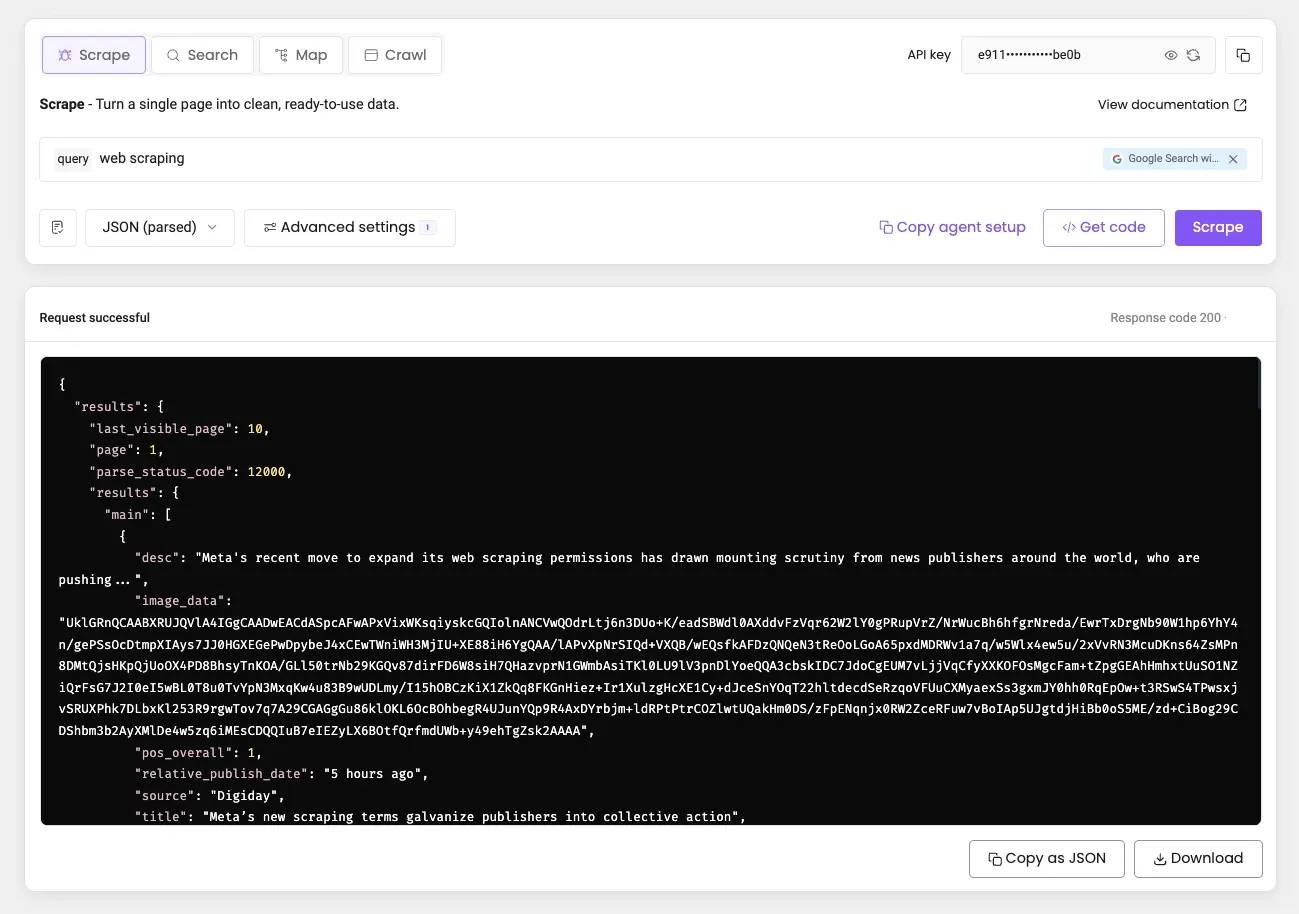
If you'd prefer a ready-made solution for collecting structured Google News results, try Decodo's Web Data API. Here's how to use it without writing any code:
- Log in to your Decodo dashboard, navigate to Web Data API, and activate a free plan or choose a subscription.
- Open the Playground tab, click the document icon, and select the Google Search with AI Overview target template.
- Open Advanced settings and set Tbm to Google News - nws.
- Enter a search query, such as web scraping, and select JSON (parsed) as the output format.
- Click Scrape to retrieve Google News results.
You'll receive structured news results containing article titles, URLs, sources, publication times, and descriptions, without writing any code.

Skip the boilerplate
Decodo's Web Data API handles proxies, CAPTCHAs, and anti-bot detection so your code stays short and your requests actually land.
Best practices for Google News data scraping
Keep these practices in mind when scraping Google News to achieve the best results:
- Respect the robots.txt file. Google News' robots.txt disallows automated crawling of most pages, including search results and RSS search endpoints, while allowing paths such as /topics/. Google's Terms of Service also prohibit automated access that violates these restrictions. Review both before scraping and seek legal advice for commercial projects.
- Limit request frequency. Reduce request rates and introduce delays between permitted requests to avoid unnecessary server load.
- Use proxies responsibly. Rotating proxies can help distribute permitted requests across different IP addresses, but they don't override website access restrictions or terms of use.
- Update your script regularly. Maintain your scraping code to accommodate changes in website structure, data formats, and access requirements.
Wrap-up
Scraping Google News with Python lets you build a custom news feed around the topics that matter to you. You've learned how to select news categories or subcategories, extract headlines and other metadata from their pages, and save the results to a CSV file. However, Google's access restrictions can complicate automated data collection, so always review its policies before scraping. For a more scalable approach without managing the scraping infrastructure yourself, try Decodo's Web Data API, which handles requests and returns structured news data.
About the author

Zilvinas Tamulis
Technical Copywriter
A technical writer with over 4 years of experience, Žilvinas blends his studies in Multimedia & Computer Design with practical expertise in creating user manuals, guides, and technical documentation. His work includes developing web projects used by hundreds daily, drawing from hands-on experience with JavaScript, PHP, and Python.
Connect with Žilvinas via LinkedIn
All information on Decodo Blog is provided on an as is basis and for informational purposes only. We make no representation and disclaim all liability with respect to your use of any information contained on Decodo Blog or any third-party websites that may belinked therein.