Zapier Web Scraping Integration
Decodo's Zapier app brings live web data into your Zaps without code. Fetch any page, up to 25 URLs in a single call, or Google and Amazon search results. Then send clean markdown or HTML to Google Sheets, Slack, your CRM, or AI. Proxies, JavaScript rendering, and anti-bot handling run in the background.
14-day money-back option

What can the Decodo app do in Zapier?
No webhook setup, no request bodies, no parsing raw responses. Add Decodo as an action step, paste a URL or keyword, and map the result into the next step.

Fetch any page
Use Fetch URL to pull a page as clean Markdown or HTML. It works on any public URL.

25 URLs, one step
Fetch URL List fetches up to 25 URLs in a single call. You don't need a loop with one step per page.


Ready for AI steps
Markdown output strips the page boilerplate, so ChatGPT, Claude, or any AI step gets the content, not the clutter.

Works on hard sites
JS-heavy pages, CAPTCHAs, and IP blocks are handled behind the step, backed by 125M+ IPs. A plain request gets an empty page; Decodo gets the content.

Available to AI agents
The same actions are available through Zapier MCP, SDK, and CLI, so agents connected to Zapier can fetch live web data too.
How do you set up Decodo in Zapier?
Step 1: Add Decodo to your Zap
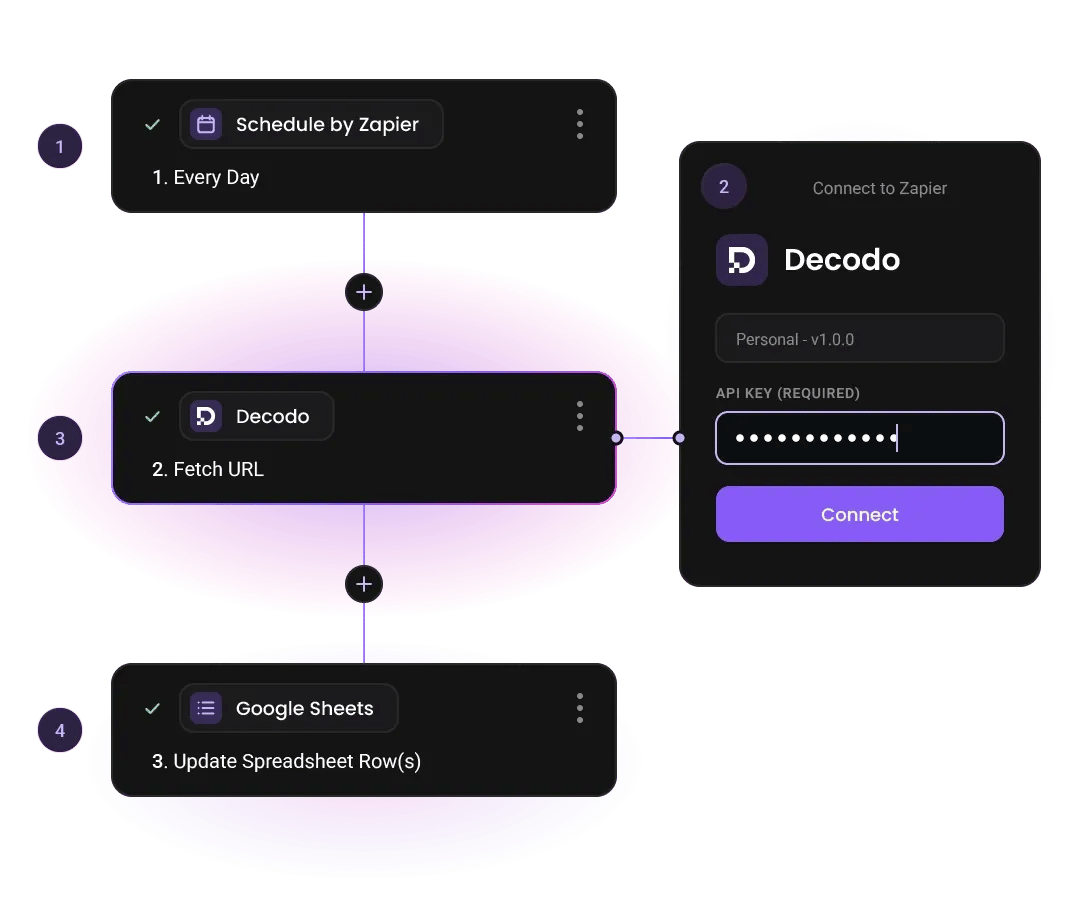
Pick any trigger, such as Schedule by Zapier, a new row in Sheets, or a new CRM lead. Then add Decodo as an action step.
Step 2: Connect your account
Paste your Decodo Web Data API key from the dashboard. Every Zap you build after that reuses the connection.
Step 3: Choose an action
Fetch URL for one page, Fetch URL List for up to 25, or Run Search for Google and Amazon. Type a URL or keyword, or map one from an earlier step.
Step 4: Send the data anywhere
Map the returned content into Google Sheets, Airtable, Slack, a CRM, or an AI step. Your Zap now runs on live web data.
Trusted by:


What can you automate with Decodo and Zapier?
Monitoring and research workflows that used to need a developer and a custom scraper, built in a Zap and run on a schedule.

Competitor price monitoring
Check up to 25 competitor product pages on a schedule, log prices, and get a Slack alert when one changes.
Schedule → Fetch URL List → AI step (extract prices) → Google Sheets → Slack

SEO rank tracking
Run your target keywords on Google daily and keep a running log of who ranks where.
Schedule → Run Search → AI step (top 10 results) → Airtable

Lead enrichment
When a new lead lands in your CRM, scrape their website, summarize what the company does, and write it back to the record.
New CRM lead → Fetch URL → AI step (summarize) → Update CRM

Content and news digests
Pull a list of articles as markdown, summarize them with AI, and send one digest instead of 20 tabs.
Schedule → Fetch URL List → AI step → Slack or Gmail

Amazon product research
Search Amazon for a keyword and compare listings and prices side by side in a sheet.
Form or Schedule → Run Search (Amazon) → Google Sheets

Visual archiving and QA
Screenshot landing pages on a schedule for QA, compliance, or competitor records.
Schedule → Fetch URL (screenshot; markdown off) → Google Drive
How much does the Decodo Zapier integration cost?
The Zapier app is free. You pay only for Web Data API requests, billed from your existing Decodo plan, with no extra fee for using Zapier. All plans include the same features, and you can start with the free plan to test your Zaps.
With each plan, you access:

JavaScript rendering
99.99% success rate
HTML, Markdown, XHR, plus JSON, PNG where supported
One-click AI integrations
LLM-ready Markdown format
100+ pre-built templates
Single API key for all endpoints
/scrape, /search, /map, /crawl
24/7 tech support
14-day money-back
SSL Secure Payment
Your information is protected by 256-bit SSL

What are users saying about Decodo?
We're proud to support a thriving community of 135K+ users and the industry's best.

Helping us build
Decodo lets us collect data from 10M+ ads every month without throttling, so our small team can focus on building.
S
Skaler.app
Easy to get things done
Decodo provides great service with a simple setup and friendly support team.
R
RoiDynamic
A key to our work
Decodo enables us to develop and test applications in varied environments while supporting precise data collection for research and audience profiling.
C
Cybereg




Frequently asked questions
What is the Decodo Zapier integration?
It's Decodo's official app in the Zapier directory, built on the Decodo Web Data API. It adds three actions to your Zaps:
- Fetch URL
- Fetch URL List
- Run Search
You can scrape pages, fetch up to 25 URLs at once, and pull Google and Amazon search results without writing code.
What actions are available?
- Fetch URL returns a single page as markdown, HTML, or a screenshot.
- Fetch URL List fetches up to 25 URLs in one call and returns markdown, HTML, or screenshot for each.
- Run Search returns Google or Amazon results for a keyword.
How many URLs can I scrape in one Zap?
Up to 25 in a single step. Fetch URL List takes a list of URLs and returns the content for each one in one call, so you don't need a loop with one step per page. For a single page, use Fetch URL instead. If you need more than 25, add a second Fetch URL List step or split the list across scheduled runs.
Does the integration have triggers?
No, the app has actions only. Start your Zap with any other trigger, such as Schedule by Zapier, a new spreadsheet row, a form submission, or a new CRM record. Then add Decodo as the next step.
How is this different from Zapier's built-in Webhooks?
Webhooks send a plain HTTP request and return whatever the site gives back, which on most modern sites is raw HTML, a CAPTCHA page, or nothing. Decodo routes the same request through a 125M+ IP pool, renders JavaScript, and handles anti-bot checks, then returns clean markdown or HTML. No request body to build, no headers to set, no parsing step afterward.
Can I use Decodo in Zapier without writing code?
Yes. The Decodo app is a no-code web scraping step: pick an action, paste a URL or a keyword, and map the output into the next app. There's no script to write and no API request to construct. The only setup is pasting your Web Data API key once, and every Zap you build after that reuses the connection.
Put Live Web Data in Your Next Zap
One API key, three actions, any app on the other end. Get your First Zap to scrape in minutes.
14-day money-back option