504 Gateway Timeout: What It Means and How to Handle It
The 504 Gateway Timeout occurs when a gateway or reverse proxy doesn't receive a complete response from the origin server before its timeout window expires. For scrapers and API developers, a 504 error rarely indicates an actual server-side problem. More often, it's the result of anti-bot systems tarpitting your request, a slow-rendered endpoint, or a proxy hop whose timeout budget is too small for the workload. This guide explains how to diagnose and fix the real issue.
TL;DR
- A 504 Gateway Timeout error indicates that a gateway or reverse proxy timed out while waiting for the server behind it to respond.
- For scraping workloads, recurring 504s often point to anti-bot systems deliberately delaying requests rather than genuine origin failures.
- To fix an anti-bot-induced 504 error, use a realistic browser TLS fingerprint, include retries with exponential backoff, and distribute requests across rotating residential proxies.
- Decodo Scraping API handles these fixes and more behind an intuitive request interface, allowing you to focus on extracting data rather than handling and fixing HTTP errors.
What is a 504 Gateway Timeout error?
The HTTP 504 Gateway Timeout is a server error response status code. According to RFC 9110 (the standard for the overall HTTP architecture), a 504 indicates that a gateway or proxy didn't receive a timely response from an upstream server it needed to access to complete the request.
Simply put, one server asked an upstream server for the data you requested, but it didn't receive a response within its timeout window.
A typical modern website's request chain involves intermediary servers, such as Cloudflare, Nginx reverse proxy, AWS ALB, or an API gateway like Kong, before the target application's database. Your request talks to these servers, which then fetch the data from the main database. If any service in the request chain takes too long to respond, the server waiting for a response returns a 504 Gateway Timeout error.
For scrapers, the most common emitter is the target's CDN/WAF edge. This information is often available in the response header, which names the emitter. Common values include cloudflare, nginx, awselb/2.0, AmazonS3, or Kong. A missing Retry-After header is also worth looking out for. Since there's no server-set wait window or guarantee that the origin will be ready in n seconds, a 504 error response header almost never includes a Retry-After header. You have to decide the retry policy: how long to wait or when to give up entirely.
Other HTTP error codes that are adjacent to the 504 Gateway Timeout include:
- 502 means the upstream replied with something invalid.
- 503 means the origin was deliberately refused right now.
- 408 means the client took too long to send.
- 524 is Cloudflare-specific and indicates an origin that took longer than 100 seconds to respond.
To learn more about these error codes and how to fix them, check out our guide: 500 Internal Server Error: causes, fixes, and how to prevent it.
Common causes of 504 Gateway Timeout errors when scraping
When web scraping, the causes of 504s are rarely obvious from the response headers or terminal log. While some instances may reflect a genuine server-side problem, most are the result of deliberate interference by anti-bot systems. Understanding the possible causes will help you narrow down your specific issue and determine the right fix. Below are the most common ones.
Anti-bot tarpitting
WAFs and bot-management edges, such as Cloudflare Bot Fight Mode, Akamai Bot Manager, DataDome, and PerimeterX, deliberately hold automated connections open without ever requesting a response. The edge eventually times out, waiting for the origin server, which it never actually contacted, and returns a 504 error.
The goal here for anti-bot systems is often to waste scraper resources and also make it difficult to diagnose. But you can verify this cause: 504s cluster on a subset of IPs, while clean browsers on the same network load fine.
Keep in mind that anti-bot systems often employ multiple methods and responses to detect and block bots. Check out our guide on anti-scraping techniques and how to outsmart them for more information.
Slow-rendered endpoints behind the edge
Server-side-rendered product pages, GraphQL endpoints with deeply nested resolvers, and pages that synchronously call third-party services (price, inventory, reviews) can legitimately exceed the edge's read timeout.
For example, a product page may return a 504 if a recommendation service takes too long to respond during a flash sale, even when the server itself is functioning normally.
Datacenter IP reputation
IP reputation is one of the primary signals anti-bot systems use when evaluating incoming requests. Because datacenter IP ranges are publicly known and commonly associated with automated traffic, requests originating from them are often treated differently. Some anti-bot systems respond by introducing artificial delays or routing traffic through slower inspection layers.
The same request that succeeds immediately from a residential IP may be delayed long enough to trigger a 504 timeout when sent from a datacenter IP.
Oversized cookies or headers
When your requests include excessively large cookies and headers, they can strain the target server, as it must allocate memory to read, parse, and assign strings for each header and cookie. The server may take so long to process the oversized headers that the gateway or reverse proxy times out while waiting and returns a 504 Gateway Timeout error.
For websites using advanced anti-bot systems, an oversized cookie or header rarely gets to the target server. Such requests are often flagged and rejected with a 400 HTTP error code, which indicates that your request exceeds the server's size limit.
However, anti-bot systems, rather than rejecting the connection outright, can also route the request to a queue where the connection remains open until the front-facing proxy gives up, resulting in a 504 error response. A diagnostic signal for this cause is a 504 error that appears after n requests to the same session, but not on a fresh session.
TLS fingerprint mismatches
Every HTTP request begins with a TLS handshake, in which your scraper sends a ClientHello message outlining its supported parameters, including cipher suites and extensions. WAFs and bot management edges that hash (JA3/JA4) those parameters often look for mismatches between your TLS fingerprint and your declared identity.
If there's a mismatch, the anti-bot system sometimes routes your request into a slow-walk path that ends in a 504 error. HTTP clients such as Python's Requests and curl produce well-known fingerprints. Browser-impersonating clients like curl-impersonate and tls-client can help you imitate a real browser at the TLS layer and scrape without getting blocked.
Concurrency bursts and rate-shaped pools
Some proxy providers limit the bandwidth of specific IP segments to preserve network health. These IP pools are also known as rate-shaped pools. If you're running 100s of parallel connections, a rate-shaped pool would add latency to your requests, causing them to arrive at irregular, delayed intervals.
Anti-bot systems often flag this latency profile and intentionally delay responses to those IPs, leading to 504 errors. This is different from a 429 Too Many Requests error, which occurs when you exceed a server's request threshold for the number of requests per defined period. Even then, some systems intentionally place those requests in a queue to keep connections open, which will ultimately result in 504s.
Real origin slowness during peak load
High traffic surges, such as Black Friday product drops and earnings day spikes, can genuinely overload the target servers. In these cases, 504s correlate with real-user latency rising on the target's status page, not just your scraper.
Impact of a 504 Gateway Timeout on your scraper and pipeline
In production, 504 Gateway Timeout errors can scale globally, triggering hidden architectural assumptions that can crash your infrastructure, corrupt data sets, or even increase overall cost. Below are 4 of the most common failures that consistently cause real damage in data pipelines.
Silent data gaps
Silent data gaps can be very dangerous in production, especially in time-series workloads such as price monitoring, SERP tracking, and sentiment analysis. Because no alerts trigger in the event of these data gaps, downstream analysis automatically treats an empty field as a valid zero or carries the last known value forward.
For example, in a price monitoring system, a 504 gap on a competitor's premium offering can be treated as out of stock by downstream models, ultimately leading to the wrong decisions, like increasing your own prices. An action that can price you out of the market.
Wasted budget on retries
Most scraping APIs and rotating proxy plans bill per request or GB. A naive retry loop on 504s burns through your budget without producing any value. The problem compounds when the cause is an anti-bot tarpitting: every retry attempt will automatically return a 504 because the anti-bot layer is deliberately stalling your requests.
When a request encounters a standard network failure, retrying makes sense. However, retrying 504s, specifically those caused by anti-bot systems, will only burn a hole in your project's pocket.
Escalation to harder blocks
Many anti-bot systems escalate responses: a first offense gets hand-held to a 504, continued hammering triggers a 403, which is a default web scraping error code for an outright block, and persistent retries from the same fingerprint or IP pool result in more aggressive blocks or an IP ban.
Retrying 504s blindly, or treating it as a simple transient error, can turn a recoverable situation (anti-bot tarpitting) into a full IP or fingerprint ban, both of which are significantly difficult to come back from.
Check out our guide on navigating anti-bot systems for more information.
Misleading monitoring and misattributed blame
Because a 504 is returned by the gateway rather than the origin server, scraper-side error handling, which generally watches for 5xx responses, can misinterpret the signal as target site downtime. Teams end up wasting time waiting for a non-existent outage to clear, when the actual scenario is an anti-bot system tarpitting your request because it suspects bot behavior.
You can rule out an anti-bot-induced 504 by checking whether real browsers on the same network receive the same response.
How to fix a 504 Gateway Timeout in your scraper
To fix 504 Gateway Timeouts when web scraping, you shouldn't treat them as simple transient errors that can always be resolved with retries. The most reliable approach is to first identify why the request exceeded the gateway's timeout window and then apply the appropriate fixes.
The methods below are ordered as you'd typically troubleshoot 504s, but you can jump to a specific fix if you've already narrowed down the root cause.
Fix 1: Retry with exponential backoff and jitter
Retrying a 504 failed request immediately only hammers the server and can worsen the situation if an anti-bot system is involved. Rather, retry with exponential backoff, doubling the wait time after each failure, and add jitter to handle concurrent requests.
Without jitter, every concurrent worker that hits a 504 at the same time retries at the same calculated interval, creating a wave of requests that can overwhelm the server and trigger an escalated anti-bot response.
Cap retries at 3-5 and only apply automatic retries to POST requests if the endpoint uses an idempotency key that guarantees the server will deduplicate the second attempt.
Here's a Python example:
This script:
- Sends an HTTP request and retries it if it fails with a 504 error.
- Uses exponential backoff to ensure retries wait longer than the previous one.
- Adds a small random delay (jitter) to prevent synchronized retry spikes from multiple clients.
- Stops retrying once the request succeeds (HTTP 200) or after the maximum number of retries (up to 5 attempts).
- Raises an error if all retries fail.
Fix 2: Send realistic headers
Bot management layers often inspect HTTP headers before forwarding the request to an origin server. If a request doesn't include browser-like headers, it's flagged as a bot and may result in a 504 Gateway Timeout error.
Default User-Agents from standard HTTP libraries like Python's requests, Axios, or Go's net/http are well-known bot signatures. You'll need to set a real browser UA, Accept, Accept-Language, Accept-Encoding, Sec-CH-UA, and Referer that match the target's typical traffic.
Some anti-bot systems also evaluate header order. Real browsers typically follow a fixed order determined by the protocol stack. Mismatched header order or missing values are common 504 triggers.
Here's a basic Python requests script with real browser headers:
Fix 3: Match a browser TLS fingerprint
The Requests library uses Python's ssl module, which produces a non-browser TLS fingerprint that advanced WAF or anti-bot systems can easily flag before even looking at your headers. So also do popular scraping libraries. That means using the right HTTP headers and order alone isn't enough.
You must also match a real browser's TLS fingerprint. Browser-impersonating libraries, such as curl-impersonate, curl_cffi, and tls-client, are the best Python HTTP clients for imitating a browser TLS and HTTP/2 handshake. CDP-driven browsers, such as Playwright and Camoufox, are also great choices, especially when JavaScript rendering is required.
Here's an example using curl_cffi:
This script impersonates a real Chrome browser at the TLS level.
Fix 4: Trim cookie and header size
If your session has accumulated megabytes of cookies (analytics, ad-tech, multi-domain tracking), the edge can silently drop your request. Persist only the cookies the target actually checks; drop everything else between requests.
To identify what cookies the target actually checks:
- Navigate to the network panel in a browser's DevTools.
- Filter to XHR/Fetch requests.
- Inspect which cookies appear in the Request headers of the first authenticated response.
Only those cookies need to be in your session jar. Everything else is unnecessary.
Fix 5: Reduce concurrency per IP
Anti-bot edges often enforce per-IP connection quotas independent of their rate-limiting rules. Too many simultaneous connections from the same IP address trigger this quota, regardless of how fast the server responds. When the quota is exhausted, new connection attempts queue at the edge. If the queue wait exceeds the proxy’s timeout threshold, the queued connections return a 504 error.
If you need more throughput, add IPs, not threads. Increasing your IP count distributes the load across multiple IP addresses (or proxy endpoints), helping you avoid triggering the per-IP concurrency limit.
Fix 6: Rotate to residential or mobile IPs
If 504s are reproducible from datacenter ranges but not from a clean home connection, the cause is IP reputation. Residential and mobile IPs are generally afforded a positive reputation because they're tied to actual user devices and physical locations.
Remember to always implement delays between requests and use rotating proxies, as making too many requests from the same IP can also trigger an anti-bot or WAF edge. Decodo offers a large residential IP pool (115M+ IPs across 195+ locations) that automatically rotates between requests, so you don't have to worry about managing or maintaining proxies.
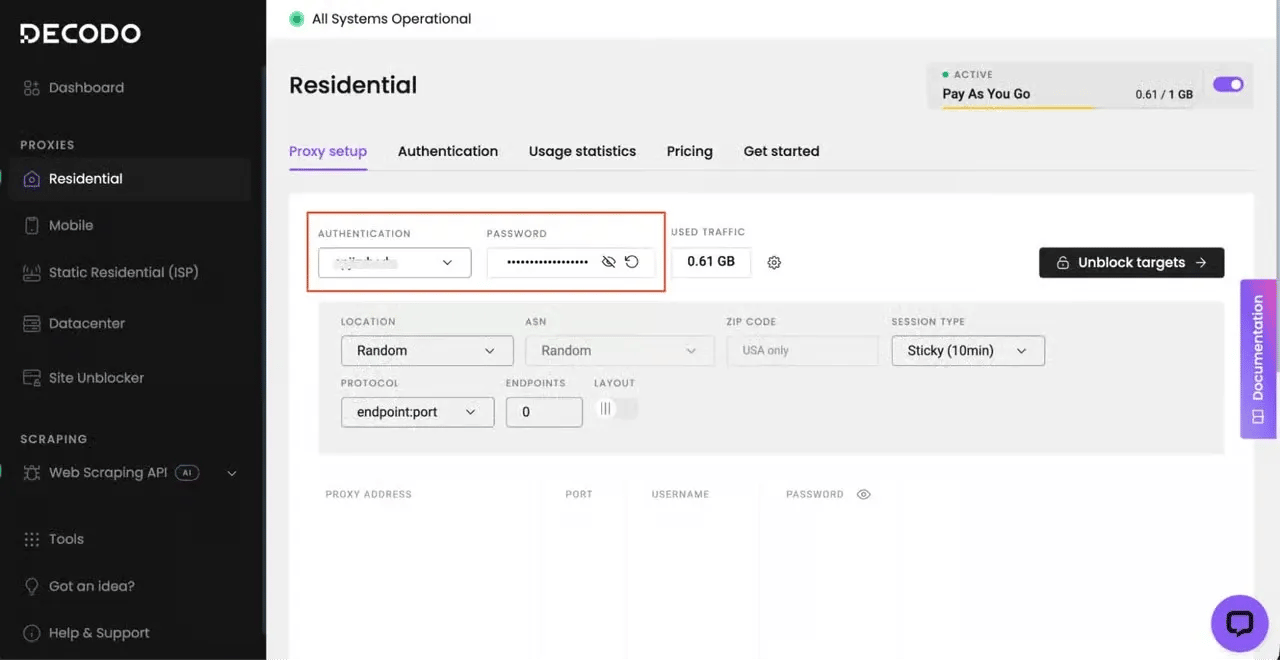
To try out the Decodo residential proxies:
- Create your account. Sign up at the Decodo dashboard.
- Select a proxy plan. Choose a subscription that suits your needs or start with a 3-day free trial.
- Configure proxy settings. Set up your proxies with rotating sessions for maximum effectiveness.
- Select locations. Target specific regions based on your data requirements or keep it set to Random.
- Copy your credentials. You'll need your proxy username, password, and server endpoint to integrate into your scraping script.
Fix 7: Hand the request to a managed unblocker
Some targets combine multiple enforcement layers: TLS fingerprinting, header inspection, IP reputation, JavaScript challenges, rotating CAPTCHA, and token-bound sessions that expire after n requests. Maintaining the client-side stack to satisfy all of these simultaneously is a substantial engineering overhead. Each layer update (a WAF ruleset update, or a new JA4 check) requires a code change and redeployment on your side.
A managed unblocker is a service or API that accepts a URL and handles fingerprinting, header construction, IP rotation, and other internal tasks necessary to return the rendered page content.
With Decodo Web Data API, you only need to make API calls, and it handles everything behind the scenes.
This approach allows you to focus on the data you want, rather than the tedious process of handling and fixing anti-bot-induced 504 Gateway Timeout errors.
The best part is that Decodo offers a free plan, so you can try it out before committing.
To set up Web Data API:
- Create an account or sign in to your Decodo dashboard.
- Select a plan under the Web Data API section.
- Start your trial.
- Select your tool (Web Data API) under the Scraping APIs section.
- Paste your target URL
- Configure your API parameters (e.g., JS rendering, headers, geolocation). You'll need these to navigate a WAF edge. See the full list of web scraper API parameters.
- Hit Send request, and you’ll receive the clear HTML or structured JSON of the requested resource.
Here’s what the Decodo dashboard looks like when using the Web Scraper API:
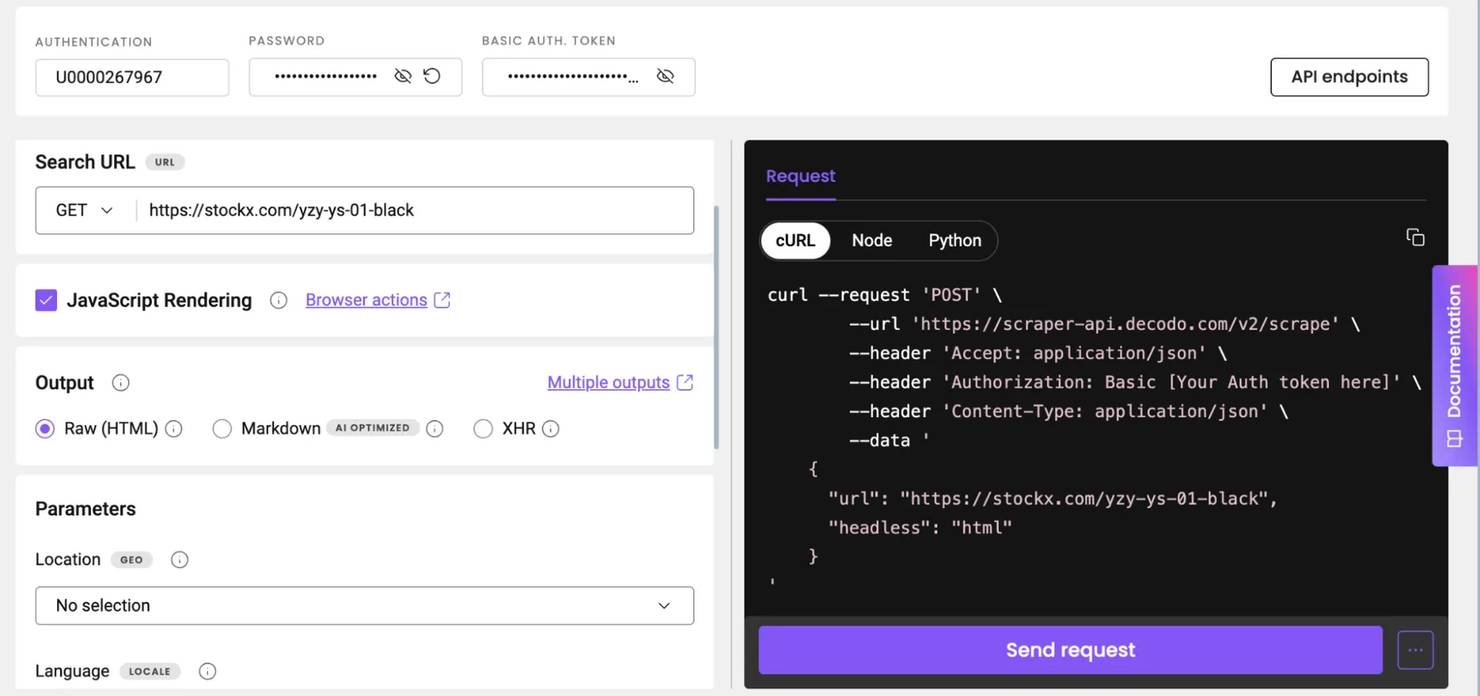
You can also copy the generated code (Python, Node.js, or cURL) on the right of your dashboard to test locally in your preferred IDE.
How to prevent 504 Gateway Timeout errors in production scrapers
The principles below are to be baked in from day one to avoid scraper-side conditions that produce 504s in the first place. Each one covers an entire category of 504 exposures, so you won't need to patch individual failures.
- Size proxy pools to per-IP limits, not total throughput. If the target tolerates approximately 10 concurrent connections per IP and you need 500 in-flight, you need at least 50 distinct IPs in rotation, not a larger thread pool on the same IP.
- Treat 504 as a first-class signal in your retry budget. Separate 504 retry counters from 429 / 5xx counters, so a 504 spike does not silently consume the retry budget you reserve for legitimate failures.
- Pin a browser-like client by default. Standardize the team on a TLS-impersonating HTTP client or a headless browser. Don't let new scrapers ship with default Python/Go/Node TLS stacks.
- Monitor 504 rate per IP, per endpoint, per target. Aggregate 504 metrics by proxy IP, target host, or endpoint pattern. A 504 spike on a single endpoint across all IPs is a target outage. However, a 504 spike on a single IP across all endpoints is a flagged IP.
- Build for politeness from day one. Per-host concurrency caps, request pacing, jittered delays, and rotation between residential and mobile pools reduce the tarpit surface area to the point where 504s become rare exceptions.
Conclusion
For scrapers and API developers, a 504 Gateway Timeout often points at the target's anti-bot edge rather than an actual server problem. That said, the fixes discussed in this article, especially a realistic browser-like fingerprint (TLS + headers), proper backoff with capped retries, and rotating residential proxies, can get you over the hump.
If managing an in-house stack is more overhead than it's worth, a managed product can handle all 3 and more. With Decodo Scraping API, each fix is built into the request layer. You only need to make API calls to receive structured data. No infrastructure maintenance necessary.