What Are Proxies Used for? 12 Common Proxy Use Cases
A proxy is an intermediary server that routes your request through its own IP address before it reaches the destination. So what are proxies used for? Far more than hiding a single IP. People use them for privacy and access, and businesses use them for scraping, monitoring, and market intelligence. This guide covers both, plus how to pick the right type.

Benediktas Kazlauskas
Last updated: Jul 22, 2026
7 min read
TL;DR
- Proxies route your traffic through a different IP, so the destination sees the proxy, not you.
- Individuals use them for privacy, safer browsing, and reaching geo-restricted content.
- Businesses use them for web scraping, price and ad monitoring, SEO tracking, market research, brand protection, and multi-account automation.
- The right proxy type, residential, datacenter, ISP, mobile, or rotating, depends on the job, since scale, stealth, and cost trade off against each other.
How proxies enable all these use cases
One mechanism explains why the same tool covers privacy, scraping, and ad verification. It comes down to a couple of ideas – the IP swap and the IP pool.
The IP swap
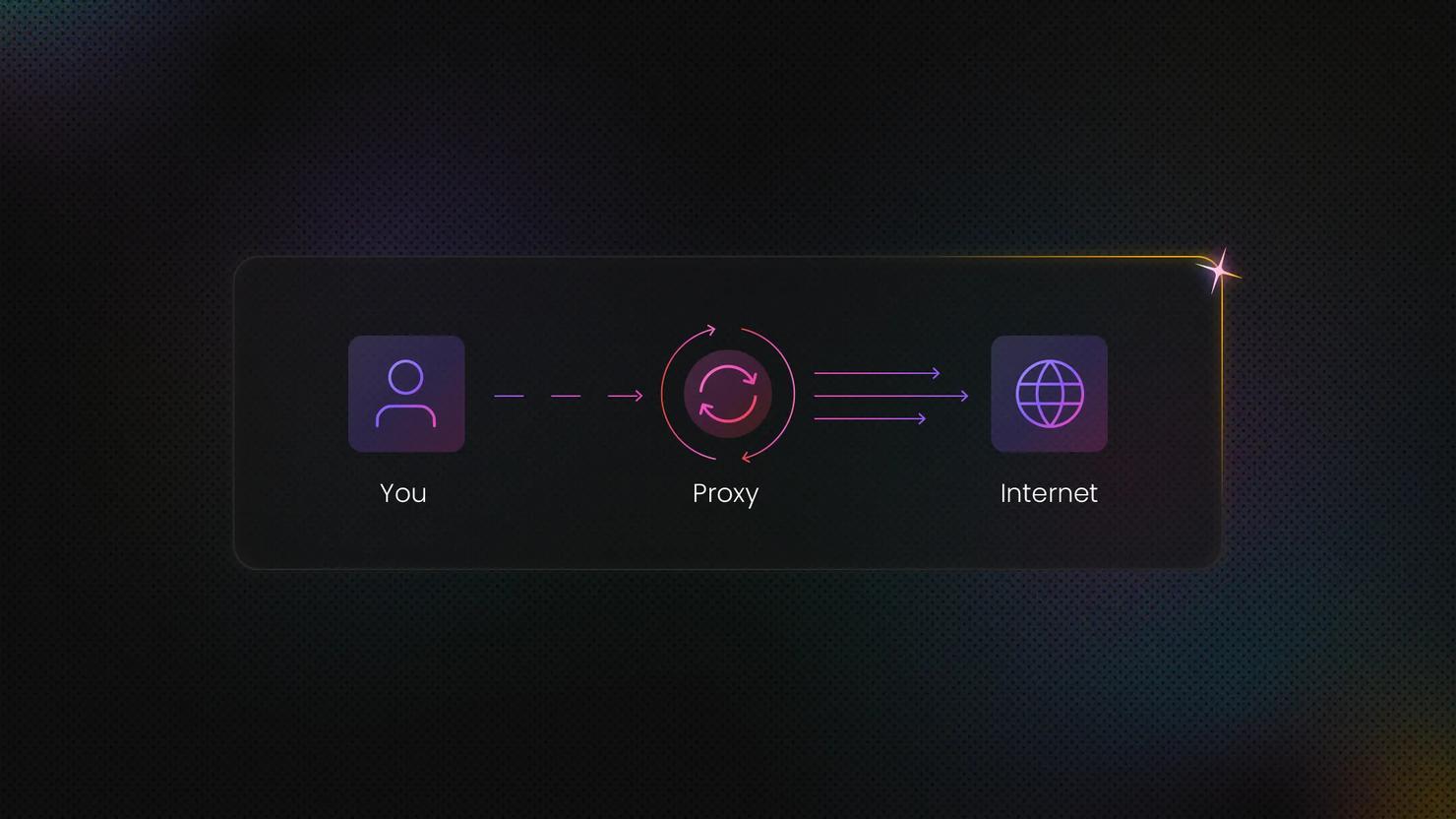
Every request gets a new face. The proxy relabels it with its own IP, so the site sees the proxy's address, not yours. Your real IP, your ISP, your location, all masked. This is the core of IP masking, and it's what makes spoofing your origin possible in the first place.
The destination server has no way to trace the request back to you. No IP leak, no fingerprint tying the traffic to your device. That's the whole mechanism behind privacy and access use cases – the site can only ever "see" the proxy standing in front of you.
The IP pool
One IP gets you one identity. A pool gets you thousands, spread across residential, mobile, ISP, and datacenter types, in cities and countries worldwide.
That's what turns IP masking into real infrastructure. With a big enough pool, you're not stuck behind a single address. You can rotate IPs per request, spread traffic across subnets, and target specific regions if your use case needs it. Rotation cuts down on rate limits and blocks. Geo-targeting lets you see the web the way a user in Berlin, Jakarta, or São Paulo would see it.
Why it matters for use cases
Controlling which IP a request appears to come from, and how often it changes, is the single capability behind almost every use case below. For the full mechanics on forward, reverse, and transparent setups, see what a proxy server is. For how much a proxy actually hides, read our article on proxy anonymity levels.
Personal proxy use cases for privacy and access
Most personal use comes down to a few things, like protecting privacy or reaching content that's otherwise out of reach. Here's what covers most of it.
Online privacy and anonymity
A proxy swaps out your real IP address for its own, so the sites you visit see the proxy's address instead of yours. That makes it harder for websites, advertisers, and networks to piece together your browsing across sessions and build a full profile of what you do online.
One thing worth knowing – a proxy hides your IP, but it doesn't encrypt your traffic by default. A VPN works differently, since it encrypts your whole connection to the internet. If you want both IP masking and encryption, a proxy alone won't get you there.
Accessing geo-restricted content
Routing your traffic through an IP in another country lets you reach content, catalogs, or pricing that's normally locked to that region. A common reason to do this is checking how a site or app looks to users somewhere else, maybe out of curiosity, or to compare prices across regions before buying plane tickets.
Safer browsing and content filtering
Households, schools, and offices often route traffic through a proxy to block off-policy sites at the network level. Proxies can also cache pages people visit a lot, so repeat requests load faster and use less bandwidth. This comes in handy on shared networks where a lot of people are requesting the same stuff.
Bypassing rate limits and network blocks
A lot of sites cap how many requests one IP can make in a given stretch of time. Spreading requests across multiple IPs helps you stay under those caps during legitimate, high-frequency activity, like research or checking your own site's performance from different locations. Spreading requests across multiple IPs keeps normal, high-volume use running smoothly, without tripping the friction that per-IP limits create.
Business and data collection proxy use cases
This is where proxies do the most work for companies. Each use case below covers what it is, why a proxy is needed, and which proxy type fits.
Web scraping and large-scale data collection
Web scraping is automated extraction of public web data at volume, and it sits under most of the use cases below. Sites rate-limit or block repeat requests from one IP, so a proxy pool distributes requests and keeps collection running without tripping blocks.
Rotating residential IPs look like real users to the target site, which is what web scraping is built on at its core, and part of why scraping without getting blocked usually comes down to how well the IPs are managed.
In case you’re building a scraper yourself, a safe demo target for testing it is a site like books.toscrape.com or Hacker News.
Price monitoring and dynamic pricing
Price monitoring means tracking competitor and marketplace prices continuously to make informed repricing decisions. Retailers who reprice manually or on stale data lose margin or lose sales, so most businesses collect data on competitors’ stock or prices constantly, not treating it as a one-off task.
Prices vary by location and are often hidden from bots. Location-accurate residential IPs return the real, region-specific price a shopper would actually see, which is the only version worth tracking.
Ad verification
Ad verification confirms that ads render correctly, appear in the right geography, and aren't served next to fraud or competitor content. A campaign that looks fine from head office can still be showing up broken or in the wrong country for actual viewers.
You need to view ads as a local user would. Residential IPs in each target market reveal what real audiences see and catch cloaked or misplaced creatives before they cost the campaign money.
SEO and SERP rank tracking
SEO tracking covers monitoring keyword rankings, local search results, and SERP features across locations. Rankings that look fine from one office IP can be completely different for users elsewhere.
Search results are personalized and geo-specific, so proxies return clean, location-accurate results at scale, without your own IP getting throttled or fed a skewed version of the page.
Market research and competitor analysis
Market research means aggregating product catalogs, reviews, availability, and content trends across markets. Doing this from a single IP gives you one market's view, which isn't enough to spot real trends or gaps.
Location-diverse IPs let you see regional catalogs and pricing tiers that competitors hide from out-of-market visitors, so the picture you're working from actually matches what's happening on the ground.
Brand protection and anti-counterfeiting
Brand protection means scanning marketplaces and social platforms for counterfeit listings, unauthorized sellers, and minimum advertised price violations. This has to run across many regions at once, since infringement rarely stays confined to one market.
Bad actors geo-target and cloak listings, showing them only to buyers in certain regions. Local residential IPs surface these infringements, which otherwise stay invisible to a single corporate IP checking from one location.
Social media management and automation
This covers running multiple legitimate brand or client accounts, plus scheduling and monitoring at scale. Agencies managing several client accounts from one office network run into this constantly.
Platforms link accounts by IP, so managing many from a single address can get all of them flagged together. Mobile or residential IPs keep separate accounts operating independently, without one account's activity putting the rest at risk. Always check each platform's terms of service before automating account activity.
Travel fare and hospitality aggregation
This means collecting flight, hotel, and rental prices that change by location and device. A fare shown to a browser in one country can differ from the same search run elsewhere, on the same day, for the same room or seat.
Fares are geo- and device-personalized, so location-accurate IPs return the true local price, which is the only number worth feeding into an aggregation or comparison tool.
Review and reputation monitoring
This covers tracking reviews, ratings, and mentions across regional versions of platforms. A brand's reputation can look very different depending on which country's version of a review site you're reading.
Regional review content differs by market, so local IPs capture the full, market-specific picture instead of just the version served to headquarters.
AI agents and autonomous web access
Autonomous web access covers AI agents that browse, click, and complete tasks on the live web on a user's behalf, rather than working from a static training set. An agent booking a flight, comparing prices, or filling out a form needs to reach the actual site a person would see, not a cached or blocked version of it.
Sites are increasingly aggressive about blocking bot-like traffic, and an agent making rapid, repeated requests from one IP gets flagged fast. Residential and rotating IPs let the agent's traffic blend in with normal user behavior, so it can keep completing tasks instead of hitting a wall of CAPTCHAs or outright bans.
AI and ML training data collection
This use case covers gathering large, diverse public datasets to train and evaluate models. A model trained on data from one region or one type of source tends to inherit that narrow view.
Volume and geographic diversity matter here, and proxy pools make large, representative collection feasible without hitting blocks partway through.
Enterprise security, filtering, and load balancing
This is the traditional infrastructure use, covering firewalls, secure web gateways, caching, and reverse-proxy load balancing. It's worth a mention for completeness, though this is the one bucket that security vendors already cover in depth.
Most of the jobs above need location-accurate, block-resistant IPs, which is where residential proxies fit. They're the proxy type most of these use cases rely on.
Which proxy type fits which use case
Knowing the use cases is one thing, picking the right proxy for the job is another. The table below maps common proxy types to what they are best at and what you give up.
Proxy type
Best for
Trade-off
Residential
Ad verification, price monitoring, brand protection, localized scraping
Highest trust, higher cost
Datacenter
High-speed bulk scraping of non-sensitive targets, internal tools
Fast and cheap, easiest to detect
ISP (static residential)
Long sessions, account management, sneaker and retail drops
Residential trust with datacenter speed and a stable IP
Mobile
Social media automation, mobile-first targets, the hardest anti-bot systems
Most trusted, most expensive
Rotating
Any high-volume job that must spread requests across IPs
An option layered on the pool types above, not a separate network
There’s no single best proxy, only the best fit for the job. Stealth, speed, and cost trade off against each other, so a network built for authenticity, like residential IPs, tends to cost more than one built purely for throughput, like datacenter IPs.
How to choose the right proxy for your use case
Before grabbing that proxy subscription, ask yourself a few questions:
- How sensitive is the target? Sites with heavy anti-bot systems, such as search engines, marketplaces, and social platforms, call for residential or mobile IPs. Open data sources are fine with datacenter IPs.
- Do you need a stable identity or high rotation? Account and session work want sticky ISP IPs that hold the same address. Broad crawling wants rotation across a large pool.
- What volume and budget are you working with? Datacenter proxies maximize requests per dollar. Residential and mobile proxies maximize success rate on harder targets.
Once you’re maintaining proxy pools, rotation logic, retries, and CAPTCHA handling yourself, the work has become an operational layer of its own. At that point, a managed option like the Decodo Web Data API handles rendering, rotation, and unblocking in one endpoint, or Site Unblocker for one-off access. Both are worth a look once self-managing stops being worth the time.
Are proxies legal, and how do you use them responsibly?
Using a proxy is legal for most use cases. What matters is the activity, not the tool itself. Scraping public data is generally allowed, while bypassing authentication or ignoring a site's explicit legal restrictions is not. Local law and the target site's terms both play a role, so it’s worth checking both before you start a project at scale.
The real risk with proxies rarely comes from the concept itself. It comes from the provider. Free or untrusted proxies can log your traffic, sell that data, or inject content into the pages you load, and they typically carry no default encryption. Using one to violate a site's terms of service adds a separate layer of risk on top of that.
Responsible use comes down to a few habits – choose ethically-sourced residential networks, respect robots.txt and rate limits, avoid collecting personal and post-login data, and read the target site's terms before you scrape or automate against it.
And here’s the golden rule – when in doubt, consult with a legal professional regarding your specific use case.

Try residential proxies for free
Get started with a 3-day free trial and unlock 115M+ ethically-sourced IPs from 195+ locations.
Bottom line
Proxies do far more than hide an IP. Individuals use them for privacy, safer browsing, and access to geo-restricted content. Businesses rely on them for scraping, price and ad monitoring, SEO tracking, market research, and brand protection at scale. The right proxy type follows the use case, trading stealth, speed, and cost against each other. If you would rather not manage that stack yourself, Decodo's residential proxies and Web Data API handle the infrastructure so you can focus on the data.
About the author

Benediktas Kazlauskas
Content & PR Team Lead
Benediktas is a content professional with over 8 years of experience in B2C, B2B, and SaaS industries. He has worked with startups, marketing agencies, and fast-growing companies, helping brands turn complex topics into clear, useful content.
Connect with Benediktas via LinkedIn.
All information on Decodo Blog is provided on an as is basis and for informational purposes only. We make no representation and disclaim all liability with respect to your use of any information contained on Decodo Blog or any third-party websites that may belinked therein.