Get Started with Site Unblocker
Avoid costly infrastructure and unlock valuable insights from real-time data in just a few simple clicks.
14-day money-back option

100%
success rate
195+
global loactions
0
CAPTCHAs
#1
response time
24/7
tech support

What is Site Unblocker?
It's a proxy-like solution that allows users to extract valuable web data from the most challenging targets without building a web scraper or using a headless browser. Site Unblocker helps access a range of targets and avoid CAPTCHAs or IP bans while collecting public data.
Most popular Site Unblocker targets
With a 100% success rate, Site Unblocker will ensure access to data no matter the target.

Zoopla

Amazon

Learn how to set up Decodo’s Site Unblocker
Get started with your Site Unblocker configuration with our step-by-step video guide.
How to set up Site Unblocker
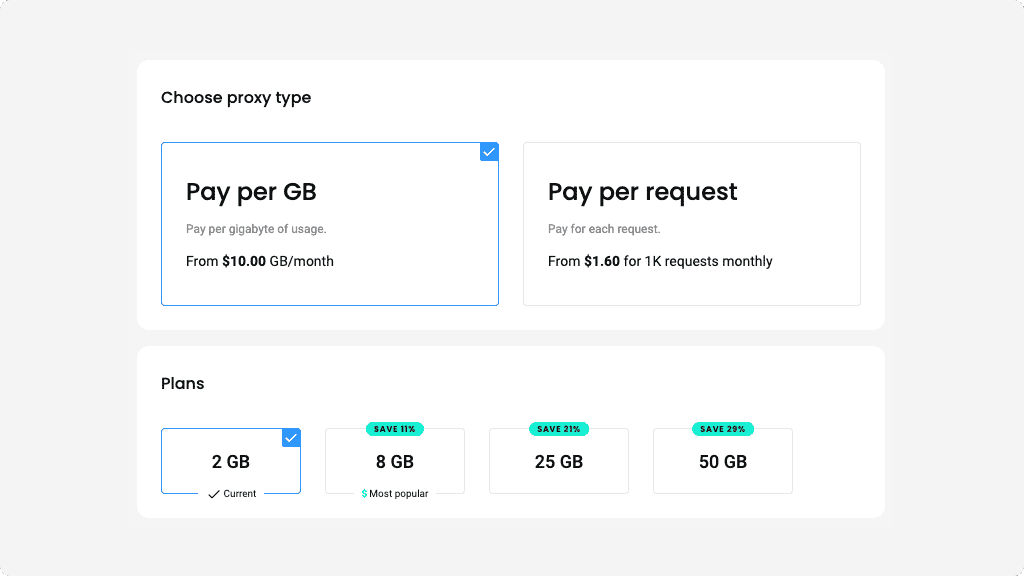
Choose a subscription
After creating your account, choose the subscription option that suits your needs. We offer a range of plans and the ability to upgrade as you go throughout your proxying journey.
You can pay per gigabyte of usage with Pay per GB or for each request with Pay per request.
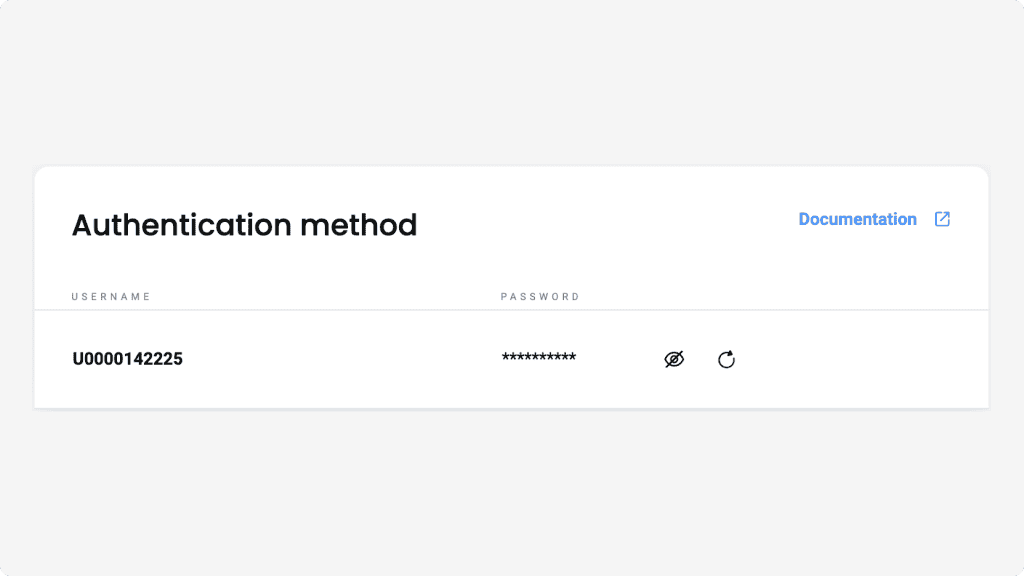
Authenticate with username:password
In the API Authentication tab, you’ll see that your user is created automatically. If you’d like to generate a new password, click on the rotation icon next to it.
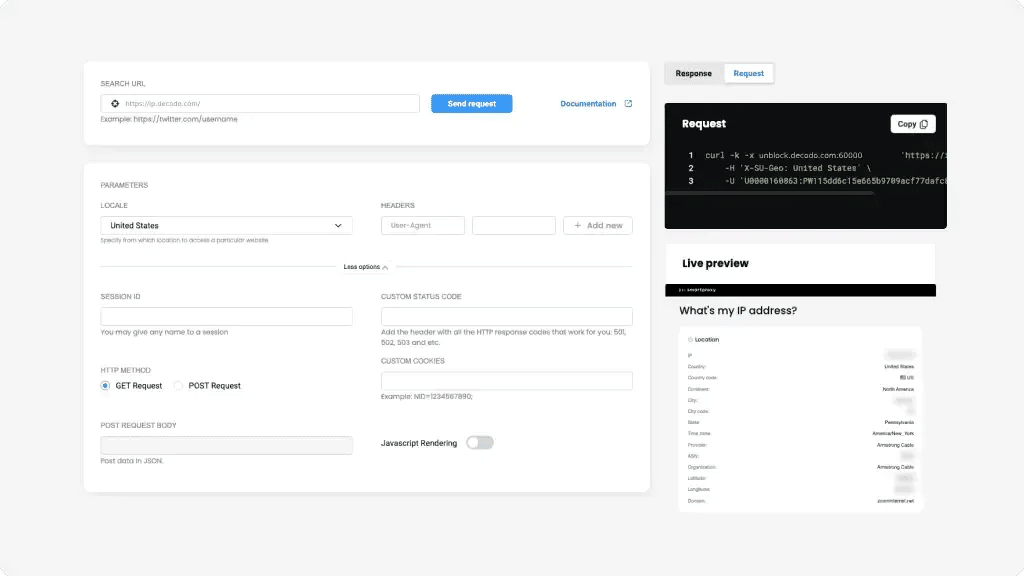
Select parameters
In the API Playground tab, you can send a request to your target directly or create a cURL code for use in your environment.
Type in your target URL in the SEARCH URL space, select a country under LOCALE, and enter your headers.
By clicking More options, you can enter additional details like Session ID, HTTP METHOD, CUSTOM COOKIES, whether to enable JavaScript Rendering, etc.
Once you’re ready, click Send request at the top of the page and see the response (in HTML and a live view rendering of the website) at the bottom. Alternatively, you can go to the Request tab at the bottom of the page to view and copy the cURL command for use in your environment.
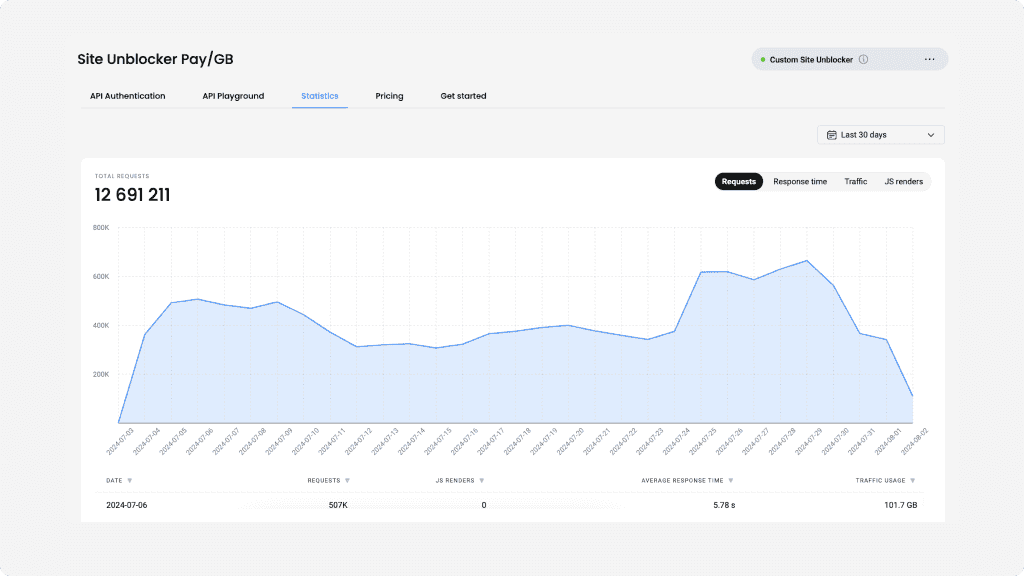
Keep track of your statistics
To monitor the usage of your Site Unblocker, navigate to the Statistics tab. Here, you’ll see the traffic usage for each user over a week, month, or a custom period. You can also view the amount of cumulative requests, the cost of each request, average response time, and more.
Use Site Unblocker
Site Unblocker can be easily integrated as a proxy using a single endpoint in cURL, Python, or Node.js. This solution chooses the most appropriate proxy type in our pool against the target you wish to access and retrieves its data in HTML with JavaScript.
A range of complimentary tools, minus the time wasted

Chrome Browser Extension
Easy-to-use, damn powerful. A proxy wonderland in your browser, accessible in 2 clicks. Free of charge.
Firefox Browser Add-on
Easy to set up, even easier to use. The virtual world at your fingertips in 2 clicks. Free of charge.

Proxy Checker
Verify your IPs with free Proxy Checker. Quickly & efficiently check your IPs to avoid potential errors.
Decodo blog
Most recent

Zapier MCP Server: Connect Agents to Apps and the Web
Zapier MCP is Zapier's hosted MCP server: one connection that lets an AI agent take actions across 9,000+ apps. It solves reach, not data. Your agent still needs a separate way to get fresh information from the web. This guide covers how Zapier MCP works, how to connect it, and how to pair it with Decodo for live web data.

Lukas Mikelionis
Last updated: Oct 21, 2026
9 min read
Most popular

How to Send a cURL GET Request
Tired of gathering data inefficiently? Well, have you tried cURL? It’s a powerful and versatile command-line tool for transferring data with URLs. Its simplicity and wide range of capabilities make it a go-to solution for developers, data analysts, and businesses alike. Simply put, the cURL GET request method is the cornerstone of web scraping and data gathering. It enables you to access publicly available data without the need for complex coding or expensive software. In this blog post, we’ll explain how to send cURL GET requests, so you’re ready to harness its fullest potential.
Dominykas Niaura
Last updated: Jan 02, 2024
7 min read
How to Bypass CAPTCHA With Puppeteer: A Step-By-Step Guide
CAPTCHAs have been a website security staple since 2000, drawing a line between human users and bots. They're a savior for website owners and a nightmare for data gatherers. But the challenge has shifted. Modern systems like reCAPTCHA v3, hCaptcha, and Cloudflare Turnstile no longer rely on distorted text and puzzles alone. They score your behavior in the background, which means avoiding them is now as much about how you act as what you click. This guide covers CAPTCHA detection, prevention, real solver integration, and where Puppeteer fits alongside Playwright in 2026.
Dominykas Niaura
Last updated: Aug 04, 2026
10 min read

Staying Ahead of the Curve: Using Proxies and Scraping Solutions to Monitor Pricing, Trends, and Competitors
Businesses rely on real-time data about pricing, market trends, and their rivals' activities to make well-informed decisions and maintain a competitive edge. In fact, 98%¹ of executives agree it’s somewhat or very important to increase data analysis in their companies over the upcoming 1 to 3 years. Manual data collection methods are time-consuming, less efficient, and sometimes even provide outdated data, resulting in missed opportunities and potential loss of market share.
Fortunately, thanks to technological advancements, innovative and easy-to-use solutions like proxies and web scraping tools offer businesses a powerful way to monitor and analyze vital information efficiently.
With this in-depth article, we invite you to explore the proxy and scraping landscape, discover the pros and cons of such solutions, and learn how to identify some of the best real-time data collection options in the market matching the most popular use cases. Grab a cup of coffee and continue reading.
If you can't access the whole article, make sure you have disabled your ad blocker.
Ella Moore
Last updated: Sep 07, 2023
11 min read

Google Sheets Web Scraping: An Ultimate Guide for 2026
Google Sheets is a powerful data management tool, but few people know it can also pull data directly from the web without a single line of code. Using built-in import functions, you can scrape website content, parse tables, and pull live feeds straight into your spreadsheet. In this guide, you'll learn how to use IMPORTXML for XPath-based data extraction, IMPORTHTML for grabbing tables and lists, IMPORTFEED for RSS and Atom content, IMPORTDATA for CSV files, and IMPORTRANGE to link scraped data across spreadsheets. We'll also cover Google Apps Script for automation, common errors and how to fix them, and when to reach for a dedicated scraping tool instead.
Zilvinas Tamulis
Last updated: Mar 30, 2026
6 min read
Access Any Target in Minutes
Experience the fastest time-to-value and leverage full scraping potential without a single restriction.
14-day money-back option