How to Scrape Shopify Stores: Complete Developer Guide
Most Shopify stores have a built-in JSON endpoint for product data: prices, variants, inventory, images. Web scraping Shopify means requesting /products.json, paginating, and getting the catalog as JSON. But the endpoint is limited to 250 products per page, and some merchants disable it. This guide covers both: the JSON approach for stores that have it, and the fallback for stores that don't.

Lukas Mikelionis
Last updated: Apr 22, 2026
15 min read

TL;DR
- Web scraping Shopify stores starts with the /products.json endpoint, which returns structured product data without HTML parsing.
- The endpoint works on most public stores. 6 out of 8 we tested returned data directly
- For stores that disable it, the XML sitemap plus JSON-LD extraction from product pages covers the core fields (name, price, availability)
- You need Python, curl_cffi (for Cloudflare TLS fingerprinting), and, optionally, residential proxies for multi-store scraping
- The complete standalone script at the end handles both approaches automatically. Change the URL and run it.
What Shopify product data is worth scraping
Each use case maps to specific fields in the products.json response:
- Competitor price monitoring. Extract price, compare_at_price, and variants across multiple stores on a daily schedule. A non-null compare_at_price indicates an active promotion.
- Product trend research. Extract title, tags, and product_type to map which categories a brand is expanding into.
- Inventory tracking. The available boolean indicates stock status per variant. Use inventory_quantity via /products/{handle}.js for exact counts.
- Feed generation. The products.json response maps to most product feed schemas with minimal transformation.
The web scraping for market research guide describes additional competitor research patterns.
Confirm a site runs on Shopify
Before writing any scraping code, install curl_cffi and verify your target site runs on Shopify:
The fastest detection method is to request the products.json endpoint and check for valid JSON:
Allbirds runs on Shopify, so the function returns True. example.com isn't, so it returns False:
The code uses curl_cffi with impersonate="chrome" because most Shopify stores run behind Cloudflare, which checks TLS fingerprints. Plain Requests with a fake User-Agent still looks like Python at the TLS layer.
If the endpoint returns a 403 or 404, the store may still run on Shopify, but with the JSON endpoint disabled. You can check 2 additional signals: asset URLs pointing to cdn.shopify.com in the page source, and an x-shopify-shop-id response header.
Test your target store first
Before targeting a specific store, run this diagnostic. It checks which endpoints are open and what scraping approach to use:
For Allbirds, every endpoint is open:
Diagnostic results across famous Shopify stores
2 out of 8 stores block products.json. JSON-LD presence varies by theme:
Store
products.json
Catalog (sitemap)
.js
/collections.json
JSON-LD
Recommended path
allbirds.com
200
1,693
✅
✅
✅
products.json + .js
gymshark.com
403
3,944
blocked
blocked
✅
sitemap + JSON-LD fallback
taylorstitch.com
200
1,610
✅
✅
✅
products.json + .js
skims.com
404
3,092
blocked
blocked
✅
sitemap + JSON-LD fallback
fentybeauty.com
200
773
✅
✅
✅
products.json + .js
kyliecosmetics.com
200
242
✅
✅
✅
products.json + .js
jeffreestarcosmetics.com
200
238
✅
✅
❌
products.json + HTML selectors
redbullshopus.com
200
685
✅
✅
✅
products.json + .js
Merchant-disabled vs. anti-bot blocked. When a store returns 403 or 404 on products.json, the cause matters. A merchant-disabled endpoint (common on Shopify Plus and headless setups) stays blocked regardless of IP. An anti-bot block is often removed when you use a residential proxy.
To distinguish them, retry the same request through a residential proxy. If the status code stays the same, the merchant likely disabled it. If it changes to 200, it was anti-bot blocking:
Neither store's status code changes through the proxy:
Both are merchant-disabled. For these stores, you skip products.json and use the sitemap to discover product URLs, then extract JSON-LD from each HTML page. Proxies still help during HTML scraping because you're making thousands of individual page requests, but they don't re-enable the disabled endpoint.
Scrape Shopify product data with products.json
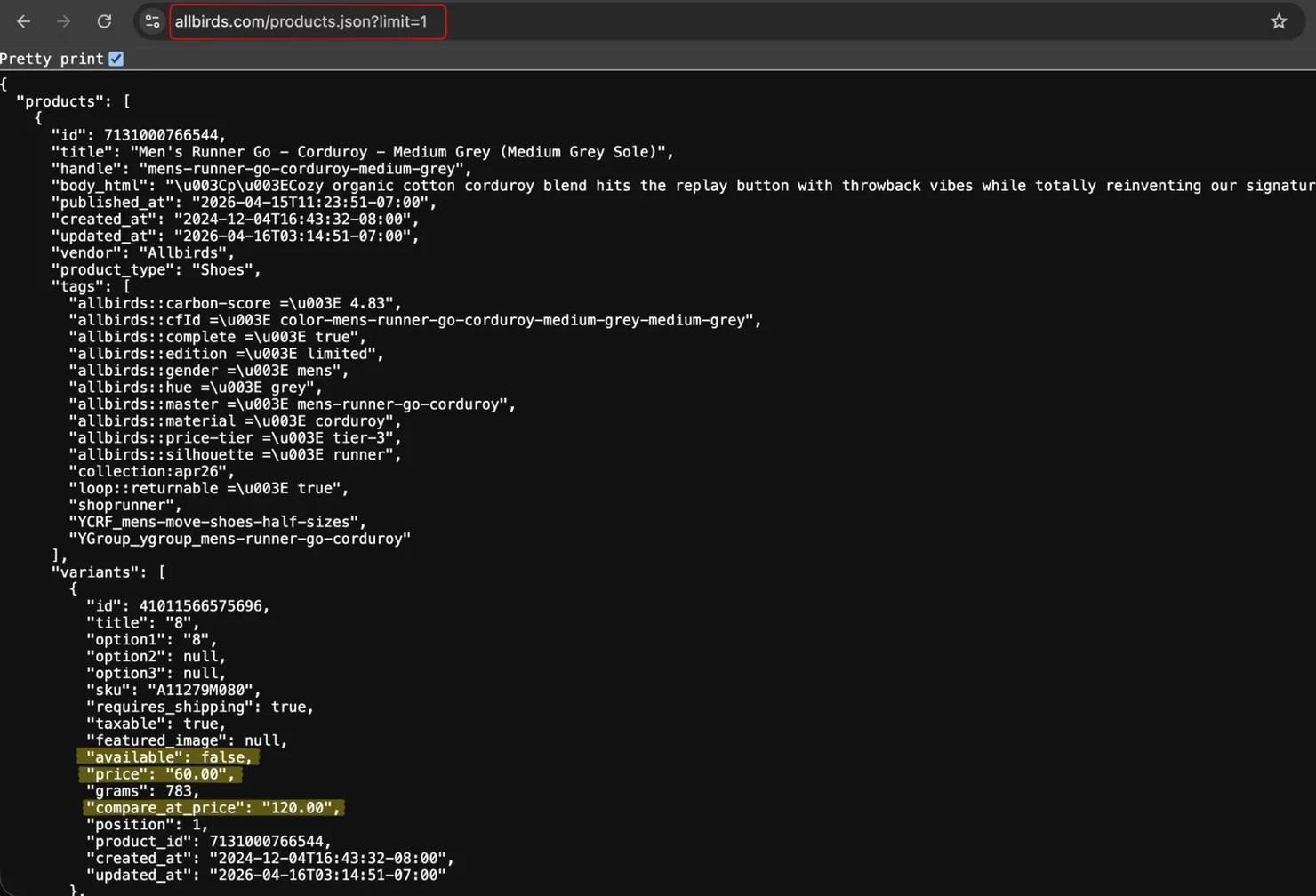
Test the endpoint in a browser first. Paste https://www.allbirds.com/products.json?limit=1, and the browser shows raw JSON.
Set up the request function
Every scraping method below uses the same retry wrapper. Define it once:
Fetch and paginate
The scraper paginates through the full catalog:
Allbirds has 917 products across 4 pages:
Without the 2-second delay, Shopify can return 429 responses or empty arrays. The default limit is 30. Set limit=250 to reduce total requests.
Note that catalog sizes fluctuate as stores update inventory. The diagnostic section shows 1,693 from the sitemap (includes color-variant URLs), while products.json returned 917 unique product entries during this test. Both numbers are correct – they count different things.
Parse key product fields
The endpoint returns prices as strings (like "110.00"), not numbers. Convert them if you need numeric comparisons:
The first product in the response is a slip-on with one variant shown:
compare_at_price is null when there's no sale. When a promotion is active, it holds the original price, and price holds the discounted value. For exact inventory counts, the /products/{handle}.js endpoint (see "Get more detailed product data") has inventory_quantity.
Export to CSV
Flatten variants into one row each for CSV export:
The script writes a date-stamped file like allbirds_products_20260414.csv. The first few rows of the CSV look like this:
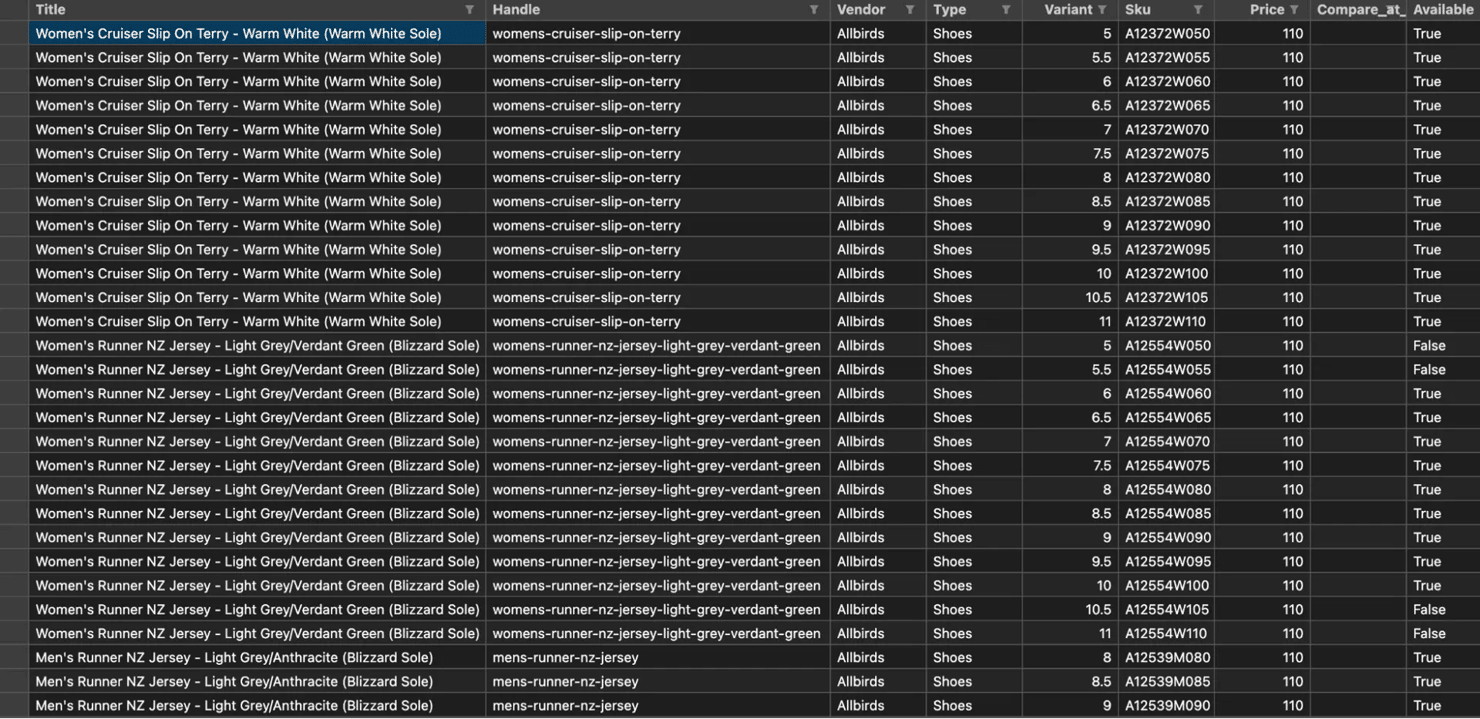
Each product has multiple size variants (6–10 per product on Allbirds), so the CSV output is several thousand rows. For JSON output with metadata, the guide to saving scraped data describes additional export patterns.
Get more detailed product data with the .js endpoint
The listing endpoint omits inventory counts, barcodes, and media dimensions. The /products/{handle}.js endpoint has them:
The output for the Men's Tree Runner includes the extra fields that products.json doesn't have:
The .js endpoint returns prices in the minor currency unit, unlike the listing endpoint. For USD, that means cents (10000 = $100.00). For GBP, that means pence (10000 = £100.00). And inventory_quantity is the reported stock count – 305 units at the time of scraping. The media[] array includes aspect_ratio, width, height, and media_type per image.
Field
/products.json
/products/{handle}.js
title, handle, vendor
✅
✅
price format
string ("110.00")
cents (11000)
compare_at_price
✅
✅
available
✅
✅
inventory_quantity
❌
✅
barcode
❌
✅
media[] with dimensions
❌
✅
tags
✅
✅
selling_plan_groups
❌
✅
Some stores encode metadata in tags using custom conventions. For example, Allbirds uses namespace::key => value strings for material and carbon scores. Inspect a sample product's tags before building your parser.
Scrape a specific Shopify collection
Append /products.json to any collection URL to get only the products in that category.
The function below reuses fetch_with_retry() from the setup section:
The mens-sneakers collection is returned in a single page:
If you only need pricing data for one category, send a single request to /collections/mens-sneakers/products.json?limit=250. That returns 241 products without paginating the full catalog.
List all collections
The /collections.json endpoint returns the category structure. On Allbirds, that's 1,334 collections across 6 pages:
Allbirds has 1,334 collections across 6 pages:
Extract product URLs from the XML sitemap
Shopify appends query parameters to sitemap child URLs. Parse the parent sitemap at /sitemap.xml first to get the exact product sitemap path. The function uses fetch_with_retry() from the setup section:
The function extracts all product URLs from every sub-sitemap:
The sitemap returns URLs, not product data. Combine it with per-page scraping for stores that disable products.json.
Deduplication note. The sitemap count is often higher than the products.json count. Color variants share a parent product but have separate sitemap URLs. Group by the product handle or product_id rather than treating each URL as unique.
Scrape Shopify HTML when products.json is disabled
Some Shopify Plus merchants disable public access to products.json. When the endpoint returns a 403 or 404, extract product data from the HTML pages instead.
Many Shopify themes embed a <script type="application/ld+json"> block on product pages with schema.org Product structured data. The schema varies – some themes use Product, others use ProductGroup with nested hasVariant arrays.
The JSON-LD on this Taylor Stitch product page has the same core fields:
Not every Shopify theme includes JSON-LD. The diagnostic table shows Jeffree Star Cosmetics as an example that lacks it, while most others embed a ProductGroup block. For stores without JSON-LD, use data- attributes like data-product-id and data-handle rather than CSS class names. For a deeper tutorial on HTML parsing, see the Beautiful Soup web scraping guide.
Build a fallback pipeline
Combine both methods into a single function that tries products.json first and falls back to HTML:
Failed URLs are logged to failed_urls.json for retry:
For large catalogs (1,000+ URLs), the HTML loop takes 15–30 minutes at 1 request per second. The complete script at the end includes progress logging.
Handle rate limits and anti-bot protections
Shopify doesn't publish official rate limits for products.json, but enforcement exists. Rapid requests from the same IP can trigger 429 responses or silent empty arrays.
Respect the request cadence
A 2-second delay between paginated requests avoids most rate limit issues. For individual product pages through HTML, use 1–2 seconds. Larger gaps (5–10 seconds) are safer when scraping multiple stores in sequence. For more retry patterns, see the retry guide for Python requests.
Common failure patterns to recognize. These are the signatures you'll see in the terminal when a request fails:
- Products: 0 after a successful 200 response → silent rate limit, treat it as a 429 and back off
- curl_cffi.requests.exceptions.HTTPError: HTTP Error 403 on .myshopify.com domains → merchant has password-protected the store (B2B or pre-launch) and no proxy helps
- xml.etree.ElementTree.ParseError: no element found on sitemap → the store's sitemap URL needs query parameters; fetch the parent /sitemap.xml first to get the exact child URL
- JSONDecodeError on products.json → the endpoint returned HTML instead of JSON (usually a 5xx error page or a Cloudflare challenge); retry through a residential proxy
Some stores require cookie consent before serving content. Pass a consent cookie in request headers or use browser automation to handle the consent flow. If is_shopify_store() or the diagnostic returns a 403 or 404, switch to the HTML extraction method.
Rotate proxies for multi-store scraping
Scraping a single Shopify store from one IP address works for small catalogs. But when you scrape multiple stores on a recurring schedule, Cloudflare flags your IP. Most Shopify stores route traffic through Cloudflare, so the protection is similar. Some headless setups (like Gymshark) use different CDNs such as AWS CloudFront, but curl_cffi is good practice for consistent browser-like requests.
For Shopify scraping at scale, residential proxies use IP addresses assigned to real household devices. They're far less likely to be blocked than datacenter IPs. Rotating proxies provide a different IP for each request automatically through a gateway.
Configure Decodo residential proxies
To get started, create an account and generate proxy credentials from the dashboard. The residential proxy quick start guide explains the full setup.
Everything goes through one endpoint: gate.decodo.com:7000. Location, session type, and duration are all controlled through username parameters:
For a random global IP without country targeting, drop the country parameter:
The proxy provides a residential IP from a random country:
By default, each request gets a new IP. To keep the same IP across multiple requests (better for paginating a single store), add session and sessionduration to the username: user-USERNAME-session-1-sessionduration-10. The default session duration is 10 minutes.
Target a specific country
For stores that serve different prices by region, add the country parameter to the username. This routes requests through a residential IP in that country:
The request goes through a US IP and returns US pricing:
Scrape Shopify with the Decodo Web Data API
Maintaining this yourself means tracking endpoint changes and store-level differences, while the Shopify Scraper API returns the same catalog, pricing, and variant data as structured output. The code above works for most public Shopify stores. But at 50+ stores on a daily schedule, maintaining retry logic, proxy rotation, and fallback chains becomes its own project. The Decodo Web Data API reduces that to a single HTTP call per page. You need an API token. The Web Data API quick start guide explains how to get one:
The API renders the Gymshark page and returns the product data that direct requests cannot retrieve:
The API has a free tier for testing. It also supports geo for country targeting and browser actions for JavaScript-rendered pages. The full parameter list is in the API docs.

Scrape Shopify without blocks
Decodo's Web Data API handles Shopify's bot detection so you get clean product data on every request.
Automate scraping on a schedule
Price monitoring and inventory tracking need recurring runs.
Schedule with cron
On Linux or macOS, add a cron job to run the scraper at a fixed time. Open the crontab with crontab -e and add:
On Windows, use Task Scheduler to create a daily trigger for the same script.
Add a lock file to prevent overlapping runs when the previous scrape hasn't finished:
Detect price changes between runs
Compare each scrape against the previous file using the product handle and variant ID as the composite key:
Push changed records to a database, spreadsheet, or notification system.
For teams that prefer visual workflows over cron scripts, the Decodo n8n integration is an alternative.
Complete script
Save as shopify_scraper.py and run with python shopify_scraper.py:
This is the output when running it against allbirds.com:
The JSON file includes metadata and the full product array:
This is the structure that detect_changes() from the automation section reads with json.load(f)["products"].
Replace STORE_URL with your target and uncomment the PROXIES block if you need rotation.
We tested it against 4 stores with different endpoint configurations:
Store
Method used
Result
fentybeauty.com
products.json (direct)
862 products
kyliecosmetics.com
products.json (direct)
246 products
skims.com
sitemap + JSON-LD (fallback)
full catalog available
gymshark.com
sitemap + JSON-LD (fallback)
full catalog available
The script handled all 4 without configuration changes. For SKIMS and Gymshark, the fallback retrieved 3,000+ product URLs via sitemap and extracted JSON-LD from each page.
What to build next
Here are 3 ideas to extend the scraper:
- Multi-store price tracker. Loop through competitor store URLs on a daily cron schedule. Send the change detection output to a Slack webhook or email alert
- Collection-level trend monitor. Use /collections.json to map a store's full category structure, then track which collections add or remove products over time
- Inventory restock alerter. Poll inventory_quantity via the .js endpoint on high-demand SKUs. Trigger an alert when stock changes from 0 to a positive value
For related eCommerce scraping tutorials, see how to scrape Target product data, scraping Amazon product data, and scraping Etsy.
Wrapping up
The biggest surprise from testing 8 stores was how many still have products.json enabled – 6 out of 8 returned data directly. For those, the scraper finishes in under a minute. The fallback path takes longer (one request per product URL), but it covers the 2 stores that disable the JSON endpoint.
If you're scraping more than a few stores, add proxies from the start. Cloudflare detects patterns across stores and blocks appear sooner than expected. The complete script includes proxy support. Uncomment the configuration block and add your credentials.

Monitor prices, not errors
Track competitor pricing across thousands of Shopify stores with Decodo's rotating residential proxies.
About the author

Lukas Mikelionis
Senior Account Manager
Lukas is a seasoned enterprise sales professional with extensive experience in the SaaS industry. Throughout his career, he has built strong relationships with Fortune 500 technology companies, developing a deep understanding of complex enterprise needs and strategic account management.
Connect with Lukas via LinkedIn.
All information on Decodo Blog is provided on an as is basis and for informational purposes only. We make no representation and disclaim all liability with respect to your use of any information contained on Decodo Blog or any third-party websites that may belinked therein.