How To Set Up PewDiePie's Odysseus AI Workspace
Odysseus is a free, open-source, self-hosted AI workspace from Felix Kjellberg, aka PewDiePie. Yes, the guy who spent a decade telling 100 million people to smash subscribe now wants you to smash docker compose up. It bundles chat, autonomous agents, deep research, and email into one interface that runs on your hardware, not someone else's cloud. It launched in late May 2026 and hit 30,000+ GitHub stars in just 3 days, signaling real demand for AI you own, not rent. Here's what it does, how to use it, and where proxies fit in.

Zilvinas Tamulis
Last updated: Jun 04, 2026
16 min read

TL;DR
- Odysseus AI is a free, open-source AI workspace created by PewDiePie that serves as a self-hosted alternative to cloud tools like ChatGPT and Claude
- It bundles chat, autonomous agents, deep research, model comparisons, and email management into 1 simple dashboard
- You'll get complete data privacy because the platform runs models locally on your own hardware via runners like Ollama, though it also supports external APIs if you prefer
- You don't need advanced coding skills to get started, as you can easily install the workspace using Docker or a native Python setup
- The platform includes a built-in Cookbook that scans your hardware and recommends the best local models your machine can reliably run
- It fully supports MCP servers, letting you easily plug in external tools like Decodo's MCP server to give your local agents live web scraping capabilities
What is Odysseus AI?
Odysseus is a self-hosted, open-source AI workspace built by Felix Kjellberg, the Swedish creator the internet knows as PewDiePie. It's the self-hosted answer to ChatGPT and Claude, except the whole thing lives on hardware you own instead of someone else's cloud. Odysseus also ships under the MIT license, so you can clone it, modify it, and run your own version however you like.
Under the hood, it's one dashboard that pulls a pile of separate tools into a single window. From the same place you can:
- chat with language models, local or hosted
- hand tasks to autonomous agents that plan, run shell commands, edit files, and browse the web
- run deep research that gathers sources and writes them up into a cited report
- send one prompt to several models and compare the answers side by side
- manage email with AI triage, summaries, and draft replies, plus a few extras like notes and calendar
It connects to local model runners like Ollama, llama.cpp, and vLLM, and it can also call external APIs such as OpenAI and OpenRouter if you’d rather not run anything locally.
The stack is refreshingly boring in the best way: Python 3.11, FastAPI, SQLite, and ChromaDB for memory, all wrapped in Docker so you spin it up with one command.
The key hook: with tools such as ChatGPT or Claude, your prompts travel to a company's servers to get processed. This leaves a concern about the privacy of your data and how it can be exposed. With Odysseus pointed at local models, the conversation never leaves your machine. That is the whole pitch: the modern AI experience, minus the bit where you hand your data to big tech.
Key features and capabilities
The landing page sells Odysseus with a row of tidy feature cards, but it's worth going one level deeper to see what each piece actually does and who it's for.
- Chat and agents. Chat is the familiar part, multi-turn conversations with whatever model you've connected. The piece worth caring about is agent mode, which hands the model a toolbox and lets it get things done on your behalf rather than just talking about them. It can plan a multi-step task, run shell commands, edit files, and browse the web, then keep looping until the job is finished. Because it's built on opencode, you get a proper agent loop under the hood instead of a chat box doing an impression of one. If you've already wired up live web access for a local model through Open WebUI, this is the same concept with a lot more bundled around it.
- Cookbook. This is the feature that quietly fixes the most annoying problem in local AI, which is working out which model your machine can actually run. Cookbook scans your hardware, scores what will fit, and recommends models from a catalog of more than 270 options with one-click serving. It also handles the fiddly quantization formats (GGUF, FP8, AWQ) for you, so you're not left guessing whether a 30B model will squeeze into your VRAM.
- Deep research. A deep research run is a multi-step investigation where the assistant goes out, gathers sources, reads them, and synthesizes the lot into a cited report. If you've used the deep research mode in ChatGPT or Claude, it's the same shape of feature, except it runs on your setup against your own endpoints. For anyone who does competitor checks, market scans, or background reading as part of the day job, this is one of the more immediately useful pieces in the box.
- Compare mode. Fire a single prompt at several models at once and read their answers side by side. Odysseus also offers a fully blind test, hiding which model produced which response, so you're judging the output and not the brand name stamped on it. It's a genuinely smart way to figure out which model earns its keep for a given task before you commit hardware to running it.
- Email assistant. Connect an inbox over IMAP and SMTP, and Odysseus layers AI on top of it. You get thread summaries, auto-tagging, spam triage, and draft replies matched to your own writing style rather than the usual robotic "I hope this email finds you well" filler.
- Memory and self-evolving skills. Persistent memory, built on ChromaDB, lets the assistant carry context across separate conversations, so you're not reintroducing your project from scratch every session. Sitting on top of that is a self-evolving skill system, where the assistant writes, refines, and reuses its own procedures over time. In practice, the more you lean on it for a particular workflow, the better it gets at that workflow without the hand-holding.
- Tools and MCP support. Out of the box, the agent ships with built-in tools for bash, files, web, and memory, each one toggleable per task, so you control exactly what it can reach. The bigger deal is full support for MCP servers, the open standard for wiring AI assistants into outside tools and services. That makes Odysseus extensible by design, since anything exposed as an MCP server can plug straight in. For example, Decodo's MCP server allows you to anonymously collect data from the web, all without leaving the Odysseus interface.

Self-hosted AI needs live data
Feed your Odysseus workspace with real-time web data. Decodo's Web Data API returns structured results from any site with no proxy configs or anti-bot workarounds required.
The philosophy behind Odysseus: PewDiePie's stance against big tech
The pitch in the launch video is simple. Modern AI is genuinely amazing, and it gets better the more it knows about you, your preferences, your documents, your workflow, your whole digital life. That is also the trap. The more context you feed it, the more of yourself you're handing to whichever giant tech company happens to be hosting the model. Felix's fix is to keep the good part and ditch the surveillance, running the workspace on hardware you own, pointed at models you control, with your data staying exactly where you left it.
He makes his stance on the industry clear. Right after promising that Odysseus will always be free, he ends his video by declaring, "The war on big tech has just begun." The project's website echoes this anti-corporate energy, proudly rejecting standard software sales tactics with the tagline: "No sales team, no demo request, no Trojan horse." It’s a surprising pivot for a creator famous for yelling at video games, but he fully embraces his new era as a privacy-focused, open-source developer. True to form, he jokingly admits that he hates the codebase and only released it because the tool simply became too useful to keep to himself.
Part of why the message lands is timing and the growing dissatisfaction of users. Every big AI platform has spent the last couple of years quietly shuffling the good stuff behind a paywall. Deep research, persistent memory, autonomous agents, the features that actually change how you work, all tend to live in the premium tier. Odysseus bundles the lot for free and asks for nothing back except, in his words, that you help keep building it.
At its core, his argument is really about data sovereignty. Every time you use a mainstream commercial AI, your conversations are beamed to corporate servers and routinely stored to train future models. He sells the point with an impression of a big tech exec shrugging through yet another "oops, we leaked everyone's data again" moment, then gets serious about the downstream reality, the spam calls, the data brokers, the accounts opened in your name. Odysseus bypasses this entire ecosystem. By running models locally, your data never leaves your machine, cutting off the privacy risk at the source.
Here's the catch, which, to his credit, he explicitly points out himself: Odysseus's privacy guarantee only applies when you're running models locally on your own hardware. The moment you plug in an API key for a cloud-based service like OpenAI or OpenRouter to get stronger outputs, your prompts are sent to their servers just like they always were. Odysseus gives you the infrastructure for total privacy, but it doesn't magically make third-party providers private. It's a crucial distinction to remember before pasting in your API keys and assuming you have gone completely off the grid.
Overall, Odysseus is a highly visible entry into a movement that has been quietly building momentum: a growing class of users who want to own their AI stack rather than just rent access to it. For some, the journey ends with self-hosting a workspace. For others, it serves as a gateway to more ambitious projects, like training a model entirely on personal data so the AI answers to them and no one else. PewDiePie didn’t invent this local-first movement, but with a massive global audience and an undeniably compelling demo, he just gave it its biggest megaphone yet.
Getting started with Odysseus
Good news for the non-developers in the room: getting Odysseus running is mostly copy, paste, and wait. You don't need to understand the code, just follow the steps.
Keep in mind that this is a v1.0 release, so expect the odd rough edge and frequent updates, and if any command here ever disagrees with the official repo, trust the repo.
There are two ways to install the workspace. While the official repository recommends the one-command Docker route, the walkthrough below focuses on a native installation. By skipping Docker, the process remains as accessible as possible for non-developers who just want a quick setup without the hassle of installing extra third-party software.
What you need first
- A terminal. On Mac, that's the Terminal, on Linux, it's your usual shell, and on Windows, use PowerShell. They should all come pre-installed on your computer.
- GitandPython 3.11or newer installed. Git fetches the code, Python runs it.
- Enough hardware to run a model locally. A small model is happy on a laptop with around 16GB of RAM, while bigger ones want a dedicated GPU with more VRAM.
If you don't have a "beefy" machine, no problem. You can skip local models entirely and plug in a cloud API key (OpenAI, OpenRouter) instead. Lighter on hardware, though your data then travels to that provider.
Option A: Docker
If you already have Docker and Docker Compose installed, this is the entire install:
When the containers finish, open http://localhost:7000, then grab your first-login password by running docker compose logs odysseus and looking for the temporary admin password it printed in the terminal.
Option B: Native install (no Docker)
This is the route the rest of the guide follows. Open your terminal and run these one line at a time:
Quick translation of what each command does:
- Download Odysseus from the official GitHub repository.
- Enter the downloaded folder to run commands inside it.
- Create an isolated Python environment (the venv) so it doesn't tangle with anything else on your machine.
- Activate the environment so that further commands stay within it.
- Install its dependencies (tools needed for Odysseus to work) listed in the requirements.txt file.
- Run the setup script. setup.py handles your admin login, so make sure to create your username and password when prompted and note it down somewhere.
Now start the app:
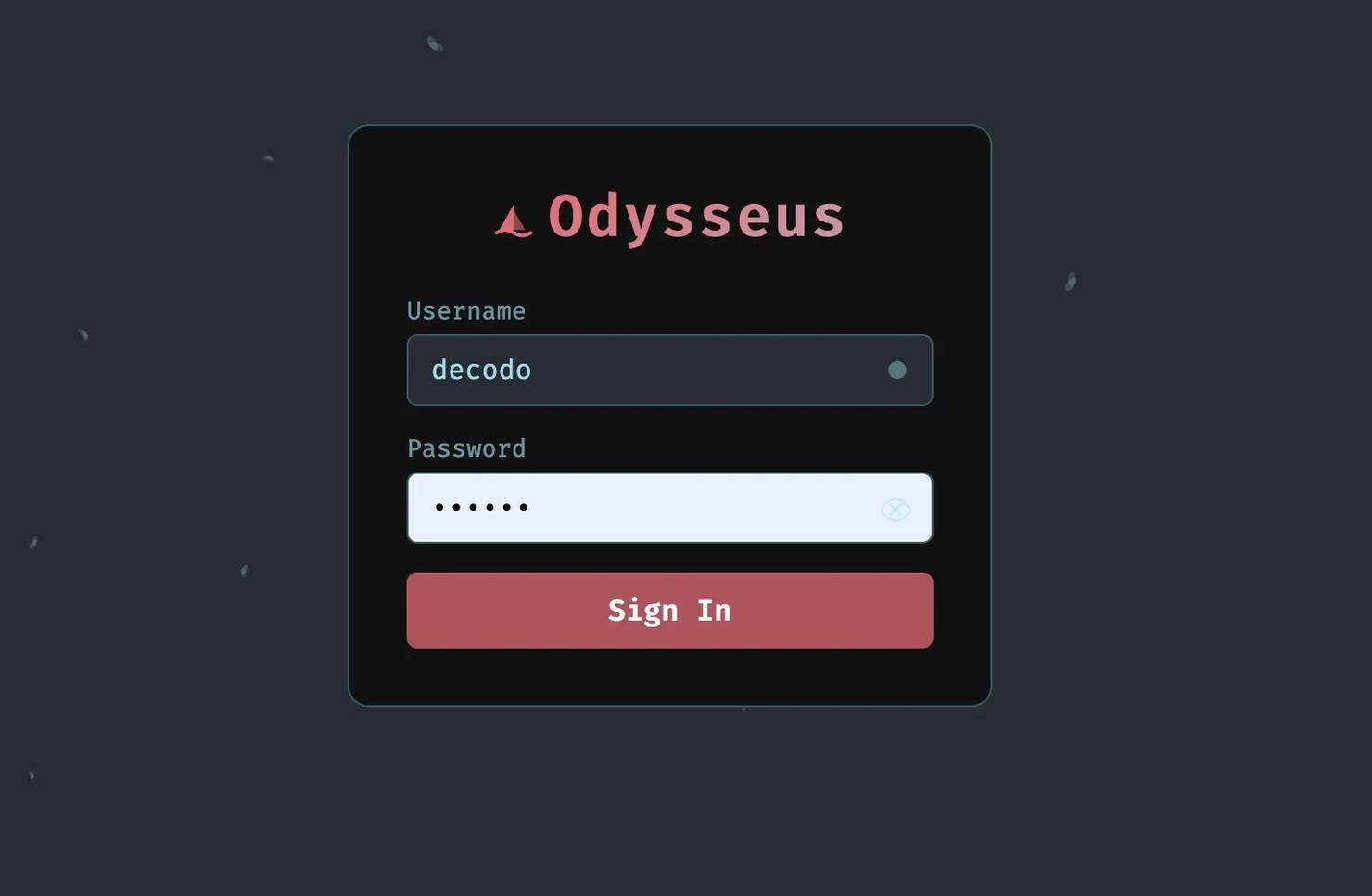
Leave that terminal running, because it's your server now. Open a browser and go to http://localhost:7000/login. If something else is already hogging that port, rerun the command with --port 7001 and use localhost:7001 instead. Log in with the admin details from the previous step.
Getting a model connected
You're in, but you can't chat yet. An AI workspace needs an actual model to talk to, and a fresh install doesn't ship with one. The simplest starting point is Ollama.
- Install Ollama from its official site. Ollama is an open-source tool that lets you download and run LLMs directly on your own computer.
- Open the Cookbook inside Odysseus. It scans your hardware and recommends models you can actually run, with a fit score. Pick one with a good score.
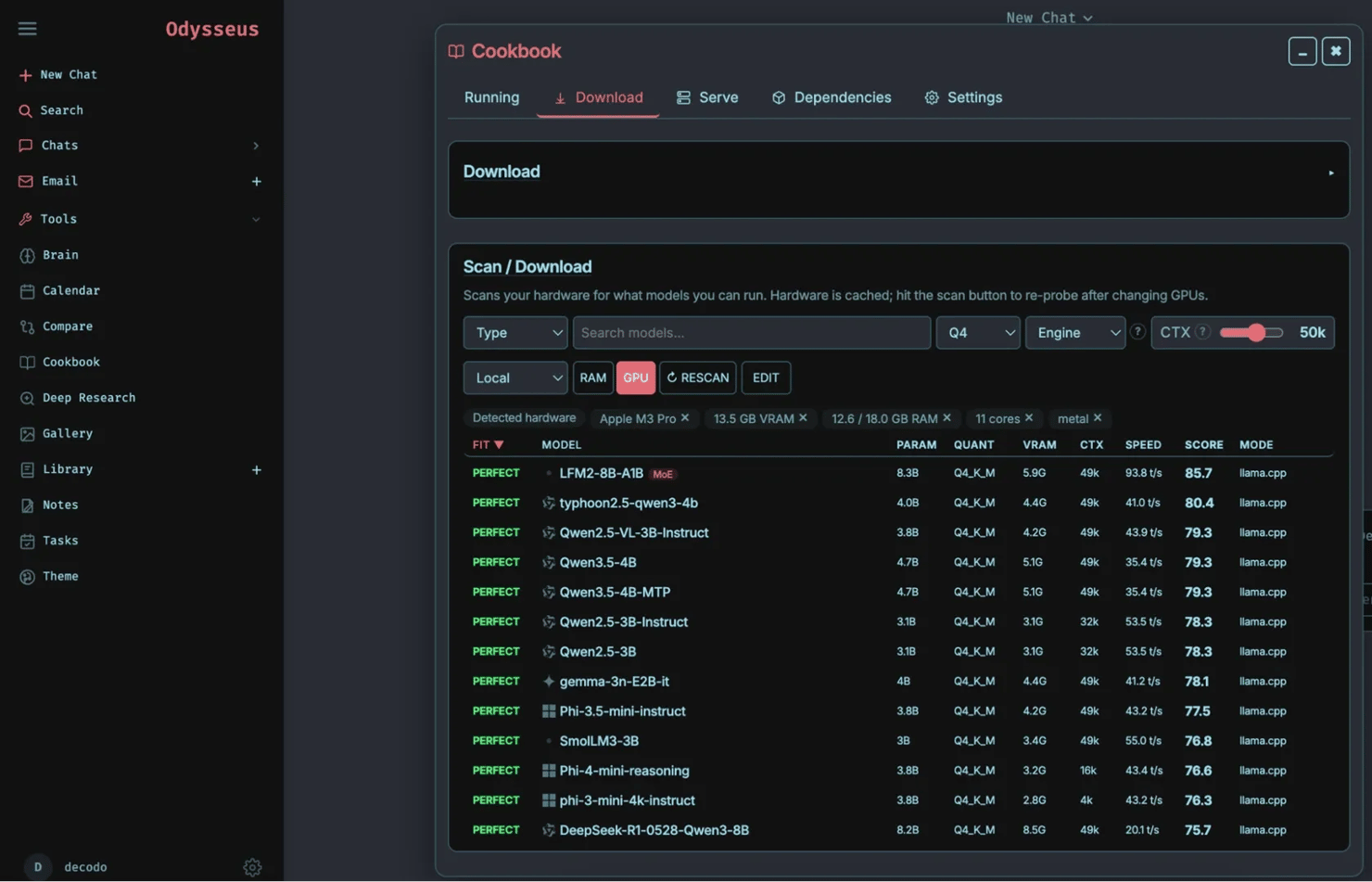
3. Download and serve that model. Two paths here:
Option 1: With tmux and llama.cpp
You must have tmux and llama.cpp on your computer. If you don't have them, install both of these from the Cookbook's Dependencies tab or install them independently.
Once you have the required dependencies, choose a model, then click Download.
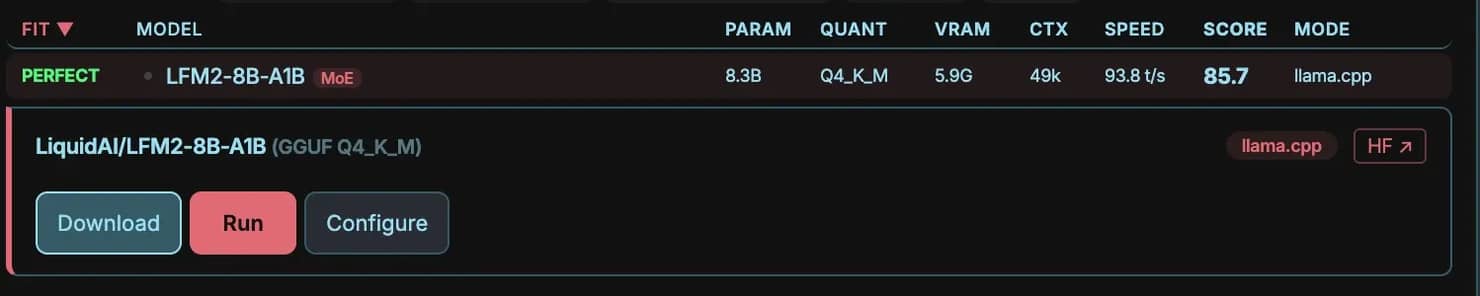
The download might take a while, as most LLMs take up several gigabytes in size. You can see the progress in the Running tab.
Once it's finished, navigate to the Serve tab. Click on your downloaded model.
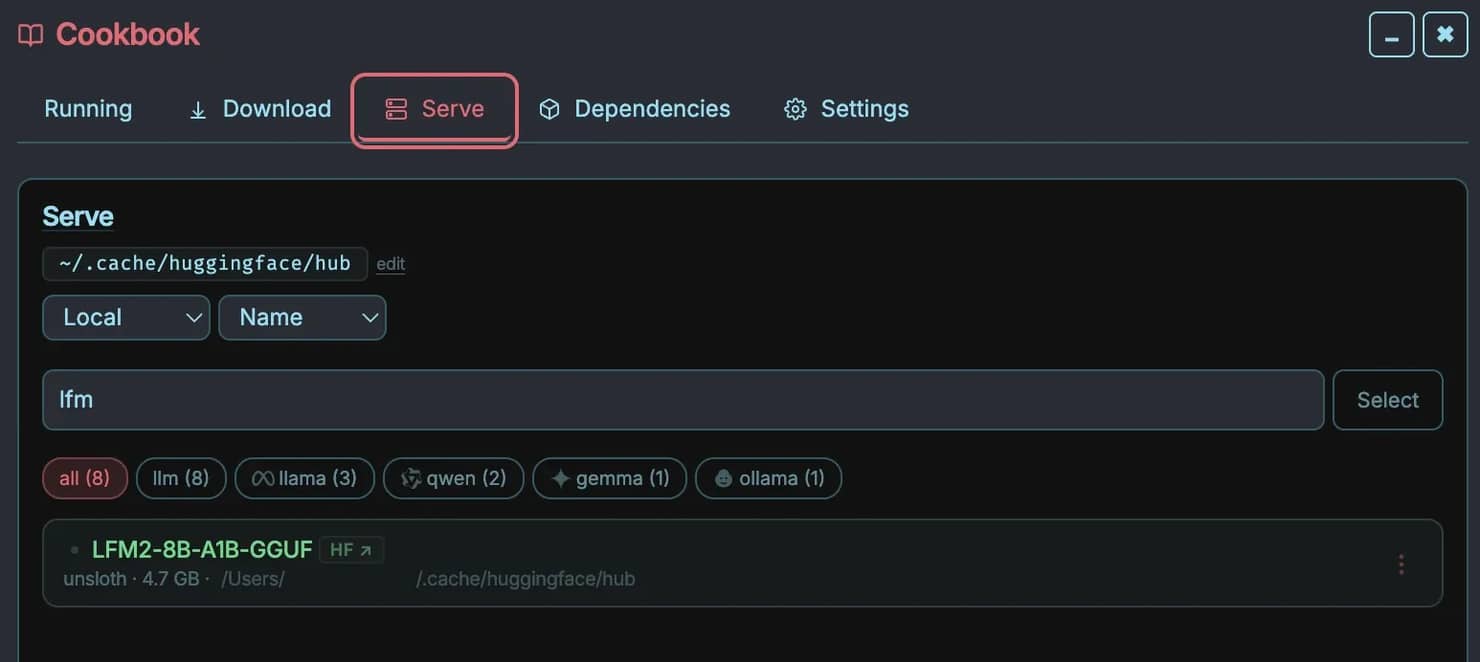
Adjust settings as needed, then navigate to the bottom of the settings and click Launch. If you can't scroll down to see the button, use the Tab button to skip through the options.
Option 2: Without tmux and llama.cpp
Copy the model's name from the Cookbook, then go to Ollama's model library and copy the pull command it gives you (it looks like ollama run modelname). Your first terminal is busy running Odysseus, so open a second terminal window:
- Windows. Open PowerShell again from the Start menu (a new window).
- macOS. In Terminal, press Cmd + N for a new window.
- Linux. Open a new terminal window, or press Ctrl + Shift + T for a new tab.
Paste the command in the new window, and wait for the download to finish.
4. Open the chat. Once you install a model or two, open a New Chat window.
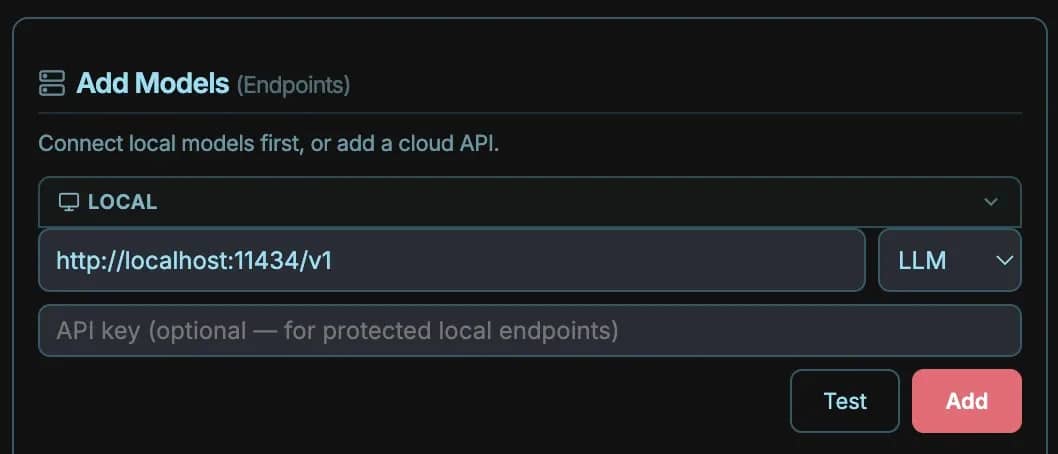
5. Find the model settings. In the chatbox, find the model choice dropdown, then click the + button.
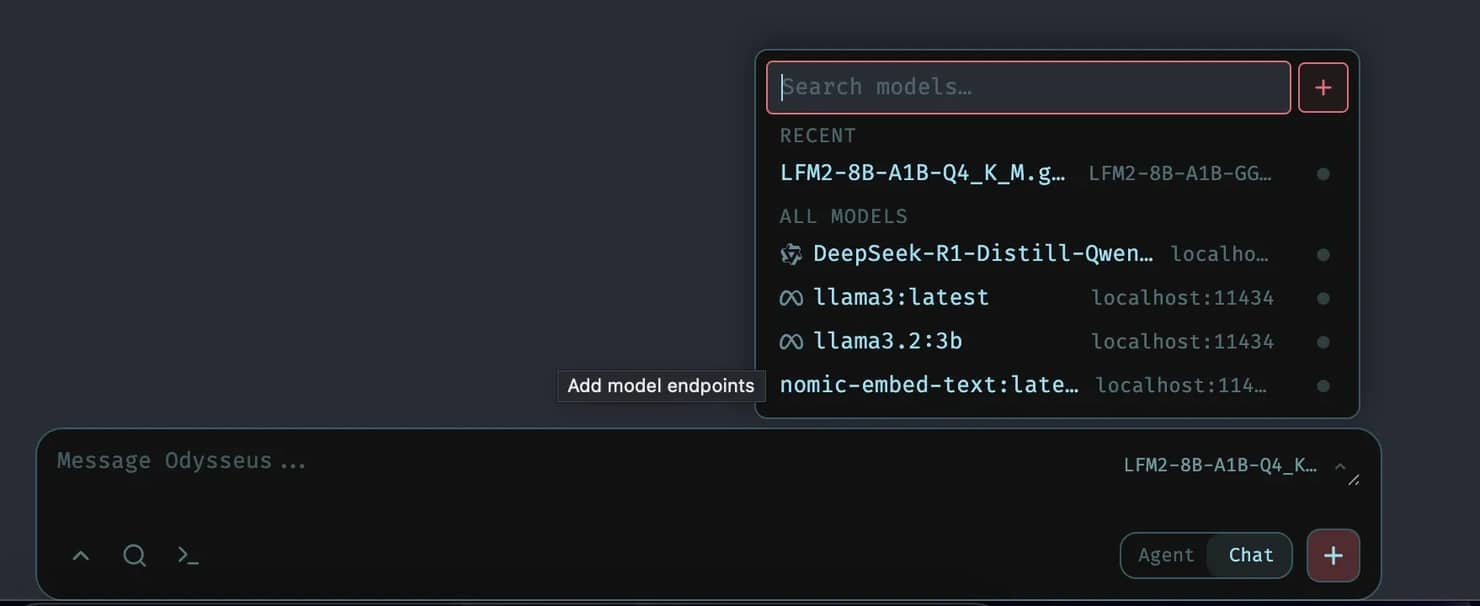
6. Add the local Ollama server. Under LOCAL, enter http://localhost:11434/v1. That's the address of your local Ollama server. Ollama exposes an OpenAI-compatible API on port 11434, and the /v1 path is the endpoint Odysseus speaks to, so that single line tells Odysseus "the model is running right here on my machine." Click Add.
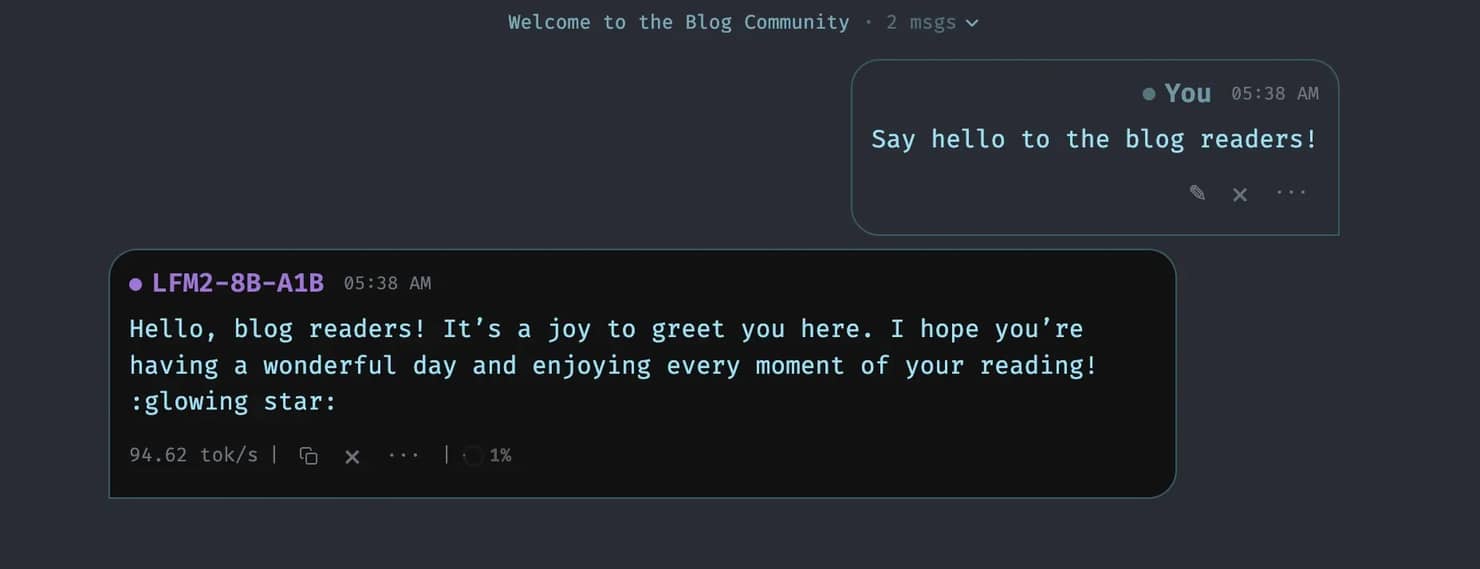
That's the finish line. Type something into the chat, and you're talking to a model running entirely on hardware you own.
Connecting Decodo's MCP server for live web data
Odysseus's agent can already open a browser, but "can open a browser" and "can reliably pull data from sites that actively don't want to be scraped" are two very different things. This is where Decodo's MCP server earns its place.
In plain terms, it's a web scraping layer that sits between your agent and the open web. It connects an MCP client to Decodo's Web Data API, so your agent can scrape websites, search engines, eCommerce platforms, and social media, including the JavaScript-heavy, anti-bot-protected ones, and get results back as structured Markdown, JSON, or screenshots.
Here's how to wire it into Odysseus. A full guide is also available that goes in-depth on how to integrate it with other tools.
Install it inside the Odysseus folder
You'll need Node.js 18+. From the terminal, drop into your existing Odysseus folder and pull in Decodo's server:
That clones Decodo's MCP server into an odysseus/mcp-server subfolder and builds it, which produces the file mcp-server/build/index.js. Keeping it inside the Odysseus folder is the small trick that makes the next step painless, because Odysseus runs node from its own directory, so a short relative path will point straight at the built file.
Add it as an integration
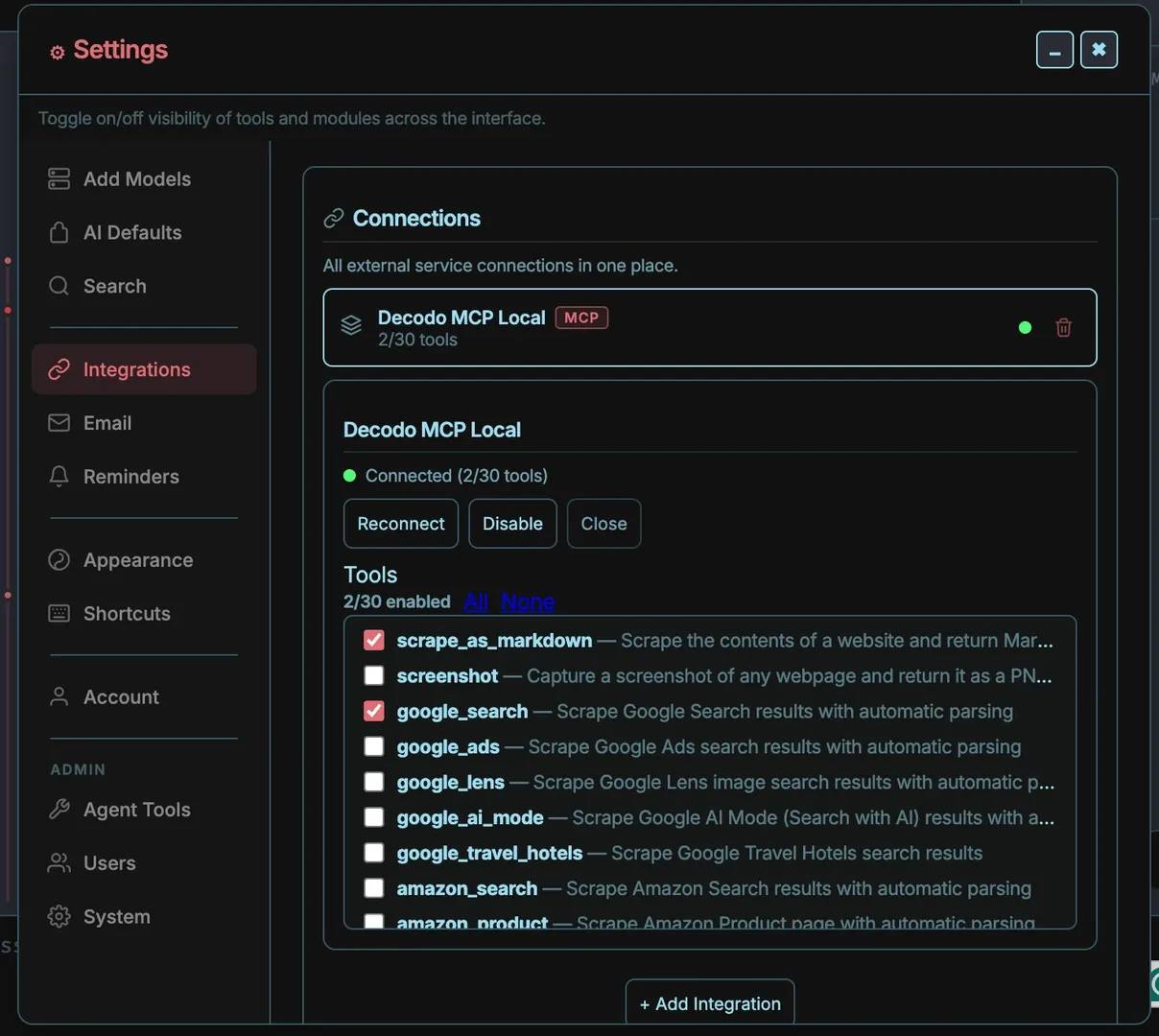
In Odysseus, go to Settings, then Integrations, then click + Add Integration and set Type to MCP Tool Server. Fill in the fields like so:
- Name: Anything you like. "Decodo MCP" does the job.
- Transport: stdio
- Command: node
- Args: ["mcp-server/build/index.js"]
- Env: {"SCRAPERAPITOKEN": "yourbasicauthtokenhere", "TOOLSETS": "web,search"}
Grab your SCRAPERAPITOKEN from the Decodo dashboard, then paste that basic auth token in place of the placeholder. The relative Args path works only because the server lives inside the Odysseus folder; if you installed it somewhere else, swap in the full absolute path to index.js instead. Setting TOOLSETS to web,search keeps things lean by loading only the scraping and search tools, which is all we need for this.
Finally, click Save.
Test that it works
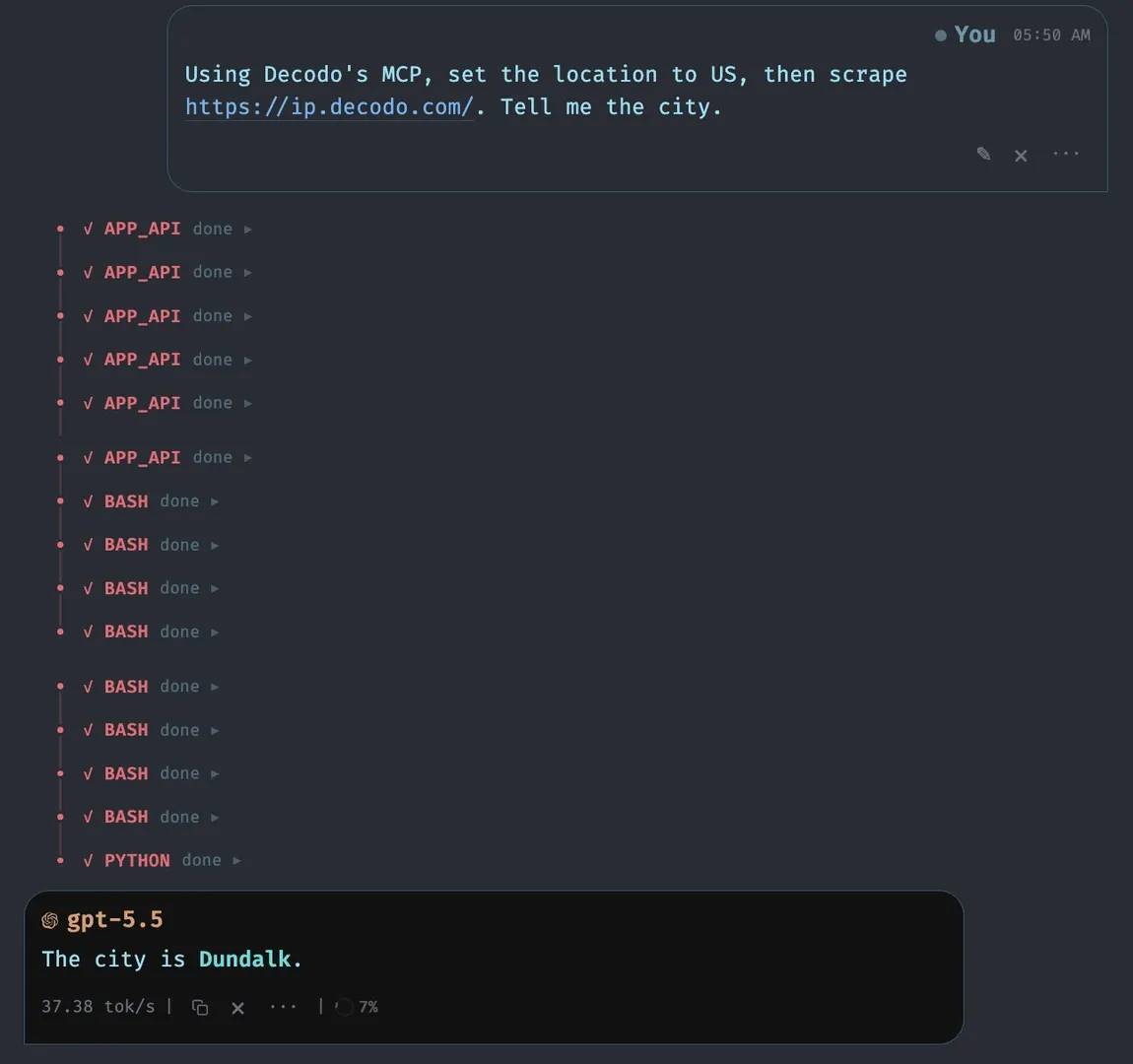
MCP tools are agent tools, so they won't fire in plain chat. In the chat window, switch the mode from Chat to Agent, then send this:
"Using Decodo's MCP, set the location to US, then scrape https://ip.decodo.com/. Tell me the city."
The location maps to Decodo's geo parameter, which sets the country the request originates from. The agent routes the scrape through a US residential IP, reads the IP info page, and reports back the city it landed in. If that city is somewhere in the States rather than wherever you're actually sitting, congratulations, geo-targeting works, and your self-hosted agent now has live, location-aware access to the web.
More than a celebrity side project
What matters here isn't the famous name, it's the packaging, research, agents, memory, and email in one self-hosted workspace that an ordinary person can actually run, arriving just as subscription fatigue peaks. The 30,000+ GitHub stars in its first days say a lot about the real demand for an alternative to renting AI from big tech. The trade-offs are honest ones: hardware, a little setup, and local models that won't beat a frontier API. But for anyone willing to invest, the control and privacy are genuine, and once you point it at the live web or expose it remotely, solid proxy infrastructure is what keeps it running. Owning your stack just got a lot less niche.

Your AI workspace, Decodo's data layer
Pair Odysseus with Decodo's MCP and Web Data API to pull live web data into your self-hosted setup. JS rendering, proxies, and CAPTCHA bypass handled automatically.
About the author

Zilvinas Tamulis
Technical Copywriter
A technical writer with over 4 years of experience, Žilvinas blends his studies in Multimedia & Computer Design with practical expertise in creating user manuals, guides, and technical documentation. His work includes developing web projects used by hundreds daily, drawing from hands-on experience with JavaScript, PHP, and Python.
Connect with Žilvinas via LinkedIn
All information on Decodo Blog is provided on an as is basis and for informational purposes only. We make no representation and disclaim all liability with respect to your use of any information contained on Decodo Blog or any third-party websites that may belinked therein.