Rust Web Scraping: Step-by-Step Tutorial With Code Examples
Python is usually the first choice for web scraping, but it can struggle in high-throughput scenarios where you’re fetching many pages concurrently or need stronger reliability. That’s where Rust comes in. In this tutorial, you’ll build a Hacker News scraper in Rust, covering setup, JSON output, and scaling, along with where Rust excels, where it adds friction, and when to offload to a managed scraping API.

Lukas Mikelionis
Last updated: Apr 15, 2026
10 min read

TL;DR
- Rust's core scraping stack includes three crates: reqwest (HTTP), scraper (HTML parsing), and tokio (async runtime).
- Native async concurrency via Tokio using tokio::spawn and semaphores lets you scrape multiple pages simultaneously without GIL constraints.
- reqwest only fetches raw HTML and doesn’t execute JavaScript, so pages built with frameworks like React or Next.js may return an empty shell.
- Concurrency improves throughput, but without rate limiting or IP rotation, it increases the risk of being blocked.
- Rust’s main advantage is predictable performance and stability under load, but tradeoffs include slower iteration and stricter compile-time checks.
- For targets with aggressive bot protection or JavaScript rendering, external scraping APIs handle that layer so your Rust code can stay focused on parsing.
Advantages and disadvantages of using Rust for web scraping
Before setting everything up, it’s worth understanding what Rust actually gives you in scraping workloads and where it adds friction.
Advantages
- Performance. Rust compiles to native binaries with zero-cost abstractions and no garbage collector. For scrapers running against hundreds of thousands of pages, that predictability in latency and throughput is real.
- Native async concurrency. Native async concurrency via Tokio lets you scrape many pages simultaneously without the GIL constraints. You can run hundreds or even thousands of lightweight tasks, with the runtime efficiently scheduling them.
- Strong typing. Rust’s type system also helps catch mismatches early. It guarantees type correctness within your code, so if a struct expects a u32 and you provide a String, that’s a compile-time error.
- Single binary deployment. A Rust scraper compiles to a single executable with minimal runtime dependencies, which makes it easy to ship and run in containers or on servers without worrying about setting up an environment.
Disadvantages
- Steeper learning curve. Ownership, borrowing, lifetimes, and async patterns introduce cognitive overhead that slows down early development. What might take an afternoon in Python can take significantly longer the first time in Rust.
- Lacking headless browser ecosystem. There’s no equivalent to tools like Playwright or Selenium in Python. For JavaScript-heavy sites, you’ll often need to rely on external services, run a separate browser process, or integrate with APIs rather than using a fully native Rust solution.
- Slower compile times. Compared to scripting languages, the feedback loop is longer, which makes quick experimentation and debugging less flexible.
- Not justified for small jobs. If you’re scraping a single site or running occasional jobs, Python, or even a simple curl pipeline, will get you there faster. Rust starts to make sense when you’re dealing with large-scale concurrency or production systems where performance and reliability matter more than speed.
When Rust web scraping makes sense
Rust isn’t the default choice for web scraping, and for most cases, it doesn’t need to be. It starts to make sense when you’re dealing with:
- Building high-throughput data pipelines that run continuously in production
- Scraping thousands of pages concurrently
- Teams already working in Rust who want a unified stack
- Performance-sensitive applications where compute or memory costs matter at scale
What you need to scrape websites in Rust
This tutorial assumes you're comfortable with basic Rust syntax such as structs, enums, functions, and error handling with Result. You should know how Cargo works, including adding dependencies and running cargo build and cargo run, and have a basic understanding of HTTP and HTML structure.
Core crates
- reqwest is the standard async HTTP client for Rust. It supports GET and POST requests, headers, cookies, redirects, and TLS, and is widely used in scraping projects.
- Scraper is an HTML parser built on top of HTML5ever that supports CSS selectors. It’s similar in role to BeautifulSoup in Python for navigating parsed HTML.
- Tokio is the async runtime that powers concurrent execution. It’s required when using async reqwest and most modern Rust networking code.
- Serde and serde_json are used for serializing extracted data into structured formats like JSON.
Installing Rust and creating the project
If you don't have Rust installed yet, rustup is the standard installer. On macOS or Linux, open your terminal and run:
On Windows, download and run rustup-init.exe from https://rustup.rs, and follow the prompts.
With rustup installed, run these two commands to make Cargo (Rust's package manager and build tool) available in your current shell session:
Running these commands will trigger rustup to download and install the core Rust components. Your terminal will confirm each one as it installs, then display a final line showing the version of the stable toolchain that's now active.

Once that's done, verify both tools are working:
If both commands print version numbers, you're set.

With your dependencies sorted, create a new project directory and navigate into it:
This gives you a minimal project with src/main.rs and Cargo.toml files.

Open Cargo.toml and add your dependencies as shown below:
Save the file, then run using this command:
Cargo will download and compile everything for you.
Before writing any Rust, open your browser dev tools on Hacker News and identify the CSS selectors you’ll need for titles, links, and metadata. Test them in the console first, as it’s much faster to get selectors right here than debugging them later in the code.
Once that’s done, you’re ready to start writing the scraper in main.rs.
How to scrape websites in Rust: a full working example
We’re going to build a scraper that fetches Hacker News, extracts structured data from each post, paginates across multiple pages, and saves everything to a JSON file.
Hacker News is a good target for a few reasons:
- It’s static HTML (no JavaScript rendering)
- The structure is consistent
- The data maps cleanly to a typed Rust struct
We're using Hacker News because it's a real site with a real DOM challenge worth explaining, specifically the sibling row structure where post metadata lives in a separate <tr> from the title.
You'll see what that means shortly.
The full working example (start here)
Before breaking things down step by step, here’s the complete scraper.
All of this code goes into a single file: src/main.rs.
Note: If you haven’t added the dependencies in Cargo.toml, do that first, otherwise the scraper won’t compile.
Run it with the following command:
You should see it fetch multiple pages and generate a JSON file in your project directory.

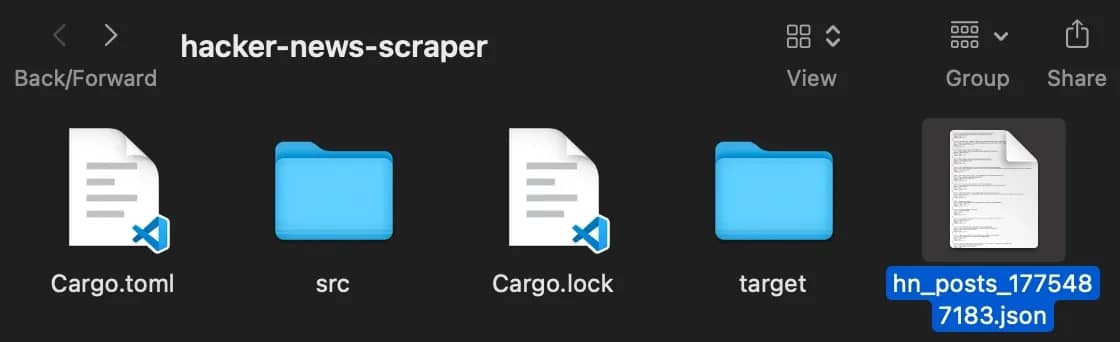
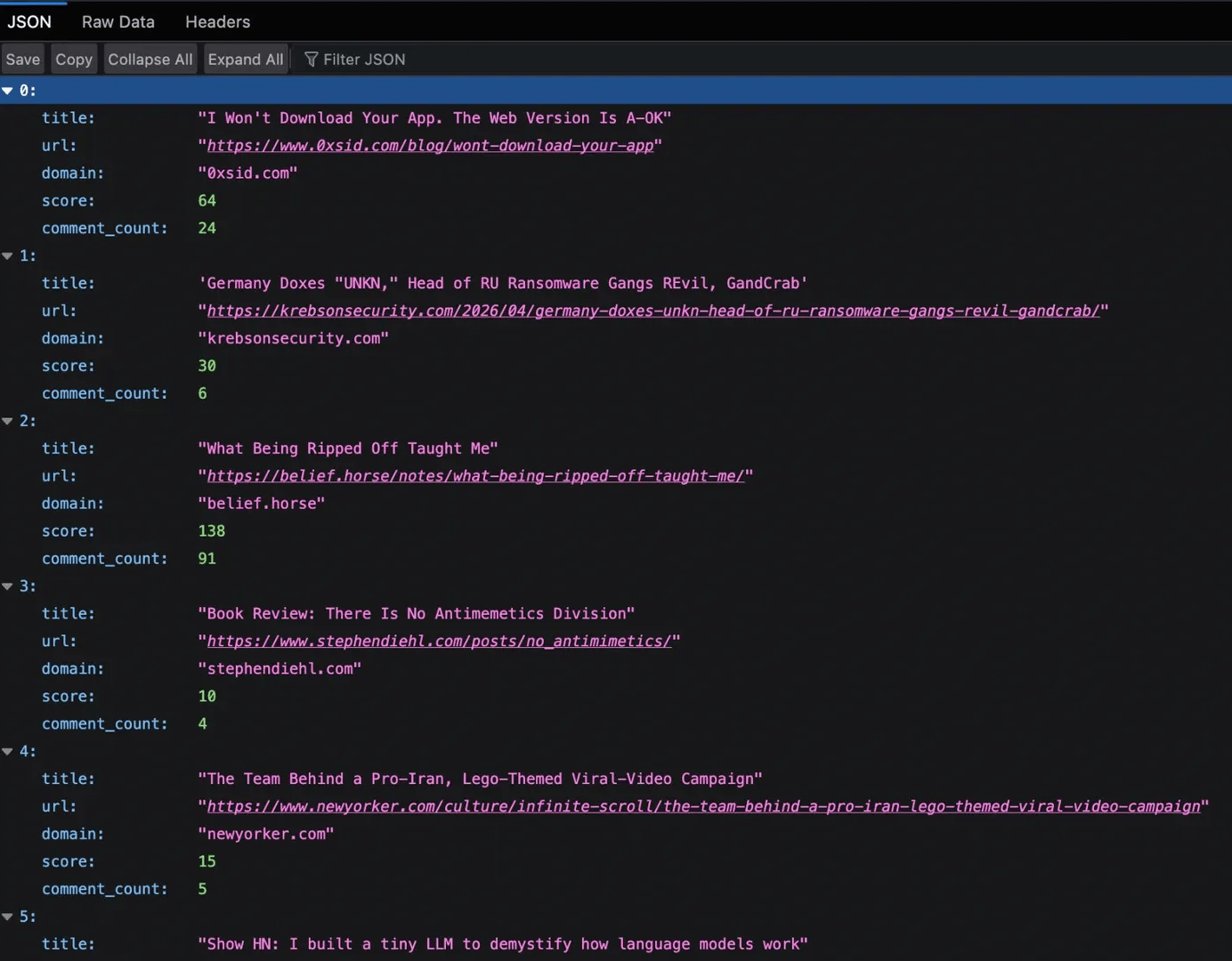
Now, let’s break down the code and the results it delivers.
Step 1: Defining the data structure
![HackerNewsPost struct defining fields in Rust code editor: #[derive(Debug, Serialize)] struct HackerNewsPost { title: String, url: Option<String>, domain: Option<String>, score: u32, comment_count: u32 }](https://decodo.com/cdn-cgi/image/width=1480,quality=70,format=auto/https://images.decodo.com/rust_web_scraping_7_png_04ddc71418/rust_web_scraping_7_png_04ddc71418.webp)
First, we define what a post should look like. This sets a clear structure for the data we want to extract.
Using Option<String> for fields like url and domain accounts for cases where those values don’t exist, such as internal Hacker News posts. The Serialize derive allows us to convert this struct into JSON later without extra work. At this stage, we are not scraping yet, just defining what a valid output should look like.
Step 2: Fetching the page
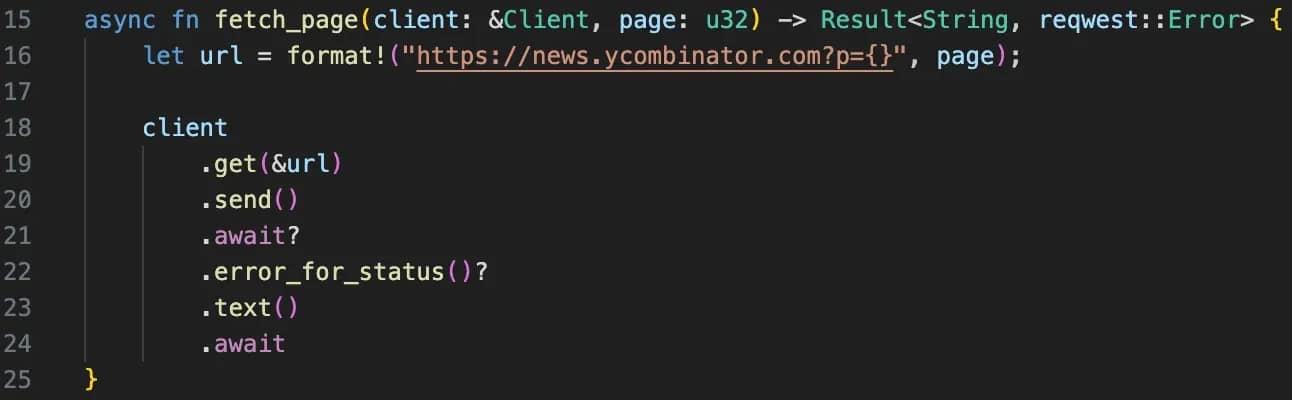
This function is responsible for fetching the HTML of a given page. One important detail is that the Client is passed in rather than created inside the function. The client manages connections internally, so reusing them avoids unnecessary overhead.
The .error_for_status() call ensures that failed HTTP responses do not silently pass through. Without it, a rate limit or error page could be treated as valid HTML and break your parser later. The ? operator keeps the function clean. Instead of manually checking errors at every step, it returns early if something goes wrong.
Step 3: Parsing the HTML
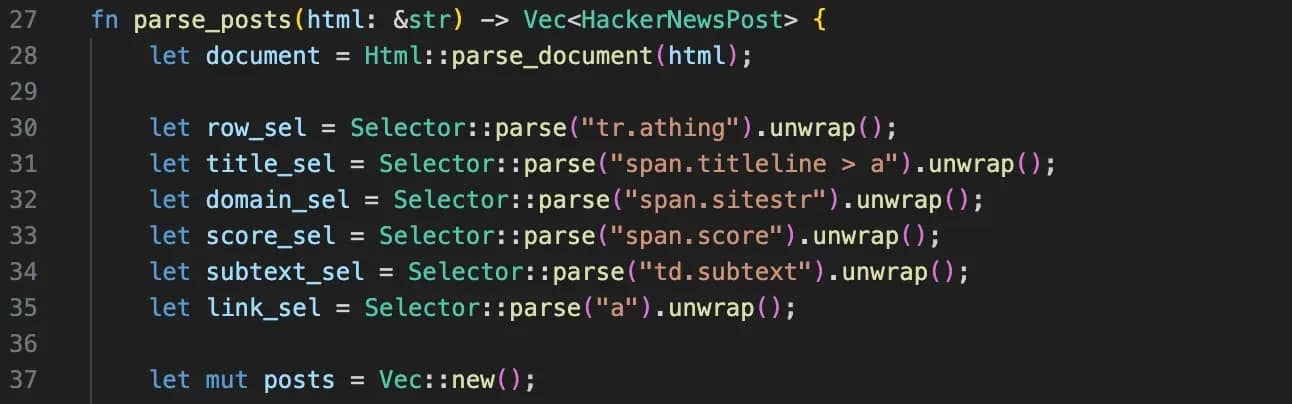
f you inspect Hacker News in your browser, you’ll notice each post is split across two rows. The title lives in one <tr>, while comments sit in the next one. That’s the main challenge. The parser handles this by first selecting each post row (tr.athing) to extract the title, URL, and domain, then moving to the next sibling row to grab the metadata.
Because HTML isn’t always consistent, the code uses and_then to safely chain operations without crashing when something is missing, and unwrap_or(0) to provide sensible defaults. You’ll also see trim() used throughout to clean up extra whitespace so the final output stays consistent.
Step 4: Looping through pages
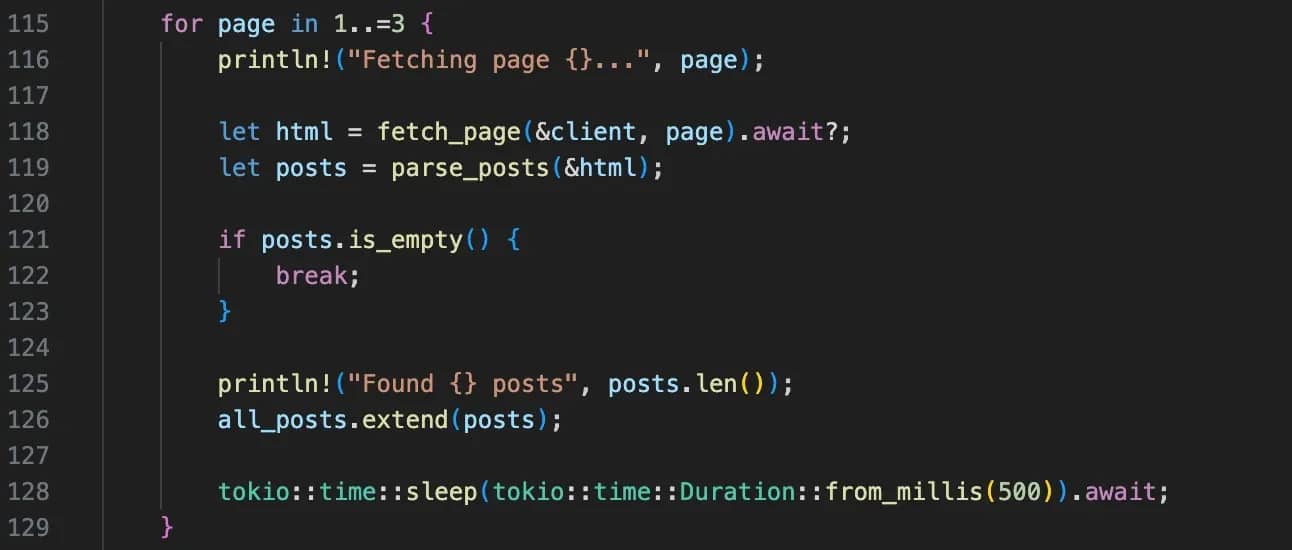
This is where everything gets tied together. For each page, the code fetches the HTML, parses it into structured posts, and adds those posts to a growing list.
The print statements show the progress, and the short delay between requests helps avoid hitting the server too aggressively.
Step 5: Saving the results
![fn save_to_json(posts: &[HackerNewsPost]) -> Result<(), Box<dyn std::error::Error>> writing pretty JSON to "hn_posts_{}.json" using serde_json and std::fs in a Rust code editor](https://decodo.com/cdn-cgi/image/width=1480,quality=70,format=auto/https://images.decodo.com/rust_web_scraping_11_png_7c1f650e1e/rust_web_scraping_11_png_7c1f650e1e.webp)
Once all the data is collected, it’s converted into JSON and written to a file. serde_json::to_string_pretty() handles the conversion from Rust structs into readable JSON, so you don’t have to format anything manually.
The timestamp in the filename ensures each run creates a new file instead of overwriting the previous one. At this point, the pipeline is complete. You’ve taken raw HTML, turned it into structured data, and saved it in a format you can actually use.
Scaling up with async concurrency in Rust
The scraper we've built so far is sequential. It fetches page 1, waits for the response, parses it, and then moves to page 2 – rinse and repeat. It’s simple and predictable, but also inefficient, because most of the time is spent waiting on network responses.
To fix that, we’ll stop awaiting each request inside the loop and will instead create all the requests upfront, then wait for them together.
In practice, this means replacing the existing page loop inside main.rs with a concurrent version:
Now, all requests are sent at once, and the program waits for all of them to complete before processing the results. This works well for small batches, but firing everything at once doesn’t scale safely.
If you try to fetch too many pages at the same time, you’ll hit rate limits or get blocked. To avoid that, you can cap how many requests run at once using a semaphore, again replacing the same loop in main.rs.
A semaphore is a way to control access to a limited resource. In our case, the resource is how many requests can run at the same time. You define a limit of how many tasks are allowed to execute concurrently, and the rest will wait until a free request slot becomes available.
Here, even though many tasks are created, only 5 will run at the same time. Each task must request permission before it runs, and once it finishes, that permit is released so another task can proceed.
It’s important to understand that concurrency improves speed, but it doesn’t solve the problem of detection. If all requests come from a single IP, sending them in parallel makes your scraper easier to block.
In practice, this is where rotating proxies prove extremely useful, distributing requests across multiple IPs, so the traffic looks more like real users rather than a single automated client.

Collect data without interruptions
Decodo's residential proxy pool covers 115M+ ethically-sourced IPs across 195+ locations, built for scrapers that need to stay undetected at scale.
Handling dynamic and JavaScript-rendered pages
Everything we’ve done so far works because Hacker News is a static site. The HTML you get from the request is the same HTML you see in the browser. But that’s not how most modern websites work.
With frameworks like React or Next.js, the initial HTML is often just a shell. The real content is loaded later with JavaScript. If you try to scrape those pages with reqwest, you’ll get an empty <div id="root"> or <div id="app"> as a result, even though the page looks fully populated in your browser.
The easiest way to spot this is to compare what your scraper receives with what you see in the browser. If the content is missing in the raw HTML, but visible on the page, it means it’s being rendered dynamically. You can confirm this in the Network tab by looking for Fetch or XHR requests that return JSON, which is often where the real data lives.
Once you’ve identified that, you have a few options:
Option 1: Find the underlying API
Many sites fetch their data from JSON endpoints behind the scenes. If you can locate that request in the Network tab, you can call it directly from Rust using reqwest and parse the response with serde_json. This is faster, more reliable, and avoids HTML parsing entirely.
Option 2: Using fantoccini for WebDriver-based control
If there’s no accessible API, the next option is using a real browser. In Rust, that typically means a WebDriver client like fantoccini, which connects to a running ChromeDriver or GeckoDriver instance and executes JavaScript just like a normal browser. This gives you access to fully rendered pages, but it’s slower and adds setup complexity.
Option 3: Using Decodo's Web Data API
The final option is to use our Web Data API to handle rendering for you. It can fetch the page, execute JavaScript, and return fully rendered HTML that you can parse into JSON, Markdown, and other formats with the same scraper setup. This keeps your Rust code simple and avoids managing a browser process yourself.
Handling anti-bot protections and blocks in Rust
On most sites, you’ll eventually run into anti-bot measures.
The usual signs include HTTP 429 responses when you’re rate-limited, 403 responses when your requests are flagged, or pages that return a 200 status but contain CAPTCHA challenges or incomplete data. These soft blocks are easy to miss if you’re only checking status codes.
The first step is making your requests look normal. That means setting a realistic User-Agent, including standard headers like Accept and Accept-Language, and maintaining cookies across requests. On top of that, you need basic retry logic. Instead of failing immediately, retry requests with a short backoff, especially for 429 and server errors, but cap the number of attempts.
As you scale, the main constraint becomes your IP. Sending many requests from a single source is easy to detect, especially when combined with concurrency. Using rotating residential proxies helps distribute requests across real user IPs, making traffic patterns harder to detect.
Using a service like Decodo residential proxies allows requests to be distributed across multiple IP addresses, making the traffic pattern look far more like real users. This becomes especially important when running concurrent scrapers, where request volume increases quickly.

Don’t want to manage infrastructure?
Decodo's Web Data API takes care of the fingerprinting, proxy rotation, and CAPTCHA bypassing, ensuring your data collection doesn’t stop.
Best practices and common pitfalls
Apply these best practices as you build, and watch out for the pitfalls that tend to surface once your scraper is running at scale.
1. Don’t parse selectors inside loops. Avoid calling Selector::parse() inside a hot loop. Every time you call it, Rust validates and compiles the selector string, which is unnecessary work if the selector never changes. The better approach is to compile your selectors once before the loop and reuse them. It’s a small change, but it removes wasted CPU cycles and makes your parser more efficient.
2. Avoid .unwrap() in DOM traversal. When extracting elements from the DOM, it’s tempting to use .unwrap() because it’s quick and works during testing. The problem is that real pages are not stable and their elements can change. Using safer patterns like .and_then() or matching on Option forces you to handle those cases properly. The code gets longer, but far more resilient in production.
3. Reuse your HTTP client. reqwest::Client is designed to manage connections efficiently, including connection pooling and reuse. Creating a new client for every request throws away those benefits and adds unnecessary overhead. Instead, you should create a single client and reuse it across your entire scraper. Cloning the client is cheap, so you can safely pass it around or share it across tasks without performance issues.
4. Be mindful of async ownership ('static). When working with tokio::spawn, each task must own the data it uses. You can’t borrow local variables from the surrounding scope because the task may outlive them. The fix is usually to move owned data into the task using async move, or to wrap shared state in something like Arc. Once you understand that spawned tasks need full ownership, these errors become much easier to reason about.
5. Expect slower iteration, but more stable results. Rust can feel slower to work with at first, especially compared to Python. The compiler forces you to handle errors, lifetimes, and edge cases upfront, which can be frustrating during development. But that upfront friction is what prevents silent failures later. Once your scraper compiles and runs correctly, it tends to be far more stable and predictable over time.
Final thoughts
We’ve built a complete scraper in Rust, from fetching and parsing Hacker News to handling pagination, adding concurrency, and exporting structured data to JSON. Along the way, you’ve seen how Rust handles data modeling, error handling, and performance in a way that’s very different from more scripting-focused approaches.
Rust is a strong choice for scraping pipelines where performance and reliability matter. It forces you to think about edge cases early, which can slow down development at first, but leads to far more stable systems once everything is in place.
At the same time, not every problem is worth solving from scratch. When dealing with JavaScript-heavy sites or more advanced anti-bot measures, it often makes sense to offload the harder parts.
Using something like the Decodo Web Data API lets you keep your Rust code focused on parsing and processing, while the underlying infrastructure handles rendering, fingerprinting, and access.
About the author

Lukas Mikelionis
Senior Account Manager
Lukas is a seasoned enterprise sales professional with extensive experience in the SaaS industry. Throughout his career, he has built strong relationships with Fortune 500 technology companies, developing a deep understanding of complex enterprise needs and strategic account management.
Connect with Lukas via LinkedIn.
All information on Decodo Blog is provided on an as is basis and for informational purposes only. We make no representation and disclaim all liability with respect to your use of any information contained on Decodo Blog or any third-party websites that may belinked therein.