Error 1005: What It Means and How to Fix It
You're trying to load a website, and instead of the page, you get a blank screen telling you access is denied. No explanation, no obvious reason. That's Error 1005, a Cloudflare security response that blocks your entire network rather than just your IP. This guide breaks down what triggers it, how to diagnose the cause, and what actually works to fix it.

Lukas Mikelionis
Last updated: Mar 16, 2026
6 min read
TL;DR
Error 1005 is a server-side access ban triggered by Cloudflare (or similar CDN services) that blocks your entire network. It appears that a website administrator has banned the ASN (Autonomous System Number) associated with your IP. This guide explains why it happens and how to get around it, whether you're a regular user or a developer running automated data collection.
What Error 1005 actually means
Ever typed in a URL, hit enter, and seen something like this?
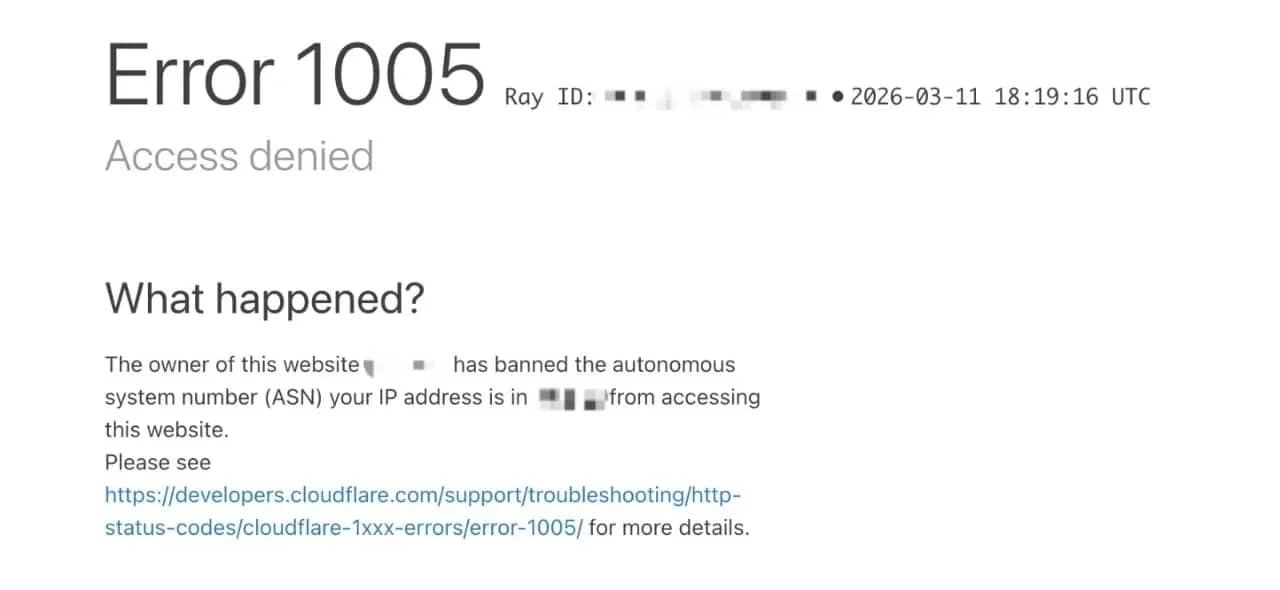
Instead of the page you expected, you're suddenly locked out with a cryptic message that reads: "Access Denied. The owner of this website has banned the autonomous system number (ASN) your IP address is in. "
That message is Error 1005, and it usually means the site's security system thinks your connection shouldn't be allowed in.
It comes down to the network your IP (Internet Protocol) address belongs to. To make sense of it, you need to know what an ASN (Autonomous System Number) is.
Every Internet Service Provider (ISP), hosting provider, university, or corporation that manages a network is assigned one: a unique identifier that groups all its IP addresses under one label.
When a site administrator bans an ASN, they're not targeting you specifically. They're blocking every IP in that network in a single rule, potentially affecting thousands or even millions of users at once.
Error 1005 is what Cloudflare serves to anyone caught in that ban.
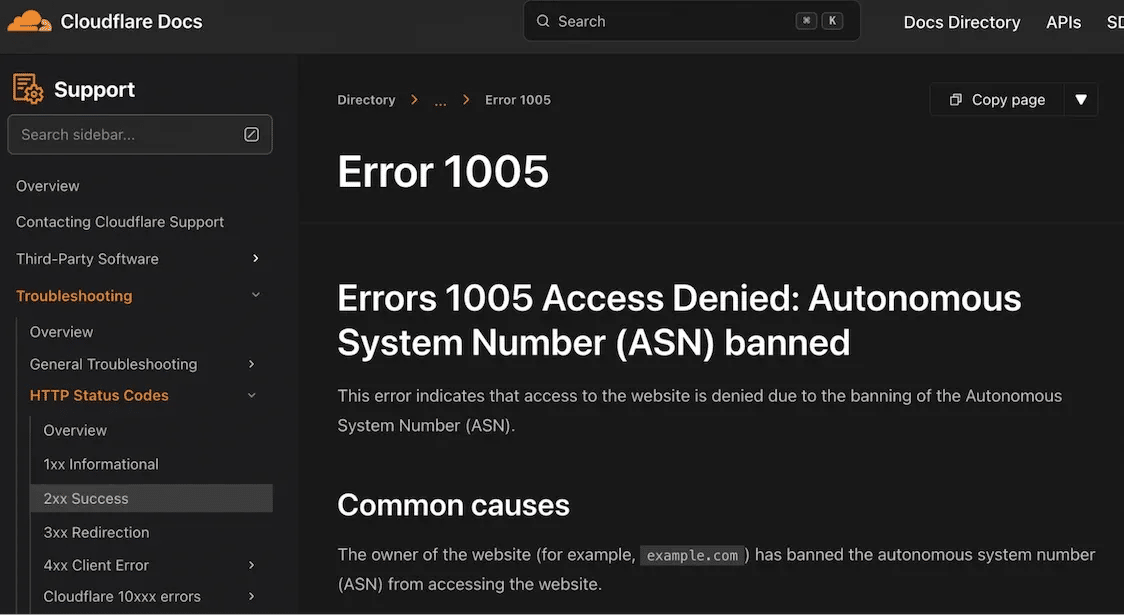
It's worth knowing how it sits within Cloudflare's broader Error taxonomy, because the cause determines the fix:
- Error 1005: Entire ASN banned (network-level block, today's subject)
- Errors 1006/1007/1008/1106: Individual IP address banned
- Error 1009: Country or region blocked by geo-restriction
- Error 1010: Browser fingerprint flagged as a bot
Error 1005 is the widest net. Site administrators configure access restrictions through Cloudflare’s firewall and IP access rules, where they can block individual IP addresses, IP ranges, countries, or entire ASNs.
When your request hits Cloudflare's edge servers, it's checked against those rules before it ever reaches the origin. If your ASN is on the list, the request is rejected immediately, and Error 1005 is returned.
To understand the scale, consider that a single ASN can represent millions of IP addresses. If a retailer blocks the ASN of a large mobile carrier or ISP, a huge number of customers connected through that network may suddenly see the same Error 1005 screen.
They are not blocked because of anything they personally did, but because their traffic originates from a network that the site has chosen to restrict.
That’s the trade-off with ASN-level blocking: it’s fast, simple to implement, and highly effective at stopping abusive traffic, but it can also catch a large number of legitimate users who share the same network infrastructure.
Common reasons why Error 1005 occurs
In most cases, getting hit with Error 1005 has less to do with what you did and more to do with the network you're on.
These are the most popular reasons it happens:
Datacenter and cloud hosting ASNs
Datacenter and cloud hosting networks carry a disproportionate amount of automated traffic, scrapers, and bots.
Many website administrators blanket-ban entire datacenter ASNs as a default security posture, which means anyone running a cloud server or VPS on those networks gets caught in the crossfire, even if they had nothing to do with the abuse.
VPN and proxy ASNs
VPN providers own or lease IP ranges, and because thousands of people share those IPs simultaneously, abuse is hard to contain.
Once a VPN's ASN gets flagged for credential stuffing, scraping, or spam, the whole range tends to get blocked. Free VPNs are especially prone to this because they have less incentive to police how their IPs are used.
If you're running a paid VPN and still seeing error 1005, the provider's ASN may already be on a blocklist for that site. Switching server locations often helps because different servers sit on different ASNs.
Your ISP's network got caught in a broader ban
Less common, but it happens. If another customer on your ISP's network was scraping aggressively or participating in a DDoS, the site administrator may have banned the whole ASN reactively.
You had nothing to do with it, but you're blocked anyway. This is the purest form of collateral damage, and it's one of the messier situations to resolve because you can't fix it from your end. The block lives in someone else's Cloudflare dashboard.
Shared hosting environments can create the same problem. If you're running a project on a shared server and another tenant on the same infrastructure abuses a site, the resulting ASN ban affects you too.
Geographical restrictions
Content licensing agreements, local legal compliance, and regional pricing strategies all lead to ASN or country-level blocks that produce the same Error 1005 screen.
If you're accessing a streaming platform from a country where they don't have rights to operate, or an eCommerce site that geo-gates its pricing, the block is fully intentional.
Changing networks won't fix it unless you're effectively changing your apparent location, which is where residential proxies with geo-targeting become useful.
How to troubleshoot and resolve Error 1005
The right first move is isolating where the problem actually lives, because the fix is completely different depending on the cause.
Work through these in order before reaching for anything more complex:
Switch networks first
This is the fastest diagnostic available. Pull out your phone, disable Wi-Fi, and try the site on mobile data.
If it loads on mobile, your network's ASN is the problem, and you're not looking at a site-wide block or a browser issue. If it still errors on mobile, the block is broader, possibly geo-based, or your device has something in its configuration worth investigating.
Trying a different Wi-Fi network (a coffee shop, a friend's connection) tells you the same thing. If the site loads there but not at home, the issue is your ISP's ASN.
Disable your VPN or proxy
If you're running a VPN or proxy, that's often the culprit. Turn it off and test the site directly.
If access is restored, your VPN provider's ASN is on the blocklist for that site. Try a different server location within the same VPN, or switch providers.
If you need a proxy for what you're doing, the solution is choosing one whose IP ranges aren't already flagged.
Clear your browser data and try a private window
Corrupted cookies or cached redirect responses can sometimes perpetuate an error even after the underlying issue is resolved.
Open an incognito or private window and test the site there. If it works, the problem was likely related to cached data, cookies, or browser extensions. If it doesn't, the problem is elsewhere.
Check your system clock
This one often catches people by surprise. SSL/TLS handshakes can fail if your system time is significantly off, which may appear as an access error.
Make sure automatic time synchronization is enabled in your operating system. Even a small discrepancy can sometimes prevent secure connections from completing.
Change your DNS
Your ISP's DNS servers can occasionally affect routing in unexpected ways.
Switching to Google Public DNS (8.8.8.8 and 8.8.4.4) or Cloudflare DNS (1.1.1.1) is worth trying, especially if other diagnostic steps haven't pointed to anything obvious.
Change the DNS settings in your network adapter on Windows, or in System Preferences on macOS.
Contact the website directly
If you've confirmed that your IP or ASN is legitimately blocked by mistake (a university student whose entire campus network got flagged, for example), reaching out to the site is the most direct path to a fix.
Include your IP address, your ISP name, and the approximate time you first saw the error. Site admins can whitelist specific IPs or ASNs on request.
It's slower than a technical workaround, but it resolves the root cause rather than routing around it.
Advanced techniques to bypass Error 1005
When Error 1005 is blocking automated pipelines, changing your system settings or clearing your browser data won't move the needle.
Your requests are originating from a network the site has already decided it doesn't trust, and the only way through is changing where those requests appear to come from.
Here are the common approaches used to do that:
Residential proxies
Residential proxies use IP addresses assigned by real ISPs to actual households. From a website's perspective, they're indistinguishable from regular user traffic.
That's what makes them effective against ASN bans: Cloudflare can't block residential IPs en masse without also locking out legitimate users, and no site wants to do that.
Rotating residential proxies cycle through a pool of IPs automatically, so each request arrives from a fresh address. For high-volume scraping, this keeps block rates low and makes your traffic pattern look organic.
If your workflow requires session persistence (staying logged in, navigating multi-step flows), static residential (ISP) proxies provide a consistent IP address sourced from a real ISP network while still benefiting from the stability and speed of datacenter infrastructure.
For targets with lighter bot protection, datacenter proxies are faster and more affordable. Just know that Cloudflare-protected sites will identify datacenter IPs quickly, so they're better suited to scraping sites that don't invest heavily in anti-bot infrastructure.

Ready to bypass Error 1005 at scale?
Access 115M+ residential IPs across 195+ locations and stop getting blocked.
Headless browsers with anti-detection
Modern anti-bot systems don’t just look at IP addresses. They also analyze how requests are made. A script sending raw HTTP requests or a basic headless browser often produces fingerprints that look nothing like a real user browsing a page.
That’s where anti-detection headless browsers come in. Tools built on frameworks like Puppeteer or Playwright allow developers to automate a full browser environment while modifying the signals that detection systems inspect.
Instead of sending simple requests, the scraper loads pages the same way a real browser would, executing JavaScript, rendering assets, and generating normal interaction patterns.
Anti-detection layers then adjust common automation fingerprints such as:
- WebDriver flags
- browser fingerprint values
- canvas and WebGL signatures
- user-agent and header consistency
This reduces the chances of being flagged by services like Cloudflare that analyze browser behavior in addition to network origin.
Web scraping APIs
Managing proxies, fingerprint rotation, and CAPTCHA solving as separate systems adds up quickly in both complexity and maintenance overhead. A Web Scraping API wraps all of it into a single interface.
Decodo's Web Scraping API handles IP rotation, JavaScript rendering, and browser fingerprinting at the infrastructure level. You send a request, it handles the rest, and returns data in HTML, JSON, CSV, or Markdown, ready to plug into your workflow.
For sites with particularly aggressive bot protection, Decodo's Site Unblocker is built specifically for that scenario.
VPNs
VPNs change your apparent ASN, which is exactly what Error 1005 requires.
The limitation is that VPN provider ASNs are widely known and many sites preemptively block them, especially sites that deal with significant scraping traffic. Consumer VPNs are worth trying as a quick fix, but they're not reliable for sustained automated access.
Choose a provider with a large, regularly refreshed server pool, and avoid free VPNs entirely. Their IPs have been overused to the point where they're blocked almost everywhere.
Tor
Tor routes traffic through multiple volunteer-operated nodes and provides strong anonymity, but its exit nodes are heavily blocked across most major websites due to the volume of abuse they've historically carried. It's a last resort and not suitable for anything requiring speed or scale.
Legal and ethical considerations when bypassing Error 1005
Using proxies to access public data is legal in most jurisdictions. The legal risk increases when the goal is circumventing paywalls, collecting personal data without consent, or violating a site's terms of service in ways that cause harm.
In the US, the Computer Fraud and Abuse Act (CFAA) has been applied to web scraping cases, though the landscape continues to shift.
A well-known example is hiQ Labs v. LinkedIn, where LinkedIn attempted to block hiQ from accessing publicly available profiles. The court ultimately ruled that this did not violate the CFAA because public websites do not have authentication “gates” that must be bypassed.
Even so, the case illustrates that scraping activity can still carry risks, particularly when it involves private data, bypassing authentication systems, or ignoring other legal protections.
Similar considerations apply in Europe, where the General Data Protection Regulation (GDPR) governs what personal data can be collected from European sites regardless of how the data is accessed.
In practice, the safest approach is to focus on publicly available data, review a site's terms of service before building any large-scale collection process, and treat robots.txt as a signal of the site owner's preferences even if it is not legally binding.
Taking a cautious approach helps reduce legal exposure while ensuring that data collection practices remain transparent and responsible.
Best practices for staying unblocked
If you're running any kind of automated data collection, getting past Error 1005 is only half the battle. Staying unblocked as you scale is where things get more deliberate.
Here are the habits that make the difference:
Request pacing and IP hygiene
The most common reason scrapers get blocked comes down to how requests are being made, not the proxies themselves. Sending requests too fast is the clearest signal that something automated is happening, and Cloudflare-protected sites are tuned to catch it.
Three to ten seconds between requests on sensitive targets is a reasonable baseline, and you should never reuse an IP after it's been blocked. Once it's flagged, retire it and pull a fresh one. If blocks are coming earlier than expected, that's usually where to look first before assuming your proxy type is the problem.
On the implementation side, it's worth building in retry logic that handles transient failures without hammering the target, and verifying your proxies are actually working before you scale anything up. Both are easy to overlook early on and painful to debug later.
Rotate everything, not just IPs
Changing your IP while keeping everything else constant is still a detectable pattern.
Anti-bot systems correlate IP, user agent, browser fingerprint, request timing, and behavioral signals together, and a consistent canvas fingerprint across thousands of requests from different IPs is a strong indicator of automation regardless of how clean those IPs are.
The fix is rotating everything in tandem: user agents, fingerprint attributes, and request timing alongside IPs. If you're managing session tokens or cookies, be deliberate about it too — a fresh IP paired with a stale session cookie from a previously blocked session can re-trigger a block immediately.
Adapt as targets change
Anti-bot configurations aren't set-and-forget on the site's end, and your scraper shouldn't be either.
Cloudflare rules get updated, fingerprinting logic evolves, and rate limits tighten, often without any announcement. A scraper that runs cleanly today can start hitting blocks two weeks later for no obvious reason, which is why building monitoring into your pipeline matters.
Catching those changes early, rather than discovering them mid-run, is what keeps operations reliable over time.
Concluding thoughts
Error 1005 can look confusing at first, but the underlying cause is straightforward.
In most cases, you’ve simply been caught in a rule that was written for someone else, whether that’s abusive traffic coming from the same VPN network, scraping activity originating from a shared datacenter IP range, or a broader restriction placed on an entire network provider.
For regular users, the fix is usually straightforward: switch networks, disable your VPN, or contact the site. For developers running data collection at scale, the answer is investing in the right infrastructure from the start.
Residential proxies can reduce the likelihood of network-level bans, while web scraping APIs help manage proxy rotation, retries, and anti-bot protections.
Understanding why the block happened is always the right first step. Once you know what triggered the restriction, the path to fixing it becomes much clearer.

Residential proxies from 195+ locations
Access 115M+ ethically-sourced IPs with #1 response time in the market.
About the author

Lukas Mikelionis
Senior Account Manager
Lukas is a seasoned enterprise sales professional with extensive experience in the SaaS industry. Throughout his career, he has built strong relationships with Fortune 500 technology companies, developing a deep understanding of complex enterprise needs and strategic account management.
Connect with Lukas via LinkedIn.
All information on Decodo Blog is provided on an as is basis and for informational purposes only. We make no representation and disclaim all liability with respect to your use of any information contained on Decodo Blog or any third-party websites that may belinked therein.