JSON.parse() in JavaScript: A Complete Guide
Every JSON payload a JavaScript app receives passes through JSON.parse(). The method has to handle malformed payloads, lossy type round-trips, files that exceed Node's default heap, and APIs that change shape without warning. Each of those failures surfaces at parse time. This guide covers them all, including practical patterns for web scraping.

Mykolas Juodis
Last updated: May 12, 2026
8 min read
TL;DR
- Use JSON.parse() to convert a JSON-formatted string into a usable JavaScript value, with an optional reviver callback as its second argument.
- 4 production failure modes cover most parse-time bugs; each failure has a fix.
- The fixes include using a reviver for schema-wide conversions, try/catch with input guards, streaming large JSON files, and runtime validation with Zod or AJV.
- For scraping, embedded JSON in script tags is often the cleanest extraction path on the page.
What is JSON?
JSON (JavaScript Object Notation) is a lightweight text-based format for representing structured data as key-value pairs, arrays, strings, numbers, booleans, and null. It's readable by humans and parseable by over 60 modern programming languages, meaning the same JSON payload can be parsed in JavaScript, Python, Go, or Java without changing its structure.
Here’s how it works in practice: when data crosses a network boundary or gets written to disk, JSON.stringify() serializes it into a JSON string. JSON.parse() reverses that on the receiving end, turning the string back into a usable JavaScript value. Without it, the response lands in your code as a plain string with no traversable structure.
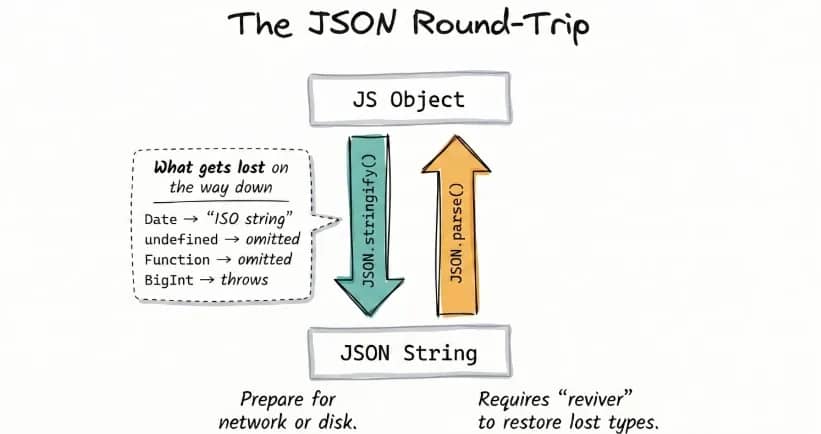
That round-trip is lossy by design. JSON has no native type for functions, undefined, Date, Map, or BigInt, so each one disappears or mutates in transit. A good example is how dates come back as ISO strings, not Date instances, consequently breaking any logic that depends on date computation.
JSON.parse() syntax and basic usage
The JSON.parse() method converts a raw string into the JavaScript value it represents. Born out of the need to replace eval(), the static method takes a JSON string as its first argument and an optional reviver function as its second, letting you parse and transform each value before the final result is returned.
The result is typically an object or array, but it can also be a string, number, boolean, or null. That variability matters when you're consuming APIs with inconsistent schemas – the code assumes the parsed result is always an object, and as such, fails when the payload is null, a number, or an array.
A JSON response for a product listing can be parsed and accessed like this:
You might be tempted to reach for eval() out of old habit. Don’t. Even when the input looks like valid JSON, eval() treats the string as executable JavaScript rather than plain data. That means any malicious code inside user-controlled input would run directly in your application. JSON.parse(), on the other hand, only accepts valid JSON and safely rejects anything outside the JSON grammar:
Another common pitfall is double-parsing with res.json(). Internally, res.json() already calls JSON.parse() and returns the parsed JavaScript value. Wrapping it in another JSON.parse() throws a SyntaxError because you're passing an object where a string is expected:
The res.json() method already returns parsed data, so the extra JSON.parse() call throws immediately because it expects a string input.
When it comes to scraping workflows, parsing sits on the critical path. Every response has to be parsed before extraction can proceed, so the parsing cost shows up directly in end-to-end runtime.
For a method handling large payloads, JSON.parse() is counterintuitively fast. Mathias Bynens’ test showed it runs 1.7x faster than an equivalent object literal on an 8 MB payload.
The quiet problem with JSON.parse() is what happens to your types: prices come back as strings, dates come back as strings, and none of it throws an error. The reviver addresses both problems.
Using the reviver function to transform parsed values
The second argument to JSON.parse() is a callback function called the reviver. And although it's been in the spec for over 15 years (ES5, 2009), most developers don't even know it exists.
The reviver callback function lets you correct the type of each value before the parsed result is returned. Behind the scenes, each call receives a key-value pair and returns either the original value or a replacement. Returning undefined removes the key.
At the end of that tree walk, the reviver is called once more with the entire parsed result. Whatever it returns at that point is what JSON.parse() returns:
One detail that matters here is traversal order. Reviver runs bottom-up, not top-down. That means nested objects are processed before their parents.
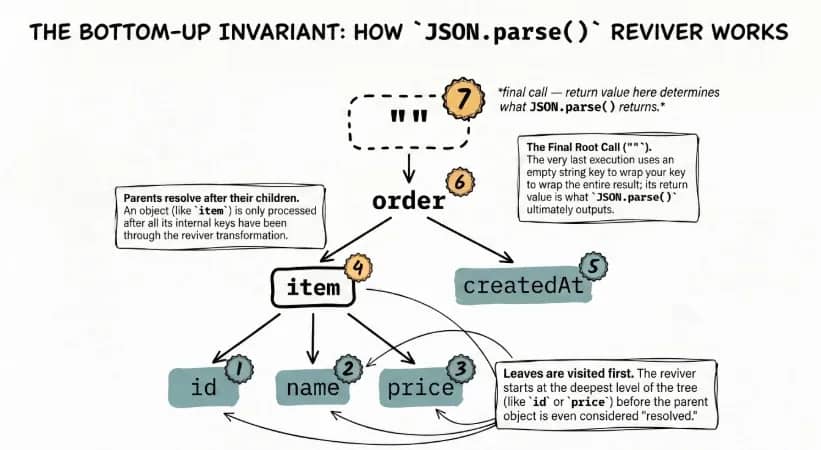
Since nested objects are processed first, any parent-level logic runs against the converted values, not the raw input. To handle that cleanly, you write a reviver function that detects those strings and turns them into Date instances before the data reaches application logic:
The created_at field is now a real Date instance, which is why date methods like getFullYear() work without any extra conversion.
A secondary use case is field transformation. Scraped APIs regularly return prices as strings. A reviver that converts "19.99" to a float at parse time is cleaner than parseFloat() calls scattered across the codebase. The same principle applies to renaming keys or filtering sensitive fields before the object enters application logic.
Use a reviver when the same transformation applies across the entire schema. For a single field converted at the point of use, a direct parseFloat() or new Date() call is simpler and carries less overhead.
Reading JSON files in JavaScript: Node.js and the browser
Before JSON.parse() can run, the JSON needs to exist as a string in memory. The right method depends on where the code runs and whether you want a raw string or an already-parsed object.
In Node.js, reading a file from disk means using the fs module:
1. fs.readFile() / fs.promises.readFile(): async reads
Use fs.readFile() when the code should keep doing other work while the file loads. It reads asynchronously and avoids blocking the event loop, which makes it the right default for production servers and longer-running scripts:
If you prefer async/await, fs.promises.readFile() gives you the same non-blocking behavior:
2. fs.readFileSync(): sync reads
Unlike fs.readFile(), fs.readFileSync() blocks execution until the file is fully read. That makes it acceptable for startup scripts, CLI tools, or one-shot scripts, but not for request handlers or async pipelines:
Both fs methods return a raw string that still requires a JSON.parse() call – subject to the same pitfalls as parsing any API response. If you want to skip that step, Node can load JSON directly as a module.
3. require(): auto-parsed module import
Node.js can also load JSON as a module. With require("./data.json"), Node parses the file automatically and returns the object, so there's no separate JSON.parse() call. The main limitation here is that runtime changes to the file are not reflected after the first load, unless the process restarts.
4. import with { type: "json" }: ESM equivalent
If your project uses ES modules, the syntax is slightly different, but the behavior is the same – Node parses the file and returns the object with no manual JSON.parse() call:
That syntax requires ES module mode, either "type": "module" in package.json or the .mjs extension.
5. fetch(): browser runtime
The standard runtime approach in the browser is fetch(). Call res.json() and the response body is parsed for you:
6. Static import: bundled client-side config
For static configuration in browser projects, modern bundlers such as Vite and Webpack 5 also support direct JSON imports:
Use fs when you need raw file contents, require() or import when JSON is part of the module graph, fetch() for runtime browser requests, and static import for bundled client-side data.
Handling special cases: arrays, dates, null, and empty values
Real-world JSON payloads don't follow a clean, predictable shape. Structure varies, values lose their types, and invalid input shows up more often than expected. The JSON.parse() method will still do its job in these cases, but what it returns isn't always what your code assumes.
A few edge cases are worth accounting for early because they can break a parsing pipeline in ways that are easy to miss.
1. Arrays as the root value
The JSON.parse() method doesn't care about the root value. It returns whatever the JSON represents, including arrays. This becomes a problem when code assumes an object shape and starts accessing properties that don't exist.
The fix is to always write a guard clause to check for the root type before processing:
2. Null values and missing keys
JSON has null, but no undefined. After parsing, both show up in different ways. A field explicitly set to null stays null. A field that doesn't exist resolves to undefined. They behave differently, but most code treats them the same, which leads to defensive branching.
Optional chaining and nullish coalescing collapse both cases into one pattern:
This handles missing objects, missing keys, and null values without extra checks.
3. Dates
As you already saw in the reviver section, dates come back from JSON.parse() as plain strings. If the same conversion needs to happen across the payload, handle it in a reviver. For a single field, new Date(value) at the point of use is usually simpler. And if timezone handling starts to matter, reach for date-fns or Temporal instead.
4. Empty strings and non-string inputs
Sometimes the problem isn't the JSON syntax but the value being passed in. An empty string fails immediately, and JavaScript also coerces some non-string inputs before parsing. That means values like undefined or plain objects still end up as SyntaxError. We'll cover the guard pattern that keeps those values from reaching the parser in the error handling section.
Parsing large and complex JSON
Before parsing, JSON.parse() needs the entire input string in memory. For normal API responses, that's fine. But with large files, the bottleneck becomes heap usage.
Why large files break Node.js memory
When Node.js parses a large JSON file, it has to hold the entire raw string in memory. JSON.parse() then builds a JavaScript object on top of that, which means even more memory overhead. A 500 MB file can easily push heap usage past 1 GB.
The default Node.js heap limit on 64-bit systems is often around 1.5 GB, depending on version and environment. Once that limit is crossed, the process exits with:
Raising the heap limit is a fix, albeit a temporary one, because it doesn't fix the underlying problem, which is that a large file is being loaded all at once.
Streaming large files with JSONL
Standard JSON often wraps multiple records in one array, which means parsing cannot finish until the full structure is available. JSONL (JSON Lines) changes that by storing 1 valid JSON object per line.
Regular JSON:
JSONL:
Think of JSONL as pre-sliced JSON. Each line stands on its own (no trailing commas), so you can parse records one at a time as they arrive instead of holding the entire file in the heap.
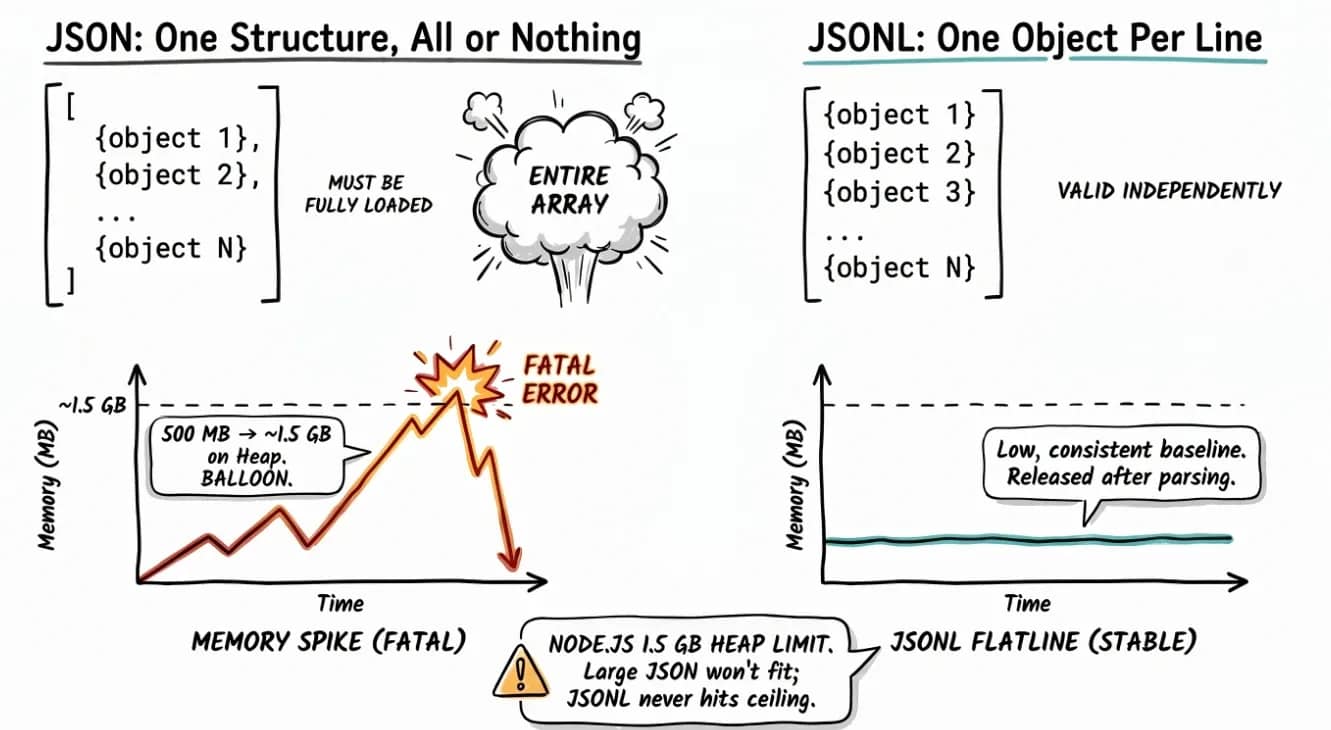
For data export pipelines and log systems where file sizes run into gigabytes, that predictability is the whole point.
Streaming JSONL with fs.createReadStream
The fs.createReadStream() method reads a file incrementally. It lets you process the file in chunks, so memory stays stable. And since it's built entirely on Node's built-in fs module, there are no additional dependencies required.
Each record is parsed and handled immediately, keeping memory flat regardless of file size. The only constraint here is that fs.createReadStream() reads raw bytes in 64 KB blocks, regardless of format. It has no awareness of line boundaries. A chunk can end mid-record, leaving an incomplete tail that carries over into the next chunk.
Using the stitch-and-split pattern handles that safely:
Records are parsed and handled the moment they arrive, keeping memory flat regardless of file size.
What if the JSON is a large array?
The JSONL shortcut hits a wall here. A standard JSON array wraps all records in one structure; thus, line splitting cannot safely isolate individual objects. In that case, you'll need a streaming parser such as the stream-json npm package. It adds one dependency, but since the alternative is holding the full payload in the heap at once, it's a worthy trade.
Decision table: which approach to use
Use in-memory parsing for small files. Once file size starts putting pressure on heap, switch to streaming – ideally with JSONL, or with a streaming parser if the source is a standard JSON array from a source you don't control and can't reformat as JSONL.
Approach
Format
File size
readFileSync + JSON.parse()
Any JSON
Under ~50 MB
createReadStream + line split
JSONL
Any size
stream-json
Standard JSON array
Source you can’t convert to JSONL
Using JSON.parse() in web scraping workflows
Scraping pipelines hit JSON in 3 places. The patterns below show how to handle each one without breaking the rest of the flow.
Pattern 1: Inconsistent API schemas
Undocumented APIs return inconsistent shapes. The same endpoint sometimes returns an array, sometimes an object. The special cases section covered the building blocks (Array.isArray and optional chaining); applying them at every call site is noisy. Normalize once at the parse boundary:
Downstream code sees one normalized shape. The empty-array fallback also hides parse failures; log inside the catch when you need visibility.
Pattern 2: Extracting embedded JSON from HTML
Modern sites often skip extra API endpoints and embed data directly in HTML <script> tags. That JSON feeds the page's own JavaScript. Developers rarely rename those fields, so it stays a reliable extraction target even when the visual layout changes.
The most common real-world uses of embedded JSON:
- __NEXT_DATA__ (Next.js hydration)
- <script type="application/ld+json"> (structured data)
- window.__data__ (global assignments)
Here's how to extract __NEXT_DATA__ with Cheerio:
The same selector-parse flow works for application/ld+json. For window.__data__, the script contains a JavaScript assignment rather than raw JSON, so a regex is needed to strip the assignment before parsing.
Pattern 3: JSON.parse() inside a full pipeline
In a full scraping workflow, your pipeline fetches the URL, extracts the raw JSON from an API response or embedded <script> tag, parses it top-to-bottom, validates the structure, maps the fields it needs, and saves the result to storage.
Here's how you wire it together:
If the target site deploys anti-bot defenses that block the fetch step, Decodo's Web Scraping API handles that layer and returns clean JSON so JSON.parse() and everything downstream work without modification.

Error handling and debugging JSON.parse()
The JSON.parse() method throws synchronously and loudly, but most tutorials stop at "wrap it in try/catch." 3 failure modes account for nearly every parse error you'll hit in production, and each one points to a different fix.
Failure mode
Trigger syntax
Error message
Malformed JSON
'{"price": 19.99,}'
Unexpected token } in JSON at position
Invalid input value
JSON.parse(undefined)
Unexpected token u in JSON at position 0
Truncated payload
'{"title": "Mystery Book"'
Unexpected end of JSON input
Malformed JSON usually traces to JavaScript syntax habits the JSON spec rejects, such as trailing commas, single quotes, unquoted keys, undefined or NaN literals, and stray Byte Order Marks. Each error includes a character position so you can locate the broken token.
The special cases section flagged empty strings and invalid input values as a failure path. Catch them before they reach the parser with this guard:
Truncated payloads can't be caught before parsing. A network error or stream chunk boundary cuts the string mid-payload. This is the same chunk-boundary issue the JSONL streaming section covered, surfacing at the network layer instead of the file layer. Handle it after the throw with this wrapper:
This generalizes the empty-array fallback Pattern 1 used at the parse boundary. Return {} when your caller can handle empty data, rethrow when downstream code can't. For production pipelines, reach for Zod or AJV to catch structural drift that valid JSON hides.
That said, 2 failure modes never make it to your catch block. Numbers above Number.MAX_SAFE_INTEGER parse with incorrect values, and JSON.parse(JSON.stringify(obj)) silently drops undefined values while turning Date objects back into strings - the same lossy round-trip we addressed with the reviver. In both cases, the parse succeeds, but the data is no longer the same.
Best practices and security considerations
This section covers the 5 best practices. Some build directly on the failure modes already covered; the rest are broader production defaults.
Never use eval() to parse JSON
There is no scenario where eval() is the right tool for parsing JSON. We already covered this in the syntax and basic usage section. eval() poses a security threat because it executes whatever JavaScript is in the string, which means a malicious payload in user-controlled input runs directly in your runtime. JSON.parse() recognizes JSON grammar and rejects anything else.
Validate before you parse
The isValidInput guard from the error handling section covers the basics: type check, non-empty check. For API responses, add one more gate and confirm that the Content-Type header is application/json before reading the body. Otherwise, a misconfigured server can return HTML with a 200 status, pass the earlier checks, and fail only when the parser runs.
Be aware of prototype pollution
A JSON payload containing the key __proto__ can modify Object.prototype when passed into a deep-merge library, affecting every object in the process. Standard JSON.parse() is a safer bet. It treats __proto__ as a regular key. The risk lives in what you do with the parsed result. For security-sensitive applications, validate the structure before use, or copy parsed data into Object.create(null) objects to remove the prototype chain entirely.
Use revivers for schema-wide transformations.
If every timestamp in your API response needs to become a Date, use a reviver. Ad-hoc new Date() calls scattered across the codebase are easier to miss when the schema changes upstream. One reviver, one place to update.
Pin your parsing to a schema
A successful parse tells you the JSON is valid. It doesn't tell you the data is correct. For production applications consuming external JSON, validate the parsed object against an expected shape with Zod or AJV before passing it into application logic. Schema drift from upstream APIs is the most common cause of silent data corruption, and it's the one failure mode none of the patterns above will catch on their own.
Final thoughts
Like most one-liner methods, JSON.parse() is easy to underestimate. But real complexity sits in not knowing what exactly the JSON payload contains.
The response to that uncertainty is a fairly short list. Wrap parsing in try/catch, use optional chaining when reading nested fields, use a reviver when the same conversion needs to happen across multiple fields, and switch to streaming when files get too large to load safely into memory. The rest of the recommendations build on the same idea: make the parse boundary predictable.
For scraping workflows, embedded JSON is often the most reliable path developers miss. Use JSON.parse() to turn that raw payload into usable data. Once the call and the practices around it are solid, JSON stops being the fragile part of the pipeline.
Reviewed by Abdulhafeez Yusuf

Skip the boilerplate
Decodo's Web Scraping API handles proxies, CAPTCHAs, and anti-bot detection so your code stays short and your requests actually land.
About the author

Mykolas Juodis
Head of Marketing
Mykolas is a seasoned digital marketing professional with over a decade of experience, currently leading Marketing department in the web data gathering industry. His extensive background in digital marketing, combined with his deep understanding of proxies and web scraping technologies, allows him to bridge the gap between technical solutions and practical business applications.
Connect with Mykolas via LinkedIn.
All information on Decodo Blog is provided on an as is basis and for informational purposes only. We make no representation and disclaim all liability with respect to your use of any information contained on Decodo Blog or any third-party websites that may belinked therein.