Kasada Bypass: How to Get Past Kasada Anti-bot Protection in 2026
Kasada is a bot-mitigation service protecting ticketing, limited-release retail, and financial platforms. Unlike Cloudflare, Akamai, or HUMAN, it shows no CAPTCHA and runs a proof-of-work challenge that a real browser solves by loading the page. A Kasada bypass, therefore, starts with a browser, not an HTTP client. This guide covers detection, the 5 layers, the tools, and the DIY limit.

Justinas Tamasevicius
Last updated: Jul 20, 2026
10 min read

TL;DR
- Kasada uses 5 detection layers: TLS and HTTP/2 fingerprinting, IP reputation, a proof-of-work challenge, browser fingerprinting, and behavioral scoring
- The proof-of-work runs as rotating, obfuscated JavaScript, so a real browser clears it, while a reimplemented solver targets a bundle that's rebuilt on every request
- You can identify Kasada from the x-kpsdk- response headers and a script path under /149e9513-…, together with a plain 403 or 429 and no CAPTCHA
Kasada detection mechanisms
You can confirm Kasada on a website before writing any extraction code. Send a normal request to the target, then read the response headers and the page source for a few specific signals. One blocked response carries all of them. The cookie name is masked below because the customer chooses it and it differs between deployments:
The script URL is the first signal. Kasada serves its client from a path built on 2 UUIDs and ending in ips.js, so the full path reads /149e9513-…/2d206a39-…/ips.js. Both segments match on a second, unrelated live deployment, and the first segment matches on a third deployment. So the second UUID looks like a shared version identifier rather than a per-site value.
The headers are the second signal. The challenge response returns x-kpsdk-ct (the session token) and x-kpsdk-r (the difficulty), while the client sends x-kpsdk-cd (the per-request proof) on its own requests. Kasada also sets a session cookie, but the name is customer-chosen and differs between deployments – KP_UIDz and tkrm_alpekz are 2 examples.
The block behavior is the last signal. A protected endpoint responds to the first request with a 429, then loads after the challenge clears. When Kasada flags a session as automation, it returns a plain 403 or 429. There's no visible CAPTCHA and no challenge page.
A short script automates the check, reading those signals from the response headers, cookies, and page source.
Run it with python detect_kasada.py. On a Kasada-protected site, you'll see:
The x-kpsdk- response headers are the signal to trust. That prefix is part of Kasada's protocol and stays valid even if the specific script UUID ever rotates. The script path is a strong backup signal – its first UUID held on all 3 deployments we checked – but don't trust it alone. Don't rely on the cookie name. The output above shows a suffixed variant, tkrm_alpekz_s1.3, that a fixed-name check would miss entirely.
How Kasada's detection works, layer by layer
Kasada evaluates a request in sequence, and each layer feeds a trust score. Knowing the order tells you which fix applies to which failure.
Layer 1: TLS and HTTP/2 fingerprinting
Before any application logic runs, Kasada inspects the TLS handshake and the HTTP/2 frame ordering. The JA3 or JA4 signature comes from the cipher and extension order. A raw HTTP/1.1 client or a default Python TLS stack produces a signature that no real Chrome or Firefox sends.
Layer 2: IP reputation
Kasada scores the source IP. Datacenter ranges start with negative trust, while residential and mobile IPs start positive. Kasada also markets cross-network threat intelligence, so an IP already flagged as automation on another Kasada site can carry that risk into your session.
Layer 3: The proof-of-work challenge
This is the layer that makes Kasada different. The client script hands the browser a computational challenge, the browser solves it, and the result becomes a signed token attached to later requests. The challenge is cheap for one real browser and expensive to run at scale.
The challenge runs in JavaScript, not WebAssembly. Public disassembly work on ips.js describes a virtual-machine-style interpreter, and the live bundle matches that: grep it, and there are no plain text strings to read, because it builds them at runtime. The bundle is heavily obfuscated and exposes a window.KPSDK global and drifts in size. Fetches across a single day ranged from roughly 545 to 650 KB uncompressed. Your network tab will show about half that, since it reports the gzipped transfer. Kasada rotates that bundle on every request. Fetch the same URL 3 times, and you get 3 different builds:
You can watch the handshake in any network log. It runs in 3 steps. First, the request to a protected path returns a 429 that points to ips.js. Then the browser loads that script, and the script POSTs the signals it collected to a /tl endpoint on the same 2-UUID path. That /tl call returns the clearance, and the retried request uses it.
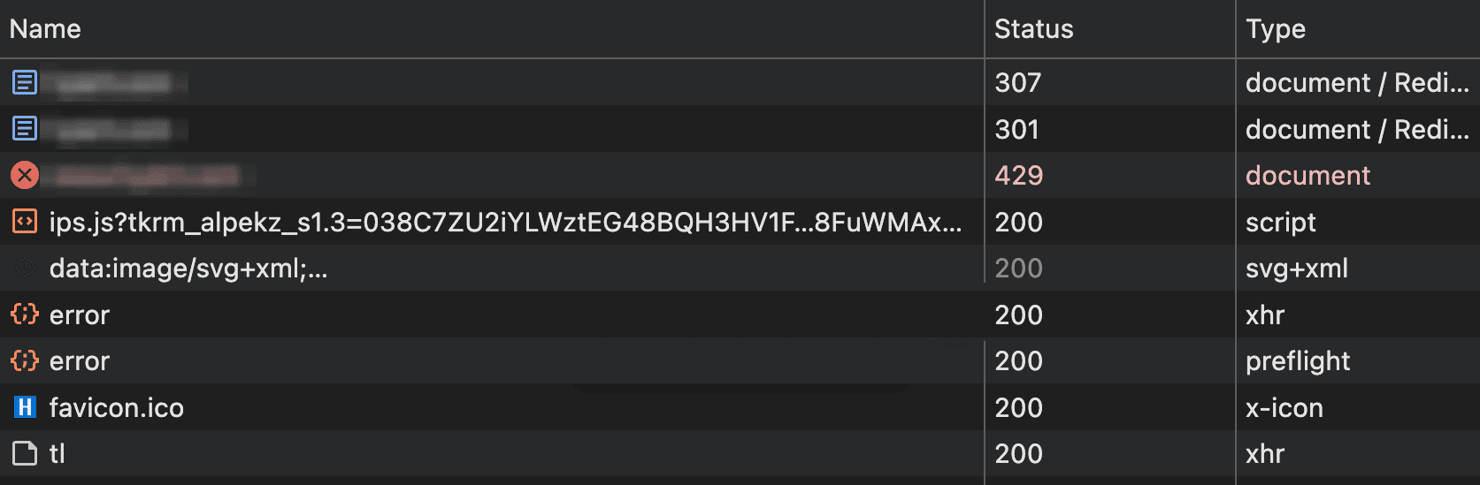
The handshake is also a debugging signal. Once you see the /tl POST return 200, the challenge is running. So, a block after that point is the fingerprint or behavioral layers rejecting you, not layer 1. On a first page load, the layer rejecting you is the fingerprint layer because nothing has behaved yet.
Layer 4: Browser and JavaScript fingerprinting
While the challenge runs, the same script reads canvas and WebGL output, navigator properties, screen dimensions, and the machine's timing entropy. This is the layer that separates the Chromium tools tested here.
Layer 5: Behavioral analysis
After the first page, Kasada scores how the session behaves – pointer movement, scroll velocity, typing rhythm, dwell time, and navigation patterns. A 2026 UC Davis study of AI browsing agents found that browser fingerprints shared across automated agents have limited power to tell those agents apart, while behavioral signals separate the agents reliably. You can match every static fingerprint and still score poorly here, because the motion and timing don't look human. In practice, though, 3 of the 4 Chromium tools we ran headless never reached this layer. Kasada re-challenged them on the first page load, before there was any behavior to score.
Cloudflare, Akamai, Imperva, and HUMAN check similar signals, but Kasada is harder to keep up with. Its proof-of-work layer and short-lived token mean you resolve continuously instead of relying on a longer session cookie. If you've handled those systems, how to bypass Cloudflare and how to bypass PerimeterX show the contrast.
Before you build a bypass, check for a lighter path
The cheapest Kasada bypass often clears the challenge once, not on every request. Many sites serve the same data through a second, lighter-protected path: a commerce platform's own API host, the endpoint a mobile app talks to, or an internal JSON route the front end calls. You can find that route by capturing the page's fetch and XHR requests. An unauthenticated request to that route returns a plain 401 rather than a Kasada challenge. That's because the challenge protects the page that issues the app's auth token, not the data behind it.
Clear Kasada once in a real browser, capture the auth token the app returns, and replay it against the lighter endpoint without re-solving per request, using a TLS-impersonating client like curl_cffi. That token is the app's own – separate from Kasada's per-request clearance and longer-lived (often a ~30-minute TTL). Within that window, solving once can cover a full scrape.
The check costs one DevTools session. Mobile-app endpoints are often the lightest of those 3 routes, since a browser-based challenge is harder to serve to app traffic. If the network tab shows only same-host calls behind the same challenge, there's no door the browser can see, and you can go straight to the layers.
Kasada challenge bypass techniques
When there's no lighter door, you clear the layers directly. Each layer needs its own fix. Match the technique to the layer instead of trusting a single tool, because skipping one layer wastes the fixes you applied to the others.
Match the TLS and HTTP/2 fingerprint
A TLS-impersonating client like curl_cffi makes your handshake look like a real browser's, which is what layer 1 inspects. That client still isn't enough, because it can't run the JavaScript that produces the token. The fingerprint gap between a plain client and an impersonating one is measurable against a public fingerprint service:
Client
Protocol
TLS (JA3)
HTTP/2 fingerprint
Plain Python Requests
HTTP/1.1
Python (c1020cdb…)
none
curl_cffi impersonating Chrome
HTTP/2
Chrome (00edbbfd…)
Akamai (52d84b11…)
Plain Requests sends a Python signature over HTTP/1.1 with no HTTP/2 fingerprint, which Kasada scores against you at layer 1. curl_cffi reproduces a Chrome signature and a real Akamai HTTP/2 fingerprint, which layer 1 checks for. Here, Akamai is the name of the fingerprint format, not the anti-bot vendor. The exact JA3 string is version-specific – it changes with the client and TLS library – so the table shows Python-class vs. Chrome-class signatures rather than fixed hashes.
Run the proof-of-work in a real browser
A real or patched browser produces the token as a side effect of loading the page, so there's no solve step to call. A bare JavaScript engine won't substitute for a browser, because the challenge reads canvas, WebGL, and navigator values that only a browser has.
The alternative is to reimplement the challenge as a standalone Python solver. The live bundle is heavily obfuscated and runs as a virtual-machine-style interpreter, with no plaintext fingerprinting or obvious network calls to read, because it builds its strings at runtime. So, reverse-engineering it means devirtualizing that interpreter. And the bundle rotates on every request, so even a working solver is code you keep rewriting, not a one-time fix.
Warm up the session
Visit a low-value page before the page you want – a warm-up page on the target's own domain, since an off-domain warm-up earns no history with that deployment. Kasada gives weight to navigation history, and a cold session that goes directly to a high-value endpoint often scores poorly. Our own cold sessions cleared the entry page anyway, so the warm-up is insurance rather than a requirement. Keep it for cold starts that go straight to a deep page. That's where a warm-up should earn its place, and it's what we didn't measure. Warmth is also per-profile, not just per-session, so a brand-new profile can score as cold even on a residential IP that starts positive.
In practice:
- Reuse a warmed profile when you can. The sample below starts fresh each attempt, which is the safe choice after a block, but throws away any warmth you had.
- Where you can, read a tab you navigated yourself rather than driving one over the Chrome DevTools Protocol (CDP). The automation channel (Runtime.enable) is a documented signal. It didn't stop the CDP-direct tools tested here, so navigating the tab yourself is a margin worth keeping rather than a rule.
Keep the token fresh
A live browser regenerates the per-request proof (x-kpsdk-cd) on its own as it issues each request. One clearance still isn't enough, so keep the session alive, and keep its token (x-kpsdk-ct) current. An expired session means the next call returns a 403.
Route through residential or mobile IPs
Layer 2 scores the source address. Residential proxies route through real subscriber IPs, which start with a positive reputation. Mobile IPs help even more. Carrier-grade NAT puts many real subscribers behind each address, so those addresses are costly for any anti-bot to blocklist. For the fundamentals, see what a residential proxy is and how to pick one.
Integration with automation frameworks
Kasada's continuous re-challenge changes how you structure a scraper.
- Track the token in a session object. Record when the token was issued and resolve before it expires, instead of reacting to a 403 after it happens.
- Pass the proxy consistently. Route the warm-up page and the target page through the same IP. Switching IPs mid-session undermines the trust Kasada is building. The Playwright web scraping tutorial shows how to attach a proxy across a browser context.
- Detect a silent re-challenge. A response can return 200 and still be a block. Even a cleared page carries Kasada's script, so that script alone proves nothing. Size is the signal. When the body comes back as a few hundred characters instead of a full page, Kasada has reissued the challenge instead of serving content.
- Then wait for the real page. There's a third state between the block and the page, and it's the one that will fool you. Read the document too early, and you get Kasada's interstitial, roughly 12 KB of script that restores the referrer while the handshake finishes. The interstitial carries no marker, no title, and no content. So a size check accepts it, and your scraper stores an empty page as a success. Give the handshake several seconds, then confirm the document actually rendered before you trust it.
- Pace the requests. The 27-page run, described later, used a randomized 2.5 to 5.5 seconds between loads, and nothing degraded across the session. Fixed timing is a standard behavioral signal, so vary it. Pacing starts to matter once you clear the first page and move across pages. Headless, 3 of the 4 Chromium tools never got that far because Kasada re-challenged them on the first page load.
The free DIY stack is 4 parts: a real browser behind a proxy, a warm-up, block detection, and a retry loop. The browser runs the proof-of-work itself. Headful, a stack shaped like this, clears the strict Kasada deployment tested for this guide. Headless, the sample below draws the re-challenge instead, a few hundred characters rather than a page, until the retry loop exhausts and returns None.
Run it against a neutral page first to confirm the stack, then point it at your own authorized target.

Kasada handled, data delivered
Decodo's Web Data API bypasses Kasada's proof-of-work challenges, TLS fingerprinting, and behavioral analysis automatically. Your code makes one request and gets clean HTML back.
Open-source tools for bypass
These tools map to different layers. Pick by the layer your target enforces, not by popularity. All of them drive a browser under automation, headless or headful, so pair each one with residential proxies. Across the Chromium tools we tested, the tool choice was invisible in headful mode and decisive in headless mode.
- Nodriver is the default starting point. It drives Chrome directly without the WebDriver layer that plain Selenium adds. That removes a whole class of automation signals. Headful, the sample above cleared the strict deployment test for this guide and returned the full page. Headless, it drew a re-challenge at 744 characters. See the guide on Nodriver for setup.
- pydoll works the same way, driving Chrome over CDP with no WebDriver layer. It cleared the same deployment headful, behind a residential proxy, and kept clearing it for 27 pages. Headless, the same tool drew a re-challenge at layer 4.
- Camoufox and Patchright are the tools you use when layer 4 is the problem. Camoufox is a patched Firefox that spoofs canvas, WebGL, and navigator values at the binary level. Patchright does the same for Playwright. The usual argument for the Firefox path is that most anti-bot tuning targets Chromium. Camoufox drew a re-challenge headful and headless, on the same machine and the same IP where 4 Chromium tools cleared the page. Patchright, which patches Chromium rather than Firefox, cleared the page headful and drew the same re-challenge headless as pydoll and Nodriver.
- Zendriver is a fork of Nodriver, released 6 times in the year to July 2026, so it's the one to reach for if you want active releases. It wasn't tested against the target in this guide.
- SeleniumBase UC mode was the only tool tested here that cleared the target headless. That makes it the one to reach for if you can't give a worker a display. It's also a reasonable choice for teams already standardized on Selenium.
Plain Playwright and Selenium without stealth patches leak the automation signals that every stealth tool here exists to remove. Plain Playwright still reports navigator.webdriver as true, and Selenium injects cdc_ variables through ChromeDriver, and detection scripts scan for those variables. Both also drive the browser over CDP, a channel with its own detection history, though it didn't stop the CDP-direct tools tested here.
undetected-chromedriver was used to cover that automation-signal gap, but its last release, version 3.5.5, came in February 2024, more than 2 years before we tested, so the newer tools have replaced it.
Tool
Best for
Kasada ceiling
pydoll
CDP-direct Chrome automation
Cleared headful. Re-challenged headless on the first request
Nodriver
Default Chrome automation without WebDriver signals
Cleared headful. Re-challenged headless
Camoufox
Firefox path when Chromium fingerprints get flagged
Re-challenged on this target, headful and headless
Patchright
Patched Playwright for fingerprint leaks
Cleared headful. Re-challenged headless
SeleniumBase UC mode
Teams already on Selenium
Cleared headful and headless. The only tool tested that survived headless
TLS-impersonation clients
Matching the layer-1 handshake
Can't run the JavaScript proof-of-work
An open-source tool cleared the target on the setup tested here. Every detail of that setup is yours to maintain for as long as you run it.
What does the ceiling look like
We tested these tools on a live high-security deployment in July 2026. Kasada releases changes continuously and rebuilds its bundle on every request, so every number below is from that date. Start with pydoll, which clears the target headful, then run it again headless. The challenge still runs, and the handshake still succeeds. The page still doesn't arrive:
The block lands on the first page load, before the session has scrolled, clicked, or navigated anywhere. Nothing behavioral has happened yet, so layer 5 can't be what rejected the session. Kasada rejected the environment itself, at layer 4.
That capture is one run. To rule out the network, pin a sticky residential session so the exit IP can't move, then run pydoll twice through it. The exit address is masked below, but it's the same address in both rows. Change nothing but the headless flag:
Run
Exit IP
Body returned
Headful
24.21.x.x
625,543 characters, the full page
Headless
24.21.x.x (same session)
725 characters, the re-challenge
The same browser, still headful, cleared with its GPU disabled and software rendering on, so a missing GPU alone isn't what Kasada is reading. The re-challenge body also drifts a little between runs, so the exact byte count isn't a reliable marker. For this tool, the headless flag decides whether the page arrives.
Repeat that A/B across 5 tools, on one test machine's own IP with no proxy, and the answer isn't the same for every tool. Each tool ran 3 passes in each mode, and we cycled through the 5 rather than finishing one before starting the next, so a change on Kasada's side would land on all of them. Every cell gave the same result all 3 times. Dropping the proxy is why pydoll's headful number below differs from the proxied run above:
Tool
Engine
Headful
Headless
pydoll
Chromium
cleared, 630,302
re-challenged, 729
Nodriver
Chromium
cleared, 820,201
re-challenged, 744
Patchright
Chromium
cleared, 834,956
re-challenged, 744
SeleniumBase UC mode
Chromium
cleared, 643,374
cleared, 800,752
Camoufox
Firefox
re-challenged, 744
re-challenged, 744
With headful, 4 Chromium tools clear the target and return the same page, so on your own machine, they're interchangeable. Headless, 3 of those 4 return a few hundred characters, and one keeps working.
Headful also hides which tool you picked. Headless shows it. A local test tells you the target is reachable, but it doesn't tell you whether the tool you chose will survive the move to a server.
Headful holds up across a session. pydoll walked 27 category and product pages on one sticky residential IP, pacing itself a few seconds between loads. Every page returned real content and real prices, and nothing degraded along the way. That's one session on one target, not a week of scraping at volume, so it's a floor rather than a guarantee.
A server with no monitor can still run a browser headful under a virtual display such as Xvfb. What we measured was the headless flag, not the display, so Xvfb is the next thing to try rather than a known answer. You'd be running and maintaining a display server next to every worker, against challenge code that's rebuilt on every request.
Chrome's newer headless mode is closer to headful than the old one, and it was still the mode in which 3 of the 4 Chromium tools above drew a re-challenge. Before you debug anything else, verify your exit IP with a request to ip.decodo.com/json, because a proxy that quietly failed looks exactly like a fingerprint problem.
Commercial bypass solutions
Building your own Kasada bypass is worth it in one narrow case: you hit a small number of targets, at very high volume, all the time, and you're willing to re-qualify your tool choice as the field moves. A managed service charges per request, so at that volume, the bill scales with the traffic while the engineering time to keep your own stack current doesn't scale with it.
For occasional or exploratory scraping, the opposite is true. Kasada rotates its challenge code on every request, so a hand-tuned scraper needs constant attention to keep up. Kasada is also well funded to sustain that pace, after a $20M raise in early 2026. In Proxyway's 2025 report, one participant half-joked that 2 days of unblocking work used to buy 2 weeks of access, and that the ratio has since inverted.
A managed scraping API solves the proof-of-work, re-solves before the token expires, and runs a fingerprint-matched browser. Your code sends a URL and gets back HTML or structured data. For Kasada, that's Decodo's Web Data API.
Mapped to the 5 layers, the Decodo stack divides into 2 parts. IP reputation is about where the request originates. Residential and mobile proxies start the request with positive trust, which every browser approach here still needs, whether DIY or managed. The TLS and browser fingerprints, the proof-of-work, and behavior are about how the client acts. On that side, the Web Data API runs a fingerprint-matched browser to clear the challenge server-side and returns parsed data.
This is the build-versus-buy decision in code. Try the DIY path, and if it comes back blocked, hand the URL to a managed endpoint.
Expected output:
Replace diy_fetch with your browser routine, and give decodo_web_scraping_api your token. The full parameter set and target templates are in the docs.
Tool churn is the clearest case for buying. A stealth browser does clear this deployment on your own machine. Run it headless, the way most servers do, and the field narrows sharply, because 3 of the 4 that cleared headful drew a re-challenge headless. One tool survived. You're not choosing a tool once; you're choosing whichever tool still clears this month, against challenge code that's rebuilt on every request.
We tested the Web Data API on the same live Kasada target, on the same day in July 2026. That target answered, with a few hundred characters, 4 of the 5 browsers we ran headless. The API returned the full rendered page, 833,967 characters. That's one target on one day, a floor rather than a guarantee, like every number above.
A managed API moves the tool churn to the vendor. The testing stays with you. "Supports Kasada" on a feature list isn't the same as clearing it in production, and the gap between the claim and the result is a question about your target, not about the feature list. Test a managed API against your own page before you commit.
The public build-versus-buy numbers in this market come from vendors, with no independent audit behind them. So run the arithmetic on your own target count, your own volume, and your own engineering time.
Final thoughts
Kasada is among the hardest mainstream anti-bot systems to automate against, and the reason is structural. Of its five layers, three are static (TLS fingerprint, IP reputation, browser fingerprint), and a residential IP with a stealth browser clears the first two. The proof-of-work is active, but a real browser clears it just by loading the page. The real separator is the browser fingerprint: in testing, four headful stacks cleared, but only SeleniumBase UC mode also cleared headless. The recipe that lasts is familiar: run a real or patched browser, route through residential IPs, warm up the session, and re-solve continuously. When that becomes maintenance you'd rather not own, a managed endpoint handles the re-qualification for you.

Stop reverse-engineering Kasada
Kasada's detection evolves weekly. Decodo stays ahead of Kasada's anti-bot stack so you don't spend every Monday patching your workaround.
About the author

Justinas Tamasevicius
Director of Engineering
Justinas Tamaševičius is Director of Engineering with over two decades of expertise in software development. What started as a self-taught passion during his school years has evolved into a distinguished career spanning backend engineering, system architecture, and infrastructure development.
Connect with Justinas via LinkedIn.
All information on Decodo Blog is provided on an as is basis and for informational purposes only. We make no representation and disclaim all liability with respect to your use of any information contained on Decodo Blog or any third-party websites that may belinked therein.