Web Scraping with Camoufox: A Developer's Complete Guide
If you're scraping with Playwright or Selenium, you've hit this. Your script works on unprotected sites, but Cloudflare, PerimeterX (HUMAN Security), and DataDome detect the headless browser and block it within seconds. Stealth plugins help, but each browser update breaks the patches. Camoufox takes a different approach – it modifies Firefox at the binary level to spoof browser fingerprints, making automated sessions look like real user traffic. This guide covers Camoufox setup in Python, residential proxy integration, real-world test results against protected targets, and when browser-level tools aren't enough.

Justinas Tamasevicius
Last updated: Mar 31, 2026
14 min read

TL;DR
A Camoufox proxy setup combines binary-level Firefox fingerprint spoofing with residential IP rotation to bypass bot detection.
- Install with pip install -U 'camoufox[geoip]' and run camoufox fetch to download the browser binary
- Pass a residential proxy and set geoip=True for automatic timezone, locale, and language matching
- Use the sync API for single-target scripts, the async API for concurrent multi-page scraping
- Camoufox does not solve CAPTCHAs or alter network-level TLS fingerprints. Heavy protection may still require a full Web Scraping API.
Quick start: Connect Camoufox to a proxy
If Camoufox is already installed, here's the proxy connection:
Expected output (IP and city vary per session, but the country matches the US target):
The snippet loads credentials from a .env file, launches Camoufox with GeoIP-aware locale matching, and prints the exit IP details. The full setup, credential configuration, and proxy modes (rotating, sticky, country-targeted) start in the sections below.
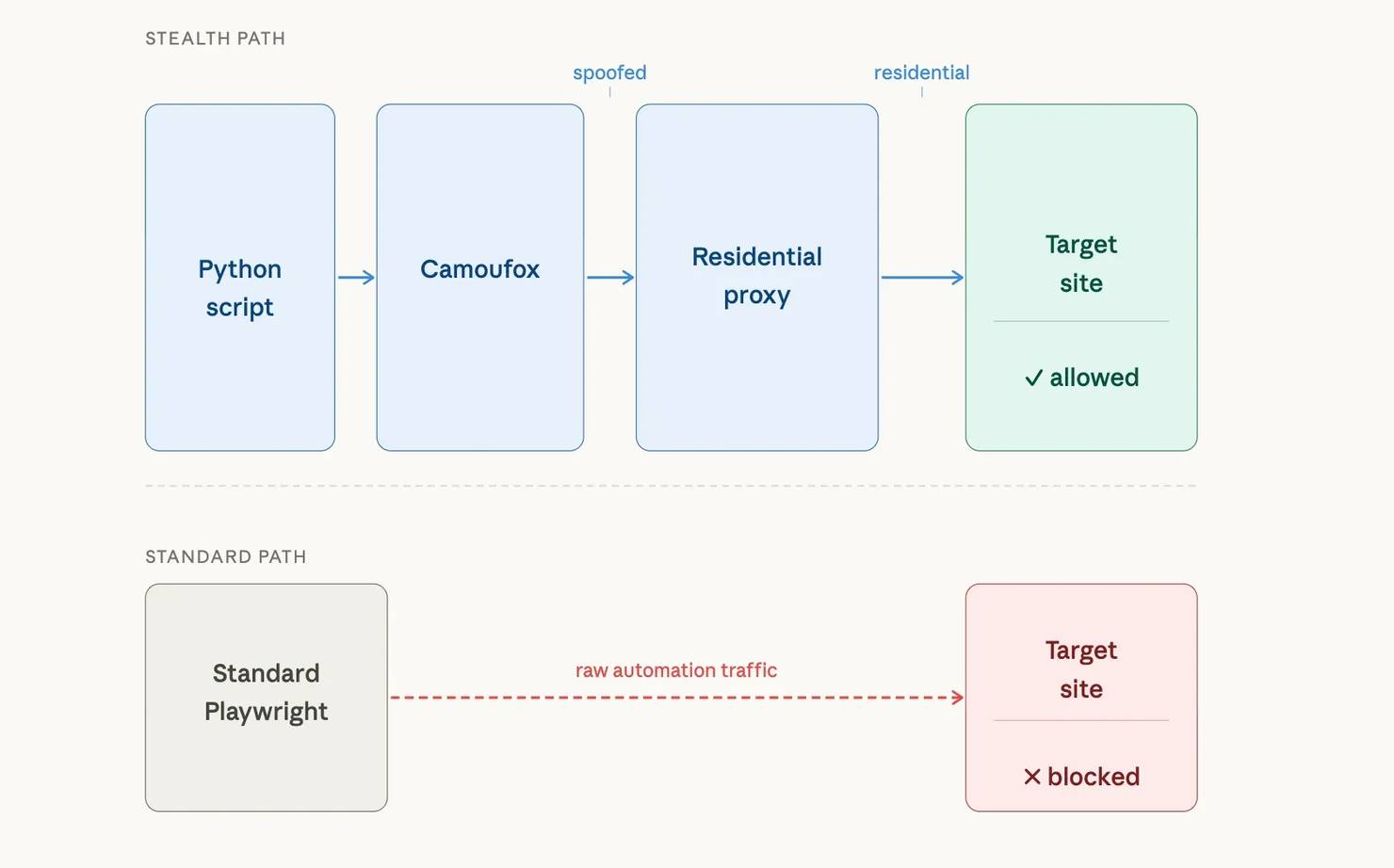
The diagram below shows how the pieces connect. With standard Playwright, raw automation traffic goes directly to the target and gets blocked. With Camoufox and a residential proxy, the traffic passes through a spoofed fingerprint layer and a residential IP before reaching the target:
What is Camoufox?
Camoufox is a customized Firefox build designed for anti-detection browser automation. Now the question comes, why does Camoufox use Firefox instead of headless Chromium? Bot detection systems target headless Chromium more than any other browser engine. It exposes navigator.webdriver, produces consistent Canvas outputs, and leaks Chrome DevTools Protocol (CDP) artifacts. Stealth plugins for Playwright and Puppeteer mask some of these signals, but each browser update can break the patches. For details on how protection systems detect automated browsers, see the guide on anti-scraping techniques and how to outsmart them.
Camoufox takes a different approach: it modifies Firefox at the binary level. The patches exist below JavaScript execution, so page scripts can't detect them. Firefox also sees less automated traffic, so fewer protection vendors target Firefox automation patterns. The core browser patches are open-source, but the fingerprint spoofing layer is intentionally closed-source to prevent protection vendors from reverse-engineering countermeasures.
Camoufox fingerprint spoofing and anti-detection patches
Camoufox includes these capabilities:
- Fingerprint spoofing. Camoufox spoofs navigator properties, screen dimensions, WebGL renderer strings, Canvas noise, audio context, font enumeration, and geolocation. All attributes are configurable per session. Each launch uses BrowserForge, an open-source library, to generate a fingerprint that resembles real browser profiles. All pages opened within the same Camoufox() session share that fingerprint. To get a different fingerprint, launch a new browser instance.
- Anti-detection patches. Camoufox fixes known automation leaks at the binary level. navigator.webdriver returns false, and Camoufox removes headless Firefox detection flags. The Playwright page agent runs in an isolated execution context separate from the main page world.
- GeoIP-aware configuration. With a proxy and the geoip option enabled, Camoufox detects the proxy's geographic location and auto-configures timezone, locale, and language to match. GeoIP matching prevents mismatches like a proxy exiting in Germany while the browser's Intl.DateTimeFormat still returns America/New_York.
- Virtual display mode. On Linux servers with headless="virtual", Camoufox runs in headed mode inside an _X virtual framebuffe_r (Xvfb) rather than in true headless mode. Headful rendering produces a more realistic browser environment, passing detection checks where headless mode fails.
- Font anti-fingerprinting. Camoufox spoofs the available system font list to match the declared OS, preventing font-based device identification.
- Persistent context support. With persistent_context=True and a user_data_dir path, session state (cookies, localStorage) persists across runs without re-login.
- Playwright-compatible API. The Camoufox Playwright integration exposes the standard Playwright API on Firefox. Migrating existing Playwright code requires few changes. The main difference is browser initialization.
- Remote server mode. Camoufox can expose a Playwright-compatible API server, enabling control from any language with Playwright support, not only Python. Run the browser on a dedicated server and connect from separate scraping workers.
What Camoufox doesn't handle
Camoufox handles browser fingerprints, but protection systems check more than the browser.
- IP reputation. A spoofed browser fingerprint isn't enough if the target site flags the source IP. For heavily protected targets, residential proxies are the least likely to get blocked. They route through IPs assigned to Internet service provider (ISP) subscribers.
- Behavioral analysis. Request timing patterns, mouse movement, and scroll behavior go beyond browser attributes. The Camoufox humanize parameter adds cursor movement, but full behavioral evasion requires additional randomized delays and interaction patterns in your scraping code.
- TLS and network-level fingerprinting. Protection systems like Cloudflare check TLS fingerprints (JA3/JA4 hashes). HTTP/2 frame ordering and TCP stack characteristics are additional network-level signals that fingerprint the client. Camoufox doesn't modify any of these network-level behaviors, so sites that inspect them can still detect automated traffic.
- CAPTCHA solving. Camoufox has no built-in CAPTCHA solver. The guide on how to bypass Google CAPTCHA covers CAPTCHA avoidance strategies and mentions third-party solver services. For a broader overview of bot detection methods, see the guide on navigating anti-bot systems.
Set up Camoufox with Python and Decodo proxies
This guide uses Python 3.9+. All code examples use Camoufox 0.4.11 on PyPI (the last stable release, from January 2025) and browser engine v135.0.1-beta.24. Active development continues under the CloverLabsAI organization.
Create a virtual environment and install dependencies
Set up an isolated environment to avoid package conflicts:
Install Camoufox with the GeoIP extra for proxy-based locale matching:
Download the Camoufox browser binary. The Camoufox binary replaces the standard Playwright browser install, so you don't need a separate playwright install command:
If you're on Linux, install the required system libraries:
On macOS and Windows, the Camoufox binary bundles these dependencies. With the browser installed, set up a project directory to organize your scraping scripts.
Project structure
Create a project directory and keep your proxy credentials separate from scraping logic:
Store proxy credentials in environment variables
Sign up for a Decodo residential proxy plan – new accounts get a free trial with up to 2,000 requests (at time of writing), enough to run every example in this guide. The residential proxy quick start guide walks through authentication setup, endpoint configuration, and usage tracking. After registration, open the dashboard, select Residential in the left sidebar, and copy the Authentication username and Password from the Proxy setup tab:
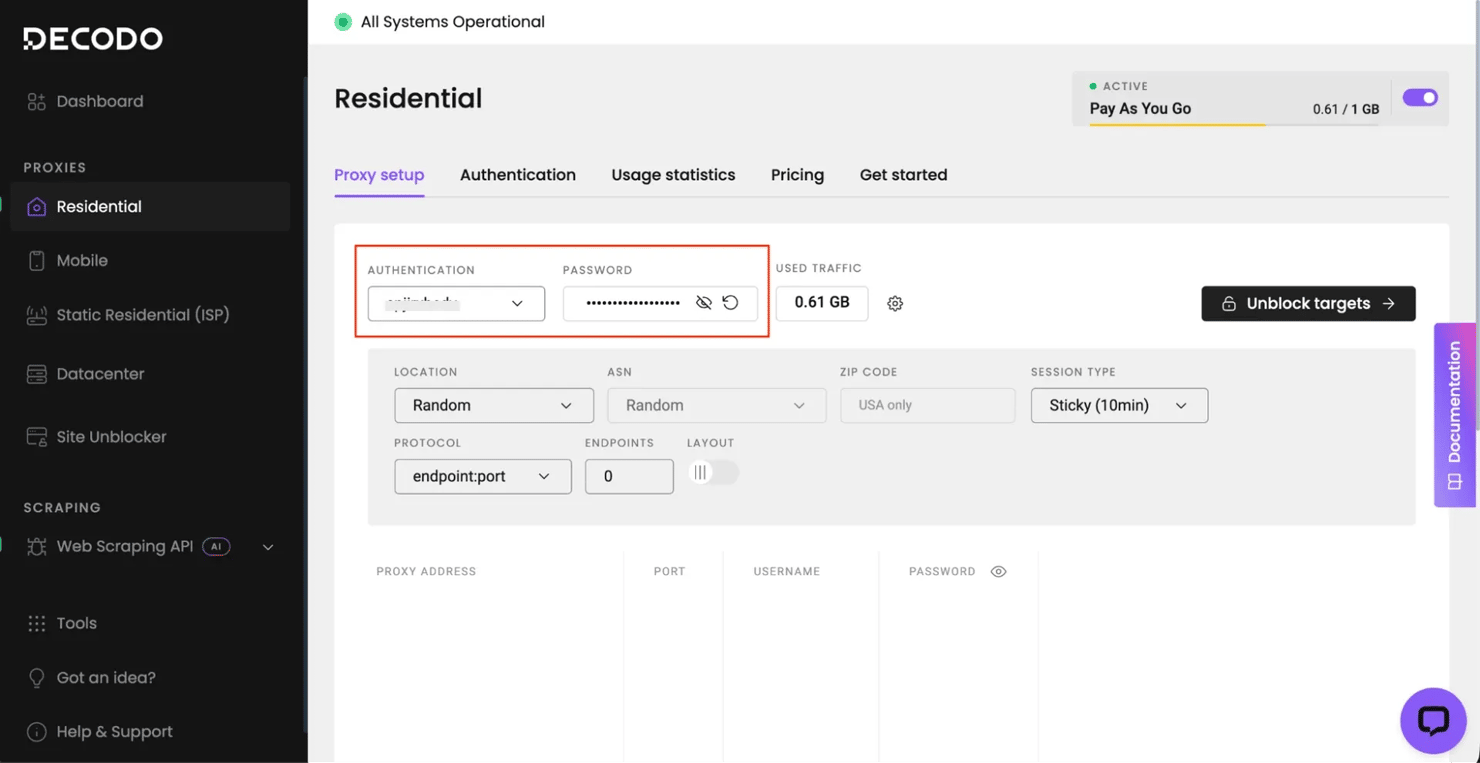
Create a .env file in your project root with these credentials:
Load these in your Python code with python-dotenv instead of hardcoding credentials:

Scale your scrapers without the bans
Decodo’s residential proxies offer 99.9% uptime and a massive global pool to ensure your requests look like real users, every single time. Stop troubleshooting blocks and start gathering data at scale.
Scrape with Camoufox in sync and async mode
Camoufox offers 2 API modes: synchronous (blocking) and asynchronous (non-blocking).
Synchronous API: Single-target scraping
The sync API blocks until each operation completes. Use it for single-target scripts, small batch jobs, or when you're prototyping a scraper before scaling it.
Import from camoufox.sync_api and use the Camoufox context manager:
Expected output:
The os="windows" parameter generates a Windows fingerprint. User agent, navigator properties, screen dimensions, and font list all reflect a real Windows machine.
Camoufox vs. standard Playwright: Detection signals
To see how Camoufox differs from standard Playwright, check the properties that bot detection systems inspect:
Expected output (hardwareConcurrency varies per session – BrowserForge generates a random value each launch):
With standard Playwright Firefox, navigator.webdriver returns True and automation-related properties keep their default values. webdriver: False matters because it's one of the first properties that bot detection scripts check. The chrome: False indicates Firefox (not Chromium), and deviceMemory: undefined is correct for Firefox, which doesn't implement that API.
Key initialization options:
Core options:
- headless – True for headless, False for visible browser, "virtual" for headful rendering inside a virtual display (Linux only)
- os – "windows", "macos", or "linux" (or a list to randomly pick from)
- proxy – Playwright-format proxy dict with server, username, and password
- geoip – True to auto-detect proxy location and configure locale/timezone (requires a proxy – without one, Camoufox skips GeoIP detection and uses system defaults)
Advanced options:
- persistent_context – True to persist cookies and localStorage across runs (requires user_data_dir)
- block_images – True to skip image loading for faster page loads and lower proxy bandwidth (a typical page load uses approximately 3 MB with images, under 500 KB without)
- config – dictionary of custom navigator property overrides (for example, custom navigator.platform or hardwareConcurrency values)
- main_world_eval – True to enable running individual page.evaluate() calls in the main page world (prefix each call with mw: to activate)
- humanize – True or a float (max seconds) to add human-like cursor movement
Pass all options as keyword arguments to the Camoufox() constructor.
Scrape JavaScript-rendered content
This sync script extracts data from a JavaScript-rendered page:
Expected output:
The wait_for_selector call is critical here. Without it, query_selector_all runs before JavaScript has rendered the content and returns an empty list. The guide on scraping dynamic websites covers wait strategies and single-page application (SPA) extraction patterns for JavaScript-rendered pages.
Asynchronous API: Concurrent multi-page scraping
The async API is more efficient when scraping multiple pages concurrently or integrating Camoufox into an async pipeline. To add proxy support, pass proxy and geoip to AsyncCamoufox() the same way as the sync examples. Import from camoufox.async_api and use async with:
Expected output:
The asyncio.Semaphore(2) limits concurrent page loads to 2. Each Camoufox instance runs a full Firefox process, so too many simultaneous pages exhaust memory and cause timeouts. Start with a semaphore value of 2, then increase based on your machine's resources. Each Camoufox() browser launch starts at approximately 200 MB of RAM and grows with page complexity; additional pages within the same browser use less.
Async only helps when you're waiting on page loads. For CPU-bound parsing work, async won't help – the event loop still runs on a single thread.
When to use sync vs. async
Match the API mode to your scraping pattern:
Scenario
Recommended mode
Prototyping a new scraper
Sync
Scraping a single page or URL list under 10
Sync
Scraping 10+ pages from the same domain
Async with semaphore
Integrating into an existing async application
Async
Login flow followed by authenticated scraping
Sync for login, async for data collection
Camoufox proxy configuration with Decodo residential IPs
Combining Camoufox with residential proxies addresses both the browser fingerprint and the IP layer.
Why proxy type matters for Camoufox
Anti-bot systems check the IP address independently of the browser fingerprint. Protected sites can still flag a perfectly configured Camoufox session if the IP belongs to a known cloud provider (AWS, GCP, and Azure). The same happens when the IP geography contradicts the browser's declared locale.
Residential proxies are the least likely to get flagged on sites that actively fingerprint visitors.
Proxy bandwidth and cost
Residential proxies bill by bandwidth. At roughly 3 MB per page with images, 1,000 pages use approximately 3 GB. Check residential proxies pricing page for current rates and plan options.
On sites that don't use Cloudflare, use block_images=True to reduce per-request cost (Cloudflare can detect image blocking as a bot signal). Monitor your bandwidth usage in the Decodo proxy dashboard.
Pass proxy credentials to Camoufox
The Camoufox proxy parameter uses the standard Playwright proxy format: a dictionary with server, username, and password:
Expected output (IP and city vary per session, but the country matches the country-us target):
Camoufox sends a request through the proxy to detect the exit IP and its geographic location. It then sets the browser's timezone, locale, and language to match. Without geoip=True, a browser's Intl.DateTimeFormat timezone might show Asia/Tokyo while the IP geolocates to the US, which triggers detection.
Verify fingerprint-to-IP consistency
After launching with geoip=True, verify that the browser's internal settings match the proxy's location:
Expected output:
The proxy timezone and browser timezone may differ slightly – the GeoIP database and the geo-resolution service sometimes map the same residential IP to different cities within the same country. Timezone, language, and locale stay internally consistent with a US locale, even if the exact timezone doesn't match the geo-label.
Sticky sessions vs. rotating IPs
The gateway supports 3 proxy modes. The following snippets show only the proxy dictionary format. They aren't standalone scripts. Replace YOUR_USERNAME and YOUR_PASSWORD with the values from your .env file, then pass the dictionary to Camoufox(proxy=proxy) as shown in the full examples above.
Rotating sessions assign a new IP for each connection. Use rotating sessions for independent page requests where each URL is a separate, stateless task (search result pages, product listings, category pages):
Sticky sessions maintain the same IP for a configurable duration. Use sticky sessions for multi-step flows where the target site tracks session continuity (login sequences, checkout flows, paginated results that use server-side cursors):
Change the port number and append a session identifier to the username to enable sticky sessions. Replace abc123 with any unique string (for example, a UUID or timestamp).
Country-targeted sessions route traffic through a residential IP in a specific country. Use country targeting when the target site serves region-specific content or when IP-to-content geographic consistency matters:
The country-us parameter in the username tells the gateway to assign a US residential IP. Replace us with any 2-letter country code (for example, country-gb for the UK, country-de for Germany). The residential proxy pool covers 195+ locations with targeting at continent, country, state, city, ZIP code, and ASN/ISP levels.
With geoip=True, the browser's timezone and locale align with the exit IP. Combine sticky sessions and country targeting (for example, user-YOUR_USERNAME-session-abc123-country-us). The guide on rotating proxies covers how IP rotation works, proxy types, and use cases for session management.
Important: Wrong proxy credentials produce a connection error, not a silent fallthrough. But if the proxy server becomes unreachable (network issue, server downtime), Camoufox falls back to a direct connection – the default Firefox behavior. The fallback exposes your real IP. Before scraping real targets, verify the proxy is active by checking the exit IP.
Camoufox proxy results against real-world anti-bot protection
The following examples test this setup against real targets with bot detection, including both successes and failures.
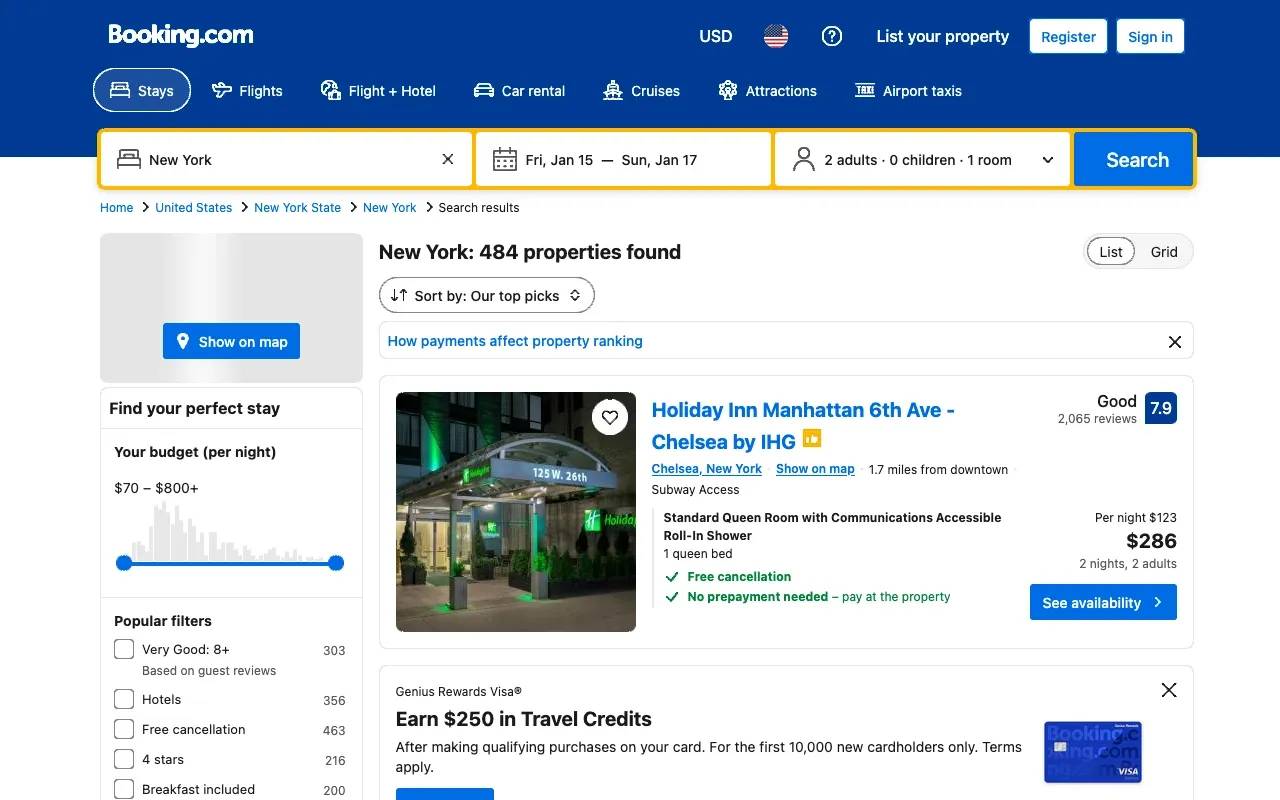
Scrape localized hotel pricing from Booking.com
Travel sites change prices, currency, and language based on the visitor's detected region. The browser's timezone, locale, and language must match the proxy's exit location for the site to serve consistent results.
This scraper extracts hotel pricing from Booking.com. Update the checkin and checkout query parameters to future dates before running:
Expected output (hotel names, prices, and currency vary by proxy exit location):
The country-us parameter in the proxy username targets a US residential IP. With geoip=True, Camoufox aligns the browser's timezone and locale to the US exit location, so Booking.com serves USD pricing. To get pricing in a different currency, change the country code – for example, country-in for Indian Rupees or country-gb for British Pounds.
Scrape property listings from Zillow
Zillow uses PerimeterX (HUMAN Security) for bot detection, checking both browser fingerprints and IP reputation. Zillow is a US-only site. Target a US residential IP with country-us in the proxy username to match the IP location to the search location:
Expected output:
This scraper differs from the Booking.com example in 2 ways. The time.sleep(random.uniform(2, 5)) call inserts a randomized delay before the request – fixed timing is a behavioral signal that protection systems flag. The CAPTCHA/challenge check after page.goto detects a block before attempting data extraction, so the script fails explicitly instead of returning empty results.
PerimeterX on Zillow checks for headless browser signals, automation frameworks, and datacenter IPs. Camoufox bypasses the browser checks, and the US-targeted residential proxy provides a US residential IP with a matching timezone via geoip=True. The wait_for_timeout(3000) allows JavaScript-rendered listing cards to fully load after the initial page structure appears.
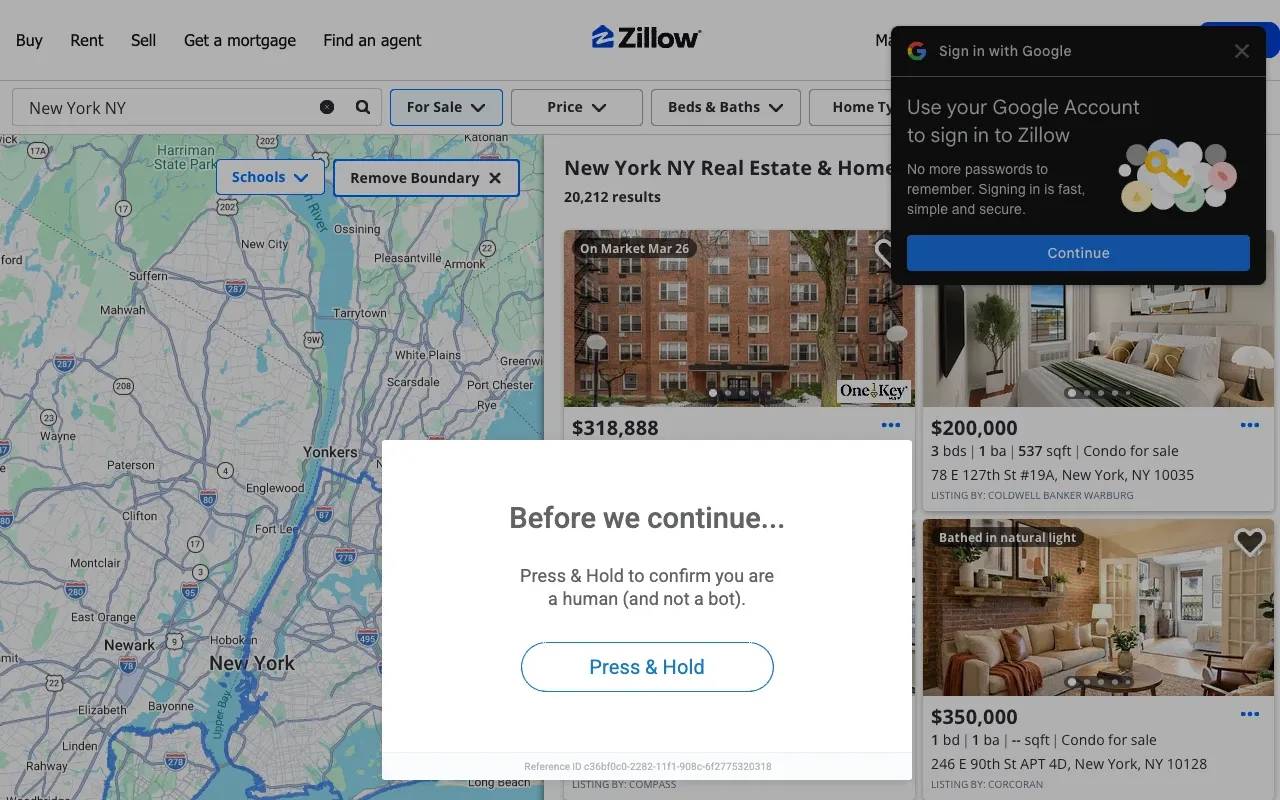
Results on Zillow are inconsistent. Some sessions extract data without issues. Others trigger a PerimeterX "Press & Hold" interactive challenge. The challenge appears either as an overlay on partially loaded content or as a full block page with zero data.
The detection goes beyond browser fingerprints: PerimeterX also checks TLS fingerprints (JA3/JA4), behavioral signals, and session trust (cookie chain from prior visits). Camoufox can't modify any of these. If your target consistently triggers the challenge, the Web Scraping API section below covers infrastructure-level approaches that handle these challenges server-side.
Sites with dynamic CSS class names (common in React and Next.js apps) need stable selectors – use data-testid attributes, ARIA roles, or structural position instead.
Handle pagination and lazy-loaded content
Before testing against protected targets, production scrapers need 2 patterns: paging through results and scrolling to load lazy content before extraction.
Pagination keeps the same browser instance open and navigates to the next page within the session. Reusing the browser instance avoids launching a new browser per page and preserves cookies and session state:
Expected output:
Lazy-loaded content requires scrolling the page to trigger rendering before extracting data. Many sites load content only when it enters the viewport:
Combine scrolling with wait_for_selector to confirm the content has rendered before extracting it.
Where Camoufox + proxies get blocked
This setup doesn't work on every site. In testing, Amazon blocked the Camoufox + residential proxy setup.
Amazon served a CAPTCHA validation page. The Amazon bot detection combines device fingerprinting with behavioral scoring and account-level signals. Sites using Cloudflare Bot Management with managed challenges (Turnstile, proof-of-work) also block this setup – Cloudflare checks JA3/JA4 TLS fingerprints, which Camoufox doesn't modify.
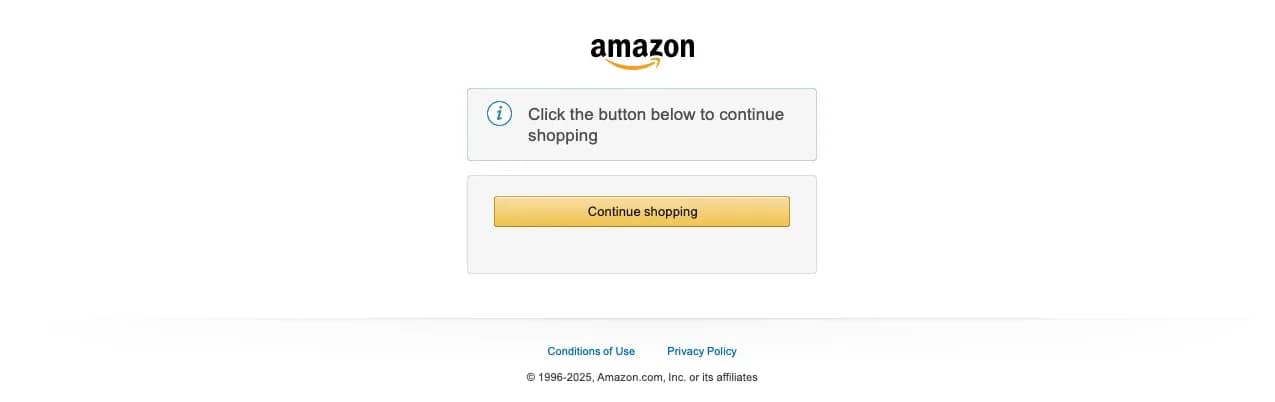
In your code, a block typically causes a TimeoutError on wait_for_selector. The expected content elements never render because the page shows a challenge or CAPTCHA instead. To detect this programmatically, check for common block indicators before assuming the scrape succeeded: .cf-turnstile (Cloudflare Turnstile), #px-captcha (PerimeterX), and a form with an action containing "validateCaptcha" (Amazon).
For targets that use CAPTCHA gates or Cloudflare-managed challenges, browser-level tools alone aren't sufficient. The Web Scraping API section below covers one option that handles these challenges server-side.
Handle login sessions with Camoufox
The workflow has 2 phases: log in and save cookies to a file, then restore cookies in subsequent runs.
Save and reuse login cookies
Phase 1 logs in and saves session cookies to a JSON file. This example uses headless=False, which opens a visible browser window – run it on a machine with a desktop environment, not a headless server:
Expected output:
If the target site requires manual CAPTCHA or 2FA solving, run with headless=False to interact with the browser window.
Phase 2 restores the cookies and scrapes as an authenticated user:
Expected output:
Build a session validation check into your scraper. Before starting data collection, verify that a login-only element (logout link, profile avatar, dashboard nav) exists on the page. If it doesn't, trigger the login flow again.
Camoufox vs. Playwright, SeleniumBase, Selenium, and Puppeteer
Each tool makes a different trade-off between anti-detection depth and ecosystem support:
Tool
Anti-detection level
Language
Key trade-off
Camoufox
Binary-level Firefox patches
Python
Binary-level patches, Firefox only
Playwright + stealth plugin
JavaScript patches on Chromium
Python, JS
Wider browser support, JS-level patches
SeleniumBase UC mode
Driver-disconnect on Chromium
Python
Handles Turnstile and reCAPTCHA, Chromium only
Selenium
No built-in evasion
Python, Java, JS
Largest ecosystem, most detectable
Puppeteer
JavaScript patches on Chromium
Node.js only
No Python support
Camoufox vs. Playwright with stealth plugins (playwright-stealth). Stealth plugins inject JavaScript patches into a Chromium browser. They mask some signals (navigator.webdriver, headless detection) but leave others intact (the Chromium headless fingerprint, CDP detection artifacts). Camoufox patches at the binary level, which addresses signals that JavaScript patches can't reach. But Camoufox is Firefox-only, while stealth plugins give you broader Chromium site compatibility.
Camoufox vs. SeleniumBase UC mode. SeleniumBase's Undetected Chrome (UC) mode disconnects chromedriver before loading a protected page, lets the page pass its challenge checks without detecting automation, then reconnects. UC mode includes built-in methods for handling Cloudflare Turnstile and reCAPTCHA challenges that Camoufox can't solve. The trade-off: UC mode works only on Chromium browsers, is detectable in headless mode (requires a virtual display on Linux), and the disconnect-reconnect pattern adds latency to each page load. Both tools still need residential proxies for IP reputation – browser-level evasion alone isn't enough on heavily protected targets.
Firefox vs. Chromium compatibility. Some sites use Chromium-specific APIs or render differently on Firefox. For those targets, Playwright with a stealth plugin or SeleniumBase UC mode on Chromium may be the only viable browser automation path.
If the site doesn't have bot detection, standard Playwright works. Use Camoufox when the target actively fingerprints browsers. If you're migrating from Selenium, the guide on web scraping with Selenium in Python covers setup and detection limitations. For teams evaluating Puppeteer, Puppeteer CAPTCHA bypass walks through that approach and its limitations.
Troubleshoot Camoufox proxy issues
These are the most common problems and their solutions:
Proxy, binary, and session errors
Proxy authentication errors. If Camoufox throws a connection error or the target page returns a 407 status, check the credentials in your .env file. Verify the username and password match the values in the dashboard, and confirm that DECODO_HOST is gate.decodo.com and DECODO_PORT is 7000. A common mistake is copying the username with a trailing space.
Proxy failures raise playwright._impl._errors.Error with a connection refused or timeout message – wrap page.goto() in a try/except to handle proxy issues separately. The guide on proxy error codes explains common HTTP proxy error codes, their causes, and troubleshooting strategies.
Browser binary not found after install. Confirm camoufox fetch completed without errors. On slow connections, partial downloads can leave a corrupted binary. Run camoufox remove followed by camoufox fetch to force a fresh download.
GeoIP module not resolving correctly. Verify you've installed the geoip extra (pip install -U 'camoufox[geoip]'). Camoufox resolves GeoIP data at launch time and sets the browser's locale and timezone once – it doesn't change them during the session.
Pages loading but returning empty content. Some sites require JavaScript execution in the main world rather than the isolated execution context. Set main_world_eval=True when initializing Camoufox, and prefix individual page.evaluate() calls with mw: (for example, page.evaluate("mw:document.title")). Only the prefixed calls run in the main world. Main world execution increases detectability, so use it only when isolated execution fails for a specific target.
Memory growth during long runs. Each open page holds memory until you close it. Close pages explicitly with page.close() (or await page.close() in async mode) as soon as you've extracted the data. Don't rely on garbage collection to clean up browser contexts.
Persistent context cookies not surviving restarts. Firefox profiles don't save session-scoped cookies (those without an explicit Expires or Max-Age header) to disk by default. Extract them with context.cookies(), save to a file, and re-inject with context.add_cookies() on the next run.
Scale limitations
Resource intensity. Camoufox launches a full Firefox browser per session. Plan for roughly 200 MB of memory per active instance. At 10 concurrent instances, plan for 2+ GB of RAM and multiple CPU cores.
Concurrency ceiling. Running more than 10 simultaneous Camoufox instances on one machine is impractical for most setups. For high-volume scraping, use horizontal scaling (multiple machines or containers) rather than increasing concurrency on a single host. Wrap each scrape in a retry loop with proxy rotation and exponential backoff between retries.
Maintenance overhead. The Camoufox fingerprint database and Firefox patches need to stay current. Monitor the Camoufox GitHub releases or the CloverLabsAI repo for updates. Test your scrapers after updating.
No built-in CAPTCHA solving. Targets that serve interactive challenges (Cloudflare Turnstile, reCAPTCHA, hCaptcha) require a separate CAPTCHA-solving service. Camoufox can render the CAPTCHA page, but solving it programmatically needs an external integration.
Handle blocked targets with the Decodo Web Scraping API
For higher-volume scraping or targets with aggressive protection, the Web Scraping API handles the infrastructure.
Send a URL to the API endpoint and receive rendered HTML or structured data. Pre-built scraping templates handle targets like Amazon and Google where browser-level tools get blocked.
The Amazon CAPTCHA gate blocked the Camoufox + proxy setup in the real-world tests. The same product returns structured data through the API:
Expected output (product details vary by availability and region):
The target parameter selects a pre-built scraping template that handles the Amazon anti-bot challenges. With parse enabled, the response contains structured JSON fields instead of raw HTML – no selectors to maintain. The Web Scraping API quick start guide covers authentication setup and making your first API request, with links to detailed parameter and target documentation.
The API has a free plan with 2,000 requests per month – enough to test the examples above and explore other pre-built templates before committing to a paid tier.
Consider switching to a scraping API when any of these conditions apply:
- Block rates increase despite clean fingerprints. The protection system has moved to network-layer or behavioral signals that browser patching alone can't handle.
- Targets serve interactive challenges on every visit. CAPTCHAs, Cloudflare Turnstile, and proof-of-work gates block fully automated runs.
The difference between residential and datacenter proxies affects block rates on protected targets. For targets that need more than proxies but less than the full API, the Site Unblocker works as a drop-in proxy endpoint. Point Camoufox at https://unblock.decodo.com:60000 with the Site Unblocker credentials from the dashboard (separate from your residential proxy credentials) – the endpoint handles CAPTCHA solving, JavaScript rendering, and fingerprinting automatically.
Bottom line
Pick a target, run the examples against it, and adjust from there. Every site has different protection, so what works on Booking.com might need tweaking for your use case. If blocks keep happening despite clean fingerprints and residential proxies, the Web Scraping API is the next step up.

Ultimate stealth for high-stakes scraping
Whether you’re bypassing sophisticated CAPTCHAs or scraping dynamic retail sites, our residential IPs provide the legitimacy you need to stay under the radar.
About the author

Justinas Tamasevicius
Director of Engineering
Justinas Tamaševičius is Director of Engineering with over two decades of expertise in software development. What started as a self-taught passion during his school years has evolved into a distinguished career spanning backend engineering, system architecture, and infrastructure development.
Connect with Justinas via LinkedIn.
All information on Decodo Blog is provided on an as is basis and for informational purposes only. We make no representation and disclaim all liability with respect to your use of any information contained on Decodo Blog or any third-party websites that may belinked therein.