How to Bypass PerimeterX: Detection Methods, Tools, and Practical Workarounds
PerimeterX, now HUMAN, is a cybersecurity platform that employs multiple detection techniques to accurately identify and block threats to web applications. Since numerous high-traffic websites rely on PerimeterX, it's almost inevitable that developers will encounter it when web scraping. This guide explains how PerimeterX detects bots, how to bypass it (tools and strategies), and how to troubleshoot common failures.

Justinas Tamasevicius
Last updated: Aug 05, 2026
12 min read

TL;DR
- To bypass PerimeterX, your request must completely mimic natural user behavior, passing each layer of the detection system at once
- These layers include IP reputation, TLS fingerprint, HTTP header analysis, browser fingerprinting, session tokens, and behavioral biometrics
- The most reliable approach is to use Web scraping APIs that handle everything automatically, rather than trying to manually configure for each signal
What is PerimeterX, and how does it work?
Founded in 2014, PerimeterX is a web security platform with a mission to detect and stop the abuse of identity and account information on the web. It sits between users and websites, analyzing incoming traffic. Each request passes through a series of detection layers, including behavioral analysis and predictive machine-learning models, before gaining access to the target website's resources.
Since its inception, PerimeterX has grown into one of the most popular enterprise-grade bot protection providers. It currently protects numerous financial services, ticketing sites, eCommerce platforms, and other high-traffic targets where the wrong bots can cause revenue loss or degrade user experience.
While the platform offers an array of defense solutions, including Code Defender (protects client-side scripts) and Account Defender (prevents credential stuffing), its core product, Bot Defender, is the most important for web scrapers to understand. This is because it's the primary system responsible for detecting and blocking bots.
To understand how to navigate this anti-bot system, we need to examine its architecture.
PerimeterX Bot Defender architecture
The HUMAN Bot Defender runs on a 3-component model:
- HUMAN Sensor
- HUMAN Detector
- HUMAN Enforcer
The sensor is an obfuscated JavaScript snippet embedded in the HTML of a protected website. When you make an HTTP request, the injected script loads the sensor module, which queries your request environment, collecting hundreds of signals, including the value of navigator.webdriver, the window.chrome object, User-Agent strings, Canvas and WebGL rendering data, and lots of other browser fingerprints.
This module also tracks network activities and user behavior throughout your entire session. As you click on page elements, move your mouse, scroll, or type, the sensor continuously collects behavioral data. All this data is sent to the HUMAN Detector, a real-time analysis engine backed by extensive machine learning training and data pipelines.
The detector enriches sensor data with additional server-side data, such as TLS handshake data, IP reputation, HTTP headers, and browser fingerprints. It then aggregates its analysis from all these signals to generate a risk score. This score determines whether a request or user is malicious or not and is sent to the HUMAN Enforcer, which applies the corresponding mitigation action.
Risk score
Action
Effect on scraper
Below threshold (request appears like a real user)
Allow
Accesses resources normally, and monitoring continues.
Moderate suspicion (undefined or unclear signals)
Silent rate limiting
The request is limited without any major indication. Depending on your scraping scale, you may not realize you're being throttled.
Medium but high-risk score
HUMAN Challenge (press and hold)
Receives the press and hold CAPTCHA.
Definitive bot
Access denied (hard block)
Blocked entirely, mostly with a 403 error response.
Common PerimeterX errors and what they mean
Not all flagged requests receive the same response. The HTTP status code, page content, or challenge type you receive can tell you which detection analysis your scraper failed and how confident the platform is in its verdict.
Here's an overview of the most common PerimeterX errors and the specific detection layers they indicate.
HTTP 403 Forbidden error
The 403 Forbidden error is the default response when PerimeterX blocks a request. It typically means that the HUMAN Detector has accurately identified the request as automated and with enough confidence to enforce a direct block.
What this means for your scraper is that, while it may have passed the JavaScript challenge, it failed at least one component of the multi-layer detection system. Common triggers at this stage include poor IP reputation, inconsistent HTTP headers, or browser fingerprint data, for example, the User-Agent string doesn't match the TLS handshake fingerprint.
"Press and hold" CAPTCHA challenge
This is the most recognizable PerimeterX response and is often misunderstood. The press-and-hold challenge page doesn't mean that the platform definitively identifies your scraper as a bot, at least not entirely. Rather, it indicates that the system's risk score is borderline (its suspects "bot-play"), and PerimeterX is serving an interactive challenge to verify its suspicion.
If your scraper can execute JavaScript like a real browser and mimic human mouse movement and clicking, you could solve the challenge.
"Please verify you are human"
These are interstitial pages that can appear on the first visit or at any point during your session, if you exhibit suspicious behavior patterns.
The "please verify you are human" interstitial page, appearing due to a pattern change, is the most common one. PerimeterX's sensor module continuously monitors user behavior even after passing the initial checks. It can detect any anomaly at any point and pause your session, with an interstitial page. However, if its scoring system definitely flags your activity as a bot, your IP address or session will be blocked from further access to the website's resources.
Silent blocks
Instead of an error response code, you get a normal HTTP 200 status, which indicates a successful request, but the server delivers an empty page or placeholder content. This typically points to a blocked XHR request, a lack of JavaScript execution, or fingerprinting inconsistencies, as in the 403 Forbidden error.
Blocks triggered after multiple successful requests
PerimeterX also employs mid-session blocks. Early in your session, your requests may pass initial checks without triggering any detection layer. However, as the session progresses, the system collects and processes more data, particularly user behavior patterns and network activities. Any shift from what's expected of human requests triggers a mid-session block.
You can avoid this by introducing reasonable delays between requests, rotating IPs, and maintaining consistency throughout your session.
Rate-based blocks
Rapid, sequential requests, such as multiple API calls per second, can lead to CAPTCHA challenges or hard blocks.
PerimeterX tracks request patterns, velocity, and behavior. When thresholds are exceeded, for example, the allowed number of requests per a defined time period, the system begins to escalate responses, which can ultimately lead to rate limiting. This directly points to behavioral patterns, which you can mitigate by adding delays between requests and rotating IP addresses.

Tired of getting blocked?
Decodo's residential proxies rotate IPs across 195+ countries so your requests land every time.
How PerimeterX detects bots and scrapers
As mentioned earlier, PerimeterX relies on multiple independent detection techniques, each contributing to a unified risk score. In practice, the system tracks mismatches across independent analyses. For example, a user agent claiming to be Chrome on Windows combined with a TLS fingerprint that doesn't match any Chrome build provides more insight than any one of those signals individually.
Here's a breakdown of PerimeterX's detection techniques.
TLS and connection fingerprinting
Let's start with the pre-connection analysis. Every HTTPS connection begins with a TLS handshake, in which both parties exchange parameters (cipher suites, TLS extensions, and supported elliptic curves). The IDs of these parameters can be hashed to form a unique fingerprint or signature that identifies the user.
Popular browsers like Chrome, Firefox, and Safari produce consistent, well-known fingerprints, and so do scraping libraries (Python requests, Axios, curl, etc.). The catch? The two groups are visibly distinctive.
PerimeterX compares each user against a database of known browser signatures. Your fingerprint not matching a real browser is a strong indication that the request is automated. For example, a scraper might set the User-Agent string below, but use a Node.js library that doesn't match any known Chrome build.
PerimeterX also uses protocol (HTTP/1.1 and HTTP/2) fingerprinting, a technique that creates a unique signature based on specific implementation details, such as SETTINGS frame, window sizes, stream priorities, and header compression parameters.
Modern browsers communicate using HTTP/2, while most scraping tools still default to HTTP/1.1. Even if everything else looks fine, using HTTP/1.1 creates a mismatch between the claimed browser type and your actual network behavior.
IP reputation and filtering
A target server can identify and collect IP address data the moment you attempt to initiate a connection at the network layer, even before the TLS handshake. PerimeterX processes this information into a trust score that reflects your IP history, type, and reputation. This score is compared against a continuously updated IP database that classifies IPs as residential, mobile, datacenter, VPN, or known proxy.
- Datacenter IPs (AWS, GCP, Azure ranges) carry a heavy negative trust score by default. They're rarely used by humans to browse the web, and almost all traffic originating from a datacenter IP is presumed to be automated.
- Residential IPs from real internet service providers (ISPs) often score high. They carry a positive reputation because they're tied to physical locations and actual user devices.
- Mobile IPs are even harder to flag because of carrier-grade NAT, which places thousands of users behind a single public IP address. Since blocking one offender might accidentally block thousands of users, security systems like PerimeterX are much more lenient with mobile IPs.
- VPNs and known proxies also carry a heavy negative score by default, especially the free ones that already have a poor history.
PerimeterX also scores IP addresses based on its rate-based reputation and geolocation consistency. If your IP has a history of scraping or spamming, or makes excessive requests in a short period, the score drops. Similarly, your IP's geographic history must match your browser's time zone, language settings, and other related signals. Any mismatch is a waving automation red flag.
Browser and JavaScript fingerprinting
Browser fingerprinting involves combining various user data points to create a unique digital signature for each website visitor, and JavaScript fingerprinting is a means of collecting even more data. Think of it as gathering the contents of a meal recipe. One mismatch can result from a device or browser misconfiguration. However, combining dozens of data points (ingredients) gives a clearer picture of who or what's making the request.
PerimeterX injects client-side JavaScript that runs various checks to reveal critical data points not visible in the request metadata, including navigator properties, screen dimensions, installed plugins, fonts, and more.
It also forces your browser engine to execute specific instructions and collects data on how they're carried out. For example, how your device processes audio signals, runs WebGL operations, draws canvas images, and what fonts are installed.
PerimeterX also checks for structural indicators that are often unique to headless browsers, such as how the JavaScript runtime handles edge-case operations. Since real browsers behave differently from automated frameworks or patched environments, PerimeterX can easily detect an automated request using these indicators.
Properties like navigator.webdriver set to true or undefined, missing plugin arrays, and missing window.chrome object, or a missing navigator.platform values are easy automation flags.
All this data combines to form a unique user fingerprint, which PerimeterX compares against a database of known browser fingerprints to identify inconsistencies. Any mismatches negatively impact your risk score.
HTTP header analysis
HTTP header analysis is one of the simplest ways PerimeterX identifies and blocks bots. Real browsers send HTTP headers in a consistent order. While it can vary slightly per browser, they maintain a general order for most headers. For example, headers such as Host, Connection, Accept, and User-Agent typically follow a consistent sequence.
However, HTTP libraries often send them in an arbitrary order or omit standard headers like Accept-Language, Sec-Fetch-Mode, or Sec-CH-UA by default. This makes it easy for PerimeterX to identify a non-browser request.
PerimeterX also cross-validates the User-Agent (UA) against other detection layers, such as TLS fingerprint, JavaScript environment properties, and rendering capabilities. Any inconsistencies, outdated, or generic UAs are strong negative signals.
Session validation and cookie checks
PerimeterX uses cryptographically signed cookies and tokens (_px, _pxhd, _pxvid) to maintain state across a session and also track users. When you visit a PerimeterX-protected website, the system issues tokens tied to your browser state, including your device fingerprint, risk score, session data, and encrypted header data used for security validation.
These tokens are expected to be returned in subsequent requests. Failing to return these cookies is an obvious indication of an automated request.
PerimeterX also checks for continuity and session consistency. Attempting to reuse cookies from a different session or replaying them across environments can trigger immediate blocks, as the system expects sessions to maintain the same IP, fingerprint, and behavioral pattern.
Behavioral analysis and machine learning
Even after passing the initial checks, PerimeterX continuously monitors the micro-patterns of how you interact with page elements throughout the session. By comparing user biometrics against known behavior profiles, the system can detect any deviation from a typical user behavior, no matter how subtle.
PerimeterX tracks things like:
- Mouse movement
- Scroll behavior
- Click and interaction patterns
- Keystroke dynamics
- Navigation paths
While human responses to these metrics are somewhat noisy and erratic, bots tend to expose themselves with machine-level efficiency.
They produce straight lines, perfectly smooth curves, or no mouse movement at all. They typically navigate directly to target URLs, without following typical browsing patterns. Those interacting with page elements often click at exact targets with machine-perfect coordinates and timing. They often scroll at a constant speed, load pages faster than humans do, and skip loading resources (images, CSS, fonts).
The bottom line is, behavioral analysis provides PerimeterX with real-time data to identify and mitigate bot traffic. This data enables the system to continuously update the risk score throughout the session.
It's also important to note that PerimeterX machine learning models are trained on real user behavior data per customer site. This means that any bypass technique must match the target website's expected user behavior. In other words, what worked on one PerimeterX-protected site may not work on another.
Reverse engineering PerimeterX's detection flow
Before writing any bypass code, it pays to study how PerimeterX is actually deployed on your target. Every implementation is a little different, and a few minutes of observation in the browser tells you what you're up against. This is diagnostic work for building a compliant scraper that collects public data, not an attempt to defeat PerimeterX's account-security products like Account Defender or Code Defender.
Finding the sensor and its collector endpoint
Open your target in a real browser with DevTools open, and watch the Network tab. PerimeterX's sensor is an obfuscated JavaScript file, and it's usually loaded from a client-specific subdomain rather than a shared PerimeterX domain, which is part of how the platform makes it harder to block or filter generically. Look for a script request that loads early in the page lifecycle, followed by outbound requests to a collector endpoint that the sensor posts to.
The Chrome DevTools Protocol is what your automation tools use to drive the browser, and inspecting traffic manually first gives you a baseline for what a real session looks like before you automate it. Watch which requests carry the _px cookie family (_px, _pxhd, _pxvid), since those are how the platform maintains session state and ties your requests together.
What the payload contains at a high level
The data the sensor posts to its collector is a bundle of encoded environment and behavioral signals: the browser fingerprint values plus interaction data collected as you move through the page. You don't need to decode it. In fact, that's the point of the next part.
Why you treat the payload as a black box
The sensor payload is deliberately obfuscated, and PerimeterX rotates the encoding regularly. This is intentional. Any effort to decode the scheme and forge a payload directly is brittle by design, since the thing you reverse-engineered this week can change next week and break your scraper.
The durable approach is to treat the payload as a black box you satisfy rather than a cipher you crack. If you present consistent, genuine real-browser signals (a matching TLS fingerprint, a real browser environment, human-like behavior), the sensor collects believable data on its own, and you never touch the encoding. That's why it's important to present authentic signals rather than fabricating the payload. It's less work, and it survives PerimeterX's updates.
Diagnosing which layer blocked you
When a request fails, the response type tells you roughly where in the pipeline it was caught: the client-side sensor, the server-side detector, or the enforcer that applies the final action. A hard 403, a press-and-hold challenge, and a silent 200 with empty content each point to a different layer and a different underlying cause.
Why this doesn't transfer between sites
One important caveat: PerimeterX trains its machine-learning models per customer. The behavioral baseline, the risk thresholds, and the exact signal weighting differ from one protected site to the next. That means the time you spend understanding one PerimeterX deployment doesn't automatically carry over to another, even when both sites run PerimeterX. Expect to repeat this observation step for each new target rather than assuming a single profile works everywhere. It's also a good reason to lean on approaches that present genuinely authentic signals, since those hold up across sites better than anything tuned to one deployment's quirks.
Strategies and tools for bypassing PerimeterX
To bypass PerimeterX, your requests must mimic those of a real user across every layer discussed in the previous section. Trying to solve for each detection technique in isolation never works and often leaks out bot behavior in other ways.
Below is a list of strategies and tools that can help you mimic real user behavior at every layer:
Use a web scraping API
Web scraping APIs offer the lowest-effort approach and are the most reliable, especially for production workloads at scale. Think of it as hiring a superpowered engineer who implements all the necessary configurations to completely mimic real user requests on your behalf.
Building your own in-house bypass stack mainly makes sense at very high request volumes, where the per-request savings are large enough to justify the engineering time to build and maintain it. For most teams, that math doesn't work out. PerimeterX updates its detection regularly, so a working in-house stack isn't a one-time build; it's a standing maintenance commitment, and the cost of keeping up usually outweighs the price difference versus a managed API. If your volume is high enough that owning the stack genuinely pays off, build it. Otherwise, letting an API handle the maintenance is the more economical choice, not just the easier one.
With the Decodo Web Scraping API, you only need to make API calls, and we handle everything behind the scenes, including:
- Managing browser sessions
- Rotating fingerprints
- Applying residential proxies automatically
- Using AI-powered anti-bot bypass to solve CAPTCHAs and defeat fingerprinting
This approach allows you to focus on the data you want, rather than the tedious process of manually trying to patch for each detection technique.
The best part is that Decodo offers a 7-day free trial, so you can try it out before committing.
To set up the Web Scraping API:
- Create an account or sign in to your Decodo dashboard.
- Select a plan under the Web Scraping API section.
- Start your trial.
- Select your tool (Web Core or Web Advanced) under the Scraping APIs section.
- Paste your target URL
- Configure your API parameters (e.g., JS rendering, headers, geolocation). You'll need these to bypass PerimeterX. See the full list of web scraper API parameters.
- Hit Send request, and you’ll receive the clear HTML or structured JSON of the requested resource.
Here’s what the Decodo dashboard looks like when using the Web Scraper API:
![Decodo request UI showing GET https://stockx.com/yzy-ys-01-black and 'Authorization: Basic [Your Auth token here]' in cURL POST](https://decodo.com/cdn-cgi/image/width=1480,quality=70,format=auto/https://images.decodo.com/how_to_bypass_perimeterx_1_png_6a7158a2d2/how_to_bypass_perimeterx_1_png_6a7158a2d2.webp)
You can also copy the generated code (Python, Node.js, or cURL) on the right of your dashboard to test locally in your preferred IDE.
Here's a Python Sample:
This code:
- Sends a request to the Decodo scraping API endpoint (https://scraper-api.decodo.com/v2/scrape) instead of directly visiting the target site.
- Includes the target URL (StockX product page) inside the JSON payload.
- headless: "html": Tells the API to load the page using a headless browser and return the fully rendered HTML.
- authorization: Uses your API credentials (DECODO_AUTH_TOKEN) to authenticate the request with the scraping service. Remember to replace this placeholder with the actual value.
- Submits the request using requests.post(), sending both headers and payload to the API, and receives the response, which contains the rendered HTML of the page (you can request a JSON format in your configuration).
Use residential or mobile proxies with IP rotation
As noted in a previous section, residential and mobile proxies have higher trust scores than other types because they're tied to real user addresses and devices. Requests from a residential proxy appear to originate from legitimate users. This makes it harder for security systems like PerimeterX to flag them or add them to a blocklist.
However, PerimeterX's rate-based reputation-scoring system can still degrade your residential or mobile IP address. To avoid this, implement delays between successive requests and use rotating proxies. Decodo offers a large residential IP pool (115M+ IPs across 195+ locations) that automatically rotates between requests, so you don't have to worry about managing or maintaining proxies.
Remember to align your proxy location with the target site's expected audience to avoid geographic inconsistencies that can raise suspicion.
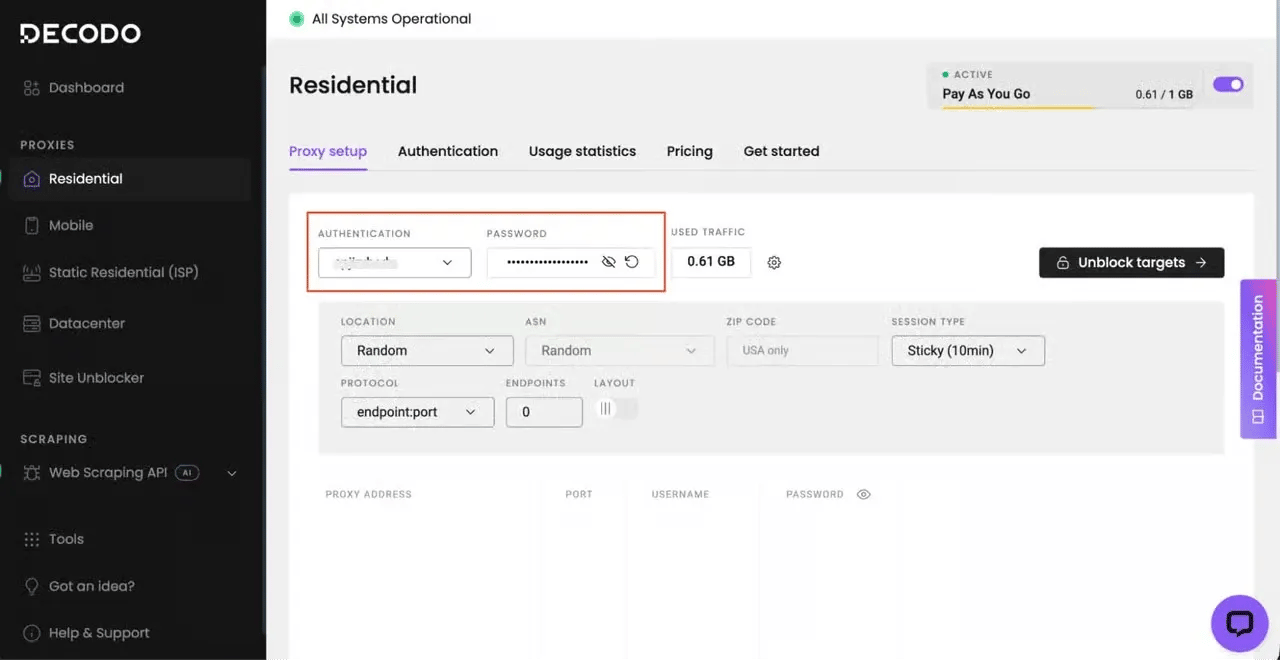
To try out the Decodo residential proxies;
- Create your account. Sign up at the Decodo dashboard.
- Select a proxy plan. Choose a subscription that suits your needs or start with a 3-day free trial.
- Configure proxy settings. Set up your proxies with rotating sessions for maximum effectiveness.
- Select locations. Target specific regions based on your data requirements or keep it set to Random.
- Copy your credentials. You'll need your proxy username, password, and server endpoint to integrate into your scraping script.
Use stealth headless browsers
Headless browsers are the go-to options for scraping websites with dynamic content. However, standard versions of the popular ones (Playwright, Puppeteer, or Selenium) often leak automation indicators, such as the navigator.webdriver, which PerimeterX detects instantly.
With the stealth versions, you can patch these leaks and produce fingerprints that more closely match real user sessions. Playwright and Selenium have multiple stealth frameworks that are easy to integrate into existing code. Below are some of the good open source libraries you can try:
- Camoufox. A modified Firefox build designed for scraping. It rotates fingerprints per session and simulates human-like mouse movements out of the box.
- Undetected-chromedriver. This library patches Selenium's ChromeDriver to hide automation signals. While it's good for existing Selenium codebases, it can become memory-intensive as you scale.
- SeleniumBase UC mode. An enhanced Selenium wrapper with built-in anti-detection that stays updated against new detection methods.
- Nodriver. A modern tool that communicates directly via Chrome DevTools Protocol, avoiding ChromeDriver entirely.
If you'd like a quick refresher on headless browser scraping before adding stealth, check out our Playwright web scraping tutorial.
Rotate fingerprints and simulate human behavior.
You must consistently simulate natural human interaction to avoid the PerimeterX mid-session block. This includes rotating browser fingerprint components, such as screen resolution, operating system, timezone, language, and User-Agent. Real users have unique fingerprints, so maintaining the same ID across sessions can raise suspicion.
Warming-up sessions before hitting a target endpoint can also help keep you under the radar. For example, instead of landing directly on a product page, visit the homepage and/or category pages before proceeding to the target. This approach enables you to maintain an organic browsing pattern: something PerimeterX continuously monitors.
You can also simulate human behavior by adding delays between page actions. No human interacts with page elements as precisely and as fast as a machine does. It's also important to load all resources as a normal browser would. While blocking unnecessary page elements, such as images, can improve speed, it also creates an unrealistic behavior profile that PerimeterX can quickly flag.
Remember that inconsistent cookie management, such as dropping or reusing the same cookie across sessions, can also trigger a PerimeterX error response.
Use TLS-resistant HTTP clients
As covered in the detection section, PerimeterX creates a JA3/JA4 fingerprint from your ClientHello parameters before any JavaScript execution. Standard HTTP libraries, such as Python requests and Go's net/http, often produce TLS fingerprints that instantly identify them as bots. Even headless browsers generate slightly different signatures compared to real browsers.
TLS-resistant HTTP clients like curl_cffi and curl-impersonate patch libcurl to mimic a real browser's TLS and HTTP/2 fingerprint. They alter handshake and protocol parameters to mimic those of popular browsers such as Chrome and Safari. The goal is to send fast, browser-like HTTP requests without spinning up a full browser.
This approach works best when you need to hit API endpoints directly without rendering the target page, but you need to pass PerimeterX’s TLS fingerprinting.
However, if you must render JavaScript to extract data, TLS impersonation alone won’t work. You must account for the JavaScript challenges. A workaround is to pair with a headless browser.
Here's an example script that attempts to scrape a PerimeterX-protected web page using curl_cffi:
This script routes traffic through a Decodo residential IP while impersonating a real Chrome browser at the TLS and HTTP/2 level.
Check out this guide on web scraping with curl for more details on curl-based scraping.
Troubleshooting PerimeterX bypass failures
PerimeterX's multi-layer system means that even the best strategies can fail at any point in the detection pipeline. What makes it even more frustrating is that PerimeterX doesn't tell you which layer is responsible. A 403 error looks the same whether it was triggered by a poor IP reputation or an unrealistic behavior profile.
Here's a breakdown of the most common PerimeterX bypass failures, categorized by where they occur in the detection system and how to troubleshoot them.
Blocked on the first request
Getting blocked on the first request means PerimeterX spotted something in the network layer or HTTP profile before it could trigger any behavioral data. Since there was no session to analyze, the issue must be at the IP level or in the request's fingerprint.
To troubleshoot, start by checking your IP address. Datacenter IPs carry a very high risk score and can be flagged even before PerimeterX's client-side JavaScript executes. Changing to a residential proxy or mobile IP could solve this, but remember that any IP, residential or mobile, can carry a high risk score based on its reputation.
If that doesn't work, verify that your TLS fingerprint matches that of a real browser. You can use an online JA3 fingerprint checker to confirm. While you're at it, verify that you're using HTTP/2, not HTTP/1.1, which is an immediate red flag.
Malformed or missing headers can also trigger a block on the first request. Use a browser DevTools to ensure you're sending the right headers and in the correct order.
Passing initially, but blocked after several requests
If you're getting blocked after several requests, it means that while your session started clean, PerimeterX eventually noticed one or more anomalies that increased your cumulative risk score. That splits the issue into two main causes:
- Behavioral anomaly
- Token expiry or inconsistent cookie state
PerimeterX's behavioral model is trained on real user inputs, so it can quickly detect requests that are behaving differently.
Check your request behavior. Are you making too many requests too fast? Are they all originating from the same IP address? What is your navigation pattern? Increasing the delay between requests (3-8 seconds recommended), rotating IPs more frequently (after every few requests), and mimicking real-user navigation can fix this issue.
Additionally, PerimeterX tokens are time-limited and session-scoped. If you're not rotating properly, and before they expire, that can trigger mid-session blocks. You can track cookies by continuously checking the Set-Cookie header in your responses as your session progresses.
Headless browser detected immediately
If a headless browser is detected on the first page load, PerimeterX identifies the execution environment as an automated framework.
Headless browser environments differ from a real browser in many ways, and PerimeterX exploits these differences to flag automated requests.
Try switching to a stealth tool (Camoufox, SeleniumBase UC, Nodriver, etc). These tools plug automation leaks that PerimeterX often monitors. However, it doesn't hurt to check for indicators your stealth tool doesn't automatically account for and plug them manually. Navigator.webdriver is the most common one, and most tools cover it, but you can check by running navigator.webdriver in the browser console before navigating.
CAPTCHA challenges keep appearing
Getting CAPTCHA challenges means that PerimeterX judges your requests suspicious enough to require human verification, but not enough to trigger an outright block. That presents a two-sided problem: the underlying risk score and bypassing the CAPTCHA Challenge.
If you solve the challenge but fail the post-solution fingerprinting, the CAPTCHA challenge can persist. On the other hand, if you solve it incorrectly (for example, too quickly or in an automated fashion), you might get blocked outright.
To avoid entering into this bind, don't attempt to solve the challenge. Focus on improving the weakest signal: typically, behavioral patterns or fingerprint consistency. If challenges persist, escalate to a scraping API or a site unblocker that automatically handles challenge solving.
Why bypass attempts fail and what to consider before scraping
As previous sections of this article have reiterated, PerimeterX relies on a correlated scoring system that analyzes at least 6 detection layers simultaneously. Any bypass attempt that doesn't address all of those layers will fail.
Remember, PerimeterX updates its database and algorithm regularly. If you manage to address all the layers today, a new week might present additional hurdles. PerimeterX also employs a Per-customer ML model, which means bypass methods may not be transferable across sites, even if both use PerimeterX.
Therefore, before writing any code, consider these two questions:
- Is it feasible to address all the detection layers, given your resources?
- What are the legal implications of scraping a PerimterX-protected website?
Scraping publicly available data is generally legal, but circumventing technical protection measures may raise legal questions depending on jurisdiction. In some cases, sites that deploy security solutions do so because automated access violates their terms of service.
It's important to respect robots.txt and terms of service, even where scraping is legal. Scraping that degrades site performance can create liability. Avoid scraping personal data protected by GDPR, CCPA, or similar regulations.
Final thoughts
PerimeterX, or HUMAN, uses multiple detection layers to identify, track, and block bots. That means for a bypass attempt to succeed, it must completely simulate user behavior. This includes addressing multiple signals simultaneously.
The strategies and tools discussed in this article can help you get started and also scale accordingly, especially the simplest approaches (Web Scraping APIs).
Keep in mind that PerimeterX frequently updates its detection layers and databases to keep pace with current bot behaviors. So, if you opt for any of the custom approaches, you must continually monitor your scraper and identify what new layers to account for.

One call, clean data
Decodo's Web Scraping API handles proxies, rendering, and CAPTCHAs – your code just parses the response.
About the author

Justinas Tamasevicius
Director of Engineering
Justinas Tamaševičius is Director of Engineering with over two decades of expertise in software development. What started as a self-taught passion during his school years has evolved into a distinguished career spanning backend engineering, system architecture, and infrastructure development.
Connect with Justinas via LinkedIn.
All information on Decodo Blog is provided on an as is basis and for informational purposes only. We make no representation and disclaim all liability with respect to your use of any information contained on Decodo Blog or any third-party websites that may belinked therein.