Playwright Wait for Page to Load: A Guide to Every Waiting Method
Knowing how to wait for a page to load in Playwright is the difference between a scraper that returns clean data and one that fails silently. In this guide, you'll learn how to handle waiting in Playwright, including how it behaves in a headless browser environment, covering auto-waiting, selectors, network events, timeouts, custom conditions, and error handling across dynamic pages.

Dominykas Niaura
Last updated: Jul 13, 2026
6 min read

TL;DR
- Wait for real signals like elements or API responses, not just page load.
- Use locators and auto-waiting first, then add explicit waits only when needed.
- Prefer waitForResponse() or selectors over networkidle.
- Avoid fixed timeouts unless debugging or handling edge cases.
- Combine smart waiting with proxies to prevent blocks and ensure consistent data.
Understanding page load events in Playwright
Before choosing a waiting method, it helps to understand the three main page load events Playwright can wait for. Each one reflects a different stage of page readiness, which matters even more on pages that rely on JavaScript rendering and other patterns common in guides on how to scrape websites with dynamic content.
The domcontentloaded event fires once the HTML is parsed and the DOM is built. External resources like images, stylesheets, and fonts may still be loading, so this option works best for fast, DOM-only checks.
The load event fires when the entire page, including all dependent resources, has finished loading. This is more reliable for scripts that depend on fully rendered layouts or visual elements.
The networkidle event waits until no network requests occur for 500 ms. It can help with API-heavy or single-page applications, but it’s generally discouraged as a default since ongoing background requests can prevent it from resolving.
In practice, use domcontentloaded for speed, load for completeness, and networkidle only when you specifically need network activity to settle.
Here’s how these options look with page.goto():
The tradeoff is straightforward: domcontentloaded is faster but less complete, load is slower but more dependable, networkidle can be useful in specific scenarios, though it should be used with care.
Waiting for specific elements with waitForSelector and locator.waitFor
When scraping or interacting with dynamic pages, you deal with website selectors and need to confirm that a specific element has loaded before proceeding. This is where explicit waiting methods in Playwright become essential.
The page.waitForSelector() method waits until an element matching a CSS selector appears in the DOM. It’s a straightforward way to ensure content exists before interacting with it or extracting data.
The locator.waitFor() method works with Playwright’s locator system and allows waiting for a specific state:
- Visible. Element is present and visible to the user.
- Attached. Element exists in the DOM.
- Hidden. Element isn't visible.
- Detached. Element has been removed from the DOM.
This approach is more flexible, especially when you’re already using locators for element targeting.
Both methods support configurable timeouts. If the element doesn’t appear within the specified time, Playwright throws a timeout error. This helps surface issues like incorrect selectors, slow-loading pages, or missing content early.
Here’s a practical example:
This pattern ensures your script runs only when the required data is available, reducing flaky results.
Network-based waiting: networkidle, waitForResponse, and waitForRequest
Some pages are not truly ready when the DOM appears complete. Instead, they depend on background API calls, XHR requests, or fetch responses to load the data you need. In these cases, network-based waiting can be more reliable than waiting for DOM changes alone.
The page.waitForLoadState('networkidle') method waits until no network requests have been made for 500 ms. This can be useful on API-heavy pages, but it should be used carefully. Playwright discourages it as a general strategy because pages with persistent connections, analytics scripts, or background polling may never become truly idle.
The page.waitForResponse() method waits for a specific network response before moving on. This is especially useful when you know which API endpoint delivers the data your script depends on.
The page.waitForRequest() method waits for a matching request to be initiated. This works well when you want to confirm that an action, such as submitting a form, triggered the expected network call.
Both methods also support predicate functions, letting you match requests or responses by URL pattern, status code, or even response details. That makes them flexible for pages where exact request timing is hard to predict.
Here’s an example of waiting for product data from an API before scraping the rendered content:
You can also use request monitoring after form submission to confirm the action was triggered successfully:
Use page.waitForResponse() when you know the critical endpoint that signals readiness. Use page.waitForLoadState('networkidle') only when you genuinely need background requests to stop and understand that it may be unreliable on pages with ongoing activity.
Using proxies to ensure reliable page loading in Playwright
Even with well-tuned waiting strategies, network-based requests can fail, get blocked, or return inconsistent data depending on your IP. This means your script may wait correctly but still miss data or receive incomplete responses. Pairing proper waiting logic in Playwright with reliable proxy infrastructure helps ensure the requests you depend on actually succeed. If you're new to routing browser traffic this way, our guide to the proxy browser covers the basics.
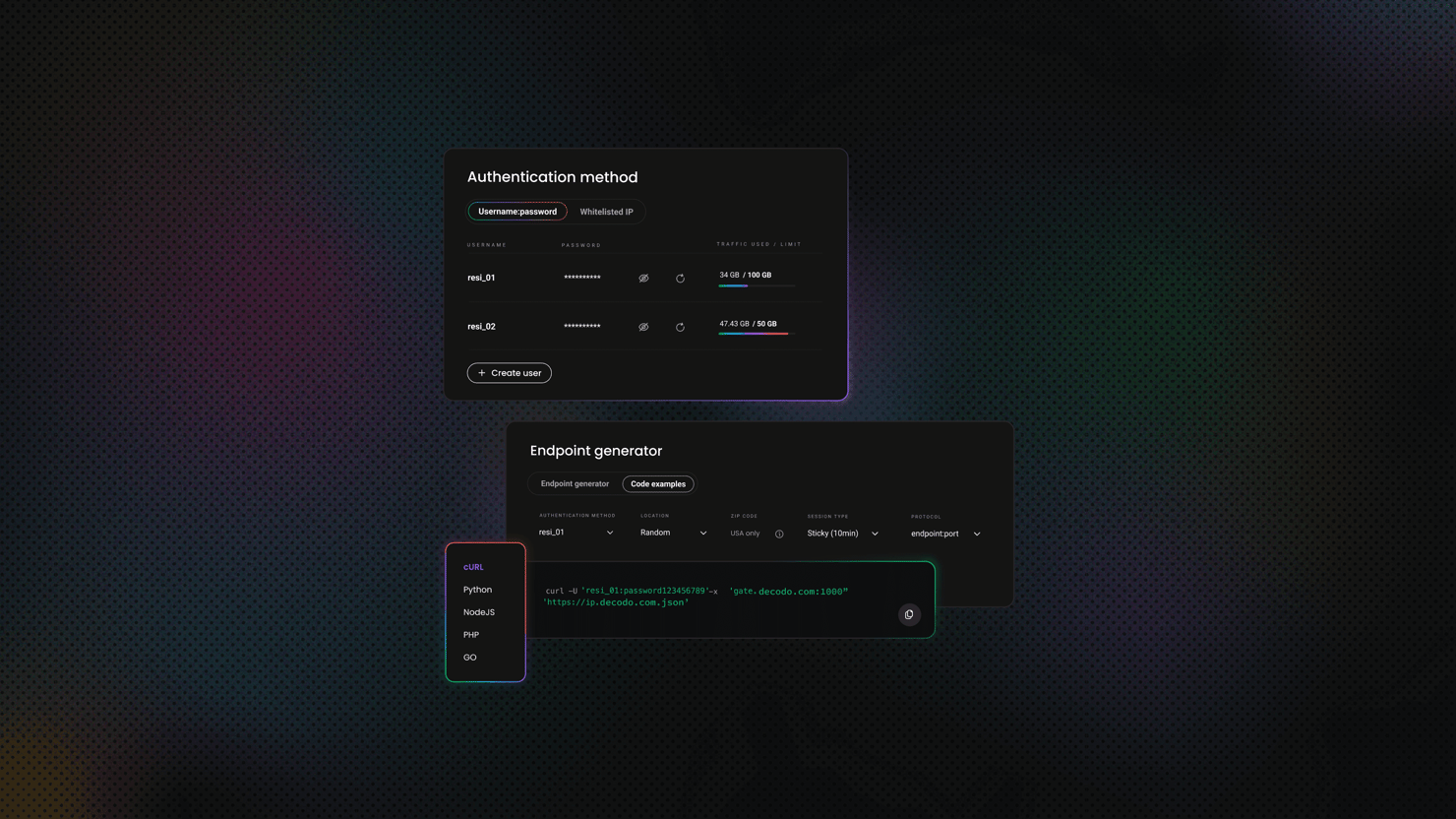
At Decodo, we offer residential proxies with a high success rate (99.92%), automatic rotation, a rapid response time (<0.5s), and extensive geo-targeting options (195+ worldwide locations). Here’s how easy it is to get started:
- Create your account. Sign up via the Decodo dashboard.
- Select a proxy plan. Choose a subscription that suits your needs or start with a 3-day free trial.
- Configure proxy settings. Set up rotating sessions for maximum effectiveness.
- Select locations. Target specific regions or keep it set to Random.
- Copy your credentials. Use your username, password, and endpoint in your scraping script.
Using residential proxies alongside proper waiting strategies ensures your scripts don’t just wait for content, but reliably receive it across different regions and environments.

Get residential proxies
Unlock superior scraping performance with a free 3-day trial of Decodo's residential proxy network.
Handling navigation events with waitForURL and waitForNavigation
Many workflows involve navigation triggered by user actions like clicks, form submissions, or redirects. In these cases, waiting for the page to load isn’t enough. You also need to confirm that navigation has completed before continuing. This is especially important in multi-page scraping with Playwright.
The page.waitForURL() method waits until the current URL matches a given pattern. This is a reliable way to confirm that navigation has reached the expected destination after an action.
Playwright supports different URL matching strategies, including exact strings, glob patterns, and regular expressions. You can also pass options like waitUntil to control which load event to wait for, along with a custom timeout.
To avoid race conditions, coordinate the action and the wait using Promise.all(). This ensures that the navigation wait starts before the triggering action.
Here’s an example of submitting a login form and waiting for the dashboard page:
The same pattern applies to pagination:
The key pitfall is starting the navigation wait after the click. By that point, navigation may already be in progress, which can lead to missed events and flaky scripts. Always start the wait first, then trigger the action.
Fixed timeouts with waitForTimeout (and when to avoid them)
The page.waitForTimeout() method pauses execution for a fixed amount of time. While simple, it’s generally discouraged in Playwright because it doesn’t respond to actual page conditions.
Fixed waits are fragile. If the delay is too short, your script may fail because the content hasn’t loaded yet. If it’s too long, you waste time waiting unnecessarily, which slows down automation and scraping workflows.
That said, there are cases where fixed timeouts make sense. They can help during debugging, simulate human-like pauses, or handle situations where timing is unpredictable and no clear DOM or network signal exists.
Here’s a basic example:
An alternative is using a manual delay with a promise:
If you find yourself relying on page.waitForTimeout() frequently, it usually signals a deeper issue. In most cases, a selector-based wait or a network-based condition will give you a more reliable and efficient solution.
Custom conditions with waitForFunction
Some scenarios don’t map cleanly to selectors or network events. In these cases, page.waitForFunction() in Playwright lets you wait for any condition defined in JavaScript.
The method repeatedly evaluates a function in the browser context until it returns a truthy value. Because it runs in the page itself, you can access DOM APIs, global variables, and runtime state directly.
You can also pass arguments into the function, which makes it useful for dynamic checks. Playwright handles polling internally, with configurable intervals and timeouts for fine control.
Here’s an example of waiting for an element’s dimensions to stabilize:
Waiting for a JavaScript variable to be defined:
Waiting until a minimum number of elements appear:
This approach is ideal for complex or edge cases where no single selector or request clearly signals readiness.
Handling timeouts and errors gracefully
When a wait exceeds its allowed limit, Playwright throws a TimeoutError. By default, the timeout is 30 seconds, but you can change it globally with page.setDefaultTimeout() or override it for individual methods.
Catching timeout failures with try/catch helps your script fail more gracefully and gives you useful context for debugging. This is especially important when dealing with slow pages, unstable selectors, or flaky network conditions. Broader retry ideas from Python requests retry and error-handling fundamentals from Python errors and exceptions can also help shape a more resilient approach.
Here’s an example of a retry wrapper that attempts navigation up to three times with exponential backoff:
This pattern gives the page more time on each retry while logging enough detail to diagnose what went wrong. Instead of failing immediately on the first slow response, your script gets a better chance to recover from temporary issues.
Common scenarios requiring waiting in Playwright
Waiting becomes much easier when you match the method to the situation. In many everyday workflows, the best approach is to wait for the signal that actually reflects readiness rather than adding a generic delay.
Before interacting with form fields, wait for the form container or a key input area to become visible. After that, Playwright’s auto-waiting usually handles actions like clicking, typing, and selecting options.
After form submissions, use page.waitForURL() or page.waitForResponse() to confirm the action succeeded. This is more reliable than assuming the page has updated just because the submit button was clicked.
Before taking screenshots, wait for the target element or the appropriate load state so the page is fully rendered. This matters even more in workflows related to how to scrape images from websites, where incomplete rendering can lead to missing or broken visual output.
For API-driven content, page.waitForResponse() is often the best choice because it lets you wait for the specific endpoint that delivers the data before scraping the rendered result.
For infinite scroll pages, trigger a scroll event, wait for new content to appear through a selector, and repeat the process until you’ve collected enough items or reached the end of the page.
For single-page applications, prefer selector-based waits over networkidle. Many SPAs maintain background connections for analytics, polling, or live updates, which can make networkidle unreliable.
In short, form fields, submissions, screenshots, API-loaded data, infinite scroll, and SPAs each call for a slightly different waiting strategy. Choosing the most specific signal usually leads to faster and more stable automation.
Combining waiting strategies for reliable automation
Complex pages often need more than one waiting method. A page may finish its initial load before key elements appear, or the DOM may update before the underlying API data is fully ready. In these cases, layering waiting strategies leads to more reliable automation.
A good starting point is choosing the right waitUntil option in page.goto() for the initial load. From there, add explicit selector waits for the elements that actually matter to your workflow. If the DOM still doesn’t reflect readiness, use a network-based wait such as page.waitForResponse(). For edge cases where neither selectors nor requests give you a clean signal, page.waitForFunction() provides a flexible fallback.
A practical way to apply this is by creating a reusable page-ready helper:
This kind of helper keeps your logic consistent across similar pages and reduces duplicated waiting code. Instead of relying on a single broad signal, you combine the checks that best reflect actual readiness for your task.
Best practices for reliable waiting in Playwright
Reliable waiting starts with choosing the most specific signal possible. In most cases, it’s better to wait for the exact element or response that matters than to rely on networkidle, which can be unreliable on pages with background activity.
Avoid fixed timeouts unless you’re debugging or dealing with a truly unpredictable edge case. They’re usually slower than necessary and can still fail if the page takes longer than expected.
Set reasonable global defaults with page.setDefaultTimeout() based on the sites you target. A timeout that works well for lightweight pages may be too short for JavaScript-heavy flows, geo-targeted scraping, or sessions routed through residential proxies.
Use locators instead of raw selectors whenever possible. Locator-based actions come with built-in auto-waiting, which reduces manual waiting code and makes scripts easier to maintain.
Combine waiting methods when a single signal isn’t enough. A page may need an initial load event, a visible element, and a specific API response before it’s truly ready.
Handle errors gracefully by catching timeout failures, retrying when appropriate, and logging enough detail to debug flaky behavior.
It also helps to test under slower conditions. Simulating throttled connections can reveal timing issues early, which is useful when comparing automation tools like Playwright vs. Selenium, applying the same ideas to web scraping with Selenium in Python, or building scrapers that run across varying network environments.
Closing thoughts
Waiting is a core part of reliable automation in Playwright. Modern pages rarely load everything at once, so choosing the right waiting strategy directly affects whether your scripts succeed or fail. By understanding how and when content becomes available, you can avoid flaky behavior and build workflows that reflect how real pages operate.
The key is to rely on meaningful signals. Use built-in auto-waiting where possible, add selector or network-based waits when needed, and fall back to custom conditions for complex cases. Avoid fixed delays unless absolutely necessary, handle timeouts thoughtfully, and combine strategies when a single approach isn’t enough. For broader Python web scraping workflows, pairing these techniques with reliable proxies helps ensure the requests you're waiting on are not blocked and return consistent data.

Access residential proxies now
Try residential proxies free for 3 days – full access, zero restrictions.
About the author

Dominykas Niaura
Technical Copywriter
Dominykas brings a unique blend of philosophical insight and technical expertise to his writing. Starting his career as a film critic and music industry copywriter, he's now an expert in making complex proxy and web scraping concepts accessible to everyone.
Connect with Dominykas via LinkedIn
All information on Decodo Blog is provided on an as is basis and for informational purposes only. We make no representation and disclaim all liability with respect to your use of any information contained on Decodo Blog or any third-party websites that may belinked therein.