Back to blog

How to Add Web Data to an Amazon Bedrock Knowledge Base

Share article:

A Bedrock knowledge base is AWS's retrieval-augmented generation (RAG) feature. It indexes documents and returns relevant chunks. Since September 30, 2026, only managed knowledge bases accept new Web Crawler connectors. AWS policy restricts that crawler to your own or authorized sites. This guide compares both AWS crawlers and tests 2 ways to add external web data with Decodo.

A glowing orange database icon on a dark, abstract background with wavy lines.

TL;DR

  • Since September 30, 2026, customer-managed Bedrock knowledge bases can't add new Web Crawler connectors, and AWS says existing connectors keep working.
  • For sites you own or are authorized to crawl, use the managed Web Crawler with its crawl scope and link limit (syncScope, maxLinksPerUrl) set explicitly. Tuned this way, it matched the Decodo pipeline's retrieval results in testing.
  • For public sites that allow crawling, one Decodo /crawl job converts a site section to Markdown for S3 or a custom data source.
  • Exclude duplicate pages such as print views, which outranked the correct pages in our Kubernetes docs test.

What is a Bedrock knowledge base?

A Bedrock knowledge base connects a model in Amazon Bedrock to your own data, such as documents and web pages. It runs the retrieval step of retrieval-augmented generation, so AWS Bedrock RAG applications can answer from your data. When an app or agent asks a question, the knowledge base returns the most relevant chunks.

In a managed knowledge base, AWS manages storage, indexing, and retrieval. The managed type has been generally available since June 17, 2026. In a customer-managed knowledge base, which the console calls an unstructured vector store KB, you choose and manage the vector store.

A standalone vector database stores and searches embeddings. A knowledge base adds ingestion, chunking, embedding, and the Retrieve API.

What changed for the Bedrock knowledge base web crawler on September 30, 2026

Starting September 30, 2026, you can't create new Web Crawler, Confluence, Microsoft SharePoint, or Salesforce connectors on customer-managed knowledge bases. The AWS notice on the crawler page says that existing connectors "will continue to function, including data ingestion and retrieval".
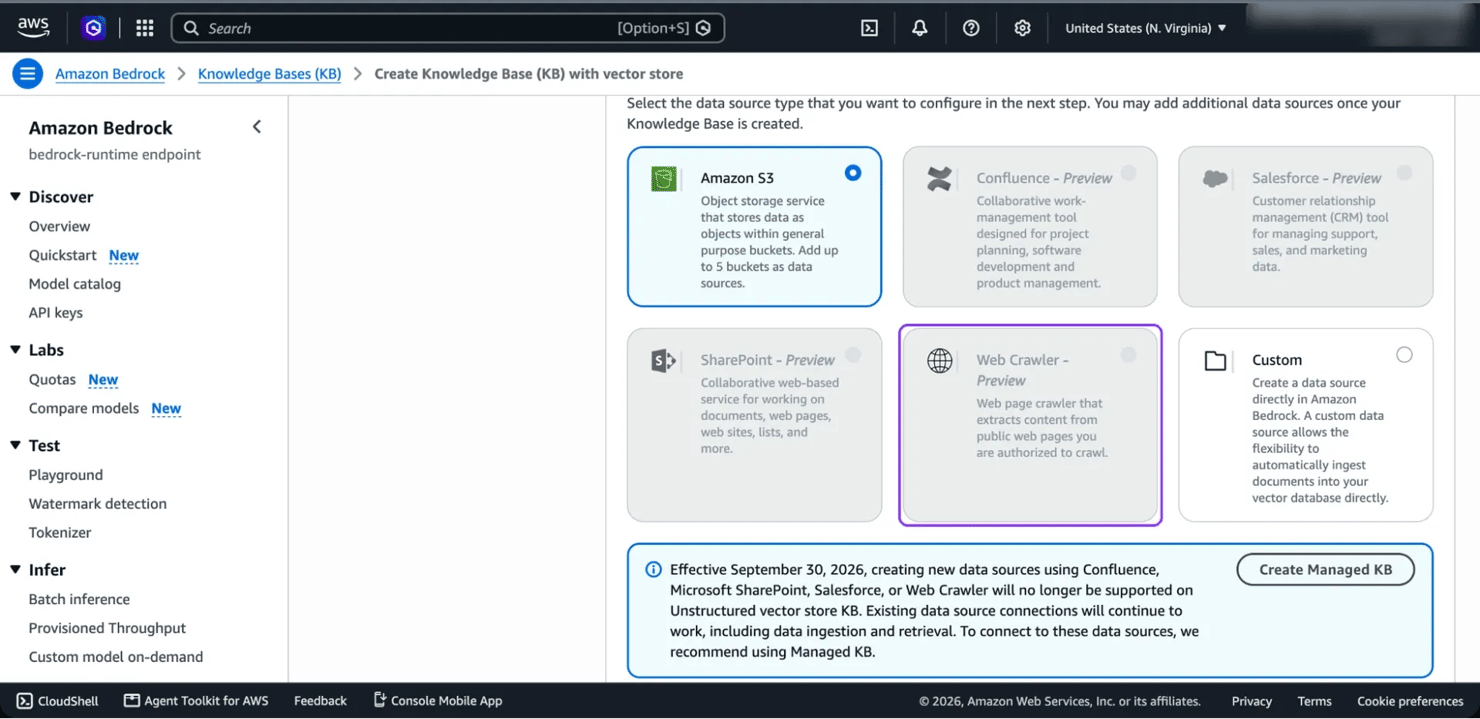
Amazon Bedrock interface showing data source options for a knowledge base, with Web Crawler selected.

To add a website to a customer-managed knowledge base, such as one on OpenSearch Serverless, load its pages through S3 or a custom data source.

Managed knowledge bases accept new Web Crawler connectors, and their crawler renders JavaScript.

The table below compares the Amazon Bedrock Web Crawler on a customer-managed knowledge base and on a managed one, covering availability, crawl limits, JavaScript rendering, authentication, and access control:

Aspect

Web Crawler on a customer-managed knowledge base

Web Crawler on a managed knowledge base

New connectors

Not available since September 30, 2026. Existing ones keep working

Available

Release status

Preview

Part of the managed knowledge base (GA June 17, 2026)

Starting points

Up to 10 seed URLs

Up to 10 seed URLs or up to 3 sitemap URLs

Crawl limits

1 to 25K pages per sync. If the crawl finds more, the sync fails and ingests nothing

The docs don't state a page cap

Depth and links per URL

Not listed

Depth 0 to 10, and up to 1K links per URL (default 100)

JavaScript

Static websites only

Renders JavaScript, without simulating user interactions such as clicks or scrolling

Authentication

None documented

Basic, form-based, or SAML authentication

Crawl rate

1 to 300 URLs per host per minute

1 to 300 URLs per minute (AWS doesn't say per host)

Followed (RFC 9309). AWS says "disallow by default if robots.txt is not found"

Followed (RFC 9309), including crawl-delay

Document-level access control

Not supported. Anyone with bedrock:Retrieve can read synced pages

Not supported. Anyone with access to the knowledge base can read indexed pages

Vector storage

Amazon OpenSearch Serverless only

AWS-managed storage

Managed or customer-managed: Which Bedrock knowledge base to build

For a new project that needs a website as a source, build a Bedrock managed knowledge base. It accepts new Web Crawler connectors, and AWS recommends it for retrieval accuracy.

The managed knowledge base has native connectors for Amazon S3, the Web Crawler, custom data sources, and apps such as SharePoint, Confluence, and Salesforce. AWS manages parsing, embeddings, and reranking. Agentic retrieval (multi-step search) is an option, priced per call. Default quotas allow 200 data sources and 10 TB of raw data per knowledge base, and both can be raised.

Pick a customer-managed knowledge base when you need a specific vector store or full control of parsing and chunking.

Choose the route that fits your situation:

Your situation

What to do

New knowledge base, and your own site or one you're authorized to crawl

Build a managed knowledge base with the Web Crawler, and set its scope and link limit as tested below

Existing customer-managed knowledge base with a Web Crawler data source

Keep it. AWS says existing connectors keep ingesting and serving retrieval

Existing customer-managed knowledge base and a new website

Load the pages through S3 or a custom data source, since new Web Crawler connectors aren't available there

Public site you don't own, whose terms and robots.txt allow crawling

Crawl it with Decodo's /crawl and load the pages through S3 or a custom data source. Treat the pages as untrusted input

For setup steps, follow AWS's guide to build a managed knowledge base.

Where the built-in web crawler stops

The Bedrock Web Crawler works best on sites you own. For external, bot-protected, or interactive sites, check these points:

  • Authorization. AWS's crawler docs say to use the Web Crawler only on pages that you own or are authorized to crawl. The Amazon Acceptable Use Policy also applies. The connector usually doesn't fit competitor pages, industry news, or public review pages. With any crawler, first check whether a site allows scraping and read about the legal side of collecting public web data.
  • Seed URL limit. Each data source takes up to 10 seed URLs or 3 sitemap URLs. A knowledge base with many sites needs one data source for every 10 seed URLs.
  • User interactions. The managed crawler renders JavaScript without clicking, scrolling, or opening menus. On many pages that load content with JavaScript, some links appear only after those actions, so the crawl doesn't reach them. When only the seed URL gets indexed, AWS's troubleshooting table names these hidden links as the likely cause.
  • Bot protection. The crawler identifies itself with its own user agent, so sites that block automated traffic can block it.
  • Deleted pages. AWS's docs say the customer-managed crawler may not detect deleted pages, so old content can stay indexed. The managed crawler syncs deletions.

For public pages that allow crawling, a Web Scraping API can handle fetching. For a few sections of your own docs or help center, the crawler is the simplest of the Bedrock knowledge base data sources.

Two ways to feed external web data into a Bedrock knowledge base

Collect the pages outside Bedrock, then sync them from Amazon S3 or push them directly into a custom data source. We ran both on a managed knowledge base with the same 190 pages from the Kubernetes docs.

For a pipeline that runs when a crawl finishes, the custom data source works best. Use S3 when you also want a copy of every page in your bucket. A web scraping API handles the collection step, fetching each URL with proxies and JavaScript rendering handled for you, and returns Markdown that S3 or a custom data source accepts.

Aspect

Amazon S3 data source

Custom data source (direct ingestion)

Ingestion method

Files in a bucket, read by a sync job

Pushed through IngestKnowledgeBaseDocuments

Sync job needed

Yes

No

Knowledge base types

Managed and customer-managed

Managed and customer-managed

Deleting pages

Delete the file, then sync

DeleteKnowledgeBaseDocuments

Copy of the data outside Bedrock

Yes, in your bucket

No, unless you store one yourself

Best for

Scheduled bulk refreshes, audit trail

Frequent small updates triggered by a finished crawl

Sync pages from Amazon S3

Each crawled page becomes one Markdown file in a bucket that the knowledge base uses as an S3 data source. Markdown keeps headings and code blocks without HTML markup, which is why Markdown works well for LLM input. A sync job (StartIngestionJob, or Sync in the console) indexes new and changed files.

Each page file can have a metadata file with the same name plus .metadata.json. That file holds the Bedrock knowledge base metadata, such as the source URL, site, and change time. Retrieval can filter on these fields.

Put the page URL in the metadata file. Retrieve returns it with each chunk, so your app can cite the web page instead of the S3 object.

Direct ingestion also works on an S3 data source. If you use it there, AWS says to write the same files to S3, or the next sync overwrites the pushed documents. AWS also asks you not to run sync jobs and direct ingestion at the same time.

Push pages to a custom data source

A custom data source accepts documents through the IngestKnowledgeBaseDocuments API and indexes them without a sync job. DeleteKnowledgeBaseDocuments removes them. If you use the page URL as the document ID, Retrieve returns that URL as the source.

Send up to 10 documents per call on a managed knowledge base. In testing, larger batches failed with "exceeds the maximum allowed (10)", although the direct-ingestion docs page listed 25.

Crawling external sites into Bedrock with Decodo's Web Data API

Decodo's Web Data API collects a whole site section in one /crawl job and returns each page as Markdown, a format both data sources accept.

You scope a crawl job with select_paths, exclude_paths, max_depth, and sitemap, and set its page count with limit. With JS_retry, pages that need JavaScript get a second request with JavaScript rendering. The geo and locale options set the country and language of each request, for sites that change content by region. The /crawl parameters page lists every option and its current range.
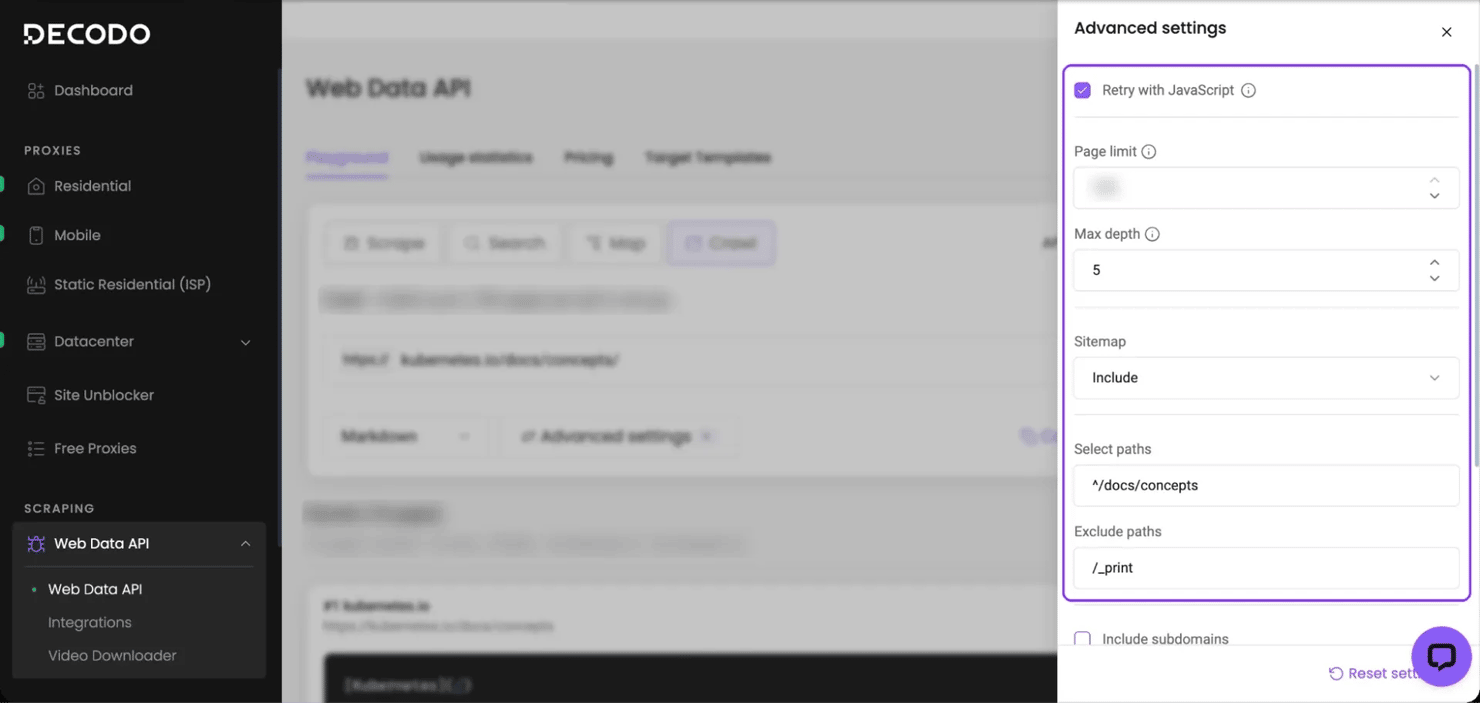
Web application dashboard showing Web Scraper API settings with an open advanced configuration panel.

A callback_url receives a webhook when the crawl finishes, so the pipeline processes the pages immediately.

Decodo runs the crawl itself, with proxies and JavaScript rendering, so your AWS account only processes the finished pages. Each job can target a different site, and one knowledge base holds them all, with one function copy per site. The code below converts each site's robots.txt rules, including those for AI search and assistant crawlers, into exclude_paths for the crawl. You decide which sites and paths to crawl and confirm you're allowed to.

The full code at the end runs this pipeline:

  1. A /map call lists the site's URLs, so you can pick the paths to crawl (see choosing RAG data sources).
  2. A /crawl job runs with a callback_url set to an AWS Lambda function URL.
  3. The webhook triggers the function, which strips the site template (repeated menus), hashes each page, and pushes changed pages to the knowledge base.
  4. The knowledge base indexes the pages, and a Retrieve call returns chunks with each page's source URL.

Testing retrieval quality on the Kubernetes docs

The pipeline ran on the Kubernetes concepts docs (CC BY 4.0). The site also has 24 /_print views, which repeat a whole section on one page, and the code excludes them by default.

The table shows how 3 versions of the pages ranked for the same 15 questions, top 5 results each. Only the 3rd includes the print views:

Pages ingested

Text stored

Correct page ranked first (top-1)

Correct page in top 5

Results that were print views

190 pages, Markdown as crawled

20.5 MB (99.3 MB as HTML)

15 of 15

15 of 15

0 of 75

190 pages, site template removed, as the pipeline stores them

2.6 MB

15 of 15

15 of 15

0 of 75

190 pages, site template removed, plus the site's 24 print views

8.2 MB

9 of 15

15 of 15

47 of 75

In each of the 6 misses, a print view that repeats the correct page ranked first. So exclude URL patterns of duplicate pages in the crawl. With Decodo's Markdown as crawled, every correct page already ranked first. Strip the site template anyway, since it cuts stored text by 87% and prevents site-wide menu changes from counting as page edits.

Keep an evaluation set of questions with known correct pages, and rerun it after each crawl change.

When the built-in crawler is enough

For docs you're allowed to crawl, the built-in Web Crawler is the main alternative. The test ran both from the same seed URL in one managed knowledge base, with the same 15 questions:

Data source, seed URL /docs/concepts/

Correct page ranked first (top-1)

Correct page in top 5

Print views or translated copies in results

Documents indexed

Built-in Web Crawler, API defaults with no syncScope

10 of 15

14 of 15

22 of 75

3,505

Built-in Web Crawler, PATH_SPECIFIC, maxLinksPerUrl 1000, URLs ending in /_print excluded

15 of 15

15 of 15

0 of 75

187

Decodo pipeline from this guide, custom data source

15 of 15

15 of 15

0 of 75

190

AWS's docs name the seed URL's host and path (PATH_SPECIFIC) as the default sync scope. With no syncScope in the API request, though, the crawler also indexed other docs sections and translated copies. Pages from other sections ranked first for 3 questions, and translated copies for 2. With syncScope set explicitly, the crawl stayed inside /docs/concepts/. The console preselects PATH_SPECIFIC, but in API calls always set crawlConfiguration.syncScope to PATH_SPECIFIC.

Each Kubernetes docs page links to over 900 URLs, mostly menu links, so raise maxLinksPerUrl on sites like this. At the default of 100, the scoped crawl indexed 105 pages, and 9 of 15 correct pages ranked first. For your own docs, the tuned built-in crawler matched the pipeline's results on these questions, so use it there.

For external sites, Decodo charges per crawled page, and you pay only for successful requests. The /crawl endpoint page lists current rates, the success rate, and the free plan's monthly allowance. That plan includes /map, /crawl, and /search, enough to run the walkthrough below.

Crawl sites into Bedrock

One /crawl job returns every page as Markdown, ready for S3 or a custom data source, with proxies and JavaScript rendering handled for you.

Keeping a web-fed Bedrock knowledge base fresh

Re-crawl on a schedule that matches how often the source changes, and re-ingest only the pages that changed. With the full code, Amazon EventBridge Scheduler starts each crawl. Use these 3 practices for keeping RAG data fresh in production:

  • Hash every page. Store a content hash per URL and skip unchanged pages. Re-crawling the 190 concepts pages 14 hours later flagged 5 as changed. The site's Git history showed the same 5 pages edited in that time. An immediate repeat crawl flagged none.
  • Delete explicitly. When a URL no longer appears in the crawl, delete the S3 file or call DeleteKnowledgeBaseDocuments. The code deletes only after a complete crawl, and never when a run would remove over 15% of pages.
  • Filter by change date. Store the time a crawl last found new content on each page as a number, and filter with greaterThan when a question needs recent content. To filter by site or section, store each as its own attribute, like the code's site. Managed knowledge bases rejected startsWith filters in testing.

Filling knowledge base gaps from user questions

In a separate test, 10 questions needed pages from the Kubernetes tasks section, which the concepts crawl didn't cover. For those 10, Retrieve still ranked a wrong concepts page first.

A score cutoff alone doesn't show which questions lack a page, because the scores overlapped. Wrong first results scored 0.564 to 0.865, and once the missing pages were added, correct ones scored 0.665 to 0.967.

Run the fill command on questions that users of your app mark as unanswered. It sends the question to Decodo's /search endpoint and uses site: to limit results to the hosts in ALLOWED_SITES. If the first result from those hosts isn't indexed yet, a 1-page /crawl job fetches it, and the pipeline adds it to the knowledge base. As with any web search, check questions for customer or internal data before you run fill.

After fill, the correct page ranked first for 7 of the 10 gap questions. In 2 of the others, fill added the correct page, but a concepts page still ranked above it. In the 3rd, search returned a kubectl reference page instead. Each fill call costs one search request and one crawled page, so crawl the sections users ask about most, and use fill for the rest.

Full crawls don't update or delete pages that fill adds. They're listed in state/gaps.json. To keep them current, move the scheduled crawl to a parent path that covers their sections.

Full code and setup

The pipeline is one Python file. It runs locally for the map, crawl, ask, fill, and process commands. As an AWS Lambda function, it handles the schedule, the webhook, and fill requests from your app. It needs Python 3.13 or later, boto3, and AWS credentials. The commands were tested with AWS CLI 2.36.29, and older versions may lack the managed knowledge base options. A single Decodo Web Data API key, exported as DECODO_API_KEY, covers the /map, /crawl, and /search calls. After you sign up for Decodo, find the key on the Web Data API page of the dashboard. If your AWS credentials come from aws login, boto3 also needs botocore[crt], so install it in the same environment.
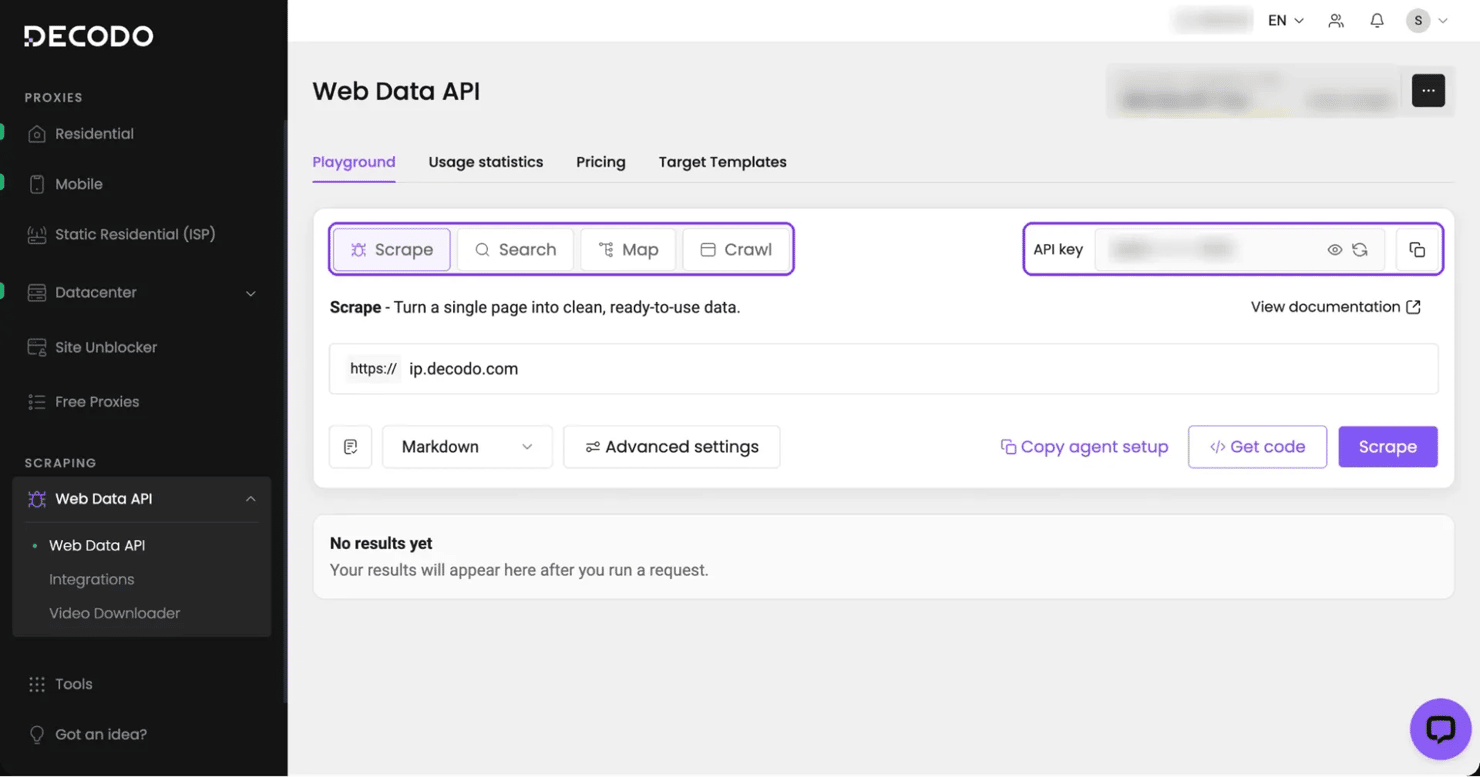
Screenshot of a web data API dashboard with navigation and data request options.

Save this policy as lambda-policy.json. The setup script inserts your account and knowledge base IDs and attaches the policy to the Lambda role:

{
"Version": "2012-10-17",
"Statement": [
{
"Effect": "Allow",
"Action": [
"bedrock:IngestKnowledgeBaseDocuments",
"bedrock:DeleteKnowledgeBaseDocuments",
"bedrock:ListKnowledgeBaseDocuments",
"bedrock:StartIngestionJob",
"bedrock:Retrieve"
],
"Resource": "arn:aws:bedrock:us-east-1:ACCOUNT_ID:knowledge-base/KB_ID"
},
{
"Effect": "Allow",
"Action": ["s3:GetObject", "s3:PutObject", "s3:DeleteObject", "s3:ListBucket"],
"Resource": ["arn:aws:s3:::web-to-bedrock-ACCOUNT_ID", "arn:aws:s3:::web-to-bedrock-ACCOUNT_ID/*"]
},
{
"Effect": "Allow",
"Action": "lambda:InvokeFunction",
"Resource": "arn:aws:lambda:us-east-1:ACCOUNT_ID:function:web-to-bedrock"
},
{
"Effect": "Allow",
"Action": ["logs:CreateLogGroup", "logs:CreateLogStream", "logs:PutLogEvents"],
"Resource": "*"
}
]
}

Save the pipeline as web_to_bedrock.py, which maps the site, starts the crawl, receives the webhook, cleans and hashes pages, and loads the knowledge base:

"""Crawl a website section with Decodo's Web Data API and load it into an Amazon Bedrock knowledge base.
Local commands:
python web_to_bedrock.py map https://kubernetes.io/docs/concepts/
python web_to_bedrock.py crawl https://kubernetes.io/docs/concepts/ https://<function-url>
python web_to_bedrock.py crawl https://kubernetes.io/docs/concepts/ # no webhook: waits, then processes here
python web_to_bedrock.py ask "How does maxSkew work in topology spread constraints?" [max_age_days]
python web_to_bedrock.py fill "How do I safely drain a node before maintenance?"
python web_to_bedrock.py process <crawl_id> # reprocess a finished crawl, for example after a function error
Deployed as an AWS Lambda function with a function URL, the same file receives
the crawl webhook, cleans the pages, and pushes them into the knowledge base.
A scheduler can start each re-crawl by invoking the function with
{"crawl": "https://kubernetes.io/docs/concepts/", "callback_url": "https://<function-url>"},
and your app can run fill by invoking it with {"fill": "<question>"}.
"""
import collections
import hashlib
import hmac
import json
import os
import re
import sys
import time
import urllib.error
import urllib.parse
import urllib.request
from concurrent.futures import ThreadPoolExecutor
import boto3
from botocore.config import Config
API = "https://data.decodo.com/v1"
DECODO_API_KEY = os.environ["DECODO_API_KEY"]
KB_ID = os.environ["KB_ID"]
DS_ID = os.environ["DS_ID"] # CUSTOM data source, or the S3 data source when ROUTE=s3
BUCKET = os.environ["BUCKET"] # holds the page manifest, and the pages when ROUTE=s3
WEBHOOK_SECRET = os.environ["WEBHOOK_SECRET"] # sent as passthrough, checked when the webhook arrives
ROUTE = os.environ.get("ROUTE", "custom") # "custom" (direct ingestion) or "s3" (sync job)
CONTACT_EMAIL = os.environ.get("CONTACT_EMAIL", "") # some sites, such as sec.gov, refuse robots.txt requests without one
ALLOWED_SITES = [s.strip().lower() for s in os.environ.get("ALLOWED_SITES", "").split(",") if s.strip()] # hosts fill may use
DELETE_MISSING = os.environ.get("DELETE_MISSING", "true") == "true" # "false" for news, where pages leave the listings but stay online
CRAWL_LIMIT = 2000 # pages per crawl; a crawl that reaches it is treated as partial
ROBOTS_AGENTS = {"*", "chatgpt-user", "oai-searchbot", "claude-user", "claude-searchbot",
"perplexity-user", "perplexitybot"} # AI search and assistant crawlers, which many news sites block by name
EXCLUDE = ["/_print"] # print views repeat whole sections, so the same text would be indexed several times
MAX_EXCLUDE_CHARS = 700 # size of the combined robots.txt pattern; above it, crawl a narrower path
MIN_CHARS = 200 # skip near-empty pages after cleaning
BLOCK_PAGE = re.compile( # phrases that mark a site's error or bot-check page rather than content
r"captcha|robot or human|not a robot|confirm that you.re human|humans only|verify(ing)? (your )?(connection|browser)"
r"|checking your browser|additional verification|unusual traffic|just a moment|pardon our interruption"
r"|access denied|access to this page has been denied|you have been blocked|please enable (js|javascript|cookies)"
r"|enable javascript and|taking longer than usual|currently unavailable", re.IGNORECASE)
MAX_BLOCK_PAGE_CHARS = 3000 # only short pages are checked, so a docs page about access control isn't skipped
ALERT_SHARE = 0.10 # alert when more than 10% of a crawl's pages are skipped
BATCH = 10 # managed knowledge bases rejected batches over 10 in testing
MAX_REQUEST_BYTES = 5_000_000 # AWS rejects ingestion requests of 6 MB or more
WORKERS = 4 # parallel ingestion calls, each about 2.5 s for 10 pages in testing
MAX_DELETE_SHARE = 0.15 # skip deletes if one crawl would remove more than 15% of indexed pages
MIN_TEMPLATE_PAGES = 20 # a crawl this size learns the template; smaller crawls and fill reuse the saved one
MANIFEST_KEY = "state/manifest.json" # pages from the scheduled crawl
GAPS_KEY = "state/gaps.json" # pages added by fill, kept out of the crawl's delete logic
TEMPLATE_KEY = "state/template.json"
agent = boto3.client("bedrock-agent", config=Config(retries={"mode": "adaptive", "max_attempts": 10}))
runtime = boto3.client("bedrock-agent-runtime")
s3 = boto3.client("s3")
def decodo(url, body=None, attempts=4):
req = urllib.request.Request(
url if url.startswith("http") else API + url,
data=json.dumps(body).encode() if body is not None else None,
method="POST" if body is not None else "GET",
headers={"Authorization": f"Bearer {DECODO_API_KEY}",
"Content-Type": "application/json", "Accept": "application/json"},
)
retry = (429, 500, 502, 503, 504, 524, 613) if body is None else (429,) # a repeated POST /crawl could start a 2nd job
for attempt in range(attempts):
try:
with urllib.request.urlopen(req, timeout=120) as resp:
return json.load(resp)
except urllib.error.HTTPError as e:
if e.code not in retry or attempt == attempts - 1:
raise
time.sleep(2 ** attempt) # transient errors, safe to retry; 613 is a Decodo server-side code, like 500 and 524
def map_site(url):
links = decodo("/map", {"url": url, "sitemap": "include"})["results"][0]["content"]["links"]
paths = collections.Counter("/".join(l["url"].split("/")[3:6]) for l in links)
for path, n in paths.most_common(20):
print(f"{n:5} /{path}")
print(f"{len(links)} URLs")
def start_crawl(url, callback_url=None):
path = urllib.parse.urlparse(url).path.rstrip("/")
rules = robots_excludes(url)
if disallowed(url, rules): # exclude_paths filters discovered pages, so check the start URL here
print("ALERT robots.txt disallows", url)
return None
rules = in_scope(rules, path)
robots = ["^(?:" + "|".join(rule[1:] for rule in rules) + ")"] if rules else [] # all in-scope rules as one pattern
if robots and len(robots[0]) > MAX_EXCLUDE_CHARS:
print(f"ALERT robots.txt has {len(rules)} rules under {path or '/'}, so crawl a narrower path")
return None
body = {
"url": url,
"limit": CRAWL_LIMIT,
"select_paths": [f"^{re.escape(path)}"],
"exclude_paths": EXCLUDE + robots,
"sitemap": "include",
"output": "markdown",
"JS_retry": True,
}
if callback_url:
body.update(callback_url=callback_url, passthrough=WEBHOOK_SECRET)
job = decodo("/crawl", body)
print(job["crawl_id"], job["status"])
if callback_url:
return job["crawl_id"]
# No webhook: wait, then process here. In testing, "pending" was the only status while a crawl ran.
while decodo(f"/crawl/{job['crawl_id']}/status")["status"] == "pending":
time.sleep(15)
return process(job["crawl_id"])
def robots_excludes(url):
"""Paths that robots.txt disallows for ROBOTS_AGENTS, as exclude_paths patterns. Allow lines are ignored, which excludes more."""
root = "{0.scheme}://{0.netloc}".format(urllib.parse.urlparse(url))
agent_header = {"User-Agent": f"web-to-bedrock/1.0 ({CONTACT_EMAIL})" if CONTACT_EMAIL else "web-to-bedrock/1.0"}
try:
with urllib.request.urlopen(urllib.request.Request(root + "/robots.txt", headers=agent_header), timeout=30) as resp:
lines = resp.read().decode("utf-8-sig", errors="ignore").splitlines()
except urllib.error.HTTPError as e:
if e.code >= 500 or e.code in (401, 403, 429):
print("ALERT robots.txt request refused with HTTP", e.code, "for", root)
raise # rules unknown, so crawl nothing; a 403 can mean the site wants CONTACT_EMAIL or refuses your network
return [] # no robots.txt, no restrictions
rules, agents, in_rules = [], set(), False
for line in lines:
field, _, value = line.split("#")[0].partition(":")
field, value = field.strip().lower(), value.strip()
if field == "user-agent":
if in_rules: # a User-agent line after rules starts a new group
agents, in_rules = set(), False
agents.add(value.lower())
elif field in ("allow", "disallow"):
in_rules = True
if field == "disallow" and value and agents & ROBOTS_AGENTS:
pattern = re.escape(value).replace(r"\*", ".*").replace(r"\$", "$")
rules.append("^" + re.sub(r"/\$?$", "(/|$)", pattern)) # exclude_paths patterns match paths without a trailing slash
return rules
def in_scope(rules, path):
"""Rules that can match a URL under path. select_paths keeps the crawl inside it, so other rules can't apply."""
kept = []
for rule in rules:
literal = re.sub(r"\\(.)", r"\1", re.match(r"\^((?:\\.|[^\\.*+?()\[\]{}|$])*)", rule).group(1))
if literal.startswith(path) or path.startswith(literal):
kept.append(rule)
return kept
def disallowed(url, rules=None):
parts = urllib.parse.urlparse(url)
path = (parts.path or "/") + ("?" + parts.query if parts.query else "")
return any(re.match(rule, path) for rule in (robots_excludes(url) if rules is None else rules))
def looks_blocked(text):
return len(text) < MAX_BLOCK_PAGE_CHARS and BLOCK_PAGE.search(text) is not None
def fetch_pages(crawl_id):
pages, url = [], f"/crawl/{crawl_id}?type=content"
while url:
batch = decodo(url)
pages += batch["url"] # Decodo lists the pages of this response under "url"
url = batch.get("next")
return pages
# The site template (menus, docs tree, footer) repeats on every page. A line that
# appears on at least half of the pages is template, whatever its link target.
LINK = re.compile(r"\]\([^)]*\)")
TABLE_RULE = re.compile(r"^\s*\|?[\s:|-]+\|?\s*$")
FENCE = "`" * 3
def line_key(line):
return LINK.sub("]()", line.strip())
def template_lines(texts, share=0.5):
counts = collections.Counter()
for text in texts:
counts.update({line_key(l) for l in text.splitlines() if l.strip()})
return {k for k, n in counts.items() if n >= share * len(texts)}
def strip_template(text, template):
kept, in_code, title = [], False, None
for line in text.splitlines():
if line.strip().startswith(FENCE):
in_code = not in_code
kept.append(line)
elif in_code or not line.strip() or TABLE_RULE.match(line) or line_key(line) not in template:
if title is None and not in_code and line.startswith("# "):
title = len(kept) # per-page navigation, such as a list of translations, sits above the title
kept.append(line)
return re.sub(r"\n{3,}", "\n\n", "\n".join(kept[title or 0:])).strip()
def load_json(key, default):
try:
return json.loads(s3.get_object(Bucket=BUCKET, Key=key)["Body"].read())
except s3.exceptions.NoSuchKey:
return default
def save_json(key, value):
s3.put_object(Bucket=BUCKET, Key=key, Body=json.dumps(value).encode())
def attributes(url, changed_at, digest):
# Unchanged pages are not pushed again, so this is the time a crawl last found new content
return {"source_url": url, "site": url.split("/")[2], "changed_at": changed_at, "content_sha256": digest}
def custom_doc(url, text, attrs):
inline = [{"key": k, "value": {"type": "NUMBER", "numberValue": v} if isinstance(v, int)
else {"type": "STRING", "stringValue": v}} for k, v in attrs.items()]
return {
"content": {"dataSourceType": "CUSTOM", "custom": {
"customDocumentIdentifier": {"id": url}, "sourceType": "IN_LINE",
"inlineContent": {"type": "TEXT", "textContent": {"data": text}}}},
"metadata": {"type": "IN_LINE_ATTRIBUTE", "inlineAttributes": inline},
}
def s3_key(url):
return "pages/" + hashlib.sha256(url.encode()).hexdigest()[:24] + ".md"
def batches(docs):
"""Up to BATCH documents per request, and under MAX_REQUEST_BYTES in total."""
batch, size = [], 0
for doc in docs:
n = len(json.dumps(doc).encode())
if batch and (len(batch) == BATCH or size + n > MAX_REQUEST_BYTES):
yield batch
batch, size = [], 0
batch.append(doc)
size += n
if batch:
yield batch
def push_custom(changed, removed):
docs = [custom_doc(*c) for c in changed]
with ThreadPoolExecutor(WORKERS) as pool:
list(pool.map(lambda b: agent.ingest_knowledge_base_documents(
knowledgeBaseId=KB_ID, dataSourceId=DS_ID, documents=b), batches(docs)))
for i in range(0, len(removed), BATCH):
agent.delete_knowledge_base_documents(knowledgeBaseId=KB_ID, dataSourceId=DS_ID, documentIdentifiers=[
{"dataSourceType": "CUSTOM", "custom": {"id": u}} for u in removed[i:i + BATCH]])
def put_page(url, text, attrs):
meta = {"metadataAttributes": {k: {"value": {"type": "NUMBER", "numberValue": v} if isinstance(v, int)
else {"type": "STRING", "stringValue": v}} for k, v in attrs.items()}}
s3.put_object(Bucket=BUCKET, Key=s3_key(url), Body=text.encode(), ContentType="text/markdown")
s3.put_object(Bucket=BUCKET, Key=s3_key(url) + ".metadata.json", Body=json.dumps(meta).encode())
def push_s3(changed, removed):
with ThreadPoolExecutor(WORKERS) as pool:
list(pool.map(lambda c: put_page(*c), changed))
for url in removed:
s3.delete_objects(Bucket=BUCKET, Delete={"Objects": [{"Key": s3_key(url)}, {"Key": s3_key(url) + ".metadata.json"}]})
if changed or removed:
job = agent.start_ingestion_job(knowledgeBaseId=KB_ID, dataSourceId=DS_ID)["ingestionJob"]
print("ingestion job", job["ingestionJobId"])
def failed_urls(manifest):
"""Pages in the manifest whose last ingestion failed, so this run sends them again."""
by_uri = {f"s3://{BUCKET}/{s3_key(u)}": u for u in manifest}
failed, kw = set(), {}
while True:
resp = agent.list_knowledge_base_documents(knowledgeBaseId=KB_ID, dataSourceId=DS_ID, maxResults=100, **kw)
for d in resp["documentDetails"]:
ident = d["identifier"]
url = ident["custom"]["id"] if "custom" in ident else by_uri.get(ident.get("s3", {}).get("uri"))
if "FAILED" in d["status"] and url in manifest:
failed.add(url)
if not resp.get("nextToken"):
return failed
kw = {"nextToken": resp["nextToken"]}
def process(crawl_id):
status = decodo(f"/crawl/{crawl_id}/status")["status"]
pages = fetch_pages(crawl_id)
seen = {p["url"] for p in pages}
done = [p for p in pages if p["status"] == "done" and p.get("content")]
if len(done) >= MIN_TEMPLATE_PAGES: # learned per crawl, so keep the scope fixed between runs
template = template_lines([p["content"] for p in done])
save_json(TEMPLATE_KEY, sorted(template))
else: # too few pages to tell the template from content
template = set(load_json(TEMPLATE_KEY, []))
manifest, now = load_json(MANIFEST_KEY, {}), int(time.time())
failed = failed_urls(manifest)
for u in failed:
del manifest[u] # treated as a new page below
changed, current, suspect, alerts = [], {}, [], []
if failed:
alerts.append(f"{len(failed)} pages failed to index in the previous run, sent again")
for p in done:
text = strip_template(p["content"], template)
if len(text) < MIN_CHARS or looks_blocked(text):
suspect.append(p["url"]) # keeps the indexed copy, like a failed page
continue
if ROUTE != "s3" and len(text.encode()) >= MAX_REQUEST_BYTES:
alerts.append(f"{p['url']} is too large for 1 ingestion request") # left out of the manifest, so the next crawl tries again
continue
digest = hashlib.sha256(text.encode()).hexdigest()
current[p["url"]] = digest
if manifest.get(p["url"]) != digest:
changed.append((p["url"], text, attributes(p["url"], now, digest)))
# A URL that a finished crawl no longer discovers is gone. A page that failed this time stays indexed.
removed = [u for u in manifest if u not in seen] if DELETE_MISSING else []
if status != "done" or len(pages) >= CRAWL_LIMIT: # an incomplete crawl didn't reach every page, so missing isn't gone
alerts.append(f"crawl {status} with {len(pages)} pages, skipped {len(removed)} deletes")
removed = []
elif len(removed) > MAX_DELETE_SHARE * max(1, len(manifest)):
alerts.append(f"skipped {len(removed)} deletes, over the {MAX_DELETE_SHARE:.0%} guard")
removed = []
bad = len(pages) - len(done) + len(suspect)
if bad > ALERT_SHARE * max(1, len(pages)):
alerts.append(f"{bad} of {len(pages)} pages failed, were too short, or matched BLOCK_PAGE")
for u in manifest:
if u not in current and u not in removed: # failed this time, or held back by the guard
current[u] = manifest[u]
(push_s3 if ROUTE == "s3" else push_custom)(changed, removed)
save_json(MANIFEST_KEY, current)
for alert in alerts:
print("ALERT", alert) # a CloudWatch metric filter on ALERT can notify someone
summary = {"pages": len(pages), "indexed": len(current), "changed": len(changed), "removed": len(removed)}
print(json.dumps(summary))
return summary
def handler(event, context):
if "crawl" in event: # scheduled run, for example from Amazon EventBridge Scheduler
return start_crawl(event["crawl"], event["callback_url"])
if "fill" in event: # a question that users of your app marked as unanswered
return fill(event["fill"])
if "crawl_id" in event: # second, asynchronous invocation does the slow work
return process(event["crawl_id"])
raw = event.get("body") or "{}"
if event.get("isBase64Encoded"):
import base64
raw = base64.b64decode(raw).decode()
body = json.loads(raw)
if not hmac.compare_digest(str(body.get("passthrough", "")), WEBHOOK_SECRET):
return {"statusCode": 403}
if body.get("status") in ("done", "truncated"):
boto3.client("lambda").invoke(FunctionName=context.function_name, InvocationType="Event",
Payload=json.dumps({"crawl_id": body["crawl_id"]}))
else:
print("ALERT crawl", body.get("crawl_id"), body.get("status"))
return {"statusCode": 202} # answer the webhook at once, before the pages are processed
def ask(question, max_age_days=None):
search = {"numberOfResults": 3}
if max_age_days: # only pages a crawl found new or changed in the last N days
since = int(time.time()) - int(max_age_days) * 86400
search["filter"] = {"greaterThan": {"key": "changed_at", "value": since}}
results = runtime.retrieve(
knowledgeBaseId=KB_ID,
retrievalQuery={"text": question},
retrievalConfiguration={"managedSearchConfiguration": search}, # vectorSearchConfiguration is for customer-managed KBs
)["retrievalResults"]
for r in results:
meta = r.get("metadata", {}) # other data sources in the same knowledge base use _source_uri
print(meta.get("source_url") or meta.get("_source_uri"), round(r.get("score", 0), 3))
print(r["content"]["text"][:300].replace("\n", " "), "\n")
def fill(question):
"""Add the page that search ranks first for a question, if the knowledge base doesn't have it yet."""
if not ALLOWED_SITES: # without a site limit, the question would go to search as is
print("set ALLOWED_SITES first")
return None
sites = " OR ".join(f"site:{s}" for s in ALLOWED_SITES)
organic = decodo("/search", {"query": f"{sites} {question}"})["organic"]
links = (urllib.parse.urldefrag(r["link"])[0].rstrip("/") for r in organic)
url = next((l for l in links if urllib.parse.urlparse(l).hostname in ALLOWED_SITES), None)
gaps, manifest = load_json(GAPS_KEY, {}), load_json(MANIFEST_KEY, {})
if url is None or url in gaps or url in manifest:
print("no gap:", url)
return None
if disallowed(url):
print("robots.txt disallows:", url)
return None
job = decodo("/crawl", {"url": url, "limit": 1, "sitemap": "skip", "output": "markdown", "JS_retry": True})
deadline = time.time() + 120
while decodo(f"/crawl/{job['crawl_id']}/status")["status"] == "pending" and time.time() < deadline:
time.sleep(1)
pages = fetch_pages(job["crawl_id"]) # fetched the same way as the full crawl, so the saved template matches
page = pages[0] if pages else {}
if page.get("status") != "done" or not page.get("content") or page["url"] in gaps or page["url"] in manifest:
print("not added:", url)
return None
text = strip_template(page["content"], set(load_json(TEMPLATE_KEY, [])))
if len(text) < MIN_CHARS or looks_blocked(text):
print("too short or matched BLOCK_PAGE:", page["url"])
return None
digest = hashlib.sha256(text.encode()).hexdigest()
(push_s3 if ROUTE == "s3" else push_custom)([(page["url"], text, attributes(page["url"], int(time.time()), digest))], [])
gaps[page["url"]] = digest
save_json(GAPS_KEY, gaps)
print("added:", page["url"])
return page["url"]
if __name__ == "__main__":
command, *args = sys.argv[1:]
{"map": map_site, "crawl": start_crawl, "process": process, "ask": ask, "fill": fill}[command](*args)

Save this script as setup.sh. It creates the 2 IAM roles, the managed knowledge base, the custom data source, the S3 bucket, and the Lambda function with its URL:

#!/bin/bash
# Creates the IAM roles, a managed knowledge base, a CUSTOM data source, and the webhook Lambda.
# Run it from the folder that holds web_to_bedrock.py and lambda-policy.json, with DECODO_API_KEY exported.
set -euo pipefail
REGION=us-east-1
export AWS_DEFAULT_REGION=$REGION # also covers the IAM and STS calls
ACCOUNT=$(aws sts get-caller-identity --query Account --output text)
BUCKET=web-to-bedrock-$ACCOUNT # holds the page manifest
SECRET=$(openssl rand -hex 24)
KB_ROLE_ARN=$(aws iam create-role --role-name WebDocsKBRole --query Role.Arn --output text \
--assume-role-policy-document "{\"Version\":\"2012-10-17\",\"Statement\":[{\"Effect\":\"Allow\",\"Principal\":{\"Service\":\"bedrock.amazonaws.com\"},\"Action\":\"sts:AssumeRole\",\"Condition\":{\"StringEquals\":{\"aws:SourceAccount\":\"$ACCOUNT\"}}}]}")
LAMBDA_ROLE_ARN=$(aws iam create-role --role-name WebToBedrockLambdaRole --query Role.Arn --output text \
--assume-role-policy-document '{"Version":"2012-10-17","Statement":[{"Effect":"Allow","Principal":{"Service":"lambda.amazonaws.com"},"Action":"sts:AssumeRole"}]}')
sleep 15 # new IAM roles take a few seconds to become usable
aws s3 mb "s3://$BUCKET" --region $REGION >/dev/null
KB_ID=$(aws bedrock-agent create-knowledge-base --region $REGION \
--name web-docs --role-arn "$KB_ROLE_ARN" \
--knowledge-base-configuration '{"type":"MANAGED","managedKnowledgeBaseConfiguration":{"embeddingModelType":"MANAGED"}}' \
--query knowledgeBase.knowledgeBaseId --output text)
while [ "$(aws bedrock-agent get-knowledge-base --region $REGION --knowledge-base-id "$KB_ID" \
--query knowledgeBase.status --output text)" = CREATING ]; do
sleep 5 # wait until the knowledge base can take a data source
done
DS_ID=$(aws bedrock-agent create-data-source --region $REGION \
--knowledge-base-id "$KB_ID" --name web-pages \
--data-source-configuration '{"type":"MANAGED_KNOWLEDGE_BASE_CONNECTOR","managedKnowledgeBaseConnectorConfiguration":{"connectorParameters":{"type":"CUSTOM","version":"1","aclEnabled":false}}}' \
--query dataSource.dataSourceId --output text)
aws iam put-role-policy --role-name WebToBedrockLambdaRole --policy-name pipeline \
--policy-document "$(sed -e "s/ACCOUNT_ID/$ACCOUNT/g" -e "s/KB_ID/$KB_ID/g" lambda-policy.json)"
zip -q function.zip web_to_bedrock.py
aws lambda create-function --region $REGION --function-name web-to-bedrock \
--runtime python3.13 --handler web_to_bedrock.handler --role "$LAMBDA_ROLE_ARN" \
--timeout 900 --memory-size 1024 --zip-file fileb://function.zip \
--environment "Variables={DECODO_API_KEY=$DECODO_API_KEY,KB_ID=$KB_ID,DS_ID=$DS_ID,BUCKET=$BUCKET,WEBHOOK_SECRET=$SECRET}" >/dev/null
aws lambda wait function-active-v2 --region $REGION --function-name web-to-bedrock
URL=$(aws lambda create-function-url-config --region $REGION --function-name web-to-bedrock \
--auth-type NONE --query FunctionUrl --output text)
aws lambda add-permission --region $REGION --function-name web-to-bedrock --statement-id url \
--action lambda:InvokeFunctionUrl --principal "*" --function-url-auth-type NONE >/dev/null
# Function URLs need both permissions. --invoked-via-function-url limits this one to calls through the URL.
aws lambda add-permission --region $REGION --function-name web-to-bedrock --statement-id url-invoke \
--action lambda:InvokeFunction --principal "*" --invoked-via-function-url >/dev/null
echo "export AWS_DEFAULT_REGION=$REGION KB_ID=$KB_ID DS_ID=$DS_ID BUCKET=$BUCKET WEBHOOK_SECRET=$SECRET FUNCTION_URL=$URL"

The script builds a managed knowledge base, which is the type the code was tested on. Its knowledge base role has no policy attached. AWS's docs say managed embedding and reranking need no model access, and a custom data source ran without one in testing. For the S3 data source below, you add bucket read access. The script uses us-east-1. To use another AWS Region, change REGION insetup.sh and us-east-1 in lambda-policy.json, and check that managed knowledge bases are available there.

Run these commands in order from the folder with the 3 files, starting with a Python virtual environment. env.sh doesn't store DECODO_API_KEY, so export it again in each new shell. Before the first ask, rerun the list-knowledge-base-documents command until it prints about 190. The crawl and the indexing take a few minutes together:

export DECODO_API_KEY="your-api-key"
python3 -m venv .venv && source .venv/bin/activate
pip install boto3
bash setup.sh > env.sh && source env.sh
python web_to_bedrock.py map https://kubernetes.io/docs/concepts/
python web_to_bedrock.py crawl https://kubernetes.io/docs/concepts/ "$FUNCTION_URL"
aws bedrock-agent list-knowledge-base-documents --knowledge-base-id "$KB_ID" --data-source-id "$DS_ID" --query "length(documentDetails[?status=='INDEXED'])"
python web_to_bedrock.py ask "How does maxSkew work in topology spread constraints?"
export ALLOWED_SITES=kubernetes.io
python web_to_bedrock.py ask "How do I safely drain a node before maintenance?"
python web_to_bedrock.py fill "How do I safely drain a node before maintenance?"
python web_to_bedrock.py ask "How do I safely drain a node before maintenance?"

For the concepts crawl, with print views excluded, the function printed this summary in the Lambda logs:

{"pages": 191, "indexed": 190, "changed": 190, "removed": 0}

A URL that returns 404 on the site itself is skipped. Your counts can differ from these by 1 or 2 pages as the docs change. After the pages were indexed, the ask command printed 3 chunks from the right page, and the first one was:

https://kubernetes.io/docs/concepts/scheduling-eviction/topology-spread-constraints 0.72
You can read more about this field by running `kubectl explain Pod.spec.topologySpreadConstraints` or refer to the [scheduling](/docs/reference/kubernetes-api/workload-resources/pod-v1/#scheduling) section of the API reference for Pod. ### Spread constraint definition You can define one or multipl

For the drain question, the first ask returned an unrelated concepts page on dynamic resource allocation (dra). Then fill added the task page, and a second ask ranked that page first:

# 1st ask, first result
https://kubernetes.io/docs/concepts/cluster-administration/dra 0.831
# fill
added: https://kubernetes.io/docs/tasks/administer-cluster/safely-drain-node
# 2nd ask, first result
https://kubernetes.io/docs/tasks/administer-cluster/safely-drain-node 0.89

To use an S3 data source instead, first give the knowledge base role read access to the bucket. Bedrock checks that access when it creates the data source. Then create it with pages/ as its inclusion prefix:

source env.sh
ACCOUNT=$(aws sts get-caller-identity --query Account --output text)
aws iam put-role-policy --role-name WebDocsKBRole --policy-name s3-read \
--policy-document "{\"Version\":\"2012-10-17\",\"Statement\":[{\"Effect\":\"Allow\",\"Action\":\"s3:ListBucket\",\"Resource\":\"arn:aws:s3:::$BUCKET\"},{\"Effect\":\"Allow\",\"Action\":\"s3:GetObject\",\"Resource\":\"arn:aws:s3:::$BUCKET/pages/*\"}]}"
sleep 15
aws bedrock-agent create-data-source --knowledge-base-id "$KB_ID" --name web-pages-s3 \
--data-source-configuration "{\"type\":\"MANAGED_KNOWLEDGE_BASE_CONNECTOR\",\"managedKnowledgeBaseConnectorConfiguration\":{\"connectorParameters\":{\"type\":\"S3\",\"version\":\"1\",\"connectionConfiguration\":{\"bucketName\":\"$BUCKET\",\"bucketOwnerAccountId\":\"$ACCOUNT\"},\"filterConfiguration\":{\"inclusionPrefixes\":[\"pages/\"]}}}}" \
--query dataSource.dataSourceId --output text

Set DS_ID to the ID it prints and ROUTE to s3 in your shell, in env.sh, and in the function's environment variables. In the console, edit just those 2 variables. With the CLI, update-function-configuration replaces all of them, so pass the full set. If you ran the custom data source first, delete state/manifest.json (the stored page hashes) and state/gaps.json (the fill pages) from the bucket. The next crawl and fill then write every page to S3. Delete the custom data source too, or each page appears twice. The same code then writes each page with its .metadata.json file and starts a sync job.

To search only recent content, add a maximum age in days at the end of the ask command, for example 7. The ask command then filters on the changed_at attribute that the pipeline stores. Right after the first crawl, every page counts as new.

Running the pipeline in production

To re-crawl regularly, create a schedule in Amazon EventBridge Scheduler with the function as its target. The console can create the role that lets the schedule invoke the function. Set this JSON as its input:

{"crawl": "https://kubernetes.io/docs/concepts/", "callback_url": "https://<function-url>"}

How you set up schedules depends on what you crawl:

  • One section. Give the function 1 schedule, with the same crawl URL every time. The code removes pages that a crawl no longer finds, so a 2nd section on the same function would remove the first section's pages.
  • Several sections of one site. Move the crawl URL up to a parent path that covers them all. The earlier pages then stay in the crawl.
  • Several sites in one knowledge base. Give each site its own copy of the function and bucket, with the same KB_ID. With the custom data source, the copies can share 1 DS_ID. With S3, give each bucket its own S3 data source. Each copy deletes only the pages in its own state/manifest.json. For each new copy, rename the function, its role, and the bucket in setup.sh and lambda-policy.json. Remove the commands that create the knowledge base, its role, and the data source, and use the existing IDs.
  • News sections. Articles leave the listing pages but stay online, so a crawl stops finding them. Set DELETE_MISSING to false in that function's environment variables, and the code keeps them.

Space out each schedule so one run finishes before the next starts.

These runs show how much time and memory the function needs, with its memory set to 1,024 MB:

Run

Pages crawled

Duration

Max memory used

Scheduled re-crawl of the concepts section, 5 pages changed

191

25 seconds

149 MB

Whole /docs section, all pages new, custom data source

1,113

191 seconds

434 MB

Whole /docs section, all pages new, S3 data source

1,113

156 seconds

439 MB

With an S3 data source, the sync job added 5 to 6 minutes for a site this size. With the custom data source, each ingestion request stays under AWS's 6 MB limit, even when 10 long pages share a batch.

The code's CRAWL_LIMIT setting limits each crawl to 2K pages. At the rates in the table, that keeps a run within Lambda's 15-minute limit and the function's memory. For a bigger site, raise CRAWL_LIMIT and run the crawl command without a function URL. Run it in an AWS Fargate task or a CI job that has the function's environment variables and IAM policy. The command then waits for the crawl to finish and processes the pages itself. Use this setup instead of the scheduled function, not alongside it, because both write the same manifest, state/manifest.json.

Running without a function URL also works when your organization blocks public function URLs, because nothing has to reach your account from outside. Before you run setup.sh, remove the 3 commands that set up the function URL, and FUNCTION_URL=$URL from its last line. Then attach the policy in lambda-policy.json to the role that your Fargate task or CI job uses, with your account and knowledge base IDs inserted.

To run fill from your app, invoke the function with a fill key that holds the question, and add ALLOWED_SITES to its environment variables. This works with or without a function URL.

To reprocess a finished crawl, for example, after you fix a function error, run python web_to_bedrock.py process with its crawl ID. The crawl command and the function's log both print that ID.

Security notes

  • Function URL. The function URL takes calls without AWS authentication, so Decodo's webhook can reach it. Decodo sends WEBHOOK_SECRET back with each webhook as the passthrough value, and the function rejects any call without it. To avoid a public URL, run without one, as described above.
  • Permissions. lambda-policy.json allows the Bedrock actions on 1 knowledge base and the S3 actions on 1 bucket.
  • Secrets. setup.sh stores DECODO_API_KEY and WEBHOOK_SECRET as environment variables. Before production, move them to AWS Secrets Manager, which security reviews commonly require. Then read them with GetSecretValue instead of os.environ, and allow secretsmanager:GetSecretValue on those secrets in the function's policy.
  • Untrusted pages. Text hidden in a page or a user review can try to instruct the model that reads it, which is called indirect prompt injection. If an agent uses this knowledge base, give it only the tools it needs for the task, and require approval before it sends messages or changes data.
  • Questions sent to search. fill sends each question to Decodo's /search endpoint, limited to the hosts in ALLOWED_SITES. Without ALLOWED_SITES, it stops before it searches.

Safeguards built into the pipeline

  • robots.txt. The crawl request excludes the paths that a site's robots.txt disallows under the crawl path. That covers rules for all crawlers and for the AI search and assistant crawlers in ROBOTS_AGENTS, and fill skips them too. A knowledge base does a similar job, so the code follows their rules. In a November 2026 check, news sites such as nytimes.com blocked all 6 named AI crawlers site-wide while allowing other crawlers. The code also checks the start URL against robots.txt before it starts a crawl. It reads only Disallow lines, so it can be stricter than a site requires, and it stops if a site refuses the robots.txt request. A site can also refuse requests from your network, and the ALERT line then shows the status code. Add new AI search and assistant crawler names to ROBOTS_AGENTS as they publish them.
  • Contact address. Some sites, such as sec.gov, refuse requests without a contact address, so set CONTACT_EMAIL in your shell and in the function's environment variables.
  • Crawl limit. The code deletes pages only after a crawl that finished below CRAWL_LIMIT, so a crawl that reaches the limit never removes pages it didn't reach.
  • Navigation-only changes. The hash covers each page from its first top-level heading down. So a site-wide menu change, such as a new language in the language menu, doesn't count as an edit.

The function prints a line that starts with ALERT in these cases:

  • robots.txt disallows the start URL, or the site refuses the robots.txt request
  • the crawl path has too many robots.txt rules and needs narrowing
  • a crawl ends with a status other than done, or reaches CRAWL_LIMIT
  • the code skips deletes
  • more than 10% of pages failed, were too short, or matched an error or bot-check phrase in BLOCK_PAGE
  • a page is too large for 1 ingestion request, with the custom data source
  • Bedrock failed to index pages in the previous run

The next run sends the pages in the last 2 cases again. If the size alert repeats for the same page, add its path to EXCLUDE or use the S3 data source, which takes larger files. Sites change error and bot-check wording, so add new phrases to BLOCK_PAGE when an alert shows one. Create an Amazon CloudWatch metric filter on ALERT with an alarm that notifies a named owner. Add a 2nd alarm for when no summary line arrives within your schedule's interval, which catches a run that didn't finish.

Cleaning up resources

To remove everything that setup.sh created, run these commands from the same folder. Delete any EventBridge schedule you added as well. After that, you can run setup.sh again:

source env.sh
aws lambda delete-function --function-name web-to-bedrock
aws bedrock-agent delete-data-source --knowledge-base-id "$KB_ID" --data-source-id "$DS_ID"
aws bedrock-agent delete-knowledge-base --knowledge-base-id "$KB_ID"
aws s3 rb "s3://$BUCKET" --force
aws logs delete-log-group --log-group-name /aws/lambda/web-to-bedrock
aws iam delete-role-policy --role-name WebToBedrockLambdaRole --policy-name pipeline
aws iam delete-role --role-name WebToBedrockLambdaRole
aws iam delete-role-policy --role-name WebDocsKBRole --policy-name s3-read # only if you added the S3 data source
aws iam delete-role --role-name WebDocsKBRole

Bottom line

Since September 30, 2026, you can add a new website to a Bedrock knowledge base through the managed Web Crawler or by crawling it yourself. Use the managed crawler for sites you own or are authorized to crawl, with its scope and link limit tuned. For public sites that allow crawling, run the full code above. It loads web data for RAG pipelines from a Decodo crawl through S3 or a custom data source. Either way, remove duplicate pages before they go into Bedrock knowledge bases.

Fresh web data, fewer gaps

Use /map, /crawl, and /search to find missing pages and keep your knowledge base current.

Share article:

About the author

Justinas Tamasevicius

Director of Engineering

Justinas Tamaševičius is Director of Engineering with over two decades of expertise in software development. What started as a self-taught passion during his school years has evolved into a distinguished career spanning backend engineering, system architecture, and infrastructure development.

Connect with Justinas via LinkedIn.

All information on Decodo Blog is provided on an as is basis and for informational purposes only. We make no representation and disclaim all liability with respect to your use of any information contained on Decodo Blog or any third-party websites that may belinked therein.


Frequently asked questions

How much does a Bedrock knowledge base cost?

Managed Bedrock knowledge base pricing is $5 per GB of raw data a month and $1 per 1K Retrieve calls. Agentic retrieval costs an extra $4 per 1K calls, and managed parsing, embeddings, and reranking are included (see AWS pricing). Customer-managed means you pay for the vector store and models.

What is the difference between Amazon Kendra and Bedrock knowledge bases?

Kendra is an enterprise search service, and a Bedrock knowledge base retrieves chunks for RAG apps. Kendra entered maintenance mode on June 30, 2026, and closed to new customers on July 30. AWS recommends the managed knowledge base for new projects, though Kendra listed more native connectors.

Does an existing Bedrock web crawler data source still work?

Yes. AWS says crawler data sources created before September 30, 2026, on customer-managed Bedrock knowledge bases still support ingestion and retrieval. To add more web content to one of those knowledge bases, load pages from a Decodo crawl through an S3 or custom data source.

How do you create a Bedrock knowledge base?

Choose the managed or customer-managed type, add data sources, then sync them or push documents to a custom data source. For a website as a source, start with the managed type. AWS's guide to building a managed knowledge base has the steps.

Central AI icon glowing, flanked by code snippets and AI Parser panel on a dark dotted gradient background

How to Build Production-Ready RAG with LlamaIndex and Web Scraping (2026 Guide)

Production RAG fails when it relies on static knowledge that goes stale. This guide shows you how to build RAG systems that scrape live web data, integrate with LlamaIndex, and actually survive production. You'll learn to architect resilient scraping pipelines, optimize vector storage for millions of documents, and deploy systems that deliver real-time intelligence at scale.

Instruction cards: buildSearchInstructions, buildAnalysisInstructions, buildReportFormat on dark dotted gradient background

End-to-End AI Workflows with LangChain and Web Data API

AI has evolved from programs that just follow rules to systems that can learn and make decisions. Businesses that understand this shift can leverage AI to tackle complex challenges, moving beyond simple task automation. In this guide, we'll walk you through how to connect modern AI tools with live web data to create an automated system that achieves a specific goal. This will give you a solid foundation for building even more sophisticated autonomous applications.

How to Scrape Data and Export in Markdown Format

Want to scrape a website to Markdown? Markdown is a plain-text format that uses simple symbols for structure, making it easy to read, write, and convert. Loved by developers and platforms like GitHub, it keeps content clean and portable. In this guide, you’ll learn how to capture site content and instantly export it in this streamlined format.

© 2018-2026 decodo.com (formerly smartproxy.com). All Rights Reserved