How To Build a Rank Tracker: Manual Checks, Python Automation, and Modern SERP Tracking
On a recent run, wired.com ranked no. 1 on US desktop and no. 2 on UK desktop computers for "best laptop 2026". Same query, same hour, different country. That gap is what a single-number rank tracker misses, especially now that modern SERPs add AI Overview citations, featured snippets, and "People also ask" blocks that most older tracking tools ignore. This post walks through building a tracker that captures all of it, starting with a manual baseline for ground truth, then moving to a Python implementation against a SERP API, and finally setting up a scaling path for more keywords and locations.

Kipras Kalzanauskas
Last updated: May 28, 2026
20 min read

TL;DR
This post builds a self-hosted SEO rank tracker in Python using the Decodo SERP Scraping API. The highlights:
- What it tracks: organic position, AI Overview citations, featured snippets, and "People also ask" blocks across locations and devices
- Stack: typed data model, fetcher with retries, SQLite storage, scheduler with Slack/Discord/SMTP alerts
- Cost: 50 keywords × 3 locations × daily = 4,500 API calls/month. Frequency tiers cut this by 30–60%, depending on your daily/weekly/monthly mix.
- When to build: the tracker pays off above 10 keywords weekly, when manual checking starts costing real time.
Set up the project
The complete project is on GitHub. Before walking through the code, clone the repo and get your credentials in place. The rest of the article explains the files you'll have on your machine.
Every module covered, the full unit-test suite, and scheduling templates (cron, launchd, systemd) are included.
Plan for 20–30 minutes end-to-end. Requires Python 3.9+. If you'd rather see it run first, complete the clone and pip install below. Then python -m unittest tests.test_all -v runs all 109 tests against a bundled real-API fixture. No credentials needed.
The repo's .gitignore already excludes .env, keywords.csv, and report exports, so your credentials and tracked domains stay local even if you push the repo elsewhere.
Here's the Decodo dashboard with the 2 important spots highlighted in red: the path to the API Playground on the left sidebar, and the Basic authentication token field on the top right. Copy that token value into the DECODO_AUTH= line in your .env file.
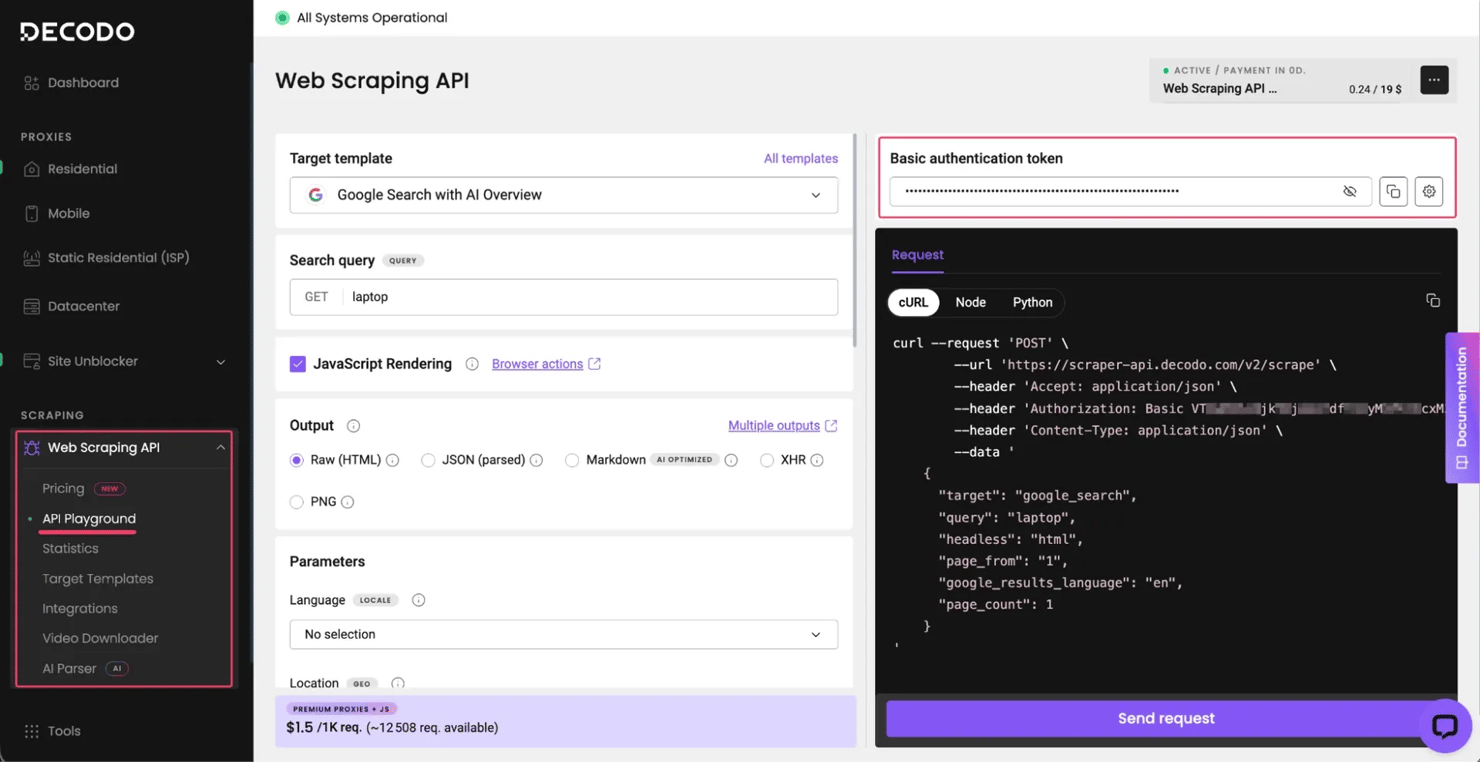
The doctor command catches the 4 kinds of misconfiguration that bit us during the build: missing DECODO_AUTH, a 401 from our API (token wrong, partial, or with surrounding whitespace), an unwritable database directory, and stale runs after a long pause. If you see [FAIL] Credentials rejected, double-check the token you pasted. The most common cause is trailing whitespace, or copying the raw username/password instead of the pre-encoded "Basic authentication token" field. The doctor command won't catch every failure mode. Malformed keywords.csv rows, locale codes we silently normalize (for example, en_US is accepted as en-us without warning), and mid-run rate-limit headers all still bite once you scale.
What a rank tracker actually measures
Traditional rank tracking captures a handful of fields: keyword, target URL, organic position, search engine, and date. That schema worked when SERPs were just 10 blue links, but on today's SERP, it misses most of what actually matters.
Modern SERPs add several surfaces above the blue links:
- Blue links / organic results. The standard 10-result list of URL + title + snippet. Every other surface here appears above or beside them on the SERP.
- AI Overview. The cited source answer block that Google generates at the top of many results pages. Cites multiple sources by URL.
- Featured snippet. The highlighted "position zero" answer box that shows a paragraph, list, table, or video directly in the SERP.
- People also ask (PAA). The expandable question block partway down the page.
- Local pack. The map + 3-business listings shown for location-intent queries ("pizza near me").
- Knowledge panel. The entity sidebar for brand or person queries ("Apple Inc.").
Tracking only the blue links misses the real question, which is whether your page appears in any of these surfaces at all. An AI Overview citation at rank 1, for example, often pulls more clicks than the organic position 1 slot below it.
Here's a quick rundown of which fields make the most impact:
Field
Why it matters
Keyword
The search query being tracked
Target URL or domain
The page or property you're tracking against
Organic position
Where the target ranks in the blue-link list (still the core, even with SERP features above it)
Search engine (Google, Bing, etc.)
Same keyword, same location, different engine, so track separately or schemas collide
Featured snippet
A snippet your domain owns gets more clicks than any blue-link slot
AI Overview
Often gets more clicks than organic position 1
PAA block
Cheap-to-track surface; expensive content opportunity if you own a question
Local pack or knowledge panel
Changes the SERP layout for location-intent and brand queries
Location (country or city)
Mandatory. The same keyword ranks differently in New York, London, and Tokyo.
Device (desktop or mobile)
Same query often returns different results on desktop and mobile; mobile-first indexing changed, which signals matter
Timestamp (always UTC)
The only sane default for comparing across regions
Here's what the location row looks like in practice, with 2 captures from the same hour:
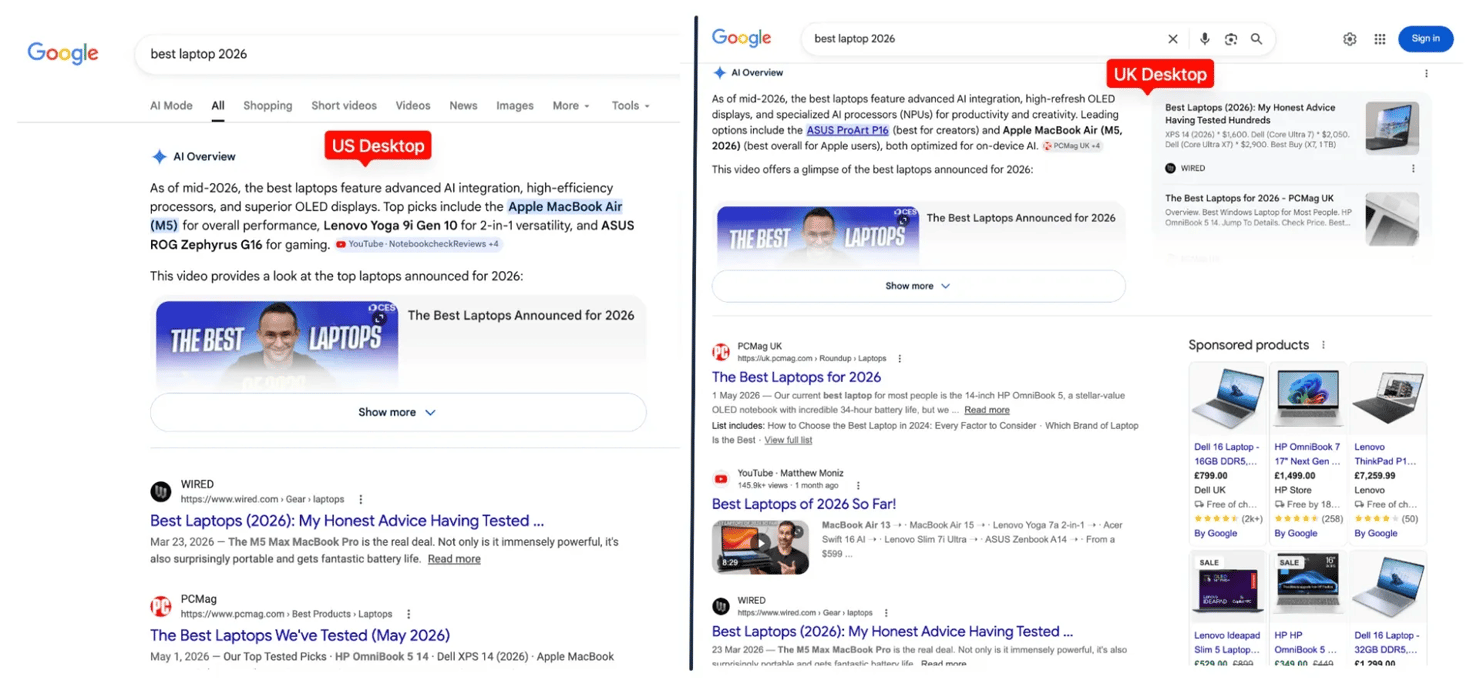
Check frequency is a design constraint, not a setting. Head terms (like "laptop") warrant daily checks, long-tail keywords (like "best lightweight 14-inch laptop 2026") do fine on a weekly cadence, and archival keywords can run monthly. The cost math comes later, and the scheduling section ties these tiers back to actual runs.
Lock the schema before moving on. The fields you pick here are the foundation for everything that follows.
If you'd rather buy than build, our best rank tracker API breakdown covers the off-the-shelf options (we're in it).

Stop scraping SERPs yourself
Google will block your IP before you finish the first keyword batch. Decodo's Web Scraping API handles proxies, CAPTCHAs, and geo-targeting so your rank tracker actually scales.
Manual rank tracking methods
You won't automate these, but they're worth keeping in your toolkit. When your scraper returns "position 3", a manual check tells you whether it's a bug or the actual SERP.
Each of the tools below earns its place differently:
- Incognito mode. Strips account personalization but doesn't change your IP-based geo. As a result, your scraper's results will differ if it proxies from a different city, which is geo-targeting working as designed rather than a bug.
- Browser extensions (MozBar, SEO Minion). These overlays are positioned on a live search page. They're useful for spot-checks but useless for tracking changes over time.
- Google Search Console. First-party, free, and accurate for your own URLs only. It reports averages over a 16-month window with no competitor data, so treat it as a source of ground truth rather than a tracker substitute.
- VPN / browser proxy. Use this for checking rankings from a specific country. The process is tedious, so it's fine only for one-off audits.
The math alone makes the case for automation: 10 keywords across 3 cities and 2 devices works out to 60 incognito searches per check, which is exactly why the next section moves into automation territory.
Technical implementation steps
Now we build. The stack: Python 3.9+, a SERP API for fetching, SQLite for storage, and a small CLI on top. You should already have the repo cloned from the setup section above. The rest of this section walks through what's in those files.
Environment setup
The environment uses a standard venv with a requirements.txt that pulls in 3 libraries: requests for HTTP, pydantic for typed models, and python-dotenv for credential loading.
The layout is modular, with 1 concern per file, so each piece stays independently replaceable:
Put credentials in .env, never in source control:
Defining data models
Typed models catch malformed API responses early, at the boundary, not 3 queries deep, where the bug is harder to trace. Pydantic gives you validation, defaults, and model_dump() serialization.
These are 2 distinct models: RankCheckConfig describes what to check, while RankResult captures what was found in the SERP.
Fetching SERP data
From here, you have 2 paths to choose between:
- Option A: Scrape Google directly. This means building your own request pipeline with rotating proxies, managing CAPTCHA, parsing HTML, and watching for DOM changes. The approach is fragile at any meaningful scale. If you're considering this path, read How to Scrape Google Search Data for the HTML structure, then How to Scrape Google Without Getting Blocked for the anti-detection challenges.
- Option B: Use the Decodo SERP API. This hands off CAPTCHA, geo, JavaScript rendering, and parsing to a service, and you get back structured JSON instead of raw HTML. The category has several vendors, but the example below uses our API. The code keeps vendor specifics in a single__post_ method, so the data model and storage stay portable.
The API-based build pays off above ~10 keywords weekly, once Option A's CAPTCHA overhead starts costing real engineering hours; below that, Google Search Console + a single proxy is cheaper than either.
The endpoint is POST https://scraper-api.decodo.com/v2/scrape. The _post method in the repo retries temporary failures (429, 5xx, request timeouts) with exponential backoff, and the parser only runs on a 2xx body. Here's the minimal payload for a parsed Google result:
With parse: true, the API returns structured JSON whose overall shape looks like this:
- Organic results – results[0].content.results.results.organic[i], each carries pos (per-page rank) and pos_overall (across-SERP rank including AI/featured blocks)
- AI Overview citations – ai_overviews[i].source_panel.items[j], each citation has url, title, source, pos
- Featured snippet – featured_snippets → items[i] (we cover the plural-vs-singular schema drift later)
- People also ask – related_questions.items[i]
- Knowledge panel – knowledge (dict)
- Local pack – local_pack (list)
The parser handles missing fields gracefully. The top-level path to the results envelope (results[0].content.results.results) is hardcoded because Decodo guarantees that the outer structure stays stable across API versions. Inside that envelope, every field lookup uses a safe default, so a missing nested field returns None instead of crashing the parser when Decodo adds, removes, or renames a field in a future release.
Sample API response
Here's a trimmed real response for "best laptop 2026" (US/desktop). Notice the dual pos / pos_overall fields and the AI Overview citations at the top:
Edge cases the parser must handle
- Handling "not in top N". If your domain isn't in the organic array, organic_position is None. Not zero, not a raised exception, not an empty string. None is a meaningful state and it should round-trip through your database (NULL) and your reports ("–"). Treating "not ranked" as a special case removes a class of bugs downstream.
- Domain matching that rejects lookalikes. Substring matching ("example.com" in url) lets example.com.evil.com match example.com. Always parse the URL with urlparse, strip www., and check the exact host or host.endswith(f".{domain}").
Parser output
Running _parse() against the response above returns a RankResult you can persist or alert on:
Other fields
(featured_snippet, ai_overview_citations, paa_question_count, local_pack_present, knowledge_panel_present, total_results, serp_url, raw_organic_count, top_results) are populated by additional mappings omitted from the excerpt above. See the repo for the full _parse().
Storing results
For a personal or team-scale tracker, SQLite is the right answer. Zero setup, single-file database, fast enough at the row counts a single-team tracker produces, and the same SQL you'd write against Postgres later.
A runs table groups checks done in the same batch; a rank_results table holds individual rows linked by run_id. This grouping is what lets you compare today's position to the previous run rather than relying on timestamps alone.
3 details in this schema are worth flagging:
- ON DELETE CASCADE lets you drop old runs and their results in one statement, which is essential for retention and prune commands
- idx_rank_results_dim makes the "previous position for this exact (keyword × location × device × locale) tuple" query fast, even at hundreds of thousands of rows
- Timestamps are stored in UTC ISO format, since that's the right default for a multi-location tracker, and local time makes debugging harder across DST and timezone changes
Comparing the current position against historical data is a single window query:
Exporting to CSV/JSON is one method of the storage class, useful for piping into Excel, Grafana, or a downstream dashboard.
Here's what a stored row looks like, with a single observation exported as JSON:
Using SERP APIs for rank tracking
We've already seen the Google Search endpoint call. The next few details cover the parameters worth tuning in production, what to budget for cost, etc.
Parameter
Purpose
target
google_search for parsed results
query
the keyword
parse
true → structured JSON
geo
country name, "City,Region,Country", ISO code, or lat/lng
locale
UI language code (e.g. en-us, de-de)
device_type
desktop / mobile / tablet and variants
google_results_language
results language
page_count
how many SERP pages to merge (1 is usually enough)
- Budgeting calls. Every check is 1 API call. 50 keywords × 3 locations × daily = 4,500 calls/month. Pricing is per call, so the frequency tier per keyword (daily / weekly / monthly) is your main cost lever, more important than concurrency or batch size. Small lists or weekly cadence are cheaper to run with Google Search Console plus a single proxy. Run the math against your actual list and our pricing page before committing.
- Verify the parameter. The obvious move is to bump page_count from 1 to 2 to see "more results" (page 2 of Google, positions 11–20). Don't do it. Testing live against 3 different queries shows what actually happens:
The pos_overall field already returns SERP-wide positions past 10 in a single call. Bumping page_count would double your bill for zero data gain.
Automated and semi-automated rank tracking
A one-off script becomes useful once it runs on a schedule, and 2 patterns are common in practice:
- Semi-automated. A CLI script reads keywords from a CSV, runs each check with a throttle delay, and saves to SQLite. You run it manually when you want results, or schedule it via cron for unattended runs.
- Fully automated. The production options are cron (Linux/macOS), launchd (macOS), Task Scheduler (Windows), or apscheduler for in-process scheduling. Add –alerts to the run, and you'll get a Slack message after each batch.
Scheduling and the frequency filter
The keyword list is a CSV with cost controls built in (column order matches the repo's keywords.csv.example):
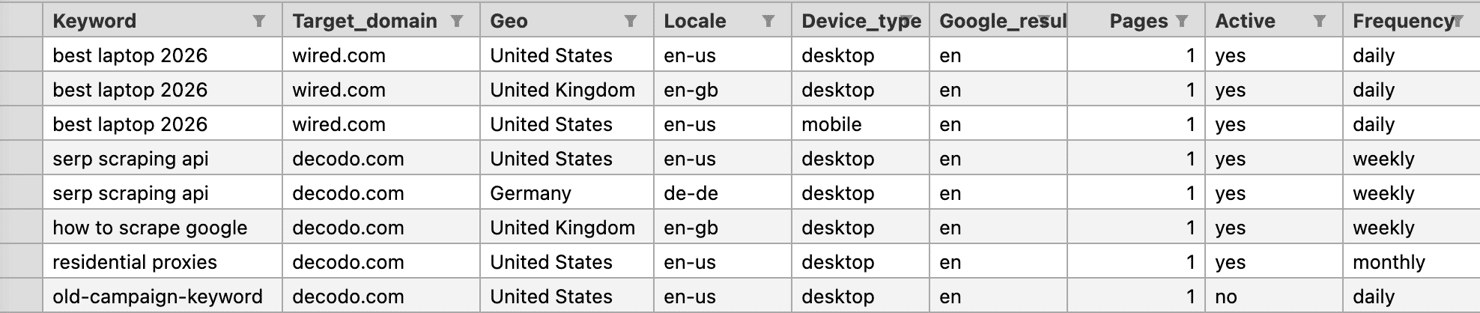
(google_results_language and pages are optional; defaults are en and 1.)
The frequency and active columns are the difference between an API budget that lasts a week and one that lasts months.
Here's what the frequency-window filter looks like in code:
This single filter prevents the double-bill problem and saves a meaningful share of calls vs. tracking everything daily. Exactly how much depends on the daily/weekly/monthly mix in your CSV.
With 8 rows in the CSV (one of them marked active=no), here's what happens on a run followed by an immediate re-run:
The second run reads the prior run's timestamp and skips everything inside the frequency window, which means zero API calls and zero cost. A daily cron at 6 am + a manual check at 7 am no longer double-bills you.
Concurrency
A ThreadPoolExecutor with a small worker pool turns a sequential batch into a faster concurrent one, bounded by your API's rate limits. SQLite uses file locking for writes, and the repo enables PRAGMA journal_mode=WAL so readers don't block on writers during concurrent runs. Also, wrap each (previous_position, save_result) pair in a threading.Lock so the prev-vs-current read isn't interleaved across workers (see BatchRunner.check_one in the repo for the exact placement).
Alerting on position change
The alerter compares the current position against the last run for the same (keyword, location, device, locale) tuple, and if the absolute change exceeds a threshold, it fires:
Slack expects {"text": "…"} while Discord expects {"content": "…"}, so the integration needs to pick the right shape by URL hostname. Discord accepts the request and returns 204 even when the payload uses Slack-shaped fields, which means that without an explicit status-code check, misshaped Discord alerts silently fail. (Teams uses a different webhook path via Power Automate with Adaptive Card payloads, so treat that as a separate integration.) On top of that, requests.post() doesn't raise on 4xx/5xx unless you call .raise_for_status(), so the alerter has to check the response itself with if 200 <= resp.status_code < 300.
When a keyword crosses the threshold, you get a one-line ping you can act on. Here's real captured output from a UK/desktop check where wired.com moved from position 1 to position 5:
evaluate() also handles the remaining cases: [NEW] when a keyword enters the SERP for the first time, [IMPROVED] for upward movement, and [DROPPED OUT] when a previously-tracked keyword falls out entirely. They share the same one-line format and differ only by prefix.
Make the alert threshold a config parameter per keyword group, not a hardcoded constant. A 3-position drop is meaningful for a head term and pure noise for a long-tail keyword, so the operator needs a way to tune sensitivity per group.
Heartbeat
Threshold alerts mean no movement = no message, so silence is unclear when something breaks. A daily heartbeat fixes that: post a one-line summary after every run, so silence means the tracker stopped. The heartbeat itself is a network call that can fail. Log delivery status locally so a dead webhook doesn't look like a dead tracker.
Here's a real captured heartbeat from a later run, where only the daily-frequency rows were due (3 of 8), and the UK desktop slot had dropped:
And here's what those alerts and the heartbeat look like when they actually arrive in Slack (a test ping, 3 [NEW] entries from a fresh run, the heartbeat with mover details, and a [DROPPED] threshold alert below it):
![Rank Tracker notification displays '[TEST] Rank tracker alert delivery check.' in dark UI listing [NEW] SERP positions](https://decodo.com/cdn-cgi/image/width=1480,quality=70,format=auto/https://images.decodo.com/how_to_build_a_rank_tracker_4_016dc1cd6d/how_to_build_a_rank_tracker_4_016dc1cd6d.png)
Tracking AI Overviews, featured snippets, and PAA
These features don't require a new architecture; they're new fields on RankResult.
- Featured snippets. The API returns featured_snippets as an items array, where each item carries url, title, and pos. Compare those against your target domain to detect ownership. The snippet type can be paragraph, list, table, or video, so store the type if you care which format Google chose.
- AI Overviews. The parser walks ai_overviews[i].source_panel.items and records ai_overview_cited (bool) and ai_overview_citation_rank (your domain's pos in the citation list). For wired.com on "best laptop 2026": True, 1. It's a visibility signal separate from organic position.
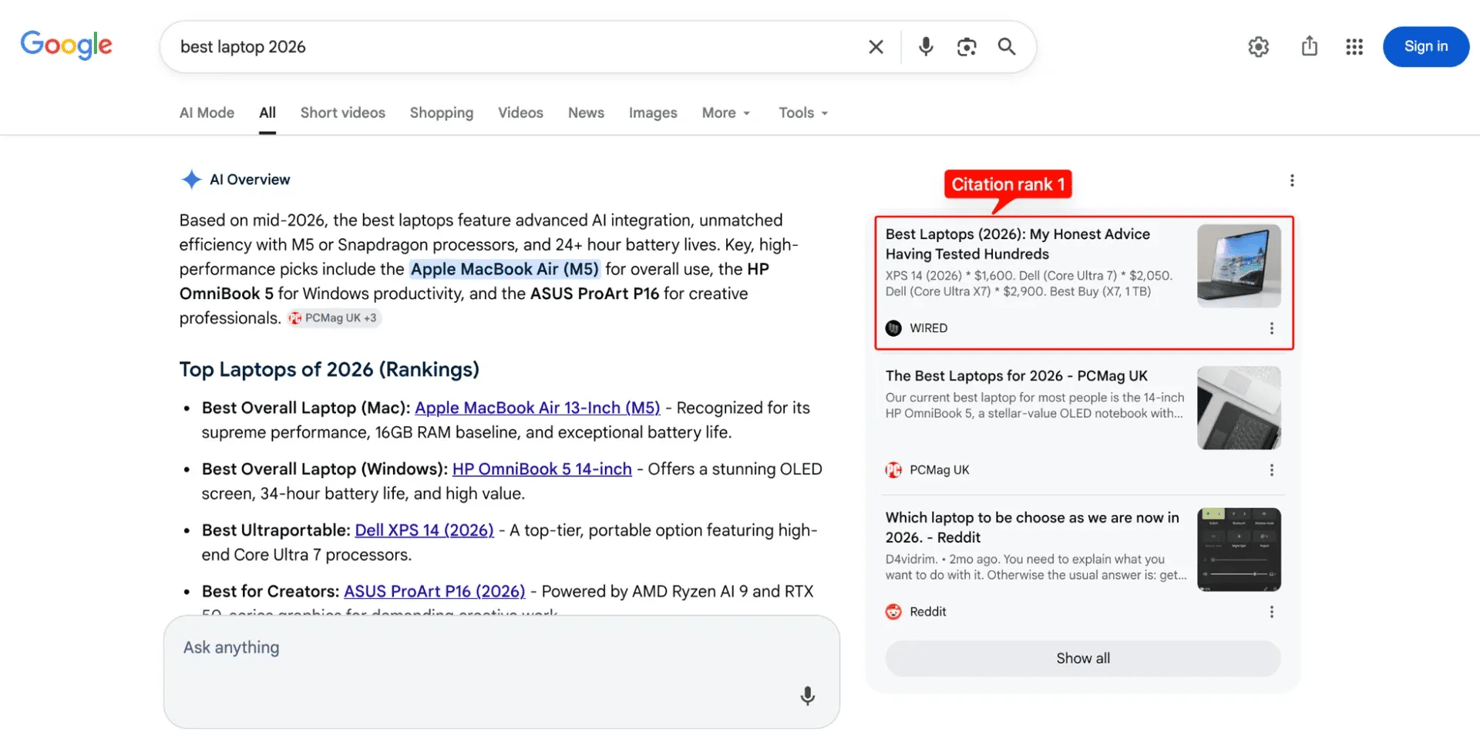
- People also ask. The related_questions block with expandable questions. The tracker records presence and question count, and if your content answers a PAA question well, your page can appear there even without a top organic slot. Per-question matching (which exact questions show your pages) is a follow-up extension; store the question strings on RankResult alongside the count if you want it.
- Local pack. The map + business list for location-intent queries ("pizza near me"), returned as local_pack. It only matters if you're tracking location-relevant keywords, but for those, it's often more important than organic position.
- Knowledge panel. The entity sidebar for brand or person queries, returned as knowledge.
- Storing feature data over time. Each feature gets its own boolean (or small structured field) on RankResult. Store it alongside the organic position so you can line up feature appearances against traffic changes. A keyword can be in position 7 organic, position 1 AI Overview citation, and not in the featured snippet. All 3 matter, and the traffic bottleneck changes over time. (Optimizing for AI-answer citations specifically is sometimes called GEO, short for Generative Engine Optimization. From a tracker's perspective, it's just another field: ai_overview_cited.)
For more on AI-driven SERP variants, including Google's AI Mode, see How to Scrape Google AI Mode: Methods, Tools, and Best Practices.
Scaling and extending your rank tracker
You'll hit 2 limits in roughly this order: more locations, more keywords.
Multi-location tracking
Make location a top-level field on RankCheckConfig, run each (keyword × location × device) pair as its own row, and store location on every result so regional comparisons fall out automatically.
The geo parameter accepts country names ("United States"), city–region–country triplets ("London,England,United Kingdom"), ISO codes ("GB"), or lat: …, lng: …, rad: … coordinates. For city-level precision on local-intent queries, you'll want exit IPs that look like they're in that city. That's what our residential proxies are for.
For IP-rotation specifics, What Are Rotating Proxies? covers the mechanics.
Scaling storage and architecture
SQLite is the right answer until one of three things is true:
- Multiple processes write concurrently
- Multiple operators edit the keyword list simultaneously
- You're producing tens of thousands of results per day
At that point, you move to Postgres with the same schema and swap your Storage class for a thin wrapper around psycopg, and the rest of the code stays untouched.
For high-volume keyword sets, split keyword submission from result collection with a job queue (RQ or Celery): the CLI enqueues, and workers fetch and save. This prevents 1 slow API response from blocking the rest of the batch.
Visualization. Feed the SQLite data into Grafana, Metabase, or a self-rendered HTML report. Even a single-file HTML report (read from the DB, rendered with f-strings or Jinja, saved to a shared folder) is more useful than CLI output for non-technical teammates.
Multi-engine expansion
Bing has a meaningful share of the AI-answer market via Copilot. Adding a Bing fetcher is the same shape: different endpoint, slightly different response schema, same downstream RankResult. Bing-specific features worth tracking are its Copilot AI answers and a slightly different local-pack format.
Operational maintenance
SERP schemas drift (the featured-snippet naming bug is one example). The other failure mode worth flagging: during one run we saw flaky 5xx responses on a few calls. The fetcher retries with exponential backoff, but in that batch the same call retried 3 times. The third attempt returned 200 OK with an unusually thin organic block, so the run completed showing pos=None for 1 keyword that was, in fact, still ranking. A retry "succeeded" at the HTTP level but the payload was incomplete. The lesson: log raw API status codes per attempt and let doctor report the per-run retry count alongside the API-call count, so a quiet 4× retry burst doesn't hide inside a "successful" run. In practice:
- Build a small canary that checks the expected fields are there in each response and warns (don't abort) when one disappears.
- Version-control the keyword list and location configs separately from the tracker code so a marketing change doesn't trigger a code review.
- Watch your API-call counter. At scale, a runaway cron is an expensive bug. Log the per-run count and the lifetime total in a doctor command.
Project reference
This section is for reference. It contains the file layout, configuration files, sample command outputs, and a CLI command reference.
What's in the repo
File
Role
models.py
Pydantic models, RankCheckConfig, RankResult, CompetitorEntry, AIOverviewCitation
fetcher.py
Our API client with retry + parser. Distinct DecodoCredentialError / DecodoAPIError
canary.py
The schema-drift validator, warns when the response shape changes
storage.py
SQLite layer with migrations, exports, retention prune
scoring.py
Composite visibility score
scheduler.py
BatchRunner, Alerter (Slack/Discord/SMTP), frequency-tier filter, heartbeat
report.py
Terminal summary + trend + competitor diff + self-contained HTML report
main.py
CLI: doctor, check, schedule, report, competitors, export, history, prune, test-alert
keywords.csv.example
Sample input. Copy to keywords.csv and edit (8 rows demonstrating frequency tiers)
tests/test_all.py
109 unit + integration tests against a captured fixture (no network needed)
examples/
cron / launchd / systemd templates for unattended runs
The 3 setup files below are reproduced inline for reference:
Configuration files
requirements.txt:
.env.example:
Sample keywords.csv.example:
Running it: Sample outputs from a real run
Your positions, scores, and timestamps will differ from the ones below. SERPs change daily, AI Overview presence changes run-to-run, and the shapes shown here are from a specific run in May 2026.
1. First-time setup verification. This runs the end-to-end preflight described above:
An accounting note: doctor's smoke-test against the live API is 1 real billable call, but it isn't recorded into the lifetime counter (which only sums BatchRunner runs). Expect a small offset between Decodo's billing dashboard and the lifetime number doctor prints.
2. Verify alert delivery before relying on it. Once you've set ALERT_WEBHOOK_URL (or SMTP credentials) in .env, this posts a sample message through every configured channel. It reports per-channel HTTP status, including 4xx responses that older code would silently treat as "delivered":
3. Run 1 batch. See the per-keyword output and the API-call cost at the bottom (add –alerts once ALERT_WEBHOOK_URL is set; without it, alerts log to stderr instead of Slack):
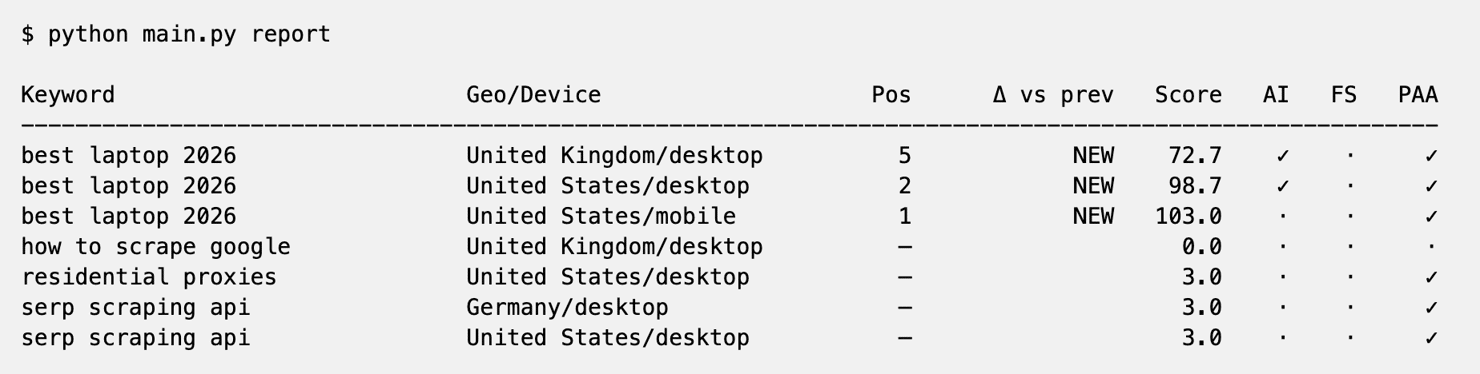
4. See the report. This is the summary view, showing the latest snapshot per (keyword × geo × device × locale) with delta vs prior run and visibility score:
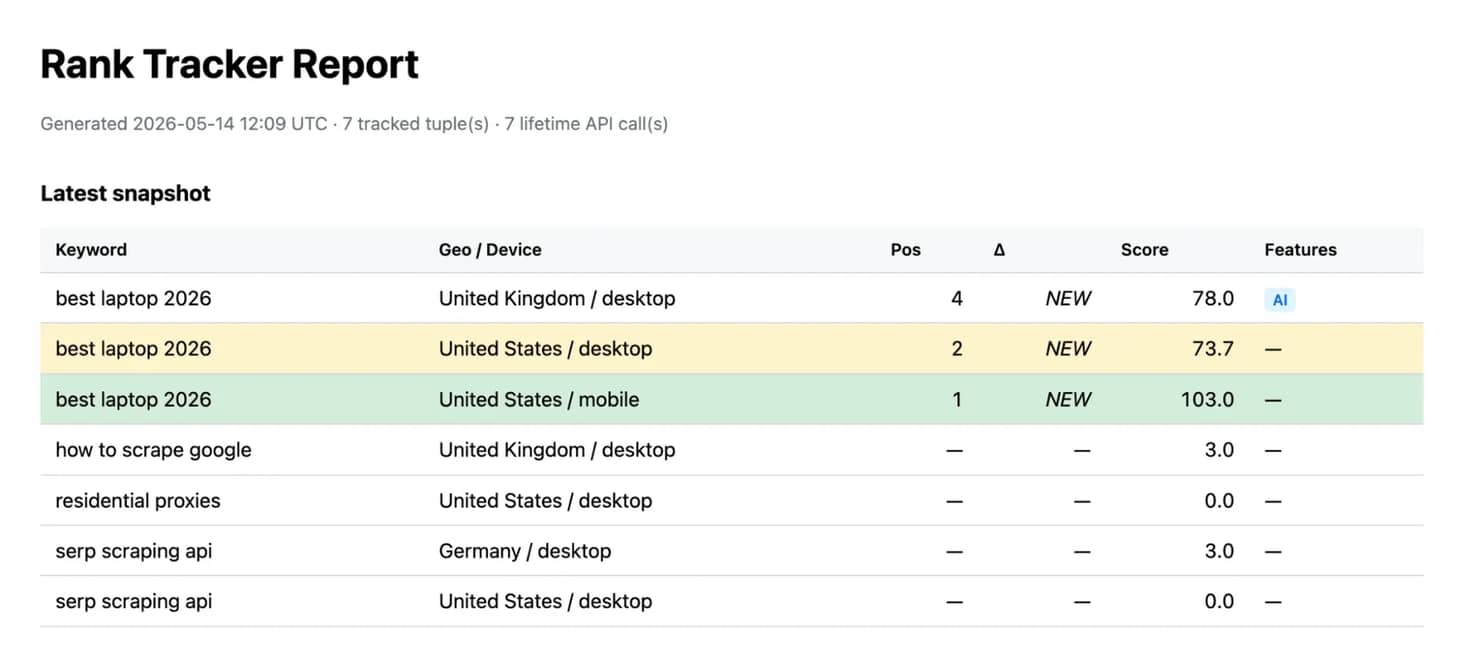
5. Share-friendly HTML version. Same snapshot data as the terminal report, styled and self-contained. Drop it in a shared folder or attach to an email. The header carries the generation timestamp so a reader weeks later knows when the snapshot was taken:
Here’s the result:
Reference: Competitors, trend, export, prune
The remaining subcommands work the way you'd expect from their flags. Examples are real captures, but the headline outputs aren't repeated. Run them yourself once the daily flow above is working:
Command
What it does
python main.py competitors –keyword "best laptop 2026" –location "United States" –device desktop
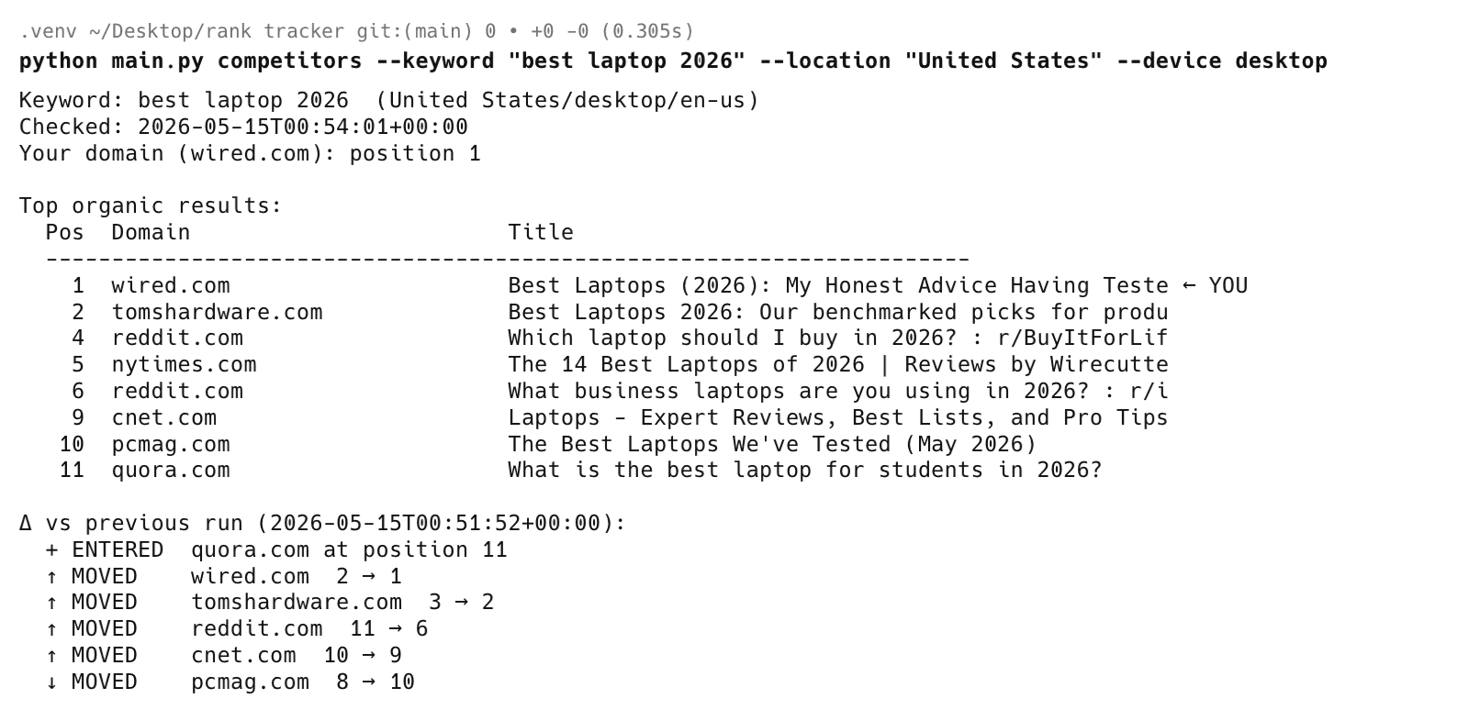
Top-N organic for a keyword with a ← YOU marker, plus a diff vs the previous run (who entered, who dropped, who moved). The view that answers "are competitors stealing my position?"
python main.py report –keyword "best laptop 2026"
Chronological trend for 1 keyword, position, score, AI/FS flags per run
python main.py report –html report.html
Self-contained HTML report you can email or open in any browser
python main.py export –format csv –output results.csv
All rows or 1 run (–run-id N) to CSV or JSON
python main.py prune –older-than-days 365 –yes
Retention: drop runs older than N days + VACUUM. Dry-run by default; needs –yes to act
python main.py schedule –every 86400
Foreground daemon. Runs check on a fixed interval. Use cron/launchd/systemd for unattended scheduling (templates in examples/)
python main.py history –keyword "…"
Raw chronological dump of every run for 1 keyword. Useful for debugging an unexpected drop
Of the reference commands, the competitors view is the one that prints competitor moves vs the previous run. Sample output (captured after a second daily run had landed, so the diff has a prior snapshot to compare against):
Wrapping up
A modern rank tracker has to do more than record an organic position. AI Overview citations, featured snippets, and "People also ask" blocks now decide where the clicks go, and the same query ranks differently across locations and devices. Tracking only the blue-link slot misses where most of the traffic is actually shaped. The Python build in this article covers all of it across as many keywords, locations, and devices as your team needs, with cost-aware scheduling and alerts that fire only on meaningful position changes. The Decodo SERP Scraping API handles the network layer (geo targeting, CAPTCHAs, and JavaScript rendering), and a free trial is enough to run the setup end-to-end before scaling up to production volume.

Millions of keywords, 195+ locations, zero bans
Decodo's rotating residential proxies let your tracker pull localized SERP data across 195+ countries without burning through IPs every session.
About the author

Kipras Kalzanauskas
Senior Account Manager
Kipras is a strategic account expert with a strong background in sales, IT support, and data-driven solutions. Born and raised in Vilnius, he studied history at Vilnius University before spending time in the Lithuanian Military. For the past 3.5 years, he has been a key player at Decodo, working with Fortune 500 companies in eCommerce and Market Intelligence.
Connect with Kipras on LinkedIn.
All information on Decodo Blog is provided on an as is basis and for informational purposes only. We make no representation and disclaim all liability with respect to your use of any information contained on Decodo Blog or any third-party websites that may belinked therein.