Asynchronous Web Scraping in Python: Build Faster Scrapers With asyncio and aiohttp
A scraper that fetches pages one at a time spends most of its time waiting on the network. Asynchronous web scraping in Python (built on asyncio and aiohttp) fixes that by handling many requests at once on a single event loop. This guide walks through building a working async scraper, then covers the proxy, retry, and anti-bot escalation patterns you'll need at scale.

Justinas Tamasevicius
Last updated: May 18, 2026
25 min read
TL;DR
- Async scraping in Python uses asyncio and aiohttp to send many requests at once on a single thread. A multi-URL scrape finishes in seconds instead of minutes.
- The baseline pattern combines ClientSession for connection pooling, asyncio.Semaphore for concurrency, split 5xx/429 backoff for retries, and JSON/CSV for export.
- At scale, add rotating residential proxies – and escalate to TLS impersonation (curl_cffi) or headless browsers (Patchright) when targets start blocking.
- For the hardest targets, a managed service like Decodo's Site Unblocker or Web Scraping API removes the anti-bot maintenance entirely.
What is asyncio and how does it work?
Python's asyncio is a standard-library module for writing concurrent code that runs on a single thread. Instead of creating operating-system threads, it uses an event loop that schedules coroutines, pausing one whenever it reaches an I/O wait and passing the CPU to another. For network-bound work like web scraping, that pause-and-switch pattern is what makes async faster.
Three concepts matter:
- Event loop – the scheduler. It watches which coroutines are ready to run and which are waiting on I/O, and interleaves them.
- Coroutine – a function defined with async def. Calling it returns a coroutine object; it doesn't run until awaited.
- Task – a coroutine scheduled on the event loop. asyncio.create_task() schedules one; asyncio.gather() schedules many and waits for all.
Here's a minimal example with no network calls, so you can see the interleaving:
Running it produces interleaved timestamps that show the overlap directly:
All 3 coroutines start in the same second, each pauses during its asyncio.sleep(), and the event loop resumes each when its timer expires – C (1s) finishes first, then A (2s), then B (3s). Total time is the slowest task, not the sum. Real HTTP requests behave the same way: the slow part is waiting for bytes, which asyncio overlaps across many tasks.
asyncio gives you 3 ways to wait on a batch:
- asyncio.gather(*tasks) – waits for every task and returns results in the same order as the inputs. The * in *tasks is Python's argument-unpacking operator; it expands a list into separate positional arguments, so gather(*[a, b, c]) is the same as gather(a, b, c). Use gather when you need the full batch before continuing.
- asyncio.as_completed(tasks) – yields tasks in the order they finish. Use it when you want to process each result as soon as it arrives, for example to write to disk without waiting for the slowest response.
- asyncio.TaskGroup() (Python 3.11+) – an async context manager. You create tasks with tg.create_task() inside the async with block, and the group applies structured concurrency: if any task raises an exception, every other task in the group is canceled, the block waits for cleanup to finish, then raises an ExceptionGroup that bundles the failures together. (ExceptionGroup is a Python 3.11 type for grouping multiple exceptions into one; you catch it with the new except* syntax – note the asterisk). The gather() function is still common for simple batch waits, but TaskGroup is the safer default when failures matter, because it doesn't leave tasks running after another task in the group has already crashed.
The rest of this guide uses gather() because it keeps the examples short and matches the 3.10+ baseline. If you're on 3.11 or later and want stricter failure semantics, replace any await asyncio.gather(*tasks) with a TaskGroup block; the rest of the code doesn't change.
asyncio isn't the same as threading or multiprocessing. Threads run multiple OS threads and work well for I/O-bound code that can't be rewritten in async form. Multiprocessing runs multiple Python processes and is typically the right choice for CPU-bound work like image processing. asyncio is the lightest of the three: one thread, one process, thousands of coroutines.
For scraping, where nearly all the time is network I/O, asyncio handles more concurrent requests with the same amount of memory – a coroutine costs a few KB, while an OS thread reserves around 8 MB of stack on typical Linux defaults. The trade-offs between these models are covered in the guide on concurrency vs. parallelism.
Synchronous vs. asynchronous web scraping: performance compared
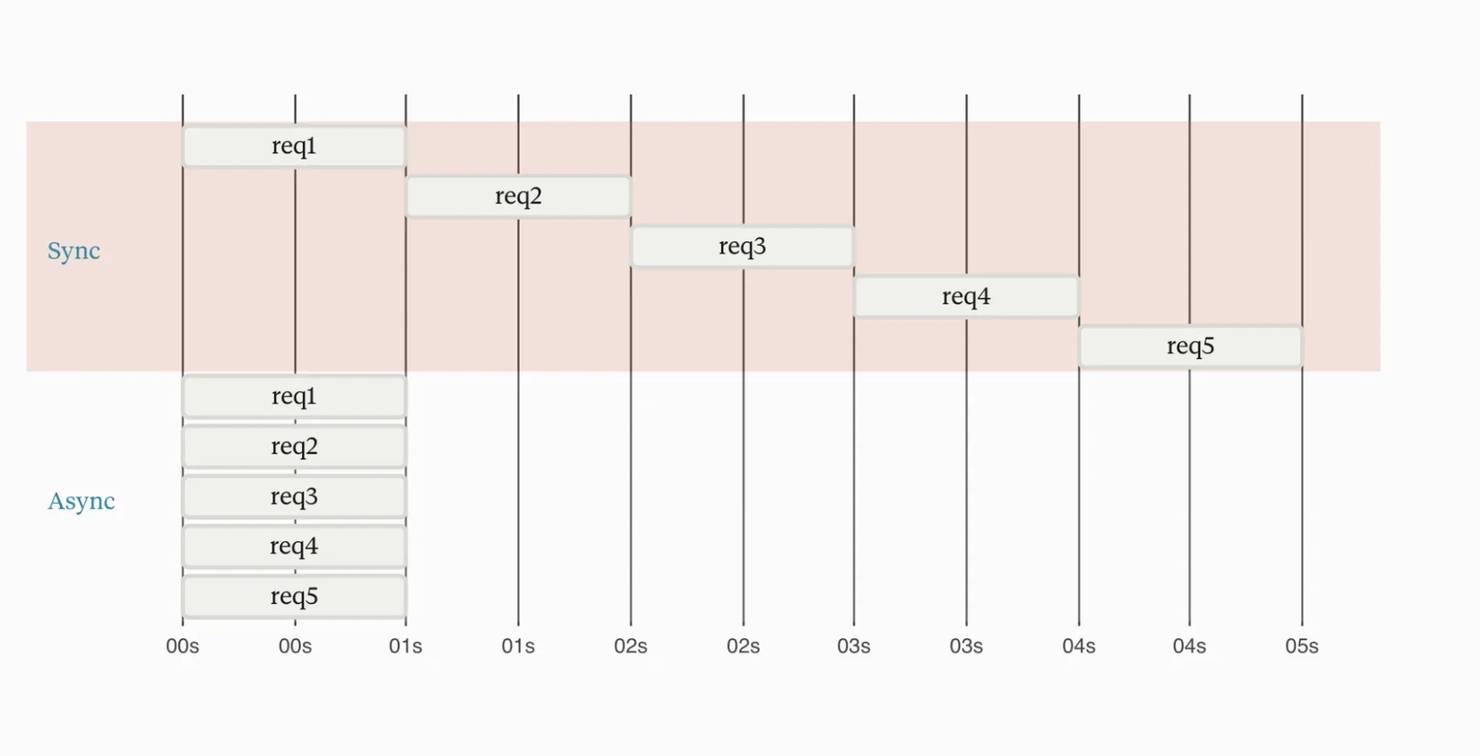
Synchronous web scraping sends one request at a time and waits for each response before starting the next. Asynchronous web scraping sends many requests concurrently on a single thread, overlapping the network waits – which is why an async scraper finishes a 50-URL batch in seconds where a sync one takes minutes. In sync scraping, every network wait runs one after another, adding up in real time. Async overlaps them inside the time of the slowest one:
To verify the speedup, build the same scraper twice – once with Requests, once with aiohttp – and run both against the same target. The example below fetches the Hacker News front page, extracts story links, then fetches each story page and parses out title, score, author, and comment count. Different HTTP clients suit different jobs; the guide on HTTPX vs. Requests vs. AIOHTTP covers when to pick which.
The synchronous baseline looks like this:
If you used the href on span.titleline > a, you would scrape the external article. The HN discussion URL has to be built from the row's id attribute (the story ID), which is why extract_story_urls reads row.get("id") and constructs item?id=… directly. To avoid this on your own targets, inspect the element in browser devtools and check the actual href / id before trusting a selector.
The async version reuses the same extract_story_urls and parse_story functions and only changes the fetch strategy. Save the file as async_scraper.py next to sync_scraper.py in the same directory so the import resolves:
To measure the speedup without sending heavy load to a real target (or being rate-limited during the benchmark), the cleanest demo is to point both scrapers at httpbin.org/delay/1, an endpoint that waits one second before responding. Each request has roughly one second of network wait, so the sync scraper pays it N times and the async scraper overlaps them.
Output from a real run on a residential connection (your numbers will vary with network round-trip time and httpbin's load, but the ratios stay in the same range):
Requests
Sync (s)
Async (s)
Speedup
10
32.67
2.63
12.4x
25
97.36
6.54
14.9x
50
169.85
7.07
24.0x
Each request to httpbin.org/delay/1 costs 1 second of server delay plus 2-3 seconds of network round-trip and httpbin's variable load, so the per-request wall time on a residential link is closer to 3-4 seconds than to 1. The async time stays close to flat as N grows until the concurrency cap is fully used, which is why the speedup widens with batch size.
The same pattern holds against real-world targets (HN, news listings, product pages), but absolute numbers depend on the target's response time, your network latency, and how strictly the target rate-limits a single IP. A high-volume scraper reaches the rate-limit before reaching the throughput maximum, which is why proxies (covered later in this guide) matter.
Sync scraping isn't always worse. It's the better choice when:
- You need to scrape a single page, where the setup cost of asyncio doesn't pay off. The Python web scraping guide covers the sync approach end to end.
- You're debugging selectors and want a fast print-then-inspect cycle.
- The target requires sequential interaction (login, then form, then result) where request order matters and there's no parallelism to exploit.
For anything past a few dozen pages against a tolerant target, async is the right default.
Setting up your async web scraping project
A clean project layout and a proxy slot set up from the start will save an hour of refactoring later. Proxies matter because a high request rate from a single IP often gets blocked quickly on strict targets, and adding proxy auth to a scraper afterwards usually means modifying every fetch call; the article on residential proxies explains why rotating residential IPs help at scale.
The stack is Python 3.10 or newer, aiohttp on the 3.13.x line, beautifulsoup4 4.14 or later, and python-dotenv for credentials. Why Python 3.10 as the minimum: the str | None union syntax used in the type hints below requires it, and the optional escalation tools (curl_cffi 0.14+ and Scrapling) both require 3.10+. Python 3.11 or later also enables asyncio.TaskGroup and the asyncio.timeout() context manager; 3.14 adds the python -m asyncio ps introspection CLI covered later.
If you have uv installed – the Rust-based package manager from Astral that became one of the most-adopted Python install tools in 2025-2026, 10-100x faster than pip on most workloads – the setup is 2 commands inside a fresh project directory:
If you use pip, the equivalent works the same, just slower:
For one-off scripts where setting up a project is more than you need, uv also supports PEP 723 inline script metadata: declare the dependencies inside a comment block at the top of a single .py file and run it with uv run, which builds a temporary environment automatically when you run the script.
This is useful for sharing a working scraper as one file: the recipient runs uv run scraper.py and the dependencies install automatically. The full multi-file project layout below is still the right structure for anything you'll maintain long-term.
aiohttp's stable releases don't support HTTP/2 (open issue upstream but not yet released); if you're scraping targets that serve measurably different content or prioritize HTTP/2 clients, HTTPX is the common alternative (async API, HTTP/2 support, slower at raw throughput). For most scraping work where the target serves plain HTTP/1.1 HTML, aiohttp's throughput advantage makes it the better choice.
Lay out the project with one file per responsibility. Small files are easier to test and change than a single scraper script that does everything:
Store your Decodo residential proxy credentials in a .env file at the project root. Keeping them out of code means the repo stays safe to commit, and rotating credentials is a one-line change. The username and password come from your Decodo dashboard once your residential plan is active; the same gateway host and port work for rotating, sticky, and geo-targeted requests, with the differences encoded in the username string.
If you don't have proxy credentials yet, leave DECODO_USER and DECODO_PASS unset – PROXY_URL will default to None in config.py and the rest of this guide will run against a tolerant target without a proxy. Add real credentials before increasing volume against any site that enforces rate limits.
Load those values in config.py so every module reads them from a single place:
That's the practical default for general scraping in 2026. The Sec-Ch-Ua and Sec-Fetch-* headers are sent by every modern Chrome and their absence is a strong "this is automation" signal, so they belong in the default set even when a target doesn't strictly check them today.
The polite alternative in the comment is the right choice for cooperative targets where the relationship matters more than looking like a browser. Pair this header set with curl_cffi's TLS impersonation later in this guide for a stack that matches Chrome at both the TLS layer and the HTTP-header layer.
Before you write any extraction logic, confirm aiohttp is installed correctly and the network is working. Save the script below as verify.py in the project root, then run python verify.py (with the virtual environment activated). Expect a 200 status and a JSON body echoing your User-Agent. If you see ModuleNotFoundError: No module named 'aiohttp', your virtual environment isn't active – re-run source .venv/bin/activate.
If this fails, fix networking or dependency issues before continuing; debugging is much harder once retries and proxies are added on top.
Is uvloop still faster than asyncio?
On Linux and macOS, uvloop is a drop-in asyncio event loop built on libuv, the same C library that Node.js uses for its event loop. It used to deliver a 2x to 4x throughput improvement on network-heavy workloads. On Python 3.13 and 3.14 the difference has shrunk for HTTP scraping – CPython's native asyncio loop has improved enough that the difference varies by workload, sometimes in either direction. Treat uvloop as a measure-then-decide optimization, not an automatic default.
Where uvloop still helps: code that does lots of small awaits in tight loops, timer-driven workloads, and WebSocket servers that broadcast to many clients at once.
The current API is uvloop.run(), a drop-in replacement for asyncio.run() (the older uvloop.install() relies on asyncio.set_event_loop_policy(), deprecated in Python 3.14 and slated for removal in 3.16). On Windows, use asyncio.run() instead since uvloop doesn't run there.
Sending async HTTP requests with aiohttp
The async benchmark above used aiohttp.ClientSession in its simplest form, but the most common performance bug in async scrapers comes from a misunderstanding of what it is. The ClientSession class is a connection pool, not a convenience wrapper around session.get(). It holds open TCP and TLS connections to the same host so the next request can reuse them – what HTTP calls keep-alive. (Each new HTTPS request normally costs an extra round-trip to set up the TCP connection, plus a few more for the TLS encryption handshake; keep-alive lets the next request skip both). Readers used to sync requests can compare the patterns in the guide on Python Requests.
Creating 1 session per request discards the pool, forces a new TCP connection and TLS handshake every time, and slows the scraper down to something close to sync speed. The correct pattern is 1 session for the whole run:
A few details in this snippet matter for production scrapers:
- headers=DEFAULT_HEADERS on the session applies to every request inside the async with block. Set the User-Agent once there rather than on every session.get() call.
- timeout=ClientTimeout(total=30, connect=5, sock_read=10) on the session sets a default timeout for every request without you having to pass one to each session.get(). The aiohttp default is total=300 with no other per-phase caps, which is too generous for most scrapers. Splitting the budget across connect (max time to open the connection) and sock_read (max time between 2 chunks of bytes) lets a stuck connect or a stalled read fail in seconds rather than waiting for the full total.
- raise_for_status=True on the session calls response.raise_for_status() automatically on every response, so 4xx and 5xx codes turn into ClientResponseError exceptions you can catch centrally.
One security note on raise_for_status: by default the exception's message attribute can include the original Authorization header value if the server echoes it back. If you're using basic auth on the proxy or target, either set raise_for_status=False and check status manually, or strip the header from logs before recording the exception.
If the target requires cookies, set them on the session so every request sends them automatically:
Custom headers per request (for example, a referer that changes per URL) go on the individual session.get() call and override the session defaults for that request only.
Parsing HTML and extracting data with Beautiful Soup
aiohttp returns HTML as a string; Beautiful Soup is the parser this guide uses for the reason most scraping stacks default to it: forgiving with malformed HTML, clean CSS-selector API, no extra binary dependencies. Keep parsing in its own function, separate from fetching, so you can save a few HTML files and iterate on selectors without making any network requests. More patterns for common HTML structures are in the guide on Beautiful Soup web scraping, and the trade-offs between selector styles are covered in XPath vs. CSS selectors.
The Hacker News story page has a predictable structure: one tr.athing row per story on the front page, and each story page has a span.titleline, a span.score, an a.hnuser, and a comment count inside td.subtext. The parser below handles all fields and returns None or 0 when a field is missing rather than crashing:
Returning a dictionary (rather than a tuple or a custom class) keeps the parser easy to use with JSON and CSV exporters. Defensive checks on every select_one result matter because HN occasionally serves a deleted or flagged story with fewer fields; crashing on None.get_text() in the middle of a 500-URL run wastes every successful response that came before it.
One note on the html.parser backend: it's part of the Python standard library, so you don't need lxml or html5lib installed. It's a bit slower and more forgiving of malformed HTML than lxml. For large pages or limited CPU, switch to lxml and the only change is the second argument to BeautifulSoup().
selectolax vs. Beautiful Soup: when parsing becomes the bottleneck
At a small scale, Beautiful Soup parsing time is small compared to network time. At a large scale, parsing can take longer than fetching. selectolax is a Python wrapper around the Lexbor HTML parser (written in C) and is significantly faster than both Beautiful Soup backends. Running 500 parses of the same ~700 KB HN story page on Python 3.14:
Parser
Time per parse
Speedup vs. baseline
Beautiful Soup (html.parser)
176.56 ms
1.0x (baseline)
Beautiful Soup (lxml)
101.32 ms
1.7x
selectolax (lexbor)
3.21 ms
54.9x
selectolax is also 31.5x faster than Beautiful Soup with lxml, which is the fastest Beautiful Soup configuration. On a 500-URL scrape, that's the difference between 50 seconds of parsing and 1.6 seconds. v0.4.7 is the current release, and the underlying lexbor backend is actively developed and more spec-compliant than the older, now-deprecated modest backend.
Here’s the code:
The API is close enough to Beautiful Soup that porting a parser is straightforward: select_one becomes css_first, select becomes css, get_text becomes text, and attribute access uses .attributes. The trade-off is that selectolax is stricter about malformed HTML; pages with deeply broken markup still parse better with Beautiful Soup. A common pattern: try selectolax first, use Beautiful Soup as a backup if a required selector returns None.
Controlling concurrency with asyncio.Semaphore
To limit concurrent requests in asyncio, wrap each fetch task in an asyncio.Semaphore(N) – only N tasks can hold the semaphore at once, the rest wait. This is the standard pattern for capping concurrency in aiohttp scrapers, and it solves the hidden problem in asyncio.gather(): gather does not limit how many tasks run at once. Pass 500 tasks and aiohttp tries to open 500 connections, which can overwhelm the target, trigger rate limiting or IP bans, and sometimes reach your local OS file-descriptor limit (default 1024 on Linux) before the requests even reach the server. Broader anti-detection techniques are covered in the guide on anti-scraping techniques.
Wrap the fetch inside an async with on the semaphore and you get a configurable concurrency cap with about 3 extra lines of code:
The right value for CONCURRENCY depends on three things: how tolerant the target is, how large your proxy pool is, and how fast each request responds. A safe starting point for most public targets is 10 to 20; increase only if the target accepts it and responses remain successful. A pool of rotating residential IPs lets you run higher concurrency because each request appears to come from a different client. (For cooperative targets where IP reputation isn't a factor, datacenter or ISP proxies are cheaper per GB; residential is the safer default when targets actively block).
Two throttles exist at different layers and they work together cleanly. asyncio.Semaphore caps coroutine-level concurrency: how many fetch tasks are allowed to run at once. aiohttp's TCPConnector caps connection-level concurrency: how many TCP sockets the pool will open. The connector defaults to limit=100 total and limit_per_host=0 (unlimited per host), which is too permissive for most scraping. Passing an explicit connector narrows both:
Using both a semaphore and a configured connector is the layered approach: the connector limits the network layer and the semaphore limits the task queue. They cover different failure modes.
The await asyncio.sleep(random.uniform(0.1, 0.5)) inside the semaphore adds a small randomized jitter after each request. It is not a replacement for proxies, but it widens the time between requests, which weakens the fixed-interval pattern that simple bot detectors look for.
Integrating proxies into async scraping with aiohttp
Async increases the need for proxies. Sync scraping sends 1 request at a time from your IP, so even a slow rate-limiter might not detect it. Async can send dozens at once from the same IP, which triggers blocks far faster. Rotating proxies change the source IP per request; the post on rotating proxies covers the models in detail.
aiohttp accepts a proxy URL as a keyword argument on session.get(). With Decodo residential proxies the URL format is http://YOUR_PROXY_USERNAME:YOUR_PROXY_PASSWORD@host:port, which is exactly what the config.py file built earlier:
Calling an IP-echo endpoint 3 times concurrently through a rotating gateway returns 3 different IPs, which confirms rotation is working.
3 patterns cover most production needs, and on Decodo they all work through the same gateway host and port; what changes is the username string. Decodo's username format is user-<your_username> with optional parameters appended as -key-value pairs:
- Per-request rotation. The bare user-<your_username> form gets a new IP on every connection. This is the right choice for high-volume scraping where each URL is independent.
- Sticky sessions. Appending -session-<id> keeps the same IP across requests carrying that identifier (for example, user-jane-session-abc123). Use it when a login flow has to be followed by data fetches on the same identity. An optional -sessionduration-<minutes> sets how long the IP is held.
- Geo-targeted requests. Appending -country-<code> (for example, user-jane-country-de) routes the request through an IP in that country. City and US state are also available (-city-new_york with underscores for multi-word cities, -state-us_california with the us_ prefix), as is -zip- for US ZIP codes.
Combining the semaphore from the previous section with the proxy parameter shown above gives you controlled concurrency plus IP rotation in one pattern:
Same structure as throttled_fetch, with 1 extra keyword argument. The semaphore controls how many requests run at once; the proxy URL rotates the source IP per request. Together they make a scraper that's more likely to stay inside the target's tolerance and look like traffic from many clients rather than one. With Decodo's rotating proxies, rotation happens server-side inside the gateway, so the snippet above is the full integration.
One implementation detail worth knowing: rotation happens per TCP connection, not per request. In the async pattern above, every concurrent task opens its own TCP connection to the gateway, so each concurrent request gets a different IP and rotation appears per-request to the target. But if you reuse a single ClientSession to make sequential requests one after another, aiohttp's keep-alive will reuse the same TCP connection and the gateway will return the same IP across those sequential calls.
Verified live on Decodo's residential gateway: 20 concurrent requests through a shared session returned 20 distinct IPs, while 3 sequential requests through the same session returned the same IP 3 times. For the async-scraping pattern this guide builds, this is invisible – concurrent tasks open separate connections, so rotation behaves as expected. It's the kind of detail that causes problems for anyone adding the same proxy URL to a serial script later. (With HTTP/2, a single TCP connection carries many requests, so rotation behavior depends on the gateway's policy. aiohttp doesn't support HTTP/2, but if you switch to HTTPX or curl_cffi, test rotation behavior before assuming it matches the per-TCP model).
Async error handling, retries, and resilience
Every production scraper hits the same failures: timeouts, connection resets, 429 rate limits, 403 blocks, and the occasional 500 from an overloaded upstream. The goal is to let one failure fail one URL, not the whole run. Retry patterns in Python are covered more broadly in retry failed Python requests.
Wrap each fetch in try/except, catch the exceptions that async HTTP calls raise, and retry with an increasing delay before stopping. The delays follow an exponential pattern (1, 2, 4 seconds) plus a small random jitter, which spreads the retries in time so many failures don't retry at the same moment and overwhelm the target again.
A few design choices in that function are deliberate:
- ReturningNoneon final failure rather than re-raising lets asyncio.gather() collect results without crashing the whole batch. The caller filters None out before exporting.
- The semaphore wraps the request, not the whole retry loop. Network-error retries release the slot during the backoff sleep (the sleep is in the except clause, outside async with semaphore). HTTP-status retries hold it, since the 5xx/429 sleeps run inside the async with block – move them outside the semaphore if you need tighter concurrency control.
- Only retryable statuses trigger retries. A 403 usually means the request was identified and banned; retrying the same URL with the same fingerprint doesn't change the outcome. A 429 or a 5xx is worth retrying because the condition is often temporary.
- Timeouts count as errors, thanks to asyncio.TimeoutError being in the except tuple.
The 2 backoff schedules above are deliberately asymmetric (the code comment explains why). On the 429 path, parse_retry_after uses the server's Retry-After hint when set, since that tells you exactly how long to wait. In testing for this post, 5 concurrent requests to one target all returned 429; the rate limit cleared only after roughly 15 minutes. A retry window under a minute would not have been long enough, which is why the 2 schedules are split.
On Python 3.11 and later, asyncio.timeout() is a context-manager alternative to aiohttp.ClientTimeout that cancels everything inside the async with block when the deadline is reached, not just the HTTP call. Use it when a single logical operation spans several awaits (fetch, parse a response header, then fetch a follow-up URL) and you want one deadline for all of them. For a plain single session.get(), aiohttp.ClientTimeout is equivalent and keeps the timeout next to the request it applies to.
aiohttp client middleware: retry and logging examples
The retry function above mixes 3 concerns in one place: HTTP, retry policy, and logging. aiohttp 3.12 added client middleware, which lets you split each concern into its own async function and apply it across every request on the session. For scrapers, it removes the per-call wrapper pattern.
A middleware is an async function that takes a ClientRequest and a handler, calls the handler to get a ClientResponse, and returns it. You register middleware on the session via the middlewares parameter:
Two details matter. First, order matters – middleware runs in the order listed, so logging_middleware processes the request before retry_middleware tries to retry it, and the response goes back through the chain in reverse order. Second, if a middleware calls session.get() itself, it must pass middlewares=() on the inner call, or the middleware chain re-enters itself and creates infinite recursion.
The retry function from earlier in this section is still useful when you want per-call control or need to support pre-3.12 aiohttp – which is why the production scraper.py below uses it. Middleware is the cleaner choice for new code on aiohttp 3.12+ when the same retry/logging policy applies to every request in the session.
For failures that still fail after 3 retries, a common pattern is a second pass. Collect the URLs that returned None, wait a minute, and run them again with lower concurrency. Most transient issues resolve on the second pass; the ones that still fail probably never will. Python's standard logging module is enough to track this; configure it once at the top of your main script:
How to debug a stuck asyncio scraper (python -m asyncio ps in 3.14)
Sometimes a scraper doesn't crash with errors; it just stops making progress. Half the tasks are stuck in some unknown await, the rest are waiting on a semaphore, and the logs stop showing new entries. Python 3.14 added a built-in CLI for this case that attaches to a running Python process and prints every asyncio task, what coroutine it's currently in, and which task is waiting on which.
For programmatic use, asyncio.capture_call_graph() and asyncio.print_call_graph() give the same data inside the running process. A common pattern on Linux and macOS is to connect them to a SIGUSR1 signal handler so you can dump the task tree on demand without stopping the scraper. The introspection CLI is Python 3.14 only, so it doesn't help on older versions; for a new scraper, choosing 3.14 includes this debugger by default.
Exporting scraped data to JSON and CSV
Once the scraper returns a list of dictionaries, 2 exports cover almost every downstream consumer: JSON for pipelines and APIs, CSV for spreadsheets and quick inspection. Python's standard library does both without extra dependencies. More storage options (databases, cloud buckets, parquet) are covered in how to save your scraped data.
Include enough metadata in the output to answer basic questions months later without re-running the scraper: when did this run? how many URLs did it attempt? How many succeeded? The export functions below put the metadata in the JSON wrapper and add a timestamp prefix to every filename so runs don't overwrite each other:
Three flags in these exporters matter in production. The ensure_ascii=False flag on json.dumps keeps non-ASCII characters (accents, CJK, emoji) as readable text instead of \uXXXX escape sequences, which is easier to read and produces smaller files. newline="" on the CSV open call is required on Windows to prevent blank rows between records. Timestamps use UTC via datetime.now(timezone.utc) so runs from different machines or time zones stay comparable.
The full scraper combines the exporters with the parser, retry function, and proxy config from earlier sections:
Common asyncio and aiohttp scraping mistakes (and how to fix them)
Most async scraping problems don't crash – they degrade. The scraper still runs and produces output. The bug only appears when you check the data and find it wrong. The list below covers the most common failure modes once your scraper grows beyond a small example.
- Forgettingawait. A bare fetch(session, url) call returns a coroutine object, not a result. The bug appears as a list of strings like <coroutine object fetch at 0x…> instead of HTML, or as a RuntimeWarning: coroutine was never awaited in the logs. Type checkers in strict mode catch most cases; enabling strict mode for your scraper module is worth the one-time annotation cost.
- Mixing Requests into async code. A single sync requests.get() inside an async function blocks the event loop for the entire duration of that call, blocking every other coroutine in the program. If you're inside async def, all HTTP must go through aiohttp (or any other async client). The same warning applies to file I/O, database drivers, and any third-party library that doesn't expose an async API.
- One ClientSession per request. Wrapping every fetch in its own async with aiohttp.ClientSession() destroys the connection pool. Every request opens a fresh TCP connection and TLS handshake, so you lose most of the keep-alive savings and performance drops closer to sync speed. Use one session per scraper run.
- Creating 100,000 coroutines at once. tasks = [fetch(s, u) for u in urls] creates every coroutine in memory before gather schedules a single one. For URL sets in the hundreds of thousands, this can exhaust memory before any work starts. Chunk the work in batches of a few thousand:
For unbounded URL sets (recursive crawls, streaming URL discovery, scrapers that run continuously), the standard async pattern is asyncio.Queue with a worker pool, covered in its own section below:
- One semaphore across multiple domains. Semaphore(20) applied to a mixed-domain crawl lets all 20 slots target one slow site, even when the other domains have spare capacity. For multi-domain scrapes, give each domain its own semaphore (a dict[str, asyncio.Semaphore] keyed by hostname) so a single slow target can't take all the slots and block the others.
- No checkpoint on long runs. A scraper that fails at URL 7,432 of 10,000 should resume from where it failed, not restart from the beginning. The simplest pattern: append each completed URL to a flat file as it finishes, and on startup load that file into a set and skip anything already present. SQLite or Redis work too; what matters is keeping the state outside the process.
- Truncated responses raised asaiohttp.ClientPayloadError. This is raised when a connection drops mid-response, which is common over unreliable proxies. Catch it alongside aiohttp.ClientError and asyncio.TimeoutError in the retry block; don't let it stop the batch.
- DNS cache surprises. aiohttp caches DNS resolutions for 10 seconds by default via the TCPConnector. For very long runs against rotating-IP infrastructure, raise it with TCPConnector(ttl_dns_cache=300) so you're not re-resolving every 10 seconds for the duration of the run.
Scaling beyond a fixed URL list: asyncio.Queue and worker pools
Everything so far assumes the URL list is known before the run starts. Most production scrapers don't work that way: a crawl discovers new URLs during the run (pagination, internal links, recursive comment threads), and the list grows while workers are still consuming from it. asyncio.gather doesn't fit this pattern because it expects all tasks to be defined before it starts. The async-native pattern for an unbounded or growing URL set is a queue and a pool of worker tasks:
The pattern has three useful properties for crawls:
- Bounded memory. The queue holds pending URLs, the seen set holds discovered URLs, and only CONCURRENCY coroutines exist at any moment. A 1-million-URL crawl uses roughly the same memory as a 1,000-URL crawl, plus the size of the seen set.
- Backpressure included. asyncio.Queue(maxsize=N) blocks producers when the queue is full, which prevents URL discovery from going faster than fetching. For a crawl that finds links faster than it processes them, this stops the queue from growing without limit.
- Graceful shutdown. queue.join() waits until every queued item has been marked complete with task_done(), which is how you distinguish "queue is empty right now" (more might arrive) from "queue is empty and every prior item has been processed" (truly done).
The retry, proxy, and middleware patterns from earlier sections work with this pattern unchanged: replace session.get(url) with fetch_with_retry(sem, session, url, proxy=PROXY_URL), add the same raise_for_status=True on the session, register the same middleware. The queue pattern doesn't replace any building blocks; it replaces gather as the orchestrator when the URL list is not known before the run starts.
For the simpler case of a known URL list, gather with chunking (shown in the gotchas section above) is enough. The queue pattern is only worth its overhead when your work is unbounded or streaming. When you grow beyond a single process – multi-million URLs/day across multiple machines – replace the in-memory pieces with durable ones:
- asyncio.Queue → Redis or SQS.
- The seen set → a Redis SET, or a Bloom filter (a probabilistic membership structure that uses a fraction of the memory at the cost of rare false positives).
- Single-process retry → an idempotent dead-letter queue (a separate queue holding failed messages for inspection or out-of-band retry; idempotent so the same task can run twice without corrupting state).
asyncio still drives each worker process. Only the queue and the seen-set become external. The infrastructure side of that (queueing, storage, monitoring, and proxy pool sizing) is covered in our guide on web scraping at scale.
Streaming large response bodies with iter_chunked
When a response body is large (a multi-megabyte JSON dump, a sitemap, a file download, a server-sent-event stream), reading it with await response.text() loads the entire body into memory before you can process it. aiohttp's response.content is an async iterator that yields chunks as they arrive, so you can process or write each chunk without holding the full body:
For large downloads, this turns a 500 MB memory peak per task into a steady 64 KB working set. It works with everything else (semaphore, proxies, retries) because the streaming happens inside the same async with session.get(…) block.
When aiohttp gets blocked: TLS fingerprint impersonation with curl_cffi
Before using a headless browser, try TLS impersonation first. A growing share of blocks in 2026 is not about IP reputation or rate limits – it's TLS fingerprinting.
Every HTTPS connection starts with a TLS handshake. The first message your client sends is called the ClientHello. It lists which encryption ciphers the client supports, which TLS extensions it understands, and which order it prefers. Each Python HTTP library produces a different ClientHello from a real Chrome or Firefox browser (different extension order, different cipher list), and those differences are stable enough to fingerprint. JA3 and the newer JA4 are short hashes computed from the ClientHello details. Cloudflare, Akamai, DataDome, and others use them to detect and block traffic from known automation tools. aiohttp, Requests, and httpx all produce JA3/JA4 hashes that anti-bot systems flag.
The same fingerprinting also extends to HTTP/2. Anti-bot vendors fingerprint the HTTP/2 SETTINGS frame and the order of HEADERS / WINDOW_UPDATE frames – called the Akamai HTTP/2 fingerprint. A client that sends a real Chrome's TLS ClientHello but Python's HTTP/2 frame order still gets blocked. curl_cffi's impersonation profiles match both the TLS and HTTP/2 layers, which is why the profile needs to track real browser builds rather than a static cipher list.
The fix is a client whose ClientHello matches a real browser's exactly. curl_cffi is Python bindings for curl-impersonate, a fork of curl patched to send the exact ClientHello and HTTP/2 settings of a real Chrome, Firefox, Safari, or Edge build. To the target's TLS and HTTP/2 fingerprint checks, the connection matches a browser. Behavioral signals, JavaScript challenges, and IP reputation are separate detection layers and can still flag you even with a perfect fingerprint match. curl_cffi has async support, proxy support, and an API close to Requests, so porting is straightforward.
Here’s the code:
The generic impersonate="chrome" profile auto-tracks the latest Chrome fingerprint when curl_cffi updates. This is usually what you want for scraper code that should keep working over time. The catch: auto-tracking only happens when you update curl_cffi, so a pinned lockfile keeps the fingerprint at the install-time version and goes out of date in a few months.
If you need a pinned profile, recent curl_cffi releases include HTTP/3 fingerprints for newer Chrome and Firefox builds – check the changelog for available profile names. The rest of your pipeline (semaphore, retries, parsing, export) stays the same. curl_cffi replaces aiohttp only for requests that need the impersonation.
A routing pattern that works in production: start with aiohttp for speed, catch 403 or Cloudflare challenge pages, retry those URLs through curl_cffi, and only use a headless browser if both fail. This three-tier order uses heavier tools only when cheaper ones are blocked.
Decodo's products follow the same order: datacenter for cooperative targets, residential when IP reputation matters, Site Unblocker when fingerprint and CAPTCHA become the main blocker, Web Scraping API when you'd rather not maintain the stack yourself. Anti-detection beyond curl_cffi (header randomization, fingerprint rotation, behavioral patterns) is covered in the anti-scraping techniques guide.

Scraping shouldn't be this hard
Replace proxy configs, retry logic, and fingerprint workarounds with a single API call that returns clean data.
Scrapling: a higher-level framework
If assembling aiohttp + curl_cffi + retry middleware yourself is more work than the value, Scrapling is an actively maintained Python framework that bundles all of these under one async API. It provides AsyncStealthySession for browser-based stealth, AsyncDynamicSession for full browser automation, and FetcherSession for HTTP requests with browser impersonation.
Scrapling also includes adaptive element tracking, which can keep a scraper running through small selector changes (renamed classes, reordered siblings) by re-locating elements through similarity heuristics rather than failing silently. Major redesigns still break it, and a near-match re-location can return wrong data quietly – check the output after each Scrapling release.
Install Scrapling with the fetchers extra to include the HTTP and browser fetchers:
Here’s the code:
Scrapling requires Python 3.10 or later. The fetchers extra is heavier than aiohttp + curl_cffi alone – even if you only use FetcherSession, it installs playwright, browserforge (a header-and-fingerprint generator), and camoufox (a stealth-patched Firefox build) for the browser-based fetchers. The trade-off: you have less control over the underlying HTTP behavior, but you get smaller code and the adaptive selector layer.
Two situations make Scrapling the better choice over an aiohttp stack you build yourself: a one-off scrape where you don't need to maintain the code, and a target whose markup changes often enough that brittle selectors are a real maintenance cost. For everything else, a hand-built aiohttp stack is the better default because you control every layer and can replace parts (selectolax for parsing, curl_cffi for impersonation, middleware for retries) without rewriting the orchestration.
When to go beyond HTTP: headless browsers and scraping APIs
aiohttp and curl_cffi cover static HTML – the long tail of listings, articles, and archival content that makes up most of the web. They don't cover pages that only finish rendering after JavaScript runs. The guide on headless browsers explains how browser-based scraping differs from HTTP-only scraping, and the Playwright tutorial goes through the browser approach end to end.
Headless browsers: Playwright and Patchright
To check if a target needs a browser, disable JavaScript in your browser and load the page. If the content you need is missing, aiohttp will get the same empty page. Single-page applications, infinite-scroll pages, and most modern dashboards work this way. The standard library for this is Playwright, a headless-browser library maintained by Microsoft with a native async API. It uses the same event loop and concurrency patterns as aiohttp. Browsers are heavy: they use orders of magnitude more memory than an HTTP client, so concurrency drops from dozens to a few, memory per task grows from kilobytes to hundreds of megabytes, and throughput drops too.
For a crawl that's mostly static with a few dynamic pages, a hybrid pipeline works well: aiohttp handles the URLs that return usable HTML, and only the JavaScript-rendered ones go through Playwright. The async API on both sides makes that routing easy to write.
Playwright has one detail worth knowing in 2026. Anti-bot vendors (Cloudflare, DataDome, and others) detect automated browsers by checking for a specific Chrome DevTools Protocol command called Runtime.Enable, which Playwright and Puppeteer send by default on every frame. (CDP is the wire protocol Playwright uses to drive Chromium-based browsers.) The command itself is harmless, but its presence almost always means the browser is automated, and detection vendors use it as a signal.
Two community projects fix this. Patchright is a drop-in replacement for playwright-python that skips the Runtime.Enable call. It evaluates Playwright's own scripts inside isolated execution contexts (the page's scripts and Playwright's scripts run separately, so neither can read the other) and patches the Console API. The Runtime.Enable signal stops firing. rebrowser-patches is a separate set of source patches for both Playwright and Puppeteer with the same goal.
If you use stock Playwright against a target with strict anti-bot defenses, replacing it with Patchright is usually the smallest change that improves success rates. It doesn't work on every target, but it removes the most common detection signal.
Managed scraping APIs
When maintaining anti-bot logic, rendering infrastructure, and proxy rotation becomes more work than the scraper itself, a managed service is the practical option. Decodo's Web Scraping API handles proxy rotation, browser rendering, and common CAPTCHA challenges behind a single endpoint. It also includes optional structured-data parsing and Markdown output for LLM pipelines. Success rates depend on the target and the CAPTCHA type, so test on a small sample before scaling.
The request is a POST to https://scraper-api.decodo.com/v2/scrape with a JSON body like {"url": "…", "headless": "html"} (use headless="html" when the page needs JavaScript to render). The response is {"results": [{"content": "…", "status_code": 200, "headers": {…}, "cookies": […]}]}.
Site Unblocker works differently: it's a proxy endpoint, so your aiohttp code only changes the proxy URL. On the backend it runs a real browser to render JavaScript, sends a Chrome-class TLS/HTTP fingerprint, and routes common CAPTCHA challenges through a solver pool. Use it for targets where stealth alone isn't enough. Success rates still depend on the target, and rendered or solved requests cost more than plain proxy traffic. To use it, change only the proxy URL:
The aiohttp code is the same as elsewhere in this guide. The unblocker runs the JS, sends the fingerprint, and rotates the IP behind the endpoint.
These aren't replacements for aiohttp. They're the next option when most of your time goes to anti-bot work instead of scraping.
Bottom line
For most async scrapers, the stack here works well: aiohttp with Decodo's rotating residential proxies handles most of the work. When TLS or CAPTCHA blocks appear, switch to curl_cffi or use Decodo's Site Unblocker, which handles JavaScript rendering and CAPTCHAs through a single proxy URL change. For larger projects where maintenance becomes more work than the data is worth, Decodo's Web Scraping API removes the proxy and anti-bot setup entirely. Pick the option that fits the target and the time you can spend on infrastructure.

Skip the boilerplate
Decodo's Web Scraping API handles proxies, CAPTCHAs, and anti-bot detection so your code stays short and your requests actually land.
About the author

Justinas Tamasevicius
Director of Engineering
Justinas Tamaševičius is Director of Engineering with over two decades of expertise in software development. What started as a self-taught passion during his school years has evolved into a distinguished career spanning backend engineering, system architecture, and infrastructure development.
Connect with Justinas via LinkedIn.
All information on Decodo Blog is provided on an as is basis and for informational purposes only. We make no representation and disclaim all liability with respect to your use of any information contained on Decodo Blog or any third-party websites that may belinked therein.