Scraping Yelp: A Step-by-Step Tutorial
Yelp doesn't make scraping easy. The data you need is spread across multiple backend systems (no single endpoint gives you everything), and standard HTTP libraries get blocked before the first response. This guide covers every extraction method with Python, including the TLS impersonation and anti-bot techniques you need to avoid blocks at scale.

Justinas Tamasevicius
Last updated: Mar 12, 2026
15 min read
TL;DR
- Yelp stores data in 4 separate locations: Hypernova JSON (search results), Apollo cache (business details), GraphQL API (reviews), and server-rendered HTML (not-recommended reviews)
- Standard HTTP libraries (Requests, httpx) get blocked – Yelp's bot detection checks TLS fingerprints before the HTTP request begins
- Use curl_cffi for browser-level TLS impersonation and residential proxies for IP rotation
- This tutorial builds 4 standalone Python scrapers, one per data source
- All code is tested as of early 2026 – complete scraper files available for download
Why scrape Yelp data?
For data teams working on market research, competitive analysis, lead generation, or sentiment analysis, Yelp is one of the richest public data sources available.
The typical data points worth extracting include:
- Business details – name, address, phone, hours, coordinates, categories, price range, amenities
- Reviews – full text, star rating, date, author info, useful/funny/cool vote counts
- Search rankings – which businesses rank for specific queries in specific cities
- Not-recommended (NR) reviews – the ones Yelp's algorithm suppresses (useful for sentiment analysis and review authenticity research)
What about the Yelp Fusion API?
Yelp offers a Places API (formerly the Fusion API) for programmatic access. But there are real limitations:
- Limited free trial – a 30-day trial gives you 5,000 API calls for evaluation only (no commercial use). Paid tiers: Starter at $7.99 per 1,000 calls (business data only), Plus at $9.99 per 1,000 calls (adds review excerpts and photos), Premium at $14.99 per 1,000 calls
- Strict rate limits – base allocation is 30,000 calls/month with a 5,000/day cap. The Starter plan limits you to 300 calls/day.
- Only short review excerpts – the Plus plan returns 3 excerpts per business (~160 characters each), while the Premium plan gets 7 via the Review Highlights endpoint. No plan returns full review text.
- No not-recommended reviews – these aren't available through the API at all
- No photo captions, limited attributes – the API returns a subset of what's on the actual page
When you need complete review datasets, full business attributes, or not-recommended reviews, scraping the site directly is the realistic option.

Yelp scraping made simple
Easily extract Yelp reviews, ratings, and business details with Decodo's Web Data API.
Setting up your Python environment
You need Python 3.10+ and 3 libraries:
What each library does:
- curl_cffi – HTTP client that impersonates real browser TLS fingerprints at the network level. Regular HTTP clients like Requests or httpx get blocked by Yelp's bot detection because their TLS handshakes don't match real browsers. Headless browsers like Playwright also pass TLS checks, but they're overkill here because Yelp's data lives in embedded JSON and a GraphQL API, so you don't need to render the page.
- Beautiful Soup 4 and python-dotenv – HTML parsing and .env proxy credential loading.
Project structure
Each scraper is a standalone file with no cross-dependencies:
Proxy setup
Create a .env file with your proxy credentials. You can get yours from the Decodo dashboard (see the residential proxy quick-start guide for setup details):
This example uses Decodo residential proxies with a rotating gateway, so each request gets a fresh IP from a pool of 115M+ residential addresses. The us.decodo.com endpoint ensures US-based IPs, which matters because Yelp serves different data based on geographic location.
The key requirement for Yelp is residential IPs. Datacenter proxies tend to get blocked quickly on Yelp because bot detection systems like DataDome can identify IPs that belong to hosting providers.
Understanding Yelp's page structure and data locations
Before writing any scraping code, you need to know where Yelp actually stores its data. A common approach is to parse the visible HTML, but Yelp uses dynamically generated CSS classes that can change without notice. The more reliable data lives in 4 separate locations.
Yelp URL patterns
Each data source uses a different endpoint:
Search results:
Business pages
NR reviews
Reviews API
A typical Yelp business page with the data points these scrapers extract:
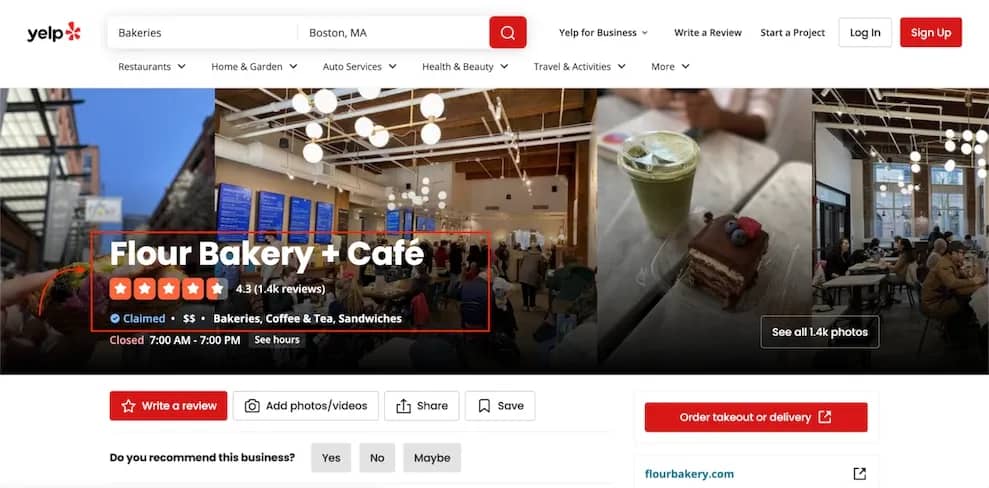
A Yelp business page for Flour Bakery + Café showing the business name, 4.3-star rating, 1.4K reviews, price range, categories, and operating hours
Data source 1 – Hypernova JSON (search results)
Search result pages embed their data in a <script data-hypernova-key> tag. This Hypernova JSON contains all the business listings, ratings, review counts, categories, and ranking positions.
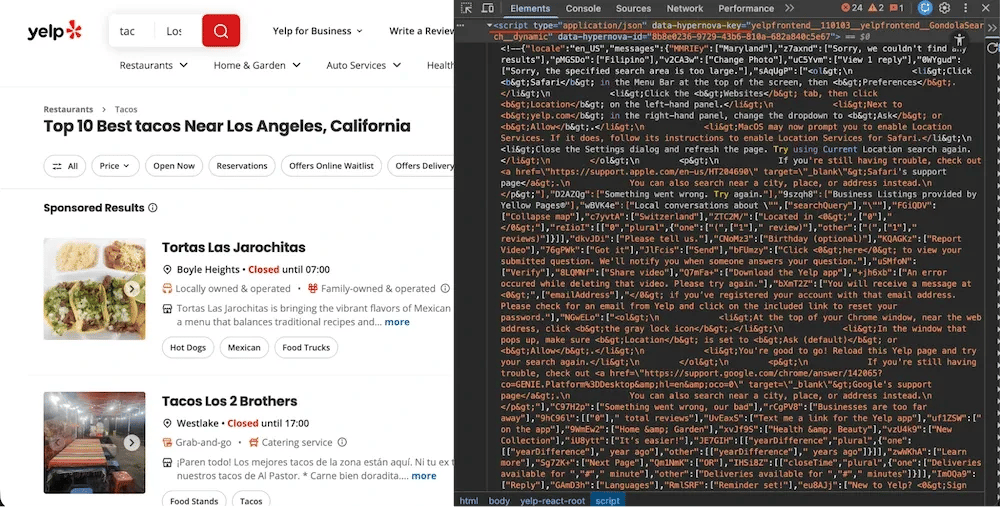
Yelp search results page with DevTools showing the Hypernova JSON script tag containing search result data
The data path is deeply nested: legacyProps → searchAppProps → searchPageProps → mainContentComponentsListProps. Addresses are stored separately in an Apollo state cache (<script data-apollo-state>) on the same page.
Data source 2 – Apollo cache (business details)
Open any Yelp business page, inspect the HTML, and search for ROOT_QUERY. You'll find a massive <script type="application/json"> tag containing the Apollo Client normalized cache, a flat JSON store with every business detail the page needs to render.
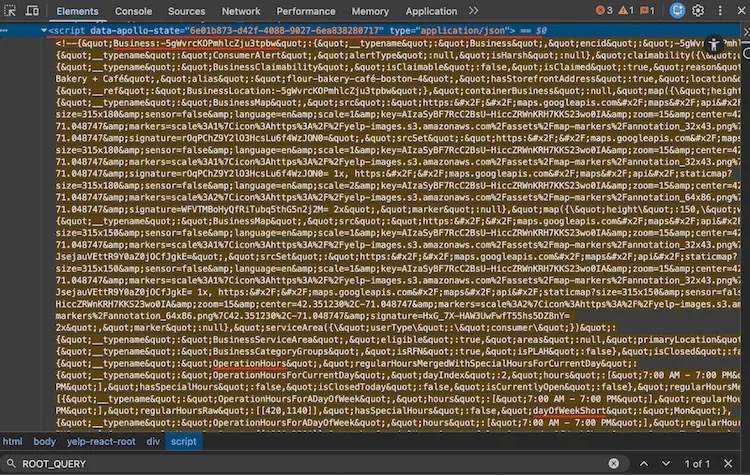
Apollo Client cache visible in Chrome DevTools on a Yelp business page, showing the large application/json script tag containing ROOT_QUERY data
This cache stores data as key-value entities with cross-references. For example, categories aren't stored directly on the business. Instead, they're referenced with {"__ref": "Category:bakeries"} and resolved from the same cache.
Data source 3 – GraphQL batch API (reviews)
Reviews load through an internal GraphQL API at POST https://www.yelp.com/gql/batch. The operation is called GetBusinessReviewFeed and returns structured review data (full text, ratings, dates, author info, vote counts) without any HTML parsing needed.
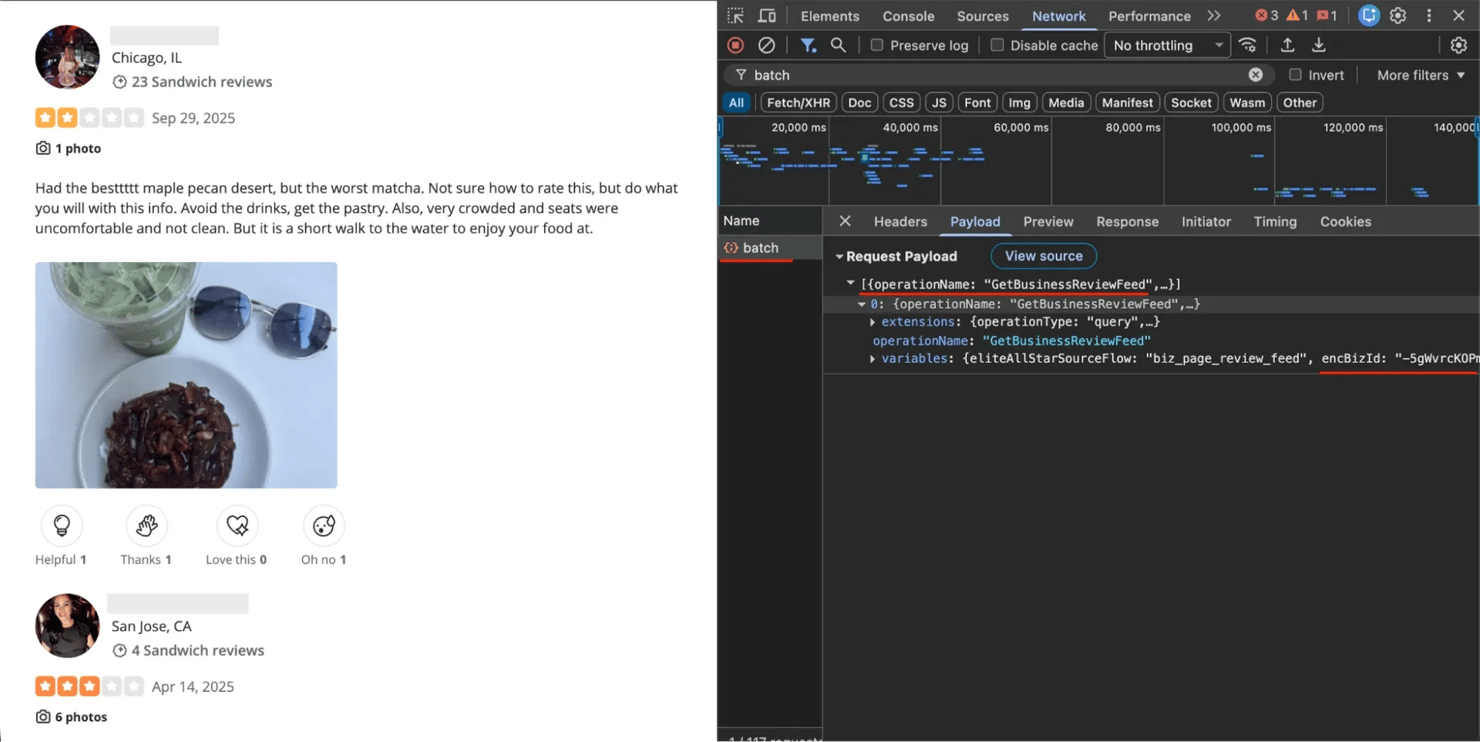
Yelp reviews page with Chrome DevTools Network tab open, showing the GraphQL batch request payload with GetBusinessReviewFeed operation
Data source 4 – server-rendered HTML (not-recommended reviews)
Not-recommended reviews live at /not_recommended_reviews/{slug} and use server-rendered HTML. No JSON blobs, no GraphQL – just HTML that you parse with Beautiful Soup. These reviews are split into 2 sections: "not currently recommended" and "removed for TOS violations", each with its own pagination parameter.
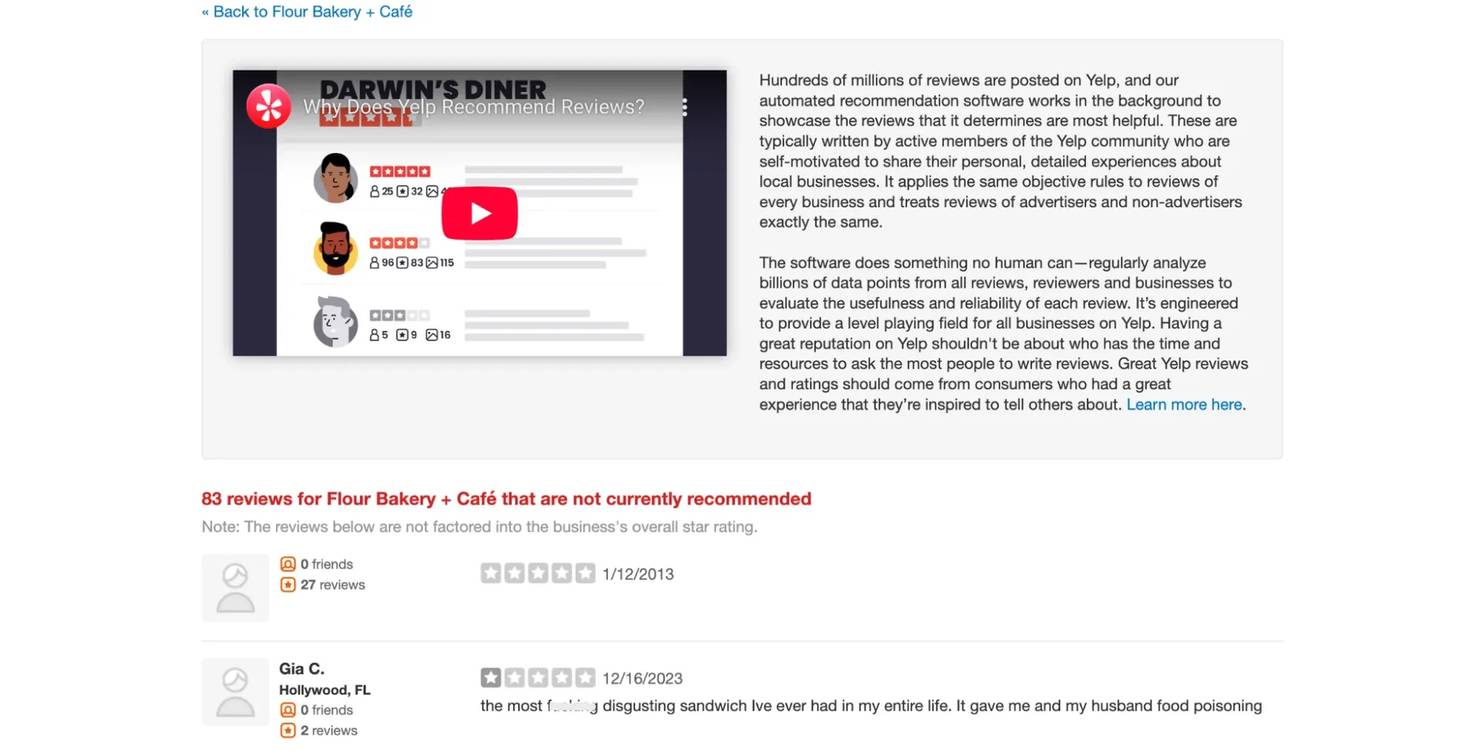
Yelp's not-recommended reviews page showing filtered reviews with the "not currently recommended" header
Scraping Yelp search results
Search pages embed their listings in a Hypernova JSON blob. Each page returns 10 results, and pagination uses a start query parameter.
Creating a session with browser impersonation
Every scraper in this tutorial uses the same imports and session setup (individual scrapers add a few more as needed):
The curl_cffi session impersonates a real browser's TLS fingerprint:
The impersonate parameter tells curl_cffi which browser to mimic. safari2601 (Safari 26.0.1) is a reliable default. The TCP_KEEPALIVE options prevent stale connections during pagination loops.
Important: don't set User-Agent, Accept, or Accept-Language headers manually. The impersonation already handles these. Setting them yourself can create mismatches that expose you as a scraper.
Extracting the Hypernova JSON
Look for the <script> tag with a data-hypernova-key attribute and strip the HTML comment wrappers before parsing:
The JSON is wrapped in HTML comments (), which you need to strip before parsing. Miss this step and json.loads() throws a JSONDecodeError.
Extracting business data from results
Business listings are deeply nested in the Hypernova JSON, and sponsored results need special URL decoding. The addresses dict is extracted separately from the <script data-apollo-state> tag on the same page (see the full source for that extraction code):
2 parsing pitfalls to watch for in the Hypernova data:
- HTML entities in Hypernova data. Category names come through with HTML entities (like & instead of &), so "Coffee & Tea" appears as "Coffee & Tea" in the raw data. Always run html.unescape() on text extracted from Hypernova JSON.
- Sponsored results use redirect URLs. Ad listings don't link to /biz/{alias} directly – they use /adredir?redirect_url=… with the real URL encoded in the query string.
Search pagination – single session is critical
Pagination for Yelp search requires the same session with cookies across all pages. If you create a new session for each page, Yelp's bot detection is more likely to flag the requests because cookies and connection state don't carry over. Here's how to keep a single session across all pages:
3 things that keep search pagination working:
- session.upkeep() – call this between pagination requests. Without it, HTTP/2 connections go stale during the 5+ second delays, and the next request fails.
- Referer chain – page 1 uses Referer: https://www.google.com/ (user arrived from search). Page 2+ uses the previous Yelp page URL.
- 5-second delay minimum – search pages need longer delays than other endpoints. The code defaults to 5 seconds (configurable via –delay), and the retry logic handles 403 responses automatically if the delay is too short.
Running the search scraper
The code blocks above are simplified for readability. See the full yelp_search.py source for the complete working script with error handling and CLI parsing.
Pass a search term, location, and optional page limit. The scraper outputs ranked results as JSON or CSV:
The output JSON contains ranked business listings with all extracted fields:
Extracting business details from Yelp business pages
The business details scraper parses the Apollo Client cache, the ROOT_QUERY JSON blob from data source 2. This gives you the full set of business attributes that search results don't include.
Parsing the Apollo cache
Identify the Apollo cache by size (50KB+) and the presence of ROOT_QUERY:
The page has multiple <script type="application/json"> tags, but the Apollo cache is the big one (50KB+). Check for ROOT_QUERY to identify it. Like the Hypernova data, it may be wrapped in HTML comments and contains encoded entities.
Resolving Apollo cache references
The Apollo cache uses a normalized format where related entities aren't nested. Instead, they're referenced by key:
You need a resolver function to follow these references:
Extracting operating hours
Hours require a truthiness edge case because ["Closed"] is truthy in Python, so you can't just check bool(day_hours):
Extracting photos
Photos are the trickiest part of the Apollo cache. They aren't stored under a simple key. Instead, they're nested under biz["media"] with GraphQL argument syntax in the key names:
3 edge cases in the photo extraction logic:
- Videos mixed with photos. The orderedMediaItems list contains both BusinessPhoto and BusinessVideo items. Filter by __typename.
- Parameterized URL keys. Photo URLs aren't under a simple url key – they're under url({"size":"LARGE"}). You need to search for the key containing "LARGE" or "ORIGINAL."
- Null captions. node.get("caption", "") returns None when the JSON value is null, not "". Use node.get("caption") or "" instead.
Running the business scraper
Pass any Yelp business URL. The scraper extracts the Apollo cache and outputs a single JSON object with the full profile. See the full yelp_business.py source for the complete script.
The output is a single JSON object with the full business profile (truncated here for readability):
Scraping Yelp reviews with the GraphQL API
The reviews scraper uses Yelp's internal GraphQL batch endpoint, the same one the frontend calls when you scroll through reviews on a business page. This returns structured data directly.
Getting the business ID
Before you can query reviews, you need the encBizId (encrypted business ID). It's in the HTML:
Building the GraphQL payload
The request uses a persisted query hash (documentId) instead of raw GraphQL, and pagination cursors are base64-encoded:
Key parameters in this payload:
- documentId – a stable hash of the GraphQL query stored on Yelp's server. You don't send the actual query text – just this hash. If this hash stops working, see the recovery steps below.
- Pagination uses base64-encoded offset tokens. The after parameter takes a base64-encoded JSON object: {"version": 1, "type": "offset", "offset": 10}.
- sortBy: "DATE_DESC" – returns newest reviews first. Other options: "RELEVANCE_DESC", "ELITES_DESC".
If documentId stops working: open any Yelp business page in Chrome DevTools, go to the Network tab, filter by batch, and look for the GetBusinessReviewFeed request. The current hash is in the request payload under extensions.documentId.
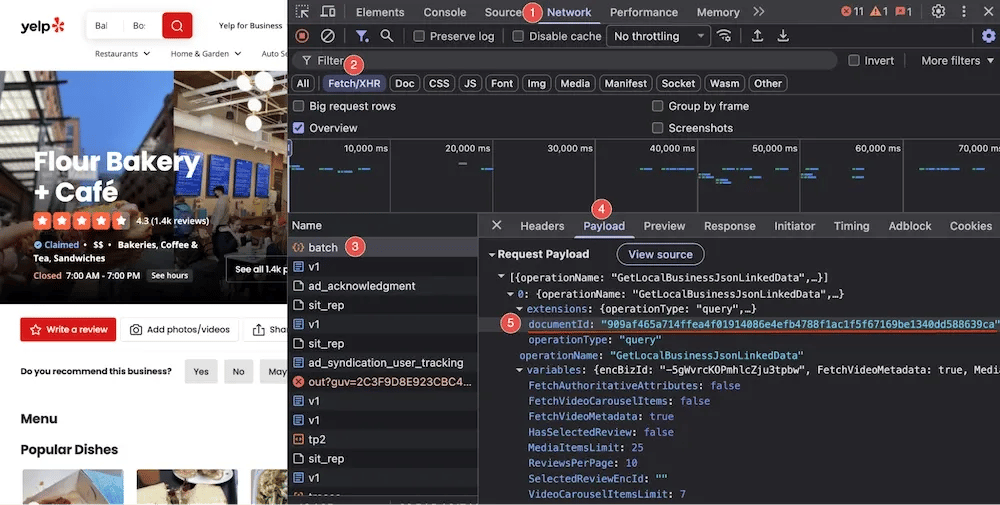
Chrome DevTools Network tab on a Yelp business page, showing the batch request payload with the documentId hash highlighted under extensions
Making the GraphQL request
The request needs specific headers to pass Yelp's server-side validation, especially x-apollo-operation-name:
Include the x-apollo-operation-name header. Without it, Yelp rejects the request. The Origin and Referer headers help the request look like it's coming from the actual Yelp frontend.
Parsing review data
Each review node from the GraphQL response contains nested objects for author, text, and feedback. Flatten them into a single dict:
Running the reviews scraper
Pass a business URL and an optional page limit. Each page returns 10 reviews sorted by date. See the full yelp_scraper.py source for the complete script.
Each review includes the full text, rating, date, author details, and engagement counts:
This is data that Yelp's Places API doesn't expose: full review text, vote counts (useful, funny, cool), and author details.
Scraping not-recommended reviews
This is the scraper most Yelp tutorials skip entirely. Yelp suppresses reviews that its algorithm deems unreliable. They aren't included in the star rating, and they're hidden behind a small link at the bottom of the reviews section.
Not-recommended reviews use server-rendered HTML at /not_recommended_reviews/{business-slug}. There are 2 separate sections, each with its own pagination parameter:
- Not-recommended reviews – paginated with ?not_recommended_start=10
- Removed reviews (TOS violations) – paginated with ?removed_start=10
Parsing a review from HTML
Each review sits in a div with a data-review-id attribute. Ratings, dates, and text live in predictable CSS classes:
A few edge cases to handle:
- Date pollution. The span.rating-qualifier element sometimes captures extra text beyond the date: "11/28/2019Updated review". Use a regex to extract just the date part.
- Empty placeholder reviews. Some review divs have an ID but Yelp has stripped all content. Skip these if both rating and text are empty.
- 2 separate pagination loops. The not-recommended section and the removed section paginate independently. You need 2 loops with different query parameters.
Running the not-recommended scraper
Pass a business URL or alias. The scraper fetches both not-recommended and removed sections with their separate pagination. See the full yelp_not_recommended.py source for the complete script.
Not-recommended reviews tend to skew older, as the NR page accumulates filtered content over time. Here's what the output looks like:
Storing and exporting scraped Yelp data
All 4 scrapers save output as JSON by default. The search, reviews, and not-recommended scrapers also support CSV as an optional format (the business scraper outputs a single nested object, so it's JSON-only). JSON preserves nested structures (categories, hours, photos) without data loss, while CSV flattens everything for spreadsheet analysis.
For JSON, use ensure_ascii=False in json.dump() to keep non-ASCII characters (café, résumé) readable instead of escape sequences. For CSV exports, flatten nested fields before writing because csv.DictWriter doesn't handle nested objects:
Data validation considerations
Validate output before storing:
- Ratings should be between 1.0 and 5.0 – anything outside this range means a parsing error
- Review IDs should be unique – duplicates indicate a pagination bug
- Dates should parse cleanly – GraphQL reviews use ISO 8601 (2026-02-18T18:10:01Z), NR reviews use M/D/YYYY
- Photo URLs should start with https:// – an empty URL means the extraction missed a video item
For more on data cleaning and storing scraped data, check out the dedicated guides.
Bypassing Yelp's anti-scraping measures
Yelp's bot detection checks TLS fingerprints, browser behavior, and request patterns. It's aggressive. 2 common block responses:
A CAPTCHA challenge. Yelp asks you to prove you're human:
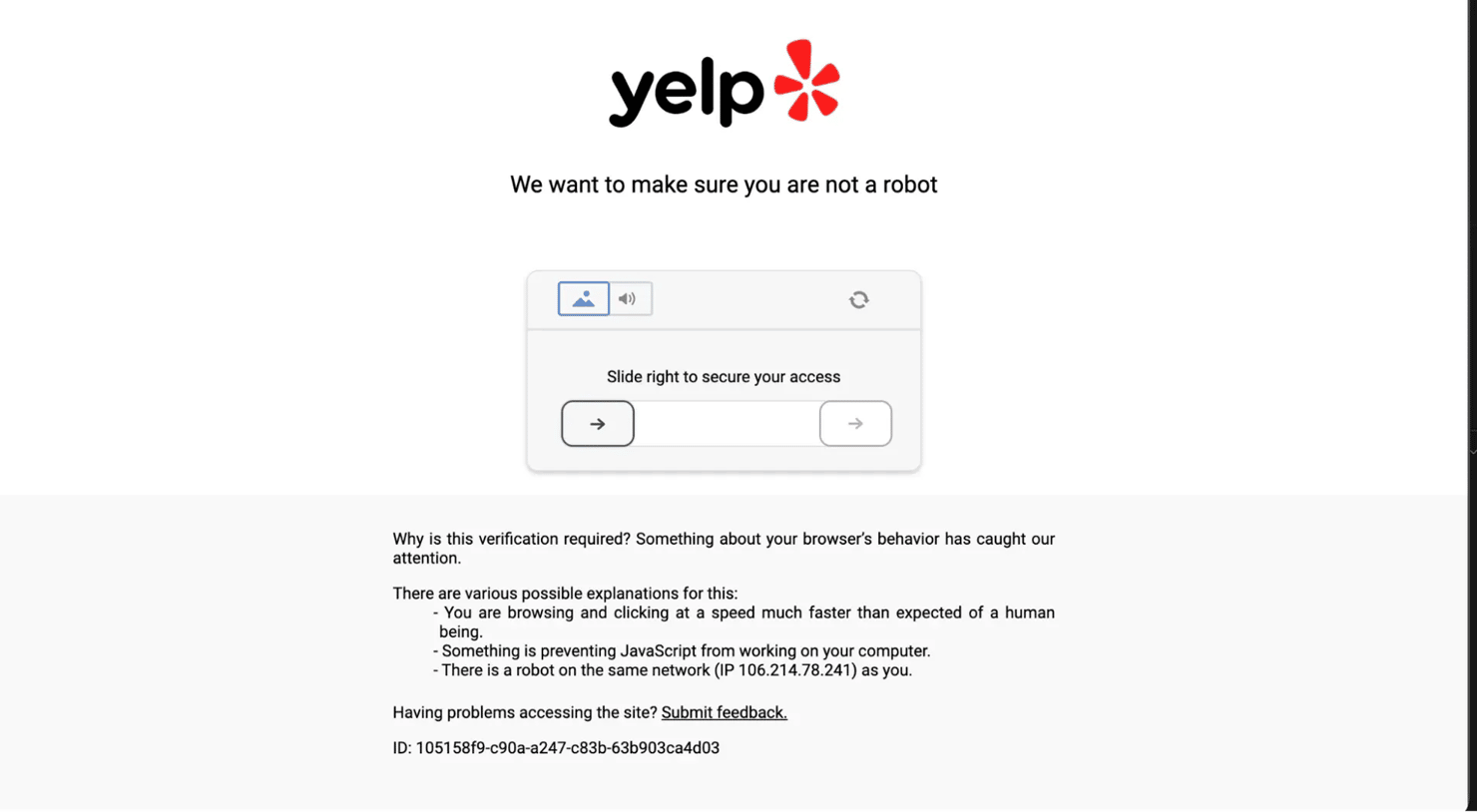
Yelp's CAPTCHA challenge page showing "We want to make sure you are not a robot" with a slider puzzle
A hard block with no option to retry. Your IP or fingerprint is flagged:
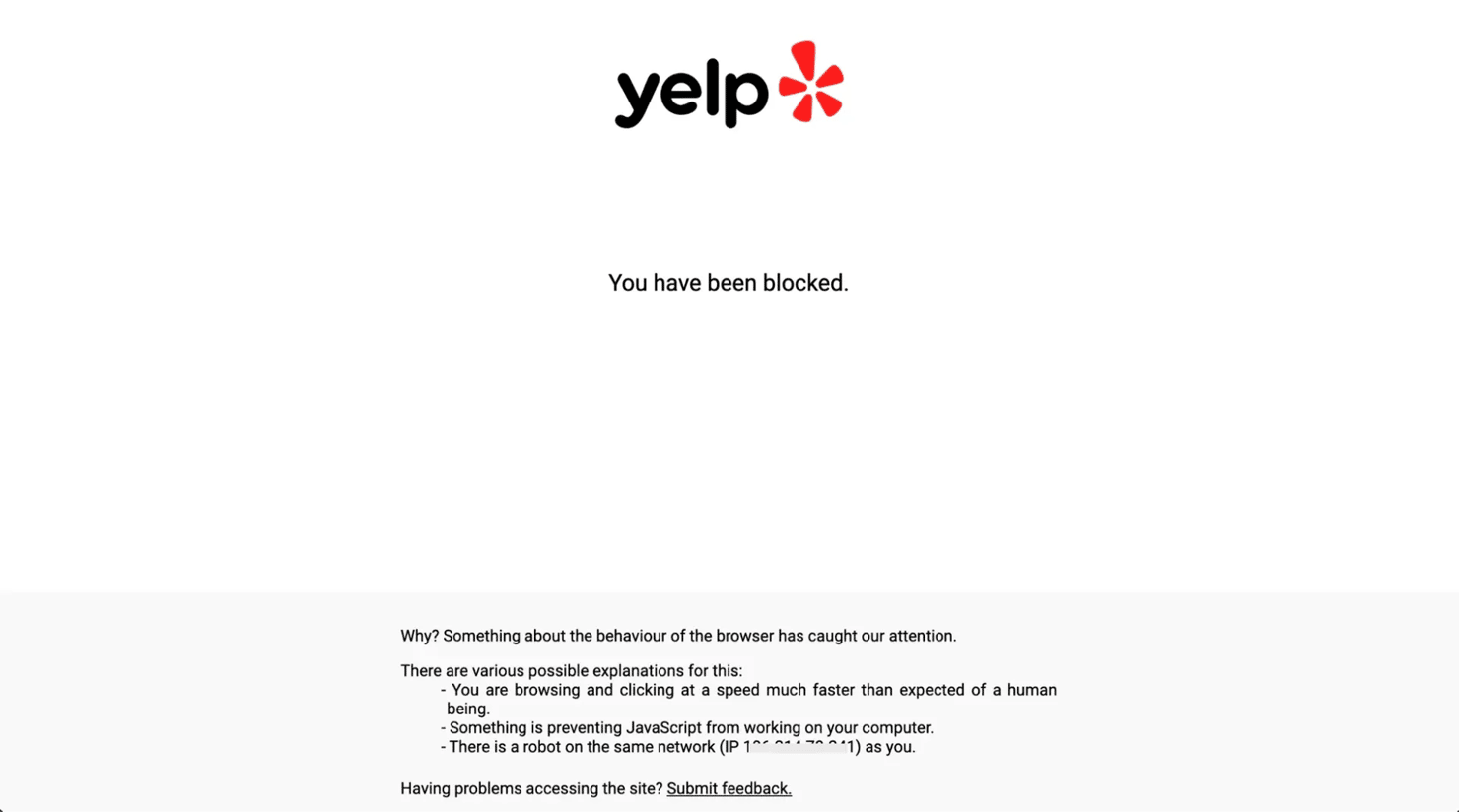
Yelp's hard block page showing "You have been blocked" with an explanation about suspicious browser behavior
Why standard HTTP libraries fail on Yelp
When a browser connects to Yelp, the TLS handshake includes a unique fingerprint (JA3/JA4 hash) that identifies the browser and version. Python's Requests library has its own TLS fingerprint that's well-known to bot detection systems. The detection layer checks this fingerprint before the HTTP request even begins. If it doesn't match a known browser, you get blocked.
curl_cffi solves this by replicating the full TLS behavior of real browsers (cipher suites, extensions, handshake order), not just the User-Agent header.
Browser impersonation rotation
The first technique is rotating between browser profiles on each retry:
This retry strategy combines 2 techniques:
- Impersonation cycling – each retry uses a different browser fingerprint. If Safari 26.0.1 gets blocked, the next attempt tries Safari 18.4, then Chrome 133, etc.
- Escalating backoff – wait times increase: ~4s → ~7s → ~10s → ~13s → ~16s, plus random jitter. Yelp returns 403 on blocks, so the retry catches them and switches fingerprints automatically.
The code blocks in the 4 scraper sections use direct session.get()/session.post() calls for clarity. All of the scraper files route all HTTP calls through _request_with_retry.
Why residential proxies matter for Yelp
Yelp uses DataDome for bot detection, which goes beyond TLS fingerprinting. DataDome also evaluates IP reputation, and datacenter IPs get flagged because they belong to hosting providers, not real ISPs. Residential proxies route your requests through real ISP addresses, which score higher in IP reputation checks. With Decodo's rotating residential proxy, requests are also distributed across different IPs, so they don't cluster on a single range.
Page validation
Yelp blocks typically return HTTP 403, but as a safety net, validate that a 200 response contains real page content:
Yelp business pages with full content are substantially larger than block or CAPTCHA pages. A response under 50KB with no yelp-biz-id meta tag means something went wrong: either a redirect, a partial load, or an edge case where the block came through as 200.
Managed alternatives
If building and maintaining anti-bot bypass logic isn't your focus, Decodo offers 3 managed options:
- Web Data API – handles proxy rotation, anti-bot bypass, and JavaScript rendering in a single call. You send a URL, get back the page content.
- Site Unblocker – handles anti-bot at the proxy layer. Point your existing HTTP client at the endpoint and add a few lines of proxy config.
- AI Parser – skip code entirely. Send a URL and a plain-language description, get back structured JSON.
Best practices for scraping Yelp
These patterns apply across all 4 scrapers and will help you avoid blocks at scale.
Rate limiting
Endpoint
Recommended delay
Notes
Search pages
5s + random jitter
Code default; retry logic handles 403s if too short
Business pages
2s + jitter (when batching)
Single requests don't need delays; batch scraping does
Reviews (GraphQL)
1.5s + jitter
Code default for GraphQL pagination
Not-recommended reviews
1.5s + jitter
Code default for HTML pagination
Always add random jitter to avoid predictable request patterns. Each scraper uses a slightly different jitter range – here's the pattern from the search scraper:
Keep scrapers independent
Run each scraper as a separate process. Reusing the same session across different endpoints can lead to unexpected blocks. Avoid combining them into a single orchestration script. If you need one, create a fresh session per scraper.
Test on small samples first
Run each scraper on 2–3 pages before scaling up. Inspect the JSON output for missing fields or unexpected values – check for None ratings, empty addresses, and HTML entities in text fields.
Handle optional fields gracefully
Not every business has a website, price range, or phone number. Use defensive extraction:
The or {} pattern handles None values without crashing.
Bottom line
You now have 4 standalone Python scrapers, one for each Yelp data source covered in this guide. Each file runs independently with no shared dependencies. Set up your .env with proxy credentials and start extracting.
The scrapers handle the hard parts: TLS fingerprint impersonation, session-based pagination, automatic retry on blocks, and Apollo cache resolution. The code blocks in this post are simplified for readability. The complete scraper files include full error handling, retry guards, and CLI argument parsing.
If you'd rather skip the infrastructure, Decodo's Web Data API handles proxy rotation and anti-bot bypass in a single API call. You send a URL, get back the page content.

Unlock Yelp data
Simplify Yelp data extraction with Decodo's high-quality residential proxies, which maintain high success rates even with Yelp's anti-bot measures. Flexible plans for every use case.
About the author

Justinas Tamasevicius
Director of Engineering
Justinas Tamaševičius is Director of Engineering with over two decades of expertise in software development. What started as a self-taught passion during his school years has evolved into a distinguished career spanning backend engineering, system architecture, and infrastructure development.
Connect with Justinas via LinkedIn.
All information on Decodo Blog is provided on an as is basis and for informational purposes only. We make no representation and disclaim all liability with respect to your use of any information contained on Decodo Blog or any third-party websites that may belinked therein.