How Do APIs Work? The Ultimate Guide to Application Programming Interfaces
Every time you check the weather, order food, or scroll through social media, APIs are working behind the scenes to make it happen. An API (Application Programming Interface) is essentially a set of rules that lets different software applications talk to each other and share data without you ever noticing. In this guide, you'll learn more about what they are, how they work, and even get the chance to create your own.

Zilvinas Tamulis
Last updated: Feb 20, 2026
17 min read

- APIs (Application Programming Interfaces) are sets of rules that allow different software applications to communicate and exchange data, regardless of how they're structured.
- The request-response cycle works by having a client send a request to a server, which processes it and returns a response, typically in JSON format with HTTP status codes indicating success or failure.
- REST is the most common API architecture using standard HTTP methods, while alternatives like GraphQL, WebSockets, and webhooks serve specific use cases like real-time communication or event-driven updates.
- API security requires storing credentials in environment variables rather than source code, using HTTPS to encrypt traffic, and rotating API keys regularly to prevent unauthorized access.
- You can integrate existing APIs by reading their documentation, obtaining authentication tokens, sending requests with tools like curl or Python's Requests, and handling rate limits and pagination for large datasets.
- Building your first API with Python and Flask involves setting up a virtual environment, defining routes with decorators, returning JSON responses with proper status codes, and implementing error handling for 404 and 500 errors.
- Deployed APIs with useful data sources can become profitable SaaS products that developers and businesses pay to access.
The basic concept: What are APIs and why do they matter?
APIs aren't exactly new. They've been around since the early days of computing, but they really hit their stride with the rise of web services in the early 2000s. Back then, companies like Amazon and eBay started opening up their systems to let other developers build on top of their platforms, and suddenly, everyone realized this whole "sharing is caring" thing could actually make a lot of money.
At their core, APIs are a set of rules and protocols that let different software components exchange data and features. Think of them as translators. Your weather app doesn't need to know how the National Weather Service stores its data or what programming language they use. It just needs to know how to ask for the temperature in your city, and the API handles the rest.
Why does this matter? Here are a few reasons why APIs make your life easier:
- Innovation. Developers can piggyback on existing technologies rather than rebuilding them from scratch. Why spend six months building a payment system when Stripe's API does it better than you ever could?
- Scalability. APIs enable microservice architecture, where small, independent services communicate with each other. This means you can scale the parts of your system that need it without rebuilding everything else.
How APIs function: The request-response cycle
The fundamental mechanism behind every API interaction is quite simple. A client sends a request, and a server sends back a response. Everything else is just details about what goes in those requests and responses.
The two parts
In this game, you've got two main characters:
- The client. This is the application starting the conversation. It could be your mobile app, a website, or even another server. The client is basically saying, "Hey, I need something."
- The server. This is the system that verifies the request is legit, processes it, retrieves or manipulates the data, and sends back what was asked for (or an explanation of why it can't).
The step-by-step process
Here's what actually happens when you open your weather app:
- The client initiates a request. Your application sends a message to the weather service's API saying something like "give me the current temperature for London."
- The API receives the request and passes it to the backend logic. The API checks if you're allowed to make this request and routes it to the right place in the server's code.
- The server processes the data. The backend logic queries the database, runs calculations, or does whatever it needs to do to fulfill your request.
- The API delivers the response back to the client. The server wraps up the temperature data in a nice, structured format (usually JSON) and sends it back through the API to your app, which then displays "12°C and rainy" on your screen.
Anatomy of an API interaction: Requests, responses, and data
Now, let's get a little more technical and look at what actually makes up these requests and responses.
The request structure
Every API request has a few key components:
Endpoint
This is the specific URL where your request is sent. For example, https://api.weather.com/v1/current might be the endpoint for current weather data. The endpoint tells the API exactly what resource you're trying to access.
HTTP methods
These verbs tell the server what you want to do with the resource:
- GET. Retrieve data without changing anything. This is what happens when you load a page or fetch some information.
- POST. Create new data. When you submit a form or upload a file, you're typically using POST.
- PUT. Update existing data. You're telling the server, "take this resource and replace it with this new version."
- DELETE. Remove data. Self-explanatory, and usually the one that makes you double-check before hitting Send.
Headers and parameters
Headers contain metadata about your request, things like content type (application/json), authorization tokens, and which format you want the response in. Parameters are the specific instructions you're passing, either in the URL (query parameters like ?city=London&units=metric) or in the request body for POST and PUT requests.
The response structure
When the server responds, it sends back a few critical pieces of information:
Status codes
These three-digit numbers are quick indicators of what happened with your request:
- 200 OK and 201 Created. Success. Your request worked, and here's your data (200) or your new resource was created (201).
- 400 Bad Request. You messed up. The server couldn't understand your request, usually because you sent malformed data or forgot a required field.
- 404 Not Found. The resource you're looking for doesn't exist. Either the endpoint is wrong, or that specific item isn't in the database.
- 500 Internal Server Error. The server messed up. Something broke on their end, and it's not your fault (probably).
Data formats
The actual data comes back in one of two main formats:
- JSON (JavaScript Object Notation). This is the modern standard and what you'll use 90% of the time. It's lightweight, human-readable, and looks like plain text structured with curly braces and key-value pairs. Example: {"temperature": 12, "conditions": "rainy"}.
- XML (Extensible Markup Language). This is the older, stricter format that looks like HTML with custom tags. It's more verbose and more complex to read, but you'll still encounter it in enterprise systems and legacy APIs. Some developers have strong opinions about XML, usually involving the phrase "why are we still using this?"
Types of APIs and architectural styles
Not all APIs are created equal. Depending on what you're building and who you're building it for, you'll encounter different flavors of APIs. Let's break them down.
Categorization by architecture
The architecture defines how the API is structured and how clients interact with it. Here are the leading players:
- REST (Representational State Transfer). This is the most common style you'll encounter. REST APIs use standard HTTP methods (GET, POST, PUT, DELETE) and URLs to access resources. They're stateless, meaning each request contains all the information needed to process it. REST is beginner-friendly, well-documented, and works everywhere.
- SOAP (Simple Object Access Protocol). Despite the word "simple" in its name, SOAP is anything but. It's a stricter, XML-based protocol with rigid standards for message structure. You'll find it in enterprise environments, banking systems, and anywhere that values formal contracts over flexibility. SOAP has built-in error handling and security features, but the tradeoff is complexity and verbosity.
- GraphQL. This method lets clients query exactly the data they need in a single request. Instead of hitting multiple REST endpoints and getting back more data than you need (over-fetching), you write a query that specifies precisely which fields you want. It's powerful for complex applications but adds a learning curve.
- WebSockets. These enable real-time, two-way communication between client and server. Unlike REST, where you have to keep asking if it has anything new, WebSockets maintain an open connection so the server can push updates instantly. Think chat applications, live sports scores, or collaborative editing tools.
- Webhooks. This is event-driven architecture where data is sent automatically when a trigger event occurs. It's push instead of pull. You register a URL with a service, and when something happens (a payment completes, a user signs up), the service sends a POST request to your URL with the details.
- gRPC (gRPC Remote Procedure Call). This is a high-performance RPC framework developed by Google. It uses Protocol Buffers instead of JSON, making it faster and more efficient for service-to-service communication. You'll see it in microservices architectures and distributed systems where performance matters.
Categorization by access
APIs also differ in who can use them:
- Private or internal APIs. These are used within an organization to connect internal systems. Is your company's HR system talking to the payroll system? That's a private API. They're not exposed to the outside world.
- Public or open APIs. These are available for external developers to use, often with some registration required. Google Maps API, Twitter API, and most of the APIs you interact with as a developer fall into this category.
- Partner APIs. These sit somewhere in between. They're shared between specific business partners under controlled agreements. A retailer might have a partner API that only their authorized suppliers can access to update inventory levels.
Real-world scenarios: APIs in action
Theory is great, but let's talk about where you actually encounter APIs in the wild.
Logins
Ever clicked "Sign in with Google"? That's OAuth in action. The third-party site uses Google's authentication API to verify your identity without ever seeing your Google password. You log in once, Google confirms your identity, and you're in. The same goes for Facebook, GitHub, or any other single sign-on (SSO) service.
Payments
eCommerce sites use payment gateway APIs like Stripe or PayPal to process transactions without storing your card details. When you buy something online, the site sends your payment info to Stripe's API, which handles PCI compliance, processes the payment, and sends back a simple "approved" or "declined" response. The merchant never touches your actual card number, which is better for everyone's legal team.
Travel and maps
Rideshare apps like Uber use Google Maps API to calculate routes, estimate arrival times, and show you that little car icon creeping through traffic. The app doesn't need to build its own mapping system or maintain global geographic data. It just asks Google's API, "What's the fastest route from A to B?" and displays the answer.
Data collection and web scraping
This is where things get interesting for developers who need data at scale. Let's say you're building a price comparison tool or monitoring competitor pricing. You could write scripts to scrape websites manually, but then you're dealing with browser automation, proxy rotation, CAPTCHA solving, and all the headaches that come with it.
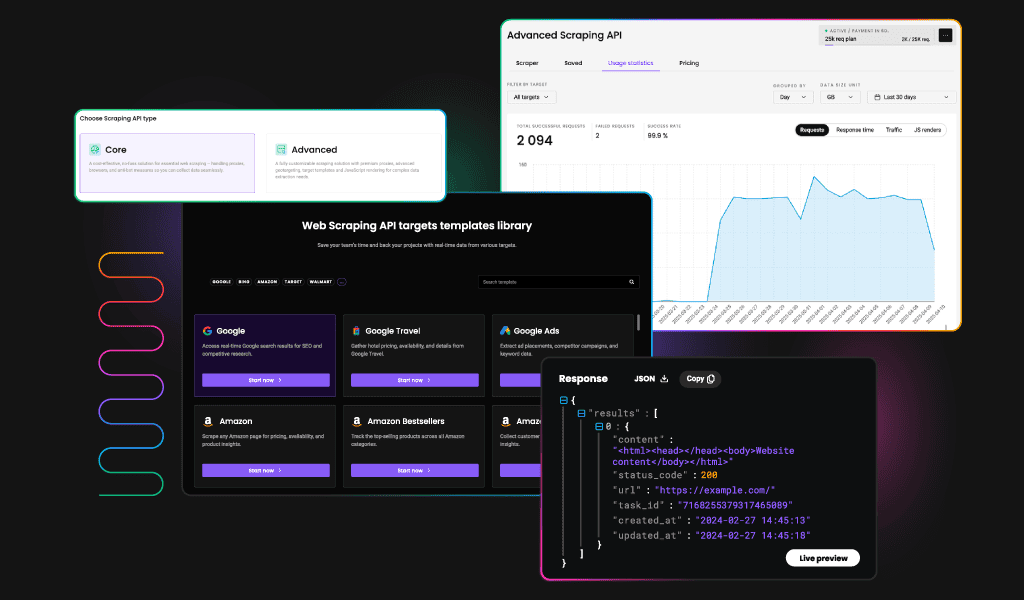
Instead, developers use APIs like Decodo's Web Scraping API to extract data from websites at scale without managing the infrastructure. You send a request with the URL you want to scrape, and you get back clean, structured JSON data instead of raw HTML that you have to parse yourself. The API handles the browsers, proxies, and all the technical complexity while you focus on what to do with the data.
IoT (Internet of Things)
Your smart thermostat, fitness tracker, or doorbell camera all use APIs to communicate with cloud servers. The device sends sensor data (temperature, heart rate, motion detected) to the manufacturer's API, which processes it and can trigger actions like adjusting your heating or sending you a notification.
Data aggregation
Travel booking sites like Kayak or Skyscanner pull data from dozens of airlines and hotels through their APIs. Instead of manually checking each airline's website, the booking site queries multiple APIs simultaneously and presents all the options in one place. Same concept powers price comparison sites for insurance, utilities, or basically anything where you want to see all your options without opening 47 browser tabs.
The common thread? APIs let you leverage other people's work, data, and infrastructure instead of building everything yourself. Work smarter, not harder.

Build APIs faster
Get structured data without managing scraping infrastructure.
How to integrate and use an API
The best way to fully understand how an API works and its benefits is by trying it yourself. Let's walk through integrating Decodo's Web Scraping API as a real-world example, but these same principles apply to any API you encounter.
Find documentation
First stop: the developer docs. Every decent API has documentation that tells you the base URL (the starting point for all requests) and the specific endpoints (the paths you append to the base URL for different operations). For Decodo's scraping API, the base URL is https://scraper-api.decodo.com and the main endpoint is /v2/scrape. Together, they form the full URL where you'll send your requests – https://scraper-api.decodo.com/v2/scrape.
Authentication
Most APIs require you to prove who you are before they'll let you in. This usually means obtaining an API key or authentication token from your account dashboard. For Decodo's API, you'll include your auth token in the request headers under the authorization field. Keep this token secret.
Sending requests
You've got a few options for actually making the request. For quick tests and debugging, curl is the best choice:
This sends a POST request to the scraping endpoint, telling it to fetch the HTML from https://ip.decodo.com. The headless parameter specifies what kind of content you want back.
For production code, you'll want to use a proper HTTP library. In Python, that's typically Requests:
This does the same thing as the curl command, but now you've got the response in a Python variable you can work with.
Handling the response
Once the API responds, you need to parse the data. In this case, Decodo's API returns the scraped HTML wrapped in a JSON response. You can extract the HTML content, parse it with a library like Beautiful Soup if needed, and pull out the data you're looking for. The beauty of using a scraping API is that you get clean, structured data instead of having to deal with messy HTML files, browser automation, JavaScript rendering, and proxy rotation yourself.
Managing limitations
APIs have some restrictions, such as rate limits that restrict how many requests you can make per minute or hour. If you exceed them, you'll get a "429 Too Many Requests" response. For large datasets, you'll often need to handle pagination, where results are split across multiple pages. The API will typically include metadata in the response telling you if there are more results and how to fetch the next page.
Securing APIs: Keys, tokens, and best practices
Let's talk about security, because API key leaks are more common than you'd think, and the consequences can be severe. Exposed credentials can lead to unauthorized access, data breaches, or even unexpected charges.
API keys
API keys are static strings that act as digital ID cards. You get a long random string from the API provider, include it in your requests, and the server knows it's you. The upside is they're easy to use. The downside is they're static, meaning if someone gets your key, they can impersonate you until you revoke it.
Most APIs include keys in the authorization header like this:
Some older APIs use query parameters (?api_key=your-key), but that's generally frowned upon because URLs often end up in logs, browser history, and other places you don't want credentials to appear.
Bearer tokens and OAuth
For more secure scenarios, especially when dealing with user-specific access, you'll encounter bearer tokens and OAuth (Open Authorization).
Bearer is an authentication scheme used in HTTP headers. It means "whoever holds this token is authorized." No extra proof is required beyond presenting the token, so possession equals access. It's popular because it's easy to use and share, but that also comes with security concerns.
On the other hand, OAuth is typically the more secure choice. Your application redirects the user to a service (like Google or GitHub), the user logs in and grants permission, the service sends back a temporary token, and your app uses that token for subsequent requests. When the token expires, you either use a refresh token to get a new one or ask the user to log in again. It's more complex than a simple API key, but it's also significantly more secure.
Security best practices
Now that you know what these credentials are, here are a few tips on how to be safe using them:
- Environment variables. Never hardcode API keys directly in your source code. Store them in environment variables or .env files that you explicitly exclude from version control. Your .gitignore file should include .env on day one.
- HTTPS everywhere. Always use HTTPS to encrypt traffic between your application and the API. This protects your credentials from being intercepted in transit. Most modern APIs enforce this anyway and will reject plain HTTP requests, but it's worth stating explicitly.
- Key rotation. Change your API keys regularly, especially for critical systems. If you suspect a key has been leaked, rotate it immediately. Most API dashboards let you generate new keys and revoke old ones.
Security isn't always a fun thing to work with, but it beats the alternative. Treat your API credentials like passwords, keep them safe, hard to guess, and change them at any immediate sign of suspicion that they may have been leaked.
Step-by-step: Building your first API
The best way to fully grasp how an API works is by building one yourself.
Let's create a simple menu API for a restaurant. You'll be able to host one locally to view menu items, add new dishes, or remove items with simple API commands.
Choose a stack
For beginners, Python with Flask is a simple choice to start with. Python is a programming language that's perfectly fitted for various web-related tasks. Flask is a lightweight web framework that allows you to quickly build API logic with simple syntax.
Setup
Begin by installing the latest version of Python. Then, open your terminal tool and create a new project with these commands:
Write the script
Here's a complete Flask app with a few endpoints:
The @app.route() decorator defines your endpoints. The first parameter is the URL path, and methods specifies which HTTP methods are allowed. URL parameters like <item_id> are automatically passed as function arguments.
Flask's jsonify() converts Python dictionaries into JSON responses. This handles all the content-type headers and serialization for you. It returns tuples like (jsonify({...}), 201) to specify both the data and the HTTP status code. The status code tells you both the response and whether the request succeeded or failed.
Testing your API
Start the server by launching the script through the terminal:
You can now make an API request to this server. For example, view the entire menu with the following cURL GET command:
Or a specific menu item by its ID:
You can also add or delete items through POST requests. Typically, this would require authentication, as you don't want just anyone modifying your database, but for this example, safety rails are off:
The changes made are also temporary, as the menu dictionary item only exists while the server is running. Once it stops, all changes that weren't hardcoded will disappear.
Deployment and further steps
Once your API works locally, you'll want to deploy it somewhere people can actually use it. Popular options include:
- Heroku. Simple push-to-deploy, suitable for prototypes and small projects.
- Railway. Similar to Heroku with a generous free tier.
- DigitalOcean App Platform. Easy deployment with more control.
- AWS/GCP/Azure. Enterprise options with more complexity and scalability.
You'll also want to store information in a permanent database like PostgreSQL or MongoDB, so that your data doesn't get lost every time the script stops running. In-memory storage works fine for learning, but production APIs need persistence.
Taking it further
Here's where it gets interesting. If you build a functional API, especially one that combines web scraping with data collection and storage, you can sell access to it. Think about APIs that aggregate product prices, track stock availability, monitor competitor data, or compile industry-specific information. Developers and businesses pay for reliable, well-structured data they don't have to collect themselves.
For example, you could build an API that scrapes multiple eCommerce sites daily, stores historical pricing data, and provides endpoints for price comparisons and trend analysis. Use a web scraping service like Decodo's Web Scraping API to handle the complex scraping infrastructure, focus your effort on the data processing and API design, and charge users a subscription for access.
Final thoughts
APIs are the invisible infrastructure that makes the modern web work. They're sets of rules that let different software systems talk to each other, enabling everything from payment processing to real-time notifications.
You've learned how the request-response cycle works, what goes into API requests and responses, the different architectural styles (REST, GraphQL, WebSockets), and where APIs show up in real-world applications. We covered how to integrate existing APIs, secure your credentials properly, and even build your first API from scratch with Flask.
The fundamentals are the same whether you're consuming someone else's API or creating your own. Start small, test thoroughly, handle errors gracefully, and remember that every complex system is just a bunch of simple API calls working together.

Ready to scrape data for your API?
Get clean JSON responses with zero proxy management.
About the author

Zilvinas Tamulis
Technical Copywriter
A technical writer with over 4 years of experience, Žilvinas blends his studies in Multimedia & Computer Design with practical expertise in creating user manuals, guides, and technical documentation. His work includes developing web projects used by hundreds daily, drawing from hands-on experience with JavaScript, PHP, and Python.
Connect with Žilvinas via LinkedIn
All information on Decodo Blog is provided on an as is basis and for informational purposes only. We make no representation and disclaim all liability with respect to your use of any information contained on Decodo Blog or any third-party websites that may belinked therein.