Jsoup Parsing HTML: A Complete Java Tutorial
Parsing HTML with jsoup is often the easiest way to extract structured data in Java when a page has no API. It handles imperfect markup, supports CSS selectors, and keeps things lightweight. This guide covers loading HTML, selecting elements, extracting data, and modifying markup – plus what to do when static parsing isn't enough.

Vilius Sakutis
Last updated: Apr 30, 2026
15 min read
TL;DR
- jsoup parsing HTML lets you convert raw HTML into structured data in Java
- It works best for static pages where content is already present in the HTML
- You can parse HTML from a string, local file, or live URL
- jsoup supports CSS selectors and DOM traversal for precise data extraction
- It doesn't execute JavaScript, so dynamic sites return incomplete data
- For dynamic sites, fetch rendered HTML first, then pass it into jsoup
What is jsoup and why use it for HTML parsing in Java
What is jsoup
jsoup is a Java library for parsing HTML into a structured document and extracting or modifying its elements using CSS selectors and DOM traversal.
It's commonly used to load HTML from strings, files, or URLs, select elements with familiar selector syntax, extract text and attributes, and clean or rewrite markup when needed. Because it handles malformed HTML the same way browsers do, it works reliably on real-world pages rather than only well-formed documents.
How HTML parsing works in Java
Before you can extract anything from a page, the HTML has to be turned into a structure your code can work with. That structure is the DOM, or Document Object Model.
Think of the DOM like a company org chart:
- The document is the CEO
- Each HTML element is an employee
- Elements can have children (subordinates) and a parent (manager)
This structure lets you navigate the page logically rather than reading raw text.
For example, a product card might contain:
- a title inside an <h3>
- a price inside a <p>
- a link inside an <a>
Once parsed, you can target each part directly without manually scanning the entire HTML.
HTML parsing is also harder than XML parsing. Real-world HTML is often messy, with missing tags or invalid structure. Browsers recover from this automatically, and jsoup does the same. That makes it reliable for scraping actual websites, not just clean documents.
When jsoup is the right choice
jsoup works best when the HTML already contains the data you need.
If you're dealing with static pages, predictable markup, or saved HTML files, it provides a fast, direct way to load the document, select elements, and extract data with minimal overhead. It's also a solid choice when you need to clean HTML or strip out unsafe tags before storing or displaying content.
It starts to fall short when the HTML you receive isn't the final version of the page. If content is loaded with JavaScript after the initial request, jsoup will only see the empty or partial structure. The same applies when a site requires login flows, heavy request handling, or large-scale scraping infrastructure.
In those cases, jsoup still fits into the workflow, but only as the parsing step. You need another layer to handle rendering, delivery, or access. That's where a broader setup becomes necessary, and it becomes natural to move toward tools or services that can fetch fully rendered HTML before passing it into jsoup.
jsoup vs. other HTML parsers
jsoup is best understood as the default choice for static HTML parsing in Java, not as the right tool for every scraping job. If the HTML already contains the data you need, jsoup is usually the simplest and cleanest option. When the page depends on JavaScript or full browser behaviour, other tools start to make more sense.
Here's how jsoup compares to other common parsing tools:
Tool
Language
JavaScript support
Best use case
Complexity
jsoup
Java
No
Static HTML parsing in Java
Low
HtmlUnit
Java
Partial
Lightweight JS simulation
Medium
Selenium
Multi
Yes
Full browser automation
High
lxml
Python
No
Fast parsing in Python
Medium
Cheerio
Node.js
No
jQuery-like parsing in Node
Low
jsoup is the best fit when you already have the HTML and just need a fast, lightweight way to parse and extract data in Java. HtmlUnit and Selenium make more sense when you need browser behaviour or JavaScript rendering, while lxml and Cheerio fill similar roles in Python and Node.js. So the choice is less about which tool is "best" overall and more about what kind of page you're working with and how much complexity you actually need.
Setting up jsoup in your Java project
Start by making sure Java is installed. jsoup works with Java 11 or newer, so that is a good baseline.
Check if Java is installed:
If it's not installed, install a JDK (Java Development Kit) such as OpenJDK 11 or later. Once installed, that command should return a version.
Because this guide shows setup with both Maven and Gradle, it also helps to check whether either build tool is already available:
If you haven't set up Maven yet, use the official Maven installation guide. If you plan to follow the Gradle steps instead, use the official Gradle installation guide. jsoup can also be used without either build tool by downloading the JAR directly and adding it to the classpath manually, which is covered on the official jsoup download page.
Create a Java project
There are many ways to create a Java project, but the simplest setup for this guide is to use a build tool. This handles dependencies like jsoup automatically.
To create a Maven project from scratch:
This creates a new folder called jsoup-demo with a ready-to-use structure, a pom.xml file for adding dependencies such as jsoup and other project configurations, and a default Java entry point. With the groupId above, the generated file will be inside:
Move into the project folder:
Add jsoup with Maven
Open the generated pom.xml file and add jsoup:
The current stable version of jsoup is 1.22.1. Make sure to check which version is the latest when you read this by checking the jsoup download page.
To run the project from the command line, add the Exec Maven plugin in the plugins section:
The exec plugin supports running a class directly with mvn exec:java -Dexec.mainClass="...".
Add jsoup with Gradle
If you prefer Gradle, start by making sure Gradle is installed and that it's using Java 17 or newer. Recent Gradle versions require Java 17+ to run. jsoup can still be added to a Gradle project in the same way as any other dependency.
Create a new Gradle project:
Choose a Java application project when Gradle asks for the project type. This creates the build files and source structure needed for a runnable Java project.
If the project uses Groovy DSL, add jsoup like this in build.gradle:
If the project uses Kotlin DSL, use this in build.gradle.kts:
The application plugin is what gives the project a standard run task, which is why it's included here. The mainClass value must match the package and class name of the entry point exactly.
A simple structure like this works well:
Keeping fetching, parsing, and extraction separate from the start makes the project easier to test and easier to extend later.
At this point, the Gradle project is set up and ready to run. For this guide, the rest of the examples will use Maven to keep the setup and commands consistent.
Loading and parsing HTML with jsoup
Once the project is set up, the next step is loading HTML and turning it into something the rest of the code can work with. jsoup can parse HTML from a string, a local file, or a live URL. In each case, the result is a Document object. That Document is the parsed page and serves as the entry point for selecting elements, traversing the DOM, extracting values, and modifying markup.
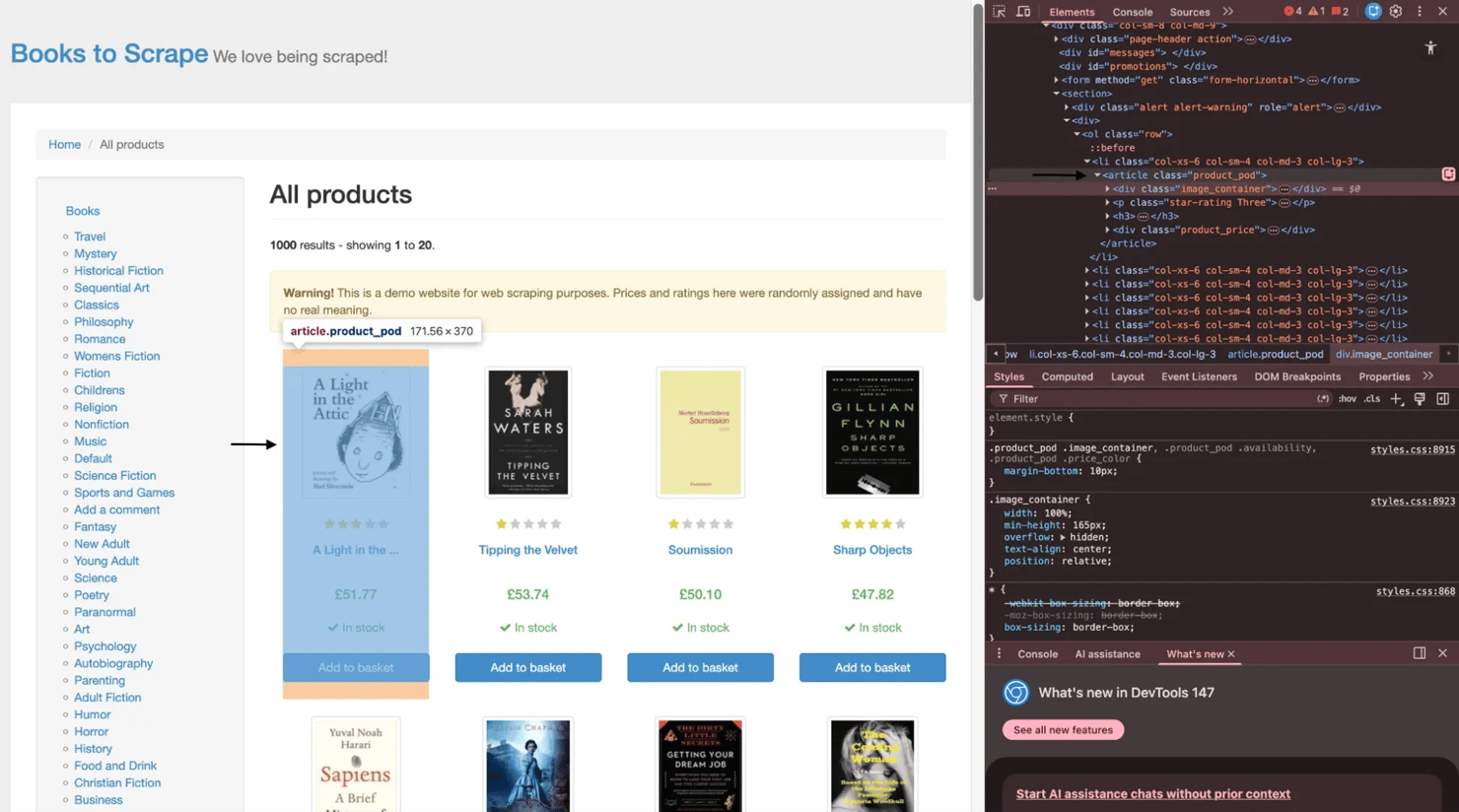
For the live examples in this guide, the target site will be books.toscrape.com. Before looking at the code, it helps to look at the page structure itself. On books.toscrape.com, each book listing is wrapped in an article.product_pod element. Inside that container, you'll find the image area, the star rating, the title link within the h3 tag, and the pricing block. That's the structure the next examples will work with.
Parsing an HTML string
A string is the simplest input source because the HTML is already in memory. This is useful when sanitizing user-submitted HTML, processing API responses that include HTML fragments, or testing parser logic without making a network request.
Here's a small example using a fictional book card:
The important part here's Jsoup.parse(html). It converts the raw string into a Document. From that point on, the workflow is the same as for a file or a live page. The input source changes, but the object you work with remains the same.
Parsing a local HTML file
Parsing a file is useful when the page has already been saved locally. That could mean working with downloaded HTML archives, exported pages, or offline analysis where the content needs to stay fixed during testing.
Here's a simple example:
It's a good idea to specify UTF-8 explicitly instead of relying on automatic detection. That helps avoid encoding issues that can corrupt punctuation, symbols, or non-English text.
Fetching and parsing a live URL
When the HTML is not already available as a string or file, jsoup can fetch it directly and parse it in one step. This works well for static pages where the content is already present in the response HTML.
Using the homepage of books.toscrape.com, the code looks like this:
This example uses Jsoup.connect(url).get() to fetch and parse the page in a single step. It also sets custom user agent, referrer, and timeout values on the connection object. That's usually enough for straightforward static targets.
The Document returned here's the same type of object returned by Jsoup.parse() in the earlier examples. That consistency is one of the reasons jsoup is easy to work with. Whether the source is a string, a file, or a live page, the next step is the same: query the document and work with its elements.
There's one important limitation, though. Jsoup.connect() does not execute JavaScript. If a site renders content in the browser after the initial request, jsoup will only see the initial HTML response, not the fully populated page. That's where browser-based tools become necessary, which is also why it helps to understand what a headless browser is and how to scrape websites with dynamic content before moving on to more advanced targets.
Why the Document object matters
Everything in jsoup starts from the Document. It's the parsed representation of the page and provides the rest of the code with a consistent structure to work with.
That matters because the input source can change, but the workflow stays the same. A string, a file, and a live URL all end up as a Document. Once that happens, the next steps are always built on it: selecting elements, traversing the DOM, extracting values, and reshaping the markup where needed.
Selecting and traversing elements in jsoup
Once the HTML is loaded into a Document, the next step is finding the parts that matter. jsoup provides a few ways to do that. Some methods are direct and simple, like selecting by ID, class, or tag. Others are more expressive and let you target elements with CSS selectors. After that, jsoup also lets you move through the DOM itself, going up to a parent, down to children, or sideways to sibling elements.
Selecting elements by ID, class, and tag
jsoup includes a few built-in methods for common selection patterns. These are useful when the HTML structure is simple or when the page already gives you clear IDs, class names, or tag patterns to work with.
getElementById() returns a single Element or null if nothing matches, so it should always be checked before calling methods on it. getElementsByClass() returns an Elements collection, which can be looped over. getElementsByTag() is useful when you want every instance of a tag, such as all links, images, or table rows.
On books.toscrape.com, each book card sits inside an article.product_pod container. That makes class-based selection a good starting point:
That prints the combined inner text of each book card, which is a quick way to confirm the selection is working before narrowing down to specific fields.
Tag-based selection works the same way. If the goal is to inspect all links on the page, getElementsByTag("a") will return every anchor element in one call.
Selecting elements with CSS selectors
For more precise queries, select() is the method that usually does the most work. It accepts CSS selectors, so if you have used querySelectorAll() in JavaScript, the idea will feel familiar. This is usually the most flexible way to target nested elements, combine conditions, or filter by attributes.
For example, these selectors all work in jsoup:
- a[href] selects anchor tags that have an href attribute
- img[src] selects images with a src
- input[type=submit] selects submit buttons
- article.product_pod h3 > a selects title links inside each book card
Here's a more targeted example using books.toscrape.com:
selectFirst() is useful when only one match is needed. It avoids manually fetching the first item from a collection and eliminates the risk of indexing into an empty result.
If you're deciding between CSS selectors and XPath, this is a good point to look at how to choose the right selector for web scraping.
Traversing the DOM
Selecting the right element is only part of the job. Sometimes the easier approach is to find one element and then move through the DOM around it.
jsoup supports both vertical and horizontal traversal. parent() moves up one level. children() returns the direct child elements. child(index) returns a single child at the specified position. nextElementSibling() and previousElementSibling() move sideways through elements at the same level.
That becomes useful when the structure is predictable, but the page does not give you convenient class names for every field.
Here's a simple example using a definition list:
That works without relying on dedicated class names for each value. It simply uses the sibling relationship between dt and dd.
Moving upward can also be helpful. On books.toscrape.com, selecting the title link first and then calling parent() or moving back up to the surrounding article.product_pod lets you work outward from the title to the rest of the book card.
Traversing an entire subtree
For deeper inspection, jsoup also supports walking through a whole subtree node by node. Element.traverse() uses a NodeVisitor for depth-first traversal, which is useful when the structure is irregular or when you need to inspect every nested element inside a section.
Here's a small example:
That kind of traversal is not needed for every scraper, but it's useful when normal selectors aren't enough, and you need to understand the full shape of a nested block.
Putting selection and traversal together
In practice, most jsoup workflows combine both approaches. Start with a selector that gets close to the right area, then traverse from there when the remaining structure is easier to navigate relative to that point.
That is what makes jsoup flexible. You're not limited to one style. You can use getElementsByClass() to grab all book cards, select() to target the title and price inside each one, and traversal methods to move through surrounding elements when the structure calls for it.
Advanced selection techniques in jsoup HTML parsing
Basic selectors are enough for many pages, but they fall short when the markup is inconsistent or when the data is not neatly labeled with unique classes. This is where jsoup becomes much more useful than a naive regex approach. Instead of trying to match HTML as plain text, jsoup lets you query the parsed document with selectors that understand structure, attributes, and text content.
To make this section more realistic, imagine a public open data directory where each dataset appears in a table row with a title, a last-updated date, and a download link. Some rows link to CSV files, others link to PDFs, and not every row uses the same classes consistently. That's a good setting for the more advanced selectors jsoup supports.
Attribute value selectors
Attribute selectors are useful when the value of an attribute tells you more than the tag or class does.
An exact match with [attr=value] is the most specific form. It works when the attribute value is known in advance and should match exactly.
A starts-with match using [attr^=prefix] is useful when the value follows a predictable pattern. For example, it can help target images or links that begin with a known CDN path.
An ends-with match using [attr$=suffix] is useful when the file type matters more than the full URL. That makes it a good fit for finding download links that end in .pdf.
A contains match using [attr=substring]* works when only part of the value is stable, such as a path segment like /download/ or /dataset/.
Here's a simple example that selects PDF links from a fictional open data table:
That kind of selector is much more reliable than trying to find every PDF link with a text pattern.
Structural and positional pseudo-selectors
Sometimes the markup doesn't provide any useful classes at all. In that case, structural selectors help you target elements based on position and relationship.
first-child selects the first child under a parent. last-child selects the last one. nth-child(n) selects a child at a specific position. These are helpful when a table has a predictable column order but inconsistent class names.
not(selector) excludes matches you don't want. A common example is skipping the header row of a table.
has(selector) is especially useful because it selects a parent element based on its contents. That makes it a good fit for filtering only those rows that include a download link.
Here's an example:
That selector does a lot in one line. It skips the header row and keeps only the rows that contain an anchor with an href attribute.
jsoup-specific extension selectors
jsoup also includes selectors that go beyond standard CSS. These are useful when the page is easier to understand through visible text than through classes or attributes.
contains(text) matches elements whose text content includes the given string, including descendant text. This is useful when a label is visible on the page, but there's no clean machine-readable hook to target it.
containsOwn(text) is narrower. It matches only the element's own text, not the text inside nested children. That difference matters when a parent container wraps multiple child elements, and only part of the text should count as the match.
Here's a small example:
In a simple case like this, both may appear to work. The difference becomes clearer when the matching text spans nested elements or when a parent contains a lot of unrelated descendant text.
jsoup also supports matches(regex), which applies a regular expression against element text. This can be useful for patterns like dates, version numbers, or IDs that follow a predictable format. For example:
This kind of selector is powerful, but it should be used carefully. Regex-based matching is more expensive than a normal class, tag, or attribute selector, so it makes sense as a fallback rather than the first option on a large page.
Why these selectors matter
The value of advanced selectors is not just that they're more expressive; it's that they let the parsing logic stay tied to the actual structure of the page rather than brittle string matching.
That is the difference between working with parsed HTML and trying to scrape markup with regex. Regex can match text, but it does not understand the DOM; jsoup does, meaning it can target elements by relationship, position, attributes, and visible content in a way much closer to how the page is actually built.
Extracting data from HTML elements with jsoup
Once you have the right elements, the next step is turning them into usable values. In jsoup, that usually means extracting text, reading attributes, checking raw HTML when needed, and then shaping the result into a format you can save or pass downstream.
For consistency, this section sticks with books.toscrape.com. Each article.product_pod contains the title, price, rating, and product link, which makes it a good example of how real extraction works on a static page.
Extracting text content
The two text methods you'll use most often are text() and ownText().
text() returns the combined text of an element and all of its descendants, with whitespace normalized and trimmed. ownText() returns only the text that belongs directly to that element, excluding nested children.
Here's a small example:
In practice, text() is the better default when you want the readable content of a block. ownText() is useful when a container mixes a label with nested values, and you only want the direct text. jsoup also normalizes whitespace in text(), so line breaks and extra spaces are flattened into a cleaner output.
If you need the original internal markup rather than visible text, use html() or outerHTML() rather than text().
Extracting attribute values
When the value you want lives in an attribute instead of visible text, use attr(attributeName). For example, the title link on books.toscrape.com stores the destination URL in href and often stores the full book title in the title attribute.
A useful detail here's that attr() returns an empty string if the attribute doesn't exist. It does not return null. That means optional attributes should usually be checked with hasAttr() first, especially if the page is inconsistent. For links and image paths, absUrl(attributeName) is even better because it resolves relative URLs against the page's base URI.
Here's a simple loop that extracts book titles and absolute product URLs:
Using absUrl("href") is cleaner than manually joining relative paths to the base domain, and it avoids subtle mistakes when the path structure changes.
Extracting encoded data from class names and data attributes
Not every value appears as visible text. Some pages encode state in class names or in data- attributes.
On books.toscrape.com, the rating is a good example. The star rating is not written as plain text. Instead, it's encoded in a class such as star-rating Three. That means the scraper has to read the class string and extract the rating word.
Here's one way to do that:
That pattern shows up often on real sites. A value exists, but it's encoded in the markup rather than displayed directly to the reader.
For data-attributes, jsoup provides dataset(), which returns a Map<String, String> of the element's HTML5 custom data attributes. That is cleaner than calling attr() repeatedly when a block uses several data- fields.
A small example looks like this:
Building a structured result
Once the fields are extracted, it helps to store them in a structure that is easy to serialize. A common lightweight option is a List<Map<String, String>>. It is flexible enough for tutorials and quick scrapers, and it keeps the output readable.
The example below extracts the title, price, rating, and absolute URL from each book card, applies simple null-safe fallbacks, and stores the results in a list.
The main point here isn't the exact container type. It's the habit of using safe defaults when extracting, rather than assuming every field exists. That keeps the scraper from failing the first time one card is missing a title attribute or a price node.
After extraction, it's also worth validating and normalizing the data. Prices may need cleaning, ratings may need conversion from words to numbers, and blank values may need filtering or flagging. If you want to go deeper on that step, it helps to read about what data cleaning is and why it matters.
Serializing the result to JSON with Gson
Once the extracted data is in a List<Map<String, String>>, serializing it to JSON is straightforward. Gson is a lightweight Java library for converting Java objects to JSON and back. Current Gson releases are published under com.google.code.gson:gson, with 2.13.2 shown as the latest version on the Maven Repository at the time of writing.
Add gson as a dependency:
Then serialize the results and write them to a timestamped file:
A timestamped filename helps keep each run separate, preventing overwriting the previous output. That's especially useful while testing selectors and making changes to the scraper.
JSON is a good default for a tutorial like this because it's easy to inspect and easy to reuse. If you later want to store the output elsewhere, the next natural step is to learn how to save scraped data to CSV, Excel, and databases.
What extraction really comes down to
At this stage, most jsoup work comes down to 3 questions:
- Which element holds the value?
- Is the value in visible text, an attribute, or encoded in the markup?
- What should happen if that value is missing?
Once those answers are clear, the code becomes much simpler. You select the right node, extract the value in the right way, apply a fallback if needed, and move on to the next field.
Modifying HTML documents with jsoup
jsoup isn't only useful for reading HTML. It can also modify the document after parsing. That matters in a few practical cases: cleaning up archived pages before storing them, removing navigation or ad blocks from scraped content, rewriting relative links, and sanitizing untrusted user input before saving or rendering it. jsoup's API supports all of those patterns through element-level DOM operations and through Jsoup.clean() with Safelist.
Adding, removing, and replacing elements
Once you have an Element, jsoup lets you change the tree directly. remove() deletes a matched node from the document. replaceWith(Node) swaps one node for another. prepend(html) and append(html) insert HTML inside an element, before or after its existing children. wrap(html) adds a new parent around an element, while unwrap() removes the parent and keeps the inner content. These methods are part of jsoup's Element API and allow you to reshape a document without rebuilding it from scratch.
That's useful when a scraped page contains things you do not want to keep, such as:
- script blocks
- style blocks
- navigation menus
- tracking or promo sections
- wrapper elements that add layout but no content value
Modifying attributes and text
jsoup also lets you change attributes and visible text directly. attr(key, value) sets or overrides an attribute. removeAttr(key) removes it. text(newText) replaces the text content of an element. Those methods are useful for rewriting links, stripping inline event handlers such as onclick, or normalizing labels before saving the result.
Here's a simple example that rewrites relative links to absolute ones, removes all script blocks, and prints the cleaned HTML:
Using absUrl("href") is the important part here. jsoup resolves the relative path against the document's base URI, which is cleaner and safer than concatenating strings by hand. jsoup's parse(String html, String baseUri) and absUrl(attributeKey) are designed for exactly that use case.
Cleaning and rewriting the article HTML
A more realistic example is cleaning an article before storing or displaying it somewhere else. This version removes script and style elements, rewrites image paths to a CDN base URL, strips inline onclick handlers, and returns the cleaned HTML as a string:
That kind of cleanup is useful when the goal is to keep the content but discard layout, tracking, or unsafe client-side behavior.
HTML sanitization with Jsoup.clean()
For untrusted HTML, cleanup isn't enough. This is where Jsoup.clean() becomes more important than manual DOM edits. jsoup's docs describe it as a way to parse untrusted input HTML and filter it through a Safelist of permitted tags and attributes. The built-in Safelist options include basic(), basicWithImages(), and relaxed(), and you can also create a custom one when the allowed markup needs tighter control.
This is one of the most practical production uses of jsoup modification: sanitizing user-submitted comments or rich text before storing them in a database or rendering them back to other users.
Here's a before-and-after example:
With Safelist.basic(), jsoup keeps a limited set of safe tags and attributes and removes disallowed markup, including elements such as iframe and unsafe inline attributes. If you need a different rule set, you can start from one of the built-in safelists and extend it.
A custom safelist can look like this:
Common jsoup mistakes and how to fix them
Most jsoup tutorials work on a single page, under ideal conditions, with no throttling, no pagination, and no blocked requests. Real scraping jobs stop being that clean very quickly. The usual problems are not selector syntax. They're request rate, pagination, encoding, and anti-bot defenses. jsoup is very good at parsing HTML, but it isn't a full scraping stack on its own. jsoup's own docs position it as a library for fetching, parsing, and manipulating HTML, not as a browser or a proxy system.
Managing request rate and politeness
If you request pages too quickly, even a static site can start returning errors or throttling responses. A simple first step is to slow the scraper down with a randomized delay between requests. In Java, that usually means adding Thread.sleep() somewhere within the page loop, with a small random interval of 2 to 5 seconds.
At the same time, check the site's robots.txt before scraping at scale. The Robots Exclusion Protocol is now standardized in RFC 9309, and while it isn't an authorization system, it remains the primary machine-readable place where sites publish crawler rules. Because robots.txt is plain text, jsoup can fetch it like any other text response, but you still need your own logic to inspect the rules and decide whether to continue.
If the server starts returning 429 Too Many Requests or 503 Service Unavailable, a fixed delay is usually not enough. That is where exponential backoff helps. Retry after a short pause, then wait longer on each subsequent failure instead of hammering the same endpoint. This is one of the first places where a scraper stops being “just parsing” and starts becoming request infrastructure.
Handling pagination
Pagination usually shows up in 2 forms. The first is URL-based pagination, where the page number appears in the path or query string. The second is element-based pagination, where the next page is determined from a next link in the HTML.
On books.toscrape.com, the next-page pattern is element-based, so the scraper has to follow the next link until there are no more. A good loop also needs a stopping condition, such as a maximum page count, so a bad selector or redirect loop does not cause the scraper to cycle through the same pages forever.
Encoding and character set issues
Encoding problems are easy to miss because the page may still “look” mostly right. But once the charset is wrong, currency symbols, accented characters, and non-English text can become corrupted. jsoup's file parsing docs explicitly support passing the charset when loading a file, and that is usually the safer option than relying on automatic detection when you already know the source encoding.
This also affects what you extract. Use text() when you want normalized, readable content. Use html() when preserving inline markup or when HTML entities matter. If a saved file starts with a UTF-8 BOM, clean that before parsing, or be ready to strip it from the first extracted value.
Anti-bot detection
Headers can help, but only up to a point. jsoup's Connection API lets you set a user agent, referrer, timeout, and request headers, so it's reasonable to use realistic User-Agent and Accept-Language values instead of the most obvious default patterns. For larger jobs, rotating user agents across requests can reduce the repetition of fingerprints, though it remains a weak signal compared with network-level defenses.
Where this stops working is when the site checks things jsoup cannot emulate: JavaScript execution, TLS fingerprinting, browser APIs, CAPTCHAs, or reputation tied to the IP itself. That is the point at which tweaking headers becomes busywork rather than a solution. If you're already hitting those limits, you can read more about anti-scraping techniques and how to outsmart them.
When jsoup isn't enough
Some failures are not caused by bad selectors or weak retry logic. They happen because jsoup has a hard boundary: it does not execute JavaScript. If a page fills its content through fetch(), XHR, or a front-end framework like React or Vue, jsoup will only see the initial HTML response, not the populated page a browser sees after scripts run.
The other hard boundary is delivery infrastructure. At a small volume, a single outbound IP may be enough. At higher volumes, that same IP address will often be rate-limited, challenged, or blocked. The usual answer is using proxies, but running a healthy proxy pool is an engineering problem in its own right. That includes sourcing IPs, handling failures, rotating cleanly, tracking bans, and dealing with targets that frequently change behavior.
That is where a managed option starts to make economic sense. Decodo's Web Scraping API is positioned for exactly those cases: JavaScript-rendered targets, CAPTCHA-blocked pages, geo-restricted pages, and IP-based blocking. It's a scraping solution that handles JavaScript rendering, CAPTCHA, georestrictions, and IP blocks, so your Java code can stay focused on parsing rather than infrastructure.
The practical pattern is simple. Fetch the rendered HTML through Web Scraping API with Java's HttpClient or a client like OkHttp, then pass the returned HTML string into Jsoup.parse(). That keeps jsoup in the role it's best at, parsing and extracting, while the delivery layer handles rendering, retries, and access. If you want the same pattern from a Python angle, this Beautiful Soup guide to parsing scraped HTML is the closest parallel.
That escalation starts to make sense when 3 things are true at once: the target changes often, the page volume is high enough that bans become routine, and the engineering time spent maintaining a DIY proxy-and-rendering stack is no longer cheap. At that point, jsoup is still part of the solution. It just should not be carrying the entire stack by itself.

Final thoughts
jsoup is a strong fit for static HTML parsing in Java because the setup is light, the selector API is familiar, and the same library also gives you useful cleanup and sanitization tools. The core workflow stays consistent from start to finish: load HTML from a string, file, or URL; select and traverse elements; use more advanced selectors when the markup gets messy; extract and serialize the data; then modify or sanitize the document when needed. jsoup's own documentation positions it exactly in that space: fetching, parsing, extracting, manipulating, and cleaning real-world HTML.
The honest boundary is that jsoup is one layer of a scraping stack, not the whole stack. It can parse HTML very well, but it isn't a browser; it doesn't execute JavaScript, and it doesn't solve delivery problems like rendering, IP rotation, or CAPTCHA handling. Once a target depends on those things, the practical move is to pair jsoup with a rendering or delivery layer rather than trying to force it to do a job it was never built for.
About the author

Vilius Sakutis
Performance Marketing Team Lead
Vilius leads performance marketing initiatives with expertize rooted in affiliates and SaaS marketing strategies. Armed with a Master's in International Marketing and Management, he combines academic insight with hands-on experience to drive measurable results in digital marketing campaigns.
Connect with Vilius via LinkedIn
All information on Decodo Blog is provided on an as is basis and for informational purposes only. We make no representation and disclaim all liability with respect to your use of any information contained on Decodo Blog or any third-party websites that may belinked therein.