Price Scraping: How To Build a Scraper, Test It, and Scale With Confidence
Price data is important for monitoring competitors in eCommerce, enforcing MAP policies, and receiving deal alerts. Doing this manually isn't effective for scaling. A practical approach is price scraping, which helps automatically collect product pricing data from eCommerce websites. This guide will show you how to build a Python scraper using Playwright. It will help you gather real prices, deal with anti-bot measures, and create structured JSON data.

Lukas Mikelionis
Last updated: Jun 08, 2026
20 min read

TL;DR
- Price scraping is the automated extraction of product pricing data, including name, price, currency, availability, and discount status from eCommerce websites
- This guide builds a working Python scraper using Playwright for rendering and BeautifulSoup for parsing, with structured JSON output via Pydantic
- Real eCommerce sites use CAPTCHA, IP blocks, JavaScript rendering, and obfuscated selectors. Each obstacle has a concrete fix.
- Rotating residential proxies, randomized request timing, and realistic browser fingerprints are the three biggest factors in staying undetected
- AI cuts the manual work of selector generation, price normalization, and anomaly detection, but adds cost and latency, so use it selectively
- Price scraping legality varies by jurisdiction and target site ToS. Amazon explicitly prohibits it; publicly available product prices are generally lower risk.
- For production use, store selectors in config files, validate every output record, monitor for silent failures, and schedule scrapes based on data volatility
- For high-value or heavily protected targets, Decodo's eCommerce price scraper API returns structured pricing data without the maintenance burden
What is price scraping, and why does it matter
Price scraping is the process of collecting product pricing data from eCommerce websites using automated tools. A typical scrape gathers the product name, current price, currency, availability, and discount status. This data is collected repeatedly and at scale from hundreds or thousands of product pages.
Price scraping is a type of web scraping focused specifically on structured product data that updates often and has strong protection against bots. Unlike general scraping, which might collect blog content or contact details, price scraping targets information that impacts revenue decisions. As a result, the websites that try to protect this data take their defenses seriously.
Why businesses use it
Competitive price monitoring
Retailers keep an eye on their competitors' prices to make quick, informed decisions about their own pricing. For example, a UK electronics retailer tracks GPU prices at Currys and Argos every day. This allows them to match a competitor's price drop within hours instead of days. Being able to respond this quickly gives them a strong advantage in the market.
MAP enforcement
Brands use price scraping to ensure that authorized sellers follow minimum advertised price rules. Checking hundreds of reseller websites by hand isn't practical, so automated scraping helps identify violations quickly. This way, brands can address issues before they harm their reputation.
Deal alerts and price tracking
Services that help consumers send alerts when a product's price falls below a set level. The scraper runs on a schedule, compares the current price against a stored baseline, and fires an alert when the condition is met. This logic is simple, but it needs reliable and accurate data to work well.
Market research
Aggregating prices from many sellers shows trends that you can't see by just looking at a single product. This includes patterns like seasonal changes, price differences by region, and shifts across different product categories. For analysts and pricing teams, this information is essential for building a solid strategy.
If you're interested in scraping eCommerce websites, for more information beyond pricing, that guide offers a complete overview. And if you're running any kind of monitoring use case, proxies for real-time price monitoring cover the infrastructure side.
Building the price scraper step by step
This section explains how to build a price scraper in Python. We'll use Playwright to display the website and BeautifulSoup to extract information. Our target site is books.toscrape.com, which is a practice eCommerce site set up for scraping. You can develop without worrying about any terms of service issues.
Setting up the project
Create a dedicated project directory and set up a virtual environment before installing anything. This keeps your dependencies isolated from other Python projects on your machine.
Create and activate a virtual environment:
You should see (venv) appear at the start of your terminal prompt, which confirms the virtual environment is active. Any packages you install from this point are scoped to this project only.
Create the main script file:
Your project directory should now look like this:
Now install the dependencies:
The ppython -m playwright install chromium step downloads the necessary Chrome browser that Playwright uses. This browser is different from any other browsers on your computer, and the download takes about a minute to finish.
Setting up your proxy credentials
The scraper routes requests through Decodo's residential proxies to rotate IPs automatically and avoid blocks. Before you write any scraping code, get your credentials from the Decodo dashboard:
- Log in to your Decodo dashboard.
- Navigate to Residential → Proxy setup in the left sidebar.
- Scroll to the Authentication section, your first proxy username and password are created automatically.
- Copy your username and password. Click the eye icon to reveal the password, or click directly on it to copy.
Your endpoint and port are fixed. gate.decodo.com:7000 is the default residential proxy gateway for rotating requests. Only the username and password are specific to your account.
Before entering your credentials into the scraper, make sure your proxy is working. Go to the Proxy setup page, scroll to Code examples, choose Python, copy the snippet, and run it.
If the response shows a different IP address from your own, the proxy is working correctly.
Store your credentials in a .env file instead of hardcoding them into your script. This is especially important if you plan to share your code publicly.
To do this, create a .env file in the root of your project:
Add .env to your .gitignore so it never gets committed:
Load them in your script:
Navigating to product pages and handling dynamic content
To start, run Playwright in headless mode. Headless mode means the browser operates in the background without a visible window. This makes it faster and better for automated scraping.
Block unnecessary resources to speed up page loads
Images, fonts, and stylesheets add load time without adding useful data. Block them:
Navigate to the product listing page and wait for prices to render:
The wait_for_selector function pauses the program until the price element shows up on the page. This is important for prices that load with JavaScript through AJAX, as it ensures the scraper only tries to read the page after the data has loaded. The random delay of 2 to 5 seconds simulates how a real person browses, making it harder for anti-bot systems to identify the scraping activity.
Parsing price data from the page
After capturing the page content, pass the source to Beautiful Soup to begin the extraction process. BeautifulSoup is a Python library that converts messy HTML into a navigable structure, allowing you to isolate specific product data using CSS selectors with precision.
A few things worth noting here:
- CSS selectors help target elements by their class name and structure. For example, the selector article.product_pod targets all product cards on the page. If you want to learn more about choosing the right selector, see XPath vs. CSS selectors.
- When it comes to prices, you should normalize them by removing the currency symbol and converting the string into a float. Different countries have different ways of writing numbers. For instance, 1.299,00 is the German format, while 1,299.00 is the US format. Always normalize the price before saving it.
- Using try/except is a good practice as it allows you to handle issues if an element is missing without crashing the entire scraping process. Learn more about data parsing and its importance.
Structuring and saving the output
Define a Pydantic model to ensure that every scraped record has a consistent structure. Pydantic is a Python library that validates data types while the program runs. For example, if a price comes back as a string instead of a float, it catches the error before it affects your output file.
Serialize the output to a timestamped JSON file:
Print a formatted summary to the console so you can sanity-check results without opening the file:
Full script put it all together:
For alternative output formats, CSV for spreadsheet analysis or SQLite for historical price tracking, see how to save scraped data for a full breakdown. If you'd rather skip building a custom scraper entirely, Decodo's eCommerce price scraper API returns structured pricing data without writing or maintaining any selector logic.

Prices change, scrapers get blocked
Skip the proxy configs, CAPTCHA solving, and anti-bot workarounds entirely with Decodo's Web Data API.
Testing your scraper with real results
Building the scraper is the first step. To make sure it works properly and to catch any errors, you need to check its results against the actual website. Run the scraper on books.toscrape.com and compare the output to what you see on the page.
Running the scraper
Make sure your virtual environment is active, then run:
You should see a summary table printed to the console immediately:
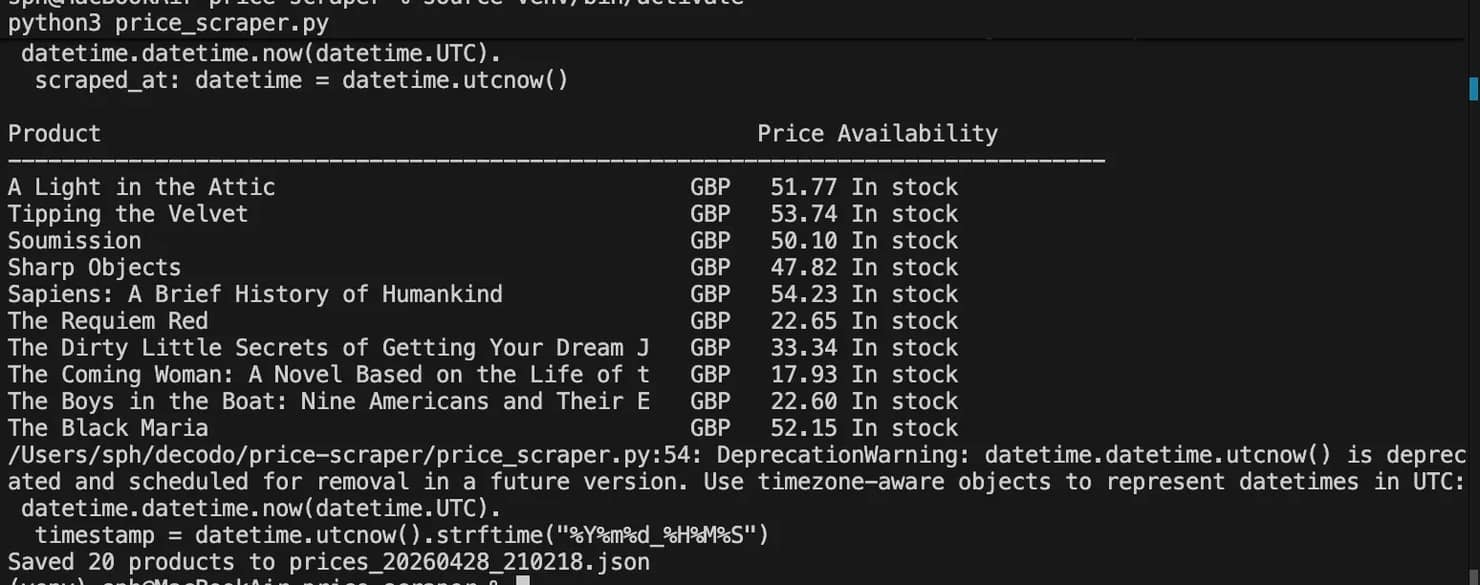
And a timestamped JSON file in your project directory:
Verifying accuracy
Open https://books.toscrape.com/catalogue/category/books1/index.html_ in your browser and manually check 5 products against your JSON output:
- Does the product name match exactly?
- Does the price match down to the decimal?
- Is the availability status correct?
A well-configured scraper should achieve 100% accuracy on books.toscrape.com. This site is simple and has no anti-bot measures, JavaScript-rendered content, or changing prices. If you notice any errors, the problem is with your selector logic, not the website itself.
Calculate your capture rate:
The website books.toscrape.com shows 20 products on each page. If you see fewer than 20 products, it means some are missing.
Diagnosing common failures
Zero products returned
The selector isn't finding anything. This might happen because the page didn't load completely before the parser started, or the HTML layout is different from what you expected. To troubleshoot, add a step to check what the scraper actually sees:
Open debug.html in your browser. If it looks different from the live page, such as missing products or incomplete HTML, it means the page did not finish loading before calling page.content(). To fix this, increase the timeout or use a more specific wait_for_selector command.
Prices returning as None or 0.0
The price element is in the HTML, but your selector isn't working. Open your browser's DevTools on the page you're checking. Right-click the price element and choose Inspect. Make sure the class name matches your selector exactly, as any small difference will cause it to fail.
Stale selectors after a site redesign
Websites often change their HTML structure unexpectedly. This means a selector that worked last week might not work today. This problem is known as selector rot, and it's the main reason why many scrapers stop working. To fix this issue, follow best practices: store selectors in a config file instead of hardcoding them in your script.
Incorrect prices from cached content
Some pages show older prices that may not be accurate. If a scraped price seems strange, either much lower or much higher than expected, make sure to check it for validation:
Flag outliers for review instead of simply discarding them; an exceptionally low price often signals a genuine sale rather than a processing error.
Why periodic test scrapes matter
A scraper that functions today offers no guarantee for next week. Websites frequently update their layouts, rotate class names, and deploy new anti-bot layers without warning. By running a test scrape against a known baseline, even on a weekly schedule, you can identify selector rot and breakage before they result in significant gaps in your collected data.
Set a simple check: if the number of products returned drops below a threshold, send an alert:
This won't catch every failure mode, but it catches the most common one: a selector breaking silently and returning an empty list.
Common obstacles and how to handle them
books.toscrape.com is easy to access. It doesn't have anti-bot measures, JavaScript rendering, or IP blocks. Real eCommerce sites will present challenges. Here’s what you can expect and how to deal with each issue.
CAPTCHAs and bot detection
Major retailers use aggressive methods to detect bots. They check your browser settings and look at how you make requests. If they see a single IP address making many requests to the same product pages quickly, it raises a red flag. They might ask you to complete a CAPTCHA if they suspect something is automated.
Three things reduce detection risk significantly:
- Rotate IPs. Decodo's residential proxies send each request through a unique residential IP address. This makes your scraper appear like regular traffic from various users
- Realistic browser fingerprints. Playwright already runs a real Chromium browser, which passes most fingerprint checks that headless detection targets. You can enhance this by setting a realistic user_agent and viewport size
- Request pacing. Adding random delays between requests is more important than many realize. Fixed delays are easy to detect, but random ones are not
For tough websites that use Cloudflare, Akamai, or custom bot protection, Decodo's Web Data API can handle fingerprinting, solve CAPTCHA, and JavaScript rendering as a managed layer. You provide a URL, and it returns the rendered HTML. For more details on how to bypass CAPTCHA, check out the guide that explains all the methods.
IP blocks and rate limiting
Getting blocked from a website isn’t always clear. You might see a 403 error. More often, the site returns a soft block, like a CAPTCHA page, an empty product page, or sends you to a login screen, while your scraper saves the incorrect HTML.
Here are some practical guidelines for most major retailers:
- Wait 5 to 10 seconds between requests to the same website.
- Limit to 1 or 2 active sessions per IP address.
- Change user agents along with IPs. Using the same user agent string for thousands of requests can identify your activity.
Dynamic content and JavaScript rendering
Prices loaded with AJAX or client-side rendering are not included in the initial HTML response. They only appear after JavaScript runs. When you make a basic Requests call, you get the page structure without any price data.
Playwright addresses this issue automatically. It uses a real browser and waits for the page to load completely before you access the content. However, for pages where prices show up only after user actions like scrolling, clicking a size selector, or accepting a cookie banner, you need to be more specific in your approach:
Use Playwright for pages that need JavaScript to load their content. For static pages where prices are already in the HTML, using requests with BeautifulSoup is faster and costs less. For more on what a headless browser is and when you need one, that covers the trade-offs. For more details on scraping dynamic content, refer to the deeper guide.
Anti-scraping countermeasures
Beyond CAPTCHAs and IP blocks, eCommerce sites use subtler traps:
- Honeypot links. Invisible links in the HTML that legitimate users never click, but scrapers follow all <a> tags will. Clicking one flags your session immediately. Filter links by visibility before following them:
- Obfuscated class names. dynamically generated class names like a3B9x_price that change on every deploy. Selector rot sets in fast when you target these; they break silently after every site update. Build selectors that rely on structural position or ARIA attributes instead:
- ARIA attributes (aria-label, aria-describedby, role) are set by developers for accessibility purposes. They're tied to the element's function, not its visual styling, which makes them far more stable across redesigns than class names.
For a full breakdown of anti-scraping techniques and how to handle them.
Geo-specific pricing
The same product can have different prices based on where you are. For example, a pair of headphones might cost $299 in the US, €319 in Germany, and £259 in the UK. These differences are not just due to currency conversion; they reflect actual pricing differences.
Use Decodo's geo-targeted residential proxies to scrape from specific regions:
Run the same scraper with different geographic targets and compare the results to understand pricing in different regions.
Data quality issues
Bad data can cause more problems than having no data at all. If a price seems valid but is incorrect, it can mess up any analysis without showing an error.
Here are some common sources of bad price data:
- Cached pages. Sometimes, a server sends an outdated version of a price from the previous day. Check scraped prices against a sensible range and mark any that are too far off
- Missing discount information. If the sale price is recorded but the original price is missing, you can't calculate the discount
- Currency mismatches. A price taken from a German website may be stored as if it were in USD, which leads to confusion
Add a validation layer before saving:
Flag outliers instead of throwing them away. An unusually low price might be a real flash sale, not an error from data scraping. To learn more about cleaning and preparing scraped data before using it, check out what is data cleaning?
Using AI to automate and optimize price scraping
Using manual selectors to write data works well when you're scraping information from one website. When you try to scrape data from 50 different retailers, each with its own HTML structure, class names, and page layout, this method doesn’t work effectively. AI can improve this process in several important ways.
AI-assisted selector generation
Instead of manually inspecting the DOM for every new target site, send the page HTML to an LLM, then ask the model to provide the CSS selector or XPath for the price element.
Here's a practical example using the Anthropic API. First, install Anthropic
pip install Anthropic SDK:
Create a new file, get_price_selector.py, and add the code below
Cache the returned selector you get in a config file. Use it for each scrape until it stops giving results. Then, create a new one. This way, you let AI do the hard discovery work only once, not with every request.
LLM-based extraction from unstructured pages
Some product pages have prices that are hard to find because they use different types of HTML or plain text. This makes it difficult to target with CSS selectors. can read these pages and provide the information in a clear JSON format without needing any selectors.
This is especially helpful for:
- Websites that have prices stored in JavaScript variables or in inline scripts
- Pages where prices are shown in unstructured text, like "Now only £29.99!"
- Aggregator pages that combine different formats from various sellers
Price normalization and currency conversion
Scraped prices come in inconsistent formats across different sites and regions. For example, you might see them as £1,299.00, 1.299,00 €, USD 1299, or $1,299. If you put these raw formats directly into a database, it can cause problems when you try to analyze the data later. Use an LLM to normalize prices into a consistent schema:
Anomaly detection
Price changes, like a product dropping 80% overnight or its price jumping 10 times, can mean a real sale, a mistake in data entry, or a problem with data collection. Finding these issues early helps stop bad data from affecting other systems.
A basic statistical approach catches most outliers:
If context is important, for example, to tell the difference between a real flash sale and a scraping error, send the flagged prices along with the relevant details to the LLM:
When to use AI and when not to
AI can slow down processes and increase costs for every request. A well-designed scraper that visits 1,000 product pages doesn’t need an LLM for each page.
Use AI for:
- Finding selectors for new sites. Do this once per site and cache the results
- Handling exceptions. If a selector fails, switch to LLM extraction instead of letting it crash
- Normalizing data. Process raw data in batches, not during the scraping
- Understanding anomalies. Only check for outliers when statistics indicate a problem
Don't use AI for:
- Every page request in a high-volume scrape. The cost and latency add up fast
- Replacing working selectors on stable sites. If a selector functions well, keep using it
- Simple tasks that a regular expression or string operation can handle
Using a smaller, faster model like claude-haiku-4-5-20251001 keeps costs low for high-volume tasks like normalization and anomaly detection. Reserve larger models for complex extraction tasks where accuracy matters more than speed.
For connecting AI agents to live web data as part of a larger pipeline, Decodo's MCP server integration covers the infrastructure side.
Best practices for reliable price scraping at scale
A scraper that works well on one site may not work the same way when it's used on 50 sites with thousands of SKUs. These practices help keep it reliable over time, not just on the first day.
Rotate everything
Using predictable patterns can lead to getting blocked quickly. Here are two ways to avoid this:
- IPs.Decodo's residential proxies handle IP rotation automatically. Each request goes out through a different residential address, making repeated scrapes look like organic traffic from different users.
- User agents. Store a collection of realistic user agent strings and change them for each session, rather than for each request:
- Viewport sizes. A single viewport across all sessions is a fingerprint. Vary it:
- Request timing. Randomize delays between requests. Never use fixed intervals:
Version-control your selectors
Hardcoding selectors in your script is a major problem for maintaining production scrapers. When a website changes its layout, which they all do eventually, you end up editing Python files instead of a simple config file.
It's better to store selectors in a separate config file:
Load them at runtime:
When a site redesigns and a selector breaks, you update one JSON entry. The scraper logic stays untouched.
Monitor for breakage
Silent failures can be very risky. When a scraper returns 0 results or incorrect data, it doesn't show an error. Instead, it just saves bad information, leading you to believe that everything is fine.
Make sure to set up health checks that run after every scrape:
If a scrape fails the health check, log it and skip writing to your main output. Bad data in is worse than no data in.
Also, check logs/ after each run, Nutch users will recognize this pattern. For scrapers, build the equivalent: a per-run log file that captures fetch status, parse success rate, and record count so you have a paper trail when something breaks.
Validate output data
A price that passes the health check can still be wrong. Add field-level validation before any scraped record touches your database:
Pydantic will raise a ValidationError if any record doesn't meet the required criteria. Make sure to catch this error, log it, and continue processing the rest instead of allowing it to disrupt the entire batch.
Schedule scrapes thoughtfully
When you scrape data, how you do it is just as important as when you do it.
- Run your scrapes during off-peak hours for the site you're targeting. For example, a US retailer has peak traffic between 9 AM and 9 PM Eastern time. Scraping at 3 am local time puts less pressure on their servers and lowers the risk of hitting rate limits during busy times.
- Don’t scrape the same page multiple times in a short period. If you're tracking 500 products on one site, spread your requests out instead of gathering them all at once
- Adjust your scraping frequency based on how often the data changes. Flash sale prices can change every hour, while standard retail prices might change weekly. Scraping stable data too often wastes resources and increases the chance of being blocked. Scraping volatile data too infrequently means you might miss important updates.
A simple frequency config per domain:
Build in retry logic
A single failed request shouldn't kill the entire scrape. Network hiccups, temporary rate limits, and transient server errors are normal. The scraper should handle them automatically and move on.
Use tenacity for clean, configurable retry behavior:
How this works:
- retry_if_exception_type only retries on specific errors. A 404 isn't worth retrying. A timeout is.
- wait_exponential waits 4 seconds before the first retry, then doubles each time up to 60 seconds. This is called exponential backoff; it avoids hammering a struggling server while still recovering automatically.
- stop_after_attempt(3) gives up after 3 attempts and raises the exception so you can log it and move on
If you'd rather not add a dependency, a basic backoff loop achieves the same result:
The random.uniform(0, 1) adds jitter. A small random offset that prevents multiple concurrent scrapers from retrying in lockstep and hitting the server at the same moment.
For a production scraper hitting hundreds of URLs, retry logic is the difference between a run that completes with a few logged failures and one that crashes halfway through and leaves you with incomplete data.
Use a scraping API for critical targets
For high-value websites like major retailers and platforms using Cloudflare or Akamai, keeping a custom scraper updated is a constant challenge. When these sites strengthen their defenses, your scraping methods can break, or your IPs can get blocked.
Decodo's eCommerce price scraper API returns structured pricing data without the maintenance burden. You send a URL, it handles rendering, fingerprinting, CAPTCHA bypassing, and IP rotation, and then returns clean JSON. For production-grade price monitoring across critical targets, the time saved on maintenance alone justifies the switch. For more on using proxies and scraping solutions to monitor pricing, that guide covers the infrastructure considerations in depth.
Final thoughts
Price scraping at scale comes down to three things: getting the data, keeping the scraper running, and trusting the output. This guide covered all three: building a working Python scraper with Playwright and BeautifulSoup, handling the real-world obstacles that break production scrapers, and validating output before it touches anything downstream.
The jump from a working scraper to a reliable one is mostly infrastructure, rotating proxies, versioned selectors, health checks, and thoughtful scheduling. Get those right, and the scraper runs itself. For targets where maintaining custom selectors isn't worth the effort, Decodo's eCommerce price scraper API and residential proxies handle the heavy lifting so you can focus on the data itself.

Build it, then scale it
Your scraper works on 50 products. Now try 50,000 across six regions. Decodo handles the infrastructure, so your code stays the same.
About the author

Lukas Mikelionis
Senior Account Manager
Lukas is a seasoned enterprise sales professional with extensive experience in the SaaS industry. Throughout his career, he has built strong relationships with Fortune 500 technology companies, developing a deep understanding of complex enterprise needs and strategic account management.
Connect with Lukas via LinkedIn.
All information on Decodo Blog is provided on an as is basis and for informational purposes only. We make no representation and disclaim all liability with respect to your use of any information contained on Decodo Blog or any third-party websites that may belinked therein.