Puppeteer Infinite Scroll: A Practical Scraping Guide
If you try to run curl on an infinite scroll page and then search (grep) for the content, the result will show zero matches. The required items aren't available in the initial HTML. The content is loaded using fetch requests that the page sends when a scroll event is triggered. This guide will cover: diagnosing the target, three scroll strategies, verification, speed, anti-detection methods, and a real-world walkthrough.

Justinas Tamasevicius
Last updated: May 29, 2026
25 min read

TL;DR
- The Network tab usually reveals all necessary information before coding begins. If there's a dedicated JSON endpoint for the scroll, a full browser may not be necessary.
- Most sites implement one of three scroll patterns: a height-check loop, viewport-step with item counting, or using scrollIntoView on a sentinel element. You must diagnose the pattern first before selecting the appropriate strategy.
- Most scrapers fail silently due to errors in loop verification. To verify, log per-iteration counts and cross-check them against the API's pagination signal when it's available.
- For optimal speed, use event hooks instead of fixed sleep delays. The page.waitForResponse() method can capture the data response, and MutationObserver detects when new items appear in the DOM.
- Anti-detection should be implemented in incremental steps. Begin with delay and scroll randomization, incorporate mouse movement, and only transition to residential proxies if IP blocking becomes an issue.
Understanding infinite scrolling
For a scraper, infinite scroll is a data delivery mechanism. The page loads more content as the user scrolls, with no pagination clicks and no full-page reloads.
How infinite scroll loads data
Most sites use a scroll event listener or an IntersectionObserver watching a sentinel element near the bottom of the page. When the trigger fires, the page sends a fetch request to a JSON endpoint, parses the response, and injects new nodes into the DOM. The cycle repeats until the API returns an empty page or the user stops scrolling.
Why standard HTTP scrapers fail
A requests.get() or plain fetch() call returns whatever the server sent in the first response. That gives you the page shell, the loader script, and sometimes the first batch of items. Anything that loads through JavaScript afterward is missing. Without a JavaScript runtime, the scraper has no way to fire scroll events, so the rest of the data never loads. That's why infinite-scroll targets need a headless browser.
You can see the gap in one command:
The raw response has an empty container div and a script tag that fetches quotes from a JSON API and injects them at runtime. Until JavaScript runs, the document doesn't contain the quotes the page displays. That's the whole problem in one shell session.
What this means for scraping
You should note 3 properties of infinite scroll when building a scraper:
- The state doesn’t survive a crash. A scraper that fails mid-scroll has no bookmark to resume from; with cursor-based pagination you can resume from the last ID.
- There's no stable URL corresponding to an item's position. This makes deduplication across runs more complex than it first appears.
- Scroll patterns can expose bot signals. Events that arrive too regularly or too fast don't match real visit behavior, so anti-detection becomes a core concern from the start.
Set up Puppeteer
Puppeteer is a Node.js library that drives Chromium over the Chrome DevTools Protocol (CDP). Calling puppeteer.launch() starts a bundled Chromium and returns a Browser object that your script can control. Every method you call (navigation, evaluation, scrolling, input) maps to a CDP command the browser executes.
Install
Install Puppeteer into a Node 22 LTS project. The package bundles a compatible Chromium build automatically:
Recent Puppeteer releases ship as ESM, so every example below uses import/export syntax. Setting "type": "module" in package.json (the npm pkg set line above) is the simplest setup. If your project still uses CommonJS, pin Puppeteer to v24 or earlier.
Two v22 API changes you should know about
These 2 changes in v22 are the main ones to watch for before you start writing code.
First, there's no built-in delay function. The page.waitFor() and page.waitForTimeout() helpers were removed in v22. For fixed delays, use a one-line helper: const delay = ms => new Promise(r => setTimeout(r, ms)). For condition-based waits, use page.waitForFunction() instead of a fixed sleep.
Second, the headless flag changed behavior in v22. headless: true now selects the modern headless implementation, and headless: 'shell' selects the legacy chrome-headless-shell binary. Both modes produce User-Agent strings that contain HeadlessChrome, which is a detection signal. The anti-detection section covers how to override the User-Agent. The intermediate headless: 'new' string from older 2023 tutorials still launches and behaves the same as headless: true. The examples below use headless: true.
Target site
The target site for every example is quotes.toscrape.com/scroll. It's a public test site built specifically for scraping practice. It has real AJAX pagination, a stable DOM, and a JSON endpoint that anyone can see with DevTools open. The site is intentionally friendly. There's no anti-bot or authentication, the termination is predictable, and the selectors are clean. That makes it a good starting point for learning the mechanics, even though most production targets aren't this clean.
Some test pages with "scroll" in the URL are static demos that don't actually load on scroll. Use the curl-and-grep diagnostic from the next section to confirm the page behavior before committing to a strategy.
Diagnose your target before writing code
The hardest part of an infinite scroll scrape isn't the scroll loop. It's figuring out how the target loads its data before you commit to a strategy that doesn't match. Spending just a few minutes with DevTools on the real site saves a lot of time debugging a loop that terminates on the wrong signal.
If you've already confirmed your target needs JavaScript rendering, you can skip to the 3 scroll strategies below and return here when you hit specific situations (picking the right strategy, handling authentication, identifying the termination signal).
Load the target in Chrome and open DevTools (our inspect element guide covers the basics if you need a refresher), then answer the 5 questions below.
Is there an API endpoint, or is the data rendered server-side?
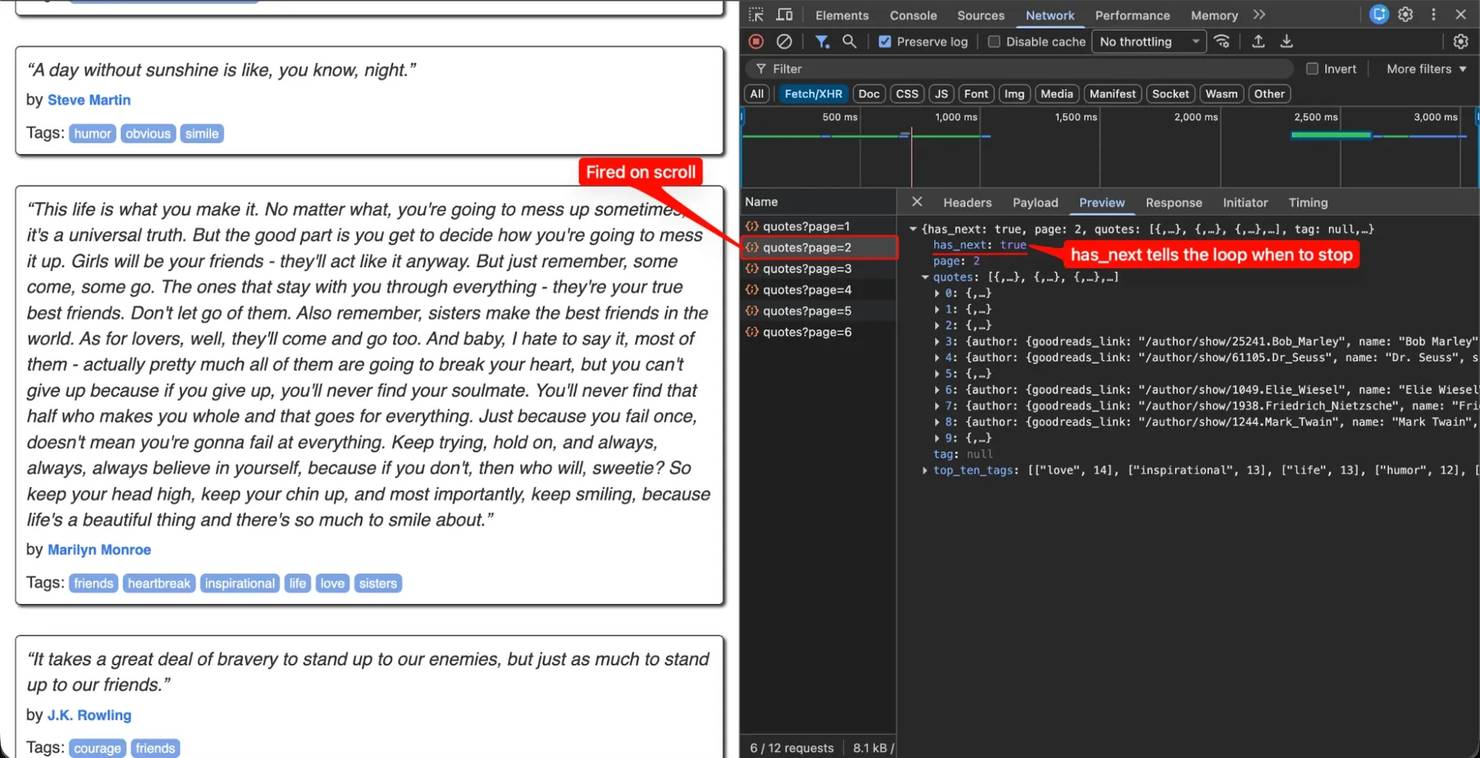
Switch to the Network tab, filter to Fetch/XHR, and scroll the page. If you see fetch requests firing on each scroll with JSON responses that contain the visible items, intercepting the API directly is the cleanest approach. If you see no new requests on scroll, the page is either re-rendering pre-loaded data client-side or using server-sent events, and you'll need DOM scraping instead.
If you found a JSON endpoint, see the alternative approaches below for the implementation. The scroll-strategy sections that follow are for targets without a clean API.
What is the scroll trigger?
3 patterns are common, and each needs a different strategy:
- The page uses a near-bottom trigger. It loads more content when the scroll position is within a few hundred pixels of document.body.scrollHeight. Test by scrolling slowly and watching where in the viewport the next batch fires. Strategy 1 (jump to the bottom and wait for height change) is the right choice.
- The page uses an IntersectionObserver on a sentinel. A specific element (usually invisible, at the bottom of the list) triggers the load when it enters the viewport. Open the Sources tab, search for IntersectionObserver, and look at the root and rootMargin properties. If rootMargin is small or zero, you must scroll the sentinel into actual view, so Strategy 2 (viewport-height increments) is the right choice.
- The page has an explicit "Load More" button. A real click advances the feed. The locator click pattern handles this, and the one-line answer is page.locator('button.load-more').click().
Does the URL change as you scroll?
If you see page=2 or ?cursor=abc123 appearing in the URL on scroll, the site has addressable pagination. Treat it as pagination instead of infinite scroll. Standard HTTP requests to those URLs usually work without a headless browser.
The same test domain shows both patterns side by side, which makes the choice concrete:
2 URL patterns produce 2 distinct scraping strategies. A few seconds of curl before you start using Puppeteer often tells you Puppeteer isn't needed. Some sites are hybrid (infinite scroll on category pages, addressable URLs on the product detail pages they link to), and you should scrape each layer with the approach that matches its architecture. For more on pagination scraping, see our guide on web scraping pagination.
What does authentication require?
Look at the captured request's headers and check for these signals:
- The request has a Cookie header with session values. You need to load the login page through Puppeteer first so it establishes a session.
- The request has an Authorization header with a Bearer token. This is a JWT or API token. Find where it comes from (login response, embedded in HTML, or generated client-side) so you can replay it.
- The request has an X-CSRF-Token or X-Requested-With header. This is CSRF protection. Extract the token from the page before replaying.
- The URL has a signed query parameter (for example, &sig=…). This is algorithmic signing. Reverse-engineering the algorithm or keeping the browser-driven approach are the 2 practical options.
How does the feed signal that it's finished?
Check what the last response looks like. The end signal might be a flag like has_next: false, a cursor that returns null, an empty items array, or no signal at all. The termination logic in your loop has to match the signal the site sends. A loop watching for has_next: false against a feed that ends with an empty array will run forever.
3 scroll strategies
Pages trigger their content loads in different ways. 3 patterns cover most production targets, and each works on the quotes.toscrape.com/scroll test site. Pick the one that matches how your target listens for scroll events.
Shared helpers and the modern delay function
Every example below shares the same boilerplate. Save this once as a helper file:
These 2 small helpers cover what the standard library doesn't. The delay() function handles fixed pauses, and randomDelay() provides the variance used later in the human-like patterns. The launch wrapper centralizes the headless and viewport defaults so every example below stays consistent. The 1920x1080 resolution matches the most common real desktop, which the anti-detection section relies on later.
Strategy 1: Scroll to bottom and wait for height change
Strategy 1 is the scroll-to-bottom pattern. Scroll to document.body.scrollHeight, wait for the height to grow (which means new content was appended), then repeat. Use this on any page that grows the body as new items load.
The loop snapshots the current scrollHeight, scrolls to the bottom, then uses waitForFunction() to block until the height grows. If 5 seconds pass with no change, the loop assumes the feed is exhausted and breaks. Wrapping the work in try/finally means browser.close() runs on every exit path, including unhandled errors. Skip the try/finally and leaked Chromium processes will silently eat memory on long runs.
A successful run prints a single line and writes quotes.json next to the script:
The output file contains the full extraction in the format extractQuotes() produced. The first few records look like this:
The site returns 100 quotes across 10 pages. If you run fewer reports, the loop terminates early, usually because the waitForFunction timeout fired before a slow page finished loading. Increase the timeout from 5000 ms to 10000 ms and re-run.
On real targets, the selectors will be more unreliable than .quote. Our guide to choosing the right selector for web scraping covers picking between CSS and XPath, and the verification section below covers how to catch silent selector mismatches before they reach production.
Strategy 2: Scroll by viewport height
Some pages don't respond to a single jump to the bottom. They use IntersectionObserver with a threshold that only fires when the sentinel is close to the viewport edge, not anywhere on the page. For those targets, scroll one viewport at a time and watch the item count instead of the document height:
Strategy 2 makes a couple of changes from Strategy 1. First, window.scrollBy(0, window.innerHeight) replaces the jump to the bottom, so each iteration advances by one screen. Second, the termination check counts .quote elements instead of measuring scrollHeight, which is a more direct signal when IntersectionObserver is the loading trigger. After 5 consecutive scrolls without a new item, the loop assumes the feed is exhausted. This pattern is slower per page than Strategy 1, and more reliable on pages that only load when the scroll position is within a small threshold of the bottom.
Strategy 3: Scroll to a specific element
When you know what the end of the feed looks like (a footer, a "no more results" banner, or a sentinel div the page adds when there's no more data), scroll-to-element is the most explicit option. It also avoids open-ended loops:
This loop scrolls the last .quote card into view, waits, and re-checks whether the footer entered the viewport via getBoundingClientRect(). The exit condition reads from the page's own DOM rather than guessing scroll depth. The iterations cap is a safety net, so a misconfigured selector doesn't trap the script in an open loop.
There's one caveat to running this against quotes.toscrape.com/scroll specifically. The test site's initial 10-quote render is short enough that the page footer is already inside the viewport on the first iteration, so the loop exits with only 10 quotes captured rather than the full feed:
That's a real-world Strategy 3 failure mode worth noticing. The technique is correct; the selector is wrong for this target. Strategy 3 works best when the end-of-feed signal isn't visible from the start. Examples include an "End of results" banner injected after the last fetch, or a sentinel div that the page adds when there's no more data. On targets without that kind of explicit end-marker, fall back to Strategy 1 or Strategy 2's growth-based termination.
For element interactions (clicking a Load More button instead of waiting for natural scroll-load), the page.locator() method is cleaner than the manual waitForSelector + click pattern. The locator auto-scrolls the element into view, waits for it to be actionable, retries on stale references, then acts as a single call:
That single line handles visibility waiting, scrolling, and the click, which older recipes wrote in 5 or 6 lines around manual waitForSelector() calls.
The Locator API does more than .click(). Other methods matter most when your script interacts with recycled or repositioned elements. This includes clicking a Load More button that re-renders, hovering to trigger a tooltip on a card the framework may have replaced, or filling a search field that resets between batches. The scroll loops earlier in this section don't strictly need the Locator API because they operate on the document itself (window.scrollTo, document.body.scrollHeight) rather than on individual nodes that could go stale. The methods below are worth using when you move from "scroll the page" to "interact with an element on the page":
- The .wait() method blocks until the locator resolves to a stable, visible element, without performing any action. It's a stricter replacement for waitForSelector.
- The .hover(), .fill(text), .map(fn), and .filter(fn) methods complete the action set for non-click interactions.
- The Locator.race([loadMoreBtn, endOfFeedBanner]) method resolves to whichever element appears first. This is useful when a scroll either reveals more content or reveals an end-of-feed sentinel, and you want to act on whichever resolves first.
Chain configurators before the action to override the defaults:
The setWaitForStableBoundingBox(true) configurator waits until the element stops moving across 2 consecutive animation frames, which removes the race between a click and a CSS transition. The setEnsureElementIsInTheViewport(true) setting is the default for click. Set it explicitly when you want the same auto-scroll behavior for non-click actions.
Handling lazy-loaded images
Lazy-loaded image handling is a separate problem from infinite-scroll data loading. Images sit in the DOM with loading="lazy" or behind an IntersectionObserver, and the browser defers fetching them until they enter the viewport. A scroll-to-bottom loop reaches the last item, but the images several screens up may never have been visible long enough to load.
The solution requires a second pass:
After your data-collection scroll loop finishes, call loadAllImages(page) before reading src attributes or capturing screenshots. The loop drives the viewport from top to bottom in screen-sized steps, so every image enters the viewport and page.waitForNetworkIdle() blocks until image requests stop arriving. Skip the network-idle wait, and you collect placeholder URLs (or empty src attributes) for any images that haven't finished downloading.
Verify your loop actually worked
With the scroll loop and lazy images handled, the next concern is making sure it worked. The most common production failure in scroll scraping isn't a crash. It's a silent partial extraction: the loop terminates early, returns 47 items out of an expected 5,000, and the downstream pipeline produces wrong results without anyone realizing. Verification has to happen at the scraper, before the data leaves the process.
Log a structured line per iteration
The cheapest signal that something is wrong is the count progression. If you log every iteration, a run that should produce 10 lines but ends after 3 is obvious in the output:
A real run against the test site produces a noisier sequence than you might expect. Here's an actual capture:
3 details in that output are worth knowing. First, added and total count items at measurement time, not at scroll-trigger time, and the page can load multiple batches between the scroll firing and the count being captured. That's why iteration 0 already shows 20 items (the initial 10 plus a batch that arrived during the scroll). Second, added: 0 in a healthy run doesn't mean the loop is broken. It just means the height grew, but no new .quote nodes appeared between the previous and current count snapshots.
This usually happens because the previous iteration already counted the newest batch. Third, large jumps like added: 70 happen when the page loads several batches faster than expected between counts. The signal you watch for isn't per-iteration added. It's whether the total eventually stops increasing at the expected final number, and whether the loop-exit line shows that plateau.
A truly failing run looks different from the noisy-but-healthy one above. An exit line at iteration: 3 with total_items: 30 on a feed you expect to produce 100 items is the clearest sign of early termination. Another failure mode is a sequence where total climbs steadily, then jumps back down (item recycling, virtual-list reset), which means your selector is matching transient nodes the framework swaps out. JSON-line output costs nothing to produce and parses cleanly when you pipe it through jq or load it into a notebook. Structured logs beat free-text logs the moment you have more than one run to compare.
Cross-check against the API's own termination signal
When the target exposes a JSON endpoint, the API tells you whether there's more data. Watch the responses passively and capture the last has_next (or equivalent) value:
When the scroll loop's termination logic disagrees with the API's own signal, the API is almost always right. This catches the common case where the wait timeout fired during a slow page load, and the loop exited even though more data was coming. Here's the warning you'll see when it triggers:
That's the signal to either raise the waitForFunction timeout, or switch to count-based termination (Strategy 2's pattern) that doesn't depend on network speed.
Snapshot the page when the loop exits
When the count looks wrong, the failure is usually visible on the page. The page might show a CAPTCHA banner, a 403 overlay, or a stuck loading spinner. A full-page screenshot at exit time tells you which:
Run all 3 checks during development. Once you've seen what success looks like and have confidence in the termination signal, you can reduce it to just the count log in production.
Speed up the scroll loop
Once verification is solid, the next concern is speed. The strategies above work, but they download everything the page requests. That includes avatars, fonts, stylesheets, ad pixels, and analytics calls. On quotes.toscrape.com, that's a few kilobytes, but on a real product catalog or social timeline, it's megabytes per scroll. 3 Puppeteer features cut that overhead and remove the polling that makes scroll loops slow.
Block non-essential resources with request interception
Calling page.setRequestInterception(true) routes every outgoing request through a Node-side handler that can continue, abort, or respond. To run a text-only scroll loop, abort the image, media, font, and stylesheet requests:
The req.isInterceptResolutionHandled() check guards against double-handling when more than one listener is registered on request. The performance gain on real targets is significant. On image-heavy feeds, it routinely reduces total bytes by an order of magnitude, which translates into faster scroll triggers and lower memory pressure across long runs.
There's one caveat. This approach is incompatible with the lazy-image pass from the previous section. Aborting image requests removes the very fetches the second pass relies on. Run a fast text-only scrape or a full-asset scrape, not both in the same browser session.
Block by URL pattern via CDP
For more precise control without using full interception, the Chrome DevTools Protocol exposes a URL-pattern blocklist that runs inside the browser process:
The page.createCDPSession() call exposes raw CDP. The Network.setBlockedURLs method adds near-zero per-request overhead because the browser drops matching requests itself, unlike setRequestInterception, which round-trips every request through your Node process. Use this when the block list is known upfront, and you only want to filter (not modify) traffic.
Push-based detection with MutationObserver and exposeFunction
By default, page.waitForFunction runs your predicate on every animation frame (about every 16ms), which is continuous CPU work even when nothing has changed. A MutationObserver runs your callback only when the DOM actually mutates, so the CPU stays idle between batches.
The page.exposeFunction(name, fn) helper installs a Node-side callback on the page's window object. The page calls it like a normal function. Puppeteer routes the arguments back through CDP. Together with MutationObserver, you get push-based notifications from the page to your script:
Against the test site, the batch handler prints a line per page load as the data arrives, with no polling between them:
Each line fires the instant the API response gets parsed, and the new .quote nodes attach, rather than waiting for the next polling interval. On the test site, the difference is small. On a real feed with strict rate limiting (one batch every few seconds), push-based detection changes the page from running the polling predicate on every animation frame to being essentially idle between batches.
Use this when the loading cadence is irregular (some pages send a batch every few seconds, some load several at once), or when you want to react to specific node patterns rather than scrollHeight changes. The trade-off is that the termination signal becomes "no batches for N seconds" instead of "scrollHeight didn't grow", so you still need a timeout on the Node side, just not a per-iteration polling timer.
Human-like scrolling and anti-detection
After the scroll loop is fast and verified, the next concern is whether it can bypass detection. Major platforms, including social feeds, large eCommerce sites, and professional networks, use scroll behavior as a component of their bot risk scoring. The default Puppeteer scrolling generates several signals that detection scripts can flag. For example, the timing between scrolls is constant to the millisecond, and the scroll distance is identical on every iteration.
Furthermore, there's an absence of mouse movement between scrolls, and no micro-pauses, re-reads, or upward scrolls are present. These patterns are rarely seen in a real user visit. The fix is to introduce variance at every level a detection script can measure. Although none of the techniques below guarantee that you won't be flagged (because no client-side method can), they collectively remove the most obvious statistical fingerprints.
Inject variance in timing and distance
A real visitor doesn't scroll at a perfectly even rate and doesn't move the same number of pixels each time. These 2 short helpers replace the constants:
The displayed values are for illustrative purposes only. They must be tuned according to your target application. The core principle to follow is variance, and not the specific numerical values. You should use a different scroll amount and a different pause length during each iteration. The removal of the constant-distance and constant-delay signals represents one of the most accessible and low-cost anti-detection improvements.
Add mouse movement
Real user activity involves mouse movement during reading. The page.mouse.move() function generates CDP input events, making the activity indistinguishable from hardware mouse input in DevTools Protocol traces:
The steps parameter breaks the movement into intermediate points. This generates a curved path and avoids the instantaneous "teleport" effect.
Use mouse.wheel() for natural scrolling
The window.scrollTo() call is purely programmatic. In contrast, page.mouse.wheel({ deltaY: n }) dispatches a real wheel event, which more accurately matches a visitor scrolling with a trackpad or mouse wheel:
Wheel events follow the same code paths that real input devices trigger. It's a stronger match than when you use the programmatic scrollTo() call.
Insert occasional upward scrolls
In order to better simulate the behavior of actual users who frequently return to previous sections for re-reading, it's recommended to implement an occasional upward scroll of a minor distance after every 5 or 6 iterations before proceeding further down the page.
This breaks the monotonic-downward pattern that simple detection heuristics watch for.
Set a realistic viewport and user agent
The default User-Agent for headless: true and headless: 'shell' contains the HeadlessChrome substring, which acts as a primary detection signal for bot scanners. It's necessary to override the User-Agent to remove the Headless prefix as a minimum anti-detection measure. The Chrome version in the User-Agent string must also remain current, because a version that is older than the bundled Chromium binary appears unusual, and hardcoded versions in documentation quickly become obsolete. You should extract the major version number from browser.version() to ensure the User-Agent string updates automatically with each Puppeteer upgrade.
The User Agent must align with the actual Chromium build to avoid version-mismatch signals across the User-Agent string, navigator.userAgentData, and the TLS ClientHello. If you need a specific historical version (some sites serve a different feed to older Chrome), hardcode that major instead of reading it dynamically.
Collectively, these patterns result in a scroll loop that simulates the behavior of a slightly distracted human user. For a deeper background on what detection scripts measure and why each control matters, see our guide to anti-bot systems. If scroll detection escalates to a CAPTCHA, the Puppeteer CAPTCHA guide is the next step.
The 2026 stealth ecosystem: a stealth plugin alone isn't enough
Many anti-detection guides recommend puppeteer-extra-plugin-stealth. However, this is only a partial solution. The plugin patches the visible Chromium headless signals (navigator.webdriver, missing plugin lists, chrome-object differences in userland). Conversely, modern web application firewalls (WAFs) inspect signals that the plugin doesn’t cover, including traces from the Runtime.Enable CDP command that Puppeteer sends to the browser during startup. Cloudflare, DataDome, and PerimeterX are reported in the scraping community to check for this specific signal, among others.
Some functionality provided by the plugin in userland can also be accessed at the browser level. For example, launching with args: [‘–disable-blink-features=AutomationControlled’] suppresses navigator.webdriver at the Chromium binding layer. This approach is more difficult to detect than a JavaScript patch that overrides the property after the page loads. The effect is observable in one line:
The primary objective of the AutomationControlled flag is to align the behavior of the automated instance with a standard browser environment. By ensuring that navigator.webdriver returns false, the scraper effectively masks the automation signal at the binding layer. In contrast to userland patches, such as those utilized by the stealth plugin, this method prevents detection via Object.getOwnPropertyDescriptor inspections on the Navigator.prototype. To achieve maximum coverage, developers should combine this Chromium flag with the stealth plugin rather than relying on a single approach.
The current options worth knowing, with their maintenance status (it matters here):
- puppeteer-extra-plugin-stealth. This represents a legacy baseline that patches common userland signals. Although widely documented, its development has stalled since early 2023, making it insufficient for bypassing modern anti-bot systems that inspect CDP-level traces.
- rebrowser-patches. This utility modifies the Puppeteer source code to suppress the Runtime.Enable leak. It's currently the most effective technical solution for maintaining Puppeteer compatibility while mitigating specific CDP-based detection fingerprints.
- puppeteer-real-browser. This library interfaces with an existing Chrome installation via CDP attachment. By utilizing a standard browser binary instead of Chromium-for-Testing, it eliminates numerous headless tells, though it requires a more complex environment configuration.
In summary, client-side stealth techniques possess built-in limitations. In-browser modifications can reduce fingerprints, but high-security targets eventually require network-level intervention. Developers must implement residential or mobile proxies, or managed unblocking services, to ensure reliable access when client-side fingerprints are no longer sufficient to bypass protection layers.
When human-like scrolling isn't enough
Browser-side controls cover scroll behavior, mouse movement, and the visible fingerprint. They don’t modify the IP address or the TLS handshake. On hard targets, IP reputation and rate limits are evaluated prior to any in-page checks, and a well-crafted scroll loop on a flagged IP still gets blocked.
When that occurs, the typical escalation involves residential proxies with rotating IPs. Decodo's residential proxies are implemented directly via Puppeteer launch arguments:
Any provider that exposes an HTTP proxy with basic authentication works the same way. Only the gateway hostname and credentials change.

Scrolling solved, IPs sorted
Your Puppeteer script handles the scroll. Decodo's residential proxies handle the part where the site blocks you after the third page load. 115M+ rotating IPs, 195+ countries.
Real-world walkthrough on Dev.to
Sandboxes serve to demonstrate mechanics. Dev.to, a real production site, implements infinite scroll and features a publicly documented API at developers.forem.com. The public API currently responds without requiring authentication or aggressive rate limiting, suitable for the read volumes generated by a tutorial. Executing the same diagnostic playbook against Dev.to shows which technical patterns translate effectively outside of controlled test environments.
Diagnose Dev.to
Here's what happens when you run the diagnostic playbook from earlier in this article against Dev.to:
- Initial HTML contains an initial batch of articles in .crayons-story cards.
- Scroll trigger is visible in DevTools Network → Fetch/XHR. Each scroll-load fires a fetch in the same shape:
- URL on scroll doesn't change. That's infinite scroll, not pagination.
- Public API exists at https://dev.to/api/articles with page and per_page parameters, and no auth required for read access.
- Termination signal is an empty array on pages past the end (public API) or an empty result on the internal endpoint.
That diagnosis points to one clear path, and to a separate note about why the internal endpoint isn't worth pursuing on this target.
The documented public API
When the publisher already exposes what you need, skip the browser entirely:
Here's the actual output from running this against the live site:
That's 150 fully-structured article objects (title, author, tags, cover image, URL, reading time, reaction counts) with 1 Node process, no Chromium, no scroll loop, in roughly 2 seconds. When a public API gives you the fields you need, it's usually the cleanest option.
A note on the internal endpoint
You might wonder whether intercepting dev.to's scroll-triggered /search/feed_content endpoint with the Auth Replay pattern from the earlier section would be even faster, or would give you fields the public API doesn't. Tested against the live site, a Node-side replay of that endpoint with captured cookies returns an empty result:
The endpoint validates something beyond cookies (probably the sec-ch-ua Client Hints headers that only real browsers send, or a session attribute set by JavaScript that doesn't persist into the cookie jar). This is the failure mode the Auth Replay section warned about. Token-or-signature aspects aren't reproducible from a static replay. The general fallback (run the fetch from inside an active Puppeteer page so it inherits the live session) works. Still, for dev.to specifically there's no reason to do so: the public API already returns richer fields, and using Puppeteer just to call the internal endpoint costs more than it saves. On Developer-friendly sites that publish a usable public API, the cheapest path is usually the right one.
The lesson and a maintenance note
The diagnostic step upfront decided the path: dev.to's public API delivers everything its DOM exposes. Defaulting straight to a scroll loop without first checking whether a public API exists is one of the most common mistakes readers make on real targets. The earlier patterns (Strategy 1, 2, 3, and Auth Replay) still apply to targets without a clean public API. dev.to just isn't one of them, and that's the lesson worth taking from the walkthrough.
2 maintenance notes are worth knowing. First, dev.to's public API response shape and the internal endpoint's path may both change between when this article was written and when you read it. The diagnostic process stays valid; the specific URLs don't. Run the diagnosis yourself when the article's specifics don't match what your DevTools shows. Second, even scrape-friendly sites publish acceptable-use guidelines: add a small delay between requests, identify your bot in the User-Agent at scale, and prefer the public API over any internal endpoint when both deliver the data you need.
Alternative approaches
Driving a headless browser is the most general approach, and on some targets it's the only practical option. On others, you have cleaner choices. If you're still choosing between browser-automation tools, see Puppeteer vs. Playwright or Puppeteer vs. Selenium for the detailed comparisons.
Intercept the underlying API
Most infinite scroll pages fetch data from a JSON endpoint and inject the result into the DOM. If you can call that endpoint directly, you skip the rendering step entirely, which is faster and more reliable at scale.
To find the endpoint, open DevTools → Network → Fetch/XHR, scroll the page, and watch what fires. On quotes.toscrape.com/scroll the endpoint is quotes.toscrape.com/api/quotes?page=N and the response looks like this:
These 2 fields drive the loop logic: has_next tells you whether to request another page, and the integer page lets you increment without parsing the URL. The actual quote payload (author, tags, text) is structurally richer than the DOM extraction (you get the goodreads_link and slug fields the page never renders), which is part of why API interception often beats DOM scraping when the endpoint exists.
Puppeteer gives you 2 ways to capture those responses. The first is a passive listener that fires whenever a matching response arrives:
This works for opportunistic capture, but the listener isn't tied to your scroll action, so timing is loose. The deterministic pattern is page.waitForResponse() with a predicate, awaited in parallel with the scroll that triggers the request:
Each iteration is deterministic: the promise resolves when the matching response arrives, so you don't need delay() calls or waitForFunction() polling. The Promise.all call matters here. It registers the listener before the scroll fires, which avoids the race where the response arrives before your code starts listening.
Wrapping that in a loop and watching the has_next field gives you a clean termination condition. Against the test site, a complete run captures every page in order and stops when the feed is exhausted:
The same 100 quotes that took roughly 24 randomized scroll iterations to collect through the DOM now arrive in 10 deterministic API calls. That ratio is what people mean when they say API interception "often beats DOM scraping". You get the same data with fewer round trips and no scroll timing to tune.
Once you confirm the endpoint shape, you can drop Puppeteer entirely and call the API with plain fetch or axios in a tight loop, incrementing the page parameter until the response returns an empty array. The trade-offs are:
- Advantages. You skip DOM parsing and scroll timing, get structured JSON output, and have fewer moving parts. It's also faster.
- Limitations. Some APIs require auth tokens, cursor parameters, signed query strings, or session cookies that you have to extract first. Some APIs also change shape without notice.
Auth Replay: replaying authenticated API calls
The previous example works on a public test endpoint with no auth. Real targets usually wrap the same kind of endpoint in some combination of session cookies, CSRF tokens, signed query parameters, and custom headers. Switching from a passive Puppeteer listener to a direct fetch loop means cloning that authentication state into your Node code.
A workable pattern involves the following steps: let Puppeteer load the page and trigger one scroll, capture the resulting request as a template, extract the browser's cookies, then replay the template from Node while only varying the cursor parameter each round:
3 failure modes are worth knowing before you use this pattern in production:
- Session cookies expire mid-run on long scrapes. When authentication errors start coming back, re-open Puppeteer briefly to refresh the session.
- CSRF tokens are sometimes single-use, which means you can't replay them statically and must re-fetch the token from the page before each API call.
- The API has its own rate limits, usually stricter than the browser-paced ceiling. Adding a small delay between requests is the difference between "cleanest path" and "instant ban".
When token refresh or signing logic gets more expensive than driving the scroll, drive the scroll. API interception is a large speedup when the auth mechanism is simple. It's a wash when it requires constant maintenance.
API interception is often the cleanest path. Try it before you commit to DOM scraping.
The Playwright equivalent
Playwright uses the same conceptual model as Puppeteer (driving a browser engine through a remote-debugging protocol), with slightly different API details and broader engine support:
3 Playwright conveniences are worth knowing:
- The page.waitForLoadState('networkidle') method replaces the manual waitForFunction and delay pair, which keeps the inner loop shorter.
- The locator.scrollIntoViewIfNeeded() method is a cleaner scroll-to-element API than Puppeteer's element.scrollIntoView() through page.evaluate().
- The page.mouse.wheel(0, scrollAmount) method serves the same purpose as Puppeteer's page.mouse.wheel() for human-like scrolling.
The largest functional difference is multi-browser support: Playwright drives Chromium, Firefox, and WebKit from the same script, which matters when the target's bot detection behaves differently per engine. For the full walkthrough, see the Playwright web scraping tutorial.
Community npm packages: state of the ecosystem
You can find several community packages that help you handle the scroll loop, such as puppeteer-autoscroll-down and puppeteer-infinite-scroller. However, the situation in 2026 is quite different for each one. The puppeteer-autoscroll-down package is still active because it received updates in the last year, and it works well with the current Puppeteer versions. In contrast, puppeteer-infinite-scroller is now outdated because it has not been updated for about 2.5 years, so it doesn’t support the headless mode changes from v22. Other available wrappers are in between these two states of maintenance.
Even when a package is current, the trade-off remains constant. Since the abstractions these libraries offer are short (e.g., 20 lines for a generic scroll loop, 40 lines for one with item-count termination), implementing the pattern in your own code is less costly than troubleshooting a wrapper that breaks due to a Puppeteer upgrade or a target-site DOM change. Use npm packages when you prefer not to write the loop yourself and are willing to replace them when they fall behind. Write the loop yourself when you require direct control over the termination signal, the timing tuning, and the upgrade path.
Putting it all together
Now that you've seen the techniques applied to a real site, here's the complete working scrape. It combines viewport-step scrolling with height-change termination, the lazy-image pass, and the human-like patterns into a single runnable file. Save as scrape-infinite-scroll.js and run with node scrape-infinite-scroll.js:
A clean run against quotes.toscrape.com/scroll prints one line and produces a 100-quote quotes.json:
The iteration count varies between runs because the scroll distance and delays are randomized. The site has 100 quotes split into 10 API-paginated batches. With 60 to 100% viewport scrolls, each batch typically takes 1 or 2 iterations to trigger, so anything in the low to mid 20s is normal here. If the count climbs into the 40s on a target that should be smaller, the stability counter is waiting longer than necessary, and you can lower the stableScrolls < 4 threshold to 3.
To route the same script through a proxy, add the –proxy-server arg and page.authenticate() pattern from the anti-detection section above. Provide any provider's gateway hostname and credentials, and the same loop runs through the proxy pool.
Next steps
You should select the optimal scraping strategy based on the target's architecture. If DevTools reveals a structured JSON endpoint during scrolling, prioritize API interception to bypass Puppeteer entirely. If the data requires JavaScript rendering, implement Strategy 1 (scroll-to-bottom with height verification). Utilize Strategy 2 for pages employing IntersectionObserver with a small threshold, and apply Strategy 3 when a distinct end-of-feed signal is present.
Before you run anything at scale, apply 3 production defaults:
- Wrap the scrape loop in try/finally so browser.close() runs on every exit path, including unhandled errors.
- Log a timestamped record per scroll iteration so a failure at quote 1,847 of 5,000 tells you exactly where it stopped.
- Run a small test pass against your real target before scaling. A selector that works on quotes.toscrape.com may not match the structure of the real site.
When local stealth is insufficient (IP reputation, scaling concurrency, CDN-grade anti-bot), configure the browser launch with proxy credentials. The --proxy-server flag and page.authenticate() pattern shown earlier works with any provider that exposes an HTTP proxy with basic auth.
For the complete Puppeteer API details, see the official Puppeteer documentation.
Bottom line
The simplest method through infinite scroll is usually the one you see in DevTools first. When that path requires a browser, the patterns in this guide are effective for most production targets. When it requires a residential pool, Decodo's residential proxies are compatible with the –proxy-server arg and page.authenticate() pattern shown earlier.

Skip the Puppeteer maintenance
Infinite scroll, lazy loading, anti-bot detection. Decodo's Web Scraping API renders the full page and returns the data. No browser to manage, no selectors to debug.
About the author

Justinas Tamasevicius
Director of Engineering
Justinas Tamaševičius is Director of Engineering with over two decades of expertise in software development. What started as a self-taught passion during his school years has evolved into a distinguished career spanning backend engineering, system architecture, and infrastructure development.
Connect with Justinas via LinkedIn.
All information on Decodo Blog is provided on an as is basis and for informational purposes only. We make no representation and disclaim all liability with respect to your use of any information contained on Decodo Blog or any third-party websites that may belinked therein.