How to Scrape IMDb Data: Step-by-Step Guide with Python
To scrape IMDb data with Python at scale, you work with the 6 data layers IMDb sends to the browser instead of parsing the rendered HTML. IMDb is a Next.js application sitting behind AWS Web Application Firewall (AWS WAF) Bot Control, and the data lives in JSON-LD blocks, hydration payloads, and an internal GraphQL endpoint. To reach any of them past IMDb's WAF, you need more than plain requests and a real User-Agent, and the rest of this guide builds the setup that holds up.

Justinas Tamasevicius
Last updated: May 26, 2026
25 min read

TL;DR
- IMDb's data lives in JSON-LD blocks, __NEXT_DATA__ hydration payloads, and an internal GraphQL endpoint, not in the rendered HTML.
- Solve AWS WAF once via Playwright + playwright-stealth, then export the aws-waf-token cookie into a curl_cffi session for the lightweight path.
- Plain requests gets blocked on repeats by JA3 TLS fingerprinting, so use curl_cffi (a _requests_-compatible client with Chrome TLS impersonation).
- Reviews are login-gated, but 5 featured reviews per title stay public via featuredReviews in __NEXT_DATA__.
What's on an IMDb page
Open any title page in a browser, for example https://www.imdb.com/title/tt0816692/ (Interstellar), and view the page source. There you'll find the first 2 of those 6 layers (JSON-LD and __NEXT_DATA__) embedded directly in the page source.
Layer 1: the JSON-LD block
Search the source for application/ld+json. You'll find a <script> tag with a JSON object:
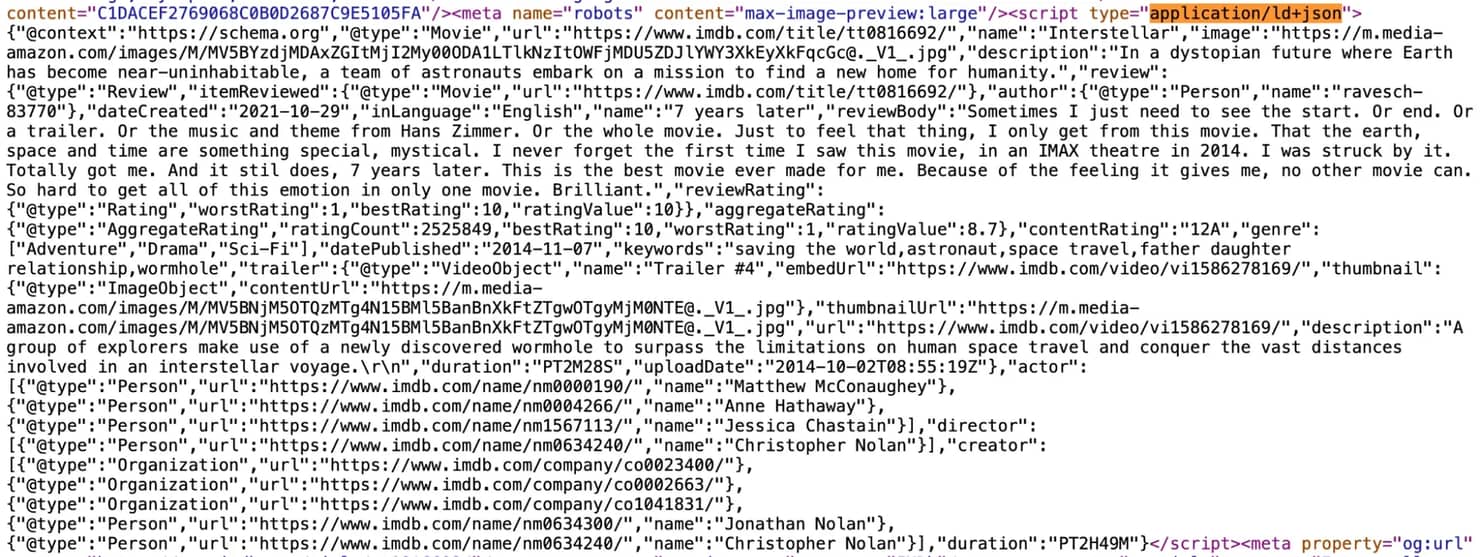
Here is the JSON content:
This block is rendered server-side on every /title/tt* and /name/nm* page by IMDb's SEO pipeline, using the schema.org vocabulary. This has 2 consequences:
- It tends to survive minified class-name churn. The DOM around it can rename every CSS class between deployments, but the JSON-LD block is generated from a fixed schema.org template, not from the React component tree.
- It's faster to parse than the DOM. You call json.loads() on the script tag instead of traversing the DOM selector by selector.
The block is the primary path for title metadata (name, year, genres, runtime, rating, vote count, content rating, plot summary, top-billed cast, director, image URL) and person metadata (name, birth/death dates when present, known-for credits).
Field population varies across content types, specifically name, year, rating, voteCount, and image , which are present on every title. runtime and director are often missing for TV series. TV series have per-episode runtimes rather than series-level values, and shows with rotating directors don't list one at the top level.
JSON-LD doesn't carry full credits beyond the top billing, episode lists, technical specs, box office, parental guide, trivia, awards. JSON-LD does include 5 keywords and 1 featured review object. For full coverage, you still need __NEXT_DATA__ or GraphQL.
Layer 2: the __NEXT_DATA__ blob
IMDb runs on Next.js with the Pages Router. Every Next.js Pages Router page ships its server-rendered hydration payload as a <script id="__NEXT_DATA__"> JSON blob at the bottom of the HTML. That payload is the response from the GraphQL queries the page made during server rendering, and it includes fields the rendered DOM doesn't show.
Search the page source for __NEXT_DATA__. You'll find a JSON blob roughly shaped like:
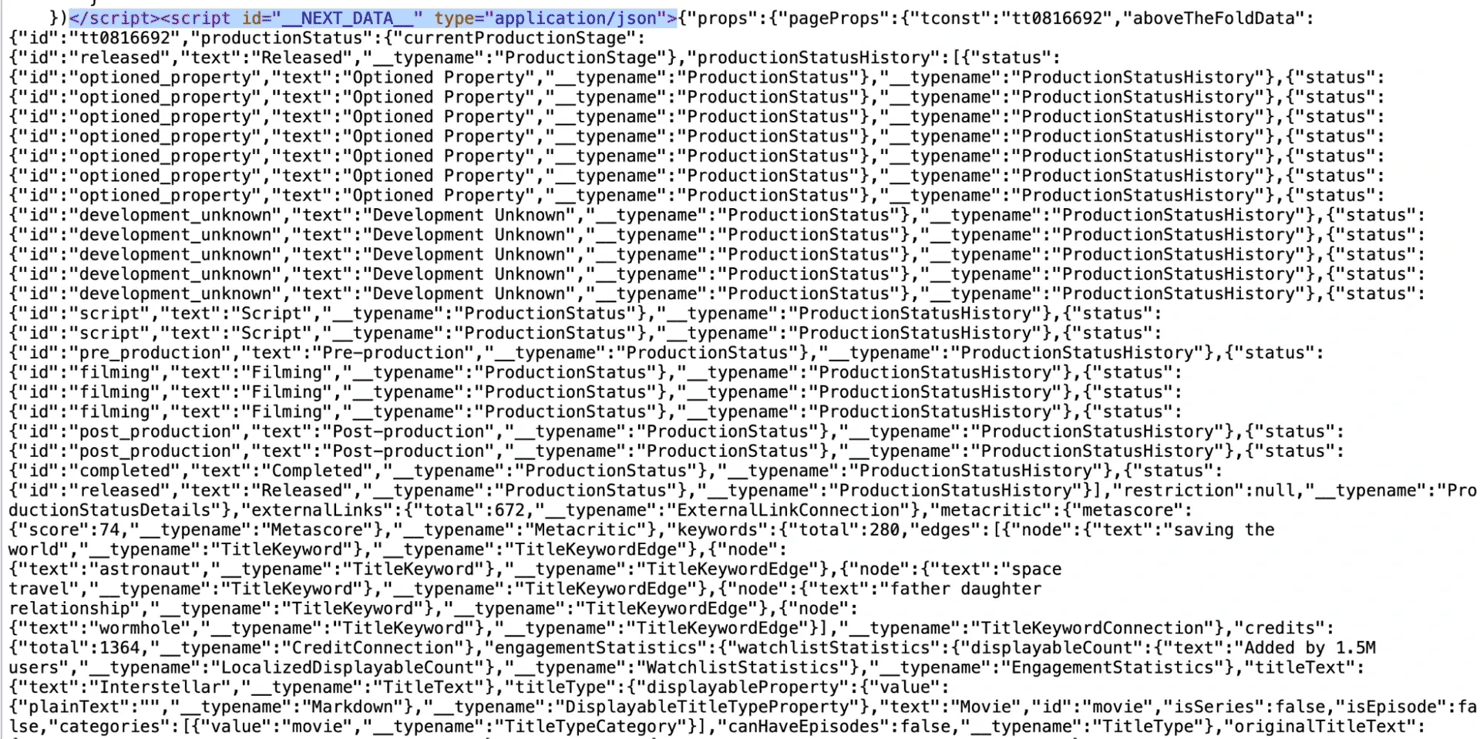
The structure looks like this:
The exact field path inside pageProps changes between deployments because IMDb ships often and the field paths shift with each release. But the pattern itself doesn't change. The practical workflow is the following:
- Fetch the page once.
- Pretty-print the __NEXT_DATA__ JSON to a file.
- Search it for the field you need (such as plotKeywords, productionCompanies, or boxOffice.budget).
- Pin your extraction to the field path you found.
- Wrap it in a defensive try/except so a deployment-time path change degrades to None instead of crashing the run.
Layer 3: the internal GraphQL endpoint
IMDb's internal GraphQL endpoint is https://api.graphql.imdb.com/. Load more clicks and the site's paginated queries hit this endpoint. To capture one, open DevTools and go to the Network tab on a title page, filter by graphql, and trigger any data-loading interaction (cast tab, episodes for a series, expanding the credits list). The reviews subpage requires a login, so capture other operations instead.
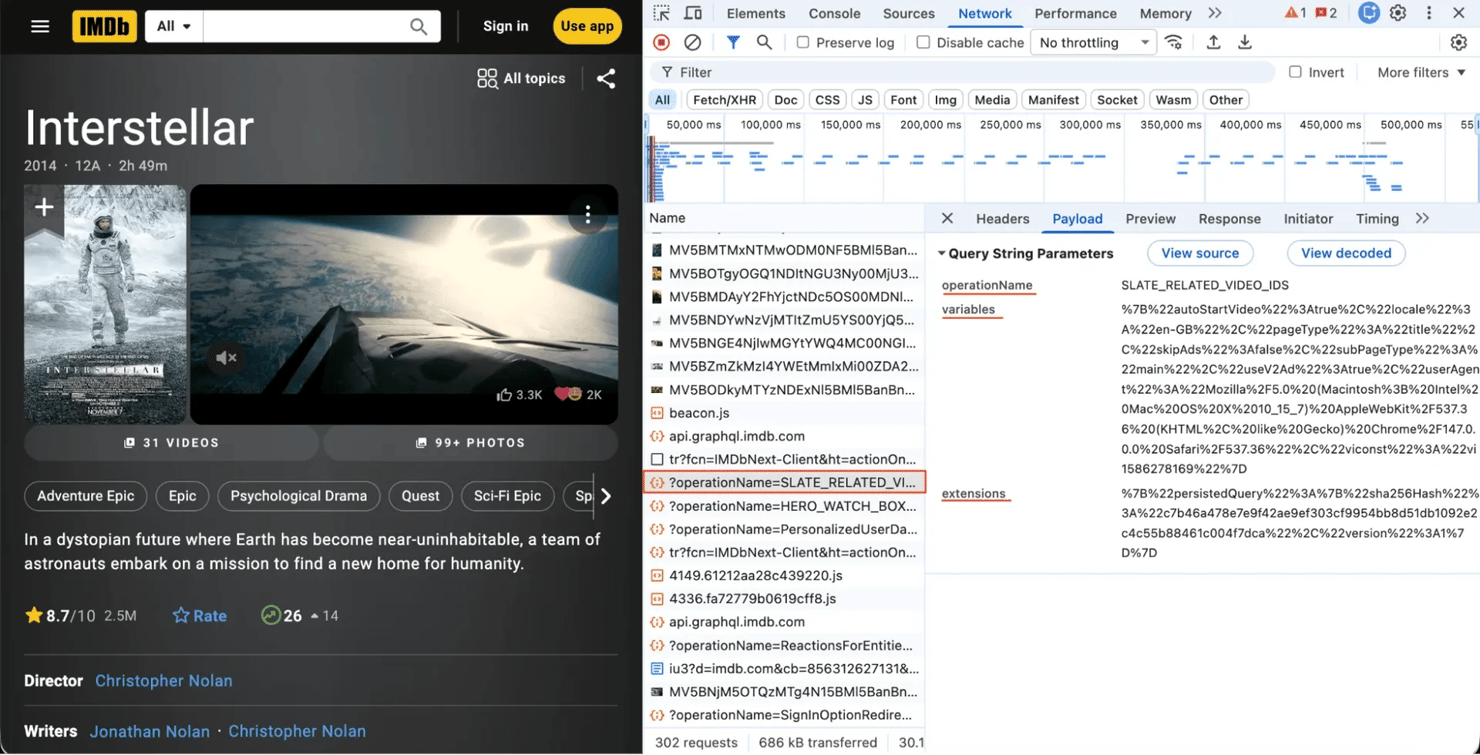
You'll see a request like:
This is a persisted query. The client sends a SHA-256 hash of the query text instead of the query itself, and the server resolves the stored query under that hash. IMDb's implementation also passes an operationName alongside the hash. The sha256Hash drifts between IMDb releases, so capture it directly from your DevTools Network tab.
For scraping, this is a direct path for paginated and live data. But the operations the IMDb client uses aren’t officially supported, and the names visible in network captures change over time. At the time of writing, a capture showed RVI_TitleView, which loads the core title view state. Capture the current operation name from your DevTools Network tab on the page that triggers the data you want:
- Episode lists. Capture the operation that fires on the /episodes/?season=N page. Variables typically include const and season.
- Full credits. Capture the operation that fires on /fullcredits.
- Filtered title search. Capture the operation that fires on /search/title/ with filters applied. The variable shape supports the same filters /search/title/ exposes (genre, year range, rating threshold, country, and the rest), paginated with first and after. For queries like "every horror film between 2010 and 2020 with a rating of 7.5 or higher," replaying this through GraphQL is faster than parsing search HTML.
Once you have the operation name, variables, and hash, replay them with this wrapper:
Keep these 2 warnings in mind:
- Hashes change. Persisted-query SHA-256 hashes can be regenerated at any release, so don't hardcode them in your repo. One pattern that holds up is when a small script runs Playwright once a week, captures network calls for a known title, and writes hashes to a config file.
- It's not a public API. The endpoint isn't authenticated, but it isn't officially supported either. Treat it as scraping, not as an integration. Keep the rest of your defensive setup (rotating proxies, retries, pacing) in place when you call it.
Layer 4: the suggestion API
IMDb's autocomplete sends requests to a separate host:
Where x is the lowercased first character of the query, so a search for "interstellar" hits https://v3.sg.media-imdb.com/suggestion/i/interstellar.json and returns a JSON object with a d array:
In practice, a live response often returns multiple result types in the same d array:
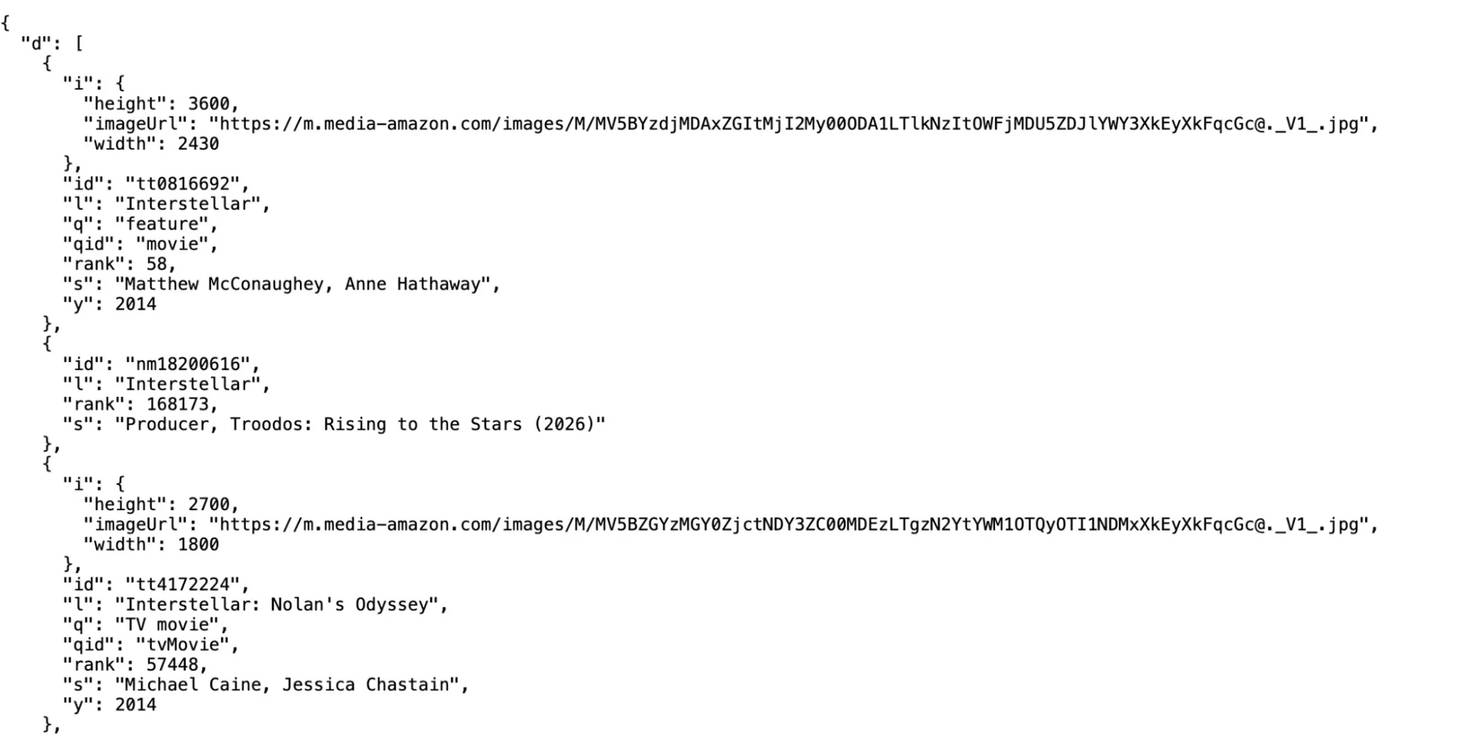
Here’s the field map:
- id – IMDb identifier (tt* for titles, nm* for names, ls* for lists)
- i – image object (imageUrl, height, width)
- l – label (title or name)
- q – qualifier (feature, TV series, TV mini-series, short, video, video game, podcast series)
- qid – machine-readable category
- s – subtitle (top cast for titles, known-for credits for names)
- y – year (or yr as a range for ongoing TV series)
- rank – IMDb popularity rank at fetch time
This is the right endpoint for resolving a title or person name to an IMDb ID, building a search-by-name workflow, and adding autocomplete to your own app.
Layer 5: the /reference view
/reference is a server-rendered alternative to the main title page that also ships a __NEXT_DATA__ blob. For any title, replace /title/tt*/ with /title/tt*/reference to fetch it. Use it when selectors on the main view break. Topic subpages (/fullcredits, /plotsummary, /releaseinfo) follow the same pattern with selectors that drift less often than the main title page.
Layer 6: the sitemap
The previous 5 layers assume you already know which tt* ID to fetch. The sitemap addresses the opposite problem – listing every title or person ID IMDb has indexed without scraping the catalog page-by-page.
The bucket listing lives at https://www.imdb.com/sitemap/ (trailing slash, returns an S3-style XML directory listing) and the gzipped child sitemaps follow a predictable naming pattern:
- title-0.xml.gz through title-N.xml.gz (iterate by index, stopping on the first 404) – every title ID
- name-0.xml.gz through name-N.xml.gz – every person ID
- list-*.xml.gz – every public list
Each child sitemap holds around 5K URLs and refreshes daily. With around 1.9K title children, that's 9-10M URLs total.
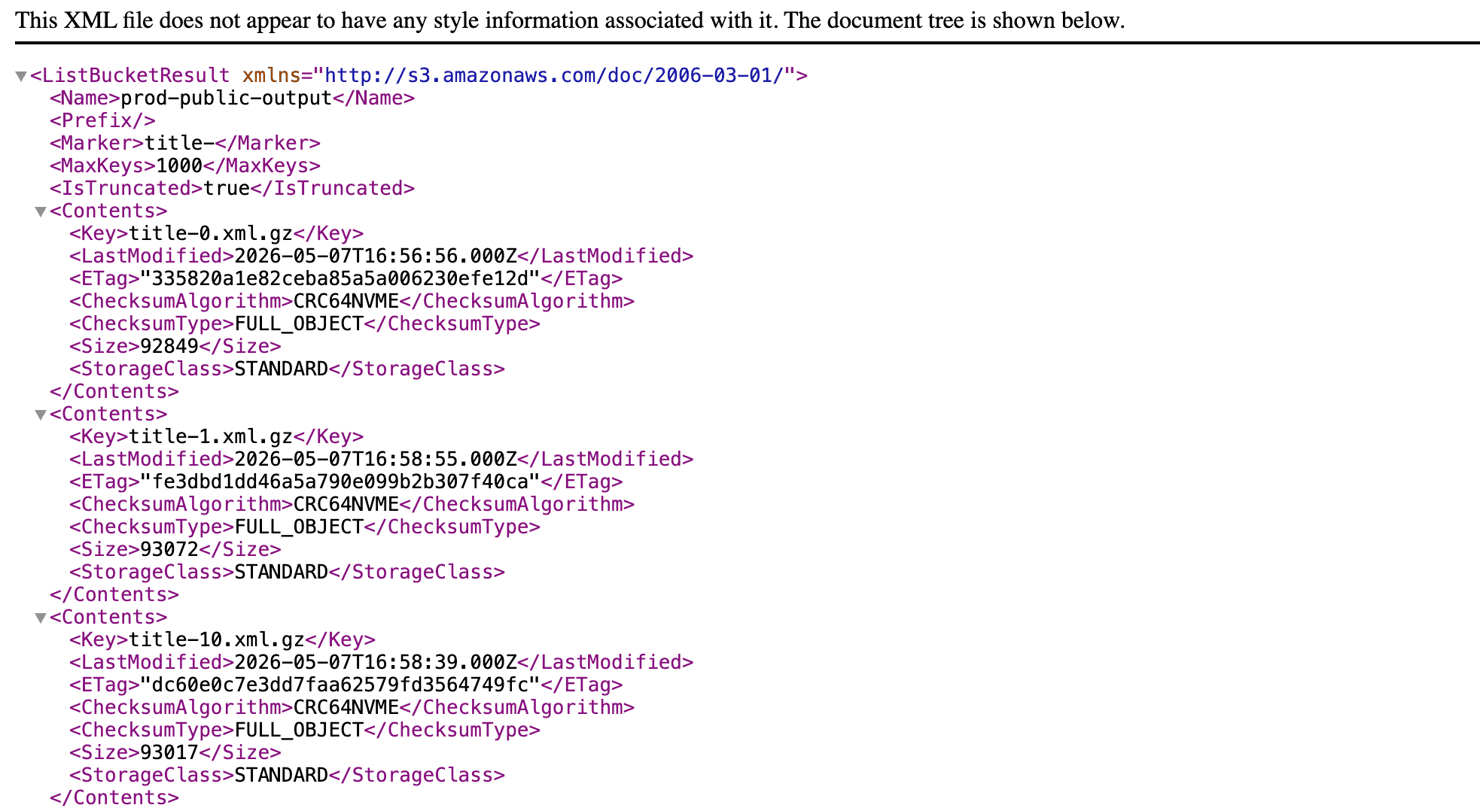
Keep in mind that https://www.imdb.com/sitemap/index.xml.gz exists, but its own Last-Modified header is from 2018, and several of the child URLs it lists use the secure- prefix that points to stale data. The reliable approach is to skip the index and iterate the bucket listing directly, or list title-0.xml.gz through title-N.xml.gz by index. Walk those, write all the tt* IDs to a file, and you have a seed list for any breadth-first scrape.
The sitemap files are smaller and cheaper to fetch than rendered pages, but they sit behind the same AWS WAF as the rest of the site. A plain requests call returns a 202 response with an empty body, so use curl_cffi with Chrome impersonation (and the aws-waf-token cookie if you have one cached) to fetch them.
When to use which layer
Match the data you need to the cheapest layer that has it:
What you need
Best path
Title or person metadata
JSON-LD, with __NEXT_DATA__ fallback for the fields JSON-LD doesn't include
Searching by name or partial title
Suggestion API
Listing every title ID in the catalog
IMDb TSV datasets at datasets.imdbws.com (refresh daily; right answer for most projects), or iterate sitemap children (title-N.xml.gz) when you need same-day-new IDs
More than 5 reviews per title
IMDb's licensed User Reviews dataset on AWS Data Exchange provides up to 15 "Most Helpful" reviews per title (paid; 12-month contract). The public path caps at 5 featured reviews. See the reviews section.
Episode lists, filtered search
Internal GraphQL is the direct path. When persisted-query maintenance isn't worth it, fall back to fetching /episodes/?season=N or /search/title/ and parsing the __NEXT_DATA__ the page ships.
Cast lists, technical specs, plot, release dates, parental guide
/reference or the topic subpage
Detailed box office (daily/weekend gross, theater counts, multi-week curves)
boxofficemojo.com (sister site, same tt* IDs, server-rendered HTML)
Bulk historical metadata for hundreds of thousands of titles
IMDb TSV datasets at datasets.imdbws.com. Don't scrape what's already shipped.
What you can extract, mapped to where it lives
Here's the extraction map, organized by data type:
Data
Best source
Why
Title, year, genres, runtime, content rating
JSON-LD on /title/tt*
Stable, schema.org standard
Aggregate rating, vote count
JSON-LD aggregateRating
Updated continuously, exposed in JSON-LD
Plot summary (short)
JSON-LD description
Single field, no parsing
Plot summary (long) and synopsis
/plotsummary subpage or __NEXT_DATA__
JSON-LD only carries the short version
Top-billed cast
JSON-LD actor
Top-billed only (first 3-4 actors)
Full cast and crew
/fullcredits (static HTML) or /reference (ships __NEXT_DATA__)
Topic subpages have stable URL patterns
Director, writer credits
JSON-LD director, creator
Schema.org standard
Plot keywords
__NEXT_DATA__
Not in JSON-LD
Taglines
__NEXT_DATA__
Not in JSON-LD
Production companies
__NEXT_DATA__ or /companycredits
Both work
Box office (budget, opening, worldwide gross)
__NEXT_DATA__ on IMDb, or boxofficemojo.com
Same tt* IDs work across both sites
Topic-specific data (filming locations, technical specs, awards, etc.)
Per-topic static-HTML subpages
Stable URL patterns; selectors drift less
Connections (sequels, references, parodies)
__NEXT_DATA__ edges, or /title/tt*/movieconnections
Graph data
External IDs (Wikidata, Rotten Tomatoes)
externalLinks in __NEXT_DATA__
Lets you join IMDb to other datasets
Episode list (per season, with imRating per episode)
/episodes/?season=N or GraphQL
Paginated
User reviews (5 featured)
__NEXT_DATA__ on title page
Public, no auth
User reviews (more than 5 per title)
IMDb's licensed dataset on AWS Data Exchange
Up to 15 "Most Helpful" per title; paid
Search by name or partial title
Suggestion API
Public, lightweight
Advanced search results
Internal GraphQL or /search/title/
GraphQL is paginated cleanly
Person metadata
JSON-LD on /name/nm*
Standard
Filmography for a person
__NEXT_DATA__ on /name/nm*, or TSV datasets
4 headline credits in knownForFeatureV2; full via TSV
Every tt* ID in the catalog
IMDb TSV datasets or sitemap children
TSV refreshes daily
Bulk metadata, hundreds of thousands of titles
datasets.imdbws.com
Don't scrape what's published

Power your IMDB scraping
Integrate 115M+ ethically-sourced residential proxies from 195+ locations. 99.92% success rate, <0.5s response time, AI-ready infrastructure.
Set up your scraping environment and proxy stack
First, install the packages used in this guide:
curl_cffi is a requests-compatible HTTP client built on libcurl with browser TLS impersonation. Even so, the early examples use plain requests because the API is familiar. The anti-bot section covers when to swap. Install both now.
Rotating residential proxies
Datacenter proxies fail fast against the WAF because shared reputation databases flag those IP ranges. Residential proxies route through ISP-issued IPs, which aren't in the flagged ranges.
If you're using Decodo, our residential proxies offer rotating and sticky sessions through a single backconnect endpoint (gate.decodo.com:7000) with parameters in the username string. Add your credentials to a .env file at your project root:
Then load them in Python:
Use rotating proxies for list-style traversal (sitemap walks, search results, broad fetches). Go with sticky proxies when you need to keep the same exit IP for a paginated flow (expanding episode lists across seasons, or holding a session cookie that's IP-bound).
Decodo's documentation lists the available parameters: country, session, sessionduration (1-1440 minutes, default 10). Finer geographic targeting is also available (city, state, continent, asn, zip).
For background on how rotation interacts with anti-bot, the rotating proxies explainer compares proxy types. If you use a different provider, the function shape carries over, and only the username convention differs.
What proxies alone don't solve
Even with a US residential exit IP and Chrome TLS impersonation (curl_cffi), a new request to a title page returns HTTP 202 with the AWS WAF challenge:
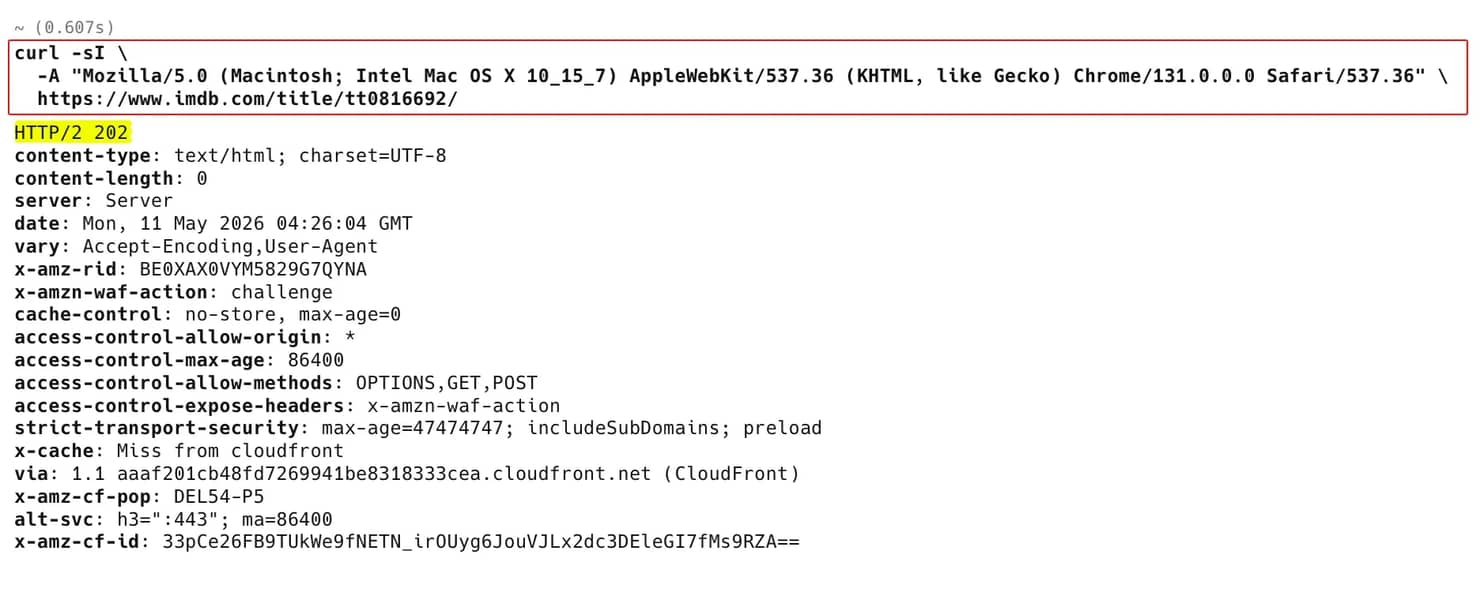
The same applies through curl_cffi with chrome131 impersonation over a residential proxy. Without the cookie, the JavaScript-challenge signal in the WAF signals table below still fires. To clear it, the cookie-export pattern in the anti-bot section is required for the lightweight curl_cffi path. The other option is to hand the WAF challenge off to a managed scraper. See When to escalate to a managed scraping API.
Scrape IMDb metadata from JSON-LD
JSON-LD is the lightest reliable path to title and person metadata. The function below fetches one title page, locates the title's JSON-LD block (IMDb ships several), and parses it into a typed Title dataclass with the shape variations (single dict vs list, missing fields) handled inline. The extractor is written with plain requests for readability.
Note that:
- Repeated calls will quickly trigger the 202 challenge, so for production, pass a curl_cffi session built per the cookie-export pattern below instead of the proxies dict
- aggregateRating is sometimes missing on titles with too few votes, so the or {} avoids an AttributeError
- parse_runtime exists because duration is ISO 8601, not minutes
Run it:
Sample output (vote counts, ratings, and box-office figures shift as IMDb updates, so your numbers will differ):
In practice, fetch_title with no proxy hits the 202 challenge on most IPs even on the first call. For reliable runs, build a curl_cffi session with the cookie-export pattern in the anti-bot section below.
Extract deeper fields from __NEXT_DATA__
JSON-LD only includes 5 keywords without taglines, full credits arrays, box office, or per-season episode counts, while __NEXT_DATA__ has the rest. The extractor below shows keywords, production companies, and box-office fields. Use the same safe_path pattern to reach other fields (taglines, credits arrays, episode counts). To find them, dump pageProps to a file once with Path("pageprops.json").write_text(json.dumps(next_data, indent=2)) and grep for the field name.
Common fields for a title page:
For tt0816692 (Interstellar), the function returns:
Box-office fields are sparse. TV series, episodes, foreign-language films, and pre-1950 titles often don't have a public budget or gross figures. For older theatrical releases, boxofficemojo.com (sister site, same tt* IDs) is the fallback.
Here are 2 notes on the path code:
- These paths are current, but IMDb does reshape pageProps between deployments. safe_path turns a path change from a crash into a silent None, which a downstream validation step can flag
- The first time you build this against a new field, dump next_data to a file and search it
Search IMDb with the suggestion API
Resolving "Christopher Nolan" or "the Irishman" to an IMDb ID is where most workflows start. Use the suggestion API instead of a /find/?q=… scrape.
Common workflows:
- Resolve a movie title from a CSV to its IMDb ID
- Resolve an actor name to a nm* ID, then fetch the filmography
- Build type-ahead in a frontend that needs IMDb-resolved entities
The suggestion API doesn't accept structured filters (year range, genre, language). For that, go to advanced search (GraphQL or /search/title/ HTML). But for resolving a name to an ID, the suggestion endpoint is the lightest path and the cheapest in proxy spend.
Discover every title ID via the sitemap
The sitemap is the starting point for any breadth-first project. This typically includes horror films, TV series with more than 5 seasons, and credits across a decade.
Use curl_cffi so AWS WAF accepts the request, iterates the title-N.xml.gz children by index, and stops on the first 404. Don't call gzip.decompress yourself – curl_cffi (like requests) reads the Content-Encoding: gzip header and decompresses automatically, so the response.text is already plain XML.
title-0.xml.gz returns ~5,400 unique tt* IDs through curl_cffi. The file pairs each desktop URL with a mobile alternate, so a loose regex like r"/title/(tt\d+)/" would double-count. To avoid that, pin to <loc> to get clean unique IDs.
- Stream to a file. Each child has approx. 5K unique tt* IDs, and there are roughly 1,900 title children, so the full pass writes close to 10M IDs. Don't try to hold them in memory.
- Don't trust the .gz in the URL. The file is compressed in transit (Content-Encoding: gzip), but the HTTP clients unpack it for you. If you try to unpack it again, the body fails with Not a gzipped file.
- Combine with filtered search for narrower needs. If you only need horror films from the 2010s, replaying IMDb's filtered title-search GraphQL operation (capture it from DevTools on a /search/title/ query) is faster than enumerating the full sitemap and filtering client-side. By contrast, the sitemap is the right tool when you need everything, or when you need IDs not yet in the latest TSV refresh.
Extract a person's known-for credits
The /name/nm* page doesn’t return a full filmography in a single response. It returns the following:
- mainColumnData.knownForFeatureV2.credits – exactly 4 entries, each with full title metadata (id, name, year, type, rating, vote count). This is the primary filmography most pages display at the top.
- mainColumnData.creditSummary.totalCredits.total – the actual total credit count, useful for a quick check.
- mainColumnData.groupings.edges – 1 entry per role category with a credits.total count per category and a single sample edge, not the full filmography per category. For that, you need paginated GraphQL calls to a _NameMainFilmography_-style operation, with cursors taken from each grouping's pageInfo.
For most projects the right answer is to skip the GraphQL pagination and use the IMDb TSV datasets: name.basics.tsv (which lists known-for tconsts per name) joined to title.basics.tsv and title.ratings.tsv.
The headline-credits extractor:
For nm0000148 (Harrison Ford), the function returns:
For the role-category breakdown without title data (useful for "this person has X acting credits, Y writing credits"), iterate mainColumnData.groupings.edges and read each node.grouping.text + node.credits.total. That's lighter than fetching the full filmography when you only need the counts.
Scrape IMDb reviews: what's gated, what's public
Before you scrape, check whether you need to. Three options replace scraping for most review use cases:
- For ML or sentiment work. The Large Movie Review Dataset (Stanford, 50,000 labeled IMDb reviews plus 50,000 unlabeled, binary positive/negative labels) is the canonical starting point and avoids scraping entirely. The dataset has only review text and labels, no movie metadata. If you need metadata too, download the TSV datasets from datasets.imdbws.com and join on IMDb IDs.
- For non-commercial review data. TMDb exposes user reviews via /movie/{id}/reviews and supports IMDb-ID lookup via /find/{imdb_id}. Free for non-commercial use with attribution, but commercial use requires a paid license.
- For more reviews per title under license. IMDb's User Reviews dataset on AWS Data Exchange provides up to 15 "Most Helpful" reviews per title (paid; 12-month contract). Even the licensed dataset is curated, not the full review listing. See IMDb Developer for the full list of available data products.
If none of those fit, the public scraping path covers up to 5 featured reviews per title. These are hand-curated by IMDb, not a representative sample, and the cap isn’t enough for sentiment training at scale or any analysis that needs the full review distribution.
IMDb has restricted review access in recent deployments with the current state being:
The /title/tt*/reviews/ subpage is login-gated. IMDb has deployed a registration gate (visible as a review-gate weblab entry in __NEXT_DATA__ on the page) that replaces the review listing with a sign-in card for unauthenticated visitors. The Load more button is gone, and __NEXT_DATA__ on the gated page no longer carries review bodies. Earlier scraping tutorials showed Playwright clicking through Load more, but that path no longer works.
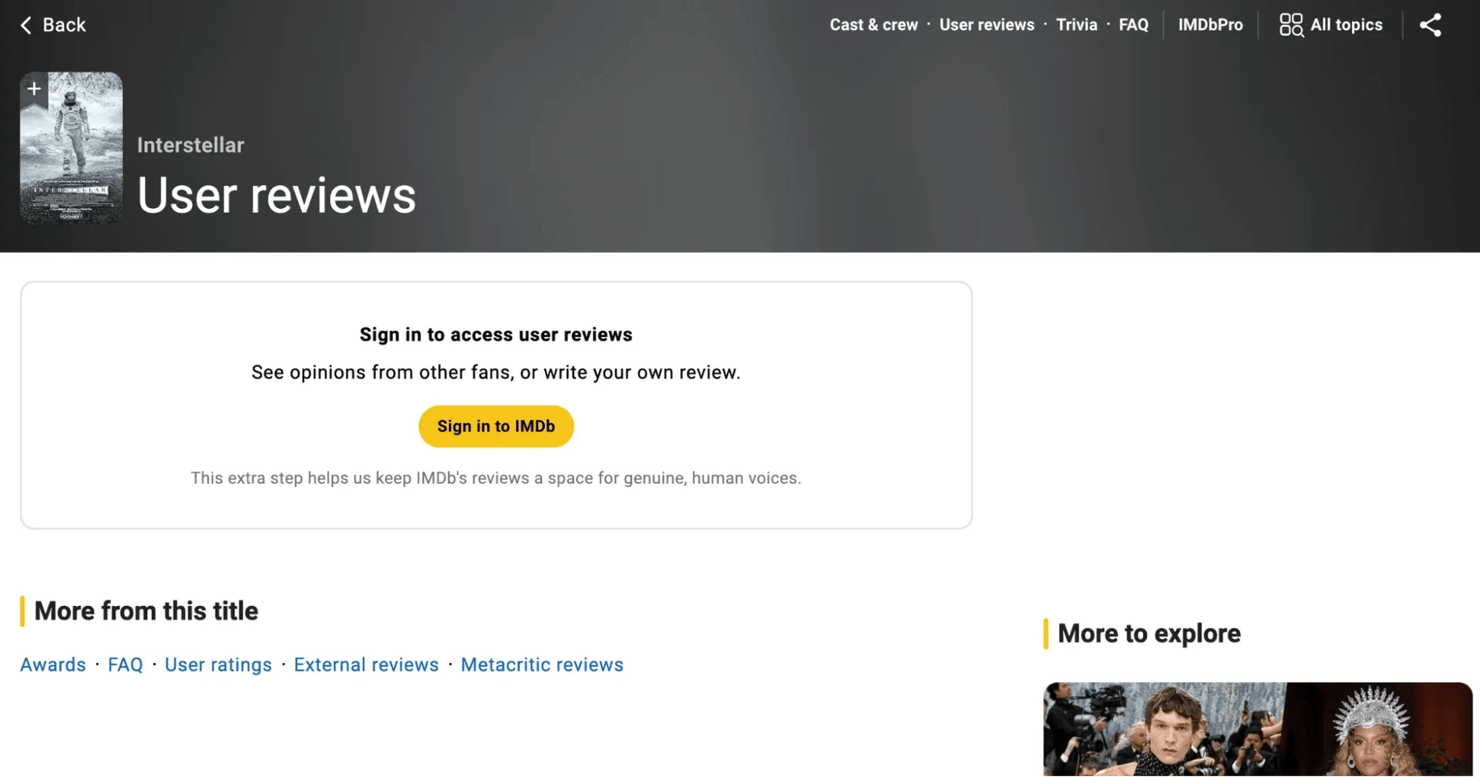
- Authenticating doesn't help. Robots.txt also disallows the same paths (/title/*/reviews, /title/*/review/*). Even with a logged-in account, the path stays in robots.txt and scraping it remains a violation. The licensed alternatives are listed at the top of this section.
Publicly accessible review data:
- JSON-LD on the title page includes 1 featured review with author, rating, date, title, and body. It is one of the same 5 covered by the featured-reviews extractor below.
- __NEXT_DATA__.mainColumnData.featuredReviews.edges on the title page has 5 reviews, each with author, summary, body text, rating, spoiler flag, and ID. These are the same 5 featured reviews the title page renders inline at the top of the user-reviews section.
The featured-reviews extractor:
Run it with the WAF cookie set on your curl_cffi session and you get all 5 reviews in a single fetch. Each entry has the shape:
The featured set isn't fixed across visits, so 2 scrapes of the same title days apart can return different sets of 5 reviews. Persist by review id and dedupe across runs if you're building an incremental dataset.
Anti-bot, pacing, and selector hardening
AWS WAF, request pacing, and selector drift each break a scraper in different ways. The subsections below cover each.
AWS WAF: signals and their counters
The challenge JS loads from awswaf.com and sets an aws-waf-token cookie. The detection stack and what counters each signal:
Signal
What works
IP reputation
Rotating residential proxies; sticky sessions for paginated flows on one title
TLS fingerprint (JA3/JA4 hashes of the TLS handshake)
curl_cffi (libcurl with browser TLS impersonation, requests-compatible API) or tls-client
HTTP/2 fingerprint
curl_cffi covers this through the same impersonation
Header order
Pass an OrderedDict to requests matching Chrome's order, or use curl_cffi (which handles header order automatically)
Behavioral signals on rendered pages
playwright-stealth patches the common automation tells via JS injection (navigator.webdriver, plugin arrays, screen geometry); for stricter targets, patchright also patches the Runtime.Enable leak in Chrome's DevTools Protocol that JS-injection stealth can't reach. (Camoufox guide compares stealth approaches.) Synthesize mouse movement before clicks; use non-uniform delays (for example, random.expovariate)
JavaScript challenge
Solve once in Playwright, export the aws-waf-token cookie into a requests (or curl_cffi) session, scrape with the lightweight stack until the cookie expires or hand the challenge off to a managed unblocker
These signals apply to most modern WAFs (Datadome, Cloudflare Bot Management, AWS WAF, PerimeterX). The web scraping without getting blocked guide explains the same detection layers (network, TLS, browser, behavioral) for sites beyond IMDb.
Once the WAF flags an IP, the flag persists for a while, so rotate before the score crosses the threshold rather than trying to recover.
The cookie-export pattern
After AWS WAF accepts a Playwright session, the aws-waf-token cookie is valid for several hours and is bound to IP, UA, and TLS fingerprint. Lock in those constants on the curl_cffi session, attach the cookie, and you can scrape thousands of pages with a fraction of the bandwidth a Playwright loop would use.
If you're new to Playwright, the Playwright web scraping tutorial covers the basics.
Here’s the pipeline:
Keep 2 cautions in mind. First, the cookie is bound to the TLS fingerprint. With plain requests, the JA3 hash doesn't match what AWS WAF saw at challenge time, and the cookie will be rejected on the first lightweight call, so pair the export with curl_cffi's Chrome impersonation. Second, keep the User-Agent and the sticky-session exit IP stable across both stages, because AWS WAF scores those for consistency, and any swap risks a re-challenge.
Don't rotate User-Agents
Don't rotate User-Agents (UA) on every request. On a WAF-protected site, that often causes more failures. AWS WAF (and every other modern bot defense) scores UA-against-TLS consistency. A Chrome 131 User-Agent paired with a Firefox TLS handshake (or vice versa) is a strong flag, because no real Chrome browser sends a Firefox-style ClientHello. So pick one realistic UA per IP, use it for the entire session on that IP, and let the proxy layer handle IP rotation. Match the curl_cffi impersonation profile to the UA you set in headers (this guide uses chrome131).
Pacing
Treat 5 to 10 seconds between requests on the same exit IP as the minimum for ongoing scraping. For paginated flows on the same title (one user expanding episode lists across seasons), a sticky session with the same delay looks more natural than a rotation that rebuilds the TLS handshake every page.
Concurrency: avoid parallel requests to the same target host without rotation. 2 parallel requests from the same IP at 5-second intervals go out at the same instant, with a 5-second gap between pairs. The WAF scores the instantaneous rate, not the average. For scraping thousands of pages per day, the web scraping at scale guide lays out worker pools, rate budgets, and recovery strategies. Scrape during US overnight hours for more capacity on the same proxy budget.
For retry strategy, wrap your session in a transport that backs off on 429/5xx without retrying on 403/404. The Python requests retry guide details the broader patterns for handling temporary failures with exponential backoff. For requests, the simplest inline pattern uses HTTPAdapter:
curl_cffi doesn't support _HTTPAdapter_-style mounting, so wrap each session.get call in a small retry loop, reading Retry-After on 429 yourself:
Distinguish block types
When a fetch fails, the right response depends on which signal tripped. There are 4 cases to distinguish:
- 403 with an AWS WAF challenge HTML body (loads awswaf.com/challenge.js with a gokuProps config block) – The IP scored too high and stays flagged for a while. Rotate to a fresh exit IP.
- 202 with the AWS WAF interstitial (small HTML page that loads challenge.js from awswaf.com, status code is the clue) – challenge issued. Solve in a real browser to get a new cookie.
- 429 Too Many Requests – pure rate limit, not bot scoring. Read Retry-After, sleep, continue with the same IP.
- 200 with empty __NEXT_DATA__ or missing JSON-LD – IMDb deployment changed the field paths or selectors. This isn't a network problem, so check the page in a browser before changing your scraping logic.
page_shape_changed falls through to alert rather than retry. Selector drift is a code problem, not a network one, and looping on it just wastes proxy budget.
Selector and __NEXT_DATA__ path drift
Because IMDb deploys often, survive selector and __NEXT_DATA__ path drift with the following:
- For any HTML scraping outside this article's path, prefer data-testid to class names. data-testid is the stable HTML attribute frontends emit as a test hook. It survives UI refactors better than CSS classes. For the broader trade-offs in selector strategy, see XPath vs CSS selectors.
- Version-control selectors and field paths separately from extraction logic. A dedicated module you can edit and deploy without changing scraper code reduces the maintenance loop from hours to minutes.
- Flag zero-result runs as alerts, not as empty success. A scraper that returns an empty list because a selector broke looks identical to a scraper that returns an empty list because the person has no credits. Add a validation check ("this title type should always have at least 1 cast member") that fires a separate alert.
When to escalate to a managed scraping API
Escalate when the engineering hours spent on selectors, proxies, hashes, and CAPTCHAs outweigh the value of the data extracted.
You have crossed that threshold when:
- You're rewriting selectors or __NEXT_DATA__ paths more than once a month
- You're shipping CAPTCHAs and AWS WAF challenge pages in your output and don't have time to build a real solver pipeline
- You're scraping more than around 10K pages a day and the proxy-rotation, retry, and fingerprint logic has become its own service.
- Your team's time on this is more expensive than the API bill would be
Decodo's Site Unblocker integrates as a proxy via a single endpoint and handles the unblocking layer: automatic CAPTCHA bypass, JavaScript rendering, browser fingerprinting, and proxy rotation. It's right for teams whose parsers are solid and who only want the unblocking work handed off, with the scraping logic still in your code.
Whereas Decodo's Web Scraping API replaces the in-house parser, proxy, and anti-bot stack in one call: JavaScript rendering, rotation across 125M+ residential, mobile, datacenter, and ISP proxies, automatic CAPTCHA solving, and 100+ pre-built scraping templates that return structured JSON. It's right for teams that also want to retire their in-house parsers and trade engineering hours for API spend.
Save the output
JSON is the default for full-fidelity output (nested credits, multi-genre fields, __NEXT_DATA__ extras). CSV works for analyst-facing flat tables.
ensure_ascii=False matters for international titles. Without it, "Amélie" serializes as the escape sequence "Am\u00e9lie" and your downstream consumer has to un-escape it.
For CSV, pandas with explicit dtype handling beats csv.DictWriter once you have list-valued fields:
Pipe-delimiting ("Action|Drama|Sci-Fi") keeps the column queryable in a spreadsheet without colliding with the CSV column separator.
For recurring jobs (tracking a film's rating week-over-week, watching for new reviews on a release), SQLite or PostgreSQL with a (imdb_id, scraped_at) primary key gives you historical series without producing many JSON files. See how to store scraped data in SQLite for schema-design patterns.
Complete script: scrape one title end to end
If you want a single runnable file to verify the path works, save this as scrape_imdb.py and run it.
What this script omits:
- Proxy and WAF cookie. Most IPs hit the 202 challenge on the first call, so add a proxy and the cookie-export pattern from the anti-bot section before running this against real titles.
- Retry and backoff. Wrap session.get in the retry pattern from the pacing subsection before deploying to production.
- The other extractors. fetch_title_extras (box office, keywords, production companies), search_imdb, collect_title_ids, and fetch_known_for are separate functions that reuse the same HEADERS, safe_path, and extract_next_data helpers. call_graphql is the thin GraphQL replay wrapper from Layer 3. Wrap the fetch loop with the handle dispatch table from the anti-bot section once you scale past one title.
- Multi-title datasets. This script fetches one title per invocation. To build a dataset, wrap main() in a loop over your tt* id list, share one WAF-cookied curl_cffi session across iterations, and pace the loop per the anti-bot section.
Robots.txt and ToS
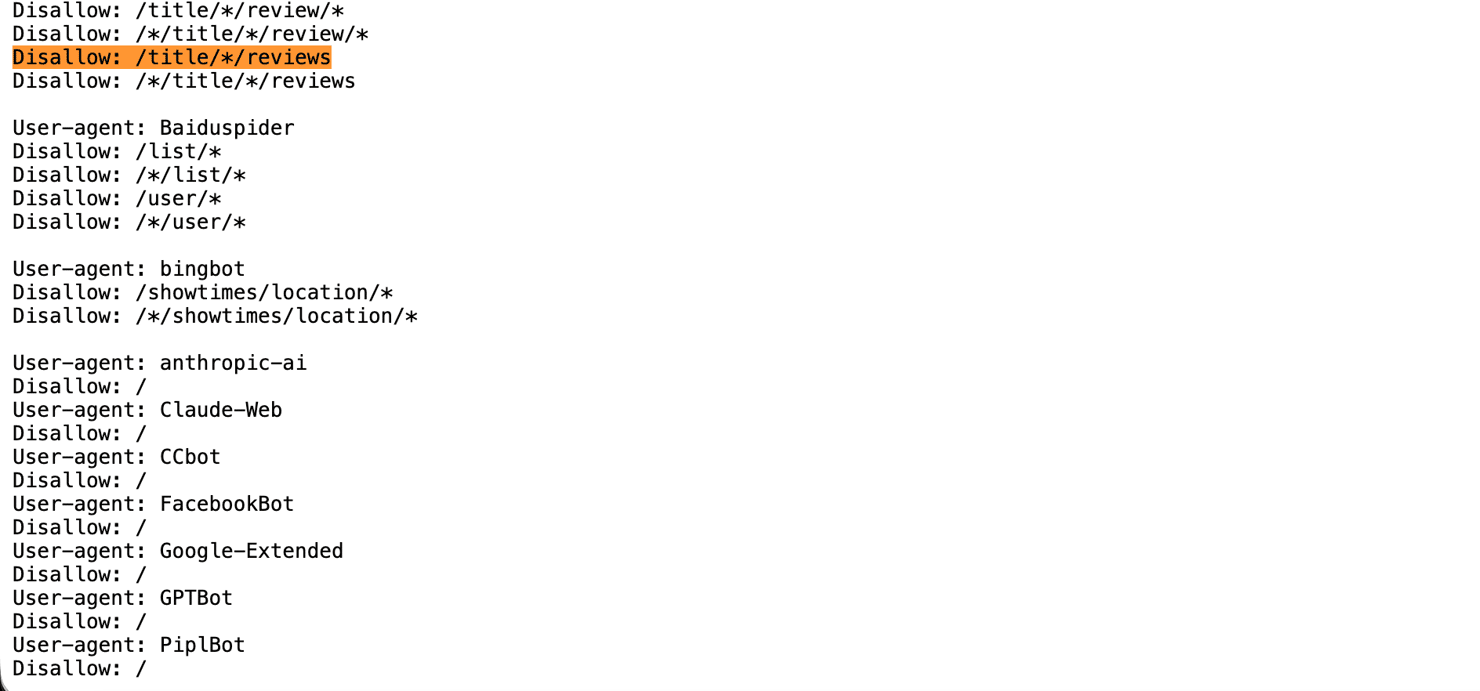
IMDb's terms of service restrict automated access, and IMDb's robots.txt lists the disallowed paths: /find, /search/title/*, /search/name/*, /search/title-text, /search/name-text, /title/*/reviews, /title/*/review/*, /ap/, /ads/, /register, /registration/, /api/_ajax/*, /_json/*, and /contribute/*. The /title/*/reviews subpage is on this list. The title page itself (/title/tt*/) isn’t, which is why the 5 featured reviews extracted from __NEXT_DATA__ on the title page don’t violate robots.txt. Separately, the agent-specific section also blocks the major AI training crawlers outright. How to check if a website allows scraping walks through robots.txt directives.
Bottom line
Scraping IMDb at production scale means working through 6 data layers behind AWS WAF Bot Control. The cookie-export pattern and the extractors above cover that, with the dispatch table handling the failure modes. When the maintenance load outgrows the value, Decodo's Site Unblocker takes the unblocking layer off your stack, and Web Scraping API can also retire your parsers.
Pick one extractor path and complete it end-to-end before you write the next. JSON-LD on fetch_title is the smallest path to working metadata. Add the suggestion API for title-by-name resolution and __NEXT_DATA__ for fields JSON-LD doesn't include.
Add these 2 production patterns:
- Log every fetch at INFO (title ID, classify() result, attempt count, latency). Bump to DEBUG response excerpts on non-ok results.
- Checkpoint progress to (imdb_id, scraped_at, status) with a uniqueness constraint, so crashed runs resume idempotently at the last unprocessed ID.

Built for high-volume IMDb scraping
115M+ ethically-sourced residential proxies across 195+ locations. 99.92% success rate, <0.5s response times, designed for AI workloads.
About the author

Justinas Tamasevicius
Director of Engineering
Justinas Tamaševičius is Director of Engineering with over two decades of expertise in software development. What started as a self-taught passion during his school years has evolved into a distinguished career spanning backend engineering, system architecture, and infrastructure development.
Connect with Justinas via LinkedIn.
All information on Decodo Blog is provided on an as is basis and for informational purposes only. We make no representation and disclaim all liability with respect to your use of any information contained on Decodo Blog or any third-party websites that may belinked therein.