What Is an MCP Server? How It Works and When To Use One
An MCP (Model Context Protocol) server gives AI apps such as Claude, ChatGPT, Cursor, and VS Code controlled access to tools, data, and prompt templates. Because MCP is an open standard, one server can work with many of them. This guide explains its architecture, how it works, when you need one, and how agents get live web data through MCP.

Lukas Mikelionis
Last updated: Nov 05, 2026
10 min read

TL;DR
- You need an MCP server when a tool should work in several AI apps. For a single script, call the API directly.
- The protocol doesn't send the server your conversation, only requests such as tool calls with arguments.
- Every server runs with the access you give it. Give it the narrowest access token and approve any data changes.
- The July 2026 revision removed protocol sessions, so on servers built for that revision, any instance can answer any request.
- For live web data, the Decodo MCP server gives agents search and scraping tools, so you don't have to build scrapers.
What is an MCP server?
An MCP server is a program that tells AI apps what a tool or data source can do and runs what they request. It doesn't need its own model, because the reasoning happens in the large language model the app uses.
A server can wrap a file system, a database, a SaaS app, an internal API, or a web data API. The server converts requests between that system and the protocol, and the system itself doesn't have to change.
MCP is the set of rules for describing and calling capabilities. An MCP server is the program that implements those rules on the tool side, the way a web server implements HTTP for a website.
MCP server architecture: Host, client, server, and transport
Every MCP setup has 4 parts:
- Host. The AI app or agent that uses the server, such as ChatGPT, Cursor, or a coding agent in a CI (continuous integration) pipeline. It calls the model and decides what the model sees.
- MCP client. The component inside the host that connects to exactly 1 server.
- MCP server. The program that exposes capabilities and answers requests.
- Transport. The channel that carries the messages. Local servers usually use stdio (standard input and output), and remote servers typically use Streamable HTTP, MCP's HTTP transport.
As an example, a host connected to 3 servers runs 3 clients, one per server. Each connection stays separate at the protocol level, so one server can't read another server's messages, and a failing server affects only its own connection. The model can still pass data from one server's result into another server's tool call.
In MCP client vs. server terms, the client asks and the server answers. The client runs inside the host, and the server runs next to the data or tool, often on another machine. You connect a server by adding it to the host, as our guide to connecting MCP servers in Claude Desktop and Claude Code shows.
The server never communicates directly with the model. The model asks the host to use a tool, and the client sends the server the tool name, the model's arguments, and protocol details. The host keeps the full conversation, though the model can copy details from it into a tool's arguments.
Because every call passes through the host, the host can ask you to approve it first. In Claude, a call to the Amazon product tool on the Decodo MCP server is paused for approval like this:
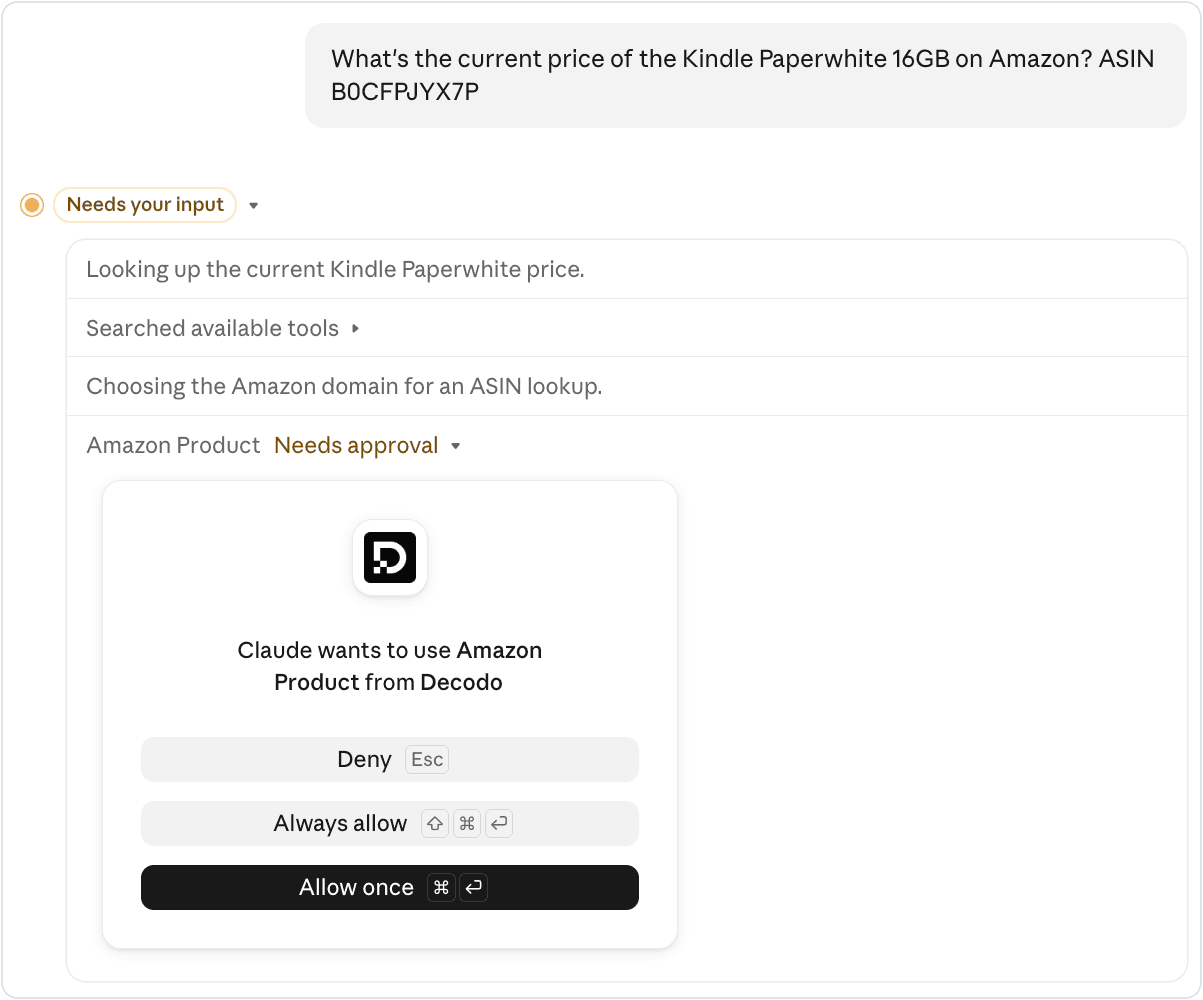
Messages use JSON-RPC 2.0, a lightweight remote procedure call (RPC) protocol that uses JSON. The message format stays the same across transports, so a server written for stdio can move to HTTP without changing its tool definitions.
MCP connects an agent to tools, while the Agent2Agent (A2A) protocol connects agents to other agents. Our A2A vs. MCP comparison explains the difference.
What does an MCP server do?
An MCP server offers AI apps 3 kinds of capabilities: tools, resources, and prompts. The 3 differ in who decides when to use them. We tested about 1,500 servers, 1 in every 22 of the remote servers listed in the official MCP registry. Of the 495 public servers that answered without sign-in, almost all offered tools, about a third offered resources, and a fifth offered prompts.
Tools
MCP tools are functions the model decides to call, such as running a search, creating a GitHub issue, or querying a database. Each tool has a name, a description, and a JSON Schema that defines its inputs. The model reads the description to choose a tool, so it treats that wording as instructions. That's why descriptions are on the security checklist.
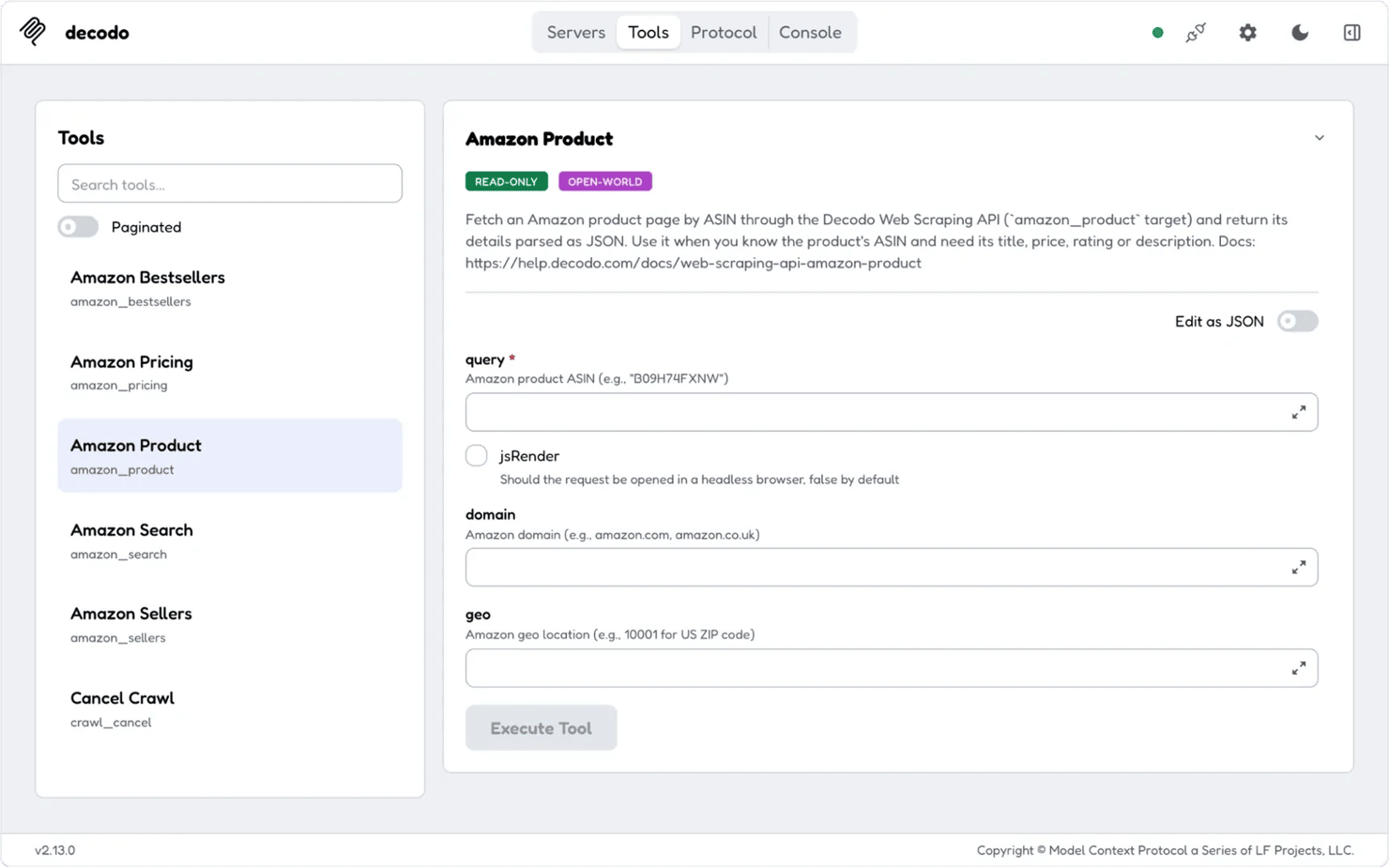
On the Decodo MCP server, the Amazon product tool's description says to use the tool when the model has a product's ASIN (Amazon's product ID). MCP Inspector is the MCP project's official testing tool. Connected to the Decodo MCP server, it shows the tool the way a client receives it:
Resources
MCP resources are read-only data that the app loads as context, such as file contents, database schemas, or documentation. You or the app choose them, and the model doesn't call them on its own. Like retrieval-augmented generation, they add relevant text to the model's context.
Prompts
MCP prompts are reusable prompt templates that you choose explicitly, such as a "summarize this pull request" command. They give everyone the same wording for a common task.
How does an MCP server work?
Under the 2026-07-28 revision, an MCP server answers requests from the host's client, and each request carries everything the server needs. MCP names each revision of its specification by its release date. Here's one tool call for an agent that checks a product's price:
- The host loads each server's tool list with a tools/list request. The result can include a cache TTL (time to live), so the host doesn't have to ask every time.
- You ask for the price. The model reads the tool descriptions, chooses a tool that returns product details, and provides the product's ID as an argument.
- The host may ask you to approve the call. The client then sends a tools/call request with its own protocol version and client details. Over HTTP, the Mcp-Method and Mcp-Name headers repeat the method and tool name, so a gateway can route the request without reading its body.
- The server fetches the product page through its backend and returns the result as text or structured content.
- If the server needs a confirmation or other input during the call, its response asks for it. The client sends the same call again with the answer attached, a pattern called Multi-Round-Trip Requests.
- The host passes the result to the model, which uses the price in its answer or chooses the next tool.
To build your own, our guide shows how to set up an MCP server step by step.
What changed in the 2026-07-28 revision
The 2026-07-28 MCP revision removed the initialize handshake that opened each connection, and the session ID that linked later requests to it. The table lists what replaced each piece:
Aspect
Before 2026-07-28
From 2026-07-28
Connection setup
initialize handshake first
None, each request is independent
Sessions
Mcp-Session-Id header
Removed, and the server returns IDs, such as a job ID, to carry state
Capability discovery
Exchanged at startup
The client sends its capabilities with each request, and servers answer server/discover
Server needs user input
Server-initiated request over an open stream
Multi Round-Trip Requests
Scaling remote servers
Sticky sessions at the load balancer, or a shared session store
Any instance can answer any request, behind a standard load balancer
Long-running work
Tasks, as an experimental part of the main specification
Tasks, as an optional extension
Source: Model Context Protocol blog, July 28, 2026.
Tools, resources, and prompts all remain. The revision deprecated 3 older features, which are Roots, Sampling, and Logging, and they keep working for at least 12 months. Tasks became an extension for long-running work, like MCP Apps, which show an interactive UI inside the host.
Servers already in production keep running on the revision they were built for. Among the 495 servers that answered, most used the older handshake, and most of the 127 on the 2026-07-28 revision accepted only the new revision. A client that supports both revisions can connect to either kind.
Where MCP servers run: Local vs. remote
An MCP server runs either on your own machine or on remote infrastructure. The choice decides how it connects, who updates it, and what it can access.
Local MCP server
A local MCP server is a process the host starts on the same machine. The host usually talks to it over stdio, without a network connection or sign-in between the two. It runs with your own system permissions and may still need an API key for the service it wraps.
Remote MCP server
A remote MCP server is hosted by a vendor or your company and typically reached over Streamable HTTP. Streamable HTTP replaced the deprecated HTTP+SSE transport, though it can still stream responses with server-sent events (SSE).
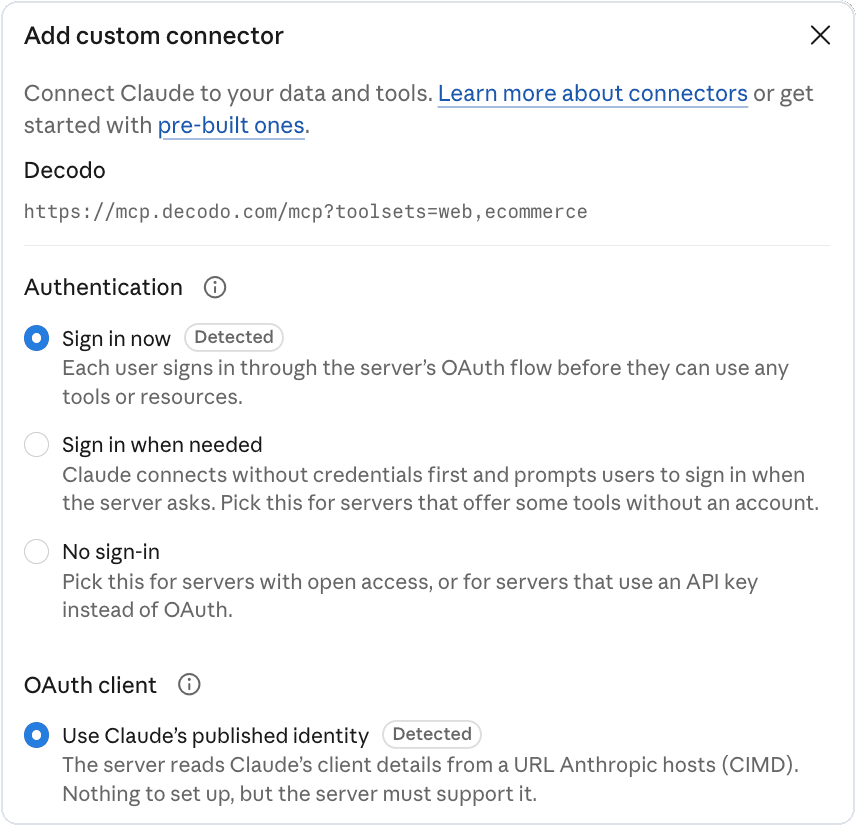
Remote servers usually use OAuth for authorization, which the 2026-07-28 revision made stricter. Under that revision, clients check which authorization server issued each authorization response, so a malicious server can't obtain another server's sign-in code. They can identify themselves with a Client ID Metadata Document (CIMD), which replaces the deprecated Dynamic Client Registration. In its connector dialog, Claude detected on its own that the Decodo MCP server supports CIMD:
ChatGPT on the web connects only to remote MCP servers. A local-only server needs a secure tunnel or a hosted deployment before ChatGPT can use it.
Local and remote servers differ on these points:
Aspect
Local MCP server
Remote MCP server
Transport
TransportUsually stdio
Usually Streamable HTTP
Where it runs
Your machine
Vendor or company infrastructure
Who uses it
You, on one machine
Many people and apps
Authorization
None in MCP; runs as your system user
Usually OAuth
Updates
Whoever installed it
The operator, with no work from you
Typical use
Files, local databases, developer tools
SaaS apps, shared company data, web data
Main risk
Runs with your system permissions
Tool definitions can change after approval
Choose local when the data lives on your machine, and remote when several people or apps need the same server. Many servers offer both options. With Decodo's MCP server, you can connect to the hosted endpoint or run the npm package locally.
MCP server security: What to check before you connect one
An MCP server is only as safe as its code and the access you give it. It acts with whatever permissions its credentials have, and the model chooses when to use it. The main risks come from over-broad access and from text that steers the model:
- Prompt injection through tool results – a ticket, email, or web page can contain hidden instructions for AI agents, and the model may follow them. One 2025 proof of concept using GitHub's MCP server showed the risk. A malicious issue in a public repository led an agent to leak private repository data into a public pull request.
- Tool poisoning – hidden instructions in a tool's description can reach the model even if nobody calls the tool. The attack works because many hosts load every tool description into context, as Trail of Bits and Invariant Labs demonstrated.
- Changed definitions – a remote server can change its tool descriptions after you approve them, an attack known as a rug pull.
- Over-privileged credentials – a server holding an admin token can do anything an admin can, and a local server can do anything your account can.
Tool annotations, such as the read-only hint, are useful, but the specification tells clients to treat them as untrusted unless the server is trusted. Confirmation prompts add a layer of protection, and Multi Round-Trip Requests let a server ask you to confirm an irreversible action. An access token's permissions limit the damage.
When you connect a server, follow these checks:
- Install servers from sources you trust.
- Read the tool list before you let an agent use the server. Scan installed servers regularly with a tool such as Agent Scan, which checks MCP servers and skills for hidden instructions.
- Give each server the narrowest access token it needs, and set a spending limit for tools that bill per call.
- Require confirmation for every tool that writes or deletes data, regardless of what its hints say.
- Pin local servers to a fixed package version.
- Run local servers in a container or sandbox with limited file and network access, as the MCP security guidance recommends.
- Log every tool call.
Do you need an MCP server?
You need an MCP server when one tool should work in several AI apps, or when AI assistants should use your product. You don't need one for a single script that calls a single API.
Here's how that rule applies to common situations:
- One script calling one API – no server. Call the API directly. For web pages, that API can be the Decodo Web Data API, which returns a page as Markdown, HTML, or JSON.
- Your own agent calling your own tools – no server yet. The model API's built-in function calling is enough until another AI app needs the same tools.
- The same tool in several AI apps – yes. You build the server once, and MCP-compatible apps can call it.
- An agent that needs live web data – yes, a prebuilt one. In AI apps such as Claude and Cursor, the Decodo MCP server gives agents ready-made search and scraping tools. An agent you build on a model API can also call the Web Data API directly through function calling.
- Scrapers your team already runs – wrap them in your own MCP server when agents in several AI apps need them. For other sites, the Decodo MCP server adds tools without new code.
- A product for AI assistants – yes, as a remote server, so users connect without installing anything.
- A coding agent with shell access – it depends. For a task you repeat, a script of command-line steps is faster and cheaper, because the model doesn't decide each step. A remote MCP server keeps its credentials out of the agent's shell. Our MCP vs. CLI for AI agents article explains when each fits.
- Reusable instructions with no new access – no. Use a saved prompt or Agent Skills instead. Agent Skills is an open format that Claude and many other agents read, and our Claude Skills vs. MCP guide explains the difference.
For prebuilt servers, start with the best MCP servers for AI workflows, or browse MCP server examples by category.
Giving AI agents live web data through MCP
The Decodo MCP server gives MCP clients scraping and search tools built on the Decodo Web Data API. The Web Data API's /scrape endpoint is the Web Scraping API under its new name. Most sites offer agents no MCP server, and many block automated access. The API handles proxy rotation, retries, and CAPTCHAs, and it renders JavaScript when a tool call asks for it.
The tools scrape web pages into Markdown, which costs the model far fewer tokens than raw HTML. They also run Google searches, with parsed results plus location and language controls.
Site-specific tools work with stores such as Amazon, Walmart, and Target, and platforms such as YouTube and TikTok. Another tool queries Google AI Mode. Map and crawl tools list a site's URLs or collect many pages, and the full tool list shows the rest.
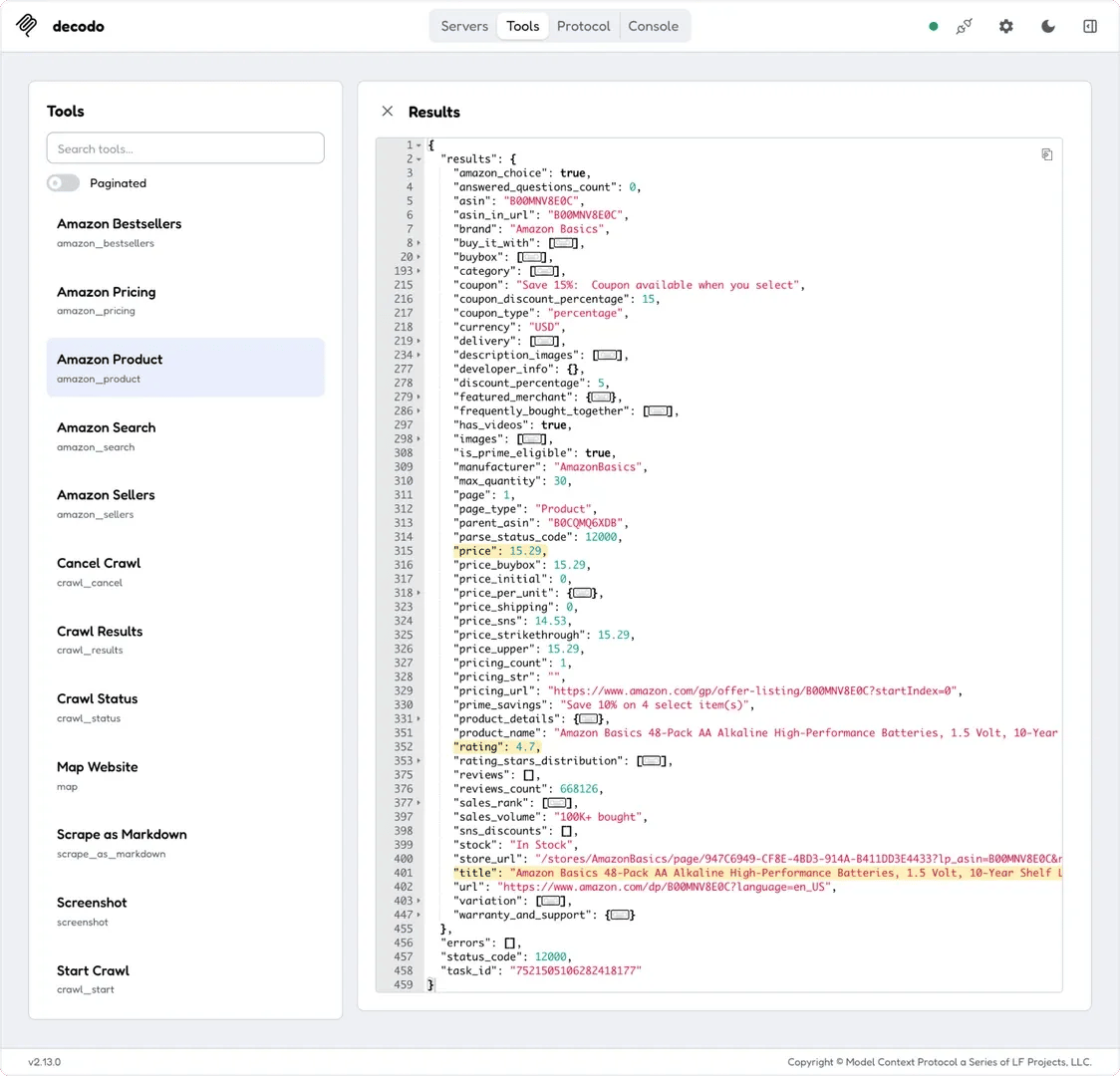
For prices, site-specific tools return parsed JSON fields, and the Amazon product tool takes a location down to a US ZIP code. Its result for an Amazon Basics battery pack, with nested lists folded, looks like this:

Connect live web data
Add the Decodo MCP server to Claude or Cursor and give your agent search and scraping tools.
For a recurring price feed, a scheduled job can read the same fields directly from the Web Data API. That way, no model spends tokens on each run. When an agent should decide what changed, an n8n workflow can call the server on a schedule. Our tutorial on orchestrating agents with n8n and MCP shows the setup.
You can start on the free plan. Tool calls are billed as Web Data API requests, and you pay only for successful requests.
To try it, add the Decodo MCP server to an MCP client you already use at https://mcp.decodo.com/mcp. Sign in with your account where the client supports OAuth, or send your Web Data API key as a Bearer token in the Authorization header. Every toolset loads by default, and a query parameter such as ?toolsets=web,search,ecommerce loads only the toolsets a task needs. Then ask it for the price of an Amazon product you track.
Bottom line
An MCP server gives AI apps tools and data through one open standard, so you build an integration once. Servers built for the 2026-07-28 revision run like ordinary stateless web services. Build one when a tool should work in several AI apps, connect only trusted servers, and limit each to the access it needs. When your agent needs live web data, connect the Decodo MCP server, so you don't have to build your own scrapers.

Skip building scrapers
Decodo's MCP server runs on the Web Data API, which handles proxy rotation, retries, and JavaScript rendering.
About the author

Lukas Mikelionis
Senior Account Manager
Lukas is a seasoned enterprise sales professional with extensive experience in the SaaS industry. Throughout his career, he has built strong relationships with Fortune 500 technology companies, developing a deep understanding of complex enterprise needs and strategic account management.
Connect with Lukas via LinkedIn.
All information on Decodo Blog is provided on an as is basis and for informational purposes only. We make no representation and disclaim all liability with respect to your use of any information contained on Decodo Blog or any third-party websites that may belinked therein.