MCP vs. CLI: How to Choose the Right AI Agent Tooling
MCP and CLI are simply two ways to give AI agents like Claude, Cursor, or your own custom agent access to tools, either through a structured protocol or through the terminal. MCP standardizes how those tools get discovered, authenticated, and returned as clean output. CLIs, on the other hand, cost almost nothing in context, and models already know them from training. So choosing between the two comes down to your context budget, your workflow, and whether you need to share the tool with other agents.

Mykolas Juodis
Last updated: Sep 09, 2026
15 min read
TL;DR
- CLI tools work well in the inner loop because they need almost no context and most models typically know common CLI tools like git, gh, az, and kubectl straight from training.
- MCP works better in the outer loop because it gives you centralized authentication, tool discovery, structured JSON, audit logging, and versioning across a whole team.
- Most production setups end up using both, CLI for development and debugging, MCP for when agents need to share tools at runtime.
- The real deciding factors for MCP vs. CLI are your context budget, who owns the feedback loop, and whether the tool has to be shared with another agent.
What MCP and CLI mean
Before we can weigh one against the other, you need to know what each one actually is and how the agents work with them.
What is a CLI?
A CLI, or command-line interface is a text-based program you run from a terminal by typing a command and passing it flags. When an AI agent uses a CLI, it starts the tool as a subprocess, passes the flags or arguments it needs, and then reads the output from stdout and stderr once the process finishes.
There's no setup step, no schema, and no persistent connection involved. The CLI process starts, the agent does its job, prints its output, and then the process dies. So when you run something like git status, the agent will get back plain text and has to make sense of that text on its own.
What is Model Context Protocol (MCP)?
Model Context Protocol is an open standard that defines how AI models connect to external tools and data through a JSON-RPC interface. Anthropic first released MCP in November 2024. Instead of spinning up a fresh process for every task, your AI agent can simply open one connection to an MCP server and keep performing tasks over that same connection.
The MCP server exposes three kinds of things to the model, and these are called primitives.
- Tools are functions the model can call, like a search_jobs() tool that pulls job listings from an API.
- Resources are the data the model can read, like a file or a database record it needs to reference.
- Prompts are the reusable templates that give the model a preset way to approach a task, like a saved instruction that says “summarize and number this scrape.”
When you're working with an MCP, your agent can simply ask the MCP server what it can do, and the server will provide it with a schema that describes every tool, its parameters, and what each one returns. So instead of spelling out what the tool does inside your prompt, the agent can just read that schema and understand how to use it.
To put it simply, a CLI starts a process, passes it some arguments, and returns plain text once that process exits. An MCP client works differently, it connects to a server, sends requests over a persistent connection, and gets back structured JSON the model can act on right away.

Connect your AI agents to live web data
Decodo’s MCP server links LLMs to our powerful web scraping infrastructure, giving them access to real-time information from any website on demand.
MCP vs. CLI: the core differences
The difference between MCP and CLI comes down to how your AI agent connects to and uses a tool. A CLI starts a process for each command, passes arguments, and returns text when that process finishes, while an MCP server stays connected and gives the agent structured tools it can discover and call.
The difference will become clearer when you run the same task through both. With a CLI, your agent might run a command, read an output, and then run another command based on what it got back. With MCP, the agent connects to the server, discovers the available tools, and calls the relevant tool through the protocol.
The lifecycle difference
The first major difference is how they run. A CLI process is short-lived in nature i.e., it starts when your agent calls it, does its one job, returns its output, and exits. So every new call has to repeat that whole cycle from scratch. An MCP server on the other hand, is a long-lived connection, so your agent can keep interacting with the same server instead of starting a new process for every operation.
The output difference
The second difference is how they return data. CLI tools usually return freeform text through stdout and stderr, so your model has to read through it and work out what actually matters. MCP tools return structured JSON that follows a set schema, so the model can act on it directly without parsing anything. That gives the agent a more consistent format to work with.
The knowledge difference
There is also a difference in what the model already knows. Models have seen common CLI tools like git, docker, kubectl, and gh across training data, so they can often use them without first learning a tool schema. An MCP server, on the other hand, exposes its tool definitions at runtime, which means the model has to work with that interface when it connects.
The failure difference
Failure handling also looks different. A CLI normally gives you an exit code and stderr when something goes wrong, making the failure fairly obvious. An incomplete MCP server can be harder to diagnose when the tool you expect simply isn’t implemented, that’s why you always need to check the server’s tool coverage before depending on it.
CLI and MCP aren't always as separate as they look. A lot of MCP servers shell out to a CLI underneath, they wrap a terminal command in the protocol, so your agent can get clean, structured output while the real work still happens through the command line. So it’s not always one or the other, sometimes it might just come down to which surface you put in front of your agent.
CLI and MCP aren't always as separate as they look. A lot of MCP servers shell out to a CLI underneath. They wrap a terminal command in the protocol, so your agent can get clean, structured output while the server does the real work through the command line. So it's not always one or the other. Sometimes it might just come down to which surface you put in front of your agent.
If you're weighing a third option on top of these two, our breakdown of Claude Skills vs. MCP covers a neighboring agent tooling surface that's worth a look.
MCP vs. CLI at a glance
Dimension
MCP server
CLI tool
Process model
Persistent process
New subprocess per call
Context cost on connect
Schema and tool definitions
Near zero
Tool discovery
Runtime schema discovery
No built-in discovery
Output format
Structured JSON
Freeform text
Authentication
Centralized
Per-machine / per-environment
State across calls
Persistent connection
Stateless per invocation
Model familiarity
Runtime schema required
Common tools known from training
Failure visibility
Tool errors / server responses
Exit code and stderr
Versioning and rollout
Centralized server-side
Per-machine updates
Works offline / local-only
Yes, with a local server
Yes
Sharing across a team
Shared server
Per-machine setup
CLI tools for AI agents: strengths and weaknesses
CLI tools for AI agents are useful because they give an agent a simple way to run existing programs without adding a server, port, or protocol. If a script already exists, you can turn it into a command-line tool and start using it almost immediately.
Why CLI tools work well
- The biggest advantage is that there's almost no setup. You run a command, pass it some arguments, read the output, and move on. You can even use a CLI to scrape URLs right from your terminal, search Google or Bing, and return structured results without leaving the shell.
- Models also already understand many common command-line tools from their training. Tools like git, docker, curl, kubectl, and gh show up in a huge amount of public documentation and code, so an agent doesn't often need a separate schema to figure out how they work.
- CLI tools are also easy to compose. You can send the output from one command into another and filter the result before it reaches the model. For example, you could fetch a page with a scraping command, return JSON, and then pass only the fields you actually need into the next command. That will keep all the unnecessary output out of the context window.
- The same idea works with curl. You can fetch a page with curl, save the response, filter it with another command, or hand the result to a script, instead of dumping the entire response on the agent. If you want to see this chained together on a real target, our guide on scraping Google SERPs with the terminal and cURL walks through the full pipeline.
- Another advantage is debugging. When an agent runs a command and something fails, you can copy that exact command and run it from your terminal yourself. You'll get the same output, the same error messages, and the same exit status, all without having to reproduce the entire agent workflow.

Scrape the web with Decodo CLI
Extract structured data from popular targets directly within your terminal. Ready for shell scripts, CI/CD, and automation.
Where CLI tools start to break down
The simplicity of a CLI also creates some real limits, so it's worth going in with your eyes open.
- The first limitation is overhead. Every call starts a brand-new process, so the cost becomes noticeable once an agent needs to make many calls in a short window. That process also doesn't keep any state after it exits, which means the agent has to rebuild things like a session or a connection on the very next call.
- CLI tools also don't have built-in discovery. An agent doesn't automatically know what commands your internal tool supports, so unless you hand it documentation or make it inspect the available commands, it's working blind.
- The environment can change between machines too. Different binary versions, installed dependencies, operating systems, and configuration can all make the same command behave differently. You might use PowerShell for web scraping on one machine and get different results from the same CLI-first workflow running somewhere else, simply because the environments aren't managed consistently.
- Security is the last limitation, and probably the most important. Giving an agent broad shell access hands it far more power than the task in front of it actually needs, which isn't a safe way to work. If a bad instruction ever slips into the data your agent is processing, an open terminal gives it room to run something you never intended. So scope the commands it can run with an explicit allowlist instead of leaving the whole terminal open. Treat shell access as a privileged operation, not the default.
Here’s a quick summary of the CLI’s strengths and weaknesses.
Strength
The limit of it
Training familiarity
Models already know common tools like git, docker, curl, kubectl, and gh, but niche or internal CLIs still need documentation.
Composability
You can pipe and filter output before it reaches the model, but complex pipelines can become harder for an agent to reason about.
Zero setup
If the script already exists, you can use it as a tool without needing to add a server or protocol, but the CLI still depends on the local environment.
Reproducibility
You can paste a failed agent command directly into the terminal, but reproducing it on another machine can fail because of environment differences.
Cost per call
A CLI has little setup overhead and can be cheap for individual calls, but repeated subprocess launches will add overhead at higher volumes.
So, CLI-first agents make a lot of sense when you want a fast development and debugging loop. They cost almost nothing in context, they lean on tools the model already knows, and when something breaks, you can reproduce it in your own terminal in seconds. Just go in aware of the limits, especially around state and security, so you're scoping access on purpose rather than handing over the whole shell and hoping for the best.
MCP servers: production characteristics, versioning, and governance
Once your agent work moves past your own machine and into something a team relies on, the MCP server becomes the better choice. This is where the protocol's structure pays off, so let's walk through what actually makes an MCP server suited for production.
Centralized authentication
With an MCP server, you can store all your credentials on the server instead of saving them in every developer's shell profile across your team. This also makes it easier to rotate them because you can just change a single token on the server rather than updating the credentials on everyone’s systems. And if the service requires it, you can even use OAuth flows for authentication, so the server never has to directly handle the raw credentials.
Versioning and controlled rollouts
An MCP server also gives you more control over how tools change. You can update a tool's behavior on the server without touching every agent's code, but that also means one wrong change can affect every connected agent at once. So it’s best you version your tool surface deliberately, roll changes out with care, and treat the server as shared infrastructure that other people's agents depend on, not something you can just rewrite anytime you feel like it.
Governance and auditability
You can log every tool call that passes through an MCP server, with details like who called it, which arguments they passed, and what result the tool returned. That logging of every call will give you a clear answer whenever you need to know what an agent actually did, while also making it easier to apply rate limits and scope permissions for individual clients.
Discovery and portability
The same MCP server can serve any client that speaks the protocol, including Claude Code, LangChain, and n8n. You don't have to build a separate integration for each one, because the server exposes its tools the same way to all of them.
It also means several agents can share one maintained implementation, instead of each agent carrying its own copy of the same logic. So when that logic needs an update, you change it in one place and every agent gets the fix.
The honest caveat
An MCP server is only as useful as the tools it actually exposes. If a server wraps just part of an API, your agent can hit a point in the workflow where the operation it needs isn't there, and it won't always make that gap obvious. So before you adopt a third-party server, check its tool coverage against what your agents actually need.
And if you'd rather build your own once you've weighed the decision, our guide on how to set up an MCP server walks you through the how-to. To find existing servers worth connecting to, top 10 MCPs for AI workflows is a good place to start.
The MCP context window tradeoff
The MCP context window is where the biggest difference between MCP and CLI starts to show. When you connect to an MCP server, the agent loads tool definitions, parameter descriptions, and other schema information into its context before it does any actual work. So the more tools your server exposes, the more token overhead you carry into every session.
We tested this with the same scraping task, fetching example.com and returning the page as Markdown, through both the Decodo MCP server and the Decodo CLI. The MCP server loaded its full schema for all 30 tools, from scrape to Amazon to Perplexity, which came to roughly 7,168 tokens before the scrape even started. The CLI did the same job with about 40 tokens, 7 for the command and 33 for the result, because the model already knew the scrape <url> pattern and loaded nothing up front.
That difference comes down to how each interface works. MCP loads the schema the moment your agent connects, so if the server exposes 30 tools, your agent will carry all 30 definitions even when it only uses one. The CLI skips that step entirely. Your agent will start with almost no overhead and pay only for what it actually runs.
The cost also adds up when you connect multiple MCP servers. If you connect four servers, each server can add its own tool definitions to the same context, which will increase the amount of information the model has to carry before it starts working.
But that doesn't mean the CLI is always cheaper. One command can dump thousands of lines of logs into the context and fill it up fast. A clean MCP call that returns just 12 useful fields is often easier for the model to handle than a CLI command that spits out 4,000 lines. So the real comparison is schema cost versus output cost, don’t just assume "MCP is expensive and CLI is free."
Dynamic tool loading changes the equation
Loading the full MCP schema the moment your agent connects to the server is a design choice, not something the protocol requires. Some MCP servers are starting to do it differently, they expose a small set of tools first, then load the rest only when the agent actually needs them. It's not common everywhere yet, but where servers do this, it lowers the context cost and shrinks the gap between MCP and CLI.
Where the context budget goes
The table below uses our measured example.com workflow to show where the context goes. Your numbers will vary depending on the MCP server, the number of tools it exposes, and how much data each call returns.
Stage
MCP server
CLI tool
Tool schema on connect
~7,168 tokens for 30 tools
~0 tokens
Per-call response
~84 tokens for the example.com scrape
~33 tokens for the same page
Output the model must read
Scoped, schema-defined fields
Raw stdout unless you filter it
Cumulative cost over a 10-call session
~8,000 tokens (7,168 schema + ~840 for 10 responses)
~400 tokens (10 × 40 per call)
Note: We ran the same example.com scrape with Markdown output through the Decodo MCP server and Decodo CLI, then counted the tokens using the cl100k_base tokenizer. The numbers are approximate, since Claude and GPT models use different tokenizers and may return slightly different counts.
How to keep the context cost under control
You can cut the overhead on both sides by controlling what reaches the model. With MCP, you can expose only the tools the agent actually needs. With CLI tools, you can use options like --format ndjson, select only the fields you want, and pipe large responses through filters before they hit the context. You can also lean on the --help command as just-in-time documentation instead of loading every command detail up front.
If your example runs through cURL, our guide on how to send JSON with cURL covers how you can scope that output cleanly.
MCP vs. API: how a protocol differs from calling an endpoint
The difference between MCP and an API comes down to who decides how a tool gets used. An API gives a program a fixed set of endpoints, and a developer writes the code that decides which one to call and when. MCP flips that – it hands an AI model a set of tools with plain descriptions, and the model discovers them and chooses which to use on its own.
A REST API exposes endpoints your application calls with methods like GET or POST. A CLI gives you a terminal command that you, or an AI agent borrowing it, can run. MCP works differently, it hands the model a structured description of the available tools and lets it decide which one to use.
The key thing is that MCP doesn't replace an API. An MCP server usually sits between the model and an existing API, turning that API into tools the model can understand and call. The protocol is just the layer the model works through to reach the service underneath.
Calling the API directly makes sense whenever you already know exactly what request you need to make. If you're collecting web data through something like our Web Data API, you just call it straight, no AI model in the loop. That direct approach fits deterministic pipelines, high-throughput jobs, and any workflow where you don't want the model deciding which operation to run. You send the request, the API processes it, and your application handles the response.
An MCP setup makes more sense when you want the AI model to pick between several tools based on the task. Your application won’t decide every operation beforehand, it’s the model that will have to discover what's available and select what it needs. An HTTP request will still be happening underneath either way, MCP doesn't remove that part. It only changes how the model gets access to the capability and how it decides what to call.
REST API vs. CLI vs. MCP
Dimension
REST API
CLI tool
MCP server
Who calls it
A Program
A person (or a model borrowing it)
An AI model
Interface contract
API endpoints
Commands and flags
Tool schemas
Who decides the operation
The developer
User or agent
Model
Discoverable at runtime
No
No
Yes
Typical consumer
Software applications
Terminal user
AI agent
MCP vs. CLI benchmarks: what the numbers actually show
The MCP vs. CLI benchmark results show that the CLI can use context more efficiently than MCP, but you shouldn't treat those numbers as universal. The published tests measure specific tasks, and the way an MCP server exposes its tools can change the result.
Published MCP vs. CLI benchmark results
Source
Task type
Reported result
What it doesn't prove
CircleCI (citing a community benchmark)
Browser automation
CLI showed 33% better token efficiency and scored 77 vs. 60 on task completion
It's one community benchmark on a single task class, not a general test of every MCP and CLI
Microsoft Graph / Intune
His measurement showed roughly a 35x token reduction with the CLI over the MCP equivalent
It doesn't mean every MCP workflow uses 35x more tokens than its CLI version
What the benchmarks don’t tell you
The numbers above are useful, but they don't prove the CLI will always beat MCP. The browser automation test covers one task class, and Reinhard's Microsoft Graph measurement looks at one specific enterprise workflow. A badly-scoped MCP server can expose dozens of tools you never touch, while a well-scoped one keeps that overhead much lower, so a lot of the "MCP is expensive" story is really about server design, not the protocol.
There's also a difference between token efficiency and task success. Using fewer tokens is good, but it doesn't automatically mean the agent finished the job better or more reliably. You still have to weigh what the agent needs to do, how often it calls the tool, and how much output it has to process.
Another thing to keep in mind is that there isn't a published benchmark here that tests MCP servers using dynamic tool loading. Dynamic loading could change the context comparison considerably, since it can reduce the amount of tool schema an agent loads upfront.
A practical scraping workflow
Let's say you have an agent that needs to monitor a website, collect new data, check the results, and write a report.
You could use a CLI for the initial scraping step. The agent can run the command, pipe the output through filters, and only send useful fields into its context. That will keep the inner loop quick and make it easy for you to reproduce a failed command directly in your terminal.
Once the data needs to move into a shared workflow, MCP becomes the wiser choice. You can expose the scraping and monitoring tools through an MCP server, then let different agents or workflows discover and call those tools without each one having to implement the integration separately. You can wire the whole thing together with a setup like n8n and Decodo's MCP server, letting the CLI carry the scraping and checking while MCP handles the credentialed, shared pieces.
The benchmark takeaway
The current MCP vs. CLI benchmark data points toward a real context-efficiency edge for CLI in some workflows, but that's not enough to declare a universal winner. The server's tool scope, the task itself, the amount of output, and whether the MCP implementation supports dynamic loading can all change the result.
So if you're comparing the two for your own agent, treat these published numbers as reference points, not guarantees. Run the same task through both interfaces and measure the context usage and task outcome for your actual workflow.
When to use MCP vs. CLI
When to use MCP vs. CLI for AI agents depends mostly on where your agent is working, how often it calls the tool, and who needs to use it. If you're working locally and want fast feedback, a CLI usually makes more sense. If the tool has to run across shared systems, agents, or scheduled workflows, MCP gives you more control. The easiest way to decide is to look at the two stages of AI agent work , i.e., the inner loop and the outer loop.
Inner loop vs. outer loop
The inner loop is the tight cycle where you and your agent write code, run it, watch what breaks, and fix it locally. CLI tools fit better here, because this stage runs on speed and context headroom, exactly what you want when you're prototyping something quickly.
The outer loop is where the work moves into shared systems like scheduled jobs, queues, CI, or other people's agents. This stage runs on coordination, authentication, and control instead of raw speed, so MCP is the better fit once you get here.
MCP vs. CLI for AI agents: a six-question checklist
If you’re still deciding between the two, ask yourself these six questions. Each one will nudge you toward one side or the other.
- Who owns the feedback loop? If you're the one running and debugging the agent locally, use a CLI. If several people or agents depend on the same tool, MCP is usually the better fit.
- How often does the tool get called? For quick, local calls, a CLI keeps things lightweight. Repeated calls across a shared workflow are where a persistent MCP server pays off.
- Does it need credentials to an external system? If the tool needs shared credentials or OAuth authentication, MCP will let you keep that access on the server instead of having to configure it separately on everybody’s system.
- Is the output freeform or structured? CLI output works well when you can pipe, filter, or read the text yourself. MCP fits better when the agent needs structured data it can act on directly.
- Is this one person's workflow or a team's? Keep it as a CLI for a personal workflow, and move to MCP when multiple agents or developers need the same tool.
- Does the tool already exist as a CLI? If it does, start there instead of rebuilding the same logic as an MCP server just because your agent can use MCP.
To put it simply, you can prototype with the CLI, then promote it to MCP once another agent, developer, or shared workflow needs it.
Note: If you're exposing a tool to agents you don't control, skip the CLI stage and go straight to MCP, since third-party consumers need discovery, versioning, and authentication from day one. The same goes for tools whose whole job is giving agents live web access, that's a shared, credentialed, outer-loop case from the start.
Which interface fits the scenario
Scenario
Recommended interface
Why
Local prototyping
CLI
Fast setup and low context cost
Debugging a failed run
CLI
Paste the exact call into a terminal
One-off batch job
CLI
No need to run a server
Scheduled recurring job
MCP
Central auth and logging for unattended runs
Continuous agent loop
MCP
Consistent output and audit trail at volume
Tool shared by several agents
MCP
One maintained implementation, not many copies
Exposing a tool to third-party agents
MCP
Discovery, versioning, and scoped permissions
Anything requiring an audit trail
MCP
Logs each call with the caller and arguments
If you're weighing a third option beyond these two, our Claude Skills vs. MCP comparison covers where that path fits
Hybrid MCP and CLI architecture: running both in one project
A hybrid MCP CLI architecture is the honest answer to the whole debate, because you don't actually have to pick a side. Most production setups run both, and once you see how they fit together, the choice stops being MCP or CLI and becomes a question of which surface handles which job.
The best way to establish this hybrid setup is to start with the CLI, then graduate to MCP once the logic is stable.
Here’s how you can do that:
- Build the logic as a CLI. Start with a script that does the actual work and expose it through a CLI interface. This will give you something you can run and test locally.
- Connect your agent to the CLI. Connect the agent to the CLI and build out the workflow end to end, debugging the complete loop on your machine. From here, you can quickly see what the CLI returns and where things break.
- Wrap the stable logic in an MCP server. Once the workflow starts working properly, you can expose the same core logic through MCP instead of rewriting it. The CLI stays underneath, while MCP gives other agents a structured way to discover and call the tool.
- Keep the CLI for debugging. When something fails in production, you can reproduce the same operation from the terminal instead of trying to debug the MCP layer first.
This approach also works well when you’re building data pipelines that start as small local scripts and eventually become shared agent workflows.
Wrapping a CLI as an MCP tool
You don’t always need to rewrite an existing CLI just to make it available through MCP. An MCP server can call the CLI underneath, which can give you a practical bridge for legacy scripts, third-party binaries, and system utilities you don’t want to rebuild.
The wrapper should handle a few things the CLI doesn't provide on its own, it has to add these three things:
- Argument validation, so the agent can’t pass junk into the command.
- A timeout, so a process that hangs doesn’t stall the whole agent
- Error mapping, so a command that fails comes back as a clear error the agent can understand, instead of just raw stderr
If you’re already building scraping tools, the same idea can apply to existing Python SDK for web scraping workflows or TypeScript SDK or Go SDK implementations.
Split by surface, not by stage
You can also run both interfaces inside the same agent without making MCP the “production version” of everything.
For example, let the CLI handle local filesystem operations and Git commands, while MCP handles external SaaS tools that need shared credentials, discovery, or controlled access. The agent doesn’t care that you’re using different interfaces, it will simply get the tools it needs for each task.
This is especially useful when you wire an agent to a workflow using tools like n8n or Decodo MCP, while keeping local operations in the terminal.
Where hybrid setups break
Running both MCP and CLI sounds simple, until the two paths start behaving differently.
Here are 3 problems you can potentially run into with the hybrid architecture, what happens and how to prevent them.
Problem
What usually happens
Simple mitigation
Implementation drift
The CLI and MCP versions slowly develop different behavior
Keep one core implementation and wrap it with both interfaces
Duplicated authentication
Each surface manages its own credentials
Keep shared credentials in one controlled layer
Unclear ownership
Nobody knows whether the CLI or MCP version is the canonical tool
Define one source of truth and treat the other as an interface
The main idea is this – don’t build two versions of the same tool just because you’re using two interfaces. Keep the logic in one place and expose it through whichever surface makes sense for the job.
Development stage to interface
The nice thing about a hybrid MCP CLI architecture is that you don't jump from one interface to the other overnight. You move through stages, and each stage keeps what the last one built.
Here's how that path looks stage by stage:
Stage
Interface
What you keep from the previous stage
Prototype
CLI
Core script and basic command interface
Local debugging
CLI
CLI workflow and reproducible commands
Internal shared tool
MCP
Stable core logic and tested behavior
Production agent loop
MCP + CLI
MCP for agents, CLI for debugging
Third-party consumption
MCP
Stable tool surface and shared implementation
That will give you a hybrid MCP CLI architecture without turning the project into two separate codebases.
CLI vs. MCP for web scraping
CLI vs. MCP for web scraping really comes down to what you're trying to do with the data you scrape. A CLI works well when you want to pull a page quickly from the terminal, while MCP makes more sense when an AI agent needs live web access as part of a larger workflow. Either way, you still need reliable proxies, retries, and rendering to deal with blocked requests and dynamic websites.
Where each interface fits
A CLI is usually the simpler option for ad-hoc scraping and quick local checks. You run the command, get the result, inspect it, and move on. You can also pipe or filter the output before it reaches the model, which helps a lot when a page hands back more data than you actually need. The Decodo CLI is built for exactly this kind of terminal-driven work.
The trouble starts when the workflow gets longer or more stateful. A CLI process ends after each call, so the session and proxy state don't carry over to the next run on their own. Your agent has to rebuild its retry and failure logic every time the next request starts.
MCP works the other way around. An MCP server gives an agent a persistent interface for calling scraping tools, so it fits better when web access is part of an ongoing workflow. Instead of making the agent work out a terminal command for every scrape, you expose the operation as a tool it can discover and call on its own.
That said, MCP doesn’t remove the problems that come with scraping. A long-running scrape still has to complete through the JSON-RPC request, and a really huge result can eat up the model’s context window. The interface changes how the agent interacts with the scraper, not the underlying work needed to retrieve the page.
That underlying layer still needs reliable IPs, retries, and rendering. So if a site blocks your request, switching from a CLI to MCP won't magically fix it. You still need infrastructure that can handle blocked requests, JavaScript-heavy pages, and scraping sessions when the target calls for them. That's why both of our surfaces run on the same Web Data API underneath.
Task
CLI
MCP server
Ad-hoc single page
Best for quick terminal requests
Useful when an agent needs the page
Scheduled crawl
Needs your own scheduling and retry logic
Better suited to a shared agent workflow
Agent-driven research task
Works, but the agent has to build and run commands
Better fit for discoverable scraping tools
Large result sets
Easy to pipe and filter before returning output
Needs careful result scoping to avoid context bloat
Proxy and session handling
State can vanish when the process ends
Server manages the scraping layer separately from the agent
The same scrape through CLI and MCP
Say you want to fetch the same page during development, then later let an agent use that page as part of a research workflow.
With the CLI, you can run the scrape straight from your terminal, inspect the response, and filter the result before you pass anything to the model. That’s what makes the CLI great for testing a target or debugging a scraping workflow.
The important thing to notice is that you're not choosing between two different scraping systems. You're choosing how the agent talks to the same scraping layer. Reach for the CLI when you want direct terminal control and quick checks, MCP will be more useful when you want an agent to discover and call scraping capabilities on its own.
Full runnable examples
Before either interface works, you'll need a Decodo account and an authentication token. Head to the Web Data API dashboard, create an account, click the free plan under Pricing, and you'll land in the API Playground where you can see and copy your basic authentication token.
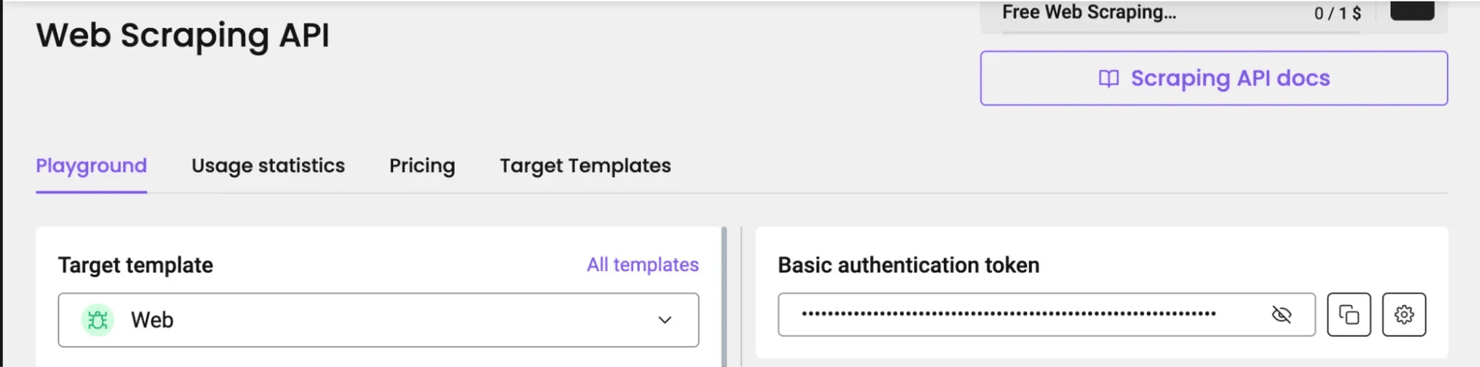
You can save that token in the CLI so it holds your credentials and you don't have to pass them on every run. Start with this command:
You’ll be prompted to paste your Web Data API basic auth token. Paste the token you copied from the API playground here. You might not see anything appear on the screen, that’s normal, just hit Enter and you’re set.
Now you can scrape any website of your choice via the CLI. Here’s the command to do that:
That’ll return the web page as Markdown, right there in your terminal
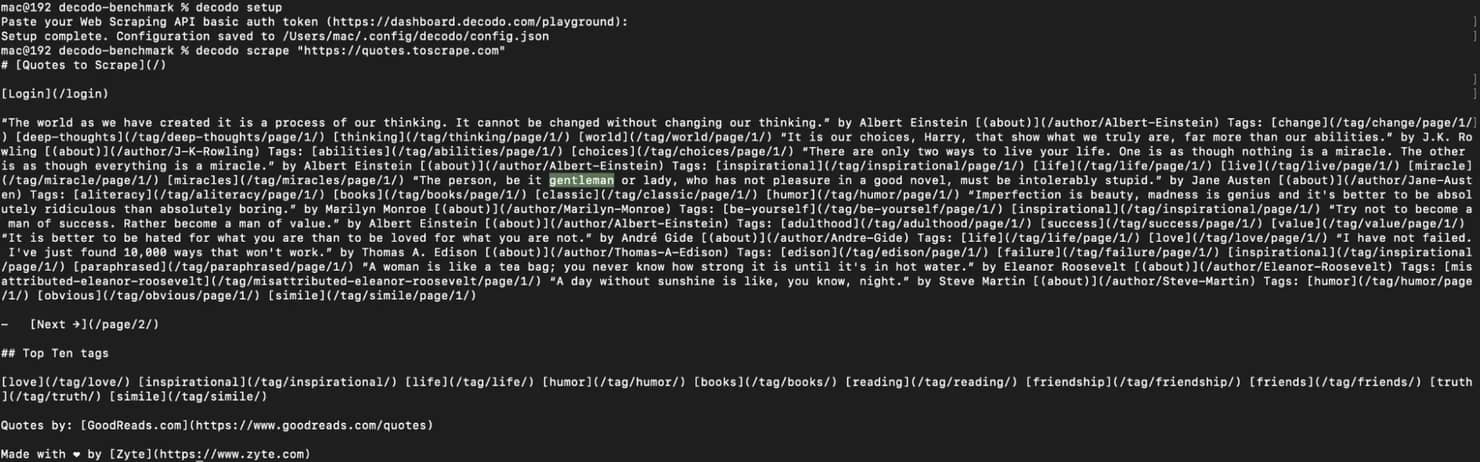
An MCP workflow works differently, there's no per-scrape command to run. You simply configure the Decodo MCP server once in your client, and from then on the agent calls the scraping tool itself whenever it needs a page.
Here's the setup you'll add to your agent:
Copy your basic auth token from the API Playground and swap it in for your-token-here. Then add this block to your agent's configuration file, for Claude Desktop, that's the claude_desktop_config.json file.
Save it, restart the application, and you'll find Decodo listed under Developer in Settings once it connects.
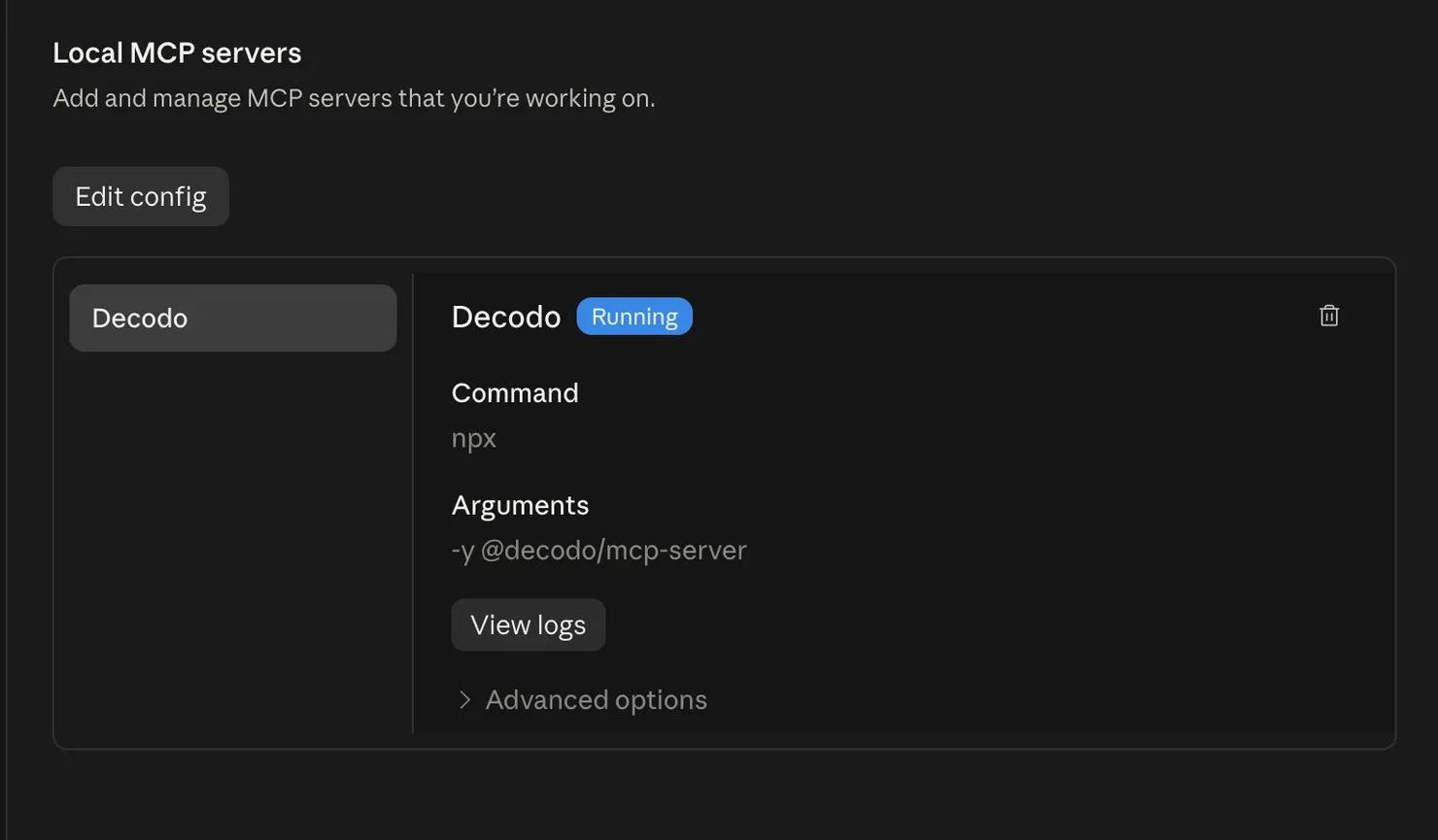
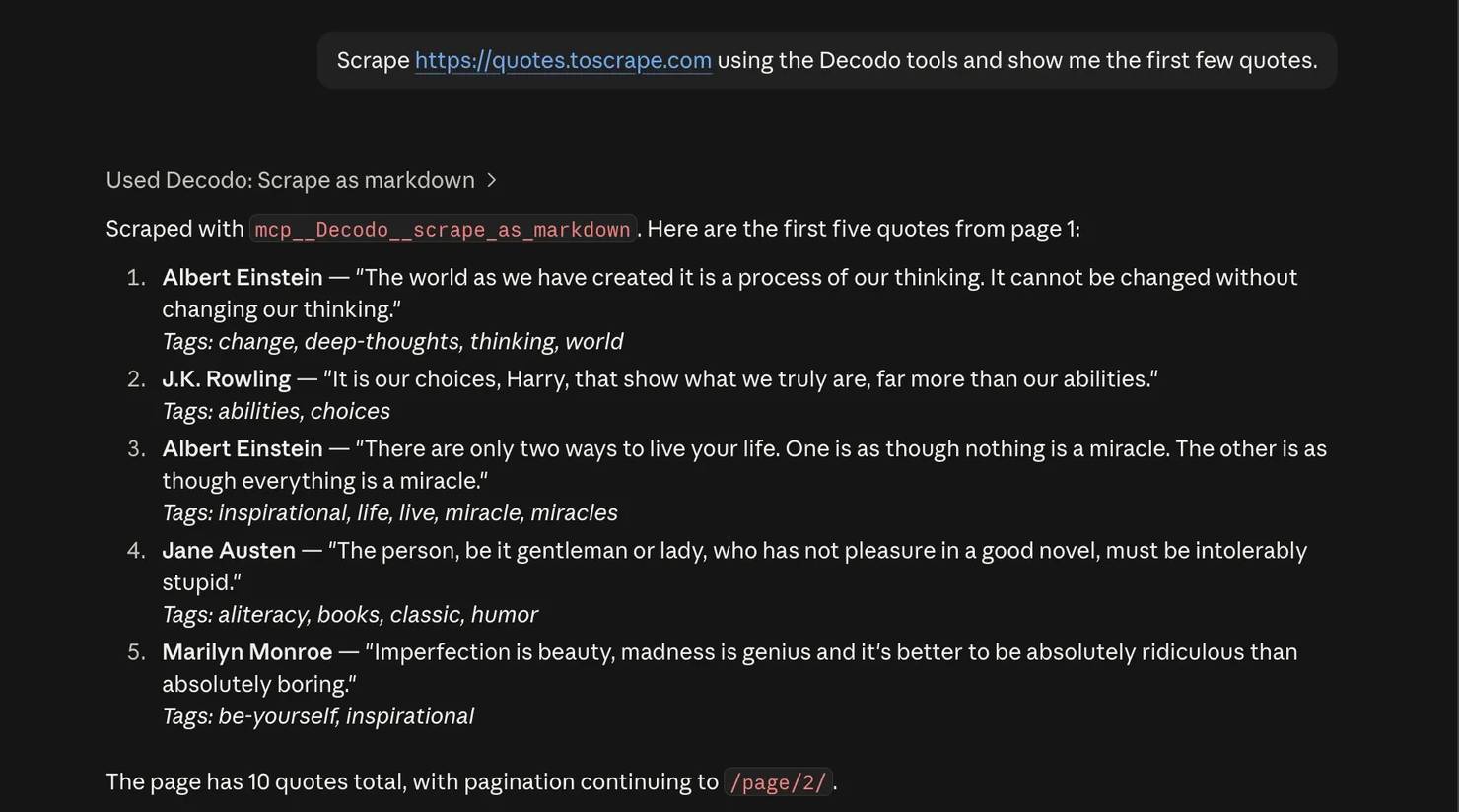
From then on, whenever you prompt the agent to scrape a page, it will call the Decodo tool on its own, no command needed.
Here’s the result of the agent using the Decodo MCP server to scrape quotes.toscrape.com through the protocol.
Common failure modes and how to fix them
Your agent can have access to the right tools and still fail to use them properly. Here's how to spot the problems you might run into when you connect an agent to a tool, and what to do about each one.
The agent ignores a tool that’s available
Usually this comes down to too many tools exposed at once, or a description too vague for the model to know when the tool applies. Trim the tool set down to what the agent actually needs, then describe each one in simple, task-focused language so the model knows exactly when to use it.
Context runs out mid-task
The agent starts strong, then falls apart halfway through. This usually happens when a large MCP schema and verbose command output pile up in the context together. Narrow the tools you expose, pull only the fields you need from CLI output, and filter your results before they ever reach the model.
The agent invents CLI flags
This usually means you're dealing with an internal or niche CLI that wasn't in the model's training data, so it guesses at a flag instead of remembering one. Give the agent a short manifest of the available commands and flags, or have it run --help before using the command rather than guessing.
A tool call silently returns nothing
An empty result usually means the MCP server doesn't actually support the operation the agent tried to call. So before you adopt a server, check its tool coverage. And if you're building your own, have it return a clear error instead of an empty response when an operation isn't supported. That small change makes it much easier to see what the agent did when you're debugging later.
Works locally, fails on another machine
CLI tools depend on the environment they run in, so different machines can carry different versions, dependencies, or configurations. Pin the binary version where you can, or move the shared logic behind a server when you need a more consistent environment across everyone using it.
The agent runs something it shouldn't
Giving an agent unrestricted shell access is a real security risk, since the model can end up running commands well outside the task you intended. Treat shell access as a privileged operation rather than a default. Use an explicit command allowlist so the agent can only run what you've approved, and keep everything else off the table.
Final thoughts
MCP and CLI solve different problems, so deciding between them should be based on where you are in the workflow rather than which protocol is better. CLI works well when an agent needs a lightweight interface for development, debugging, and one-off tasks, while MCP becomes more useful when the same tool needs to be shared, authenticated, versioned, or monitored across multiple consumers.
You can default to starting on the CLI, then you promote the tool to MCP once you need a second consumer, shared credentials, or an audit trail, while you keep the CLI around for local development and debugging. And since dynamic tool loading is starting to cut MCP's context overhead, the gap between the two may keep narrowing, so it's worth re-checking the tradeoff as your setup grows.
Either way, the interface is only part of the solution. Your agent still needs reliable data, authentication, connectivity, and a tool that actually works behind whichever surface you choose.
Reviewed by Churchill Doro.

Scale agent-driven scraping
Decodo's Web Data API keeps your data reliable once your agent is running at volume.
About the author

Mykolas Juodis
Head of Marketing
Mykolas is a seasoned digital marketing professional with over a decade of experience, currently leading Marketing department in the web data gathering industry. His extensive background in digital marketing, combined with his deep understanding of proxies and web scraping technologies, allows him to bridge the gap between technical solutions and practical business applications.
Connect with Mykolas via LinkedIn.
All information on Decodo Blog is provided on an as is basis and for informational purposes only. We make no representation and disclaim all liability with respect to your use of any information contained on Decodo Blog or any third-party websites that may belinked therein.