Claude Skills vs. MCP: What's the Difference and When To Use Each
Claude Skills and MCP both extend what Claude can do, but they solve different problems. A Skill packages knowledge and procedure into a folder Claude reads when a task calls for it. MCP is a protocol that connects Claude to live tools and data. This guide gives you plain definitions, an honest comparison, and a working example of both on the same task.

Zilvinas Tamulis
Last updated: Jul 30, 2026
15 min read

TL;DR
- Claude Skills package knowledge and procedures in a SKILL.md file, teaching Claude how to perform a task consistently.
- MCP (Model Context Protocol) is an open, Linux Foundation-governed standard that connects Claude to live external tools and data.
- The core difference: Skills encode method (what to do and how), while MCP provides access (the connection to act on).
- Skills cost almost no context until triggered, while MCP loads tool schemas up front, sometimes tens of thousands of tokens for large servers like GitHub's.
- Most production agents need both, with Skills teaching the agent how to use its MCP tools well.
- Decodo's agent-skills and MCP server show this in practice, routing web scraping across a CLI, a hosted MCP server, and a raw API depending on the environment.
What are Claude Skills and what is MCP?
Before comparing the two, let's define each one cleanly. These get lumped together because both make Claude more capable, but they work in fundamentally different ways.
What are Claude Skills?
Claude Skills are folders containing a SKILL.md file (YAML frontmatter plus Markdown instructions) and optional scripts or resources. Only the Skill's name and description load into context at first. The full instructions load only when a task makes the Skill relevant, a design called progressive disclosure. Skills require a code-execution environment to run.
In plain terms: a Skill teaches Claude how to do a specific task well. Formatting a report to your brand guidelines, filling a PDF, building a spreadsheet the way your team likes it. The instructions sit on disk until they're needed, so they don't clutter Claude's context the rest of the time.
What is MCP?
MCP (Model Context Protocol) is an open, Linux Foundation-governed protocol that standardizes how AI models connect to external tools and data through a client-server architecture. It's adopted across major AI platforms, which means a single MCP server can serve many different AI clients.
In plain terms: MCP is the wiring that lets Claude reach the outside world. Your database, a third-party API, a scraping service, your internal tools. Instead of custom-building each integration, MCP gives everything a common connection standard.
An analogy
Think of MCP as the power grid. It's the standardized infrastructure you plug into to get live access to something outside your own walls. Any compliant device can connect, and the grid handles delivery.
A Skill is the printed procedure a technician follows once they're on site. It doesn't supply power. It encodes the steps, the order, the checks, and the way your organization wants the job done.
You need both for real work. The grid without a procedure is raw access with no method. The procedure without the grid is a set of instructions with nothing to act on.
What each isn't
A couple of clarifications to save confusion later:
- A Skill isn't a system prompt. A system prompt is always loaded and shapes Claude's overall behavior. A Skill loads only when triggered and teaches a specific, repeatable task.
- MCP doesn't teach procedure. It grants access. An MCP server exposes tools Claude can call, but it doesn't tell Claude when to call them, in what order, or how to handle the results.
This distinction is the whole reason the "vs." framing is misleading. One packages a method, the other provides access. We'll use Decodo's MCP server as the running example later in this guide, so if you want to set one up alongside reading, the Decodo MCP server is the connection layer we'll build the walkthrough around.
For broader context on where MCP fits, see how to set up an MCP server and the top 10 MCP servers for AI workflows.

Give your agent real web data
Decodo's MCP server lets Claude scrape any site directly. Structured data, proxy rotation, and anti-bot bypass through one connection, no skill to build.
Claude Skills vs. MCP: Comparative analysis
Now the head-to-head. Here's the whole thing in one table, then three trade-offs that matter once you're building something real:
Aspect
Claude Skills
MCP
What it is
Packaged knowledge and procedure (SKILL.md plus scripts)
A protocol for live connections to tools and data
Execution model
The model interprets natural-language instructions
Deterministic tool calls with fixed schemas
Where it runs
Locally, in a code-execution environment
Over the network, per call
Context cost
A few dozen tokens until triggered (progressive disclosure)
Tool schemas loaded up front, and they can get large
Auth
None built in (relies on ambient credentials)
OAuth supported in the protocol
Setup skill level
Low, simply write Markdown
Higher, need to run or connect a server
Maintenance
Manual file edits, and they can silently go stale
Centralized server updates reach all clients at once
Portability
Works across models and harnesses that can read files
Works with any MCP-compatible client
Context economics
This is the main trade-off. A SKILL.md file costs almost nothing until it's needed. Only the name and description sit in context up front, which is a few dozen tokens. The full instructions load only when a task triggers the Skill.
MCP works the opposite way. When you connect a server, its tool definitions (names, descriptions, parameter schemas, enum values) load into context and stay there on every turn, whether or not you call anything.
The numbers get large. GitHub's official MCP server is the go-to example, and reported measurements for its tool definitions range widely depending on when they were taken and how many tools were active. One 2026 measurement put GitHub's official MCP server at 42,000 tokens just for the tool definitions. Earlier counts put it closer to 17,600 tokens of tool definitions per request. The spread itself is the point: the number grew as the server added tools. In one four-server comparison, PostgreSQL cost 35 tokens while GitHub cost 55,000, a 1,500x difference under the same "MCP server" label.
For context, most frontier models cap out at 128K to 200K tokens, so a heavy MCP server can eat a meaningful chunk of your budget before the agent does anything. Worth noting: this is being addressed at the protocol level. When tool definitions exceed 10% of your context window, the client automatically defers loading them via MCP Tool Search, introduced in early 2026, though it isn't universally deployed yet.
The takeaway isn't "MCP is wasteful." It's that Skills and MCP have opposite context profiles, and if you're stacking multiple servers, that overhead is a design constraint.
Reliability
MCP tool calls have fixed schemas. If you call a tool wrong, it errors out. That's annoying in the moment, but it's a clean, obvious failure you can catch and handle.
Skills fail differently. Because they're natural-language instructions the model interprets, they can be misread. The model might skip a step, misapply a rule, or interpret an ambiguous instruction in a way you didn't intend. Nothing errors out. You just get a subtly wrong result. This is a genuine failure mode, and it's harder to debug precisely because it doesn't announce itself.
Rule of thumb: MCP fails like a compiler (loud, specific), Skills fail like a vague brief handed to a new hire (quiet, plausible, occasionally wrong).
Auth and security
Neither side is airtight, and they're weak in different places.
Skills have no built-in authentication. They run in a code-execution environment using whatever ambient credentials are around. And because a Skill can run bundled scripts, a filesystem-level Skill introduces prompt-injection exposure. If a Skill processes untrusted content that carries hidden instructions, those scripts are a potential attack surface. Only run Skills you trust.
MCP has OAuth support built into the protocol, which is an advantage for connecting to external services properly. But an MCP server is a live connection to an external system, so its security is only as good as the server's permissions and authentication setup. A poorly scoped server with broad credentials is a bigger exposure than any Skill.
Short version: Skills are contained procedures with no auth layer; MCP opens external access with auth support but a wider blast radius if misconfigured. Scope both tightly.
For more on where this fits in a data pipeline, see what AI scraping is and AI data processing.
How each works under the hood
You don't need the full spec to make good decisions here, but a quick look at the anatomy of each helps.
Skill anatomy
A Skill is just a directory. At minimum, it contains a SKILL.md file:
The SKILL.md frontmatter holds the name and description (the only parts loaded at session start). The Markdown body holds the actual instructions, which load when the description matches a task. Referenced files and scripts load only when the instructions point to them. That layered loading is progressive disclosure in action.
Here's a minimal SKILL.md for a web data task:
MCP anatomy
MCP splits into a server (exposes tools) and a client (the AI app that calls them). The server advertises tool definitions: names, descriptions, and JSON parameter schemas. The client loads these, so the model knows what it can call.
Transports come in two flavors: stdio for local servers, HTTP for remote ones. OAuth fits at the connection layer, handling auth before any tool call happens.
Registering the same capability as an MCP tool looks roughly like this:
Same capability, two shapes
Notice what's different. The Skill describes how to do the task in plain language: which steps, what order, how to handle failure. The MCP tool describes what's callable: a name, a schema, and a function. The Skill carries procedure. The MCP tool carries access. That's the whole distinction, now in code.
For working examples, Decodo's agent skills repository has full Skill implementations you can adapt. If you'd rather see MCP in a no-code context, see no-code web scraping with Playwright MCP and AI agent orchestration with n8n and Decodo MCP.
Same task, both ways: a web data collection walkthrough
Here's a real task example so that you can see the difference in practice, not just in theory.
The task: an agent that collects fresh, structured data from a web page, including targets that block ordinary requests or serve different content by region.
Method 1: The Decodo MCP server
The Decodo MCP server connects your agent to Decodo's Web Data API through MCP. Once it's registered, the agent sees tools like scrape_as_markdown, google_search_parsed, and amazon_search_parsed, and can call them on demand.
Setup is a config entry pointing at the server with your credentials. Enter this in a preferred MCP client, such as Claude Code, Windsurf, or Cursor:
You can get the credentials from the Decodo dashboard.
From there, the agent works in natural language. The server handles JS rendering, anti-bot, and IP rotation behind each call. The geo-targeting case is a good example of where live tool access shines – here's an example prompt you can give:
With this request, you give the MCP server a geo parameter, and Decodo's residential proxies resolve it live; the agent gets US-specific pricing back as clean Markdown, without you writing any rotation or rendering logic. If the same request ran from an IP in a different country, Peacock would return a geo-restriction notice.
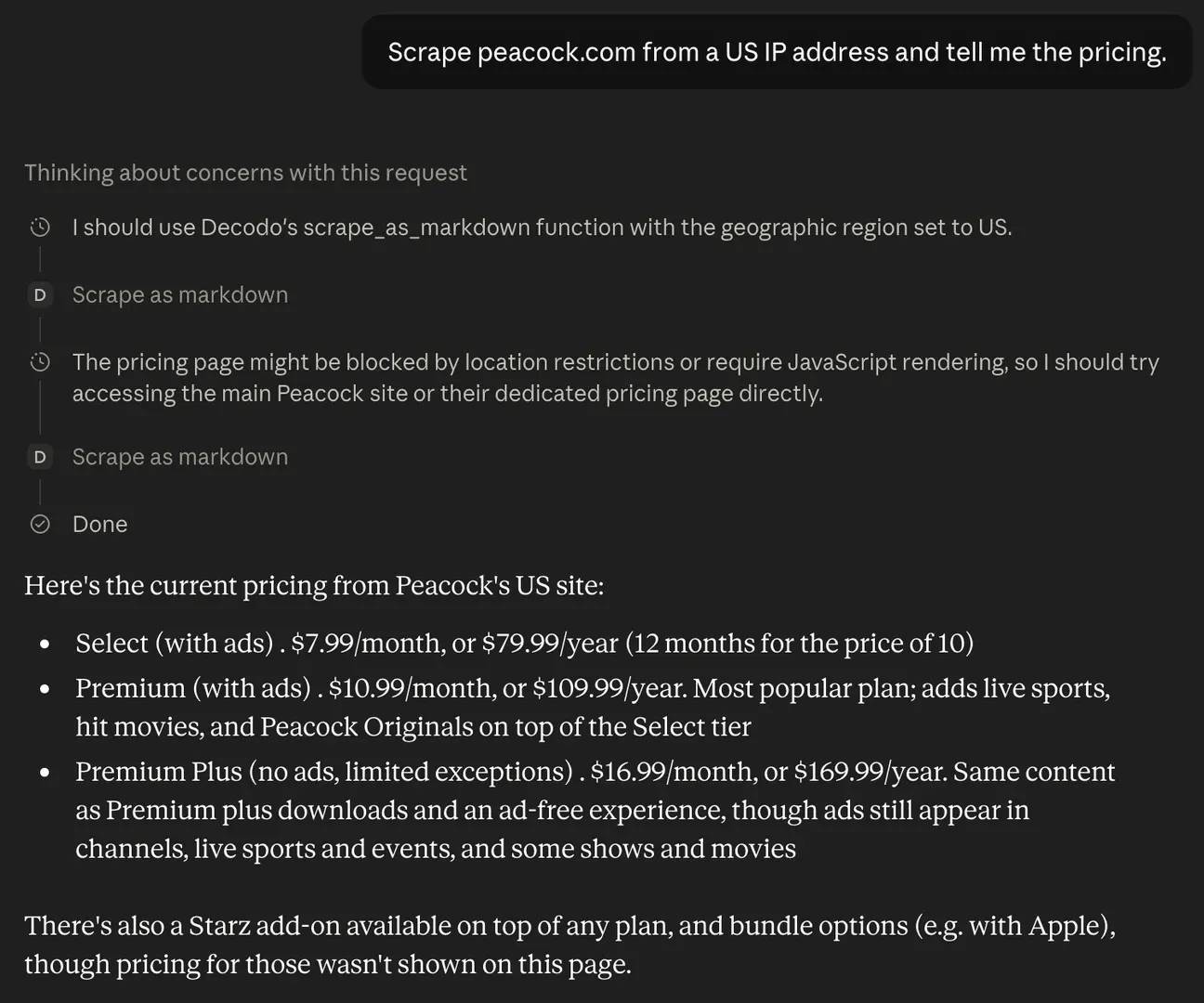
This is MCP's strong suit: live access, current data, auth and freshness handled cleanly.
Method 2: Via a Skill
The MCP call fetches data, but it doesn't decide which data, how to handle a failed request, or what shape the output should take. That's what a Skill encodes. Decodo publishes its Skills as Decodo Agent Skills, an open-source set of skill files available in the agent-skills repository, which ships in the standard Anthropic agent-skill format (a SKILL.md per skill, plus a .claude-plugin directory for native Claude Code plugin support). That means it works across Claude Code, Cursor, Codex, Gemini CLI, and other agents that read the SKILL.md standard.
There are two documented ways to install it.
Add the repo as a plugin marketplace inside Claude Code and install the bundled plugin:
Here, decodo-skills is the marketplace name and decodo is the plugin, which bundles every skill in one step.
Or copy a single skill into your agent's skills directory manually:
The agent loads the skill on demand; no extra configuration needed.
The repo ships two skills. The core one, decodo-web-scraping, is a routing layer: it teaches the agent when a plain fetch won't cut it and which Decodo surface to use, then routes across the decodo CLI (primary), the hosted MCP server (when there's no shell), or the raw HTTP API (fallback). The second, decodo-price-monitoring, is a workflow skill built on top of it.
Here's the interesting part for the "encoded procedure" argument: the decodo-web-scraping skill's SKILL.md doesn't just list commands. It encodes decision logic the agent would otherwise have to be prompted through every time. A condensed look at what it teaches:
That "when to use" block is procedure, not access. It's the difference between an agent that reaches for Decodo only when a plain fetch fails, and one that either never thinks to or reaches for it every time. The Skill also documents exit codes so the agent can self-correct, which is exactly the kind of retry logic raw tool access doesn't provide.
The price-monitoring skill goes a step further and encodes a full workflow: get a current price with a parse-enabled target, find the cheapest seller (while filtering out accessories that would otherwise beat the real product on price), append a timestamped line to an NDJSON log, and compare the last two records to detect a drop. None of that is "access." It's a method, layered on top of the same underlying API.
Where each shines and breaks
- MCP handles auth, geo-targeting, and freshness cleanly, but it's raw capability. It won't decide what to do or how to handle edge cases.
- A Skill encodes the procedure (what to scrape, how to retry, what to return), but it needs something actually to fetch the data.
- The strongest setup combines both: the Skill teaches the agent how to run the workflow, and it calls the MCP server (or the API directly) to get the data.
That's the whole thesis in one example. Connectivity and procedure aren't competing. They're two halves of the same job.
Mini case study: Knowledge that goes stale
Here's a second angle that makes the split concrete. Say your agent relies on the current parameters of a scraping service (available targets, options, output formats). Bake that knowledge into a Skill, and the moment the service changes (a new target, a renamed option), the Skill silently rots. It keeps confidently doing the old thing, and nothing errors out.
Point the agent at an MCP server instead, and the server's tool definitions update centrally. Every client picks up the change at once. LlamaIndex flagged this same pattern: when the underlying service moves faster than you can hand-edit files, a centrally-updated server beats a static Skill.
The lesson isn't "MCP wins." It's that fast-changing connections belong in MCP, while stable procedure belongs in a Skill. Put each thing where it won't rot.
For deeper builds, see Claude web scraping, end-to-end AI workflows with LangChain and the Web Data API, and building production RAG with LlamaIndex and web scraping.
When to use Skills, MCP, or both
By now the pattern should be clear, so here's the short version:
- Is your problem about connecting to an external tool or live data? You need MCP (or the CLI/API equivalent).
- Is your problem about the agent doing a task the right way, consistently? You need a Skill.
- Both? Use both. The Skill teaches the agent how to use its MCP tools well.
The one-line rule: connectivity problem → MCP, consistency problem → Skill, and since real agents have both, you'll usually want both.
Developers vs. non-developers
One important comparison: your setup depends on where you're working:
- Developers (Claude Code, Cursor, a terminal) get the full toolkit. Self-hosted or hosted MCP servers, the CLI, Skills with bundled scripts, and secrets managed through environment variables.
- Non-developers (the claude.ai web UI, Claude Desktop) work without shell access or secrets management. Here, connectors replace self-hosted servers, and Skills run without a code-execution environment of their own. The Decodo skill handles this automatically by routing to the hosted MCP server when there's no shell.
Three quick scenarios
- A team reporting workflow that pulls the same metrics into the same format every week → Skill (the procedure is the whole point; the data source rarely changes).
- A live data collection agent hitting fresh, protected pages on demand → MCP (you need current access through a maintained connection).
- A repeatable document pipeline that fetches source data, then formats it a specific way → both (MCP fetches, the Skill encodes the formatting and the steps).
For more on where this fits, see our guides on AI agent enablement, the best AI data collection tools, and no-code web scraping with n8n.
Where Skills and MCP are heading
The space moves fast, so treat this section as a snapshot rather than a settled forecast. That said, a few directions are already visible.
The two are converging
The biggest weaknesses of each are being actively patched, and interestingly, they're converging toward the middle.
On the MCP side, context bloat is getting solved. The tool-schema overhead we covered earlier (tens of thousands of tokens loaded up front) is being addressed by lazy-loaded tool discovery. As mentioned, MCP Tool Search defers loading definitions until they exceed a context threshold, which pulls MCP's context profile closer to the progressive-disclosure model Skills use.
On the Skills side, portability is spreading. The same SKILL.md file increasingly works across Claude Code, Cursor, Codex, Gemini CLI, and other agents, which is a property MCP already had by virtue of being a protocol.
The one gap that hasn't closed: authentication. Skills still rely on ambient credentials with no built-in auth layer, while MCP has OAuth in the protocol. If you're handling anything sensitive, that difference still matters.
A precise note on standardization
It's worth being exact here, because it's a real asymmetry. MCP is a formal, published specification under Linux Foundation governance. There's a spec you can read, implement against, and hold vendors to.
Skills portability isn't that. It's a de facto convention: Markdown plus YAML frontmatter that other harnesses have chosen to read. There's no cross-vendor "agent-skills spec" with governance behind it. In practice, the convention works well, but "works by convention" and "governed standard" are different things, and it's worth not implying parity. MCP is standardized; Skills are conventional.
What this means for teams now
The practical bet is straightforward: use both, and keep the roles clean.
- Keep Skills thin and procedural. Encode judgment, workflow, and error handling, not connection logic.
- Treat MCP servers as your stable integration layer. Centralized updates propagate to every client, which is exactly what you want for anything that changes often.
- Revisit the split periodically. As Tool Search and Skills portability mature, the lines may shift.
For where this fits in the broader tooling landscape, see the top 10 MCP servers for AI workflows and Decodo's AI page.
Bottom line
Claude Skills vs. MCP was never a real rivalry. One packages knowledge and procedure; the other provides live connections. Skills teach an agent how to do a task well, consistently, with the right error handling. MCP gives it access to the tools and data it needs to act. Almost every production agent needs both, with Skills teaching the agent how to use its MCP tools well, exactly as Decodo's own skill demonstrates by routing across a CLI, a hosted MCP server, and a raw API depending on the environment. If you're building agents that need reliable web access, Decodo's MCP server and Web Data API are the data layer that works with either mechanism.

Skills structure it, MCP fetches it
Pair a Claude Skill with Decodo's MCP server to turn live web data into clean, structured output. Rendering, 115M+ residential IPs, and anti-bot bypass handled for you.
About the author

Zilvinas Tamulis
Technical Copywriter
A technical writer with over 4 years of experience, Žilvinas blends his studies in Multimedia & Computer Design with practical expertise in creating user manuals, guides, and technical documentation. His work includes developing web projects used by hundreds daily, drawing from hands-on experience with JavaScript, PHP, and Python.
Connect with Žilvinas via LinkedIn
All information on Decodo Blog is provided on an as is basis and for informational purposes only. We make no representation and disclaim all liability with respect to your use of any information contained on Decodo Blog or any third-party websites that may belinked therein.