LLM Honeypotting: What It Is and How to Scrape Around It
LLM honeypotting is an emerging deception tactic where websites feed AI crawlers and scrapers plausible-looking but fake or worthless content. That fake data discourages scraping by raising compute costs and degrading what gets collected. It isn't widespread yet, but it's gaining traction. This guide covers what it means for you if you run a scraper, and how to keep your data pipeline clean.

Justinas Tamasevicius
Last updated: Aug 18, 2026
9 min read

TL;DR
- LLM honeypotting feeds crawlers fake or useless content to waste compute and quietly corrupt scraped datasets.
- Common tactics include proof-of-work slowdowns, infinite content mazes, and statistically incoherent poisoned text.
- The technique is still early and experimental, with only a small number of publishers and eCommerce brands testing it.
- Selective crawling, realistic browser behavior, and basic data validation help keep honeypot output out of your dataset.
What is LLM honeypotting?
LLM honeypotting is a deception tactic targeted at AI crawlers and web scrapers. It applies a familiar cybersecurity practice, deception, to trap AI crawlers and feed them inaccurate data.
Instead of blocking a scraper outright, the target makes each request more expensive while returning less usable data. Over time, the crawler consumes more bandwidth, compute, and storage without gaining enough reliable information to justify the cost.
LLM honeypotting remains a niche tactic. One early public example is Cloudflare’s AI Labyrinth, launched in March 2025 to route suspected crawlers into AI-generated decoy pages. The term gained wider attention in July 2026, when Digiday reported that a small number of publishers and eCommerce brands were experimenting with similar techniques.
Web scraping normally assumes that a successful response contains genuine data from the target website. LLM honeypotting challenges that assumption. So, a response can look valid, parse correctly, and still lead the scraper nowhere.
How LLM honeypotting actually works
LLM honeypotting is different from traditional anti-bot systems, and there isn’t one standard way to build an LLM honeypot.
Some systems rely on an LLM to generate large amounts of realistic decoy text. The content may come from a locally hosted model or an external API, then get published through pages and links that automated crawlers can discover. Other implementations don’t need generated text at all. They simply slow down suspicious clients or require them to do extra work.
There are 3 general approaches:
Technique
What the site does
What it costs you
Proof of work
Forces your client to solve a computational puzzle before serving a page
Compute and latency on every single request
Content maze
Serves endless fabricated pages that link to more fabricated pages
Crawl budget, bandwidth, processing time, and storage
Data poisoning
Returns fluent but fabricated text
Data quality, model accuracy, and time spent cleaning the results
Proof-of-work challenges and subtle slowdowns
A website can require suspicious clients to complete extra computational work before serving a page. This is commonly called a proof-of-work challenge.
Now, completing only one challenge may not require much processing power. However, that cost piles up when a crawler makes thousands or millions of requests. Every page requires additional CPU time, which reduces the number of requests the crawler can complete using the same infrastructure.
The target can also introduce subtle response delays. An extra second may be barely noticeable to someone opening a few pages manually. At scale, that same delay reduces throughput, occupies browser instances for longer, increases queue pressure, and raises the total cost of the scraping job.
Proof-of-work challenges don’t need the website to block every request. Instead, it only needs to increase the cost of obtaining each useful page until large-scale collection becomes less attractive.
Infinite content mazes
A content maze creates pages that appear crawlable and keeps linking them together. Each page typically contains normal HTML, readable paragraphs, convincing titles, and internal links. This makes it easy for a crawler to fall into a rabbit hole and continue moving through the site without reaching a natural endpoint.
Cloudflare’s AI Labyrinth is a good example of this. When Cloudflare identifies unwanted bot activity, it can expose hidden links that lead to pre-generated decoy pages. Those pages carry convincing but irrelevant material and connect to more pages. Normal visitors never see the links, but a bot parsing HTML adds them to its queue. Cloudflare also treats the decision to follow those paths as a bot signal in itself.
Infinite content mazes are quite tricky to catch because the pages can keep returning valid 200 responses for hours. Hence, the scraper appears to be working, even though it’s collecting pages that have no real value. While all this is going on, your scraping bill is massively increasing with nothing to justify it at the end of the day. To learn more about the detection layer underneath all of this, see our Cloudflare anti-bot evasion guide.
Data and model poisoning
Data poisoning targets the quality of the collected information. Instead of blocking the scraper or trapping it in an endless crawl, the site returns fabricated content to lower the value of whatever you're building.
The fake output might include:
- Fabricated product listings and identifiers
- Prices that don’t belong to real products
- Contradictory dates or specifications
- Fake relationships between people, companies, or events
- Repetitive text
- Statistically coherent nonsense
A training dataset may absorb repeated synthetic patterns that distort the final corpus and make cleanup more difficult.
Poisoned content doesn’t automatically damage every dataset or model. Its impact depends on how much content is collected, whether duplicates are removed, how sources are scored, and what checks are run before the data reaches production.
Why this matters more for AI and data teams than for old-school scraping
With traditional scraping, if your request fails, your logs flag the problem, and you know which target needs attention. Most times, it's a 403, a 429, or a CAPTCHA, so it's easier to fix it and move on.
Honeypot output doesn't fail. You get valid HTML, a 200 OK, and nothing in the response tells you it's fake, irrelevant, or deliberately misleading, so it flows into your dataset, or your training pipeline.
The problem may only become visible later, when something downstream drifts or a model starts producing unreliable answers. This makes LLM honeypotting a data quality problem as much as an access problem. It hits teams building AI training data far harder than someone pulling 40 product pages a day, because the bad rows get buried under everything else you collected that week. If you're working at that scale, our comparison of AI data collection tools covers the tradeoffs.
How to recognize you may have hit a content maze or poisoned page
There’s no single signal that confirms if you’ve hit a honeypot. Plenty of legitimate sites have duplicate pages, incomplete sitemaps, unusual URL structures, and inconsistent content. However, you can catch most honeypots by watching a handful of concrete signals rather than trusting status codes.
Signal
Likely cause
What to check
Crawl count far exceeds sitemap.xml
Content maze
Compare discovered URLs with the declared sitemap
URLs keep nesting without reaching a final page
Generated link graph
Set a crawl-depth cap and log where it triggers
Fluent text contains no verifiable facts
Generated filler
Compare a sample with pages you know are genuine
Similar content appears under many URLs
Maze loop
Hash page bodies and remove duplicates before storage
Pages exist outside the sitemap and normal navigation
Bot-only decoy path
Check whether a human browser can reach them
Response times repeat at an unusual fixed delay
Deliberate slowdown
Compare latency with a known-good crawl
The same URL changes across sessions
Conditional bot routing
Compare responses by browser profile, session, and IP type
Establish the site’s normal shape
Before starting a large crawl, record the site’s approximate page count, common URL patterns, sitemap size, and typical navigation depth. Also,set limits for total URLs, crawl depth, query-parameter combinations, and links discovered from one page. A crawler shouldn’t treat endless URL growth as success. If you are running an agent to oversee the scraping job, you can instruct them to do these preliminary checks and set limits.
Inspect the crawl graph
A decoy page may look genuine in isolation, but its position in the site often exposes it. Track where each URL came from. Suspicious pages may form deep, isolated branches that don’t connect to the sitemap, navigation, category pages, or other genuine content. Store each page’s parent URL so you can trace unexpected branches back to their source.
Check for repeated content
Exact duplicate checks won’t catch generated pages that change a few words. Use near-duplicate detection such as SimHash, MinHash, n-gram comparison, or embeddings to find pages that say essentially the same thing. If thousands of URLs collapse into a small number of content patterns, pause the crawl before storing the results.
Validate important fields
Focus validation on values that affect downstream decisions, such as prices, dates, identifiers, product specifications, rankings, and availability. Also, compare suspicious records with a verified page, a previous crawl, or another reliable source. Data found only inside a deep, unfamiliar branch should receive a lower confidence score.
Compare sessions
Request the same pages using controlled sessions and change one factor at a time, such as the IP type, rendering method, or browser profile. Extra links, deeper navigation, unusual delays, or different page content may show that your scraper is seeing a bot-specific version of the site. Our guide to building a web crawler with Python covers crawl limits, URL normalization, deduplication, and monitoring in more detail.
How clean unblocking and extraction reduce honeypot risk
Most LLM honeypots rely on first identifying a visitor as a bot, either through browser fingerprints, IP reputation, inconsistent sessions, or scraping patterns that don’t resemble normal browsing. So, the less obvious your automation looks, the lower the chance of being routed into a maze or poisoned branch. But access alone isn’t enough. Here’s what you can do to minimize getting caught in a honeypot.
Reduce avoidable bot signals
Keep headers, cookies, browser properties, IP location, and navigation behavior consistent throughout a session. Also, avoid switching identities halfway through a crawl, and don’t send every request at the highest concurrency your infrastructure allows.
A Playwright Stealth setup can reduce some browser-level automation signals, while residential proxies can help can make requests look more like authentic traffic coming from real users.
Control what the crawler can discover
Define the domains, path patterns, content types, and query parameters your crawler is allowed to follow before the run starts. This means setting hard limits for crawl depth, total page count, and URL variations, as well as rejecting repeated tracking parameters or URL combinations that don’t produce meaningfully different content. Make it easier for yourself and use the sitemap and normal site navigation as a baseline. If the crawler suddenly discovers thousands of pages outside that structure, investigate before expanding further.
Validate before data enters production
Don’t assume that a successful response contains trustworthy data. Instead, store useful context with each record, such as the source and parent URLs, retrieval time, response hash, and session identifier. Then apply basic validation before the data moves downstream.
These are some useful checks you can put in place:
- Acceptable value ranges
- Cross-checks against known-good data
- Alerts for sudden increases in page volume
- Quarantine rules for records collected from suspicious branches
If a site that normally exposes 1K pages suddenly gives you 10K, treat that as a signal to investigate.
Our Web Scraping API and Site Unblocker handle JavaScript rendering, proxy rotation, session management, and anti-bot challenges in ways that reduces the chance of being routed into a bot-only decoy path. However, they can’t guarantee that every returned page is genuine, so validation still needs to happen on your end.

Don’t get caught in a honeypot
Power your AI solutions with our no-hassle Web Scraping API, backed by 125M+ IPs across 195+ locations and a 99.99% success rate.
Code example: handling proof-of-work protection on a real website
To see what this looks like in practice, let’s test a real protected target, git.kernel.org. The site uses Anubis, an open-source anti-bot system that places a proof-of-work challenge in front of suspected automated traffic. In simple terms, the browser has to complete some computation before the real page is served.
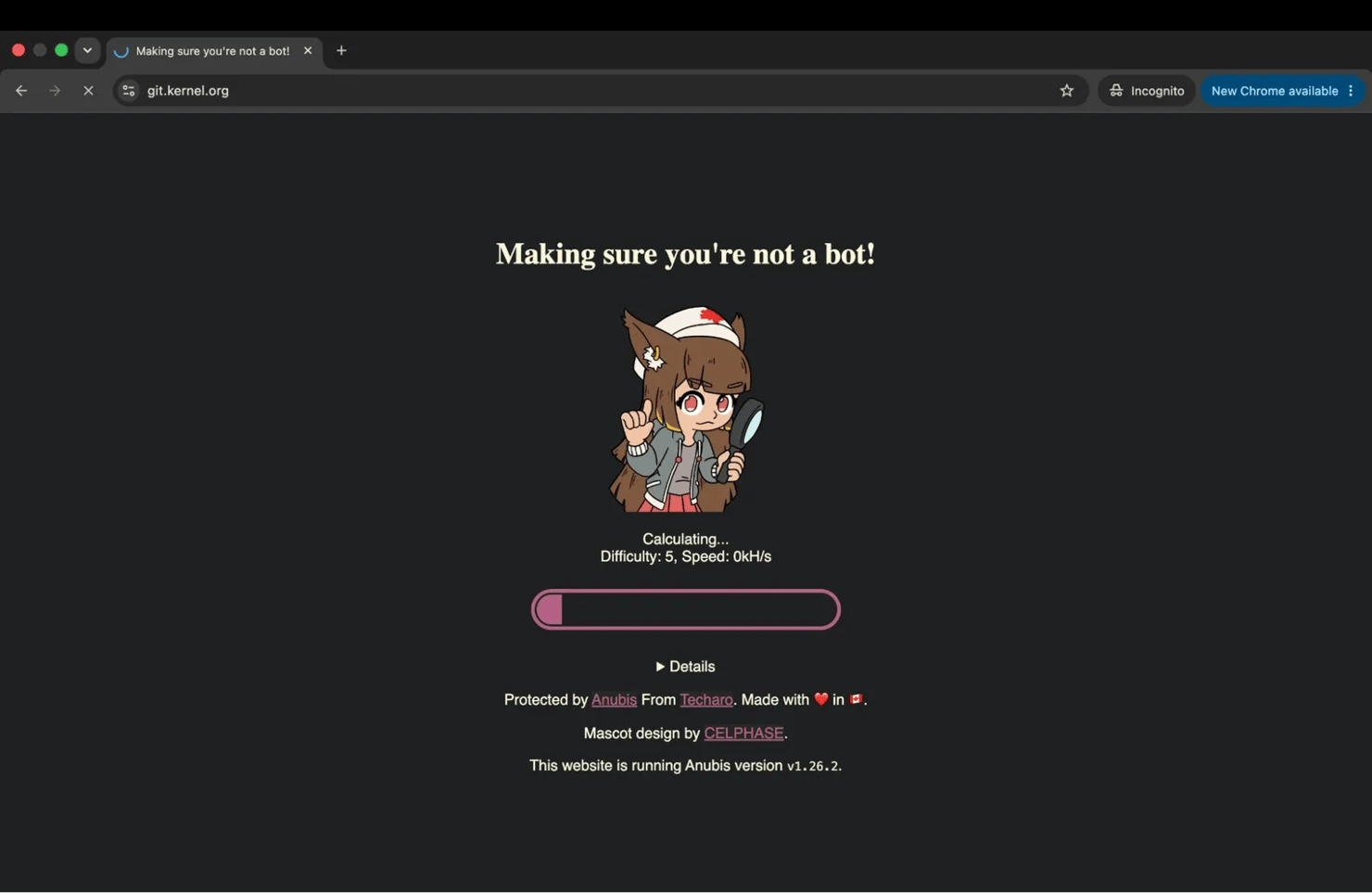
This way, a basic Python request would get immediately blocked. If you’re new to scraping with Python or need help setting up Requests first, our Python web scraping guide covers the setup from scratch.
The response from our test was:
As you see, the scraper never reaches the actual repository page.
Now send the same target through our Web Scraping API with browser rendering enabled. Since the challenge needs time to complete in the browser, we also wait 15 seconds before collecting the final HTML:
Before running the code, you’ll need your Web Scraping API Basic token. Log in to the Decodo Dashboard, open the API Playground, copy your API token from the credentials section and save it as DECODO_BASIC_TOKEN. Decodo’s Web Scraping API quick-start guide walks through where to find the credentials.
Now, that same target returned:
The key detail is that browser rendering alone wasn’t enough in our first test. Waiting 15 seconds gave the browser time to complete the challenge and load the actual Kernel.org page.
That same lesson applies to honeypotting. A 200 OK only confirms that the server returned something. You still need to verify that the response is the genuine page before storing it.
Does LLM honeypotting actually work? What the industry is debating
The honest answer is that the evidence is still limited, and the industry hasn’t settled on how effective LLM honeypotting really is.
Some scraping engineers argue that it doesn’t need to stop every scraper to be useful. If a content maze forces a crawler to spend more compute, bandwidth, and storage to collect less usable data, it can make large-scale scraping more expensive, especially on high-value sites.
The counterargument is that well-built scrapers may avoid the trap entirely. If a crawler behaves like a real browser, maintains consistent sessions, and follows a selective crawl strategy, it may never get routed into the decoy content in the first place. Once a maze is identified, its URL patterns or content can also be filtered out.
Then there’s the defender’s own bill. Running a maze isn’t free. Generating, storing, and serving millions of fake pages consumes infrastructure, and the site absorbs that cost for as long as the crawler keeps going.
So, the economics have to make sense on both sides. Thus, from cost and business points of view, content maze can be quite draining to both parties. Data poisoning adds another layer of uncertainty. Collected decoy content may never reach a model at all if the pipeline deduplicates aggressively, scores sources, or filters suspicious content before it reaches training or retrieval. There's a targeting risk too. Traps aimed carelessly can catch Googlebot and Bingbot and damage the site's own visibility.
For now, LLM honeypotting appears most effective against broad, low-selectivity crawlers that follow every discovered link and trust every valid response. Selective crawlers with clear crawl limits and strong data validation are much harder to trap and less likely to carry poisoned content into their data pipelines.
Final thoughts
LLM honeypotting is still an experimental tactic, but it changes what a successful scrape can mean. Instead of only watching for blocks, scraper operators also need to question unusual crawl growth, repetitive content, and data that doesn’t match known patterns.
The best defense is a combination of realistic browser behavior and strong data validation. Decodo’s Web Scraping API and Site Unblocker can handle the unblocking layer while you focus on keeping the data itself clean.

Get Web Scraping API
Scale your projects hassle-free, even past honeypotting measures. Plug in our Web Scraping API, backed by 125M+ IPs, 195+ locations, and a 99.99% success rate.
About the author

Justinas Tamasevicius
Director of Engineering
Justinas Tamaševičius is Director of Engineering with over two decades of expertise in software development. What started as a self-taught passion during his school years has evolved into a distinguished career spanning backend engineering, system architecture, and infrastructure development.
Connect with Justinas via LinkedIn.
All information on Decodo Blog is provided on an as is basis and for informational purposes only. We make no representation and disclaim all liability with respect to your use of any information contained on Decodo Blog or any third-party websites that may belinked therein.