Wikimon Scraper: Build a Digimon Data Scraper in Python
Wikimon.net is a community-maintained Digimon wiki, but it doesn't offer a public API, so web scraping is the most practical way to pull structured data from its Visual List. In this guide, you’ll build a working Python scraper with Requests and Beautiful Soup to extract Digimon names and image URLs, then save the results to either a CSV file or a MySQL database for later use.

Lukas Mikelionis
Last updated: Aug 06, 2026
15 min read

TL;DR
- Wikimon.net has no public API, so scraping its Visual List is the practical way to get structured Digimon data.
- You can use Python's Requests and Beautiful Soup libraries to extract Digimon names and image URLs straight from the page HTML.
- You can save your scraped data in a plain CSV file for smaller projects, or a MySQL database for larger datasets.
- If you want to scrape beyond a single page, you'll need to handle pagination, errors, and eventually IP-level blocking from Wikimon.
What is Wikimon and why scrape it?
Wikimon is a community-maintained wiki dedicated to Digimon. It brings together information on Digimon, its characters, anime, games, cards, and other parts of the Digimon franchise in one place. Since the site doesn’t provide a public API, scraping is often the most practical way to collect Wikimon data for research, analysis, or personal projects.
One of the most useful pages to scrape is the Visual List of Digimon. It organizes Digimon into a structured list with links to individual pages, which makes it a natural starting point for you to build your own dataset or collect information at scale.
Note: Before you start scraping Wikimon, take a few minutes to understand the site’s rules by reviewing its robots.txt file, try to keep your request rate reasonable, and avoid causing traffic on the site. If you’re planning a larger project, it’s always nice to contact the site’s maintainers and ask for permission where possible. That type of relationship will go a long way to securing your scraper long-term.
Tools and dependencies you’ll need
You don’t need much to get this scraper up and running. We recommend Python 3.9 or newer. It gives you access to the latest language features and works well with modern web scraping libraries.
For this tutorial, you’ll need:
- requests to send HTTP requests and fetch the page content
- beautifulsoup4 to parse HTML and extract the data you need
Depending on how you want to store your scraped data, you can also install these:
- pandas if you plan to export results to a CSV file
- mysql-connector-python if you want to save your data in a MySQL database
It’s also a good idea to create a virtual environment before you start installing these packages so your project can stay isolated from your other Python projects.
Activate the virtual environment, then install the necessary dependencies:
If you're saving your results to a CSV file or a MySQL database, install the optional dependencies as needed:
If you want to know more about web scraping with Python, you can check out our guide on the Best Python Web Scraping Libraries: Comparison and How to Choose. You can also read through Scrapy vs. Beautiful Soup to get a clearer picture of what library to use and why.
Inspecting the Wikimon Visual List page structure
Before you start writing the actual scraping code for Wikimon, you need to first inspect the Visual List page so you can have a better idea of how they organized the data and their selectors. When you get to the Visual List page, right-click anywhere on the page and select Inspect. This will open the browser’s developer tools, where you can explore the page’s HTML structure and see how they rendered each Digimon entry.
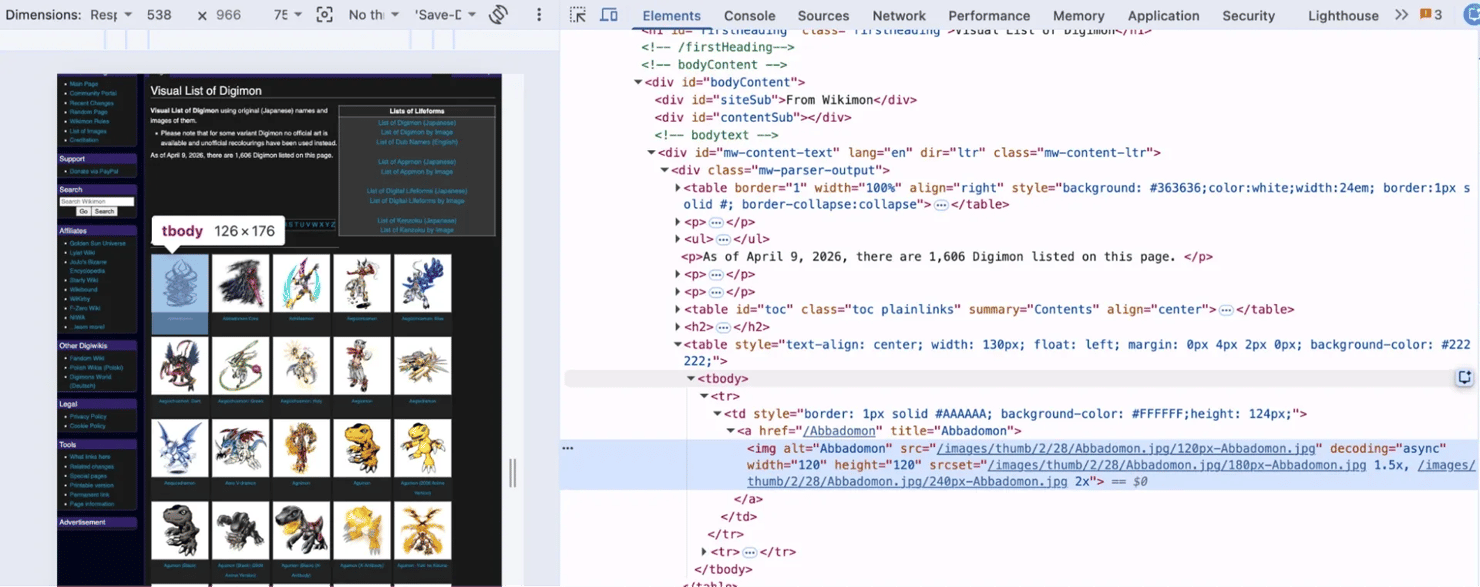
Unlike an eCommerce site that would often wrap its products in predictable product cards, Wikimon uses a MediaWiki layout. The page is built from wiki-generated HTML, so galleries and lists follow a different structure. Meaning you can’t assume that selectors that work on other websites will automatically work here.
As you inspect the page, look for repeating HTML patterns. On Wikimon, each Digimon sits inside its own <table> element that runs from the table down to a tr, a td, an anchor tag, and finally an img tag, which is where both pieces of data live. The name sits in the image's alt attribute, not as visible text, while the image sits in the src attribute as a relative path like /images/thumb/2/28/Abbadomon.jpg/120px-Abbadomon.jpg, so you'll need to join it onto Wikimon's base URL to get a working image URL.
This repeating structure is what your scraper will loop through. You can target the parent element for each entry and extract the information you need from there, instead of searching the entire page for individual names or images. That way, your scraper will be easier to read, easier to maintain, and less likely to break if the page changes slightly.
If you want more insight into how Beautiful Soup actually works, then you can check out what is Beautiful Soup?
Writing the scraper: Extracting names and image URLs
The next step is to turn what you found during your inspection into working code. Your scraper needs to do three things: fetch the page, parse the HTML, and loop through every entry to pull out a name and an image URL.
Fetching the page
Start with Requests. Wikimon may work without a custom User-Agent, but it's still worth setting one. It identifies your script in the site's logs, and plenty of other MediaWiki sites reject requests that don't have one.
The raise_for_status() call will stop the script early if Wikimon returns a 404 or a server error, so you don't parse a page that isn’t there.
Locating the entries
Every Digimon on the Visual List sits inside its own small table. Rather than chasing table classes that could change, rather scope your search to MediaWiki's content wrapper and grab the images directly.
Each img gives you 3 fields at once: the name from its alt attribute, the image from its src, and the wiki page link from the a tag around it.
Looping through and extracting
The urljoin() in the code above handles a small but important detail. Wikimon writes its image paths as relative URLs, like /images/thumb/2/28/Abbadomon.jpg/120px-Abbadomon.jpg. That path is incomplete on its own, so you can't download anything from it. You now have to use urljoin() to attach it to the base URL and give you a full, working link.
When you run the script, you should land on 1,591 Digimon out of 1,610 entries on the page:
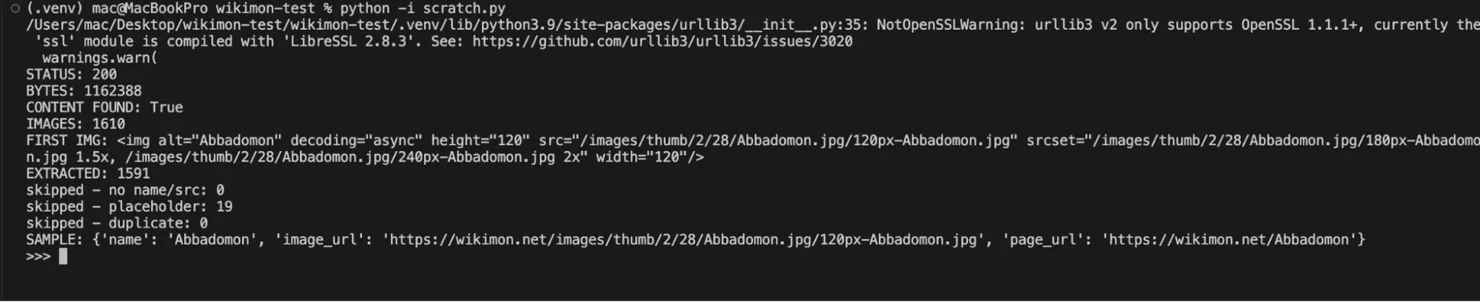
Some Digimon have no artwork yet. They all share a placeholder file called Digimon_noimage.jpg, so the loop skips them, which is why your extracted count comes in slightly under the total.
If your count comes back way lower, then your selector is probably matching a subset rather than the full list. That usually means the page structure has shifted.
Getting full-size images
The scraped URLs point to 120px thumbnails. Strip out the /thumb/ segment and the size prefix, and you're left with the original file.
Wikimon also ships a srcset attribute on every thumbnail, which offers 180px and 240px versions of the same image. If a slightly larger preview is all you need, it's simpler to just read srcset instead of rewriting the path.
If you want to understand how Beautiful Soup traverses and filters HTML, you can check out our guide on parsing scraped HTML with Python. You can also check out our Python web scraping guide to get a better understanding of the entire toolkit.
Storing the scraped data: CSV and database options
Right now your scraper holds everything in a Python list that'll disappear the moment the script stops running. You need to save your extracted data somewhere, and you've got 2 practical options.
Saving to a CSV file
Python ships with a csv module, so you don't need to install anything extra for this. Simply add this to the end of your script:
Run it, and you'll get a digimon.csv file containing your Digimon data:
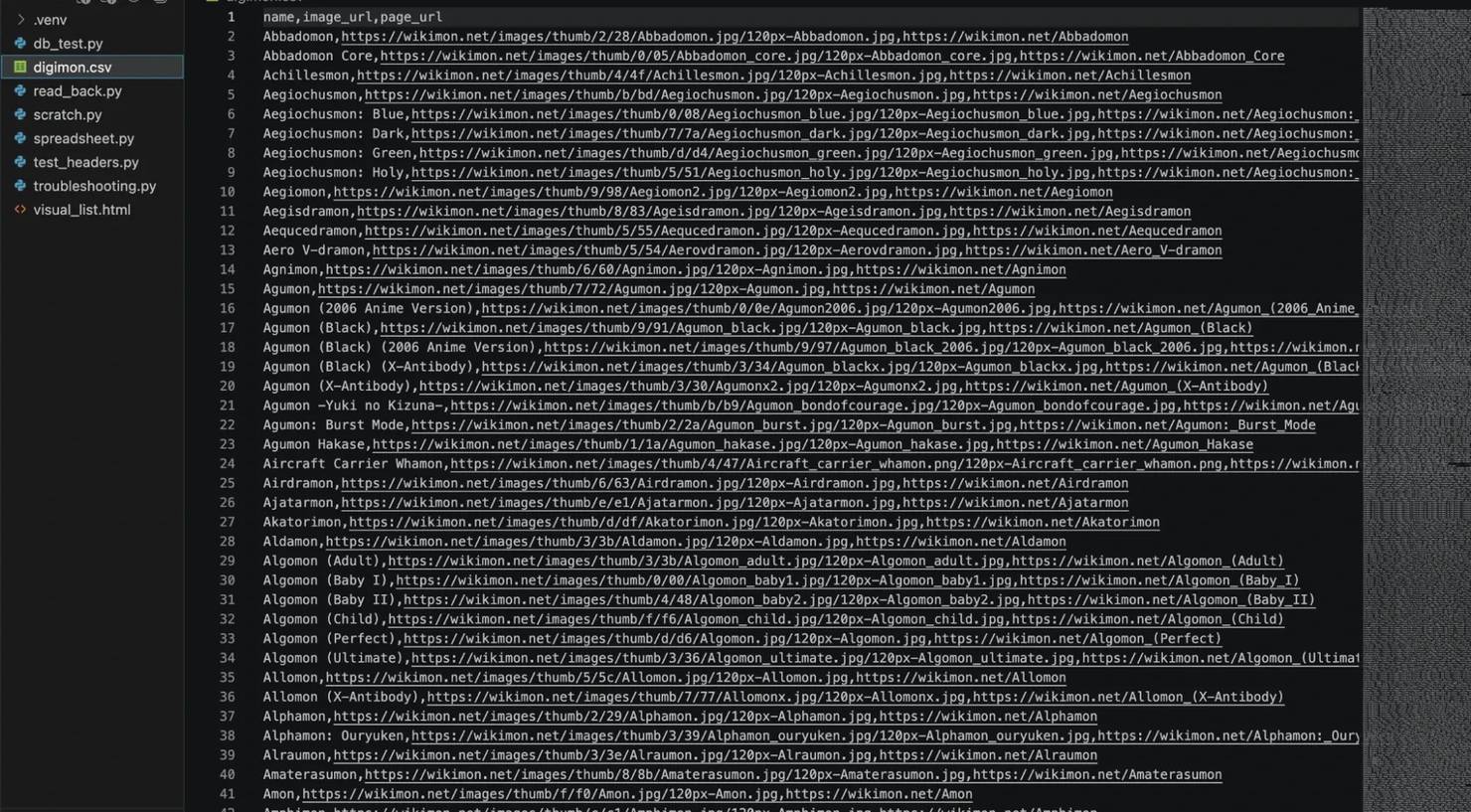
If you already installed pandas, you can do the same job with 2 lines:
Set index=False unless you want pandas to add its own numbered column to your output.
Saving to a MySQL database
A database makes sense once you plan to query the data rather than just look at it.
Install the connector first:
Then create a database and table. You can run this in the MySQL shell or through a client like phpMyAdmin.
The id column auto-increments, so every row gets a unique identifier without you having to track one yourself. VARCHAR(255) handles Digimon names comfortably, and TEXT is used for the image URLs because it removes any length limit, which matters since wiki image paths can run long.
Now connect from Python and insert your rows:
Swap in your own MySQL username and password, then run it. Here’s the result you’ll get:

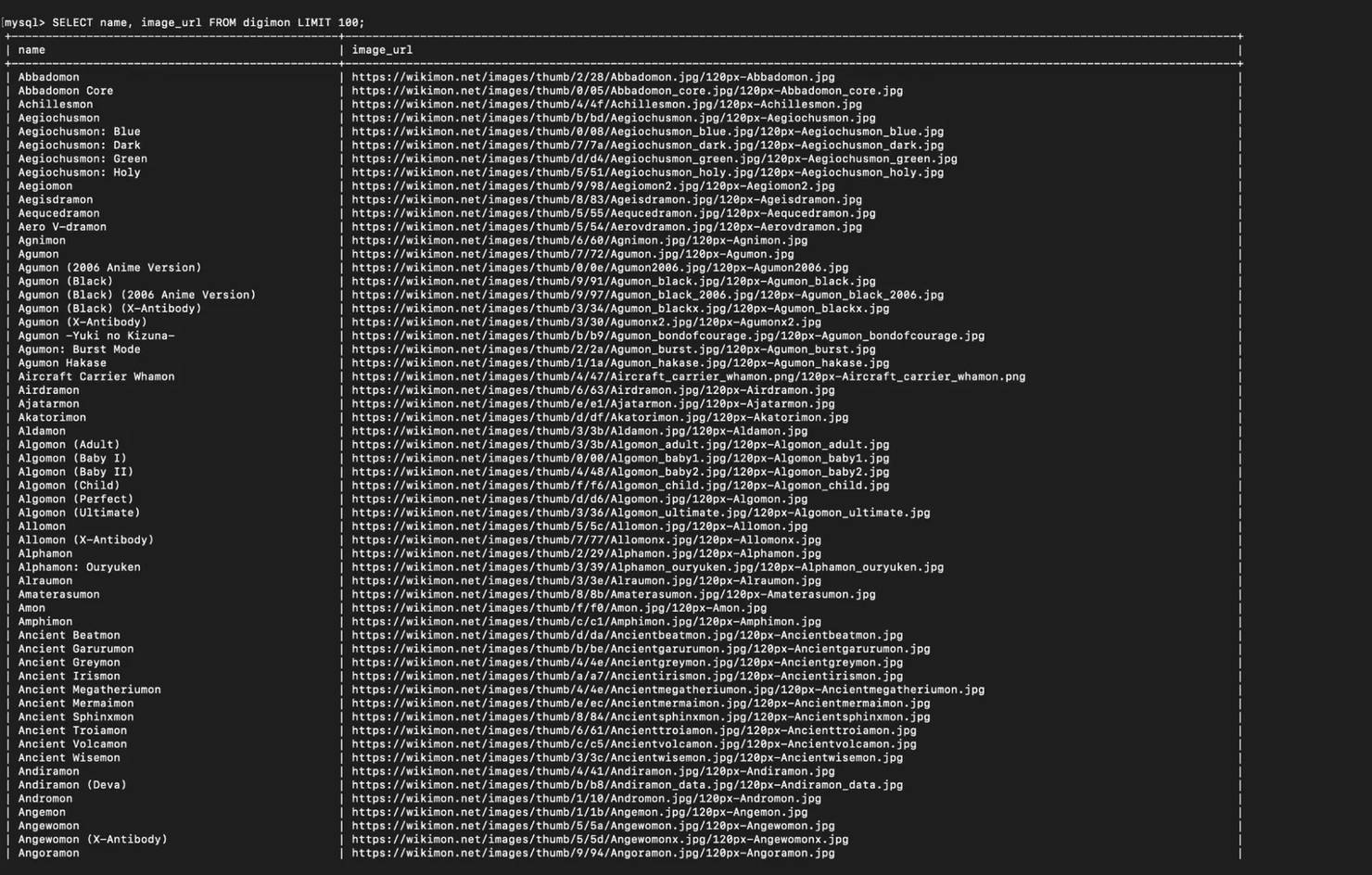
The executemany() call will insert all 1,591 rows in one go, and cursor.rowcount will tell you how many landed. To confirm that the data actually made it to your database, you can open the MySQL shell and query the table with this command:
You’ll see your Wikimon data in a table format like this:
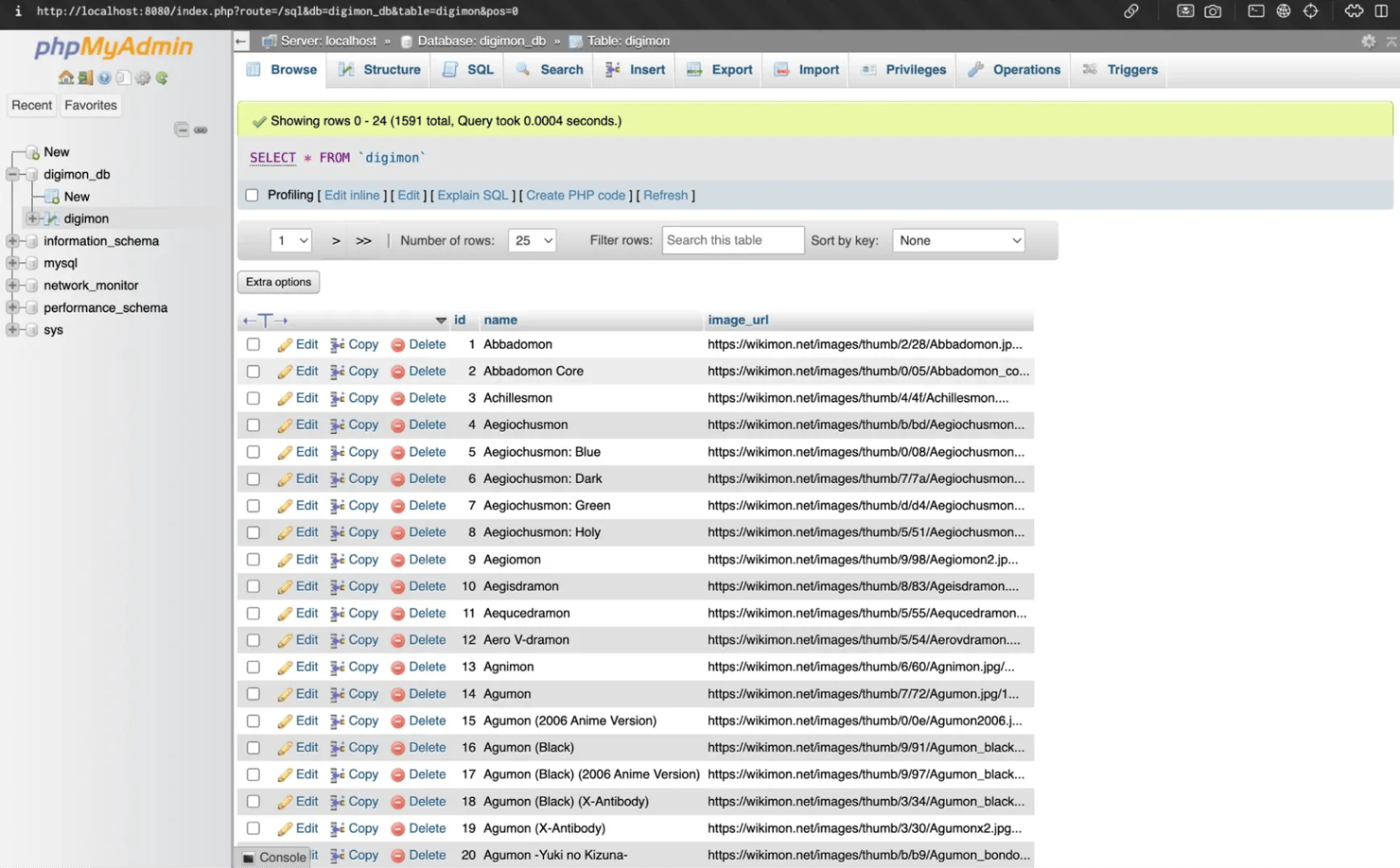
You can also open phpMyAdmin, click digimon_db in the sidebar, then the digimon table, and you'll see all 1,591 rows arranged in a grid:
Which one should you pick?
Go with CSV when you’re just scraping once, or you want to open the results in a spreadsheet, or you’re just experimenting. It's quick to set up and requires no additional infrastructure.
Go with MySQL when you’re re-running the scraper on a schedule, or you need to filter the data by attributes like level or type, or you plan to join this data against another dataset. A database also gives you room to enforce a unique constraint on the name column later, so you can stop duplicates from piling up on re-runs.
If you want to explore other formats in which you can save your extracted data, you can check out our guide on how to save scraped data.
Handling pagination and scaling the scraper
The Visual List of Digimon sits on a single page, but it isn't one flat block of HTML. Wikimon splits it into alphabetical sections, A, B, C, and so on, each with its own heading and a set of tables underneath. That structure gives you a clean way to walk the page section by section instead of grabbing everything at once.
Each Digimon sits in its own small table, so a single find_next_sibling() function will only reach the first one. You need to keep walking siblings until you hit the next heading, like this:
Your output will now come back grouped by letter like this:
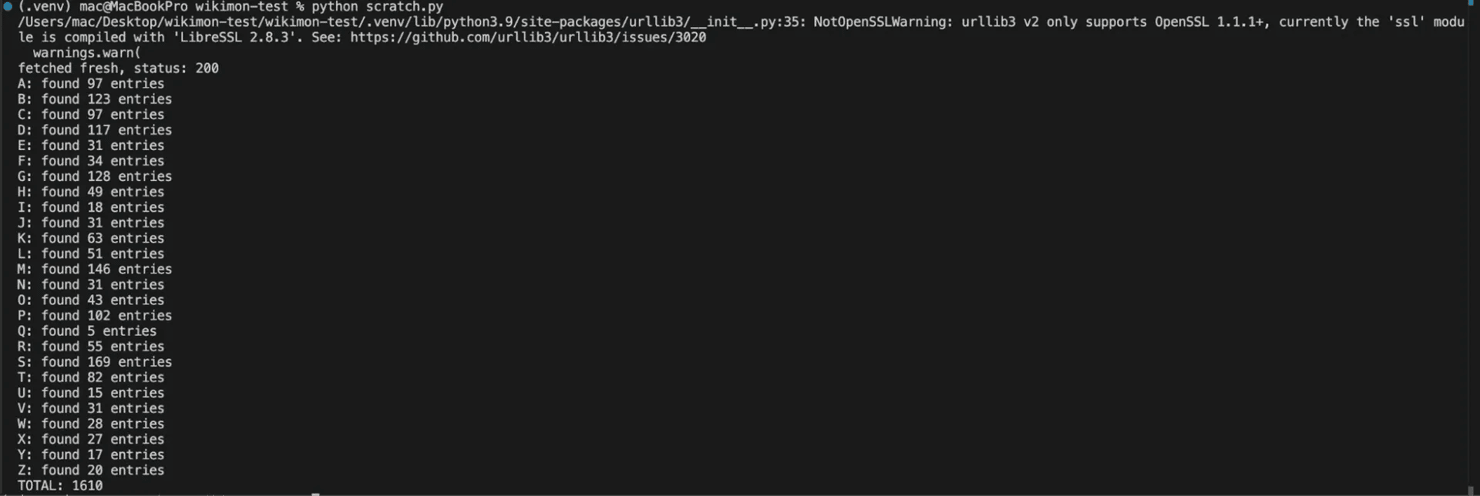
Those 26 counts add up to 1,610, which matches the total from your main scraper. Grouping like this will help when something goes missing halfway through a run, and you need to work out where.
When you move beyond a single page
The Visual List hands you everything on one page, but Wikimon's category pages don't work that way.
If you open Category:Digimon, you'll see 200 entries at a time, with a "next page" link at the bottom. You have to fetch a page, pull the data you need, find the "next page" link, then repeat. When there's no next link left, then you're done.
Run it, and you'll watch the Digimon names print out page by page as the loop works its way through the category, one batch at a time, until there's no "next page" link left to follow:
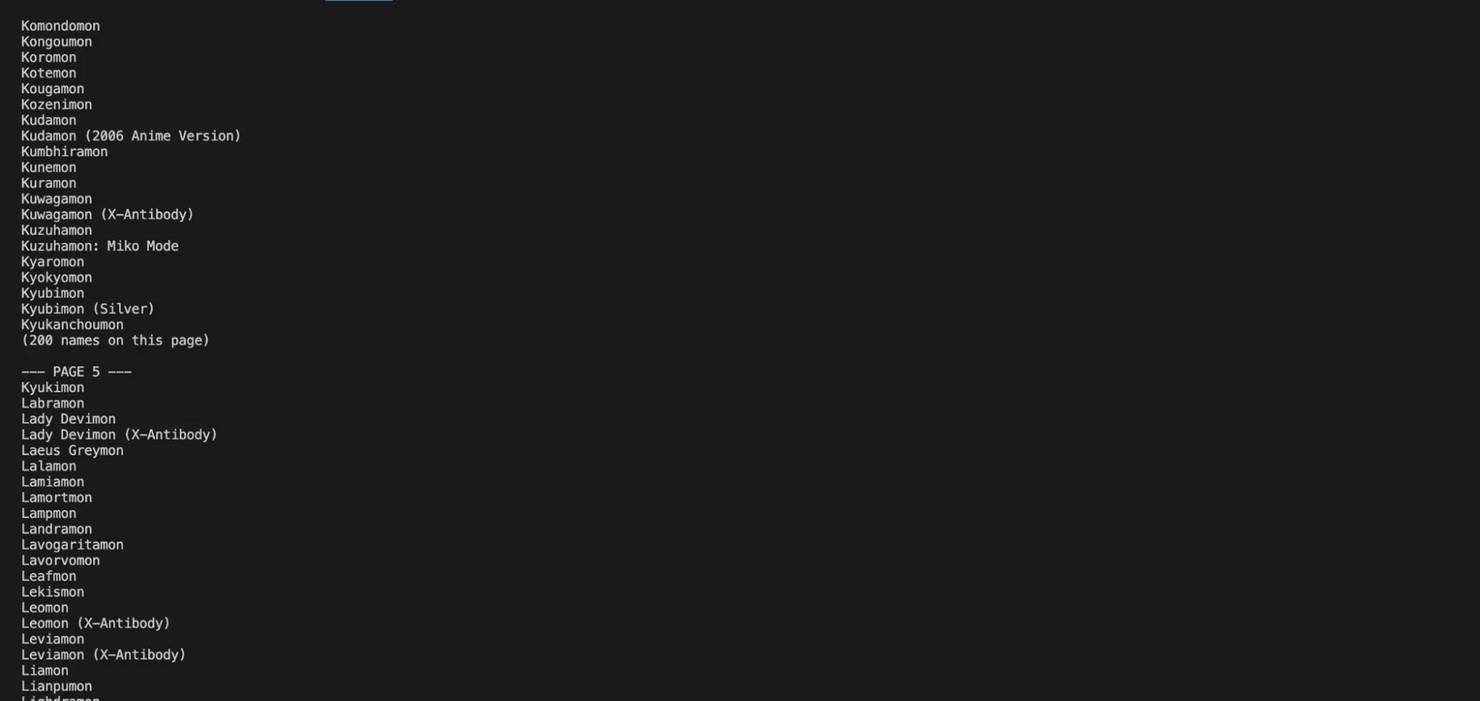
That time.sleep(2) line would help create a two-second delay between requests in a bid to make the scraper more ethical and prevent the IP from being blocked.
If you want to explore other pagination patterns, check out our guide on handling web scraping pagination in Python.
Where a single-machine scraper breaks
A hobby Digimon scraper pulling one page every 2 seconds will run fine until you decide to scale it. When you start pulling stats and evolutions for all the Digimon you extracted, or you start running the job weekly, you'll discover that you're now sending thousands of requests from one IP. That kind of volume can trigger rate limits, and eventually IP blocks.
Your script won't crash either; you'll just get 429 response codes or half-loaded HTML, and end up with a CSV full of blanks. If you want a fuller picture of what sets these limits off and how to stay clear of them, check out our guide on scraping without getting blocked.
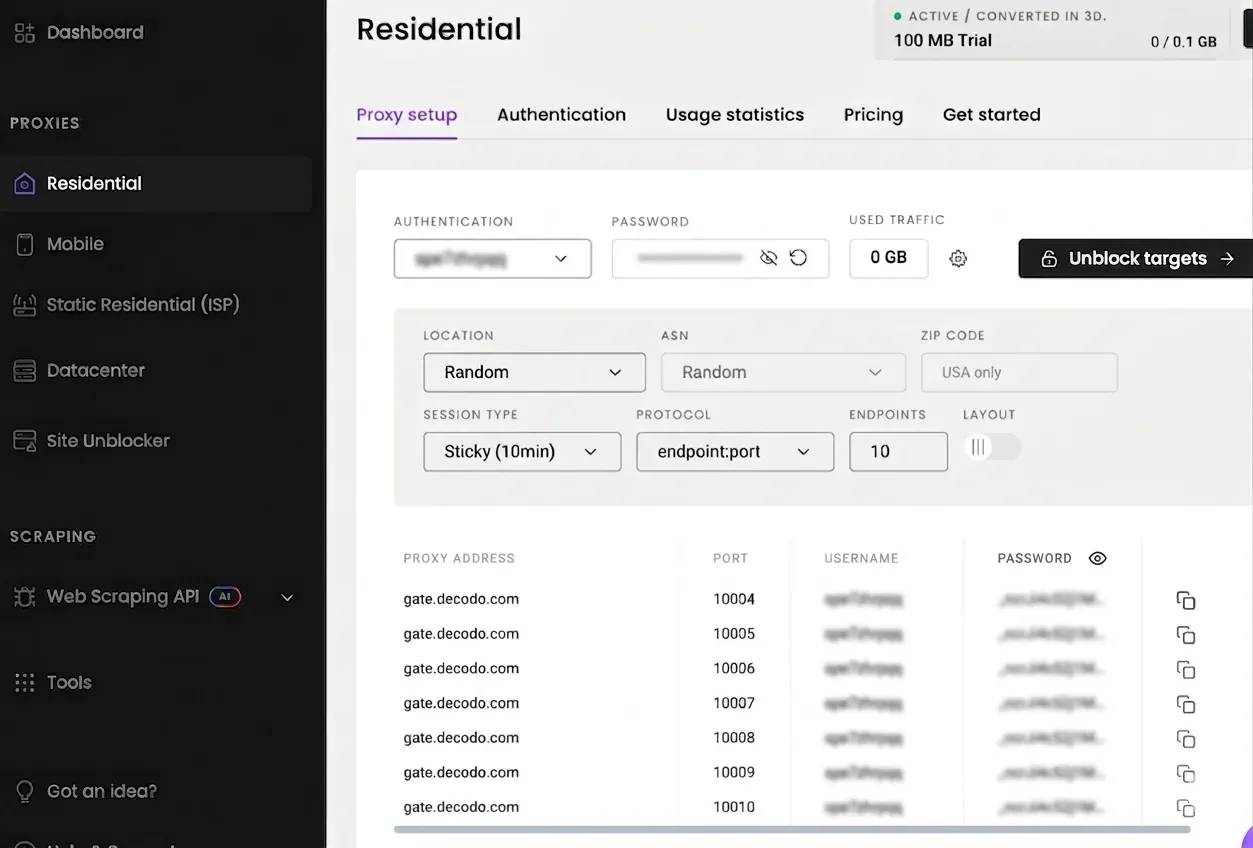
You can always rotate residential proxies so your requests look like they're coming from different real IP addresses. Head to the Decodo dashboard, sign up or try the proxy for free before you pick a plan that fits your needs. When you get to the dashboard, navigate to Residential, then Proxy setup, where you'll see your credentials and gateway addresses. You can pick any country you want, and choose what proxy session type you prefer to use.

Scale past the fan wiki
Wikimon is gentle, but real targets fight back. Decodo's residential proxies give your Python scraper 115M+ rotating IPs for when you level up to tougher sites.
Common errors and troubleshooting
Sooner or later your Digimon scraper will break because Wikimon might go down for maintenance, your connection might drop mid-request, or the wiki’s maintainers might restructure the Visual List page. None of these are unusual, and all of them are worth handling before you run your scraper script:
1. Connection errors and timeouts
A bare requests.get() call will hang indefinitely if the server stops responding. Always set a timeout and wrap the request in a try/except block:
The timeout=10 argument will tell requests to give up after 10 seconds, and raise_for_status() will turn any error response into an exception instead of letting something like a 404 page slip through to your parser.
2. Adding retry logic
One failed request doesn’t mean the site is down; it can just be a temporary hiccup from your scraper’s end. Give each URL a few attempts with a short pause between them:
Three attempts with a 3-second gap will handle most transient failures without hammering the server. If all 3 fail, log the URL and move on rather than crash the whole run.
3. When the HTML structure changes
This is the failure mode that bites hardest, because it fails silently. Your scraping script will keep running, your selectors will match nothing, and you'll end up with an empty CSV and no error message.
You can guard against this by checking that your selection actually returned something before you loop over it.
When your script fails loudly, you'll be able to discover the problem much quicker. When Wikimon does change its layout, open the Visual List page in your browser, inspect the new markup, and update your selectors. This is why it's always a great idea to keep the selectors as named variables at the top of the script so you can just change one line instead of having to hunt through the entire file.
4. Status codes worth watching
A 403 or 429 response code means the server is pushing back rather than failing. 429 specifically signals rate limiting, so at that point, you need to slow your requests down before you try again. You can check out scraping error codes to get a better understanding of what each code means and how to respond to them.
If you’re routing your Wikimon scraper through proxies and requests start failing at the IP level, then the issue is usually an authentication issue or a dead endpoint rather than the target site. Check out our guide on proxy error codes to understand how to tell those error codes apart and what they represent.
Are you allowed to scrape Wikimon? A note on ethics
Wikimon is a community wiki, built and maintained by fans who volunteer their time. That context matters more than any technical answer here because the data you’re pulling exists because people chose to compile it and share it publicly.
Here are some ethical steps you can take towards fostering a better relationship with the site maintainers:
- Ensure you always check Wikimon’s robots.txt and terms of use before you run anything. Those signals will tell you which paths the site owners are happy for bots to touch. Ignoring them is the fastest way to sour your relationship with a small community project. Our guide on whether web scraping is legal covers the broader compliance picture if you want to go deeper.
- Keep your request rate low. A wiki like Wikimon runs on modest infrastructure, so if you hammer it with rapid-fire requests, you can genuinely degrade the site for everyone else. Always add delays between your request runs to stay on the safer side of things.
- The Morphclue project took this a step further and reached out to Wikimon’s maintainers directly before scraping. That's worth copying if your project goes beyond a small one. A small message explaining what you’re building will go a long way to improving your relationship with the site maintainers.
- Finally, credit Wikimon anywhere your scraped data ends up. If you publish a Digimon dataset, an app, or a visualization built on this, a link back is the least the community deserves. The same principle applies to how proxies themselves are sourced; you can check out this guide on ethical residential proxy sourcing to have better context on that.
Full script
Here's everything from the main walkthrough in a single file you can copy and run. It fetches the Visual List, extracts each Digimon's name, image URL, and wiki page link, then saves the results to a CSV.
Run it with python wikimon_scraper.py, and you'll get a digimon.csv file in the same folder with all 1,592 entries.
Final thoughts
You now have a working Wikimon scraper that pulls structured Digimon data straight from the Visual List, no API required. It fetches the page with Requests, parses the HTML with Beautiful Soup, and writes clean rows into a CSV file or a MySQL table you can query later.
Once you have the basics working, you can extend the scraper to capture additional fields such as evolution lines, stages, abilities, or other details that fit your project.
This approach is usually enough if you’re only scraping a small dataset. But as your project grows, managing requests, handling blocks, and keeping the scraper reliable will take a lot more work. At that point, using residential proxies or a managed Web Data API can help you scale without changing the core logic of your scraper.
Reviewed by Churchill Doro.

From hobby scraper to production
When your project hits JS rendering and anti-bot walls, Decodo's Web Data API handles them in one call, so your Python code just parses data.
About the author

Lukas Mikelionis
Senior Account Manager
Lukas is a seasoned enterprise sales professional with extensive experience in the SaaS industry. Throughout his career, he has built strong relationships with Fortune 500 technology companies, developing a deep understanding of complex enterprise needs and strategic account management.
Connect with Lukas via LinkedIn.
All information on Decodo Blog is provided on an as is basis and for informational purposes only. We make no representation and disclaim all liability with respect to your use of any information contained on Decodo Blog or any third-party websites that may belinked therein.