Top Python Scraping Libraries: Overview, Comparison, and How to Choose the Right One
Python has the richest scraping ecosystem of any language. That breadth is exactly why making a choice is harder than it should be. This article continues from our Python web scraping guide, focusing on the selection problem: 8 libraries across 4 categories, what each one does best, where it breaks down, and how to choose the right one for the job.

Vilius Sakutis
Last updated: Apr 30, 2026
20 min read

TL;DR
- Python scraping libraries fall into 4 groups: HTTP clients, parsers, crawl frameworks, and browser automation tools.
- For most static pages, Requests with Beautiful Soup is the simplest place to start.
- When the job grows into a large multi-page crawl, Scrapy adds structure: built-in pipelines, scheduling, and output handling.
- curl_cffi fills the narrow void of sites that fingerprint TLS connections and reject standard Python HTTP clients.
- If the site needs JavaScript to load content, as is the case with client-side rendered sites, use Playwright.
- All examples in this guide are collected in a single folder, so you can run the scripts directly.
What is a Python web scraping library?
A Python web scraping library is a reusable code package that handles at least 1 layer of the web scraping pipeline: fetching, parsing, or crawling. Every scraping stack is 3 layers deep, and the library you start with is rarely the one you finish with. Picking one that doesn't own the layer you actually need is the most common source of early friction.
Python scraping libraries generally fall into 4 categories, based on the job they do in the scraping pipeline:
- HTTP clients. Tools like Requests, HTTPX, and curl_cffi send requests to a server and return the raw response. They're mainly used for static sites, where the HTML you need is already present in the initial response.
- HTML/XML parsers. Tools like Beautiful Soup and lxml take that raw response and make it queryable. They're mainly used to extract data from static HTML, not content that only appears after JavaScript runs.
- Full-stack crawling frameworks. Scrapy combines request management, parsing, and output into a single architecture built for scale.
- Browser automation tools. Playwright and Selenium launch a real browser, execute JavaScript, and interact with the fully rendered page before extraction begins.
Most scraping projects start with one library and end up using several. That usually happens because the target changes, not because the original choice was wrong. A static page becomes JavaScript-heavy, pagination gets more complex, or blocking becomes a real constraint. Each shift changes what the scraper needs the tool to handle.
A scraping library isn't a scraping API, a no-code tool, or a proxy service. It runs in your environment and gives you control over how the pipeline behaves.
A scraping API, on the other hand, moves that responsibility to a hosted service. That difference matters once you begin to scale, when reliability becomes a top requirement, and your target requires crawling multiple pages, not just extracting from one. Web crawling vs web scraping covers more on this.
Comparison of popular Python web scraping libraries
The table below maps all 8 libraries by category, primary use case, and compatibility. We'll then cover each one in depth, from the simplest fetch-and-parse combination to full browser automation.
Library
Category
Best for
JS support
Async native
Learning curve
GitHub stars
Requests
HTTP client
Static page fetching
No
No
Easy
~53k
Beautiful Soup
HTML/XML parser
Structured data extraction
No
No
Easy
N/A (Launchpad)
lxml
HTML/XML parser
High-volume parsing, XML feeds
No
No
Moderate
~3k
Scrapy
Full-stack framework
Large-scale multi-page crawls
Via plugin
Yes (Twisted)
Hard
~61k
HTTPX
HTTP client
High-concurrency static scraping
No
Yes
Easy to moderate
~15k
curl_cffi
HTTP client (TLS impersonation)
Sites that fingerprint Python clients
No
Yes
Moderate
~5k
Selenium
Browser automation
Sites requiring real browser interaction
Yes
No
Moderate
~34k
Playwright
Browser automation
JavaScript-heavy SPAs, advanced bot detection
Yes
Yes
Moderate
~14k
1. Requests
Category: HTTP client | ~53k stars
Requests was built around a single idea: HTTP shouldn't require reading a specification to use. Kenneth Reitz released it in 2011 with the tagline "HTTP for Humans," and it became the most downloaded Python package on PyPI for years. Now maintained by the Python Software Foundation, it sits at approximately 53k GitHub stars and is the assumed starting point for almost every Python scraping project.
What makes Requests the default isn't just its API; it's that almost every scraping engineer has used it at some point, and there's no real learning curve. It handles the fundamentals cleanly, including sessions, authentication, SSL, timeouts, and headers, making it a good choice for fetching static sites, especially when concurrency isn't a concern yet.
The example below shows the simplest scraping pattern. Send a request, get the HTML back, and inspect the response.
First, install the package:
Then run a simple request against the Mystery category page:
Pros:
- Minimal boilerplate. A working GET request requires just 2 lines.
- Predictable execution. Synchronous behavior is easy to debug.
- Exceptional documentation. Covers almost every networking edge case.
- Industry standard. Zero onboarding cost for most Python teams.
Cons:
- Synchronous only. No native async support; threading is a sub-optimal workaround.
- No built-in parsing. Always requires a partner library like Beautiful Soup.
- No JavaScript support. Blind to content rendered in the browser.
- Identifiable fingerprint. Default headers are easily caught by modern bot detection.
Skip it when: you need high-concurrency requests or the target site requires JavaScript rendering. Mastering Python Requests covers the full API.
2. Beautiful Soup
Category: HTML/XML parser | ~35M downloads/month
Beautiful Soup (BS4) is the parsing layer that Requests doesn't have. It takes raw HTML and makes it queryable through CSS selectors and tag-based navigation (find() and find_all()). It's the parser most developers reach for first, mainly because it reads like plain English. Al Sweigart built his entire Automate the Boring Stuff with Python curriculum around it for that exact reason.
What makes BS4 reliable is how tolerant it is. Real production sites serve broken HTML more often than you'd expect, and Beautiful Soup handles it without crashing. Python's built-in html.parser works out of the box as well, so there's no need for setup or extra dependencies.
The tradeoff is speed. There's no HTTP layer and no JavaScript support, and at higher volumes, parse time becomes noticeable. That's usually the point where teams start reaching for lxml as a faster backend or alternative, depending on how much throughput they need. The companion guide, Beautiful Soup web scraping, documents every parsing edge case.
Just like the Requests example above, the logic starts by fetching the page first. Beautiful Soup then takes the returned HTML and parses it into something you can query.
However, if your use case involves login flows or form-heavy navigation, MechanicalSoup is a higher-level wrapper. It wraps Requests and BS4 into one interface, so you can handle logins, cookies, and form submissions without stitching pieces together.
It's maintained by a small team, so the ecosystem is thinner than the others here, and there's no JavaScript support. That's the trade-off: quick and practical for form-driven sites, limited beyond that.
Pros:
- Forgiving parser. Handles broken HTML that strict parsers reject.
- Intuitive API. Shallow learning curve for most developers.
- Client agnostic. Works with any fetch library (Requests, HTTPX, etc.).
- Large ecosystem. Answers to almost any parsing edge case are available.
Cons:
- Performance ceiling. Significantly slower than lxml for large-scale processing.
- No HTTP layer. Requires a separate fetch library.
- No JavaScript support. Cannot process client-rendered data.
- Memory usage scales poorly with very large documents.
Skip it when: document volume is high enough that parse time becomes a bottleneck or the target uses JavaScript.
3. lxml
Category: HTML/XML parser | ~3k GitHub stars | ~250M PyPI downloads/month
Where Beautiful Soup prioritizes readability, lxml prioritizes speed. It's built on libxml2 and libxslt, 2 battle-tested C libraries, which is why it benchmarks 10-30x faster than Beautiful Soup on large documents. At 250M+ PyPI downloads per month, it's the most widely used parser in production Python pipelines, often running silently as a dependency of tools like Scrapy and Pandas before developers ever install it directly.
Beyond speed, lxml adds something Beautiful Soup doesn't have at all: XPath. CSS selectors work for most extraction tasks, but XPath earns its place when you need to traverse upward in the DOM, selecting parent or ancestor nodes, which CSS has no mechanism to express.
For a direct comparison, see XPath vs CSS selectors.
lxml is, however, less tolerant of broken markup - unclosed tags, stray characters, etc. It doesn't implement HTML5 error recovery, so it chokes on malformed markup that Beautiful Soup would handle with no issues. Its C library dependency can also add friction in containerized deployments. For more on these, check out our lxml tutorial.
The example below pairs lxml with Requests to scrape the book titles. Requests fetches the HTML, the lxml.html submodule parses the DOM using XPath selectors:
Pros:
- 10 to 30 times faster than Beautiful Soup on large documents
- Supports both XPath and CSS selectors
- Handles very large documents without degrading
- The parser backend Scrapy and Parsel are built on
Cons:
- Less forgiving of malformed HTML than Beautiful Soup
- C library dependency adds deployment friction in some environments
- Steeper learning curve for XPath
- No HTTP layer, no JavaScript support
Skip it when: the problem has grown past parsing individual pages into managing hundreds of URLs with structured output requirements – at that point, speed per document matters less than having a pipeline that handles the rest of the crawl.
4. Scrapy
Category: Full-stack crawling framework | ~61k GitHub stars
Scrapy is what you reach for when the problem stops being "how do I parse this page" and starts being "how do I manage 10,000 of them." Unlike Requests or lxml, Scrapy doesn't slot into an existing script; it is the script's architecture. Released in 2008 and maintained by Zyte, the library structures each concern into its own layer: request management, parsing, and output all have a designated place.
Scrapy handles request scheduling, retries, concurrency, rate limiting, and structured exports. That built-in structure is what makes it so effective for large, multi-page scraping projects.
But that structure also makes Scrapy harder to learn. It has more moving parts than any other library on this list, so it has a steeper mental model. For a quick scraper, that overhead is usually unnecessary. It becomes more justifiable, however, when the crawl is large, and you need to keep the extraction logic consistent across hundreds of targets.
Scrapy handles the crawl and extraction inside one framework. The example below defines a spider that starts from a URL and yields structured data from each matching page element:
If all you need is XPath or CSS extraction without the framework overhead, Parsel is a solid pick. It's Scrapy's selector engine, and it's built on lxml, so it's fast and predictable. If you use Scrapy, you already have it. But outside Scrapy, Parsel is less common, since Beautiful Soup has the bigger community, and lxml already covers most performance needs.
Pros:
- Asynchronous by design, as it handles concurrency, retries, and rate limiting out of the box
- Built-in exporters for JSON, CSV, and databases
- Extensible middleware system for proxies, headers, and custom logic
- The most production-tested Python crawling framework available
Cons:
- Significant learning curve – spiders, pipelines, and middleware each have their own mental model
- No built-in JavaScript support – requires scrapy-playwright for JavaScript-rendered pages
- Overkill for single-site, low-volume scrapes
- Twisted reactor adds friction when integrating with asyncio-native tools
Skip it when: the target is static, and the bottleneck is concurrency rather than crawl management – standing up spiders, pipelines, and middleware to fetch a few hundred static pages adds overhead that a few lines of async HTTPX handles more directly.
5. HTTPX
Category: HTTP client | ~15k GitHub stars
Most scraping bottlenecks are I/O-bound, and that’s the gap httpx fills. With Requests, each call blocks the next, which is fine for small scripts but inefficient at scale. httpx solves that with native async support while keeping an API that feels very similar to Requests.
That familiarity is deliberate. httpx is effectively what Requests would look like if it were designed today, so the adoption path for developers is minimal.
httpx doesn't render JavaScript, but for high-concurrency fetching on static targets, it's the clearest upgrade from Requests. But there is a key upgrade in that the fetch runs through an async/await client instead of a blocking call.
The more natural comparison to httpx is aiohttp, which is also async-native and has been the go-to high-concurrency HTTP client in Python for years. But it takes more work to set up, requiring boilerplate and a solid understanding of asyncio to use well. httpx covers the same concurrency ground with less plumbing and a Requests-compatible API, making it the practical default for most scraping workloads.
See the script to use it below:
Pros:
- Async and sync in 1 library
- HTTP/2 and connection pooling are built in
- Drop-in compatible with most Requests code
Cons:
- No JavaScript rendering
- HTTP/2 complicates traffic debugging
- Thinner scraping-specific docs
Skip it when: the site is rejecting requests despite no JavaScript rendering – modern bot detection often operates at the TLS layer, where both Requests and httpx produce recognizable client fingerprints that a real browser would never expose.
6. curl_cffi
Category: HTTP client (TLS fingerprint impersonation) | ~5k GitHub stars
curl_cffi is a Python HTTP client built on libcurl. It solves a specific problem that no other HTTP client on this list does: TLS fingerprint impersonation, which lets it mimic the TLS signature of real browsers like Chrome, Firefox, or Safari without launching a full browser.
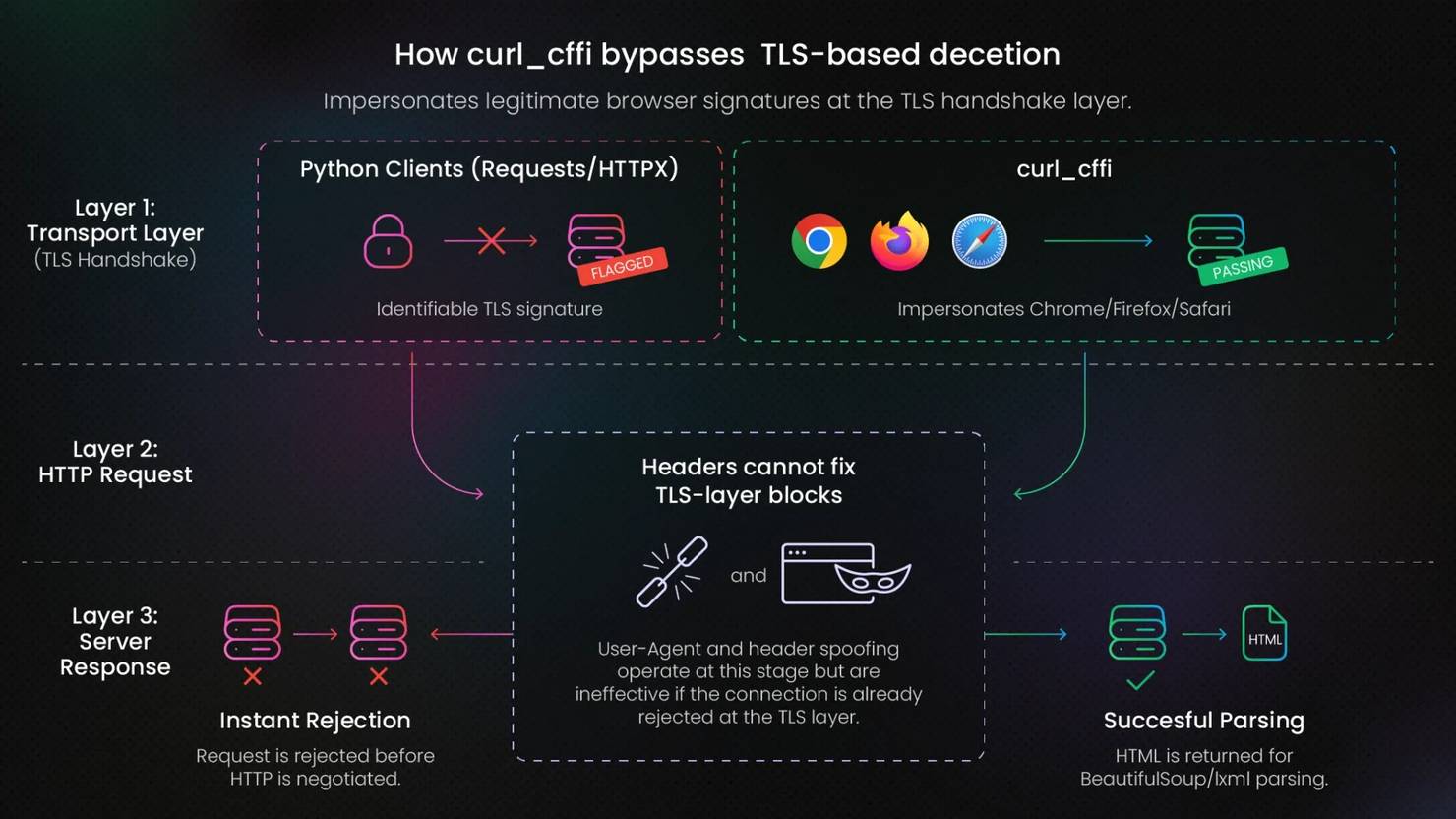
Websites inspect and flag a client's TLS handshake before any HTTP request is processed, and Python clients tend to have identifiable signatures at that layer. Since the handshake occurs before HTTP is even negotiated, no amount of User-Agent or any other HTTP header spoofing touches a block at that layer.
Browser automation tools like Selenium and Playwright get this job done as well, but they come with higher memory usage, slower startup, and a full browser dependency to manage. When the only barrier is TLS-based detection and not JS rendering, that overhead is unnecessary.
However, TLS is only one layer of modern bot detection. curl_cffi doesn't cover browser fingerprinting, behavioral analysis, or CAPTCHA challenges. Its scope is narrower, and it's mainly suited to static sites that reject Python clients at the transport layer.
The example below uses curl_cffi for the request and Beautiful Soup for parsing the returned HTML:
Pros:
- Impersonates real browser TLS fingerprints (Chrome, Firefox, Safari)
- Drop-in replacement for Requests in most cases
- No browser overhead, faster and cheaper than Playwright for TLS-only evasion
Cons:
- Only covers TLS as the one layer of modern bot detection
- Smaller community than established HTTP clients
- No JavaScript rendering
Skip it when: the site combines TLS detection with JavaScript rendering or behavioral analysis. You'll need a full browser in that case.
7. Selenium
Category: Browser automation | ~34k GitHub stars
Every library so far assumes the HTML is already on the server; Selenium is in a different class entirely. It controls a real browser instance via the WebDriver protocol, which means JavaScript execution, rendered DOM access, and cross-browser support, including Chrome, Firefox, and Edge. It is the tool you reach for when the content isn't present in the initial HTML response.
More so, many teams already have production workflows built around it. Selenium has been the default browser automation tool for over 2 decades. At 50M+ monthly PyPI downloads, the ecosystem is large, and that has become its major asset. For those teams, the infrastructure and institutional knowledge are the real switching costs.
Where it shows its age is in performance. Every command makes an HTTP round-trip through a driver process before the browser acts on it. Compared to Playwright, a simple click is nearly 2x slower in Selenium on identical hardware.
The logic below uses a browser session to load the page, render JS, then extract content from the fully loaded DOM, all via the Selenium WebDriver:
Pros:
- Mature ecosystem with extensive documentation
- Cross-browser support (Chrome, Firefox, Edge)
Cons:
- The WebDriver protocol adds latency to every command
- Resource-heavy, requiring a full browser per session
- Not suited for high-throughput scraping workloads
Skip it when: starting a new project with no existing Selenium infrastructure. Playwright covers the same ground with less overhead.
8. Playwright
Category: Browser automation | ~14k GitHub stars
Playwright is a Microsoft-backed browser automation framework. Released in 2020 by the same team that built Puppeteer at Google, Playwright controls real browser instances across Chromium, Firefox, and WebKit.
The numbers tell a clear preference story. Playwright leads with 45% adoption among QA professionals; Selenium sits at 22%. But adoption only tells part of the story, 94% of teams that try Playwright stick with it, the highest retention rate across end-to-end testing tools.
The retention comes from architectural leverage, not just speed. Network interception, persistent browser contexts, auto-waiting, and built-in stealth capabilities give scraping workflows a foundation that most tools can't match, and that combination is hard to walk away from once you've used it.
The catch with Playwright is in everything that it takes to run it. A full browser per session is expensive memory-wise, and running Playwright at scale requires managing concurrency, session handling, and browser pool limits. For static pages, that's a significant overhead for a problem that an HTTP client solves at a fraction of the cost.
To get started with Playwright, you need to install the package alongside the Chromium binary**:**
The script below runs a headless Chromium browser via Playwright, loads the Mystery page, parses the HTML with Beautiful Soup, and returns each book's title and price as a list of dictionaries:
Pros:
- Direct browser communication via WebSocket, no WebDriver overhead
- Async-first design with native Python asyncio support
- Built-in network interception to block unnecessary resources
- Covers Chromium, Firefox, and WebKit in a single API
Cons:
- Overkill for static HTML targets
- Browser binary installation adds deployment complexity
Skip it when: the target serves static HTML. An HTTP client gets the same result at a fraction of the infrastructure cost.
How to choose a Python web scraping library: key criteria
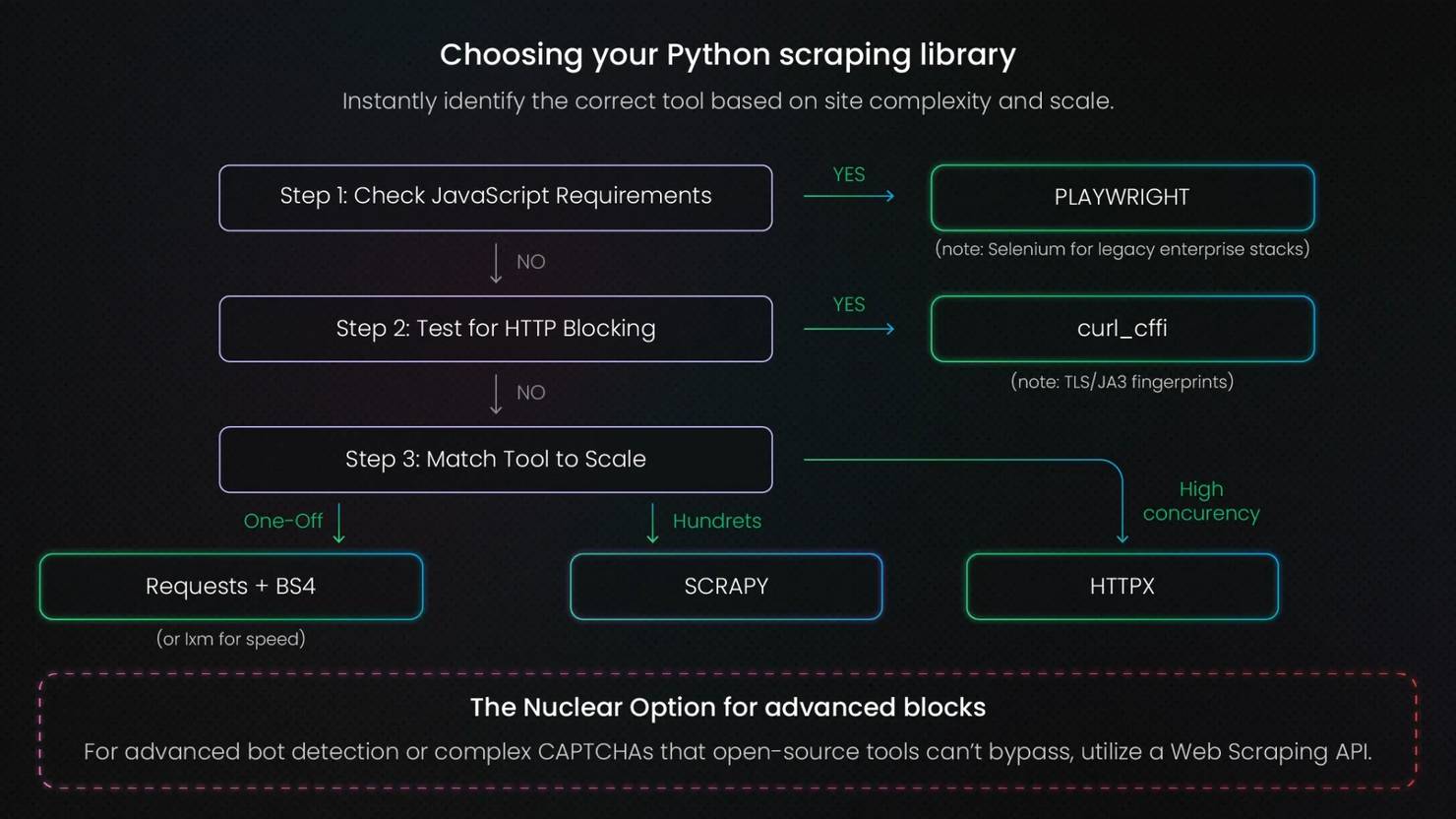
You've seen what each library does. The question now is which constraint in your specific project settles the choice. These criteria work in order, and the first one that returns a clear answer is usually the right stopping point.
Is the target static or JavaScript-rendered?
Static HTML means the full page content is in the initial server response. Requests and Beautiful Soup cover that, with lxml if parsing speed matters.
If the content loads via JavaScript, Playwright is the default. The mid-ground: some sites block Python HTTP clients at the TLS handshake layer without requiring JavaScript. curl_cffi covers that gap without the overhead of a full browser.
What is the scale of the crawl?
For a one-off single-page extraction, Requests and Beautiful Soup are the fastest path to working code. When the scope grows to hundreds or thousands of pages with structured output requirements, that approach starts to break down. Scrapy handles that scale out of the box.
For very high concurrency on static pages where the bottleneck is pure I/O, HTTPX with asyncio is more efficient than Requests with threading. It's the leaner option when fetch throughput is the only concern.
Does the site use bot detection beyond basic rate limiting?
IP-based rate limiting is solvable with proxy rotation. TLS fingerprinting is the next layer: if Requests or httpx are getting rejected on a static target with no clear rate limit pattern, the block is likely happening at the handshake. curl_cffi resolves that without launching a browser. Our anti-scraping techniques guide maps for each layer of the detection stack.
Browser fingerprinting, CAPTCHA, and behavioral analysis don't have a clean library-level answer. Every site update to the detection stack becomes a code update on your side, and the 2 systems compound each other's maintenance. Decodo's Web Scraping API handles that layer infrastructure-side, which is the practical answer once evasion starts taking more time than the scraper itself.
What is the team's existing skill set?
Async experience changes which tools are low-friction to adopt. HTTPX and Playwright both have first-class async APIs, and if the team hasn't worked with asyncio before, the debugging overhead on first use is real and slows down the initial build. Requests and Scrapy are the safer starting points in that case: Scrapy handles concurrency internally via Twisted, so async knowledge isn't a prerequisite to get a working crawl running.
Does the pipeline need long-term maintenance?
Scrapy's pipeline architecture wins on maintainability. Extraction logic, request handling, and output formatting each live in their own layer, so when something changes, the fix is localized. Ad-hoc scripts built on Requests and Beautiful Soup don't have that separation, which means a site redesign can require rewriting the whole scraper.
Selector maintenance is a problem no library solves. Class names change, DOM structures shift, and at scale, that cost compounds across every target you maintain. If the pipeline needs to stay reliable for months, a scraping API is worth evaluating over managing selectors manually.
Use cases and when to use each Python web scraping library
To make the choice easier, the quick reference below maps typical scraping needs to the tools best suited to them, based on all the features we've discussed:
Price monitoring on static eCommerce catalog pages
Recommended library: Requests + lxml or Beautiful Soup
Catalog pages are typically server-rendered HTML, which means no JavaScript execution is needed. Fast parsing across large numbers of SKUs matters more than browser capability here, and both lxml and Beautiful Soup handle that well, paired with Requests.
High-concurrency harvesting from static or semi-static endpoints
Recommended library: HTTPX with asyncio
When the bottleneck is I/O and the target is static, async HTTP/2 with connection pooling handles hundreds of concurrent requests more efficiently than Requests with threading. No framework overhead, no browser cost.
Sites that block Python HTTP clients at the TLS layer
Recommended library: curl_cffi
If Requests or HTTPX are getting rejected on a static target with no obvious rate limit pattern, the block is likely happening at the handshake before any headers are read. curl_cffi impersonates real browser TLS signatures and resolves that without the overhead of launching a full browser.
Single-page applications and JavaScript-rendered content
Recommended library: Playwright (preferred), Selenium for teams with existing infrastructure
Only a real browser execution environment can trigger the JavaScript that populates the DOM. No HTTP client approach reaches content that doesn't exist in the initial server response.
Crawling structured public datasets at scale
Recommended library: Scrapy
Structured output pipelines, configurable rate limiting, and built-in exporters handle the scale and output requirements of large crawls better than one-off scripts.
Mixed static and JavaScript-rendered sites
Recommended library: Scrapy + scrapy-playwright
When listing pages are static, but detail pages require JavaScript execution, Scrapy handles the crawl architecture, while Scrapy-playwright takes over rendering on pages that need it.
AI training data collection and LLM pipeline ingestion
Recommended library: Scrapy or Playwright, depending on the target site type
Scrapy's item pipeline makes downstream processing straightforward at scale. For targets that require JavaScript execution before content is accessible, Playwright handles the rendering side while the same pipeline logic applies downstream.
How to use Python web scraping libraries: a practical walkthrough
The sections above covered which library to choose and when; this one shows what that choice looks like in practice. We'll use the same target as we have throughout this guide: the mystery books page of Books to Scrape.
Prerequisites and environment setup
Set up a virtual environment first. You'll need Python 3.9 or higher:
Install all the required libraries:
Example #1: Requests + Beautiful Soup
The goal is to extract a structured list of book titles, star ratings, and prices from the Mystery category page on books.toscrape.com. The page is fully server-rendered, so Requests fetches the HTML and Beautiful Soup handles the extraction – no JavaScript execution needed.
Start with the GET request and pass the response HTML straight to Beautiful Soup:
Inspecting the page in DevTools shows each book wrapped in an article.product_pod container – that class attribute is the CSS selector.
From each container, extract the title, price, and star rating. The star rating is the one non-obvious field – books.toscrape.com encodes it as a word class (One, Two, Three) rather than a number, so it needs a conversion step:
The try/except block around each iteration means a missing or malformed element skips that book rather than crashing the entire scrape. Connection failures and retry patterns are documented in this guide.
Here’s what your output should look like:
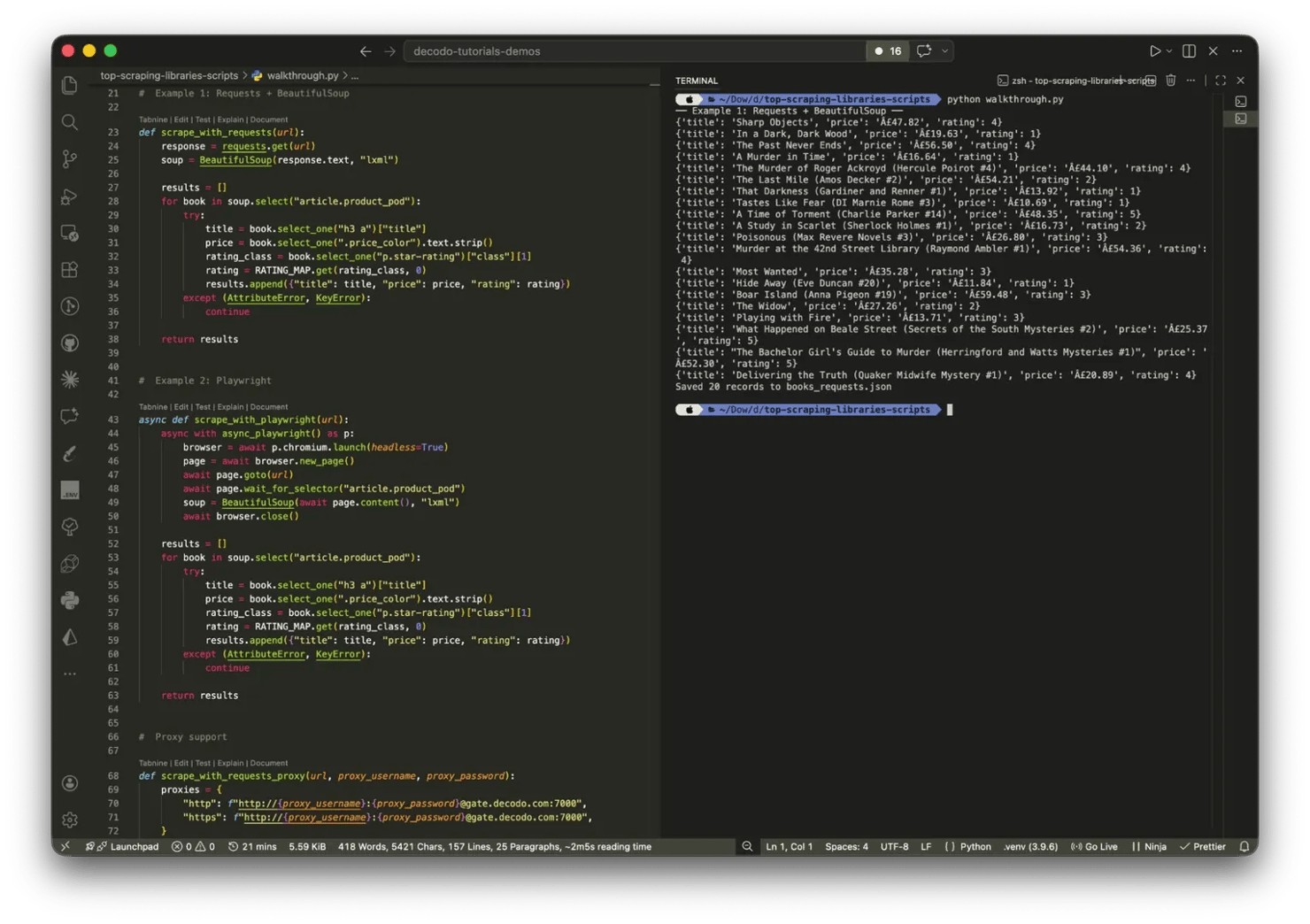
Example 2: Playwright
Books to Scrape is a static site, so Requests is the right tool for it. But the same extraction logic applies to JavaScript-rendered pages. The difference is in how you await and get the HTML.
Install the browser binaries required for Playwright by running the following command in your terminal:
The parsing logic after the browser closes is identical to Example 1. The key addition is page.wait_for_selector - on a real JS-rendered page, that wait is what makes the difference between getting fully populated HTML and an empty list. The output should be the same as above.
Adding proxy support
For repeated scraping, a single IP address will eventually trigger rate limiting. Here's how to add proxy support to each library.
With Requests:
With Playwright:
Residential proxies route requests through real device IPs, which makes them significantly harder to detect than datacenter proxies. For production scraping workloads, Decodo's residential proxies are the recommended layer; they handle IP rotation automatically so the scraper itself doesn't need to.

Did your IP get blocked?
Rotate through 115M+ residential IPs so your Python scraper stops getting blocked after the first dozen requests.
Saving the data
Once extraction is complete, write the results to JSON:
For CSV, Excel, and database output, check out how to save scraped data.
When Python web scraping libraries aren't enough
Libraries give you full control. That's genuinely useful, but only until the maintenance surface grows large enough that control becomes a liability.
The maintenance problem
Sites change, DOM layouts shift, and every frontend update is a potential scraper breakage. For one target, that's manageable. Across dozens of domains, you're no longer maintaining a scraper but a dependency on someone else's frontend decisions, indefinitely.
A scraping API returns structured data directly, which means DOM changes on the target stop being your problem.
The anti-bot problem
CAPTCHA, browser fingerprinting, and behavioral analysis can't be patched at the library level. The infrastructure required to stay ahead of modern detection systems, including proxy rotation, TLS impersonation, and fingerprint management, is genuinely hard to maintain, and detection systems don't stand still. Most teams that try end up in an arms race they didn't sign up for.
The scale problem
Playwright at scale means operating a browser pool. Session management, concurrency controls, and retry logic are all real overhead, and none of it is the actual scraping work. Every new target adds to it, and the cost compounds.
When to reach for a scraping API
When the detection stack keeps breaking your approach faster than you can fix it. When the team needs reliable output from many different domains without a separate maintenance burden for each. When the deliverable is structured data, not raw HTML.
Decodo's Web Scraping API handles JavaScript rendering, proxy rotation, and CAPTCHA solving infrastructure-side, which makes it the practical answer when assembling and maintaining a library stack stops making sense.
Final thoughts
The decision framework holds throughout: HTTP clients for static pages, parsers for structured extraction, Scrapy for crawls at scale, browser automation for JavaScript. Rendering method and crawl scale are the 2 variables that settle most choices. Libraries give full control, and for most projects, that's the right call. The cost is the maintenance surface: selectors break, detection evolves, and infrastructure accumulates. Knowing when that cost outweighs the control is what turns a scraping project into a scraping operation.
Reviewed by Abdulhafeez Yusuf

pip install less frustration
You've got Requests, BeautifulSoup, and Selenium all duct-taped together. Decodo's Web Scraping API replaces the stack with one endpoint.
About the author

Vilius Sakutis
Performance Marketing Team Lead
Vilius leads performance marketing initiatives with expertize rooted in affiliates and SaaS marketing strategies. Armed with a Master's in International Marketing and Management, he combines academic insight with hands-on experience to drive measurable results in digital marketing campaigns.
Connect with Vilius via LinkedIn
All information on Decodo Blog is provided on an as is basis and for informational purposes only. We make no representation and disclaim all liability with respect to your use of any information contained on Decodo Blog or any third-party websites that may belinked therein.