502 Bad Gateway Error: Causes, Diagnostics, and Fixes for Users and Developers
A 502 bad gateway error means a gateway or proxy contacted an upstream server but didn't receive a valid response. The issue usually sits somewhere in the server path, not on your device. This guide explains what 502 means, why it happens, how to diagnose it, and how to fix it as a visitor, developer, or operator.

Vilius Sakutis
Last updated: Jul 13, 2026
5 min read
TL;DR
- 502 bad gateway means a gateway, proxy, CDN, or load balancer couldn't get a valid response from an upstream server
- The root cause is usually a crashed backend, bad proxy configuration, DNS failure, TLS mismatch, timeout, or unhealthy load balancer target
- If you're a visitor, refresh once, test another network, clear DNS cache, and check whether the site is down for everyone
- If you run the site, start with upstream health, proxy logs, DNS resolution, TLS settings, timeout values, and target health
- If you're scraping, retry with backoff before changing proxies. Use proxies when the pattern points to IP reputation, per-IP pressure, or edge-layer blocking
What is a 502 bad gateway error?
A 502 bad gateway error is an HTTP 5xx server error. RFC 9110 defines it as the response a gateway or proxy returns when it receives an invalid response from an upstream server.
In plain English, the server in front could reach the next layer, but it couldn't get a usable response back.
The gateway is the middleman, such as Nginx, Apache with mod_proxy, a CDN, a reverse proxy, or a cloud load balancer. The upstream server is the backend it tried to reach, such as your application process, API service, auth service, or container.
You may see the same issue as 502 Bad Gateway, 502 Service Temporarily Overloaded, Error 502, HTTP Error 502 – Bad Gateway, or 502 Proxy Error. Different wording, same problem: the visible server couldn't get a valid upstream response.
How proxies, gateways, and load balancers work
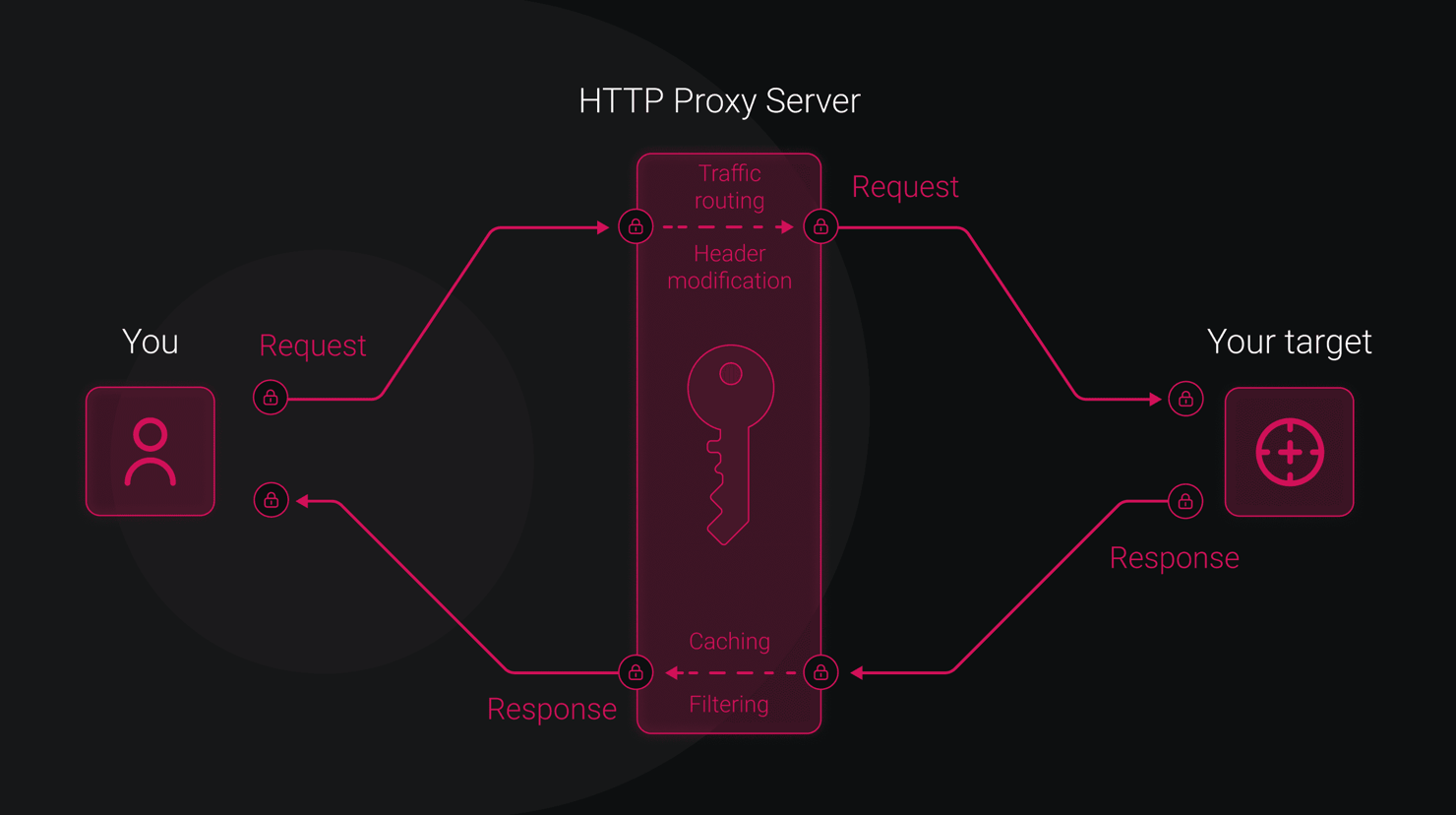
A typical request path looks like this:
A reverse proxy sits in front of servers. It forwards public requests to backend services and returns their responses to the client. A forward proxy sits in front of clients instead. When you're scraping through a proxy, you're usually using a forward proxy. When a site runs behind Nginx, a CDN, or a cloud load balancer, you're usually dealing with a reverse-proxy path.
A load balancer distributes traffic across backend targets. Health checks decide which targets should receive requests. If the health check path, port, protocol, or expected status code is wrong, a working app can still look unavailable.
That's why a 502 often comes from the middle of the chain. The gateway didn't necessarily fail itself. It failed to get a valid response from the upstream service.
Common causes of 502 bad gateway errors
A 502 is a symptom and the fix depends on which layer broke.
Cause
What happens
First check
The upstream server is down
The backend crashed, wasn't started, or was listening on the wrong port.
Process manager, container status, service logs
Server overload
The backend is alive but too busy to respond correctly.
CPU, memory, worker count, queues
Application crash
Code errors, memory leaks, or failed deploys stop valid responses.
App logs and recent releases
Timeout
The proxy gives up before the backend responds.
Proxy timeout settings and slow traces
Misconfigured proxy
The gateway points to the wrong host, port, protocol, or socket.
proxy_pass, ProxyPass, service discovery
DNS failure
The gateway can't resolve the upstream hostname through DNS.
dig, nslookup, resolver config
Firewall block
Security rules block gateway-to-backend traffic.
Security groups, ACLs, host firewall
The gateway reaches the upstream but fails the encrypted handshake.
Certificates, SNI, TLS versions, TLS fingerprinting
Health check failure
Load balancer targets are marked unhealthy.
Health path, port, protocol, expected status
If the response header says Server: nginx, check Nginx logs. If the page comes from a CDN, confirm whether the CDN can reach the origin. Don't change proxy settings, DNS, TLS, and application code in the same pass – you'll make the failure harder to isolate.
502 vs. 503 vs. 504: Understanding the differences
These 5xx codes look similar, but they point to different failures.
Status code
What it means
What to check first
502 Bad Gateway
A gateway or proxy received an invalid upstream response.
Backend process, proxy config, TLS handshake, malformed response
503 Service Unavailable
The server is temporarily unable to handle the request.
Maintenance mode, overload, capacity limits, and unavailable dependency
504 Gateway Timeout
A gateway reached the upstream but didn't get a response in time.
Slow endpoint, long database query, network delay, and timeout settings
The key distinction is 502 vs. 504. A 502 means the upstream response was invalid or unusable. A 504 means the gateway waited, but the upstream took too long to respond. A 503 usually points to temporary unavailability and may include a Retry-After header.
How 502 errors can affect authentication flows
Authentication flows are fragile around 502 errors because login often depends on several gateway-backed requests. If an auth service sits behind a reverse proxy, a 502 can block the login page, token exchange, session refresh, or identity metadata request.
OAuth, a common authorization protocol, often depends on endpoints such as /oauth/authorize, /oauth/token, and /.well-known/openid-configuration. If those endpoints return 502, users may see a generic error page, a failed redirect, or an unexpected logout.
Don't cache 5xx responses on auth paths. A bad CDN rule can keep serving an old gateway error after the backend has recovered. Use strict health checks, bypass cache for auth endpoints, and retry only safe, idempotent validation calls.
Diagnosing a 502 bad gateway error
Diagnosis starts by proving where the error is generated. Don't change DNS, proxy config, app code, and cache rules in the same pass.
For visitors:
- Check whether the site is down for everyone. Use an external uptime checker.
- Try another browser, device, or network. This rules out a local cache, extension, VPN route, or DNS resolver issue.
- Open browser developer tools. In the Network tab, confirm the 502 and inspect headers such as Server, Via, or CDN IDs.
For developers and operators:
- Step 1 – reproduce with curl. Run curl -v https://your-domain.com/endpoint to inspect DNS, TLS, headers, and status.
- Step 2 – test upstream directly. Bypass the proxy if possible, for example, curl -v http://127.0.0.1:3000/health.
- Step 3 – check process status. Use systemctl status, pm2 status, docker ps, or your orchestrator.
- Step 4 – check proxy logs. In Nginx, start with /var/log/nginx/error.log; look for messages like connect() failed, upstream timed out, or no live upstreams.
- Step 5 – test DNS resolution. Run dig or nslookup from the gateway host, not only from your laptop.
- Step 6 – check load balancer health. Confirm target health, health path, port, protocol, timeout, and expected response code.
Fixing 502 errors: User-side troubleshooting
As a visitor, you can't repair the origin server. You can only rule out local cache, browser, DNS, VPN, or network issues before waiting or contacting the site owner.
- Refresh the page. Short gateway failures often clear on retry.
- Check whether the site is down for everyone. If external uptime checks fail too, the issue isn't local.
- Try another browser or device. If it works elsewhere, your browser profile, cache, cookies, or extensions may be involved.
- Try another network. Mobile data is a quick check against Wi-Fi, ISP, VPN, or DNS resolver issues.
- Flush DNS cache. On Windows, run ipconfig /flushdns; on macOS, run sudo killall -HUP mDNSResponder.
- Restart your router and modem. Do this if the issue appears tied to your local network.
- Disable your VPN or proxy temporarily. Traffic-routing tools can change how your request reaches the gateway.
If the site fails across browsers, devices, and networks, the root fix is almost certainly server-side.
Fixing 502 errors: Server-side solutions
Start with the upstream. Verify the app is running and listening where the proxy expects it:
For Nginx, check proxy_pass and timeout settings:
Longer timeouts can help slow endpoints, but they won't fix a dead process, wrong port, or broken upstream hostname. If your upstream uses dynamic DNS, use the resolver directive and test before reload.
For Apache, enable proxy modules and confirm ProxyPass points to the correct backend:
Watch trailing slashes because path rewriting mistakes can look like app failures.
For Cloudflare-specific errors, check whether the origin is reachable from Cloudflare, whether the origin firewall allows Cloudflare traffic, and whether SSL/TLS mode matches your origin certificate setup. Cloudflare lists a 120s proxy read timeout and categorizes Cloudflare-generated 502 and 504 errors as origin-related transient failures. Use the exact Cloudflare error page and response headers in your diagnosis.
For load balancers, check target health before app code. Confirm the health check path returns 200, the health check port matches the service, and security rules allow traffic between the load balancer and targets. AWS notes that TCP resets, malformed target responses, invalid response headers, oversized headers, and SSL handshake errors can produce Application Load Balancer 502 responses.
Finally, review recent deploys, restart failed workers, inspect crash logs, and increase resources only when metrics show resource exhaustion. If the failure is in Python application code, see Decodo's guides on retrying failed Python requests and Python errors and exceptions.
Preventing 502 errors: Best practices
Prevention comes down to health, timeouts, capacity, and visibility. Your goal is simple: make sure the gateway always knows which upstreams are healthy, how long to wait, and where to send traffic.
- Use health endpoints. Expose a lightweight /health route that returns 200 only when the app is ready to serve requests.
- Set explicit proxy timeouts. Match connect, send, and read timeouts to real endpoint behavior instead of relying on defaults.
- Monitor upstream availability. Alert when gateway-to-upstream checks fail, not only when the public page is already down.
- Track 5xx error rates. Break errors down by gateway, upstream service, route, and target so a small 502 spike doesn't hide inside aggregate traffic.
- Centralize logs. Keep proxy logs, app logs, load balancer logs, and deploy events in 1 timeline.
- Configure automatic restarts. Use systemd, PM2, containers, or orchestrator restart policies to recover crashed workers.
- Keep TLS certificates valid. Automate renewal with tools such as Let's Encrypt or cert-manager.
- Use rolling deployments. Shift traffic gradually so a bad release doesn't take every backend out at once.
- Test config changes. Validate proxy and load balancer changes before production reloads.
502 errors and web scraping: What you need to know
In web scraping and automated web data collection, 502 can come from the target's infrastructure, your proxy path, or edge-layer blocking.
Treat it as an infrastructure signal first. Retry transient 502 responses with exponential backoff and jitter. Don't retry instantly from every worker. That only creates another traffic spike while the target or gateway is already unstable.
Then look at the pattern. If 502 affects every IP, route, and session, the target may be down. If it appears only on certain exit IPs, sessions, request rates, or regions, the issue may be IP reputation, per-IP pressure, or proxy-layer blocking. Track status code, response body shape, CDN headers, proxy exit IP, route, region, and success rate together.
Rotating proxies can help when the issue is tied to one exit IP or a small IP range. Residential proxies can help when failures correlate with datacenter IP ranges or repeated requests from the same network. Managed residential proxy and unblocking setups can help when proxy rotation, retry behavior, and edge handling need to work together.

502s killing your scraper?
Decodo's Web Scraping API retries failed requests automatically, rotates IPs on every attempt, and returns clean responses. Your code never sees the 502.
Final thoughts
A 502 bad gateway error isn't the root cause. It's the signal that something between the gateway and the upstream service failed.
If you're a visitor, rule out local browser, DNS, VPN, and network issues, then stop chasing fixes you can't control. If you run the site, work from the gateway inward: reproduce the request, test the upstream, read the logs, then verify DNS, TLS, timeouts, and load balancer health.
For scraping, treat 502 as a pattern to investigate, not an automatic proxy failure. Retry with backoff, compare results across IPs and routes, and use proxies only when the failure pattern points to IP reputation, per-IP pressure, or edge-layer blocking.

Reliable data, every request
Server errors, rate limits, bot detection. Decodo handles the retry logic, proxy rotation, and rendering so your scraper gets data instead of error codes.
About the author

Vilius Sakutis
Performance Marketing Team Lead
Vilius leads performance marketing initiatives with expertize rooted in affiliates and SaaS marketing strategies. Armed with a Master's in International Marketing and Management, he combines academic insight with hands-on experience to drive measurable results in digital marketing campaigns.
Connect with Vilius via LinkedIn
All information on Decodo Blog is provided on an as is basis and for informational purposes only. We make no representation and disclaim all liability with respect to your use of any information contained on Decodo Blog or any third-party websites that may belinked therein.