Golang Colly: How To Build a Web Scraper in Go
Golang Colly is a fast, callback-driven scraping framework for the Go programming language. It wraps HTTP requests, HTML parsing, rate limiting, and concurrency in a clean API, so you can pull structured data from a website with very little code. This tutorial walks you through building a working Colly scraper from an empty project all the way to proxy rotation.

Kipras Kalzanauskas
Last updated: Jun 10, 2026
15 min read

TL;DR
- Colly gives Go a callback-driven scraping framework with built-in caching, rate limiting, and concurrency
- You build a scraper by attaching callbacks like OnHTML, OnRequest, and OnError to a Collector, then visiting URLs
- Colly parses static HTML only, so pages built with JavaScript need chromedp, Rod, or a server-side renderer instead
- Route requests through residential proxies once you scale, or IP blocks will stop the crawl fast
Why Go works well for web scraping
Most web scraping tutorials default to Python, and for good reason. Its ecosystem is mature, and getting a scraper running is often quick and straightforward.
Go stands out for a different set of strengths. It compiles into a single binary, making deployment simple, and its performance becomes noticeable when you're processing thousands of pages or running large scraping jobs.
The biggest advantage is concurrency. Goroutines make it easy to fetch and process many pages at once with minimal overhead, allowing scrapers to handle high request volumes while keeping memory usage low.
That doesn't make Go the right choice for every project. It pays to be clear-eyed about where Go pulls ahead of Python and where it lags before you commit a project to it.
Python still has a larger scraping ecosystem and stronger data analysis tools. But for reliable, high-volume scraping, Go is often the better fit.
By the end of this tutorial, you will have a Colly scraper that extracts book titles, prices, ratings, and availability from a real website, follows pagination across the catalog, and uses proxy rotation to help maintain reliability as scraping volume increases.
Go web scraping libraries: Where Colly fits in
Before choosing Colly, it helps to understand the alternatives. Go's scraping tools operate at different levels, and the right choice depends on the type of site you're targeting.
Colly is the most popular option for traditional web scraping. It combines HTTP requests, CSS selector parsing, rate limiting, proxy support, and asynchronous crawling in a single package, making it a strong fit for extracting data from server-rendered HTML pages.
GoQuery sits a level lower. It provides jQuery-style DOM parsing but leaves requests, retries, concurrency, and rate limiting up to you. It's excellent for parsing HTML you've already downloaded, but less suited to building full crawlers.
When content is rendered with JavaScript, browser automation tools become necessary. chromedp and Rod control a real Chrome browser, allowing them to execute JavaScript and interact with pages just like a user would. The trade-off is higher memory usage, slower execution, and a more complex setup.
Ferret takes a different approach, using its own query language for extracting data from websites. While powerful, it has a smaller community and is less commonly used in production.
Laid side by side, the four split cleanly along the factors that usually decide the matter:
Library
JavaScript rendering
Built-in concurrency
Learning curve
Proxy support
Colly
No
Yes, async plus rate limits
Low to moderate
Yes, built-in switcher
GoQuery
No
No, manual goroutines
Low
Manual, via net/http
chromedp
Yes, via Chrome
Yes, via contexts
Moderate to high
Yes, via Chrome flags
Ferret
Yes, built-in driver
Limited
Moderate, own query language
Yes
For the rest of this tutorial, we'll use Colly because it covers the most common scraping scenario: extracting structured data from HTML pages quickly and efficiently.
While development moves slowly compared to newer projects, Colly is mature, stable, and widely used, making it a dependable foundation for production scrapers.
Prerequisites and project setup
Before you can use Colly, you'll need Go installed on your machine.
Check whether Go is already available by running:
If Go is installed, you'll see output similar to a printed version number:
If you get a "command not found" error, download and install the latest version from the official Go website.
Once the installation is complete, open a new terminal window and run go version again to confirm everything is working.
Once Go is installed, create a project directory and move into it:
If the directory already exists, simply move into it:
Next, initialize a Go module:
This creates a go.mod file, which Go uses to track project dependencies. If you see a message saying go.mod already exists, the module has already been initialized, and you can move on.
Now install Colly:
The /v2 suffix is important because it installs the current major version of the library.
At this point, your project directory should contain at least a go.mod file and a go.sum file. You can verify this with:
You should see:
Next, create a new file named main.go in your project directory using your preferred editor, such as VS Code or TextEdit.
Add the following code:
This simple scraper creates a collector, visits a page, and prints the size of the response. It's a quick way to verify that Colly is installed correctly and can make requests.
Save the file and run:
If everything is working, you'll see output similar to:
If you see a message showing the number of bytes fetched from the page, your environment is ready, and you can start building your scraper.
How Colly works: Collectors, callbacks, and the request lifecycle
Every Colly scraper revolves around a single object: the Collector. It manages requests, stores configuration, and triggers callbacks as pages are processed.
You create a collector with colly.NewCollector() and optionally configure it with settings such as allowed domains, a custom user agent, or a maximum crawl depth:
Once a collector is created, you register callbacks that run at different stages of the request lifecycle.
A typical request flows through the following events:
- OnRequest runs before a request is sent, which is where you set headers, log the URL, or abort the call
- OnError runs when a request fails, making it the home for retry logic and failure logging
- OnResponse runs once the response arrives but before any HTML is parsed, useful for inspecting raw bytes or status codes
- OnHTML runs for each element matching a CSS selector you register, and this is where most extraction happens
- OnXML is the same idea as OnHTML for documents addressed with XPath
- OnScraped runs once after a response is fully processed, which suits cleanup or a per-page summary
Of these callbacks, OnHTML does most of the work. You provide a CSS selector and a function, and Colly executes that function for every matching element on the page:
The selector engine is powered by GoQuery, so most CSS selectors you test in your browser's DevTools can be used directly in Colly.
You'll also encounter two methods for making requests: Visit() and Request(). In most cases, Visit() is all you need. It sends a standard GET request and triggers the callback chain automatically.
Request() gives you more control when you need a different HTTP method, custom headers, or a request body. It's commonly used for tasks such as submitting forms or interacting with APIs.
Around all of this, Colly provides a number of useful features, including domain restrictions, rate limiting, asynchronous crawling, cookie handling, and proxy support.
Building your first colly scraper
Now it's time to scrape some real data. Throughout this tutorial, we'll use books.toscrape.com, a website built specifically for scraping practice.
Before writing any code, inspect the page structure. You can do this by right-clicking on a book and selecting Inspect. This opens your browser's developer tools and highlights the HTML responsible for rendering that book.
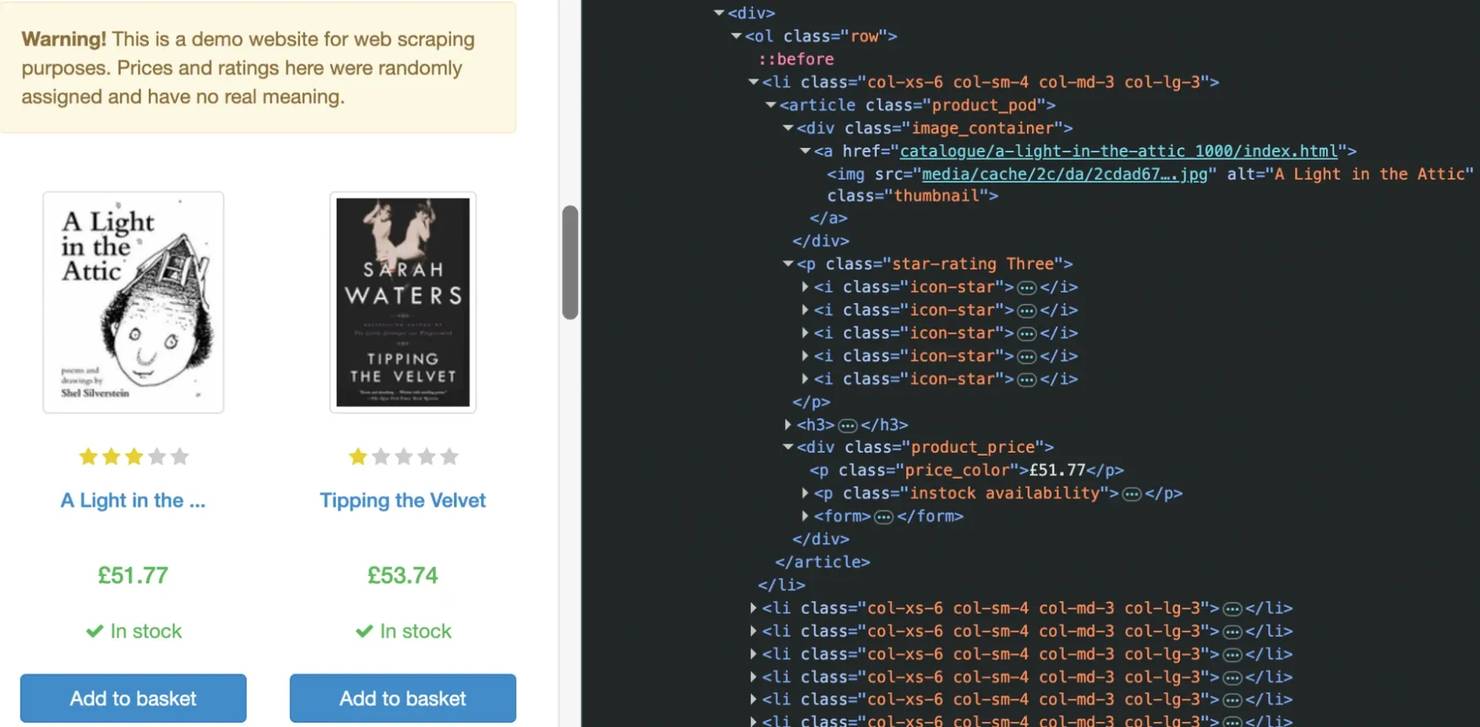
This tells us exactly where the data lives:
- Each book is wrapped in an article.product_pod element
- The title is stored in the title attribute of the h3 a link
- The book URL is stored in the link's href attribute
- The price appears inside .price_color
- Availability appears inside .availability
- The rating is encoded as a class on p.star-rating, such as star-rating Three
Now we'll upgrade the simple test scraper from the previous section into a scraper that extracts real data.
Open the same main.go file in the project directory you created earlier.
Replace with the existing code with:
Save the file and return to your terminal. Then run:
You should see a JSON array containing the books found on the page.
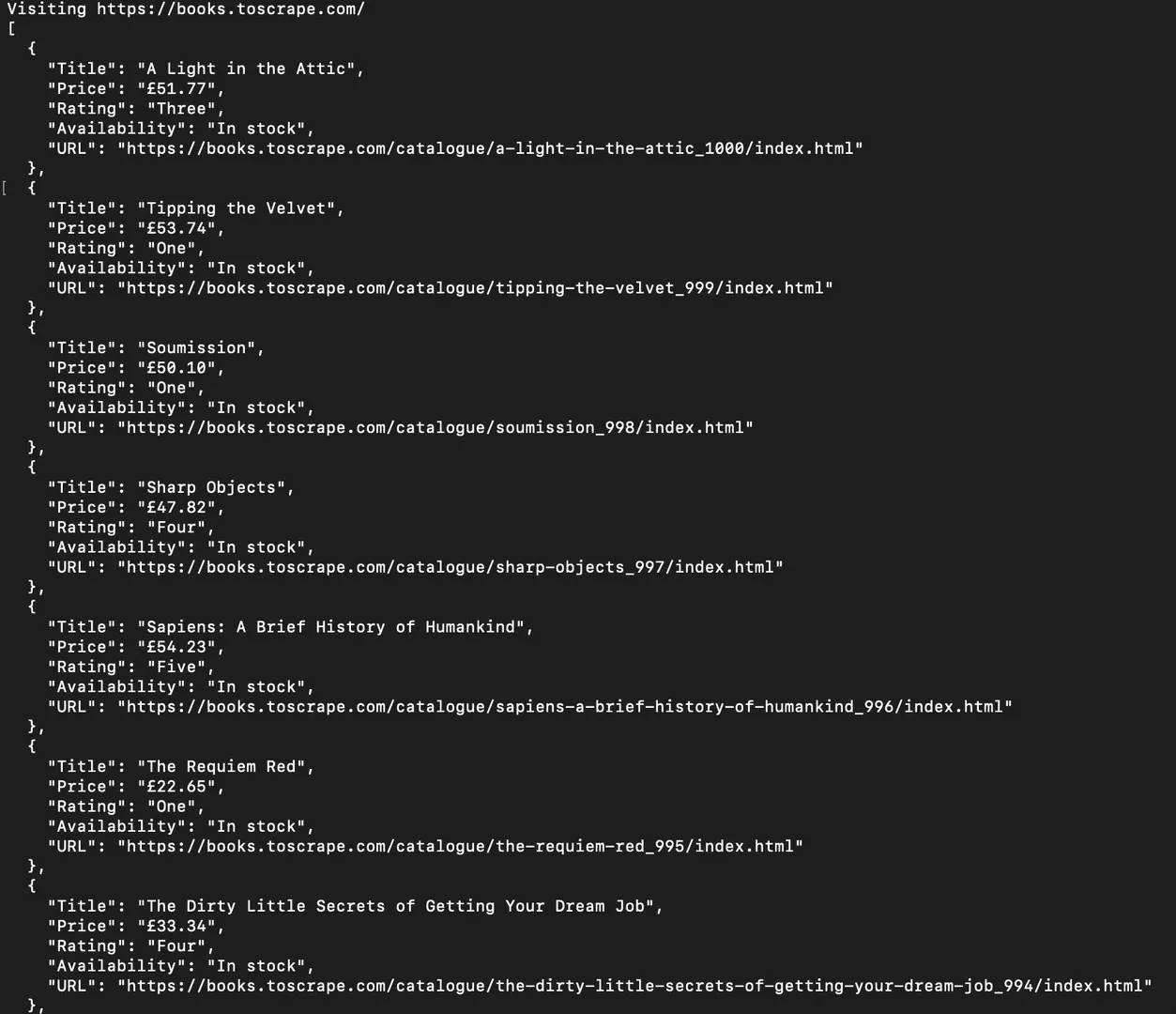
The scraper only needs a single callback because Colly automatically runs it for every matching article.product_pod element. Since there are 20 books on the homepage, the callback executes 20 times and appends 20 records to the books slice.
A few methods do most of the work:
- ChildText() returns the text content of the first matching element
- ChildAttr() returns the value of an attribute on a matching element
- AbsoluteURL() converts relative links into full URLs
The selector logic comes directly from the HTML you inspected earlier. For example, e.ChildAttr("h3 a", "title") extracts the book title from the title attribute of the link, while e.ChildText(".price_color") extracts the price from the element with the price_color class.
The URL requires one extra step because the site uses relative links. Rather than storing a path such as catalogue/a-light-in-the-attic_1000/index.html, AbsoluteURL() converts it into a complete URL that can be used directly.
At this point, you have a working scraper that extracts structured data from a real website. The next step is making it crawl beyond the first page so it can collect every book in the catalog rather than stopping after the first 20 results.
Handling pagination and multi-page scraping
The scraper now extracts every book on the homepage, but that's only a small fraction of the catalog. Books to Scrape contains 50 pages and roughly 1,000 books, so stopping after the first page leaves most of the data behind.
Fortunately, the site uses a simple pagination system. If you scroll to the bottom of the page and inspect the Next button, you'll find HTML similar to:
Rather than visiting each page manually, we can teach Colly to follow that link automatically.
Open your existing main.go file and add the following callback underneath your book extraction callback:
It should look like this:
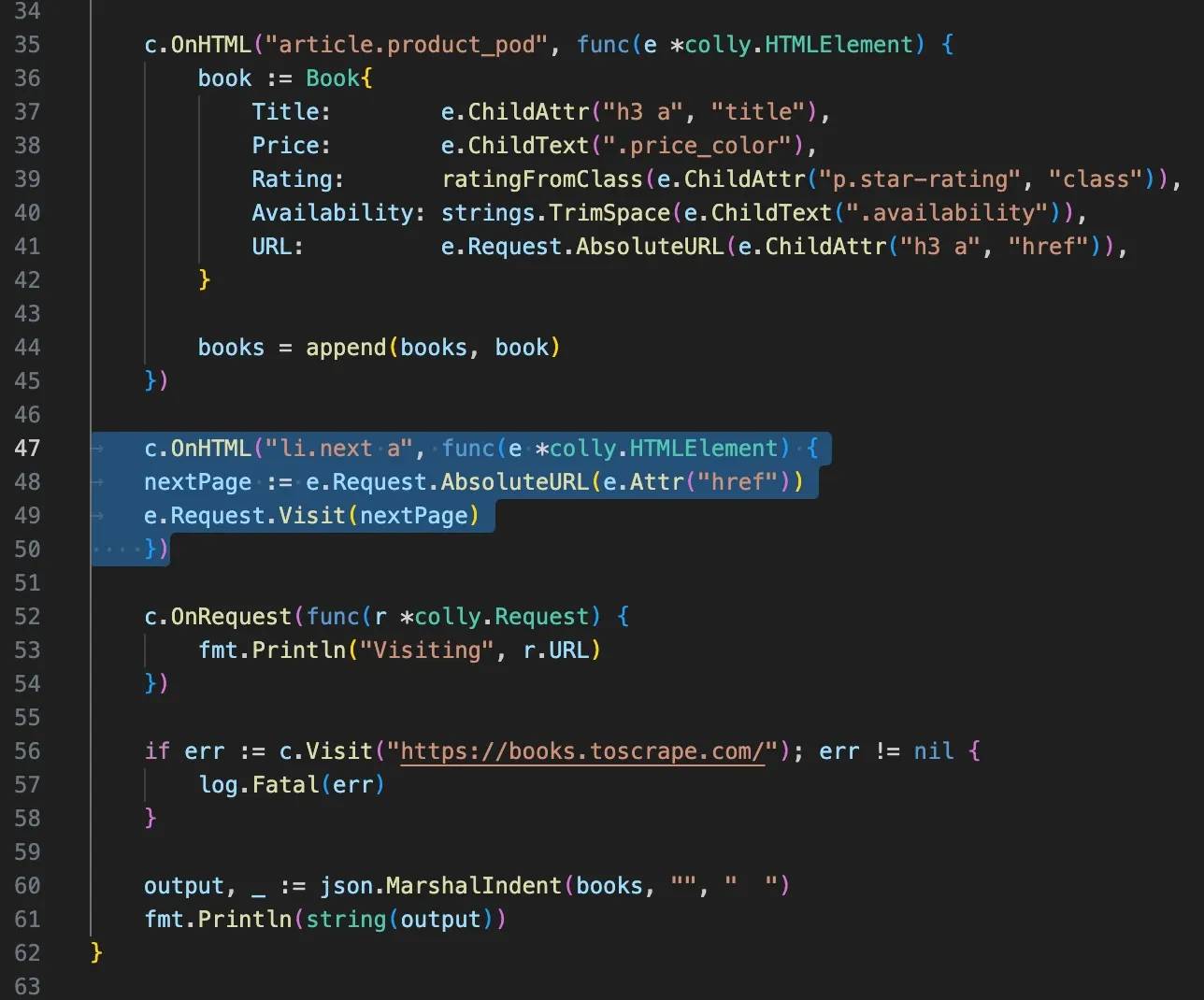
Save the file and run the scraper again. You'll see Colly visiting multiple pages instead of stopping after the homepage.
The process continues until Colly reaches the final page, where no next link exists. At that point, the crawl stops automatically.
One of the advantages of this approach is that you don't need to know how many pages exist in advance. As long as the next link is present, Colly keeps following it.
Because every book is appended to the same books slice regardless of which page it came from, the results accumulate into a single dataset automatically.
Using concurrency to speed up scraping
So far, the scraper has processed pages one at a time. That approach is simple and reliable, but it can become slow when you're crawling hundreds or thousands of pages.
One of Go's biggest advantages for web scraping is concurrency. Colly can take advantage of this by making multiple requests at the same time rather than waiting for each page to finish before starting the next one.
Enabling asynchronous scraping takes just one option when creating the collector:
With Async(true) enabled, Colly sends requests concurrently instead of processing them sequentially.
However, there's one extra step. Because requests now run in the background, the program must wait for all of them to finish before exiting.
Add the following line near the end of main():
Your final section should now look similar to:
Without c.Wait(), the program may exit before all pages have been scraped.
As your scraper becomes more aggressive, it's also worth controlling how many requests are sent at once. Colly provides a built-in rate limiter that lets you balance speed with politeness:
This configuration allows up to four concurrent requests while introducing a short delay between them. To use time.Millisecond, add the time package to your imports:
The exact performance improvement depends on the target website and your network connection, but concurrency can dramatically reduce crawl times on larger projects.
As your crawls grow, however, speed introduces a new challenge. The faster you scrape, the more likely you are to encounter rate limits, CAPTCHAs, and IP blocks. The next section shows how to route requests through proxies to make your scraper more resilient.
Integrating proxies with colly for reliable scraping
The examples so far work well because Books to Scrape is designed for practice. Real websites are often less welcoming.
As your scraper sends more requests, you may encounter rate limits, CAPTCHAs, or temporary IP blocks designed to slow down automated traffic.
Proxies help solve these problems by routing requests through different IP addresses instead of sending everything from a single machine. They're not always necessary for small projects, but they become essential once you start scraping at any meaningful scale.
For a single proxy, configuration is straightforward. After creating your collector, add a proxy URL with SetProxy():
Once configured, every request sent by the collector will be routed through that proxy.
For larger crawls, residential proxies are often the best choice. Rather than sending all traffic through one IP address, a residential proxy network distributes requests across a pool of real residential IPs. This makes traffic appear more like normal user activity and reduces the likelihood of IP-based blocking.
Services such as Decodo provide rotating residential endpoints that can be used directly with Colly.
In many cases, the proxy network handles IP rotation automatically, so a single proxy endpoint can give you access to thousands of rotating residential IPs without any additional logic in your scraper. For example, you simply need to set the port to 7000 with Decodo.
Colly also supports rotating between multiple proxy endpoints using SetProxyFunc() and RoundRobinProxySwitcher():
This approach cycles through the configured proxies as requests are made. It's useful when you want more control over how requests are distributed across multiple endpoints.
Many proxy providers also support geo-targeting, allowing requests to originate from specific countries, regions, or cities. This is useful when scraping location-dependent content such as local search results, regional pricing, or country-specific product listings.
Whatever proxy provider you use, avoid hardcoding credentials directly into your application. Environment variables provide a safer alternative:
You'll need to add the os package to your imports if it isn't already present.
Proxies can significantly improve scraping reliability, but they're most effective when combined with sensible rate limits and responsible crawling practices.

Stop scraping from a single IP
Decodo's residential proxy pool covers 115M+ ethically-sourced IPs across 195+ locations, built for scrapers that run concurrent requests without getting flagged.
Common issues, tips, and troubleshooting
If your scraper isn't behaving as expected, the problem is often smaller than it appears. Most Colly issues come down to selectors, request restrictions, or simple configuration mistakes.
One of the most common problems is getting no data back despite receiving a successful response. When that happens, revisit the page in your browser and inspect the HTML again. Websites change over time, and a selector that worked yesterday may no longer match today's markup.
If a callback isn't firing, add a request logger to confirm Colly is actually visiting the pages you expect:
Similarly, error logging can help identify failed requests:
Another common source of confusion is JavaScript-rendered content. Colly downloads the HTML returned by the server, but it does not execute JavaScript. If the data only appears after the page loads in a browser, Colly may never see it.
You can often spot this by comparing the page source with what appears on the screen. If the content exists in the browser but not in the source HTML, you'll need a browser automation tool such as chromedp or Rod instead of a traditional HTML scraper.
Rate limits are another frequent issue. If requests suddenly start failing after a successful run, slow the scraper down before assuming the site is broken. Adding delays and limiting concurrency often resolves the problem:
Finally, remember that not every website permits automated scraping. Before crawling a site, review its terms of service and check whether any restrictions apply. A technically possible scrape isn't always an appropriate one.
When debugging, start simple. Confirm that requests are being sent, verify that selectors still match the page, and test against a single URL before scaling up to a larger crawl. Most scraping problems become much easier to solve when you isolate them one step at a time.
Final thoughts
Go and Colly make a powerful combination for web scraping. This tutorial went from a single request to a scraper that extracts structured data, follows pagination, runs concurrently, and routes traffic through proxies.
The same workflow applies beyond Books to Scrape: inspect the HTML, pick reliable selectors, extract what you need, and add pagination, concurrency, and proxy support as the crawl grows. Expect inconsistent markup, rate limits, and JS-rendered content on real targets. Start simple, get one page working, then expand one feature at a time. Colly's callback-driven design makes that progression straightforward.

Scale your Colly scraper with confidence
From a handful of pages to millions, Decodo's infrastructure keeps your crawl running so you can focus on the data instead of the upkeep.
About the author

Kipras Kalzanauskas
Senior Account Manager
Kipras is a strategic account expert with a strong background in sales, IT support, and data-driven solutions. Born and raised in Vilnius, he studied history at Vilnius University before spending time in the Lithuanian Military. For the past 3.5 years, he has been a key player at Decodo, working with Fortune 500 companies in eCommerce and Market Intelligence.
Connect with Kipras on LinkedIn.
All information on Decodo Blog is provided on an as is basis and for informational purposes only. We make no representation and disclaim all liability with respect to your use of any information contained on Decodo Blog or any third-party websites that may belinked therein.