How to Scrape Perplexity: Methods, Tools, and a Python Tutorial
Perplexity is slowly becoming one of the more prominent LLMs in 2026 because it delivers output in a unique way that sets it apart from the rest. When you send a prompt, Perplexity AI will return a direct answer, along with cited sources (URLs and titles), related follow-up questions to that prompt, and supporting images as well. All this information can be worth tracking for businesses that care about their brand visibility, and how Perplexity is representing them and their competitors to a typical user.

Mykolas Juodis
Last updated: Jul 14, 2026
16 min read

TL;DR
- The data fields you can scrape from Perplexity include the prompt itself, Perplexity’s response text, cited sources, follow-up questions, and other supporting links and images.
- Scraping Perplexity responses that are publicly available is broadly permissible, but you still need to review Perplexity’s terms of service(ToS) and scrape responsibly.
- There are 3 ways with which you can scrape Perplexity; you can use Perplexity's official Sonar API, you can also build an entire scraper setup on your own with Playwright, or you can use a managed web scraping API to handle repetitive tasks and allow you scrape more data at scale.
- In this guide, you'll learn exactly what you can scrape from Perplexity, whether doing so is legal, how each extraction method compares, and how to build your own Perplexity scraper from scratch with Python, Playwright, and residential proxies.
What you can scrape from Perplexity, and why it's worth it
One of the biggest reasons you'd want to scrape Perplexity is to understand how it talks about your brand, product, or service. As more users turn to AI-generated responses instead of traditional search results, tracking those responses has become just as important as tracking your rankings on Google.
But before you start building your scraper, you need to know exactly what sort of data Perplexity actually exposes and what you can do with it once you have it.
Data fields you can extract
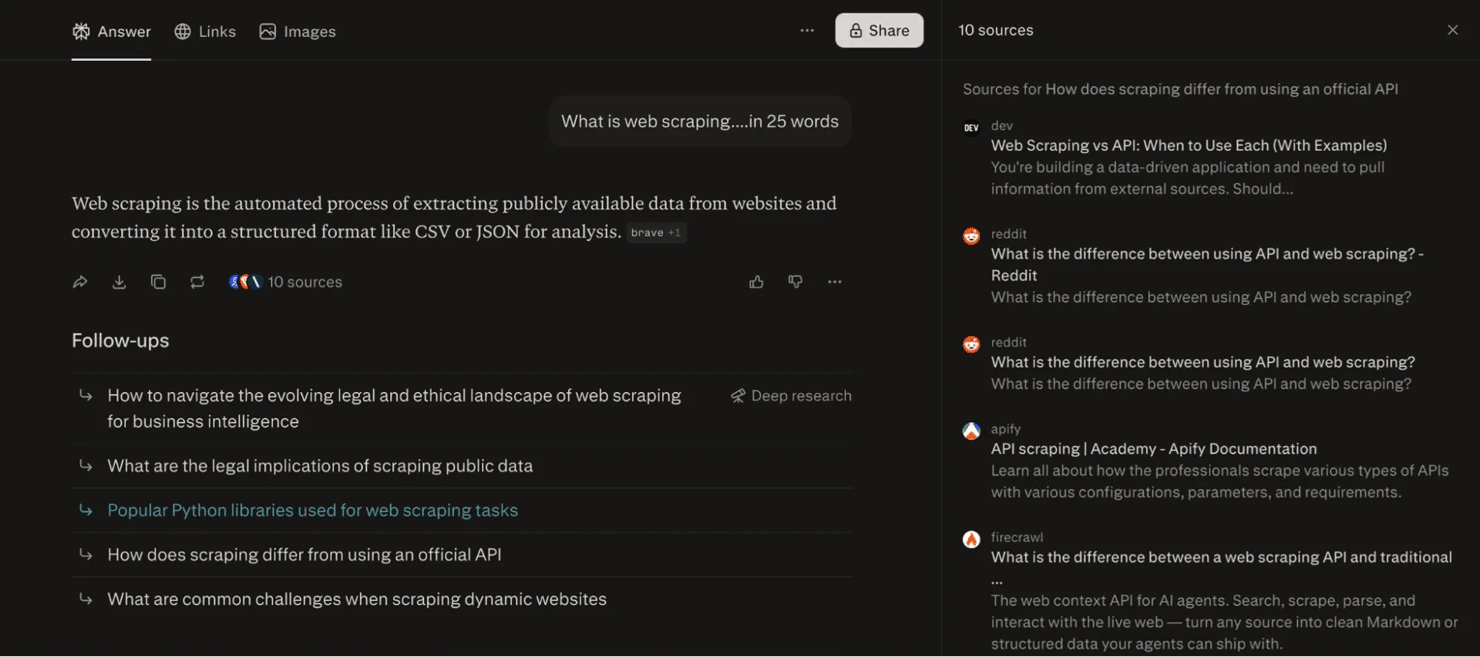
When you scrape a Perplexity result, here's what the response typically gives you:
- The prompt or query – the original question that was submitted to Perplexity
- The AI response text – the full response, available in both plain text and Markdown format
- Cited sources – each with a title and URL, showing you exactly which domains Perplexity pulled from to build the response
- Displayed tabs – the tabs Perplexity surfaces in its interface, like link, images, and sources
- Follow-up queries – the follow-up questions Perplexity suggests after the main response text
- Supporting media – top images with their titles and URLs
- Metadata – including the model used to generate the response, timestamps, and the conversation URL
Why scrape Perplexity?
As mentioned earlier, the biggest reasons you might want to scrape Perplexity are for brand visibility and monitoring. For example, if you submit the prompt "best residential proxy providers", you can extract the complete response, identify which providers Perplexity actually suggests to the user, see which websites Perplexity cites, and track how those citations change over time. You can then pair that scraped data with a rank tracker API to build a fuller picture of your AI search visibility across multiple channels.
Beyond brand monitoring, here are other reasons why you might want to scrape Perplexity:
- Competitive intelligence. Suppose you regularly monitor that same "best residential proxy providers" prompt. You will be able to see which companies appear in the response, how Perplexity describes them, and which websites it cites as supporting evidence. Over time, this’ll help you identify shifts in market positioning, emerging competitors, and new sources that Perplexity trusts when generating responses.
- Research and fact tracking. Perplexity’s responses aren't static, so you might decide to regularly scrape the same prompt over a period of time to track how the response changes. A research prompt like "best laptops for students" today might look very different in 6 months as new laptop models will get released, reviewed, and indexed. Scraping the information from this prompt will let you monitor those shifts systematically instead of you having to check it manually. Content and SEO auditing. Every Perplexity response comes with a list of cited sources. If you scrape those sources across multiple related prompts, you will be able to get a clearer picture of which domains Perplexity trusts for a given topic, and what kind of content you should put out to earn those citations. And since Perplexity isn't the only LLM that people use, you can apply the same approach to Google's AI Mode and compare how each one talks about your brand or your competitors.
- Building a dataset. Collecting Perplexity prompt-response pairs at scale will ultimately give you structured data that you can use to evaluate AI systems, build internal research datasets, or benchmark how different LLMs respond to the same prompts. If you need to do this across other LLMs, Decodo's ChatGPT scraper follows a similar extraction pattern and is worth looking at.
Is it legal to scrape Perplexity?
While scraping publicly available data is allowed in many jurisdictions, there are still factors you need to consider in the context of Perplexity:
Perplexity's terms of service (ToS)
Double-check if your particular use case and volume are permissible under Perplexity’s terms of service because breaching it can lead to account bans, cease-and-desist letters, or liability, depending on your jurisdiction and data use.
Copyright considerations
A response may look like one answer, but it's often built from content published on external sites. Storing, republishing, or redistributing large volumes can raise copyright questions that reach beyond Perplexity to the publishers it cites. Internal analysis differs from external publishing, so be careful with what you extract.
Personal data
Scraping details about specific individuals puts you in personal data territory, which comes with obligations. GDPR (in Europe) and CCPA (for California residents) govern how organizations collect, process, and store that data. The safest path is to avoid responses that reference or could identify real people and to make your data handling compliant before scaling your scraper.
Responsible use
Even if your particular use case and scope are legal, always scrape responsibly. Whether your scraper is proprietary, customized, or uses an API, keep your request rates reasonable and avoid generating unnecessary load on the platform.
Excessive requests can trip anti-bot protections and degrade service for other Perplexity users. Check the robots.txt file and respect its directives, it's a basic signal of good faith. Ethical collection practices keep you out of trouble and your scraper sustainable for longer.
Just to be clear, nothing in this section is legal advice. Consult a lawyer to get a full breakdown of how web scraping sits legally in your particular case. You can also learn more about the topic in our in-depth guide on whether web scraping is legal.
Methods for extracting data from Perplexity
If you want to scrape Perplexity, there's no one right way to go about it. There are different methods for scraping Perplexity, and the one you choose depends on what data you need, how much control over that data you want, and how much time you're willing to spend maintaining your scraper.
Here are 3 of those methods:
1. Using Perplexity's official Sonar API
The Sonar API is Perplexity's own programmatic interface, and it's the most straightforward way to get Perplexity responses and citations without touching a browser at all. Since this is an official solution, you don't have to worry about browser automation, JavaScript rendering, or anti-bot systems. You simply send a prompt, and the API returns a JSON response that contains the response text, sources, and other related metadata.
That being said, keep in mind that Sonar API returns model output, not the exact experience you'd see on the perplexity.ai interface. So the responses, the layout, and the follow-up questions may look different from what you'd typically get if you typed that same prompt directly into Perplexity. On top of that, the API comes with its own pricing and rate limits, so you'll want to review those before committing to it.
2. DIY browser automation with Playwright
Browser automation gives you much more control, if you want to scrape the actual Perplexity website. The best tool to use for that automation is Playwright because Perplexity renders its responses dynamically through JavaScript and streams tokens in real time.
What’s more, with Playwright, you can interact with Perplexity the same way a real user would. You can submit prompts, wait for responses to finish rendering, collect citations, extract related questions, and capture other pieces of Perplexity data directly from the page. While this approach gives you maximum flexibility, it also requires an ongoing effort to keep your scraping workflow reliable. You’ll need to handle JavaScript rendering, manage proxies, deal with anti-bot protections, and maintain your scraper anytime Perplexity updates its interface.
3. Using a managed scraping or SERP API
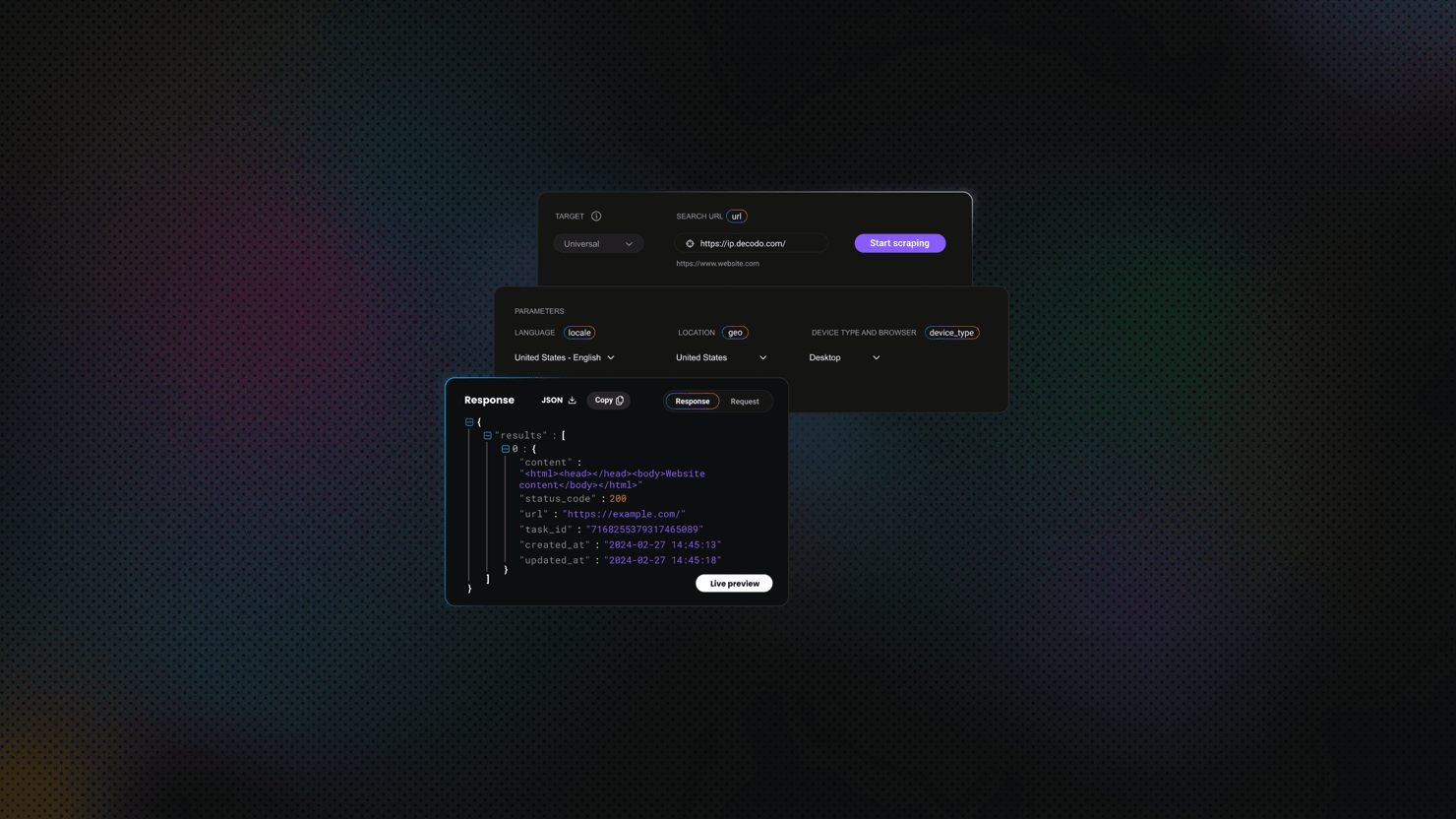
If managing browser automation starts slowing you down, Decodo's SERP scraper API handles JavaScript rendering, proxy rotation, and anti-bot bypassing in a single API call. This means you won’t have to deal with browser instances or Perplexity’s chunky response format. You’d only need to send a prompt and you’ll get a structured JSON with the fields you need.
You can use this method when you need a reliable and scalable scraper that can run on its own for a long time without you having to control the entire browser automation layer.
And if your use case goes beyond SERP-style queries, it's worth looking at our Web Data API. It gives you a fully managed way to collect and structure Perplexity data at scale, so you don't have to worry about building or maintaining the scraping infrastructure on your own.
Why Perplexity is difficult to scrape
Even with the right method in place, Perplexity is still a technically demanding target to scrape, and there are a few reasons for that.
- Responses are delivered dynamically, so the content doesn't appear all at once. That means your scraper has to wait for the response to finish loading before it can extract the data.
- The platform uses aggressive anti-bot protection, and datacenter IPs tend to get flagged pretty quickly. So, if you're going the browser automation route, you'll need residential proxies and proper stealth configuration.
- There's no public conversation API that mirrors the full user-facing experience, which means you're either working with the Sonar API, which isn't identical to what real users see, or you're scraping the actual UI through a browser.
- Then there's the issue of login walls. Some features on Perplexity, like saved threads and certain search modes, are only available behind a login, and that adds another layer of complexity if your use case requires access to those parts of the platform.
The right approach really comes down to your use case. For small projects, research, and learning purposes, browser automation with Playwright will get the job done. But if you need reliable, programmatic access to Perplexity model responses and citations, Sonar API is the cleaner option. And when you start collecting Perplexity data at scale and want to skip the ongoing work of managing browsers, proxies, and anti-bot systems, then a managed solution like our SERP Scraper API or Web Data API is the most practical choice.
Building a Perplexity scraper with Python, step by step
You can always build your own scraper if you want full control over your Perplexity scraping workflow. While tools like the Web Data API or SERP API can handle much of the heavy lifting for you, creating a scraper yourself will help you understand how Perplexity delivers responses, citations, and related questions.
For this walkthrough, we’re going to use Python, Playwright, and residential proxies to collect Perplexity answers and structure them into usable JSON data.
Step 1: Set up your environment
Before you start, make sure you're running Python 3.9 or newer. Create a virtual environment so your project dependencies stay isolated from the rest of your system.
Then install your dependencies:
Once that's done, pull down the Chromium browser binary that Playwright needs:
At this point, you have everything you need to start building your scraper.
Step 2: Configure your proxy
Perplexity actively protects its platform, which means repeated requests from the same IP address can eventually trigger blocks or rate limits. You need to integrate rotating residential proxies into your scraper to get consistent results, especially if you're sending multiple prompts or targeting responses associated with specific regions.
Log into your Decodo dashboard and navigate to Residential. There you will see your proxy username and password. You can store those credentials in a .env file so you don’t have to use them in your Playwright script directly.
You'll load these into Playwright's launch options in the next step.
Step 3: Submit a prompt to Perplexity
Once the browser launches, you then point your script to Perplexity and submit your prompt. It's better to construct a direct search URL than to click through the interface manually, since that reduces the number of interactions your script makes with the page.
Step 4: Handle streamed responses correctly
As mentioned earlier, one of the biggest challenges you face when you scrape Perplexity is that responses are generated dynamically. Perplexity doesn't render the complete response immediately, it streams onto the page over time. That means you cannot set fixed delays because they will be unreliable for this use case. Instead, wait for the response paragraph to appear in the DOM first, and then give the stream a few extra seconds to finish before you start scraping.
Here's how to do that:
This will give the response enough time to finish rendering and reduce the risk of your scraper extracting incomplete content. For a full breakdown of every waiting strategy available, you can check out our guide on waiting methods in Playwright.
Step 5: Extract responses, sources, and related questions
You then set your script to start collecting the data as soon as the response finishes rendering. Your scraper should typically be able to collect the response text, source URLs and titles, and the follow-up questions Perplexity suggests at the bottom of the page.
Do not rely on auto-generated class names alone where you can avoid it, and wrap every extraction in a try/except block so your script can catch missing fields before they crash your scraping run. One thing to note here is that Perplexity hides its sources behind a button, so your script has to click that button first before the sources panel renders and you can pull anything from it:
If you're new to extracting structured data from web pages, our guide on what is parsing will give you a solid background.
Step 6: Structure your output with Pydantic
Managing raw data at scale can get really repetitive and difficult, so it's better to use Pydantic models for both your search configuration and the scraped responses you get from Perplexity. Pydantic models give you consistent validation, much cleaner code, and more predictable output.
The table_data field is there because Perplexity sometimes formats part of its answer as a ranked table instead of plain paragraphs, so the script captures that too when it shows up.
Once you're done scraping, you can serialize the responses like this:
This’ll give you a clean JSON representation of the response that you can feed into dashboards or analytics workflows.
Step 7: Save the results
Lastly, you can set your script to save each result to a timestamped JSON file so you can track how the responses change over time. Also set ensure_ascii=False to preserve international characters that may appear in source titles, citations, or response text:
For larger scraping projects, Decodo's guide on how to save your scraped data covers how you can save data in CSV files, databases, and other storage options.

Get a scraper for any use case
Simplify how you collect data by connecting our Web Data API into your AI workflows. Backed by 125M+ IPs across 195+ locations and 99.99% success rates.
Full working script
Create a file called perplexity_scraper.py. Here's the full script:
Run it with this command:
A JSON file will be automatically created for you that will contain your scraped data. Here’s what your output should look like:
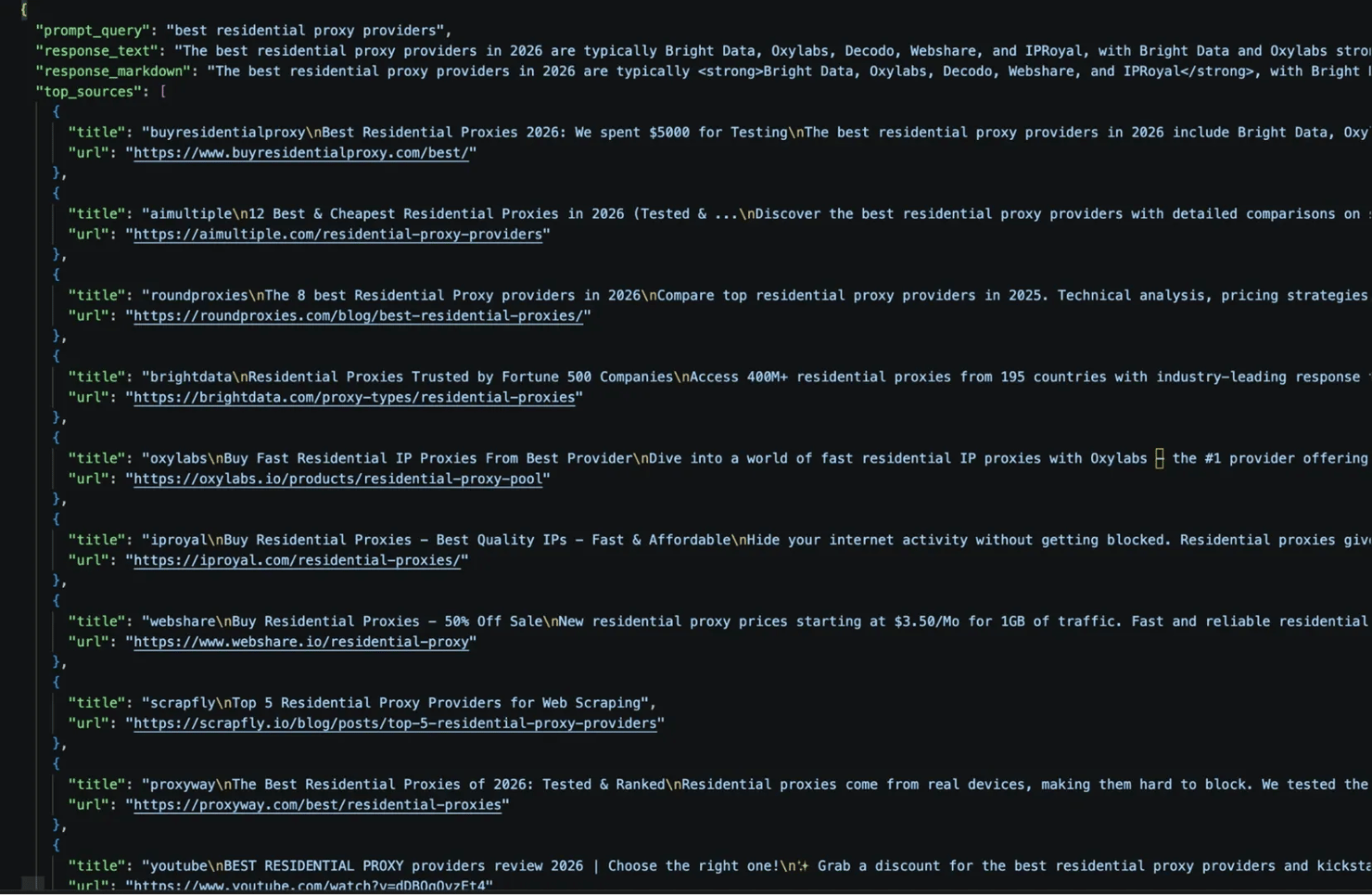
Here are the follow-up questions as well:
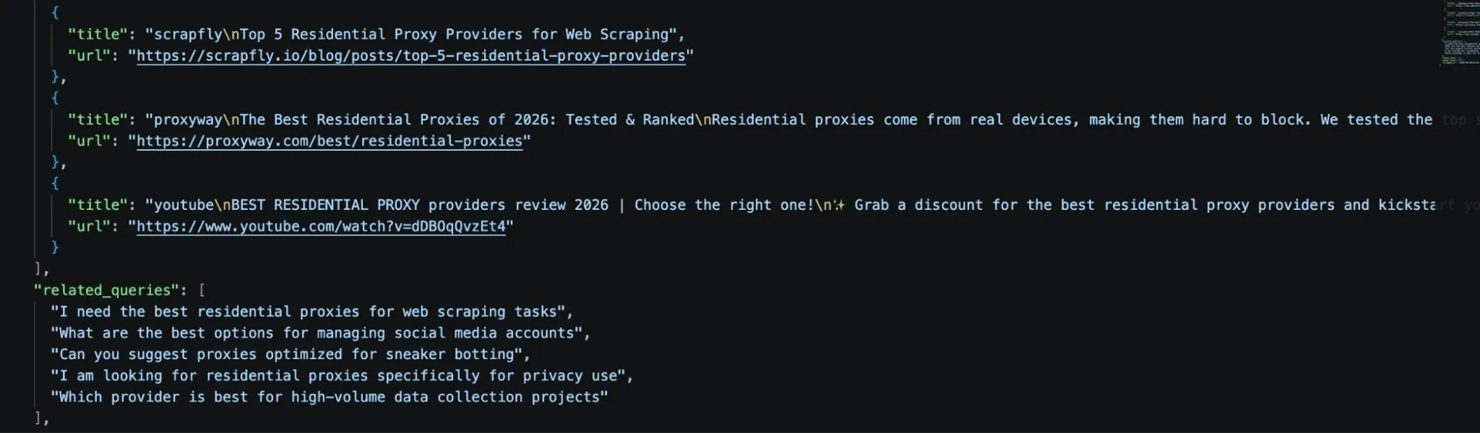
That's your structured Perplexity data in one clean JSON file. You can always scale this workflow with better proxy rotation or hand the infrastructure off to a managed Web Data API.
What to look for in a Perplexity scraper: features, performance, and pitfalls
Before you commit to a scraping setup, whether you're building or buying, it's worth checking a few things: the features on offer, how it performs, and the traps to watch out for.
1. JavaScript rendering
Because Perplexity loads and streams its responses entirely through JavaScript, any tool that only fetches raw HTML will return an empty shell. Your scraper needs to either run a browser automation framework like Playwright, or rely on a managed scraping solution that handles JavaScript rendering for you.
2. Geo-targeting
If you're monitoring how many times Perplexity mentions or cites your brand in a specific market, you need to send prompts from the right location to collect data that actually reflects that region. A good Perplexity scraper should support geo-targeting, backed by a large IP pool – in fact, the bigger, the better.
3. Structured parsing and output formats
A reliable scraper should return information in formats that are easy to analyze and process. JSON remains the most common choice, but Markdown output is most useful in AI workflows. Ideally, your scraper should support output formats that best fit your needs and tool stack.
4. Success rate and anti-bot handling
Perplexity uses modern web technologies and anti-bot measures that can make large-scale data extraction difficult. Check how your scraper handles detection, whether it rotates proxies, spoofs headers, or manages browser fingerprints. For a deeper look at how to stay undetected while scraping, you can check out our guide on web scraping without getting blocked.
5. Throughput and concurrency
Your scraper needs to be able to send requests concurrently and process responses in the thousands without failing. Go with scraping setups that have built-in support for queue management and large-scale exports so you can keep pulling data from Perplexity at any scale.
6. Maintenance requirements
Perplexity regularly updates its interface, and when it does, hard-coded selectors will break because there will be inconsistencies with the class names. You should build your scraper around resilient selectors and avoid relying on deeply nested class names whenever possible. You can also offload that maintenance to a managed API so you don’t have to patch your code every few weeks and you can spend more time actually analyzing the data you scraped.
Common pitfalls to avoid
Here are some of the most common issues you can run into when scraping Perplexity:
1. Capturing a half-streamed response. Perplexity renders responses token by token. So, if you scrape the DOM too early, you'll save incomplete data and won't even know it's incomplete. Always wait for a stable network signal before you start scraping.
2. Using fragile selectors. Perplexity uses obfuscated class names that can change anytime they deploy a new build. If you use those class names directly in your script, it'll likely break the moment Perplexity updates its UI. Lean on stable attributes like rel="noopener", data-pplx-citation-url, ARIA roles, and structural selectors wherever possible, rather than deeply nested class chains.
3. Getting blocked on datacenter proxies. Perplexity flags datacenter IPs very quickly, so if they keep blocking your requests, or you keep seeing empty responses, then you should check your proxy type. Rotating residential proxies will make your requests look like they're coming from real users, which is exactly what Perplexity's bot detection is looking for.
4. Missing citations. Cited sources sometimes load in a separate tab or panel that only renders after the main response has finished loading. If your scraper exits too early or doesn't wait for the full page to render, you'll miss those citations entirely. Make sure your wait logic accounts for all the content you actually need, not just the response text.
5. Triggering rate limits. Submitting the same prompt repeatedly in a short time window is one of the quickest ways to get rate-limited or blocked. Space out your requests, rotate your IPs, and avoid re-requesting prompts you've already collected. If CAPTCHAs start appearing, our guide on how to bypass CAPTCHAs will give you a walkthrough on how to get past them.
Pricing and cost structure
Cost is one of the first things you need to think about before you start scraping Perplexity. To determine your cost, you need to know how much data you actually need, how often you need it, and how much time you're willing to spend maintaining the scraper setup.
Browser automation scraping costs
Building your own Perplexity scraper gives you the most control, but it also comes with the most moving parts. If you choose the DIY route, your costs will come from:
- Proxy bandwidth
- Infrastructure
- Development and maintenance time
Residential proxies are usually billed per GB, so every prompt, page load, and retry will add to your bandwidth usage. As your scraping volume grows, those costs can add up faster than you might expect. You also pay with your engineering time. You’d have to write the scraper yourself, handle Perplexity's streamed responses, and constantly fix broken selectors whenever they update their UI. That's ongoing maintenance work, and it's time you'll keep putting in for as long as the scraper needs to run.
Official Sonar API costs
The Sonar API is Perplexity's official way to access its models programmatically. The pricing is straightforward, since you pay per request or per token depending on the model you use. It’s predictable, so you can estimate your potential costs upfront and scale without surprises.
However, Sonar API returns model outputs through the API layer. It’s not the same as scraping the public Perplexity interface, so if your project depends on collecting data exactly as it appears on the UI itself, this method might not be effective for that use case.
Managed scraping API costs
A managed web scraping API sits at the other end of the spectrum. Instead of paying for bandwidth or tokens, you pay per 1K successfully delivered results. Failed requests, retries, and blocked attempts don't count against you. You can go this route if you need consistent access to Perplexity data without having to maintain your own infrastructure.
What drives the cost of scraping Perplexity?
Regardless of which method you choose, here are some of the several factors that will always push your costs up:
- JavaScript rendering. Perplexity relies heavily on dynamic content, so rendering pages will consume more resources than scraping static HTML.
- Geo-targeting. Collecting results from multiple countries usually requires you to pay for proxies for different locations.
- Retries and blocked requests. Perplexity's anti-bot protection means a portion of requests will fail on the first attempt and need to be retried. Those retries will increase your scraper's bandwidth and processing time.
- Data volume. Managed APIs often become cheaper as you scale, while DIY setups usually get more expensive because you need more proxies and infrastructure.
Which option should you choose?
- It really comes down to your use case. If you're learning how to scrape websites, testing ideas, or just collecting a small amount of perplexity data, a DIY setup would work fine. If you need structured model responses through an official channel, the Sonar API is usually the most straightforward path for that use case. But if you need a more reliable scraper setup that can collect large volumes of data at scale, without you maintaining anything, then a managed solution, like a SERP Scraper API or Web Data API, is almost always the better long-term call.
Final thoughts
Perplexity is one of the most valuable, yet most technically demanding web apps you can scrape right now. The content you might want to pull from Perplexity is all rendered dynamically with JavaScript, and the anti-bot measures demand a strategic and methodical approach to scraping.
Realistically, you have 3 ways of scraping Perplexity, namely the official Sonar API, browser automation with Playwright, and using a managed web scraping API. Each has a clear use case, so choose a method, consider your scope and legality, and you should be good to go.
Reviewed by Churchill Doro.

Get Web Data API
Plug our Web Data API straight into your Perplexity scraper to access 125M+ IPs from 195+ locations with 99.99% success rates.
About the author

Mykolas Juodis
Head of Marketing
Mykolas is a seasoned digital marketing professional with over a decade of experience, currently leading Marketing department in the web data gathering industry. His extensive background in digital marketing, combined with his deep understanding of proxies and web scraping technologies, allows him to bridge the gap between technical solutions and practical business applications.
Connect with Mykolas via LinkedIn.
All information on Decodo Blog is provided on an as is basis and for informational purposes only. We make no representation and disclaim all liability with respect to your use of any information contained on Decodo Blog or any third-party websites that may belinked therein.