How to scrape eBay: Methods, Tools, and Best Practices for Data Extraction
eBay is the second-largest online marketplace in the US, and unlike traditional eCommerce platforms, it's an open marketplace where people auction cars, sell rare collectibles, and seal personal deals directly with buyers. That makes it one of the richest targets for web scraping and data extraction – you get access to auction bids, final sale prices, seller ratings, and historical records of what buyers actually paid, not just listed prices. In this guide, you'll learn how to scrape eBay with Python, covering the tools, methods, and best practices to extract data cleanly and at scale without getting blocked.

Justinas Tamasevicius
Last updated: Mar 30, 2026
23 min read

Why scrape eBay over other eCommerce platforms?
Scraping a platform like Amazon or Walmart gives you fixed product prices and standard retail listings. eBay's data is fundamentally different. It's a marketplace where individuals and businesses list everything from used electronics to fine art, often through auctions rather than fixed-price sales.
This means the data you extract is richer and more varied:
- Auction dynamics. Bid histories show real-time demand and what buyers were actually willing to pay, not just what sellers hoped to get.
- Broader product range. Used goods, one-of-a-kind items, bulk lots, and categories that don't exist on traditional retail platforms.
- Seller and buyer signals. Ratings, feedback history, and transaction volume give you insight into marketplace trust and activity patterns.
- True market pricing. Completed listings reveal what items actually sold for – far more useful for pricing intelligence than listed prices alone.
Setting up your eBay scraping environment
The first thing you need to do is set up a clean, working environment. Here's what you will need:
- Python 3.8 or newer
- A code editor like VSCode
- A terminal (command line)
- Good understanding of HTML and DOM elements
Step 1: Create a virtual environment
When working on scraping projects, it's best you keep your project dependencies separate from the rest of your system, so you need to create a virtual environment before you install anything. A virtual environment is a small, isolated workspace where you will store all the libraries you need to build your scraper.
Run this command in the terminal to create a virtual environment.
Then activate it in your project folder like this:
Step 2: Install necessary dependencies
Next, install all the necessary dependencies you will need for this scraping project. When scraping platforms like eBay, your scraper’s activity needs to look like that of a real browser.
Here are the core dependencies that will help you do that:
- playwright – loads web pages in a real browser, renders JavaScript, and lets you extract data directly from the DOM.
- pandas – helps you organize, clean, and export your scraped data into a CSV or JSON file.
Here's the command to install these dependencies in your project folder:
Other dependencies you can install include:
- requests – this will send HTTP requests to eBay's web pages so it looks like it's coming from a browser.
- beautifulsoup4 – this library parses HTML and XML documents and extracts data from them so it will help you find the specific data you want, like titles and prices from eBay's web pages.
- lxml – this will also help you process XML and HTML documents faster.
- fake-useragent – this rotates browser user-agent strings i.e. strings that represent your browser and device ID to make your request look like it’s coming from a real browser.
You can run this command to install these additional dependencies:
These other dependencies work well for static pages or lightweight scraping tasks. However, if you use them to scrape platforms like eBay, you might run into blocking issues or 503 errors like this more often than not.
![Terminal showing scraper log: [ERROR] No data extracted. Possible block or selector issue.](https://decodo.com/cdn-cgi/image/width=1480,quality=70,format=auto/https://images.decodo.com/how_to_web_scrape_ebay_1_png_ff59bd960c/how_to_web_scrape_ebay_1_png_ff59bd960c.webp)
So instead of trying to mimic a browser with headers and user agents, it’s more reliable to use a headless browser like Playwright, that loads the page like a real user and lets you extract the data directly.
If you're new to running Python from the terminal, feel free to check out Decodo's guide on how to run Python code in terminal before you proceed.
An easier way to scrape eBay
Building your own scraper works well for small projects if you're still learning or just practicing. However, when you start stepping in the big leagues of scraping large amounts of eBay data on production, then you will run into rate limiting(eBay limits that amount of requests you can send), your scraper might get blocked and eBay can change the page's HTML structure at any time. Instead of building and maintaining an entire web scraper yourself, you can just use a tool like Decodo's eCommerce Scraping API, that is powerful enough to handle your scraping endeavors efficiently and without all the headaches that come with scraping platforms like eBay.
With this API, you can send a request for a specific eBay page, and the service will return structured data from that page. So you don't have to manage proxies yourself anymore, or rotate browser identities, or even solve CAPTCHAs, the API handles all that.
Here are the steps you can take to start using the API in less than 5 minutes:
- Create an account by signing up with Google.
- Navigate to Web Scraping API, then click API Playground. You will be redirected to your dashboard.
- Inside the Playground, select the universal Web template, then paste the eBay URL you want to scrape.
- Choose a proxy for any country and choose your preferred language.
- You can enable/disable JavaScript rendering (for content that will render dynamically).
- Choose whatever output you want, whether raw HTML, Markdown or XHR.
- Then input the necessary parameters for that scraping action, you will see your results immediately in whatever output format you chose.
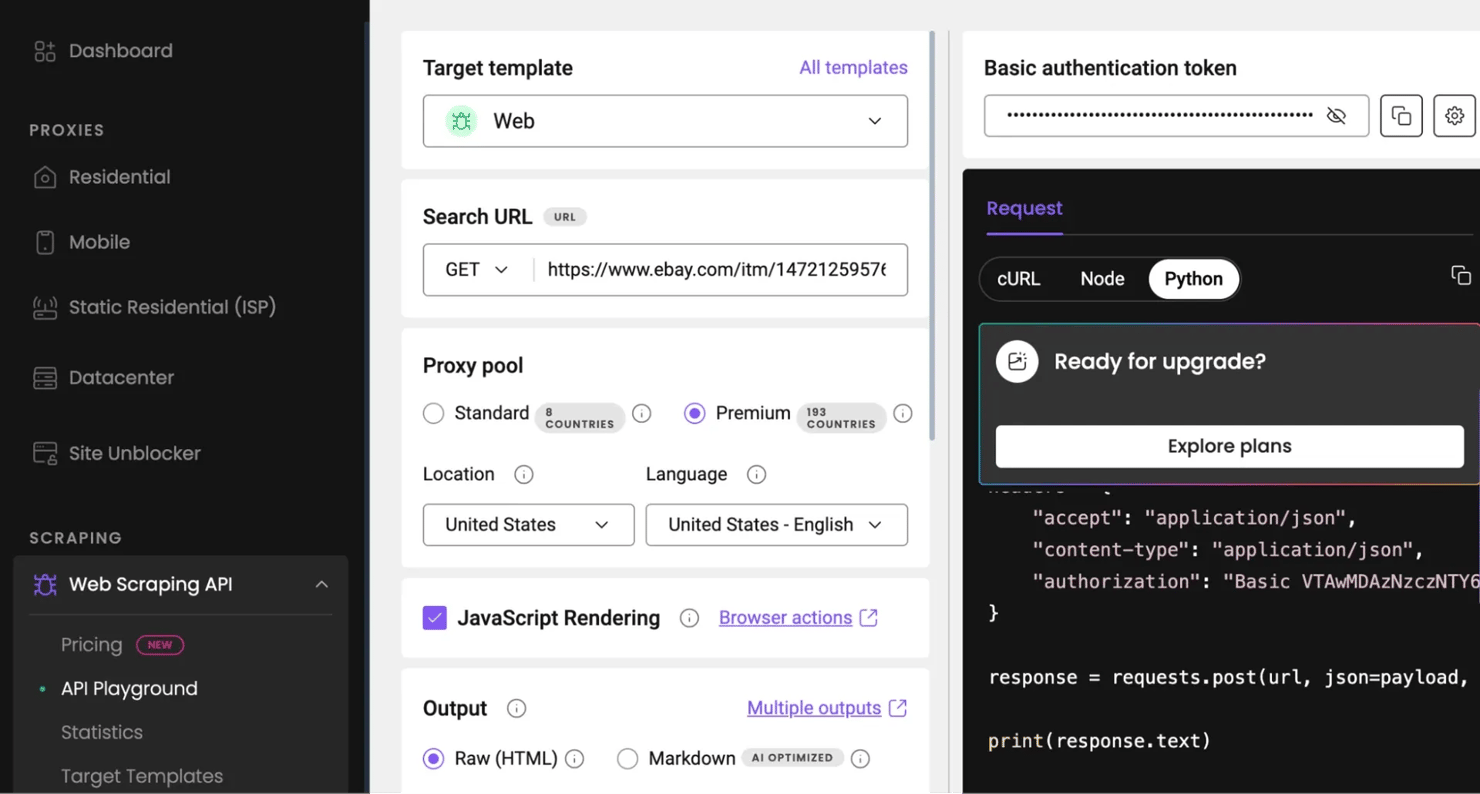
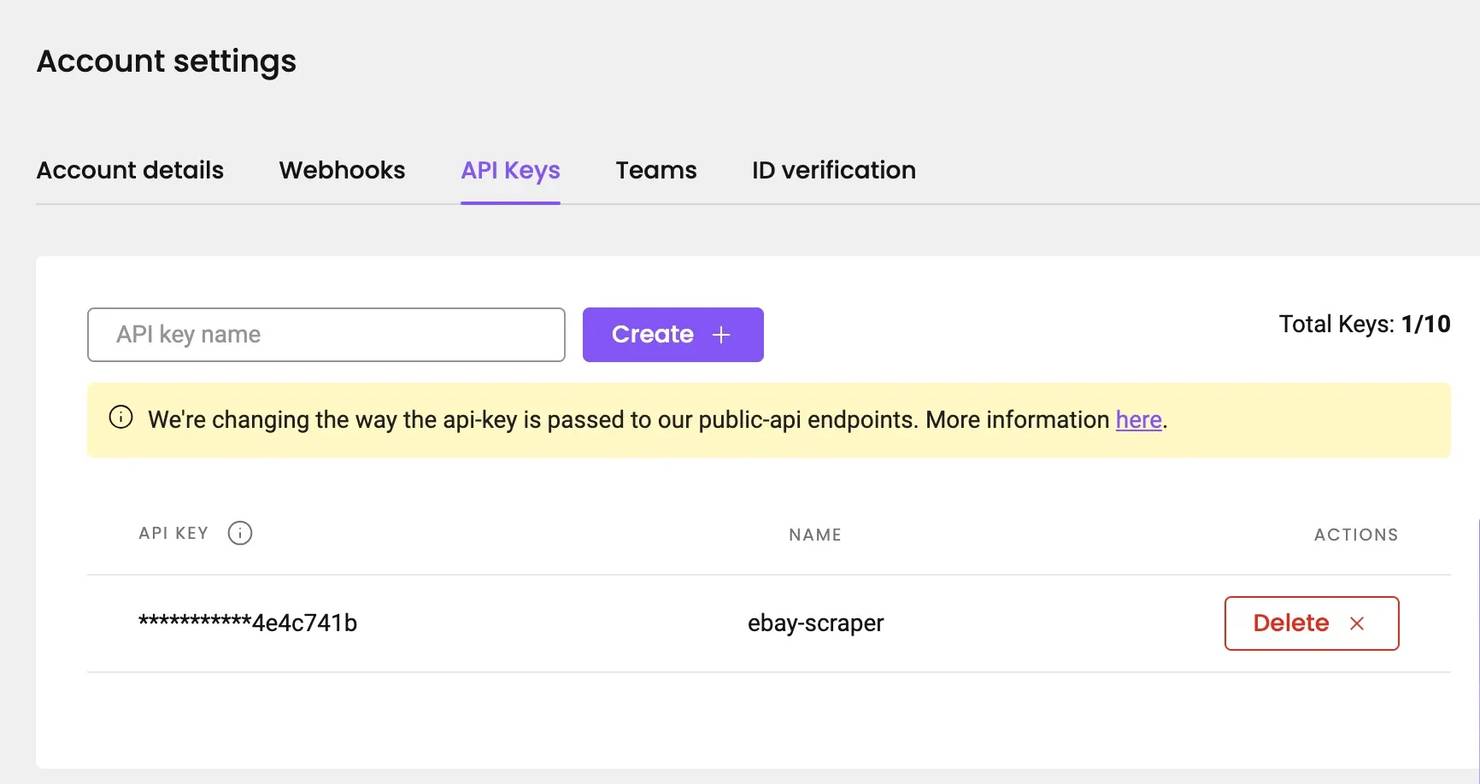
The Playground runs inside your Decodo dashboard, so you don't need an API key while testing requests there. However, when you want to run the same scraping request from your own script or application, you will need an API key to authenticate your requests and connect your scraper to Decodo.
To get an API key, simply navigate to settings, then API Keys to create an API key for your project, quickly copy it and save it somewhere.
For a broader introduction to web scraping with Python, see Decodo's Python web scraping guide.
Exploring eBay's page structure and data locations
Before you write any scraping code, you need to know where eBay actually stores its data. You need to inspect the page, identify where the information appears, and decide which methods and tools you'll use to effectively extract information.
eBay displays product information in different types of pages. Each page exposes data differently, either through visible HTML elements or through structured information embedded in JavaScript. Once you understand these patterns, you will be able to extract, parse, clean, and save data easily from eBay.
Types of pages you will find on eBay
There are 4 page types you'll likely interact with when scraping and each one contains a different type of product data.
1. Search results pages. These are usually the starting point for data extraction. This is the list view you get after you type a keyword into the search bar.
Here are the things you will find in a typical search results page on eBay:
- Product titles and links to their listings
- Product prices, delivery fees and discount percentages
- Current condition of the products and their images
- Seller username, feedback score and percentage.
- Auction bid prices (best offer), number of bids so far, and the number of people watching the auction.
- Where the product is located
- Filters you can use to find the exact specification for the product you're looking for
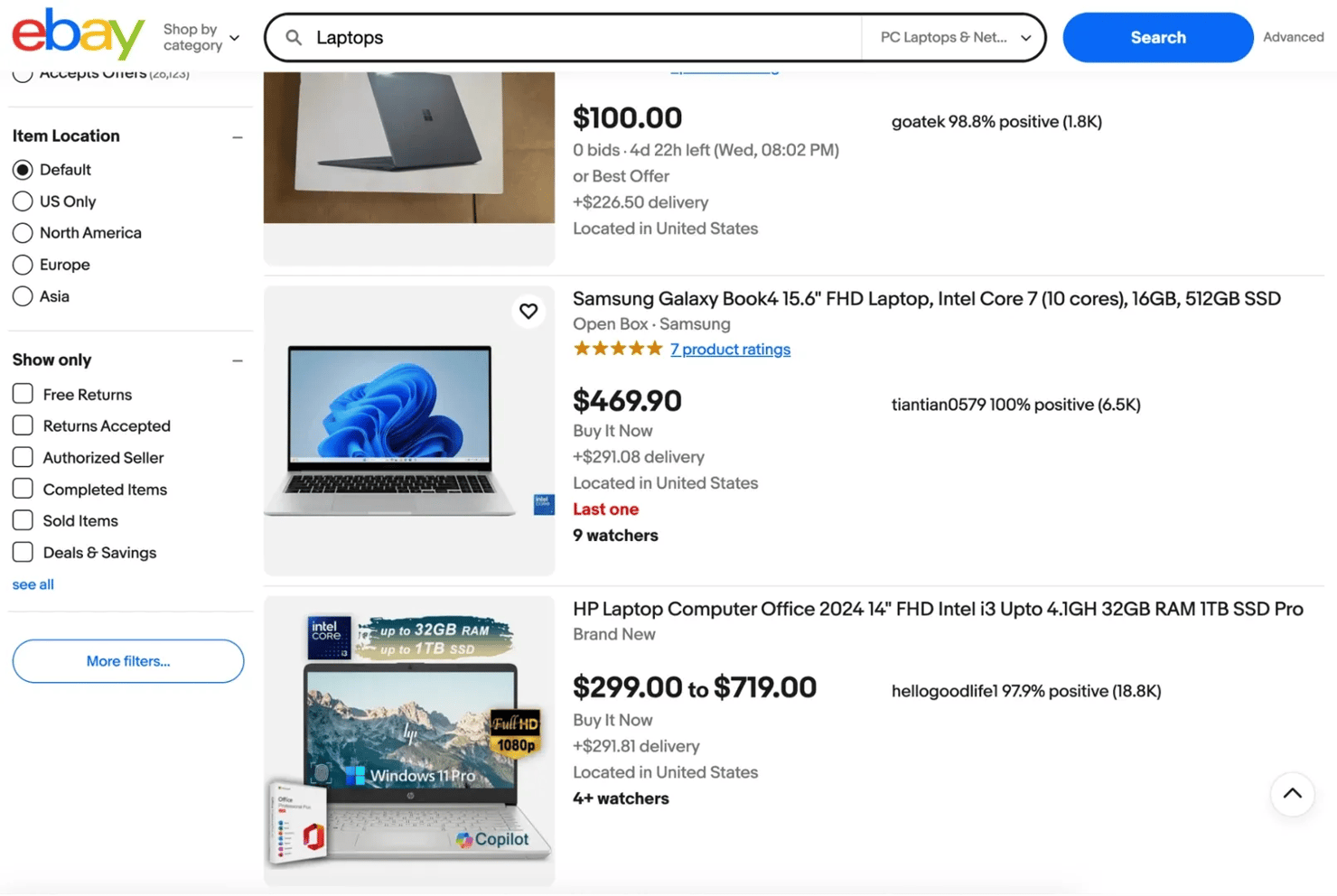
Your scraper would typically start collecting information from this page before moving deeper into individual listings to collect more detailed data.
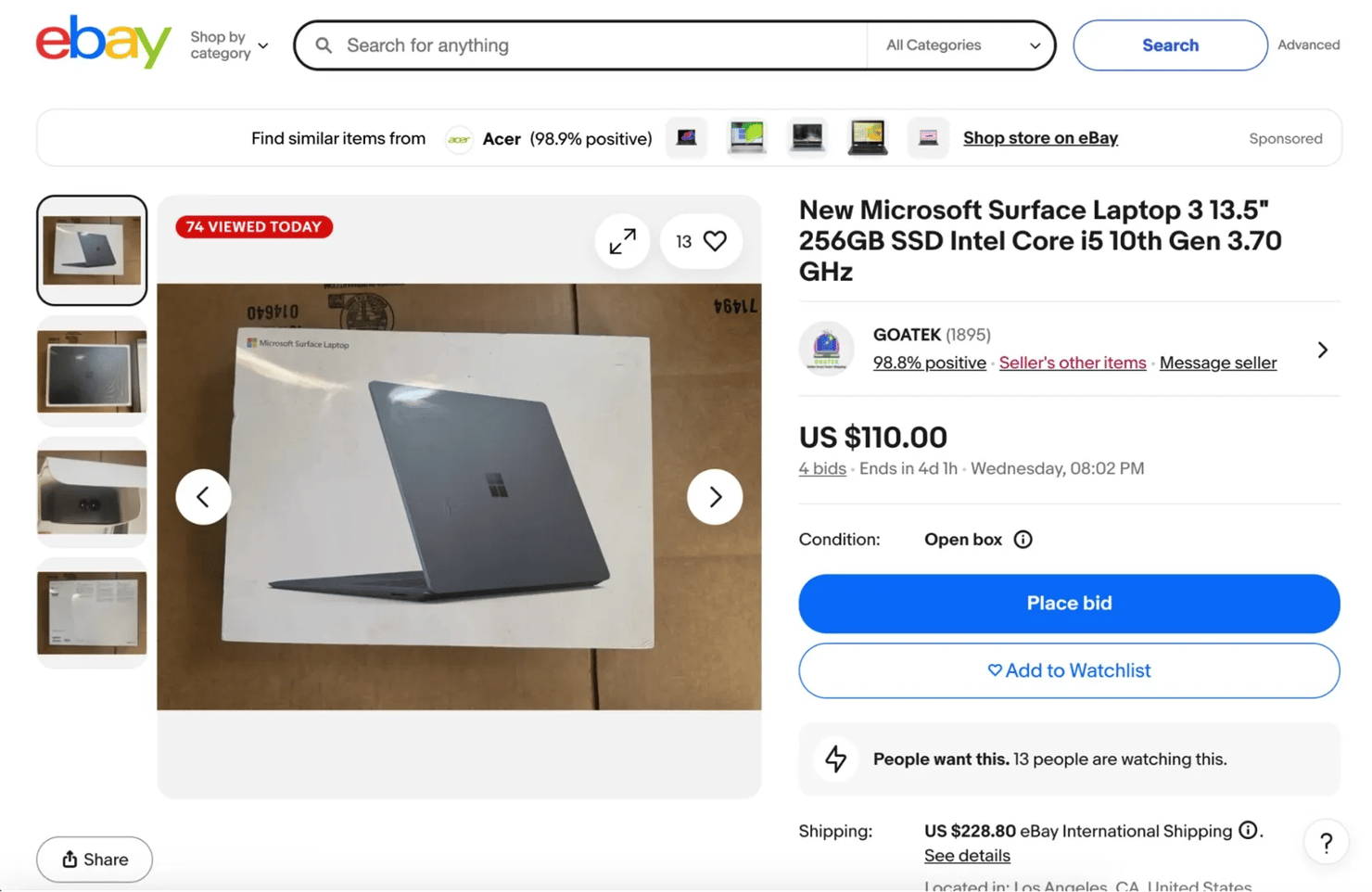
2. Product listing pages. A product listing page focuses on a single item and contains far more detailed information than a search page. They provide the structured product data that most scraping projects aim to collect.
Here are the things you can scrape from a product listing page on eBay:
- Full product title and description
- A carousel view of the product's images
- Product price and current condition
- Shipping information including the price of shipping, the import fees, an estimated delivery date and Payment options
- A link to eBay's refund policy
- Number of active offers made for the product and current bid prices
- An about seller section and the Feedback comments from previous customers
- The seller's positive feedback percentage and a link to message the seller
- A link to that seller's product page
- The seller's name and a link that directs you to the Seller's profile page
- Items specifics and product features
- The product reviews and ratings
- Related products
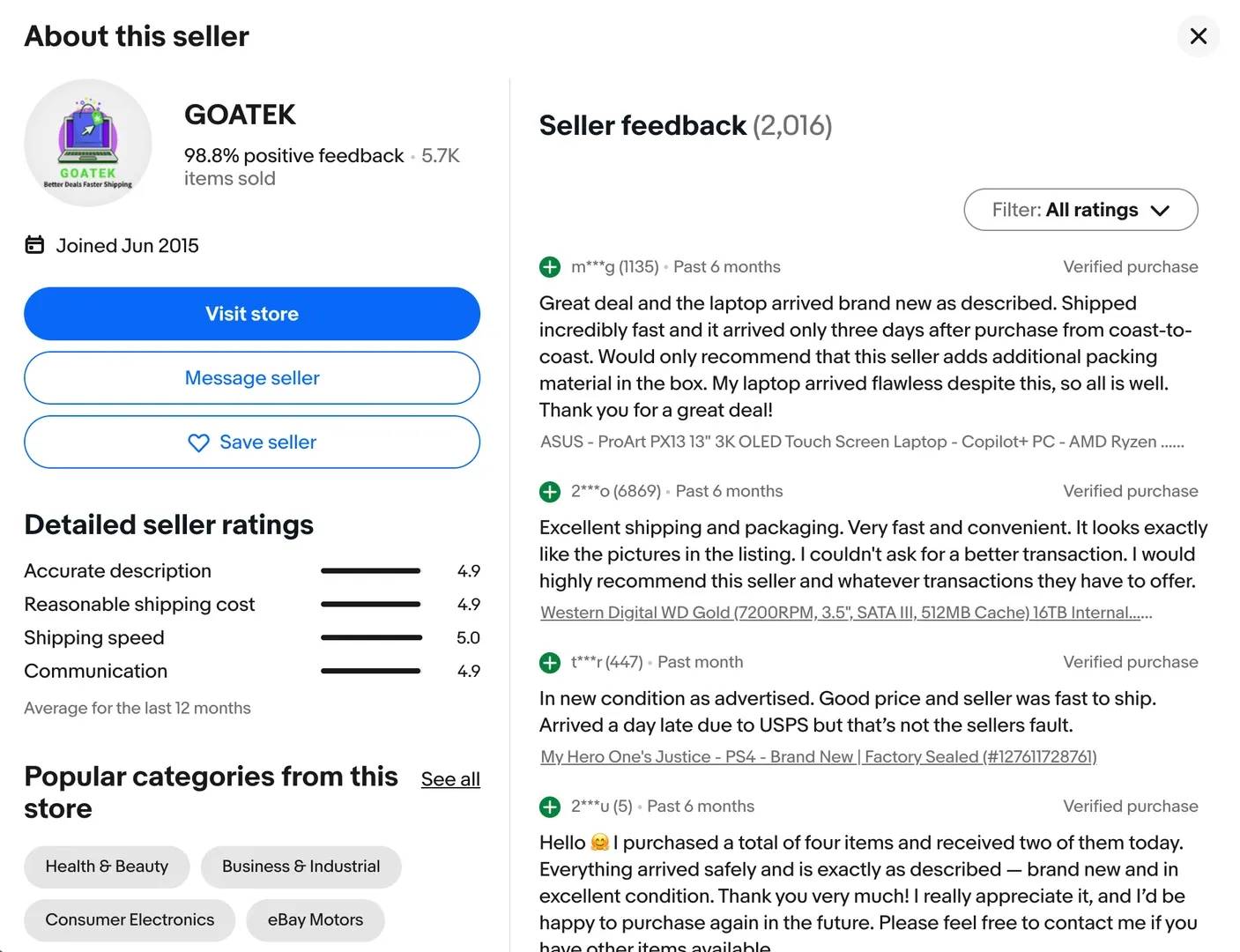
3. Seller profile pages. They contain information about the person or store selling the product. When you scrape seller profile pages you will get access to the following information:
- The seller's name and number of items they have sold
- Positive feedback percentage
- The date the seller joined eBay
- Popular categories from the seller's store
- The seller's ratings in detail
- Feedback comments from customers
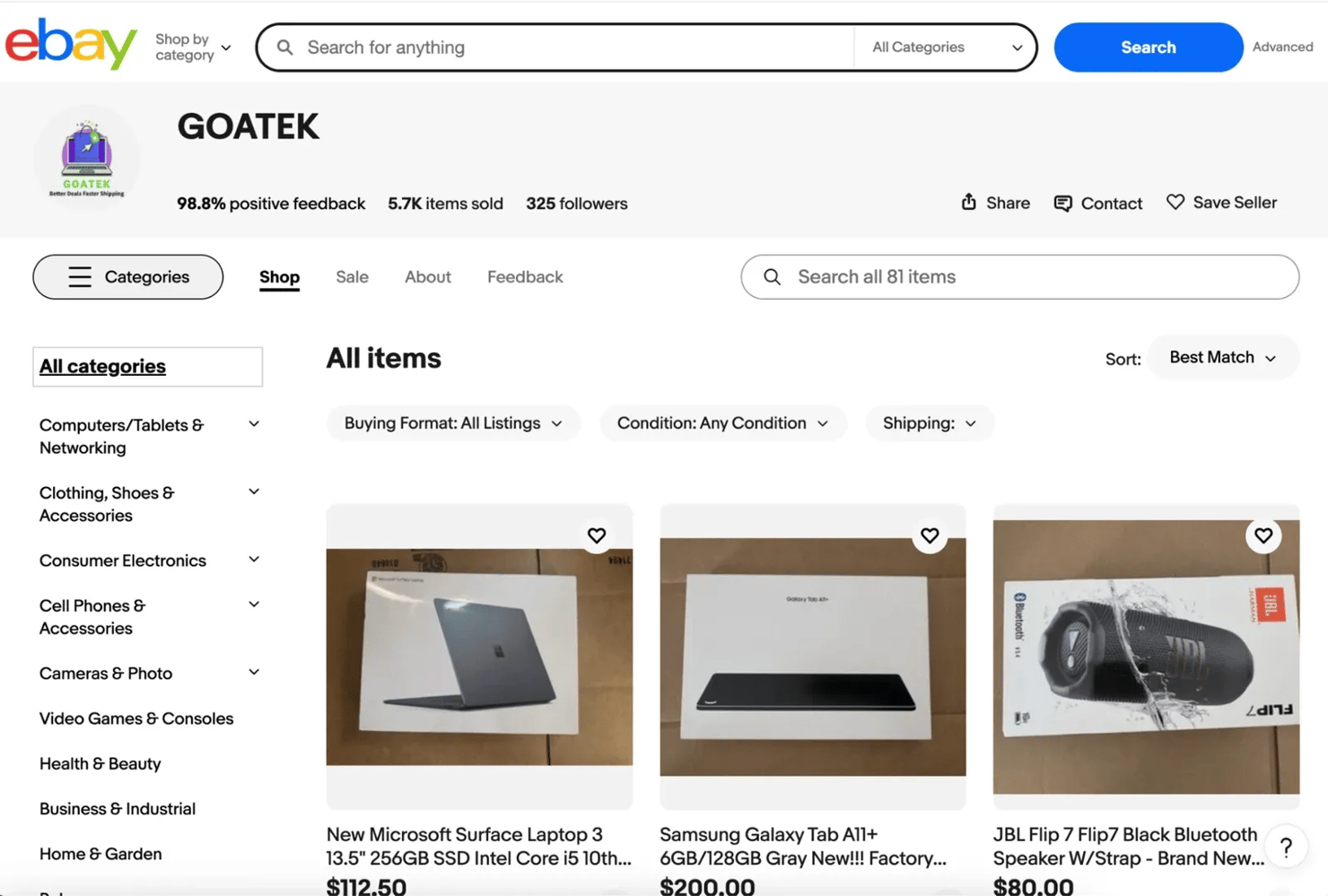
4. Seller store pages. The full storefront of a seller and all the products they currently have listed on eBay.
When you scrape seller store pages you can extract the following information:
- The product categories the seller offers in their store
- A listing of the seller's products with prices and item links
- Sorting and filtering options for browsing listings (price, newly listed, ending soonest, etc.)
- The seller's Sales, Feedback, and About sections
- Store details and general information about the seller's offerings
eBay URL structure and search parameters
When you search for something on eBay, it follows a predictable pattern and that makes it easier for you to write a python script that can generate queries to get the necessary data from eBay's pages.
This is how a typical eBay URL looks like:
That URL is the foundation of any eBay search scraper. Here's what the key parameters do:
- _nkw – defines the search keyword used to find listings (spaces get replaced with +)
- _sacat – defines the product category (0 means all categories)
For instance if you search for something like "iPhone 17" eBay will redirect you to a URL that looks like this:
When performing web scraping, you will mostly rely on the parameters that control the search query and pagination. These are the ones that will allow your python script to automatically generate multiple search URLs and collect data from eBay's pages.
Other parameters you can come across include:
- _sop – defines the sort order of the results (for example: best match, price low to high, newly listed).
- _pgn – defines the page number in the search results (used for pagination when scraping multiple pages)
- _ipg – defines how many listings appear per page (the default value is usually 60)
You can chain these together to get very precise scraping results. For instance if you want page 3 of iPhone 17 listings, sorted by lowest price + shipping then your URL will look like this:
Where does eBay store its data?
Once you inspect the page structure, you will notice that eBay stores information in different places, here they are:
1. Visible HTML DOM elements. The first place you will get data from eBay is the data that you find right there in the HTML structure of the page(what you can see). You can easily extract product titles, prices, shipping costs, and other things you can see on the page with common python web scraping techniques.
2. Dynamic content rendered by JavaScript. eBay loads some other data dynamically i.e. data that loads and renders after the initial DOM has loaded. When the page loads, JavaScript may call API endpoints that fetch those extra information like bid counts, real-time auction timers, listing metadata, product attributes and some other seller information.
3. Structured data embedded in the page source.
Sometimes, eBay stores useful data inside <script> tags or internal data objects, but you can’t always rely on it. In some listings, especially ones with product variants, that data won’t show up as a clean JSON object like MSKU anymore. You can only find them in the page source after the page has finished loading properly.

Scrape eBay undetected
Decodo's residential proxies route your requests through real IPs in 195+ locations so anti-bot systems treat your scraper like a regular visitor.
Scraping eBay search results
eBay's search results pages are where most scraping projects start, and for good reason too because one search query can surface hundreds of listings packed with product data. If you know how to work the URL structure, you can pull all of that data at scale and turn them into datasets you can analyze or integrate into your system.
Building the search URL
Before you start extracting anything, you need to construct the correct search URL. eBay uses predictable parameters in its search URLs that make it easier for you to automate queries.
We've established that a typical eBay search page URL looks like this:
That URL is your scraper's entry point. Every filter you apply in the browser i.e. category, condition, price range, or number of sold items, they all modify a parameter in that URL. Once you understand what each parameter does, you can write the code for a search query on eBay without having to open the browser at all.
Here are the key parameters to know:
- _nkw – your search keyword (spaces become +)
- _sacat – category ID (0 means all categories)
- _sop – sort order (e.g., 12 = best match, 15 = price + shipping: lowest first)
- _pgn – page number for pagination
- _ipg – listings per page (default is 60, max is 240)
- LH_Sold=1 – filter for sold/completed listings only
- LH_Complete=1 – show completed listings
- _udlo / _udhi – price range (low and high)
- LH_ItemCondition – filter by condition code
When building a search URL in Python, it's best you use the urllib.parse module to format the query correctly. This module automatically handles spaces and special characters in search terms. Try not to join strings together, because keywords can contain spaces or symbols that can break the URL.
Here's a Python representation:
In the code above, we build an encoded search URL for iPhone 17 Pro listings being sold on eBay. It automatically builds the search URL by combining the base eBay search page with specific filters like the keyword, page number, and sold or completed listings, so a scraper can easily request the correct results page.
Here's the result you should get:
Extracting listing data from search results
Once you have your URL, the next step is to extract relevant listing details from eBay’s search result pages.
Create a python file, you can name it ebay_scraper.py, then copy and paste the following python script in it:
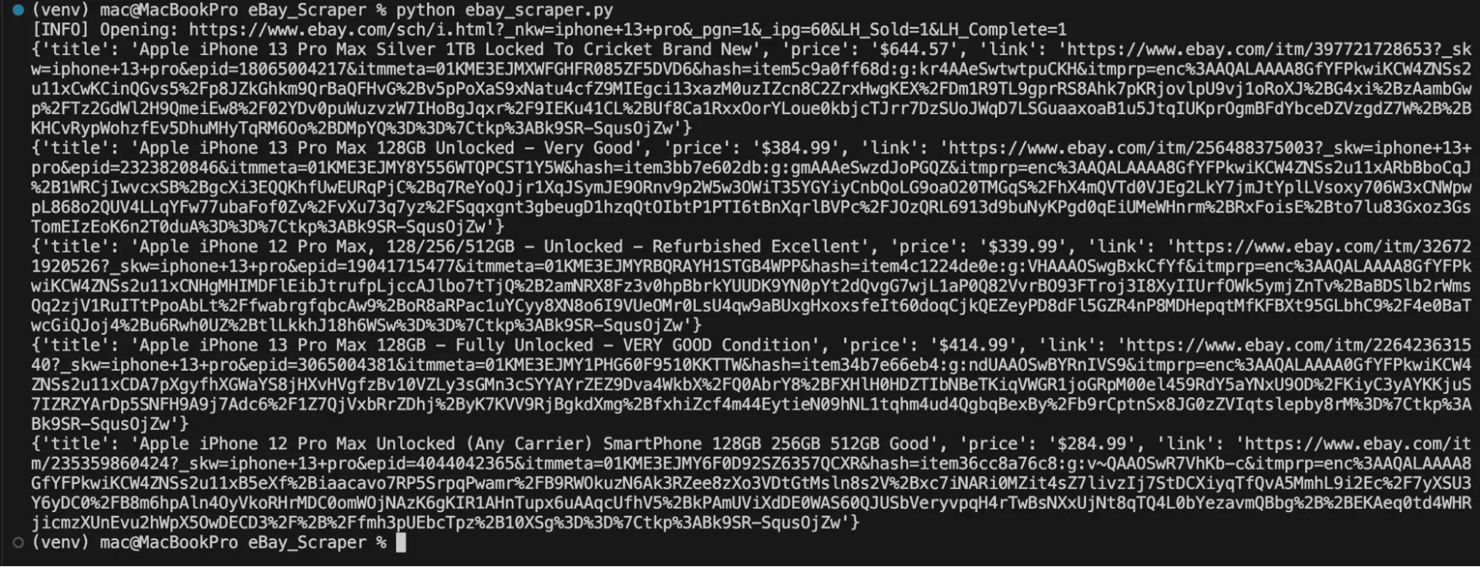
The Python script above opens the eBay search results page in a real browser session, waits for the listings to load, and extracts details like the title, price, and link from each product listing card. Make sure you have installed all the necessary dependencies before you run this script.
If you successfully scrape the listings you should get a result like this:
Handling pagination
An eBay search page can return up to 60 product listings, some even return more than that, up to thousands of pages. You need to handle each page systematically to collect the full dataset.
eBay organizes its search results into pages, and you can move between them by updating the _pgn parameter in the URL. When you see _pgn=1, it means you’re on the first page, _pgn=2 takes you to the second page, and it continues like that as you go further. Your scraper can loop through these pages one at a time, but make sure you set a limit so it doesn’t keep running indefinitely and draw eBay's attention.
Here’s a simple Python example that builds on the previous scraper and loops through multiple pages:
In the code above, we create a function that automatically goes through 3 search result pages. It stops when it reaches the end of the results and adds short random delays between requests to avoid getting limited and noticed by eBay.
If this script runs successfully, you should get a result like this:
![macOS Terminal running python ebay_scraper_pagination.py logging [INFO] Scraping pages 1-3 and Total listings collected: 180](https://decodo.com/cdn-cgi/image/width=1480,quality=70,format=auto/https://images.decodo.com/how_to_web_scrape_ebay_9_png_5048b046b7/how_to_web_scrape_ebay_9_png_5048b046b7.webp)
Extracting detailed data from eBay product pages
Once you collect the URLs from eBay search results, the next step is to start scraping individual product pages. Search pages usually expose only a small portion of the available information, but it's the product pages that you can get the complete dataset you are looking for.
Here are the different ways to do that:
Extracting products with one variant
Many listings on eBay sell a single product with no selectable variations i.e. buyers cannot choose a different size or color or version of that product. If you want to scrape these types of pages, you can inspect the page and check out elements, there you will see the class names that represent the necessary information you want to scrape.
For instance you can scrape the product title by targeting the <h1> tag with the class .x-item-title__mainTitle or extract a product's price by targeting a <div> with the class x-price-primary.
If you're not sure how to locate the selectors you need, open the product page in your browser and inspect the page's structure like this:
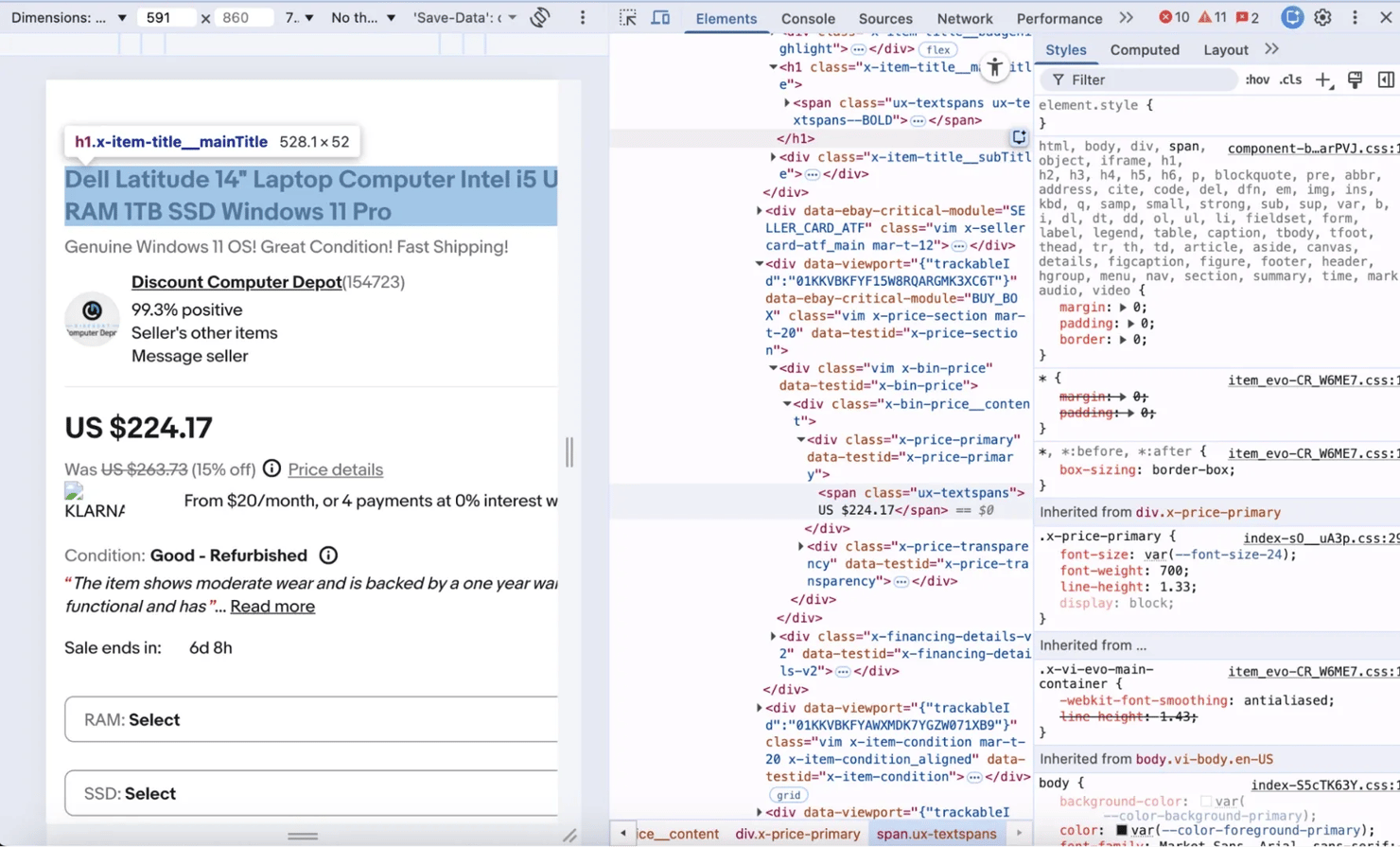
For a deeper look at how to find the right selectors in any web page, you can check out Decodo's guide on how to inspect elements.
Here's how to scrape a single variant product page with python:
The script above opens an eBay product page in a real browser, waits for the page to load, and extracts product information i.e. product title, price, condition, and item specifics with their class names.
If your script runs successfully, you should expect this type of result:

Extracting products with multiple variants
Multi-variant listings are where eBay's page structure can become more complex. Take an iPhone listing for instance, the same product can appear with multiple storage options (128GB, 256GB, 1TB), different colors, or different models. Each combination has its own price and availability status so eBay loads these values dynamically with JavaScript, meaning they don't load with the initial HTML.
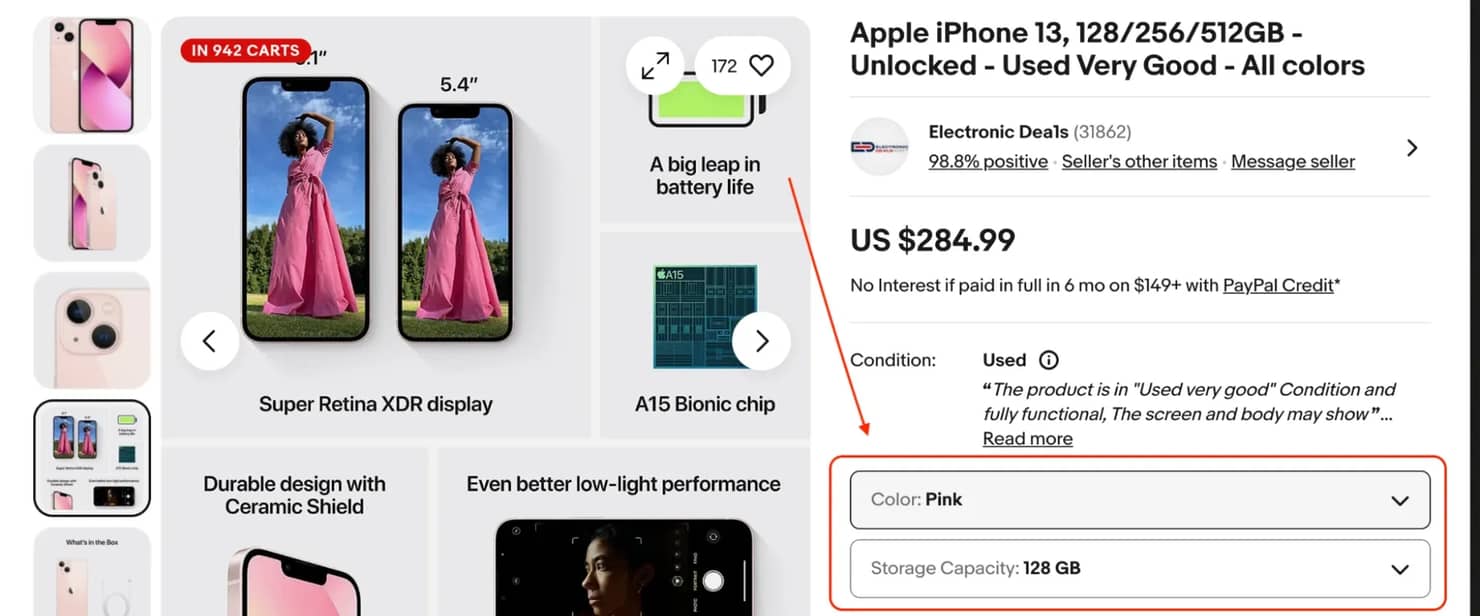
The variant data on eBay product pages doesn’t live in the visible HTML you get from a simple request. eBay renders it as interactive UI elements with class name listbox-button. The actual variant options only appear in the DOM after JavaScript finishes rendering.
If you inspect the page in your browser, you’ll find that the variant section is grouped inside a container like this:
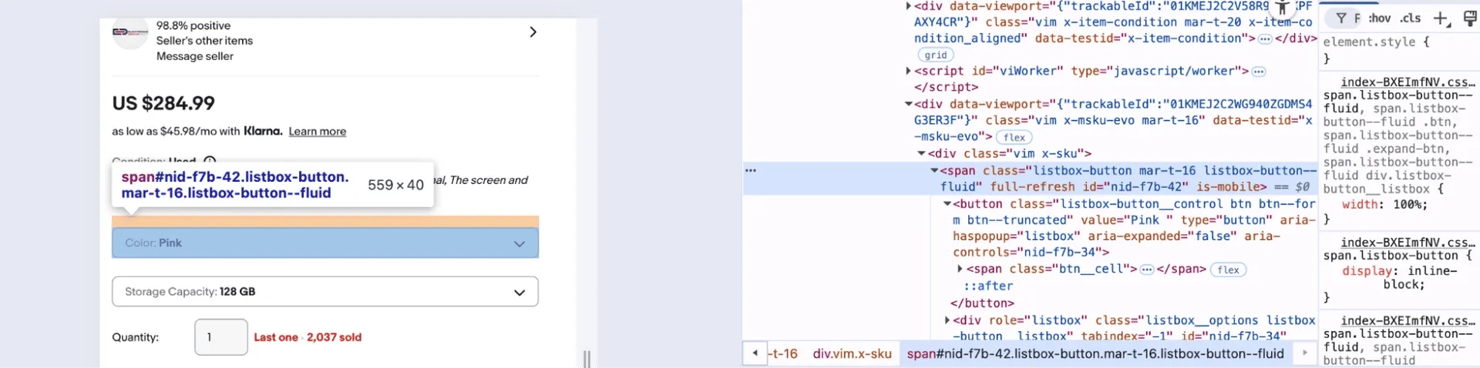
Once you locate it, the next step is to extract the product data with python like this:
This script above opens an eBay product page in a real browser using Playwright, waits for the page to fully load, and then parses the HTML with BeautifulSoup. It finds the variant section on the page and extracts each variant group, like color or storage or any other variant option available for that product .You'll then get the results back in JSON format
If your script runs successfully you should get a response like this:
![Terminal showing python ebay_product_listing_page_variant.py output with [INFO] Extracted variants: "variant_group":"Most popularMost popular","options":["Starlight","Midnight","Blue"]](https://decodo.com/cdn-cgi/image/width=1480,quality=70,format=auto/https://images.decodo.com/how_to_web_scrape_ebay_14_png_b421cc5c79/how_to_web_scrape_ebay_14_png_b421cc5c79.webp)
Extracting auction data
eBay still supports live auctions till today unlike many eCommerce platforms. These auction data introduce additional fields that do not appear in standard fixed-price listings.
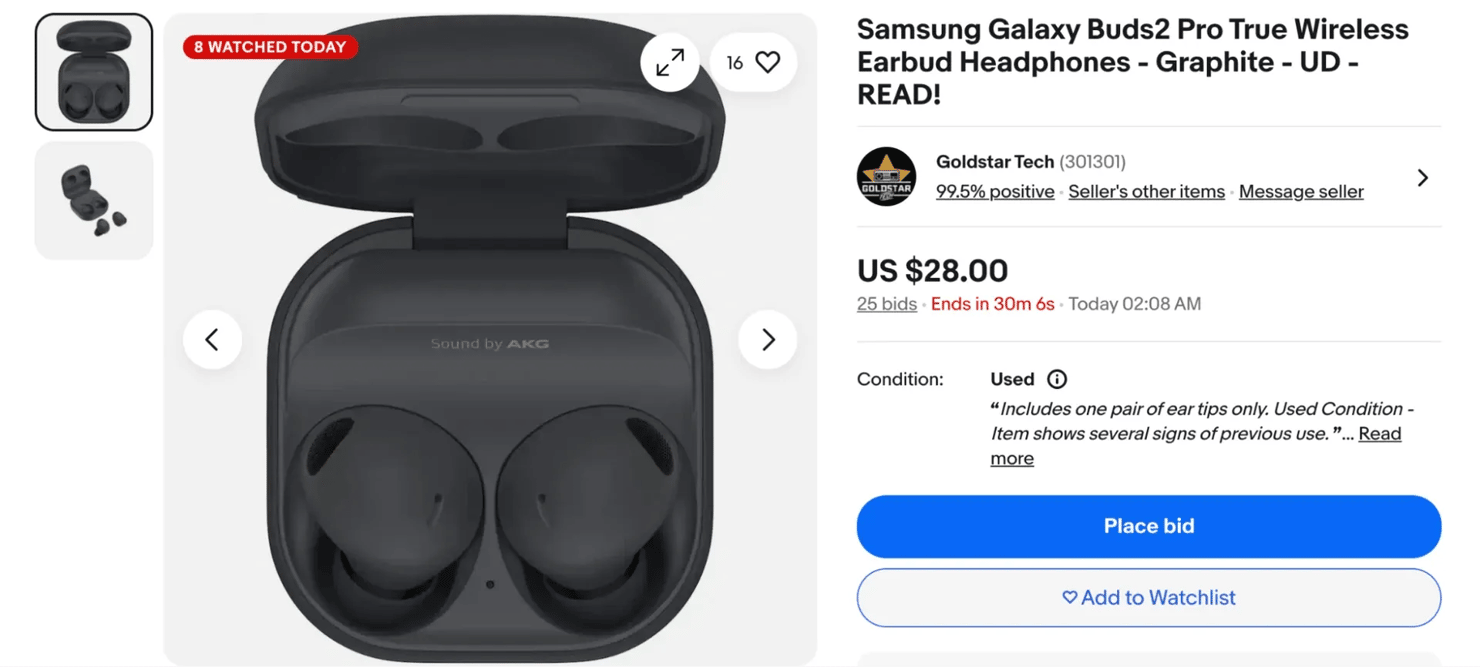
If you're trying to get data from online auctions on eBay, your scraper should be able to capture the following information:
- Current bid - the highest bid at the time of your scrape
- Starting price - what the seller set as the minimum opening bid
- Number of bids - shows how many times people have placed a bid on the item. A higher number usually means more buyers are interested, which can signal that the item is popular or in high demand.
- Bid history - this shows the progression of bids over time but you can't always access it if you're not logged in.
- Time remaining - eBay shows a countdown for how long the auction will last. Instead of saving it as a specific date and time, store it as a duration (for example, “2 hours left”). This makes the data easier to understand and keeps it accurate even if you check the listing later.
- Number of people watching - eBay often shows how many users have added the item to their watchlist. This number gives you a quick idea of how much interest the listing is getting, even if no one has placed a bid yet.
Here's a Python function that extracts all of these fields from an active auction listing:
The script above opens an eBay auction listing in a real browser with Playwright. It then extracts key auction details like the title, current bid, number of bids, time remaining, and watchers directly from the page. It then prints the collected data in a structured format.
If everything works, your output should look like this:

When scraping auction listings, you have to run your web scraping scripts at intervals because listings do change as soon as someone places a new bid. If you extract the data at interval, you will be able to see how the price changes and how bidding activity evolves before the auction ends.
Extracting seller information
Product listings also contain valuable seller metadata that can help you evaluate seller reputation, analyze marketplace activity, or monitor specific stores. A price from a seller with 5000 feedback ratings and 99.8% positive reviews doesn’t carry the same weight as one from a new account with very little history. A seller's feedback score, percentage, and history tell you a lot about the seller's reputation before you process or act on any pricing data.
Here's how to extract the key seller fields from an eBay product page:
In the code above, we create a function that looks through an eBay page's HTML and finds the seller information section. It then extracts the seller's name, feedback score, positive feedback percentage, seller's location, and the store link.
If your script runs successfully, you should get a response like this:

Note: eBay updates their HTML structure from time to time so if your selectors stop returning data, you have to go back to the inspect element tool and try to confirm that eBay hasn't changed the class names or moved the elements to another page. You need to set your scraper up in a way that it always returns logs as it scrapes, so you can quickly see when something breaks during the data extraction process. It is imperative you do this if you are to maintain your eBay web scraper and scale the amount of information you collect long term.
If you want to explore broader methods for scraping product pages for different online marketplaces like eBay, then check out Decodo's guide on how to scrape products from eCommerce sites.
Parsing, cleaning, and saving your eBay data
Once your scraper starts collecting data from eBay search results or eBay product pages, the output rarely looks ready for analysis. The data comes as raw HTML fragments, inconsistent values, and incomplete fields.
For example, a price might appear as a string like this $ 1,299.99, the shipping field might say “Free shipping” or “_+$8.50 shipping”_, and the condition field could show values like “Pre-Owned”, or “New”, or sometimes nothing at all.
Before you can use any of this information you need to process them, that means you need to parse the content, clean the values, and save the data in a structured format that your scraper can actually work with.
Data parsing and validation
Parsing is the step where your scraper reads HTML content and extracts specific elements from eBay's page structure. Libraries like beautifulSoup will help it identify titles, prices, seller ratings, and other product details embedded inside the page.
Web scrapers typically gather data from HTML elements, script tags, and metadata fields, some of these fields can go missing, prices can come back malformed, and dates can be altered as your scraper is gathering data from these sources. This is why you need to set it up to parse and validate the data before it gives you an output.
Here are some of the key steps you need to take to properly parse and validate the data you're scraping:
1. Handle missing fields. eBay can return some missing fields when you're extracting data from auctions, fixed-price listings, or collectibles. For example, an auction item may not have a “Buy It Now” price, or a seller might have forgotten to include their location in a product listing. Your scraper should be able to safely return “None” or a default value when information like this is missing.
In the code above we locate the price element then extract and clean the text value of the price with .strip()(a Python string method that removes any extra whitespace from the beginning and end of a string). Lastly, we set the code to return “None” if the price element doesn't exist instead of just throwing an error.
2. Validate price formats. Prices from eBay search results can show you listings in the form of ranges(e.g. $10.00 to $25.00), there are always currency symbols, and sometimes even discount deal labels. You need to set your scraper up to remove those symbols and labels so that it can extract the numeric price value and then process it.
Here's a simple Python representation:
In the code above we create a function called parse_price that extracts a numeric price from a raw text string. That function finds the first number in the price text, removes commas, converts it to a float, and returns it as a clean numeric value (or “None” if no price exists). So eBay can return a string like this "US $899.00” but the script will parse it to “899.00”.
3. Normalize condition descriptions. eBay can return condition labels like "Brand New", "New (Other)", "Pre-Owned", "For Parts or Not Working". If you're storing or comparing this data, you need to standardize them to consistent values that your scraper can work with:
The code above converts eBay's raw condition labels into cleaner, standardized values. The function then takes the incoming condition text, converts it to lowercase, removes extra spaces, and returns the mapped value, or the cleaned original. So eBay can return a string like " Brand NEW " but the script will parse it to something like “new” which is easier for your scraper to read.
4. Parse auction dates and times. The time an auction ends on eBay product pages appear as relative strings like “2d 14h left” or absolute timestamps depending on where you scrape them from. You need to convert these values to a Unix timestamp or ISO 8601 format with Python's datetime module if these values are to be of any use to you. The datetime module provides classes you can use to manipulate dates, times, and time intervals.
Here's a simple Python representation of this:
In the code above, we define a function that takes eBay's raw auction end-time string, convert it into a standardized UTC timestamp with Python's datetime module, and return it in ISO format. So eBay can return a time string like this "2024-07-18T19:45:00Z" the script will then parse it to something like this “2024-07-18T19:45:00+00:00.”
If you set your scraper up to properly parse the data it gets from eBay, your data's quality can significantly improve, and it will prevent downstream errors when you start extracting larger datasets. If you want a deeper dive into the concept of data parsing, you can check out Decodo's guide on What is data parsing.
Data cleaning techniques
After extracting and parsing information from eBay, the dataset still needs cleaning. eBay's HTML contains extra whitespace, HTML entities, and inconsistent formatting that'll make your data ugly and difficult to use if you leave it alone.
Here are a few ways you can clean the data you get from eBay:
1. Remove extra whitespace and HTML entities. Titles and descriptions usually contain encoded characters or formatting tags. If you set your scraper up to clean these values, fix the formatting and remove any unnecessary whitespace, then it will produce cleaner output.
Here's a Python representation:
In the code above, we import Python's built-in re module(a text processing module) and use re.sub() to replace multiple whitespace characters (like spaces, tabs, or newlines) with a single space and then remove any extra spaces at the beginning or end of the text. So if eBay returns a value like this “Apple iPhone 17 Pro Max \n” the script will clean it to this “Apple iPhone 17 Pro Max”.
2. Standardize category names. Some product categories on eBay may appear in different formats depending on filters or localization. Run them through .lower().strip(), build a lookup table, and normalize them to maintain consistent product data.
3. Convert prices to floats. After cleaning the raw string, always store prices as floats, not strings. Doing arithmetic, sorting, or filtering on a string price field is a headache you don't need. Make sure to use the parse_price() function from earlier to handle this and make it part of every price field you scrape.
4. Handle shipping values. Some listings display “Free shipping,” while others show the numeric costs. Your scraper needs to convert these values into a consistent format to prevent errors during aggregation.
Here's a sample Python representation of this:
In the code above, the parse_shipping function checks the shipping text from an eBay listing and converts it into a usable numeric value. It returns “0.0” if shipping is free, extracts the price as a number if a cost appears, and returns “None” when no valid shipping value is found.
Saving your eBay data
Once you have set up your scraper to clean and structure the data you get from eBay, the next thing you need to think about is how to store it. The right format depends on the amount of data you're extracting, your analysis workflow, and the tools you are using for downstream processing.
Here are a couple of formats you can use to save your data and when they work best.
1. JSON. It works well for nested structures like item specifics, variant details, shipping options, or seller feedback. It preserves the shape of your data exactly.
You can export JSON with the built-in json module in python like this:
In the code above, Python will open a file named ebay_listings.json and write the scraped results into it with the json module. The json.dump() function will then save the results data in a readable JSON format with indentation, while ensure_ascii=False will preserve special characters.
If you're scraping a larger dataset, you can use the JSON Lines format (.jsonl). In this format, each line will contain a single JSON object that will allow your scraper to process records one at a time instead of loading the entire file into memory.
JSON Lines is the better choice when you're continuously scraping thousands of listings. You can append to it safely without altering existing records.
2. CSV. Saving the data you get from eBay in CSV files is the right call for tabular data( i.e. flat listings where every record has the same fields) because it's easy to open CSV files in Excel or Google Sheets and they work well for one-off analyses.
You can use Python's pandas for clean CSV export. Here's how:
The code above will turn a nested field like this:
And turn them to two columns like this:
Which you can easily use in a spreadsheet like this:
specifics_brand
specifics_model
Apple
Airpods Pro
Database storage
When scraping large volumes of eBay product pages, your local file storage may not scale well. You will need to store all that data in a database, because only a database can handle continuous data collection and long-term storage efficiently.
Common databases you can choose from include:
1. SQLite for local development. SQLite requires no setup, it's built into Python and stores your database as a single file. You can use it while you're building and testing:
In the code above, we create a small SQLite database called ebay_data.db, build a table to store the eBay listing details, and then save the scraped results into it. Each record (title, price, seller, link, etc.) will then be added to the table.
2. PostgreSQL for production. PostgresSQL is a production-ready database that supports larger datasets. It handles concurrent writes, gives you proper indexing, and lets you run complex queries that SQLite cannot handle at scale.
Note: You can save your extracted data in JSON or CSV files when you're running a one-time scrape, sharing data with someone else, or feeding it directly into a data processing tool. You have to switch to a database the moment you start scraping larger datasets at scale. A database will also allow you to remove duplicate listings from multiple scraping runs, quickly search for specific records, and keep a long-term history of eBay listings.
If you want to explore more options you can use to save your scraped data, feel free to check out Decodo's guide on how to save your scraped data.
Handling eBay's anti-scraping defenses
When scraping eBay, sooner or later you will inevitably run into blocking mechanisms. eBay is a massive platform, and they actively monitor traffic patterns to stop automated web scraping that looks abusive or suspicious. When your scraper starts sending too many requests or its activities don't look like that of a normal browser session, eBay will notice and respond with its set defensive measures.
eBay runs a fairly aggressive anti-bot setup so if you're building a serious eBay scraper, you need to understand exactly what you're up against and how to work around each defense without getting your IP burned.
Here are some of the most common blocking scenarios you'll encounter while scraping ebay search results or ebay product pages:
- Rate limiting - When a scraper sends too many requests in a short time, eBay will slow down or temporarily block those requests. Your responses will slow down, you will start getting partial data and eventually your requests will start failing.
- IP blocking - If rate limiting doesn't stop you, eBay will flag your IP and either temporarily suspend it or permanently ban it. Datacenter IPs usually trigger these blocks faster than residential ones.
- CAPTCHAs - CAPTCHA challenges are eBay's way of forcing human verification. This step confirms that a real user is interacting with the site rather than an automated scraper. Once you hit one mid-scrape, your scraper will stop cold until you solve it or reroute.
- Bot detection - Bot detection through fingerprinting goes deeper than just your IP. eBay analyzes browser headers, TLS fingerprints, request patterns, and session behavior. If your scraper doesn't look like a real browser, it doesn't matter what IP you're using, you'll still get flagged.
- 403 Forbidden errors - An eBay server will throw a 403 Forbidden response when access is denied entirely for that IP. eBay's servers flat-out deny the request, no partial data, no redirect, just denied access. They do this to IPs that they suspect of automated scraping or fraud.
Why does eBay block scrapers?
eBay isn't blocking you because it's hostile to developers, it's blocking you for very specific business reasons that concern their operational policy.
Here are some of the reasons why eBay blocks scrapers:
1. Protecting the server load. When you run large-scale web scraping, you send a lot of requests to eBay's servers and if those requests come too fast, they can put pressure on the platform's infrastructure. To prevent this, eBay built several anti-scraping defenses designed to detect and block automated bots.
2. Preventing competitive data harvesting. Competitive data harvesting is a bigger concern. eBay holds billions of dollars worth of market pricing data so they cannot just let competitors or arbitrage tools collect it unchecked, because that will undermine the platform's value.
3. Preventing fraud. They can block you to prevent fraud too. A lot of automated traffic on eBay isn't scraping, it's account fraud, shill bidding, and people trying to manipulate inventories, so the same systems that catch fraud are the ones that catch scrapers.
4. Enforcing terms of service. eBay's terms of service outline acceptable platform usage so automated data extraction that violates those terms may trigger defensive responses.
How to get around eBay's defenses
You can use several practical methods to reduce blocking when building an ebay scraper. These strategies focus on making your scraper's traffic look like it's coming from a real user's browser.
Here are some of the steps you can take to do that:
1. Pace your requests properly. Sending requests too quickly is one of the fastest ways to get blocked. eBay's rate limiting triggers on request density, not total volume. Space your requests 1 - 3 seconds apart at minimum and you effectively cut your risk of detection. Make sure your scraper has random delays built in instead of fixed intervals, because a scraper that sends requests every 2.0 seconds on the dot looks just as robotic as one that fires every 0.1 seconds.
Here's a Python representation:
In this code, the function sends a request to a webpage and waits for a random delay between 1.5 and 4 seconds before continuing. This pause helps the scraper behave more like a real user and reduces the chance of triggering rate limiting or blocking.
Sometimes a request can fail because eBay temporarily blocks or slows down the connection. Instead of retrying immediately, you can wait a bit longer before sending another request. A common approach is called exponential backoff, where you set your scraper to wait longer after each failed attempt, for example, 2 seconds, then 4 seconds, then 8 seconds before trying again.
Here's a Python representation of exponential backoff:
In the code above, we request a web page several times if the first attempt fails. Each time it fails, it waits longer before retrying (2 seconds, then 4, then 8, and so on), so your scraper doesn't send too many requests too quickly.
2. Use Residential rotating proxies. eBay notices datacenter proxies pretty quickly and flags them almost immediately because they don't look like organic user traffic. Residential proxies (i.e. IPs assigned to real homes by ISPs) usually blend in better because they look like real consumer connections.
You need to rotate a fresh IP on every request or every session depending on how aggressive your scrape is. For regional eBay sites (eBay UK, eBay Germany, eBay Australia, etc), you must use proxies that match the respective locations. If you send UK eBay requests through a US IP, that IP will get blocked immediately.
Below is a simple Python example that sends a request through a proxy while collecting product data from ebay search results:
Decodo's residential proxies provide access to 115M+ ethically-sourced IPs, which helps distribute scraping traffic across many real connections. A large proxy pool reduces the chance of repeating the same IP addresses during data collection.
For more detail on integrating proxies into your Python requests setup, Decodo's guide on mastering Python Requests with proxies covers the patterns you need to know.
3. Set realistic headers and manage sessions. eBay checks your headers. A bare request with no user agent or missing browser headers sticks out to eBay immediately. Your scraper needs to look like Chrome or Firefox made the request.
Here is an example of headers that mimic a normal browser request:
These headers make your scraper look like a real browser while it collects product data from ebay web pages.
However, using the same User-Agent for every request can still create a pattern. eBay may detect this if thousands of requests use the exact same browser signature. A simple fix is to rotate the User-Agent with the fake-useragent library so your web scraper appears to come from different browsers.
Sessions also help your scraper behave more like a real user. When people browse eBay, their browser keeps cookies and session data between pages. Using a Python session allows your scraper to do the same, which helps requests look more natural.
Here's a simple example:
In the code above, we create a session that keeps the same connection while our scraper visits multiple ebay web pages. We also use the fake-useragent library to generate a random User-Agent that will make each request look like it comes from a real browser.
4. Handle dynamic content. Some information on eBay web pages only appears after the page runs JavaScript, so if you send a simple request and parse the page with Beautiful Soup, that data may not appear because it loads later in the browser. You need tools like Playwright or Selenium to open the page the same way a real browser would, allow JavaScript to run, and then let your eBay scraper collect the data.
Here's a simple Python representation of how to use Playwright:
In the code above, we launch a headless browser with Playwright, open the eBay product page, and allow the page to run its JavaScript before collecting the fully rendered HTML.
Using Decodo solutions for large-scale scraping
Managing proxies, solving CAPTCHAs, and avoiding detection can quickly get complex when scraping thousands of eBay pages. You can implement every technique we mentioned above, but eBay will still update their defense systems, they will still change their selector classnames, and you will still run out of proxies to rotate. This is the point where you need to forget about the infrastructure problem and get a smarter alternative that fits your use case.
Decodo provides several powered tool solutions that simplify these scraping challenges for you:
- Residential proxies - A network of 115M+ IPs that rotate automatically and reduce the risks of your scraper getting detected during web scraping.
- Site unblocker - A service designed to bypass common anti-bot protections, including CAPTCHA challenges. It helps your scraper solve CAPTCHAs, spoof browser fingerprints, emulate headers, and route intelligent requests so you can get clean HTML back without you managing any of it.
- eCommerce Scraping API - A managed, cloud based API that handles requests, rotates proxies, and parses your data. It handles anti-scraping defenses, renders JavaScript, and delivers structured product data i.e. titles, prices, seller info, auction details, directly in your pipeline.
These tools will allow your team to build scalable scraping workflows while still following responsible best practices for automated data collection.
For a full breakdown of every anti-scraping technique eBay and other platforms use, see Decodo's guide on anti-scraping techniques, as well as their tutorial on bypassing CAPTCHAs.
Automating and scaling your eBay scraper
A scraper that only runs when you manually send requests cannot be useful for ongoing data collection. If you're tracking price changes, monitoring new listings, or collecting product data for analysis, you need your eBay scraper to run on its own, reliably, consistently, and at whatever scale the project demands.
Scheduling your scraper to run automatically
The simplest way to automate scraping tasks involves scheduling your script to run at regular intervals. Instead of running your script by hand, you let the operating system handle it.
You can use cron jobs on Linux or Mac. A cron job runs your Python script at defined times, such as every hour or once per day.
On macOS or Linux, you can use a cron job. Open your crontab with:
Then add a line like this:
This runs your scraper every day at 8am. If you want it to run every hour, you can use this:
If you want to run your scraper at a higher frequency then you can use this command:
This runs your scraper every 15 minutes
On Windows, you can use Task Scheduler. Create a task, set your trigger (daily, hourly, or when it boots), and point it to your Python script.
How often you run your scraper depends on your use case. If you're tracking general price trends or new listings, once a day is enough. If you're monitoring auctions or fast-moving listings, you may need to run it hourly or even more frequently.
Automating data extraction with n8n
Scheduling gets your scraper running on a clock, but if you want to build a proper data pipeline, one that scrapes, transforms, stores, and alerts without you touching anything, then n8n is the tool to reach for.
n8n is a workflow automation platform that connects directly to Decodo's Web Scraping API. You can build visual pipelines where one node triggers the scrape, another processes the output, and a third pushes it to a database, spreadsheet, or messaging channel.
For example, an n8n workflow can help you:
- Trigger your scraper when new listings appear in eBay search results
- Send scraped product data to your storage database
- Run cleaning and parsing steps before exporting the final dataset
Check out Decodo's n8n web scraping automation guide for a step-by-step walkthrough of how to build one of these n8n pipelines.
Scaling your scraper with concurrent requests
Once your scraper works reliably on a single page, the next challenge is speed. Sequential requests, one page at a time, waiting for each to finish before starting the next is a slow process. For anything beyond a few hundred URLs, you need concurrency.
Since we're using Playwright, the right way to run concurrent requests is with Python's asyncio and Playwright's async API. Each browser context will run independently, so your scraper will be able to load multiple pages at the same time:
This code opens multiple eBay pages at the same time using Playwright and loads them like a real browser. It waits for the page to fully render, collects the HTML content from each page, and returns all the data so you can extract and parse the information you need.
If your scraper runs into temporary request failures, you can apply retry logic to make it more reliable and stable..
Scaling your scraper with distributed scraping
For very large data extraction projects, you may need to move beyond a single machine. When concurrent requests on a single machine aren't enough, you split the workload across multiple machines. Distributed scraping is how you go from thousands of pages to millions.
The standard approach looks like this:
- You keep a list of URLs to scrape in a queue (You can use Redis with Celery, or a cloud queue like AWS SQS)
- Multiple worker machines pull URLs from the queue
- Each worker processes pages independently
- Results are written to a central database, PostgreSQL, MongoDB, or a cloud data warehouse
This setup lets you scale easily, you can add more workers when the queue grows, and scale down when it shrinks. Cloud platforms like AWS, GCP, or DigitalOcean make deploying and managing those workers straightforward.
For the proxy layer, rotating residential IPs across distributed workers is non-negotiable. Each machine needs a fresh IP pool to work from, or you end up with all your workers getting blocked at the same time.
Monitoring and maintaining your scraper
Even a solid eBay scraper will break at some point. Websites change often, and even a small update in eBay's page structure can stop your data extraction from working.
To keep your web scraping setup stable, you need to monitor a few key things:
- Track which requests succeed and which fail
- Watch for sudden spikes in errors
- Check if your scraper starts missing or returning incomplete product data
One simple trick that saves time is don't hardcode your selectors. Store your CSS selectors or XPath in a separate config file so that when eBay updates their HTML, you only update one place instead of digging through your entire code.
Using Decodo's eCommerce Scraping API instead
There's a point where managing workers, queues, proxies, and selectors costs more time than it saves. Building and maintaining a distributed scraping system requires time, infrastructure, and ongoing maintenance, so if you want to focus on extracting data instead of having to manage your scraper all the time, then Decodo's eCommerce scraping API is the way to go.
The API handles the infrastructure side completely:
- It rotates proxies across 115M+ residential IPs and runs automatically.
- Solves CAPTCHAs without you having to write any code.
- Renders Javascript to handle dynamic content.
- You get structured data back directly, you don't need to parse it or select any HTML class name.
- Has built-in protection against eBay's anti-scraping defenses.
Instead of sending a raw request and wrestling with the DOM elements and their class names, you can just send one API call and get clean product data back.
Here's a simple python representation of how to extract product data from an eBay product page with the API:
Here's the kind of result you should expect back:
Ethical scraping practices
Ethical web scraping plays an important role in data extraction. It means going a step further to treat eBay's infrastructure, and the people whose data appear on it, with genuine respect.
You scrape a platform ethically when you focus on collecting information without harming the platform or its users.
Here's how to scrape data ethically:
- Stick to publicly available data. Only scrape what any user can see without logging in. Product listings, prices, seller ratings, item descriptions are all fine. Scraping private data like order histories, private messages, account dashboards should be off-limits.
- Check eBay's robots.txt file first. This file outlines which parts of the site eBay asks scrapers not to access. It's not legally binding, but ignoring it is a clear signal that you don't care about operating responsibly and that can get you blocked.
- Don't jam their servers. Rate limiting your requests isn't just about avoiding blocks, it's about not degrading the platform for actual users. If you set a 1 to 3 seconds delay between requests, with exponential backoff on errors, that will keep your data collection process from becoming someone else's problem.
- Only collect what you need. If you're tracking sneaker prices, you don't need seller addresses. Collect the minimum data required for your actual use case and nothing more.
Best practices for responsible eBay data collection
To keep your eBay web scraping project both legal and ethical, follow these 6 rules:
- Scrape at reasonable rates. Avoid sending too many requests that will trigger rate limiting or disrupt the platform.
- Collect only the data you need. Extracting a smaller amount of data will reduce the legal and technical risks.
- Don't store personal data longer than necessary. Avoid keeping seller information longer than necessary.
- Don't republish entire eBay datasets. Redistributing scraped data at scale can create additional legal exposure.
- Think carefully about commercial use. Selling scraped eBay data as a product is a different legal situation than using it for internal analysis.
- Consult a lawyer before scaling. If you're planning a large-scale, continuous data collection operation, get proper legal advice. This guide isn't a substitute for it.
For a deeper dive into the legal side of data scraping, check out Decodo's guide on whether web scraping is legal and how to check if a website allows scraping before you start any new project.
Final thoughts
eBay gives you data no other eCommerce platform can – auction histories, real sale prices, bid counts, and peer-to-peer market signals that are impossible to find on traditional retail sites. A well-built scraper can navigate search results, extract product details, and store clean data, but getting there means handling eBay's page structure, parsing logic, and anti-scraping defenses all at once.
The Python approach in this guide works well for smaller projects. For anything at scale, Decodo's eCommerce Scraping API takes over the heavy lifting – JavaScript rendering, proxy rotation, CAPTCHA bypassing, and structured output in your preferred format. Less fighting infrastructure, more working with data.
Reviewed by Churchill Doro

Let the API do the work
Send a URL, get clean data back. Decodo's Web Scraping API handles proxies, CAPTCHAs, and JavaScript rendering so you don't have to.
About the author

Justinas Tamasevicius
Director of Engineering
Justinas Tamaševičius is Director of Engineering with over two decades of expertise in software development. What started as a self-taught passion during his school years has evolved into a distinguished career spanning backend engineering, system architecture, and infrastructure development.
Connect with Justinas via LinkedIn.
All information on Decodo Blog is provided on an as is basis and for informational purposes only. We make no representation and disclaim all liability with respect to your use of any information contained on Decodo Blog or any third-party websites that may belinked therein.