How to Build a Grubhub Promo Offer Scraper in Python
A Grubhub promo offer scraper collects the discounts and perks attached to restaurants. Requesting a restaurant page won't return any of them: Grubhub answers with HTTP 200 and 13,631 bytes of JavaScript shell, byte-identical to the homepage. This guide reverse-engineers the 2 Grubhub endpoints that return the data, builds a working promo collector in Python, and measures what each one omits.

Justinas Tamasevicius
Last updated: Aug 28, 2026
17 min read
TL;DR
- Grubhub answers a restaurant-page request with the same 13,631-byte JavaScript shell it serves on the homepage, so HTML parsing returns 0 promo fields.
- The search listing returns structured offers, but only when the request carries includeOffers=true, and it caps at 1 offer per restaurant.
- A 2nd endpoint, /offers/availability/{id}, returns the full set plus loyalty campaigns and, in testing, needed only a bearer token.
- Delivery and pickup carry different promotions, so a delivery-only collector captured 31 of the 50 offers reachable from the same coordinates.
- Almost none of these are promo codes. code_text was null on 105 of 107 sampled offers, because the discount auto-applies at checkout.
What a Grubhub restaurant page actually returns
Start with the page a promo scraper would naturally open. Wholesome organic market on 2nd Ave in New York was carrying 4 discounts and a loyalty tile, 3 at a time behind a carousel:
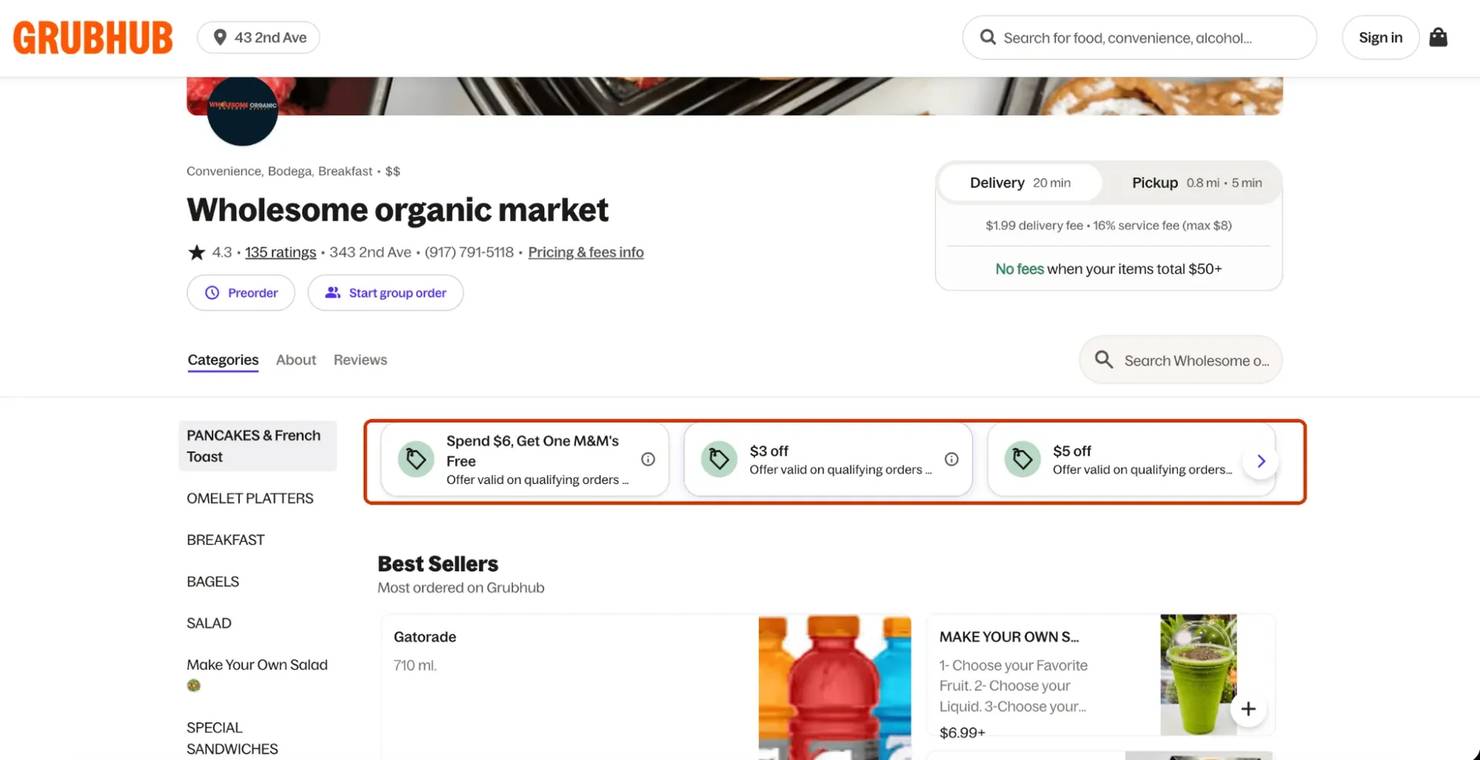
Clicking that arrow shows the rest, including a loyalty tile in a different color:

That page is a fair test of whether any of it reaches an HTTP client. The collector runs on 3 packages, and the schema contract later needs pydantic 2 rather than 1. Playwright appears once, for a measurement, and isn't needed to run any of this:
With that installed, a plain request to the restaurant page shows what actually comes back:
The status looks like success and the body contains nothing you asked for:
That 13,631-byte body is the same one the homepage returns. Viewing the source of the same URL shows why:
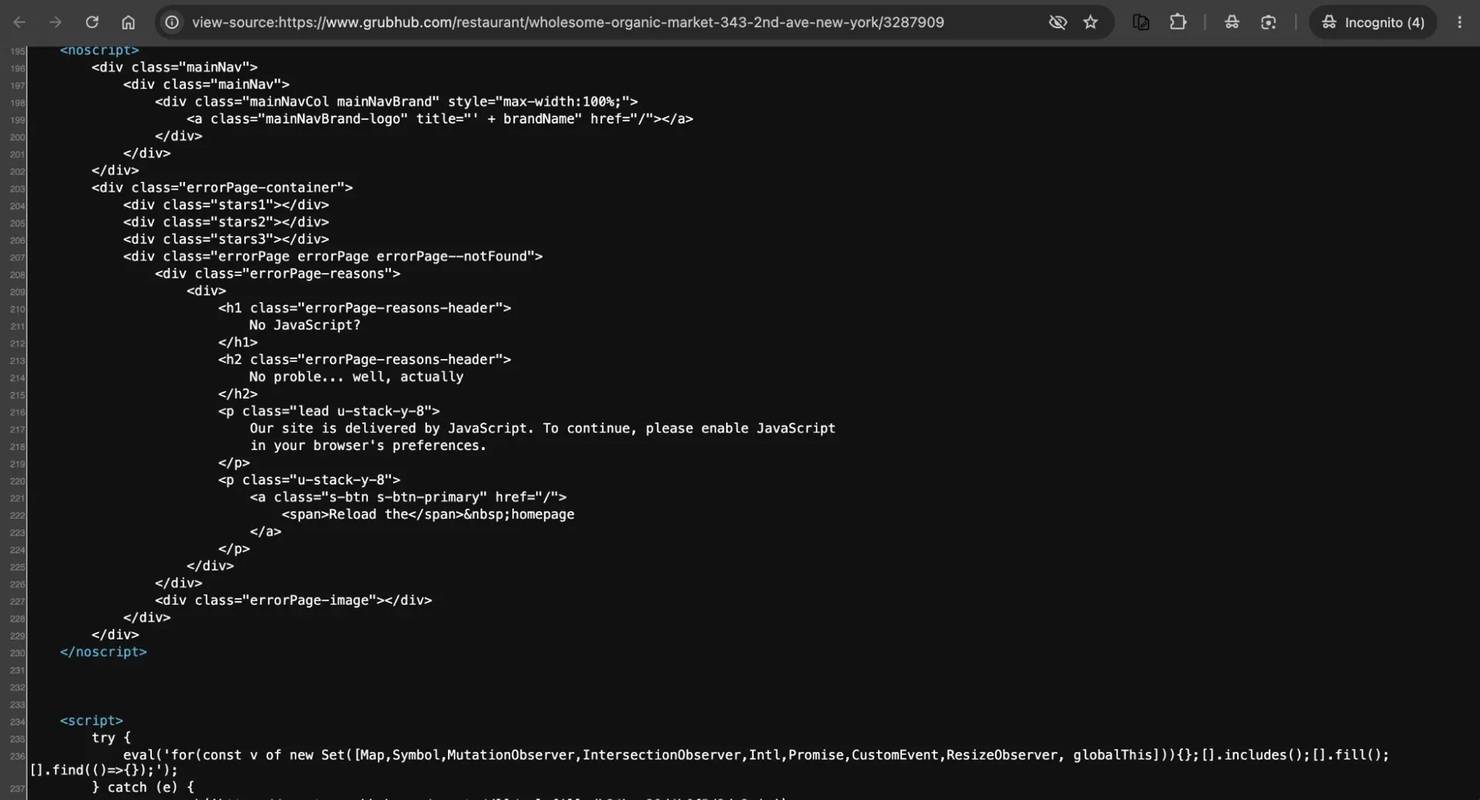
The body carries that <noscript> block and a feature-detection script. Searching it for the offer title, for off, for Perks and for promo returns 0 hits each.
This is client-side rendering: a headless browser does show the offers. Running the same URL through Playwright and waiting for the offer text itself, page.wait_for_selector("text=25% off"), rather than a fixed sleep, produced 356,154 characters in 8.0 seconds, with all 5 offer titles present as rendered text. That's 1 restaurant and 5 strings to parse, while the endpoints the page itself calls return the same offers already structured.
Where the offer data lives
Reverse-engineering this starts with watching what the Grubhub web app itself does: it authenticates anonymously, then reads restaurants from a JSON API on api-gtm.grubhub.com. Discovery takes 2 calls. The 1st exchanges the web client's public identifier for a bearer token:
That returns a bearer token under session_handle.access_token, with no login and no API key. Older write-ups pass the identifier beta_UEUvbhDCFm7Ba8VjFQdQ8LT1FiA, which has since been rotated out and now returns 401 {"message":"Invalid client_id"}. Expect the current client_id to rotate too, which is why the code below reuses that same dead value as a placeholder rather than a live one.
Reading it from the HTML won't work either: the string appears nowhere in those 13,631 bytes. Extract your own from the traffic instead. Open DevTools → Network, reload any Grubhub page while the panel is recording, find the POST to /auth/anon in the request list, and read client_id from its Payload tab.
The 2nd call is the listing, and it takes latitude and longitude. Offers arrive only if you ask for them:
Whether the response carries any offers at all depends on includeOffers. Across 10 requests that differed in nothing else, omitting it, setting it false, setting it yes, and passing an invented includeDeals=true all returned the same 247,775-byte body with 0 offers, while true returned 265,864 bytes and 13 restaurants carrying offers. A wrong value is silently discarded, so the failure looks exactly like a market with no promotions.
The token call ran a median of 0.54 seconds over 5 runs and the listing 0.81 seconds.
Reading an offer object
value carries a different unit depending on type, so a collector that divides every amount by 100 converts "20% off" into a 20-cent discount. Here’s one entry from the search listing's available_offers:
Money is in cents throughout. These are the 5 types Grubhub uses, and whatever ratio your own market carries them in, the contract below has to handle all 5. An earlier, standalone census of 465 restaurants – distinct from the collector run covered later – returned 661 offers across 5 types:
amount.type
Share of 661 offers
What value holds
What amount_maximum holds
FLAT
84.3%
The discount in cents, so 1000 means $10
Null
MENU_ITEM
10.0%
Always 0
The free item's worth in cents, or absent
PERCENTAGE
4.8%
The percentage, so 20 means 20%
The dollar cap, in cents
UNKNOWN
0.8%
A percentage, despite the label
The dollar cap, in cents
DELIVERY
0.2%
Always 0
The cap on the waived delivery fee, in cents
That "or absent" on the MENU_ITEM row is easy to miss, and it's cheap to check on any free-item or BOGO offer you pull: look for amount_maximum and read legal_text for a dollar figure. In a sample of 29 such offers, 13 carried neither. Their cash worth appears nowhere in the payload, so reading the field as a number writes a null that looks like a collection failure. The full collector run confirms it across more records: 26 of the 67 free-item rows across 2 markets carry no published worth.
Reading each type on its own terms fixes it:
Passing {"type": "PERCENTAGE", "value": 20} now returns ("percent_off", 20), and the storage layer builds on it.
Almost no offer carries a promo code
In a separate 107-offer sample, code_text was null on 105, and their own legal_text explains why with wording such as "offer will auto-apply at checkout". The 2 that did carry a code were also the only 2 flagged is_perk: true, both with entitlement_type: PROMO_CODE. A "promo code scraper" would have captured roughly 2% of that sample. What Grubhub calls a promo offer is overwhelmingly a discount that auto-applies at checkout, so build for offer terms and not for codes.
The listing returns a sample, and the endpoint returns the set
Every result also carries total_offers_count, and it's regularly larger than the list beside it. Parameters like tab=offers, offersLimit=10, maxOffers=10 and includeAllOffers=true were all tried against that gap, and each returned the same 267,644-byte body and the same hard ceiling of 1 offer per restaurant, which rules out getting past the cap by guessing before it costs you the time.
The restaurant detail endpoint was tested as the next candidate, across 3 parameter sets – including the exact query the web app itself sends, whose response is a 530,857-byte body carrying the full menu – and for a restaurant the listing flagged as having offers, it returned available_offers: [] every time: dead across everything tried here, before it costs you a wasted integration.
Watching a restaurant page load answers it. Filter the Network panel to api-gtm and the page's own API calls are all there, menu, ratings, geocode, and one more:
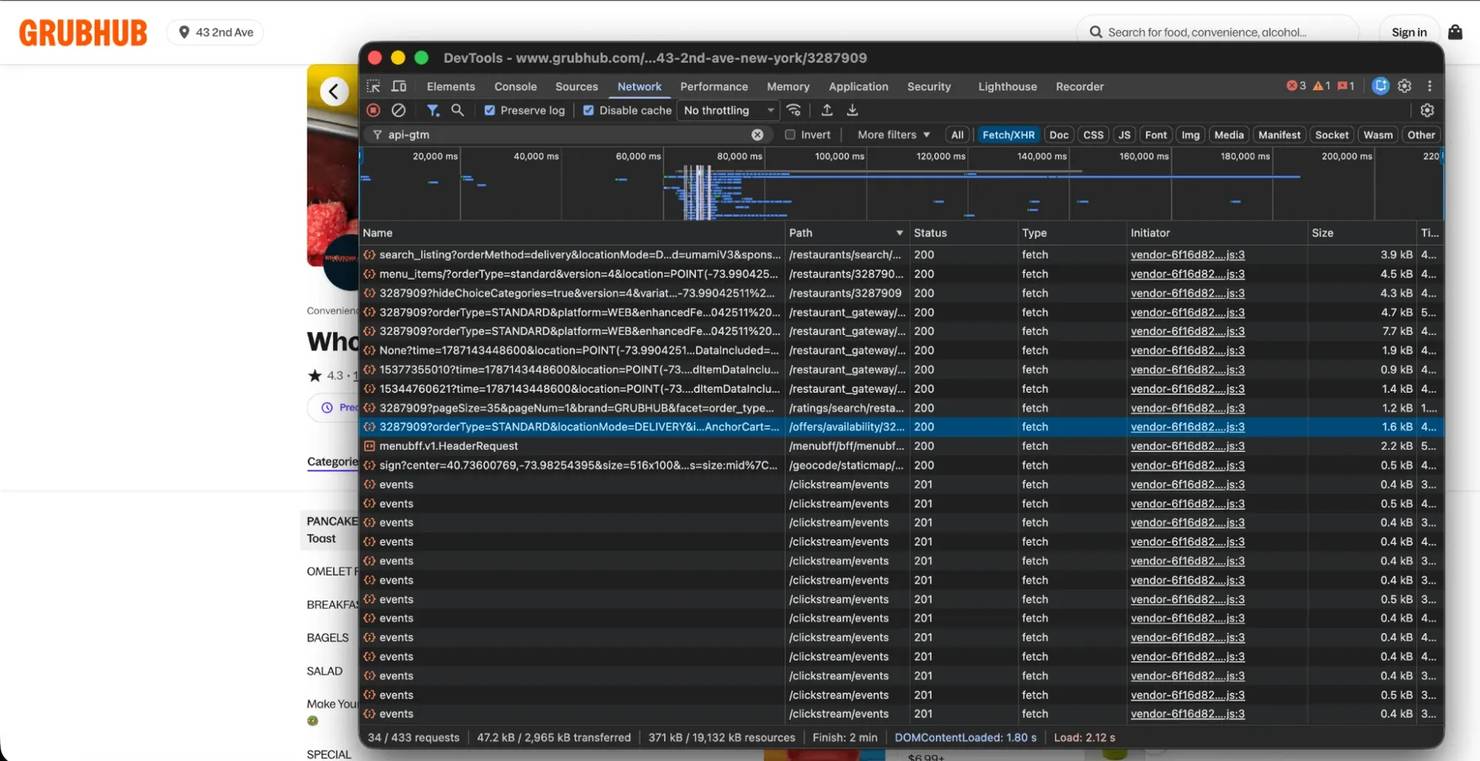
The full path is short enough to type:
That call returned all 5 records for the restaurant whose listing row carried 1. The page carries the same 5, 3 at a time behind a carousel arrow, so a human clicking through sees everything the listing didn't return. It took the bearer token and nothing else in testing, with no cookies and no coordinates, so a restaurant you already know can be polled without any search:
That restaurant returned 4 discounts and a loyalty campaign where the listing returned 1 record. Run it yourself and the count can differ, because that churn is the whole point of collecting: the same restaurant had dropped to 3 discounts a few hours later. Across the 91 restaurants from 3 city listings, the endpoint answered 200 every time at a median of 0.41 seconds:
Source
Offers
Loyalty campaigns
Records
search_listing
21
0
21
/offers/availability
29
12
41
total_offers_count is a flag, not a quantity
The count field decoded exactly on 91 of 91 restaurants above: total_offers_count equaled the number of offers plus the number of loyalty campaigns, which is why the listing's number reads as inflated. It counts a class of record the listing doesn't return.
Other runs disagree. The obvious explanation – that a bigger sample would be less reliable – doesn't hold: the run that matched perfectly was the largest of the 3.
On a run of 40 flagged restaurants, 32 matched exactly and 8 reported precisely double, and co-location proved not to explain that either: 8 of the 10 virtual brands sharing the affected address matched correctly, while an unrelated restaurant elsewhere didn't. A separate check of 20 restaurants found a 3rd pattern, 13 exact, 4 doubled and 3 declaring exactly 1 more than the endpoint returned.
So read total_offers_count as a yes-or-no flag and let the endpoint supply the number. The comparison needs only the same 2 len() calls from the offers/availability demo shown earlier for the sum, compared against total_offers_count from the listing response you already have; run it on any restaurant of your own and you will either see it agree or you won't.
The flag itself didn't fail. Across 96 restaurants the listing reported as having nothing, the endpoint found nothing: 0 false negatives, which is what makes it safe for the discovery pass to skip them and what the whole 2-stage design rests on. Check it on your own restaurants before trusting it: from the results a listing call already returned, pick a few where total_offers_count is 0, call /offers/availability/{id} on each, and confirm available_offers and available_campaigns are empty too. It costs 1 more request per restaurant, and it either holds or it doesn't.
The 2 endpoints don't return the same offer object
Nothing errors when the shape changes without warning. The offer object shown earlier came from the listing, and the one this endpoint returns is a different shape, with every line of collector code below reading the 2nd:
Only on search_listing offers
Only on /offers/availability offers
code_text, campaign_tags, is_perk, expires_at, attributes, availability, images, restrictions
end_date, pill_text, redeem_item_count
They share amount, campaign_id, description, display_type, entitlement_id, entitlement_type, legal_text, offer_type and title. Across 3 listing pages, campaign_tags was present on 51 of 56 listing offers; across 20 of the restaurants they flagged, it was present on 0 of 19 offers from the availability endpoint.
A requires_code column derived from code_text reads 0 for every offer if you populate it from the availability endpoint, because that endpoint carries no code_text field for the column to read.
campaign_tags says who funds the discount, and only the listing carries it
It's the field most useful for competitive intelligence: it tells you who funds a discount before you decide whether to match it. In the same 107-offer sample used above, RESTAURANT_FUNDED appeared on 96 offers and THIRD_PARTY_FUNDED on 9. It lives only on the listing's offer objects – the same place this section already traced the other listing-only fields to – which is exactly why the collector below captures it during discovery and joins it back on campaign_id rather than expecting the complete-set endpoint to carry it. Coverage follows the same 1-offer-per-restaurant limit as the listing itself, so a restaurant running 4 discounts still contributes 1 confirmed funding tag rather than 0.
available_campaigns holds loyalty campaigns, a different object again
A campaign such as Spend $30, get $3 carries a program_title of Earn $3 Perk, a progress float, and no discount amount, unlike the offers covered above. Putting it in the same column as a 25%-off promotion mixes a progress float and a percentage – 2 different units – into one average, with nothing in the row to distinguish them.
end_date names the campaign cycle, not the offer's end
The endpoint also carries an expiry, which the listing's offers never do: expires_at was null on all 107 listing offers, and the availability object replaces it with a differently named end_date. A single offer object carries both a machine-readable date and the same date in prose:
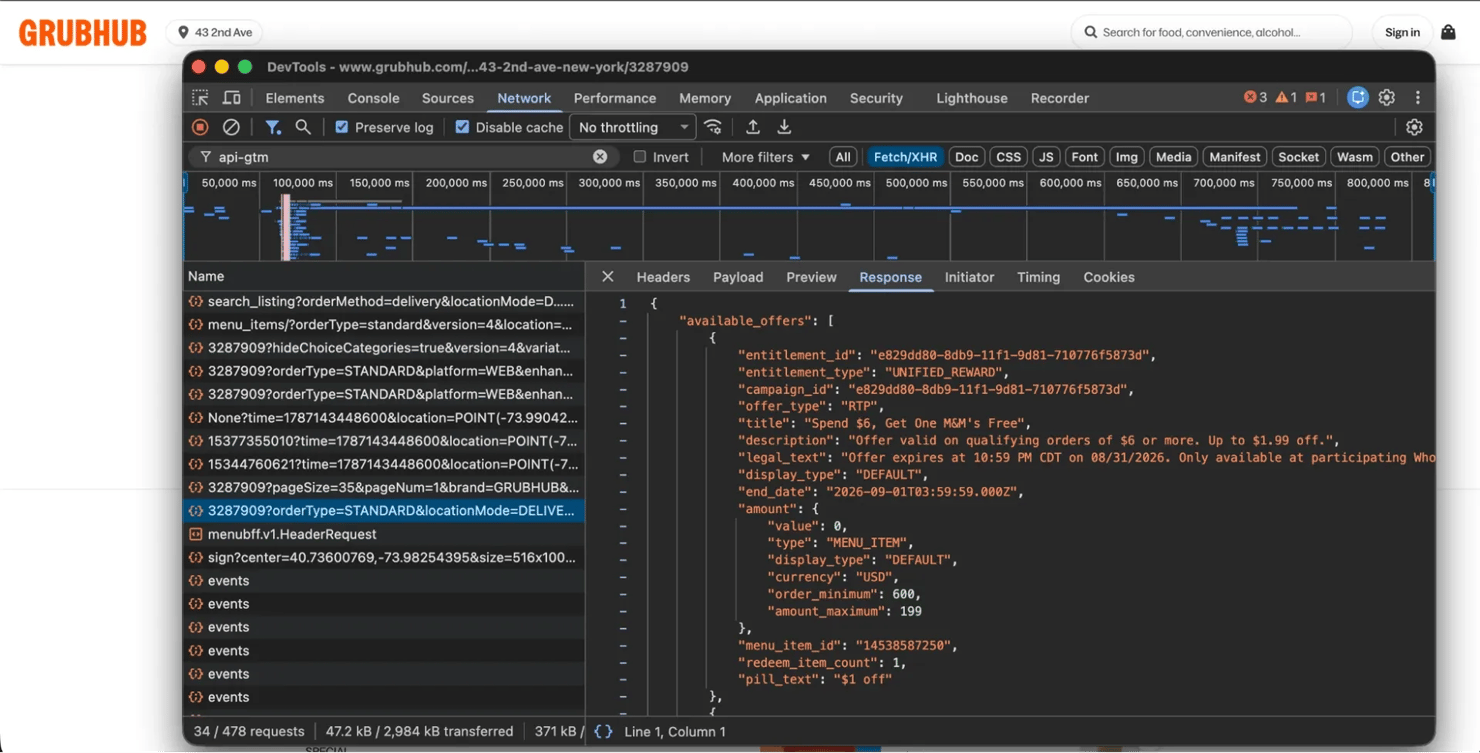
That's 1 offer, checked by hand. The comparison is worth repeating across a market before anyone relies on it.
Reading 170 offers from 1 market shows what the field is worth. A date inside the next 14 days appeared on 128 of them, a date in the year 2126 on 30, and nothing at all on 12. Most of those 2126 values are the request clock plus 100 years, and you can prove it against most offers that carry one: call /offers/availability/{id} twice on a restaurant with a 2126 end_date, once immediately and once after some delay, and diff the millisecond.
Call it twice within a few seconds and the millisecond is identical, which looks like a stored field. Let more time pass and it moves, which is what a value generated fresh per request does. A short stability check tells you the opposite of the truth. A longer one shows what's real: a row read at 13:35:06 returned 2126-08-19T14:18:58.024Z on a re-read 44 minutes later, at 14:18:57.
A separate pull of the full stored table shows the shape of it in more detail. Of 39 sentinel rows, 38 fall inside the 34 seconds the collector was running, carrying 37 distinct millisecond stamps between them. The one repeat is 2 offers from a single restaurant sharing the stamp of the request that fetched them, which is what 1-per-request predicts. The 39th reads 2126-02-01T22:37:32.983Z, 6 months before the run and generated by nothing in it, so treat "century out" as the test rather than the clock arithmetic.
Of the 128 real dates, 125 are the same timestamp, a month-end boundary. So end_date tells you which monthly cycle a campaign sits on, not when this particular offer stops.
Delivery and pickup are different markets
Delivery and pickup are entirely separate, and locationMode is the switch that actually moves you between them. orderMethod on its own does nothing: sending orderMethod=pickup while locationMode stays DELIVERY returned the delivery result set unchanged, 20 of 20 identical IDs, and so did a deliberate nonsense value. Only locationMode=PICKUP returned a genuinely different set, sharing 1 restaurant of 20 with delivery. Set both, and treat a wrong locationMode as another parameter that fails silently. Collecting both from the same coordinates in each of 4 cities returned 31 delivery offers and 22 pickup offers, with only 3 in common:
Query
Restaurants seen
Offers found
orderMethod=delivery
~100
31
orderMethod=pickup
~90
22
Present in both
34
3
A delivery-only collector captures 31 of the 50 offers those 4 coordinates can reach. Running the discovery pass twice, once per order method, is where the fix starts, and the collector below does exactly that, deriving locationMode from the method so the pair can never drift apart. If you need /offers/availability to respect order method, check it yourself before relying on it: the shipped fetch_offers sends no order parameters at all, while the browser's own call includes them.
A contract that fails loudly
That's one narrow instance of a wider risk: what you assume an API does can silently stop being true. Field names in an undocumented API aren't a stable interface. The failure that costs you isn't a 500 – it's amount.value becoming amount.amount while your normalizer keeps returning None and your table keeps accepting it, exactly what discount_unit's own fallback does for a type it doesn't recognize.
A model that asserts what each discount type must carry converts that into an exception:
Against simulated drift it raises on a renamed value, on an unmapped amount.type, and on a missing campaign_id, while a new upstream field passes untouched. extra="allow" is deliberate, since Grubhub adding a field isn't a reason to stop collecting.
Live data is the test: the map above is the record of what it caught. Run the version printed above on those same cases and you get 0 rejects, because both surprises it found are now mapped – a fresh live run can always surface something new, which is exactly what this contract is built to catch rather than silently swallow. An earlier run over 2 markets, when needs held only PERCENTAGE, FLAT and MENU_ITEM, rejected 6 of 661 offers, none of them a fetch failure. Grouped by cause and market, which the driver does rather than fetch_offers, the 6 collapse to 2:
Both types are in the type table earlier only because the contract put them there. DELIVERY waives the delivery fee up to the cap in amount_maximum. UNKNOWN is the more interesting one, because Grubhub's own enum declines to classify the offer while value holds a clean 20 and the title says "20% off". A scraper that branches on type without a fallback writes nothing for it.
That census also explains why a page-1 sample would likely never have shown them. UNKNOWN accounts for 0.8% of offers and DELIVERY for 0.2%, a tail that only a full market sweep reaches.
The contract had already caught a flaw in its own design. An earlier version of the map required amount_maximum on MENU_ITEM, and a run against it rejected 13 offers that carried none. That's why MENU_ITEM maps to None above and discount_unit returns a free_item_unpriced label, instead of a null that looks like a failed fetch. Encode a contract loose enough to survive legitimate variation and it can surface both the schema you hadn't seen and the field your own code assumed would always be there.
The contract has a tested edge case, worth stating plainly: not every silent failure leaves a shape for the model to catch. Both invented restaurant IDs, well outside Grubhub's real ID range, returned HTTP 200 with available_offers: [] and available_campaigns: [], not a 404, so a delisted restaurant and a restaurant with no promotions look identical to your code – no field is wrong, so no validator fires. A non-numeric ID does return 422 Invalid value for restaurantId, which is a boundary worth knowing rather than a safety net: it only catches malformed input you'd likely have rejected before the request went out, not an actually delisted restaurant.
Nothing in the response distinguishes the 2 cases, so the fix here isn't a smarter check but a longer memory: keep the restaurants you have seen in their own table, record when each last carried anything, and treat a long silence as a prompt to re-run discovery for that market. The storage section builds that table, and the refresh pass reads from it rather than from the offers.
Covering a market without missing half of it
A single coordinate doesn't cover a city. The New York listing reported 1,309 matching restaurants, capped enumeration at 500 across 14 pages, and returned 36 per page no matter what pageSize asked for: 36, 60, 100 and 200 all produced the same 36 results and the same 476,181 bytes.
Coverage is also tight around the point you supply. Moving the same query 1 km north of 1 Manhattan coordinate kept 23 of 36 results, 2 km north kept 1 of 36, and 3 km north kept none. That decay puts the grid spacing at roughly 2 km for a market this dense; run the same 3-point check on your own market before trusting that number, since a sparser city needs wider spacing and a denser one needs tighter.
Whether the grid actually finds the offers depends on two things.
The listing has a server-side offer filter, and it's in no parameter
Clicking the Offers control on Grubhub's own search page sends facet=offer_category_type:ALL. It improves recall, and at sweep scale it reduces requests too, cutting discovery from 369 to 187 over the same grid. The A/B below holds the request count fixed at 60 per arm by design, so it measures the recall half only. The likely reading is that the 500-result cap lets an unfiltered page rank offer-carrying restaurants below the visible cutoff – what follows is the measured yield itself, not a test of that explanation. Run over the same 12 cells consecutively, plain first, then faceted, then plain again to size the drift between runs:
The 12 restaurants between the 2 plains run the noise floor for about a minute. The facet's net gain, 71, sits well outside it, at identical request cost.
A cell that hits the page cap is truncating, and that's the signal to split it
Probing all 50 cells of a 2 km grid over Manhattan costs 50 requests and shows exactly where the grid is too coarse:
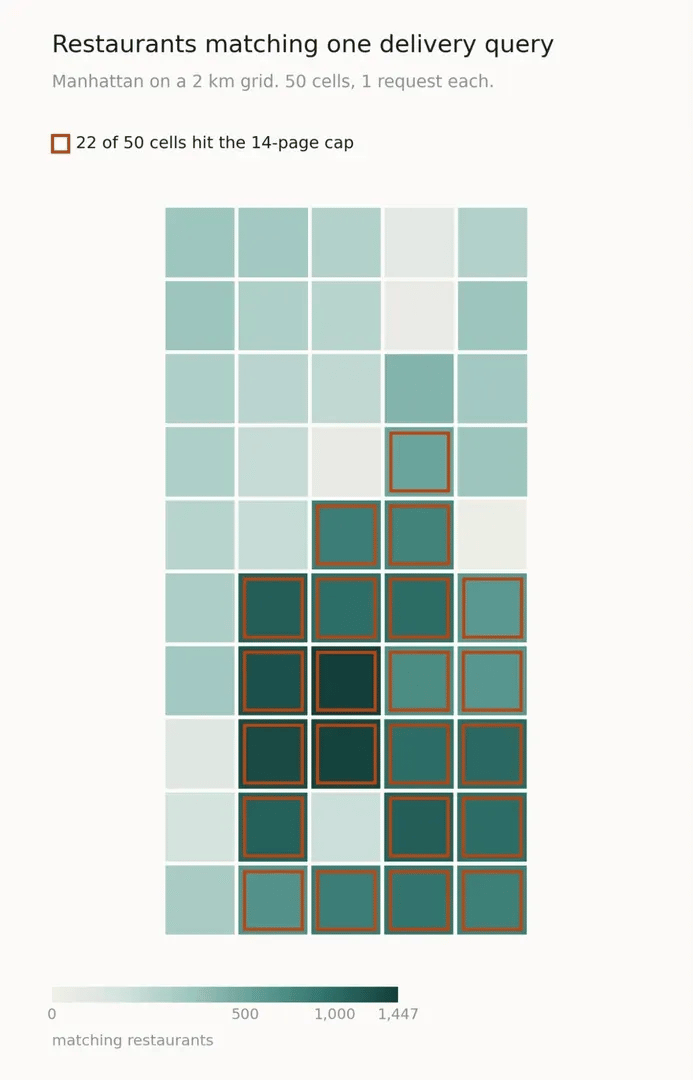
That probe returned 22 cells at the pager's 14-page maximum. An earlier probe the same day returned 12, and the adaptive run priced later in this piece split 7, so the count moves with the hour as restaurants open and close. Treat 7 to 22 as the working range rather than a fixed property of the grid, and a split rule keyed to the pager adapts on its own rather than needing a fixed list. 1 dense cell, subdivided into 4 at 1 km and run consecutively, gives this:
Requests
Offer-carrying restaurants
1 cell at 2 km
7
153
4 cells at 1 km
28
246
The subdivision netted 93 restaurants the 2 km cell didn't show, for 21 extra requests. That's the strongest comparison here, because both halves ran consecutively against the same cell minutes apart.
At the whole-market scale it's less settled, and the 3 arms are worth seeing together. A single level of splitting cost 605 discovery requests. Recursing a 2nd level to 0.5 km cost 2,743. Not splitting at all cost 187. Those runs are hours apart, so their restaurant counts aren't comparable and only the request costs are. Splitting the capped cells is what the controlled test supports and it's the setting shipped below, but it's more than 3 times the discovery cost of leaving the grid alone. What it yields in restaurant coverage across a whole borough is the number worth measuring on your own market before you commit to splitting at scale. If the bill is your binding constraint, that's the 1st knob to turn, and the 2nd level isn't worth pricing at all.
From here, the collector switches to HTTPX and drops the earlier requests.Session calls entirely: HTTPX provides the same request API as requests plus an async client, so the discovery walk and the offer pass share one code path. Everything from here runs on Python's async model: functions declared async def run concurrently under asyncio.gather, awaited with await, and rate-limited by the asyncio.Semaphore below – worth a quick read of Python's asyncio docs first if this is new to you. The whole rule is reading the page count from the 1st response and recursing on it, and the constants and 2 helpers it relies on are short:
The discovery pass then walks a cell, collects the flagged restaurants, and splits itself once if the pager returned full:
The offer pass is 1 independent request per restaurant, which makes it the cheapest stage in the pipeline to parallelize. Running the same 87 restaurants at 6 concurrency levels shows where the gain stops mattering:
Median latency holds near 0.4 seconds at every level, so nothing degraded for this client at this volume. Ship 8 anyway. A measurement of what the endpoint tolerates is a different thing from a decision about what to take from someone else's production service, and with latency that flat, concurrency 8 lands near 20 requests a second against 2.4 sequential. This table measures only the offer-fetch endpoint; the shared semaphore below applies the same limit to discovery's listing calls too, untested at this specific concurrency.
A single shared semaphore governs both stages, so the whole collector is one knob:
By this point your file should hold discount_unit, the Amount, Offer and Campaign models, and anon_body, children, seed_cells, funding_of, listing_page, discover, fetch_offers, client_for, authenticate, and collect, plus the PAGE_CAP, CONCURRENCY, API, CLIENT_ID, UA and MANHATTAN constants – miss any of these and you'll hit a NameError rather than a wrong result. The full collector as one file is also up as a gist, if you'd rather check your assembly against a working copy than this list.
The contract was enforced across 2 markets, both stages, delivery only, so the numbers stay comparable with the cost section below. The per-market lines are what run() prints; the totals under them are a Counter over the stored table, which is 2 lines of driver code rather than part of the collector:
Free-item records split 26 unpriced against 41 priced, so the amount_maximum gap appears in the data itself, not as a minor footnote.
Storing offers so the history becomes the product
A table of current offers can't say when a restaurant withdrew an offer early or replaced it, because nothing in the payload records that, and the dates upstream describe a campaign cycle rather than an individual offer's run. Your own table can, within one limit worth stating up front: keying on restaurant plus campaign records the interval a promotion was observed over, not every time it appeared and disappeared. A campaign that ran in July, vanished in August and returned in September leaves the same single row as one that ran all 3 months. Catching that needs the run-time report below, or a row per observation rather than per campaign.
The schema needs a kind column, so loyalty campaigns and discounts stay distinguishable on purpose, not just because value happens to be null for one of them. Keying on restaurant plus campaign lets a re-run refresh a row it's already seen:
Those pieces need one function to join them, and it's the piece worth writing carefully, because the same seen_at string has to reach both the write and the report for the disappearance check to mean anything:
A refresh is the same pass without the discovery half. It reads the restaurants you already know and costs 1 request each, which is the cheap job the schedule below runs twice a day:
The end_date, title, description, unit, value and min_spend_cents all update on conflict, because a restaurant extending a promotion or changing its terms keeps the same campaign ID, and a stored row should track what the promotion currently says rather than freeze at whatever it said the first time it was seen. first_seen never moves, so the pair records the observed interval alongside the advertised one, and report() catches what starts and what ends between them at run time.
This runs 2 markets through the collector; here's a look at what actually reached the table:
Every unit answers differently, and only 1 of them is clean at any real sample size:
Reading that row by row is the point of running it. Loyalty campaigns carry no dates at all, which is expected. Of the 39 sentinels, 37 sit in cents_off. And free_item_unpriced is a real category rather than a collection failure, which is exactly what the earlier amount_maximum finding predicted.
A single row per unit puts the different kinds of number side by side. Pin which row you get, because a bare column beside GROUP BY is otherwise SQLite's choice rather than yours:
Reading down the value column is the fastest way to see why the unit column has to exist:

That's the whole reason the unit column exists, and the reason a dashboard should filter end dates above 2100 before it computes anything.
Do the same check against your own table before trusting it: pull a stored row's payload again and diff it field by field against what SQLite has. A normalizer that silently miscategorizes a discount produces a table that looks perfectly healthy, which is what makes the check worth writing once and running after every schema or normalizer change, not just at the end. It caught nothing across all 881 rows checked this way, which is the result you're running it to get, not the one you should expect by default.
Storing scraped data covers the database and flat-file options if SQLite isn't the right choice here.
Choosing a polling cadence
Discovery and refresh have different costs, and separating them keeps a schedule affordable. Discovery needs the coordinate grid. A refresh needs 1 request per known restaurant and no location, so re-reading a tracked set costs little enough to run twice a day.
A cron job covers both on different clocks, with refresh.py and discover.py as thin entry points calling refresh() and run(), both imported from wherever you saved the collector code above, with the market name and bounding box hardcoded in each file since the crontab itself passes no arguments:
The cadence is a judgment call rather than a number this data settles outright, and stating the conflicting signals plainly beats presenting a guess as a result. The only short-interval check behind this piece pulled the same page 8 times, and it was reading total_offers_count rather than offer sets: 6 pulls agreed and 2 didn't, which is the count instability described earlier and not evidence of a steady market.
The outside signal points slower, since a practitioner asking for exactly this dataset on r/webscraping in 2026 described offers in their area changing "every few weeks". The signals inside the data point faster. A single restaurant tracked here lost a discount within hours, and the campaign tags argue that timing matters rather than that it doesn't, since values such as TIME_TARGETED and RECURRING_PROMO_TUESDAY_1H_2025 describe campaigns keyed to a weekday window that a 12-hour gap can straddle entirely.
Running 2 refreshes a day resolves a same-day promo that outlasts the gap between checks, though a window as narrow as the hourly recurring promos above can still land entirely inside one. A weekly discovery pass catches restaurants that joined or left the platform, provided they're still in that state when the pass runs. Scheduling web scraping tasks covers the alternatives when cron isn't the right host.
What a whole market actually costs
Running the adaptive discovery and the concurrent offer pass over all 50 Manhattan cells produces the number to plan against. This is orders=("delivery",), 1 method only, because that's what every figure in this section is measured against. The cell, split and request counts below come from a separately instrumented run – add the same counters to discover() yourself if you want it to report them on every call:
A borough is about 1,400 requests and just over a minute. The same market collected sequentially without the facet took 1,250 requests and 867 seconds, so the optimizations were roughly 12 times faster for 14% more requests, most of that going to the 7 cells that were truncating. Restaurant counts across those 2 runs are hours apart and not comparable, but request counts and clocks are.
That 14% is a net, and the parts underneath it move further than the total does. The facet cut discovery from 369 requests to 187 across the same grid, so it improves recall and offsets part of its own cost. The adaptive split then took discovery from 187 back up to 605, which is where the requests actually go: 418 of them, about 1/3 more than the whole sequential run. A smaller offer pass absorbs the rest. Concurrency is the one part that's genuinely free, spending the same requests in a fraction of the time.
No request was throttled at the volumes tested. Across every run behind these measurements, including a 50-way concurrent burst, none was refused, rate-limited or challenged. Almost every non-200 from Grubhub came from deliberately invalid input: a retired client identifier, a malformed restaurant ID, and a wrong endpoint path. The exception was a single transient 503 on 1 listing page during a later sweep, which returned 200 on the next attempt and on the 5 requests after it. That's the reason listing_page retries 5xx rather than raising: 1 transient error shouldn't end a run that has already spent 1,000 requests. The proxy path had its own quirks, covered below.
The defenses are still deployed. api-gtm.grubhub.com sets _pxhd, _px2 and _pxvid cookies, the page CSP allows b.px-cdn.net, and a first-party collector runs at sensor.grubhub.com. How these anti-bot signals hold up at scale covers what one address looks like once a borough sweep becomes a daily habit.
Spreading requests across addresses
The workload stays portable because of 2 properties. Location comes from the coordinates in the query, not from the exit IP. The measurements here were collected from a residential connection in India against US coordinates, mostly New York and Chicago but as many as 12 cities across earlier test runs, and the listing returned results from those markets throughout. The token isn't bound to the address that minted it either, and 1 minted on a residential connection returned US market offers through a US datacenter exit. A collector can therefore spread its requests across any number of addresses without changing a line of its query logic, which is worth doing once a single address stops covering the market rather than before.
Decodo's Web Data API forwards an Authorization header and a POST body through rotating US exits, so both stages run through it unchanged at the request level. The demo below calls it with plain, synchronous requests for clarity – wiring it into the async collector itself needs an async-compatible client in its place, not a literal substitution.

Skip the boilerplate
Decodo's Web Data API handles proxies, CAPTCHAs, and anti-bot detection so your code stays short and your requests actually land.
The proxied path returned a full record set:
The 2 paths were also run against the search listing, and they agreed on every field checked: 36 restaurants, 13 carrying offers, and the same 36 restaurant IDs.
Both calls need custom headers – a content type in the request, a bearer token in the response – and testing which pool actually carries them settles the question before you build against the wrong one: the standard pool rejects the headers parameter outright with a 400, and dropping the headers to work around that instead returns status 613, because the token never reaches Grubhub. The premium pool is what carries both, which fixes the rate at the premium tier:
Monthly plan
Premium requests
Per 1,000
What it yields for 1 borough, delivery only
Free
1K
$1.00
1.6 discovery passes at 605 requests each, or 70% of a full sweep
$19
19K
$1.00
13 full sweeps, or a daily refresh for 23 days
$49
54K
$0.90
twice-daily refresh plus weekly discovery, 51,500 a month
$99
116K
$0.85
the same with pickup collected as well
Rates may have moved since this was measured, so check the current pricing page before budgeting off these figures; the request math below still holds regardless of the exact price. A refresh skips discovery entirely, so 818 requests re-read a tracked borough. Adding pickup roughly doubles everything, and 10 markets at delivery only reaches 515,000 requests a month, 10 times the $49 row above and past what the $99 tier covers – that volume requires a custom plan.
Running direct from one address costs nothing, and it didn't fail once at the volumes tested. The case for the paid path is the month you add the 10th market, or the day one address can no longer cover the markets you're already running, and that's where residential proxies become the escalation: raw IP access billed per GB, rather than the per-request managed calls the Web Data API makes on your behalf. Price it before the grid sweep rather than after.
Wiring that up goes faster once you know two details, neither obvious from the parameter reference. headers has to be a JSON object; passing it as a string returns 400 headers must be an object. session_id needs the premium pool. In testing, a sticky session occasionally returned an undocumented status 15002; retry on a fresh session_id if you see it. These pool and header specifics, and the status codes above, are what testing found rather than documented guarantees, so confirm current behavior before building a hard dependency on any of them.

Enhance your web scraper with residential proxies
Claim your 3-day free trial of residential proxies and explore full features with unrestricted access: 115M+ ethically-sourced IPs, advanced geo-targeting options, a 99.86% success rate, an average response time under 0.6s, and more.
Where the legal line sits
Grubhub's terms of use are explicit. Under "Your Content and Conduct" they prohibit "any scraping, indexing, surveying, data mining, or any other kind of systematic retrieval of data or other content from the Platform", and separately bar compiling a database from the platform. www.grubhub.com/robots.txt disallows /search, /checkout/, /account/ and /explore/*, while api-gtm.grubhub.com publishes none. Terms and robots directives change without notice, so confirm both before relying on this.
Terms of use are contract terms, and computer-crime claims are argued on separate grounds. Public visibility of a promotion settles neither question. Treat this as a decision for counsel about your own use, keep request rates low enough that nothing you do degrades the service, and read the current state of web scraping law before a project goes into production.
Final thoughts
A Grubhub promo scraper is a JSON client with 2 stages, not the HTML parse that returns nothing: the search listing says which restaurants have something, and /offers/availability/{id} says what. The distinction that matters is that the listing returns a sample and its count is a flag rather than a quantity, so in one sweep, 91 restaurants that yielded 21 records through the listing yielded 41 through the endpoint.
History still makes the dataset worth keeping, because an end date says when Grubhub intends a promotion to stop while your own table says when it actually ran. A borough is about 1,400 requests and a minute, which puts the infrastructure question at the 10th market rather than the 1st. Point the collector at a single market, run both order methods, and compare declared against captured before you trust a row of it.
About the author

Justinas Tamasevicius
Director of Engineering
Justinas Tamaševičius is Director of Engineering with over two decades of expertise in software development. What started as a self-taught passion during his school years has evolved into a distinguished career spanning backend engineering, system architecture, and infrastructure development.
Connect with Justinas via LinkedIn.
All information on Decodo Blog is provided on an as is basis and for informational purposes only. We make no representation and disclaim all liability with respect to your use of any information contained on Decodo Blog or any third-party websites that may belinked therein.