How to Automate Web Scraping Tasks: Schedule Your Data Collection with Python, Cron, and Cloud Tools
Web scraping becomes truly valuable when it is automated. It allows you to track competitor prices, monitor job listings, and continuously feed fresh data into AI pipelines. But while building a scraper that works can be exciting, real-world use cases require repeatedly and reliably collecting data at scale, which makes manual or one-off scraping ineffective.
Scheduling enables this by ensuring consistent execution, reducing errors, and creating reliable data pipelines. In this guide, you will learn how to automate scraping using 3 approaches: in-script scheduling with Python libraries, system-level tools like cron or Task Scheduler, and cloud-based solutions such as GitHub Actions.

Justinas Tamasevicius
Last updated: Apr 01, 2026
12 min read

TL;DR
- You can schedule web scraping tasks on three levels – in-script, system, and cloud.
- Local-level scheduling involves data collection through Python code only.
- System-level scheduling involves OS infrastructure such as cron on Linux/macOS and Task Scheduler on Windows.
- Cloud-based scheduling involves cloud services, for example, GitHub Actions.
- Optimize web scraping, even at the production level, with rate limiting, residential proxies, and error handling.
- Scale with cloud infrastructure or a Web Scraping API.
Prerequisites and environment setup
The first step in building a scheduled scraper is to set up a Python development environment tailored towards scheduled scraping.
Python environment
Create a Project Folder
Create a virtual environment
Install Python 3.9+ and core dependencies like:
- requests / httpx. For making HTTP requests (scraping websites or APIs).
- schedule / APScheduler. For running web scraping tasks at intervals.
Python-dotenv. For loading secrets (API keys, passwords) stored in your .env file.
Install scraping drivers
Install Beautiful Soup, Playwright, or Selenium as your scraping drivers. Beautiful Soup works fine for easily scrapable websites, but use Playwright or Selenium if you are scraping JavaScript-heavy sites.
API keys and credentials
Safety measures in setting up your development environment involve keeping your API keys and credentials secret and avoiding sensitive information in your code. A secure way to achieve this is to create an .env file to store your credentials and use a .gitignore file to prevent sensitive files from being exposed in version control.
Proxy setup
Proxy setup involves configuring a managed proxy system that distributes requests across multiple IPs to prevent flagging during continuous scraping.
Decodo's residential proxies with rotating IPs are the best for proxy setups because they route your internet traffic through IP addresses belonging to actual devices, so they won't get flagged by anti-scraping bots.
To set up your proxy, first sign up for a Decodo account. In the dashboard, select Residential, and start a free trial to access your proxy username, password, and other credentials.
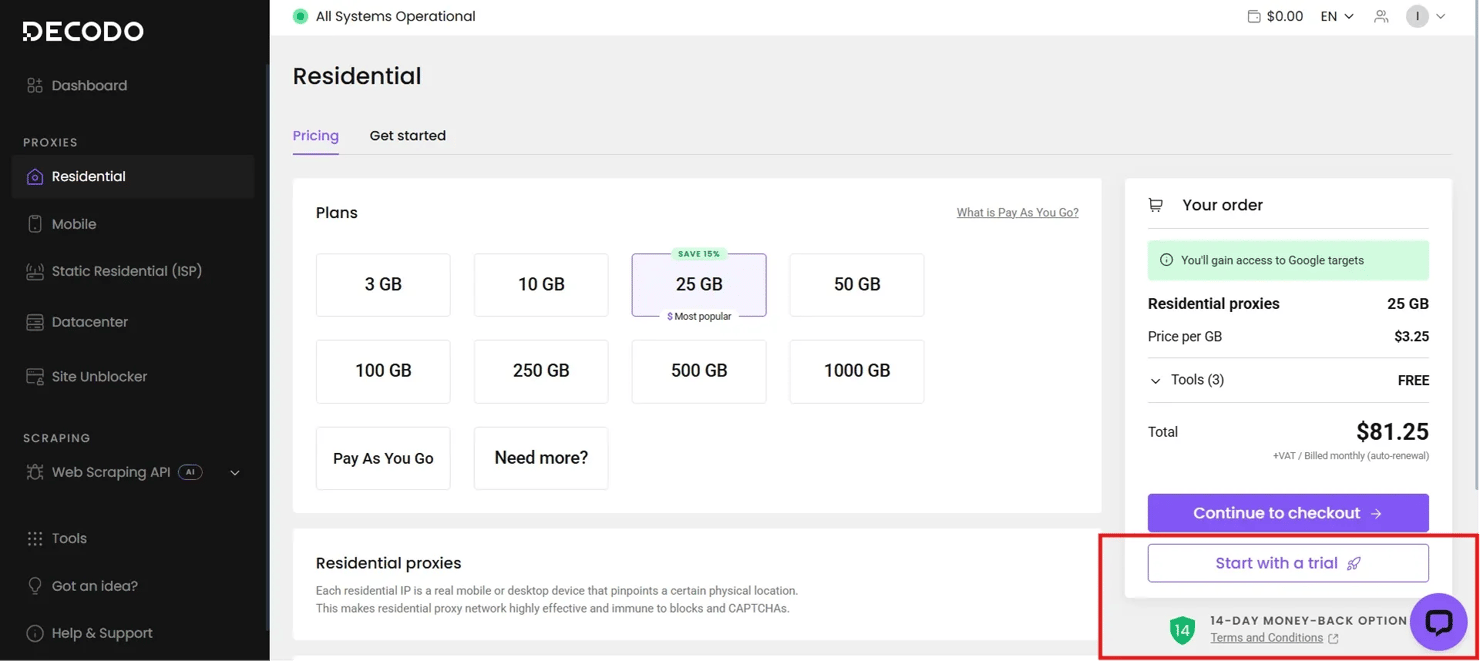
Residential proxies are often preferred for continuous scraping because datacenter proxies, offered by cloud providers, are more easily identified and blocked by anti-scraping systems.
Project structure suggestion
If you are scraping at scale, here is a recommended project structure for scalability and modularity in your scraping_schedule folder.
Building a scraper designed for automation
Designing an automated scraper means defining structural patterns in the scraper architecture, ensuring error resilience, and specifying output formatting for downstream use.
Scraper architecture for scheduling
- Single entry point. Ensure your scraper runs via a single-entry command, usually a main() function or an if name == “main” block, that any scheduler can invoke.
- Configuration. Make sure you use configuration files or environmental variables to keep sensitive parameters safe.
- Stateless design. Your scraper should be set up so that each run is independent and does not rely on the previous state to prevent it from crashing.
Error resilience from the start
- Logging. Log with timestamps and context. This helps you debug errors when websites update their JavaScript or layout. However, logging errors, preferably in a file, would help your scheduled scraper become more resilient to errors, as you could learn from its mistakes.
- Wrap extraction logic in try/except blocks. When fetching data, ensure Python's try and except blocks are implemented (or use other parsing techniques), so the entire scraper doesn’t fail easily. Exceptions allow the script to handle runtime issues gracefully, performing actions such as logging and continuing execution rather than terminating the scraper.
- Return partial results. In some cases, like where failed scrapes are very minimal compared to successes, it would be unwise for your scraper to totally crash. Therefore, you can design your scraper to return partial results when they occur.
Output formatting for downstream use
Save results to JSON with timestamps embedded in filenames. This guarantees that, at a glance, you can retrieve useful data about the results.
Include such metadata as the timestamp, the proxy location used, and the number of items extracted. Incorporating this, along with the actual scraped data, during results retrieval provides context for the data, aids debugging, and makes analysis efficient.
Utilize design output schema to support easy comparison across runs. This ensures your output schema remains constant across continuous runs, enabling easy comparison and analysis.

Build your scrapers with Decodo
125M+ residential, mobile, ISP, and datacenter proxies available for any scraping scenario.
Scheduling with Python libraries: schedule and asyncio
Script scheduling via the schedule and asyncio libraries in Python is the first level of scheduling scrapers.
Using the schedule library
Install schedule
The basic syntax is schedule.every(n).hours.do(scraping_function). It allows you to schedule the scraper to run every second, minute, hour, and day.
Run the scheduler loop. Use the schedule.run_pending() and time.sleep() command:
- schedule.run_pending(). Checks whether any scheduled task is due and, if so, runs the script's scheduled function.
- time.sleep(). Runs due schedule functions at specified intervals to prevent CPU overload
Start the scrape. Launch the scheduler with a while loop.
Note. While the schedule library is easy to set up, it requires a continuously running Python process. As such, if you close your script by shutting down your IDE or if there is a network provider issue, your scraper stops working.
Using asyncio
Scraping with asyncio makes sense when you are running multiple scrapers with different intervals. So, when you have web scraping tasks that are I/O (input/output) bound, asyncio initiates such functions and continues code execution while waiting for the output of the previous function.
Install aiohttp and aiofiles. aiohttp is an asynchronous HTTP client/server framework that handles network requests without blocking the program's execution, while aiofiles provides asynchronous file operations like reading or writing to disk that integrate seamlessly with asyncio.
Basic async scheduling pattern. The asyncio.sleep() function is used in each scraper loop to tell the scraper to pause for some time while other scrapers are being initiated in other loops.
Then asyncio.gather() loads up all scrapers after they have been initiated and runs them simultaneously.
When to use in-script scheduling
- Quick prototypes and development testing. When you are testing scraping ideas and aren’t ready to configure cron just yet.
- Scrapers running inside long-running processes. Scrapers running inside Docker containers or any long-running server processes are fit for in-script scheduling since they don’t have to worry about termination failures.
- Situations where external schedulers are unavailable, or overkill. This includes small projects or one-off scraping.
However, if you need scrapers that don’t depend on Python schedulers, you have to take a step further.
System-level scheduling: cron jobs and Task Scheduler
System-level scheduling involves using tools such as cron on Unix/Linux/macOS and Task Scheduler on Windows to run web scraping tasks independently of the Python runtime. It only depends on whether your system is on or off.
Cron jobs
Cron automates scripts or scrapers using a 5-field syntax, namely:
Field
Allowed Values
Minute
0-59
Hour
0-23
Day of Month
1-31
Month
1-12 or Jan–Dec
Day of Week
0-7 (0 or 7-Sun) or Sun–Sat
These 5 fields are separated by spaces, followed by the command to run.
- Every 5 minutes. */5 * * * * /usr/bin/python3 /path/to/scraper.py
- Every two hours (on the hour). 0 */2 * * * /usr/bin/python3 /path/to/scraper.py
Other cron fields follow the same pattern.
Create a cron entry
Add the scraper’s absolute path to the terminal with the cron pattern.
It is important to use absolute paths because cron runs in a minimal environment; cron doesn’t know your virtual environment unless directed to it.
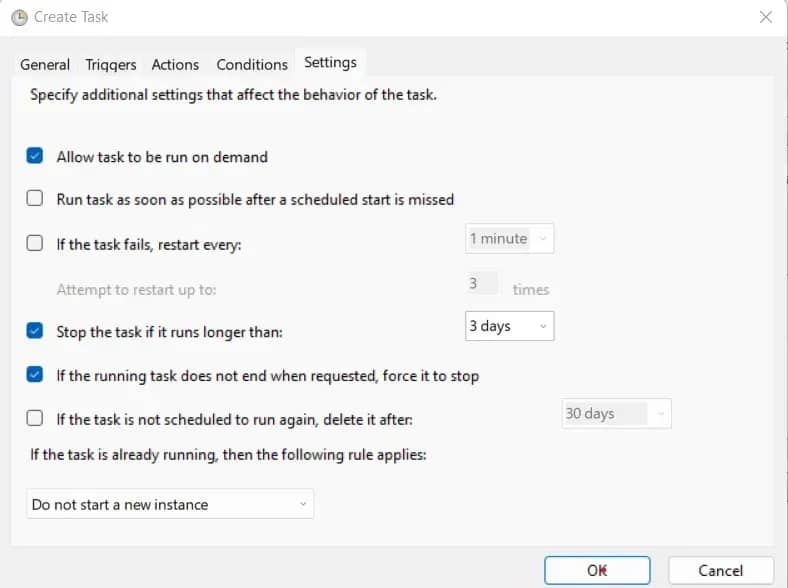
Windows Task Scheduler
Save the following PowerShell command as scraper.bat in your project directory:
- Press Win + R and paste taskschd.msc. This opens the Task Scheduler.
- Click Create Task. Provide a name and description for the task.
- Click New. Then click Browse, and select scraper.bat.
- Under Triggers, click New. Then choose your preferred interval and start time.
- Click Conditions. Ensure power-related restrictions are unchecked.
- Go to Settings. Adjust as needed, then click OK.
Cloud-based scheduling with GitHub Actions
Cloud-based scheduling is the best approach, as it helps you scrape automatically using cloud-based tools like GitHub Actions, thereby granting you independence from local infrastructure and server failures.
Why use GitHub Actions for scraping?
- Free tier. It gives free computing time with limits. This is sufficient for hourly scrapes and daily data collection.
- Built-in secrets management. It provides encryption for sensitive data, so your Decodo Web Scraping API credentials are safe when scraping complex target websites.
- Automatic retry and failure notifications. It has built-in automatic retry and failure notifications for audit trails and observability.
Creating a workflow file
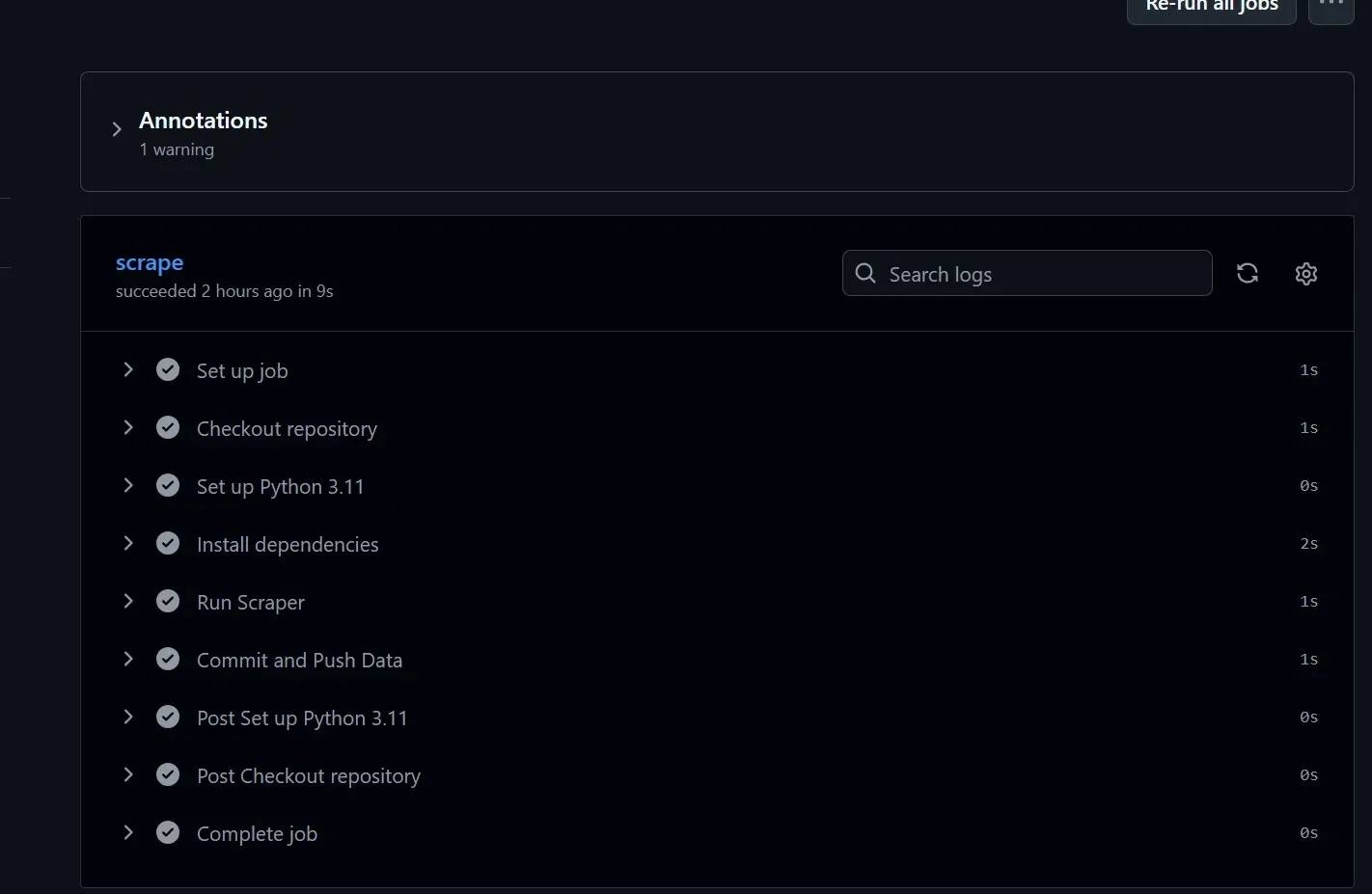
Before creating a workflow file for your cloud-based scheduling, you need to create a GitHub repository and push your scraper.py code to it.
Directory structure. Create the .github/workflows directory in GitHub, then navigate to the workflow file in your root directory locally.
Create your workflow file.
Workflow syntax. Your scraper.yml contains the code that tells GitHub what to run, when to run, and how to run it.
Push your changes to GitHub. Important syntax to note:
- on.schedule defines when it runs (cron syntax).
- jobs determines what web scraping tasks to execute.
- steps are step-by-step instructions.
- actions/checkout pulls your repository code.
- actions/setup-python configures Python environment.
![GitHub repo listing showing 'github-actions[bot] Update rates data [skip ci]' and files .github/workflows, data, scraper.py](https://decodo.com/cdn-cgi/image/width=1480,quality=70,format=auto/https://images.decodo.com/schedule_web_scraping_tasks_3_jpg_8d406f3413/schedule_web_scraping_tasks_3_jpg_8d406f3413.webp)
Store credentials in GitHub repository secrets. Click Settings on your repository page, then navigate to Secrets to enter your API keys and secrets.
Best practices for credential rotation include rotating secrets every 90 days, or sooner if there’s risk, and using GitHub’s audit log to monitor their use and rotation.
Persisting or storing scraped data
- Committing results back to the repository automatically. Do this by adding this code to your YAML workflow file.
- Upload to cloud storage. An alternative is to upload to cloud storage or to a database for large-scale or long-term storage.
- Artifacts. GitHub has a feature called Artifacts for temporary data retention for debugging and downloading.
Optimizing scheduled scrapers: rate limiting, proxies, and error handling
Various optimization strategies that make scheduled scrapers reliable over weeks and months of continuous operation are:
Rate limiting and request pacing
Most scrapers don't get banned for what they scrape – they get banned for how they do it. The fix requires you to limit your scheduler’s data collection rate by delays.
To introduce a random delay in Python, use the time.sleep() function combined with random.uniform(a, b), which generates a random floating-point number between 2 numbers. This technique is commonly used to mimic actual user behavior, creating unpredictable clicking patterns that generate authentic-looking web traffic through users' natural clicking.
Also, you need to examine the robots.txt file of your target website located at yourtargetwebsite.com/robots.txt. This shows which website sections are designated as restricted-access and the required time interval between requests.
Follow these rules as a rough baseline for safe request intervals:
- General content sites and blogs require a 3 to 8 second wait between user requests.
- eCommerce and high-traffic platforms require a 2 to 5 second wait between user requests, including session rotation.
- The minimum waiting period for smaller sites on shared hosting should be between 8 and 15 seconds, as their systems can crash quickly.
Proxy rotation for long-running scrapers
Proxy rotation involves cycling through multiple IP addresses during scraping. Thankfully, Decodo’s residential proxies automatically manage their rotation by switching between multiple residential IP addresses, allowing users to access them without maintaining an IP address pool because Decodo requires no IP list upkeep and no operational procedures for IP rotation.
The Python configuration process requires the procedure below.
The above code sends an HTTP request through a proxy server using the Requests library. The proxy_config dictionary defines the authentication details and the proxy endpoint address, which apply to both HTTP and HTTPS network traffic.
The function scrape_with_proxy(url) takes a url as input, makes a GET request using the specified proxy and a 10-second timeout, and returns the server’s response object.
Error handling and resilience
The foundation of error resilience is implementing retry logic with exponential backoff-wait duration before retrying scraping.
The backoff_factor=2 field increases the retry wait time to double its previous duration on each retry attempt, starting at 2 seconds and progressing to 4 seconds before reaching 8 seconds. Immediate retry attempts to overloaded servers create additional problems, which lead to extended periods of system unavailability. Python requests retry provides detailed information on advanced retry patterns, including custom failure-type logic.
Common errors include:
- 429 (Too Many Requests) indicates that the server is explicitly telling you to back off. Check the Retry-After header if present and honor it.
- The 403 (Forbidden) status can indicate either a temporary or permanent block. You should wait longer before making another attempt because your IP address or session information has been flagged after multiple failed attempts.
- The 503 (Service Unavailable) status occurs when the server becomes overloaded or is undergoing maintenance. The system requires you to wait before you can attempt your next access.
- The 404 (Not Found) status indicates that the resource does not exist. Keep a record of it and proceed to the next task.
Note that retriable errors are errors like 503 that can be resolved by rerunning the scrape, while permanent errors are errors like 404 that don’t require the scraper to rerun because it won’t work.
Data storage strategies
If the data you are retrieving is something you want to store for a while, you append it to the file. However, if you require only the latest results, then overwrite is the better function to use. However, if you don’t manage data files, they pile up, and disk space fills up.
Therefore, use databases for large-scale scraping. If your scraper produces large amounts of data, JSON or CSV files won’t scale. Better options are SQL or NoSQL databases for efficient querying and better integration with analytics tools.
Handling common obstacles in automated scraping
This section provides practical solutions to common obstacles faced in automated scraping.
CAPTCHAs
CAPTCHAs works by triggering alerts when your request pattern shows unusual behavior, which is more frequent during automated access, then blocks data retrieval. Bypass CAPTCHAs by proactive detection – catching CAPTCHAs before they catch your scraper.
The code checks whether a webpage response contains CAPTCHA indicators by scanning for keywords such as "CAPTCHA" or "verify you're not a robot."
The function fetch_with_captcha_check() requests a URL, then checks for CAPTCHA to evade if present. This article on How to bypass Google CAPTCHA covers all the necessary methods to understand its system operations and bypassing techniques.
Website structure changes
Some CSS selectors break easily when sites update their site structure. Thus, the proper choice of CSS selectors determines the actual strength of your scraper against structural system changes. Detect broken selectors by checking for expected elements and raising alerts when they are missing, instead of allowing scrapers to fail silently. Also, version control selectors for easy maintenance of selector updates during site changes.
Network and infrastructure failures
Handling network and infrastructure failures, such as DNS resolution failures, involves switching from your ISP's DNS to reliable providers like Google and Cloudflare, and clearing the local DNS cache to remove corrupt entries.
Connection timeouts can also be handled by setting specific timeouts in your HTTP requests and by capturing timeouts in your code, such as requests.exceptions.ConnectTimeout and using rotating proxies.
Also, a circuit breaker pattern prevents your scraper from endlessly hammering a downed server by detecting a threshold of consecutive failures and pausing scraping entirely for a recovery period. The principle is simple: after 5 failures in a row, stop attempting for the next few minutes, then try again. If it recovers, resume normally.
Anti-bot detection
JavaScript-heavy sites initially return an HTML response, and then JavaScript dynamically loads the data. Hence, a scraper tends to return none initially when encountering these sites.
However, a headless browser solves this by executing the website in a real browser environment, mimicking real users and enabling data extraction. For example, Playwright and Selenium execute JavaScript the way a real browser does, which sidesteps an entire category of rendering and detection issues, and reserves them for target websites where lighter approaches have genuinely failed.
Maintaining script reliability over time
Scheduling periodic health checks to verify that scrapers still work helps maintain script reliability over time. These health checks include comparing results against known urls (lightweight testing) and testing with more than 1 scheduling method.
Ensure the scraper remains reliable by automating alerts to Gmail or Slack when logs are unusual or retrieved data deviates from expected patterns. Documenting expected behavior helps standardize results and amplify troubleshooting. Do this by saving the expected data result in a separate file for comparison.
Monitoring and logging scheduled scraping tasks
This section describes the observability practices that make scheduled scrapers maintainable.
Implement structured logging
- Prioritize logs over print statements for debugging.
- Log levels matter. Use DEBUG during development to get visibility into every request and decision. Then use INFO and WARNING at production because these settings provide sufficient information about incidents while maintaining proper system performance.
- Write logs to rotating files to prevent disk space issues. Systems use rotating file handlers to prevent disk space issues. The system encounters difficulties when all log data is sent to 1 ever expanding file. A rotating system that caps file size and keeps a fixed number of backups is sustainable for logging indefinitely.
Tracking key metrics
- Items scraped per run. This is the most direct measure of whether your scraper is doing its job. The first sign of site changes or blocking is a sudden drop in site traffic. You can also structure data storage patterns to support monitoring.
- Success rate. Successful requests divided by total requests, expressed as a percentage. A scraper attains about a 95% success rate when operating against a friendly target. Any metric that shows a decline across multiple testing sessions needs to be examined.
- Run duration and average request latency. These are useful for catching performance regressions and spotting when a target site is slowing down.
Alerting on failures
Metrics and logs are only useful if someone looks at them. For the alerting channels themselves, the right choice depends on your setup.
- Use Email via SMTP or SendGrid for critical failures that require a paper trail and don't require an instant response.
- Slack or Discord webhooks are better for team visibility and faster response times. A message to a shared monitoring channel means whoever is available can pick it up.
- Track critical failures by triggering alerts after N consecutive failures and not on every error.
Reviewing logs effectively
Knowing which logs to search first, like ERROR and WARNING log entries, helps with proper log reviews and saves more time than reading all the logs. Also, correlating failures with external events, such as general server issues, and using run IDs to trace a single execution across multiple log files are important for reviewing what happened in a session.
Best practices for production-ready scheduled scrapers
Here is a checklist of all best practices for scrapers running in production, spanning over operational, technical, and ethical dimensions.
Operational best practices
- Running scrapers during off-peak hours, like overnight and early morning, reduces the load your requests place on target servers during their busiest periods.
- Version control everything.
- Document each scraper explicitly. Write down why it runs, when it runs, what it's supposed to produce, and the solutions to likely errors.
Technical best practices
- Always use virtual environments to isolate dependencies.
- Dependency versions should be spelt out in requirements.txt to prevent unexpected breakages.
- Scrapers should undergo manual testing before entering scheduled operations. The process requires you to execute the tests manually while confirming the expected results.
Ethical and legal considerations
- Read and respect robots.txt directives, and read the target site's terms of service before you scrape it. Is web scraping legal is a robust article that covers the legal landscape in depth before you operate at any meaningful scale.
- Don't scrape sensitive data without appropriate authorization. Data protection laws in many jurisdictions treat personal data differently from public content, and the consequences of getting this wrong are significant.
- Use request rates that don't degrade the target site's performance.
- If you're scraping at scale, consider reaching out to the site owner about API access. Many companies will permit structured data access through an API. An API arrangement is more reliable than scraping, more stable through site changes, and puts your operation on an unambiguous legal footing.
Scaling considerations
- When you realize that the scraping task has greatly increased or that the CPU is limiting the potential of your scraper, then it's time to incorporate distributed machines in your scraping workflow.
- You can use task queues like Celery and RQ for complex multi-step scraping pipelines. These task queues decouple the pipeline as needed for scraping optimization and dedicate queues to achieve the best concurrent scraping performance.
- Consider Decodo’s Web Scraping API instead of custom scrapers when scraping maintenance costs exceed the cost of third-party scraping services, or when your target site’s anti-bot systems require complex scraping solutions.
Final thoughts
In this article, we’ve covered how to schedule web scraping tasks, the 3 tiers of scheduling scrapers, and the essentials of automation, from local to production-level.
Optimizing scrapers, maintaining schedules, and following best practices are crucial to the safety and reliability of your scraper in the long run, whether you are a beginner or an expert developer.
Anti-bot mechanisms remain a challenge, but implementing Decodo’s scraping solutions, such as its 115M+ residential proxies, is the best way to ensure your scheduled scraper doesn’t fail.

Start scraping in minutes
Quickly and easily build scrapers for any scenario with Decodo – 115M+ residential proxies, <0.5s response time, and a 99.92% success rate.
About the author

Justinas Tamasevicius
Director of Engineering
Justinas Tamaševičius is Director of Engineering with over two decades of expertise in software development. What started as a self-taught passion during his school years has evolved into a distinguished career spanning backend engineering, system architecture, and infrastructure development.
Connect with Justinas via LinkedIn.
All information on Decodo Blog is provided on an as is basis and for informational purposes only. We make no representation and disclaim all liability with respect to your use of any information contained on Decodo Blog or any third-party websites that may belinked therein.