Web Scraping with Kotlin: A Complete Guide with Jsoup, OkHttp, and Coroutines
Kotlin developers don't need to reach for Python to scrape. The JVM ecosystem covers the full stack: Jsoup for HTML parsing, OkHttp for HTTP requests, and coroutines for concurrency. This guide is for JVM and Android developers, as well as Java teams evaluating a migration. By the end of this piece, you'll have a working scraper that handles pagination, runs concurrent requests, integrates proxies, and exports data to CSV.

Lukas Mikelionis
Last updated: Jun 16, 2026
8 min read

TL;DR
- Kotlin shares the JVM with Java, so Jsoup, OkHttp, and Playwright work without wrappers. The added value is null safety, coroutines, and data classes on top of libraries you already know.
- For most static sites, OkHttp + Jsoup is the right starting point. Add Playwright via the Java library only when the page requires JavaScript to render.
- Coroutines make parallel scraping straightforward. A Semaphore caps concurrency, delay() spaces requests without blocking threads, and supervisorScope keeps one failed page from canceling the rest.
- At any meaningful request volume, a single IP gets blocked. Decodo residential proxies handle rotation server-side with no code changes beyond the proxy configuration.
Why Kotlin for web scraping?
If you have already built scrapers within the Java ecosystem, Kotlin doesn't ask you to start over. The JetBrains-developed language runs on the JVM, so you keep everything Java offers, while fixing many of the pain points that come with it.
By the time Google named Kotlin the preferred language for Android development in 2019, developers had spent years writing defensive code and infrastructure plumbing to address problems Java itself could have prevented.
You're not trading away Java's scraping toolset either. Libraries like Jsoup, OkHttp, Selenium, and Playwright work right out of the box, without wrappers or special integrations.
What changes, however, is the safety and ergonomics Kotlin adds.
1. Null safety
Null handling has been a persistent source of bugs in Java applications for decades. So much so that Tony Hoare famously called null references his "billion-dollar mistake" at QCon London in 2009.
The challenge becomes more pronounced in web scraping, where page structure is outside your control. Any selector can quietly fail if the underlying page shifts, from a redesign, an A/B test, or just a different layout served to certain users.
2. Coroutines
Concurrent scraping with coroutines is more direct compared to Java’s traditional approach. Instead of configuring thread pools and managing an ExecutorService, you can launch lightweight coroutines with a few lines of code while also cutting down on tons of overhead. We’ll discuss coroutines in more detail in a later section.
3. Data classes
Scraped data often ends up in structured records. Kotlin data classes automatically generate constructors, equality checks, and string representations, eliminating a lot of boilerplate.
If your Java scraper is already stable and null-related bugs aren't a problem, migration probably isn't necessary. The real gain with Kotlin is less boilerplate and fewer runtime surprises as the codebase grows.
Kotlin scraping libraries: Choosing the right stack
The Kotlin scraping stack has four layers, each with a clear default: HTTP client, HTML parser, JavaScript rendering, and a Kotlin-native DSL option.
1. HTTP client
OkHttp | ~47k GitHub stars
OkHttp is the assumed starting point for HTTP in Kotlin scraping. It handles connection pooling, interceptors for headers and retries, and proxy authentication without touching your request logic. However, if your project already runs a Ktor server-side or you prefer coroutine-first HTTP from the start, Ktor Client is a reasonable alternative.
2. HTML parser
Jsoup | ~11k GitHub stars
Jsoup is the parsing layer most Java scrapers' first choice. It supports CSS selectors, resolves relative URLs automatically, and is better documented than any alternative on the JVM. Worth knowing: Jsoup doesn't fetch. You'll need OkHttp or Ktor Client to get the page before it can parse anything. For a Kotlin-native alternative, see the Skrape{it} section.
3. JavaScript rendering and browser automation
Playwright | ~90k GitHub stars
Playwright is the best pick for JavaScript-heavy sites. It's faster than Selenium on modern SPAs and more cross-browser capable than Puppeteer, which runs Chromium only — and while there's no dedicated Kotlin library, the Java bindings (com.microsoft.playwright:playwright) integrate cleanly through JVM interop.
For simpler JS needs, HtmlUnit skips the browser binary entirely but won't hold up on complex SPAs. If your team already has Selenium set up, it works; all three are covered in the browser automation section.
None of these tools covers the full pipeline on its own. In practice, you'll combine one from each layer. The table below maps common use cases to the right combination:
Use case
Stack
Static sites
OkHttp + Jsoup
Kotlin-first projects
OkHttp + Skrape{it}
JavaScript-heavy sites
OkHttp + Jsoup + Playwright
High-volume parallel scraping
Ktor Client + Jsoup + coroutines
Setting up the Kotlin scraping environment
By the end of this section, you will have a small project that fetches a page and prints its title.
Prerequisites
- JDK 17+, the current LTS release. Use SDKMAN to manage JDK versions across projects. If you are targeting Android, check the min SDK requirements in the Android section.
- Gradle 8.x. This guide uses the Kotlin DSL (build.gradle.kts).
- IntelliJ IDEA Community (free). Every step below also works from the command line.
Create the project
Gradle's init command scaffolds the project with the Kotlin application template and sets up the directory structure you'll build on:
Gradle creates a project with this layout:
Open app/build.gradle.kts. The next step adds the dependencies to this file.
Add the core dependencies
Replace the dependencies block with the following:
Run ./gradlew build to confirm that all three dependencies resolve cleanly before you move on.
Verify the setup
Quotes to Scrape is a sandbox site for scraping practice. It has stable HTML and no terms of service issues. Add the following to App.kt and run it:
Expected output: Quotes to Scrape. If you see that title, the environment is working.
Android (optional)
If you are adding scraping to an Android app, two constraints apply that do not exist on the server side.
- Network calls cannot run on the main thread. Android throws NetworkOnMainThreadException if you call OkHttp from a UI context. Wrap the work in a coroutine with Dispatchers.IO:
- The INTERNET permission is required. Add this to AndroidManifest.xml:
Jsoup works on Android without modification.
Building a basic Kotlin web scraper
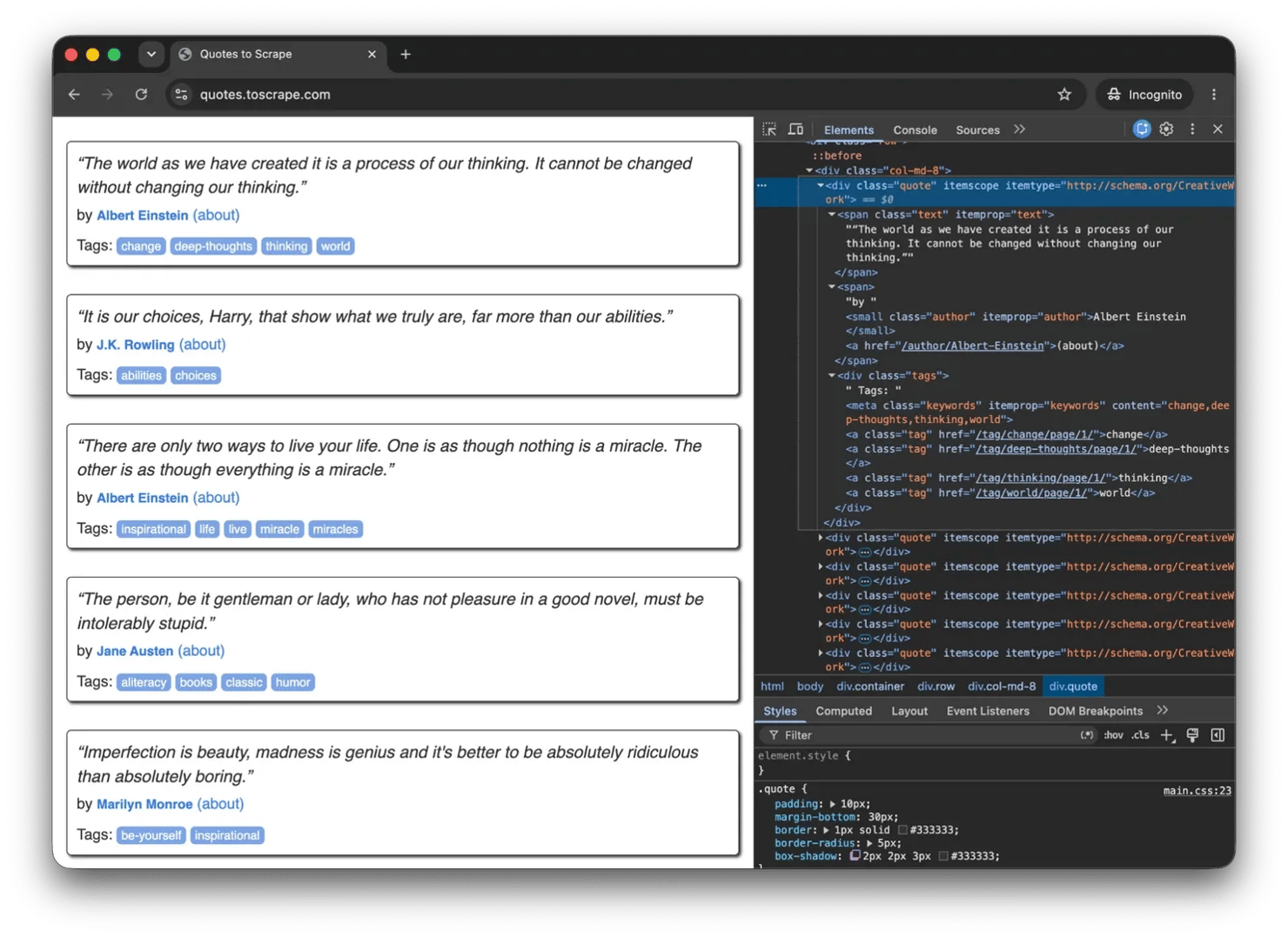
With the environment confirmed, the next step is to extract each quote's text, author, and tags. The scraper will be in two parts. A fetch function for retrieving HTML and a parser for extracting data. But first, inspect the page structure and identify the CSS selectors you'll need for extraction:
Fetching HTML
The function below uses OkHttpClient to send a GET request with a browser User-Agent and returns the page HTML, or null if the request fails:
After sending the request, the function checks for a successful response and returns the page HTML. If a timeout, DNS failure, or other network issue occurs, it catches the exception and returns null instead of crashing the scraper.
A custom User-Agent helps the request resemble normal browser traffic, while use {} ensures the response is closed automatically after it has been read.
Parsing and extracting data
Jsoup turns raw HTML into a document that you can query with CSS selectors. The function below targets each quote card on the page and pulls out its text, author, and tags:
From each quote container, the parser extracts the quote text, author, and tags. A quote is discarded if its main text is missing, but a missing author simply becomes an empty string. Tags are collected into a list and stored alongside the quote data.
Putting the functions together
Passing the URL to Jsoup.parse() sets a base URI, allowing relative links to be resolved into absolute URLs later when pagination is added.
Run the scraper with ./gradlew run. You should see 10 quotes printed to the console, each containing the quote text, author, and tags.
Scraping with Skrape{it}: the Kotlin-native alternative
Skrape{it} is best understood as a Kotlin-first alternative to writing raw Jsoup selectors by hand. Instead of chaining selectors manually, you describe the extraction in a builder block. Here's the same quotes.toscrape.com scraper from the previous section:
For simple cases, Skrape{it} can also handle the fetch step itself. In larger scrapers, teams often keep OkHttp for HTTP and use Skrape{it} mainly for parsing.
The DSL reads cleanly if your team prefers type-safe builders over imperative selectors. However, Skrape{it}'s last release was in 2022, documentation is thin, and the community is small. For production scrapers that require long-term maintenance, raw Jsoup is the safer dependency.
Handling pagination
In the real world, as with Quotes to Scrape, you rarely get everything on a single page, so handling pagination is part of the job. To get all the quotes, the logic below follows the "Next" link at the bottom of every page until there are no more pages.
absUrl("href") resolves relative paths like /page/2/ into full URLs, which is why we passed a base URI to Jsoup.parse() earlier.
Quotes to Scrape uses predictable URLs (/page/2/, /page/3/), so a counter-based loop would also work here. The approach we opted for is generally recommended because many sites do not expose a simple page-number URL pattern.
Scraping JavaScript-rendered pages
Some sites load content after the initial HTML response using JavaScript. When that happens, OkHttp returns an empty container and the selectors find nothing.
This section covers 2 ways to handle that: checking for a JSON API first, and using Playwright when a real browser is unavoidable.
Check for a JSON API first
Open your browser's Network tab and filter for Fetch/XHR requests. Many sites that look JavaScript-heavy are really pulling data from a JSON API behind the scenes.
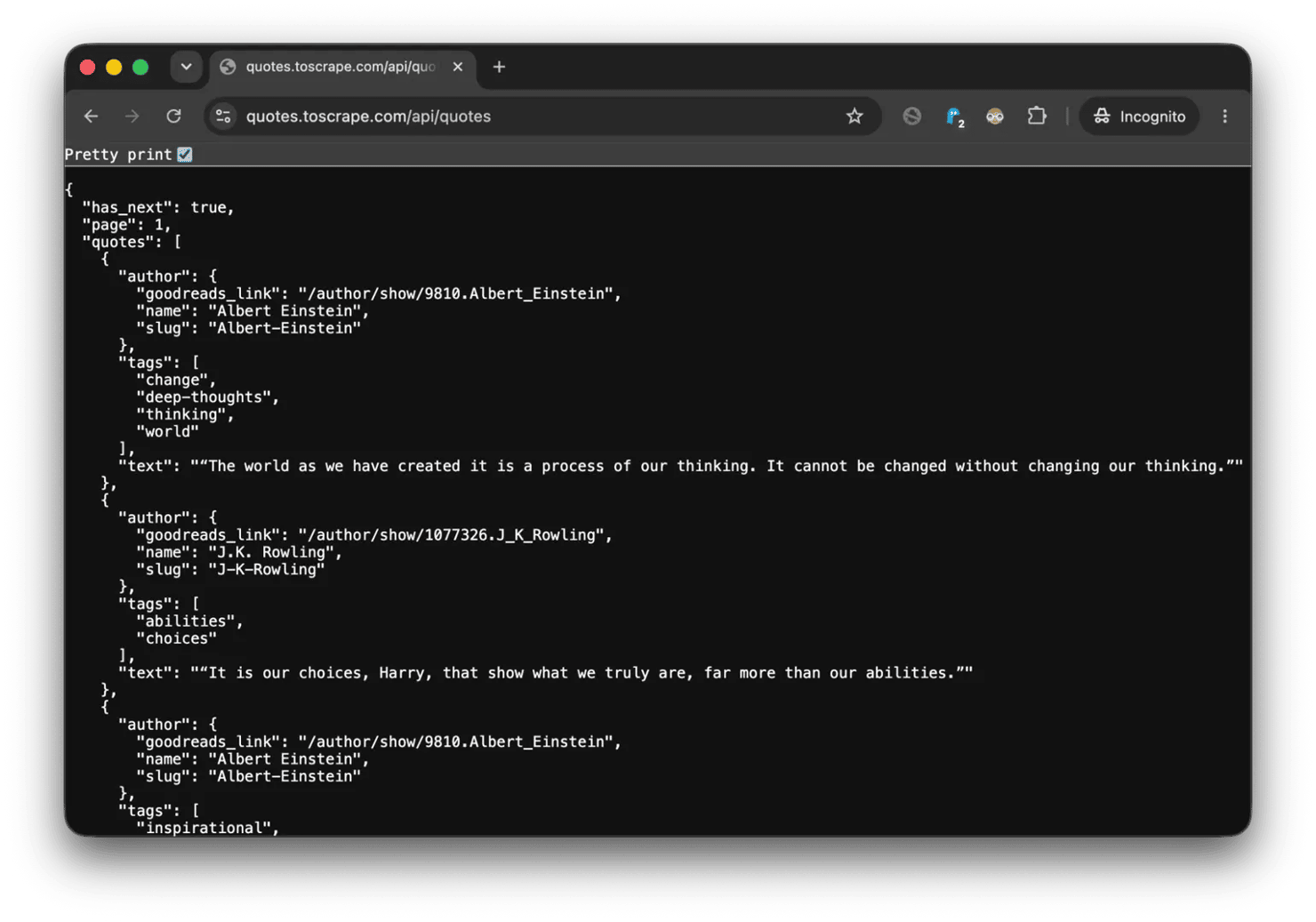
If you find an endpoint like that, fetch it with OkHttp and skip the browser entirely:
Rendering pages with Playwright
When the page really needs JavaScript to render, Playwright gives you a headless browser. There is no Kotlin-specific Playwright library, so you use Microsoft's Java library directly.
Add the dependency to build.gradle.kts:
The parsing logic stays the same. Call Jsoup.parse() on the result and extract with the same selectors from the earlier sections.
Selenium works too if your team already has it running. Same pattern: headless browser, wait for the element, pass the page source to Jsoup.
That said, browser automation comes with a speed cost. A JSON API is usually much faster. When you do need Playwright or Selenium, rendering pages sequentially can get slow. The next section shows how coroutines help scale the scraper by processing multiple pages concurrently.
Parallel scraping with coroutines
At 1 second between requests, scraping 100 pages sequentially takes almost 2 minutes. And most of that time is spent waiting on the network. Java can run those waits in parallel, but every waiting request ties up a thread. 100 pages means 100MB of stack memory allocated almost entirely to waiting.
Coroutines take a different approach: when a request is waiting for I/O, the coroutine suspends and releases its thread for other work. In this example, the OkHttp call is still blocking, but running it on Dispatchers.IO keeps those waits off the main thread:
Three parts of this function do most of the work:
- Semaphore limits concurrency to 5 requests at a time, preventing a sudden burst of traffic.
- delay() suspends the coroutine without blocking a thread, so other work can continue while it waits.
- supervisorScope isolates failures. If one page fails, the remaining coroutines keep running.
To run it, generate URLs from the pagination pattern and pass them in as shown below:
What takes 10+ seconds sequentially finishes in under 3, with hundreds of requests sharing a handful of threads, not spending most of their time waiting on the network.
Avoiding blocks and anti-bot measures
Your scraper now runs concurrently and fast, but every request still leaves from the same IP with the same headers. As of June 2026, automated traffic accounts for 57.5% of all HTTP requests according to Cloudflare, which means sites are investing heavily in detection systems.
Without countermeasures, getting blocked is a matter of when, not if.
Routing requests through a proxy
OkHttp supports proxies natively. The configuration below routes traffic through a proxy endpoint and authenticates with credentials stored in environment variables:
When the proxy returns a 407 Proxy Authentication Required response, the proxyAuthenticator adds the credentials automatically and retries the request. From that point on, traffic leaves through the proxy instead of your machine's IP.
A single proxy works for low-volume scraping, but all requests still originate from the same address. As traffic grows, that address becomes easier to identify and rate-limit.
One option is to rotate across multiple static proxies. Create a client for each endpoint and distribute requests between them:
This works, but it pushes proxy management into the application. You have to maintain the pool, distribute requests, and replace endpoints when they fail.
Decodo residential proxies remove that overhead. The scraper connects to a single endpoint while the proxy network handles IP rotation server-side. For workflows that require consistency, such as login sessions, shopping carts, or multi-step forms, sticky sessions can keep the same IP for a limited period.
Reducing other detection signals
IP reputation is only one detection signal. Headers are another. A missing Referer, an unrealistic User-Agent, or a minimal request profile can make automated traffic stand out even when the IP looks legitimate.
An OkHttp interceptor applies realistic headers to every request:
Rotating the User-Agent and sending realistic browser headers reduces some of the most obvious automation signals, but it doesn't solve everything.
CAPTCHAs, browser fingerprinting, and TLS fingerprint analysis are designed to identify automated traffic regardless of the request source. For those targets, Decodo Site Unblocker handles the challenge layer and returns clean HTML, removing the need to manage CAPTCHA solving or browser fingerprinting in scraper code.

Coroutines run, IPs rotate
Your Kotlin scraper handles concurrency natively. Decodo's residential proxies make sure each coroutine hits from a different IP. 115M+ addresses, 195+ countries.
Exporting scraped data
CSV is a good fit for flat records where every row follows the same structure. It opens easily in spreadsheets, imports cleanly into databases, and remains one of the most common exchange formats for scraped data.
These examples use helper libraries, so you will need to add their dependencies before using them in your project. To export the scraped quotes as CSV, write a header row first and then add each quote as its own row:
JSON preserves nested structures naturally, making it a better fit when records aren't flat. In this example, each quote contains a list of tags, which would need to be flattened when stored as CSV.
For long-running jobs where deduplication, querying, or updates matter, a database is usually a better choice than flat files. SQLite paired with the Exposed ORM provides a lightweight solution that runs locally without additional infrastructure. Decodo's guide on saving scraped data covers storage options in greater depth.
Error handling and retry logic
The fetchHtml() function from earlier already handles basic failures through try/catch blocks and HTTP status checks. Network errors, timeouts, and rate limits usually warrant a retry rather than an immediate failure.
This pattern implements exponential backoff. The first retry waits 1 second, the second waits 2, and the third waits 4. Spacing requests out reduces pressure on the target and gives the server time to recover.
Selector failures deserve a different debugging approach. If selectFirst() suddenly returns null, log doc.outerHtml() before changing the selector. The site's structure may have changed, or the scraper may be receiving a different page entirely because of blocking or rate limiting.
Character encoding can cause another class of failures. If text appears garbled, inspect the response headers and pass the correct charset when reading the response body instead of assuming UTF-8.
Legal and ethical considerations
The legality of web scraping depends on where you operate, but the same 3 checks apply almost everywhere.
- robots.txt communicates which areas of a site are intended for automated access. It isn't legally binding in most jurisdictions, but ignoring it can trigger technical countermeasures and increase legal risk.
- Terms of service often restrict or prohibit automated collection. In some jurisdictions, violating those terms can become part of a legal claim, particularly for commercial scraping projects.
- Public data and personal data are not treated the same way. Product prices, public listings, and article titles generally carry less risk than names, email addresses, or other personally identifiable information. Regulations such as GDPR and CCPA can apply even when the information is publicly accessible.
Legal scraping practices go beyond ethics. Our guide to web scraping legality covers the legal landscape in greater depth.
Final thoughts
Kotlin gives JVM developers everything needed to build production-grade scrapers without leaving the ecosystem. For most projects, OkHttp and Jsoup are the right place to start. Add Playwright when the site depends on JavaScript, and add proxy rotation when request volume starts attracting attention.
That said, extracting data is the easy part. Keeping a scraper reliable after thousands of requests is where retry logic, concurrency control, and IP management become requirements rather than optimizations.
Reviewed by Abdulhafeez Yusuf

Kotlin parses, Decodo fetches
Skip the proxy configs, CAPTCHA solvers, and fingerprint workarounds. Decodo's Web Scraping API returns rendered, clean data that your Kotlin code just deserializes.
About the author

Lukas Mikelionis
Senior Account Manager
Lukas is a seasoned enterprise sales professional with extensive experience in the SaaS industry. Throughout his career, he has built strong relationships with Fortune 500 technology companies, developing a deep understanding of complex enterprise needs and strategic account management.
Connect with Lukas via LinkedIn.
All information on Decodo Blog is provided on an as is basis and for informational purposes only. We make no representation and disclaim all liability with respect to your use of any information contained on Decodo Blog or any third-party websites that may belinked therein.