Self-Healing Selectors: How AI Web Scrapers Survive Site Redesigns
Self-healing selectors let a scraper relocate the data it's looking for after a site's HTML changes, instead of breaking and needing a manual fix. Search interest in AI-driven scraping has spiked sharply lately, and open-source tools built around this idea have seen rapid adoption, as site redesigns get more frequent and selector maintenance becomes the real cost of running a scraper.

Zilvinas Tamulis
Last updated: Sep 17, 2026
9 min read

TL;DR
- Self-healing selectors record a structural fingerprint of an element the first time a scraper finds it, not just its CSS path or class name.
- When a site redesign breaks the original selector, the scraper compares that fingerprint against the new page and relocates the closest match.
- Self-healing solves selector maintenance specifically, not IP blocking, rate limiting, or anti-bot detection, which are separate problems needing separate handling.
- Open-source tools built around this idea, like Scrapling, have seen fast adoption recently as more scraping workflows move toward AI-assisted, lower-maintenance approaches.
Why selectors break in the first place
A traditional scraper doesn't understand a page; it just follows directions to a fixed address. You write a CSS selector or an XPath expression pointing at a specific class name, ID, or position in the DOM, and the scraper goes exactly there, every time, with no sense of what it's actually looking at or why. That works fine right up until the structure changes.
And structures change more than most developers expect. A site doesn't need a full redesign to break a selector; renaming a single class during routine A/B testing is enough, and so is a framework migration that restructures the underlying markup without changing a single pixel of what a human visitor sees. The page looks identical, but the selector pointing at .product-title or div:nth-child(3) is now pointing at nothing, or worse, at the wrong thing entirely.
That "worse" case is the one that costs time. A selector that stops matching anything throws a clear error; you notice, you fix it. A selector that starts matching a different element fails silently, returning empty fields or confidently wrong data that looks plausible enough to ship. If you're weighing which of the two addressing systems to build on in the first place, XPath vs. CSS covers the traditional tradeoffs.
How self-healing selectors work
The mechanism runs in two distinct phases:
- Phase one happens the first time everything still works. When a selector successfully matches an element, an adaptive parser doesn't just use it and move on; it also saves a lightweight profile of what it found: the element's tag, its attributes, its text content, and where it sits relative to its parent and siblings. That profile is the actual asset here, not the selector string itself, which is really just a set of directions that happened to work on one specific version of the page.
- Phase two only kicks in once that original selector stops matching anything, signaling that something on the site has changed. Instead of failing, the scraper takes the saved profile and searches the current page for whatever element resembles it most closely, weighing several of those saved signals together. A renamed class alone won't throw this off, since the tag, the surrounding structure, and the text content are all still doing their part to identify the right element. Enough of the original signature has to survive for the match to hold. A full redesign that also strips out the surrounding context or replaces the text entirely can still break it, which is why this is resilience, not immunity.
What's worth underlining: no model gets called to interpret what the element means. This is similarity matching against saved structural data, which is a comparison problem, not a language-understanding one. That's the whole reason it's fast and cheap enough to run on every single page of a crawl, unlike full AI-based extraction, which solves a completely different problem and pays a higher cost for it.
Trying it yourself: a basic self-healing scraper example
This example is deliberately small: one script, one selector, and two versions of the same fake page, so you can watch the mechanism work.
Step 1: Install Python and Scrapling
You'll need Python 3.10 or newer. Once that's in place, install Scrapling with pip:
That's all this example needs. If you're building a bigger project, our comparison of Python web scraping libraries covers where Scrapling fits alongside the more familiar options.
Step 2: Create two versions of a fake "website"
Save this as page_v1.html, a simple product page with a price in a span tagged by an id:
Now save the next code block as page_v2.html, a "redesigned" version of the same page. The price is still there, same value, same position on the page, but it's a completely different tag, with a different class and no id at all:
That's the redesign this example simulates: nothing a human visitor would notice, but enough to break a selector built for the original markup.
Step 3: Write the scraper
Save this as scraper.py, in the same folder as your two HTML files:
A quick note on what each flag is doing:
- adaptive=True on the Selector itself turns the feature on and tells Scrapling where to keep saved profiles; then the storage_file writes it to disk.
- auto_save=True on .css() saves a profile of whatever the selector finds, so there's something to fall back on later.
- adaptive=True on .css() triggers the fallback: if #price-tag doesn't match anything, Scrapling retrieves the saved profile for identifier="product_price" and searches the current page for the closest structural match instead of just giving up.
This is an entirely different job than something like Beautiful Soup is built for. Beautiful Soup parses whatever HTML you hand it and finds elements matching a selector, full stop, with no memory of what it found last time. There's nothing to save a profile to or retrieve one from. That statelessness is what makes it simple, but it's also finicky, and self-healing selectors need to be added on top of it.
Step 4: Run it against the original page
Copy version 1 of the page into the "source" page.html (it will be created automatically with the cp (copy) command). Then run the scraper.
Output:
Nothing surprising yet. #price-tag exists on this page, so it matches directly. But behind the scenes, auto_save=True writes a structural profile of that element to selectors.db.
Step 5: Swap in the redesigned page and run it again
Imitate a site structure change by copying version 2 into the "source". Run the scraper again.
Output:
Even though #price-tag no longer exists anywhere in page_v2.html, the result didn't change. The direct selector match failed, but because a profile was saved in step 4, adaptive=True kicks in, compares that saved profile against the new page, and relocates the price based on its tag, its text, and its position, not the selector string that no longer applies.
Step 6: Prove it's not a coincidence
Worth doing once, so you're not just taking the last step on faith. Delete the saved profile and run the redesigned page again with nothing to fall back on:
Output:
Same page, same script. The only difference is there's no saved profile this time, and without one, adaptive relocation has nothing to compare against.
What self-healing selectors don't solve
Adaptive selectors solve what happens when a page's structure changes. They do nothing for a page you can't reach in the first place.
Go back to the demo you just ran. The script worked because it had a page to read, a local HTML file sitting right there on disk. A live target doesn't hand you that for free. IP-based blocking, rate limiting, CAPTCHA, behavioral bot detection, and JavaScript rendering are separate problems, and none of them care how clever your selector logic is. A scraper with perfect self-healing selectors, run from a single flagged IP, gets blocked exactly as fast as one with brittle selectors that break on the first redesign.
This isn't a gap in Scrapling specifically; it's a gap in what the technique is built to do. Bypassing anti-bot systems, getting past something like Cloudflare specifically, or keeping a Playwright-driven session from getting flagged as automated, all of that sits on a completely different layer than structural matching. It needs its own handling regardless of how good the adaptive parsing is.
That's what Decodo's Web Data API and residential proxies are built for, handling rendering, rotation, and blocking so the selector layer's job stays focused on what it's good at. For JavaScript-heavy targets specifically, pairing self-healing selectors with a headless browser covers the rendering side.

Smart selector, blocked IP
Self-healing fixes a broken selector. It does nothing for a banned IP. Decodo's residential proxies cover the half of "my scraper stopped working" that adaptive parsing was never built to touch.
Self-healing selectors vs. full AI extraction: What's the difference
Both of these get categorized under "AI scraping", but they're solving different problems, and mixing them up leads to picking the wrong tool.
Self-healing selectors relocate elements using structural similarity. When a match fails, the scraper compares saved attributes, text, and position against the current page, finds the closest resemblance, and moves on, all without anything understanding what that element actually is or what it means. It's pattern matching against a saved shape, not comprehension.
Full AI- or LLM-based extraction works differently and goes further: it passes page content to a model and asks it to identify and return specific fields based on meaning, not position. Decodo's AI Parser is built around this. These solutions are a lot more flexible, since they don't need a previously saved profile to work from at all, but cost more per page and take longer to run, since every page means a model call rather than a lightweight comparison. Building this kind of scraper in practice covers what that tradeoff looks like.
These aren't competing approaches you have to choose between once and commit to, either. Some modern tools run both, using cheap structural matching as the default path and only falling back to AI interpretation when that first match fails entirely, which keeps most pages fast and cheap while still having a fallback for the pages that need meaning-based understanding rather than a structural resemblance.
Building a complete, production-ready scraper
The demo so far has shown self-healing selectors surviving a redesign. Push the redesign one step further, and you can see where that mechanism reaches its limit and where an AI fallback is needed.
Following the previous steps, continue with these:
Step 7: Push the redesign further
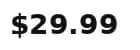
Create a third version of the page, saved as page_v3.html. This time, the price isn't just wearing a different tag. It's not even text at all; it's rendered as an image:
price_badge.png is a small generated image with "$29.99" rendered as pixels. Save this image under that file name, in the same folder:
Now run the scraper against this version, using the saved profile selectors.db from version 1:
Output:
It isn't an error, but it isn't nothing either. Adaptive relocation actually finds an element, the img tag, since enough of the surrounding structure still resembles the saved profile: tag position, sibling elements. But an image has no text content, so .text comes back empty. This is the exact failure mode from earlier in this piece: not a crash, a silent, confidently wrong answer that looks like it worked.
Step 8: Add the fallback
Structural matching, no matter how good, can't read pixels. You'll need an LLM here – use whichever you prefer, but for this example, we'll use OpenAI:
Add the OpenAI API key as an environment variable through the terminal:
Save this as scraper_v2.py:
Step 9: Run the full sequence
One script handles all three runs now, since scraper_v2.py is an upgrade of scraper.py. Structural matching first, AI only if that comes up empty:
What's happening under the hood on each of these, even though the script and the printed result stay consistent:
- Run 1 answered directly. #price-tag still exists, so nothing past the first check ever runs.
- Run 2 answered the same way but for a different reason. That selector is gone, so this is adaptive relocation doing the work using the saved profile.
- Run 3 required a fallback AI. It's the only one that reached the else branch, since price is now a rendered image. Because the regular selectors couldn't read it, it called AI to identify it.
Worth noting, a real version of this page would add two more problems: getting the request through in the first place, and rendering whatever JavaScript builds, which is the job a web scraping API with JS rendering handles. A static image, the way this demo's price_badge.png works, is the easy case. A price drawn into a canvas element at runtime is the one you'd face online – it doesn't exist yet when the page first loads, only after its JavaScript runs.
Final thoughts
Self-healing selectors solve a specific, expensive problem: the ongoing cost of fixing a scraper every time a site redesigns. Search interest in the approach has spiked sharply in recent months, and open-source tools built around it, like Scrapling, have seen rapid adoption as more teams move toward lower-maintenance scraping. That's a different problem from getting blocked, though, so a scraper built to survive redesigns still needs residential proxies or a Web Data API working alongside it, one layer keeping it pointed at the right element, the other keeping it able to reach the page at all.

Bypass the redesign. Then fix the rest.
A self-healing selector survives a site redesign. Pair it with Decodo, and the whole scraper survives everything else, too.
About the author

Zilvinas Tamulis
Technical Copywriter
A technical writer with over 4 years of experience, Žilvinas blends his studies in Multimedia & Computer Design with practical expertise in creating user manuals, guides, and technical documentation. His work includes developing web projects used by hundreds daily, drawing from hands-on experience with JavaScript, PHP, and Python.
Connect with Žilvinas via LinkedIn
All information on Decodo Blog is provided on an as is basis and for informational purposes only. We make no representation and disclaim all liability with respect to your use of any information contained on Decodo Blog or any third-party websites that may belinked therein.