Complete Guide to Web Scraping With OpenClaw and Decodo
Web scraping used to mean wrestling with Python scripts, brittle selectors, and an ever-growing list of sites that suddenly stopped working. AI-powered agents are changing that. This guide walks you through setting up OpenClaw with Decodo's scraping skill to build a reliable, proxy-backed web scraping setup. By the end, you'll have a working configuration that handles JavaScript rendering, bot detection, and proxy rotation out of the box.

Zilvinas Tamulis
Last updated: Feb 19, 2026
10 min read
TL;DR
- OpenClaw is an open-source AI agent framework that connects AI models to the web through browser automation, web fetching, and system control.
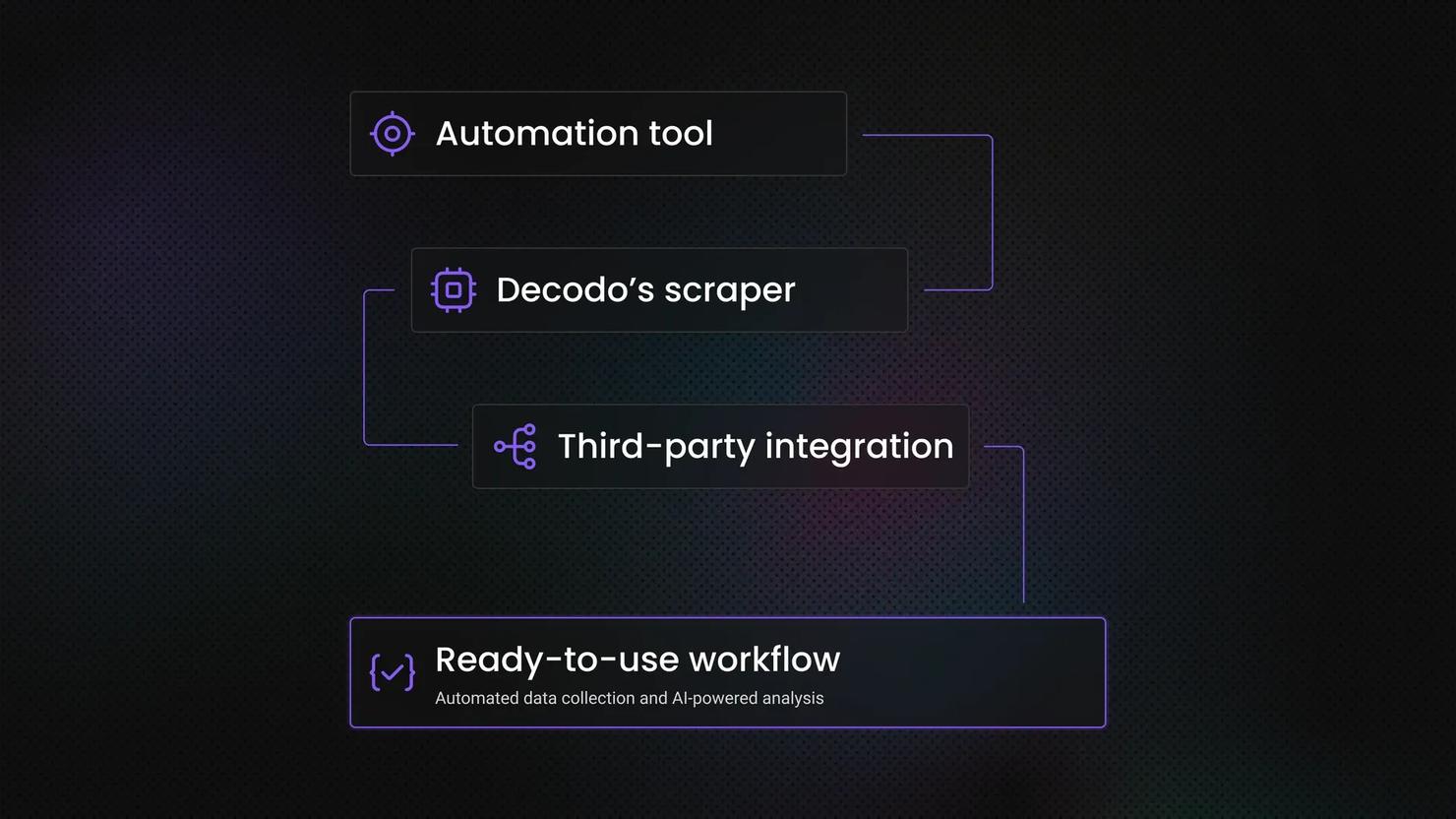
- Decodo's OpenClaw skill is a standalone scraping tool that routes requests through Decodo's Web Scraping API, handling bot detection, CAPTCHA bypass, proxy routing, and advanced fingerprinting automatically.
- The OpenClaw onboarding wizard handles model provider setup, channel integration, and skill configuration in one guided flow.
- Decodo's OpenClaw scraper skill is installed via ClawHub and activated by adding your Decodo API token to a .env file in the skill directory.
- OpenClaw is free and open source; Decodo's Web Scraping API offers a free trial, with paid plans for higher volume.
What is OpenClaw?
OpenClaw is an AI agent framework built for browser automation, web fetching, and system control. It functions as a connective tissue between an AI model and the open web, giving AI agents the tools they need to navigate sites, extract content, and trigger actions without you having to wire everything together yourself.
At the core of OpenClaw's scraping capability is the web_fetch tool. By default, it pulls content from a URL using local HTML parsing and converts it to readable Markdown or plain text. For simple, static pages, that works fine.
The problem is that most interesting sites aren't simple or static. JavaScript-heavy pages render content in the browser after the initial load, meaning the built-in tool grabs nothing but an empty shell. Bot-protected sites block requests that look like automated traffic – which, let's be honest, they are. Standard HTTP requests don't get far there.
That's where Decodo's OpenClaw skill comes in. It extends web_fetch with residential proxy routing, stealth mode, and automatic fallback logic. You get clean, structured content back without having to manage the infrastructure yourself.
Introduction to web scraping and Decodo's OpenClaw skill
Web scraping is straightforward in principle – fetch a page, pull the data, do something with it. The infrastructure behind doing that reliably at scale is where things get complicated. Bot detection has gotten sophisticated: IP reputation checks, browser fingerprinting, CAPTCHAs, and rate limiting. Without the right setup, you're constantly patching around blocks instead of actually getting data.
Decodo's OpenClaw skill is a standalone scraping tool you can call directly inside your agent workflows. You point it at a URL, and it runs the request through Decodo's Web Scraping API. It handles everything that would normally derail a scraper – CAPTCHA bypass, proxy routing, advanced fingerprinting, and anti-bot detection. The best part? You don't have to manage any of it.
The output comes back clean and ready to use in your format of choice: HTML, JSON, CSV, or Markdown.
The practical applications are broad: lead generation pipelines pulling contact data at scale, price monitoring across multiple retailers, content research workflows that need consistently fresh data, or automated pipelines feeding into a database or BI stack. Whatever the use case, the common thread is extraction that doesn't fall apart the moment a site pushes back.

Get unrestricted access to web data
Decodo's Web Scraping API overcomes any challenges of the web, gathering data for you at scale.
Prerequisites
Before installing OpenClaw, make sure you have the following:
- Python 3.9 or higher version installed
- A Decodo account with Web Scraping API Advanced plan enabled (free trial available)
- An AI model provider API key – choose OpenAI, Gemini, or another trusted source
- (Optional) Telegram account – or another app you want to integrate with
Step-by-step setup
Getting everything running is less work than you might expect. You'll need OpenClaw installed, a Decodo API key, and about ten minutes. The steps below walk you through installing OpenClaw, adding Decodo's skill, and running a test scrape to confirm it's all wired up correctly.
Install OpenClaw
Getting OpenClaw might feel intimidating for a beginner – there's no "download" button or a visual installer. However, the command-line interface is quite neatly designed, so you'll have no trouble figuring it out.
Start by opening your terminal tool and pasting one of the following commands:
macOS/Linux:
Windows:
npm (Node Packet Manager, regardless of operating system):
Click Enter, and after a couple of minutes, OpenClaw will be installed.
From here, use arrow keys to select your answers, and press Enter to make a choice. For multiple-choice answers, use the spacebar to select/deselect options.
You'll be asked to generate and configure a gateway token – this basically allows anyone with authorization to connect to your OpenClaw gateway and interact with it. Unless you plan to work with a team, it's best to choose No. Otherwise, check out the official documentation. The same thing goes for any follow-up questions – unless you know what they're for, it's best to choose not to install them.
Once the initial installation is complete, you can check if it was successfully installed using this command:
Then, you'll need to go through the onboarding process. Run the following command:
Here's what you should do in each of the onboarding steps:
1. When prompted, "I understand this is powerful and inherently risky. Continue?" confirm that you understand the risks and security concerns of using this tool. Choose Yes if you want to proceed.

2. Onboarding mode – choose QuickStart, unless you need to configure ports, networks, or anything specific to your use case.

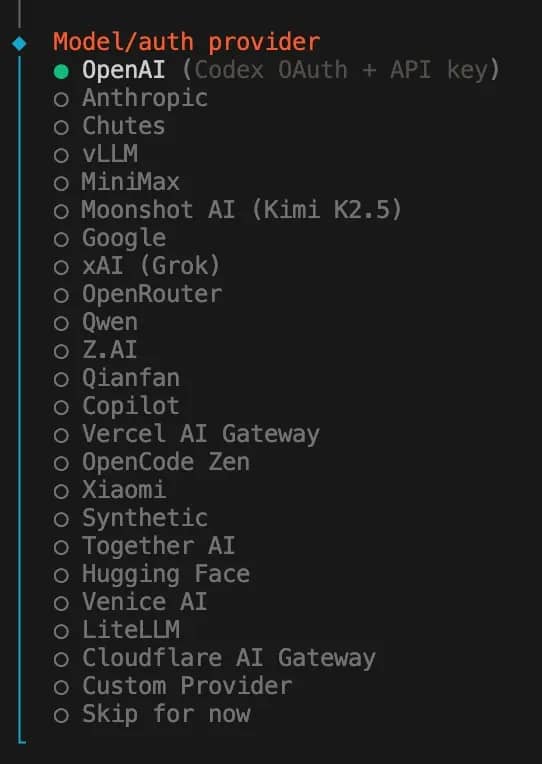
3. Model/auth provider – choose which AI provider you're going to use. For this tutorial, we're using OpenAI, but the choice is entirely up to personal preference.
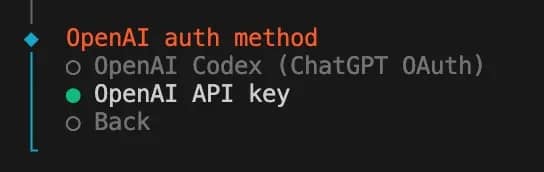
4. If you chose OpenAI, you'll be asked about an OpenAI auth method: select OpenAI API key. This step will differ depending on your choice in step 3.
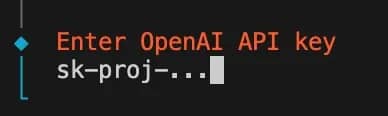
5. Enter OpenAI API key – get your key from the OpenAI dashboard and paste it here.
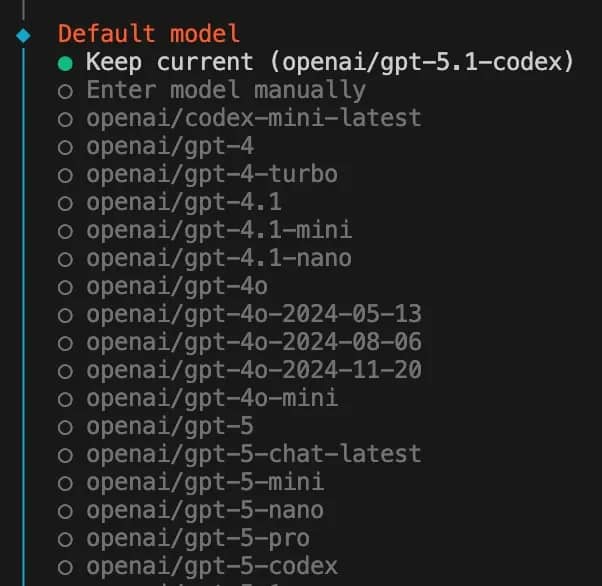
6. Default model – choose which model you want to use, or stick with the default choice.
7. Select channel (QuickStart) – choose which channels you plan to integrate with OpenClaw. Once again, the choice is yours, but for this tutorial, we're using Telegram, as it's the easiest to get started with. Follow the in-terminal instructions on how to set it up. You'll also need to create a name and a username for it; keep it in mind. Enter the Telegram token once you receive it from the app.
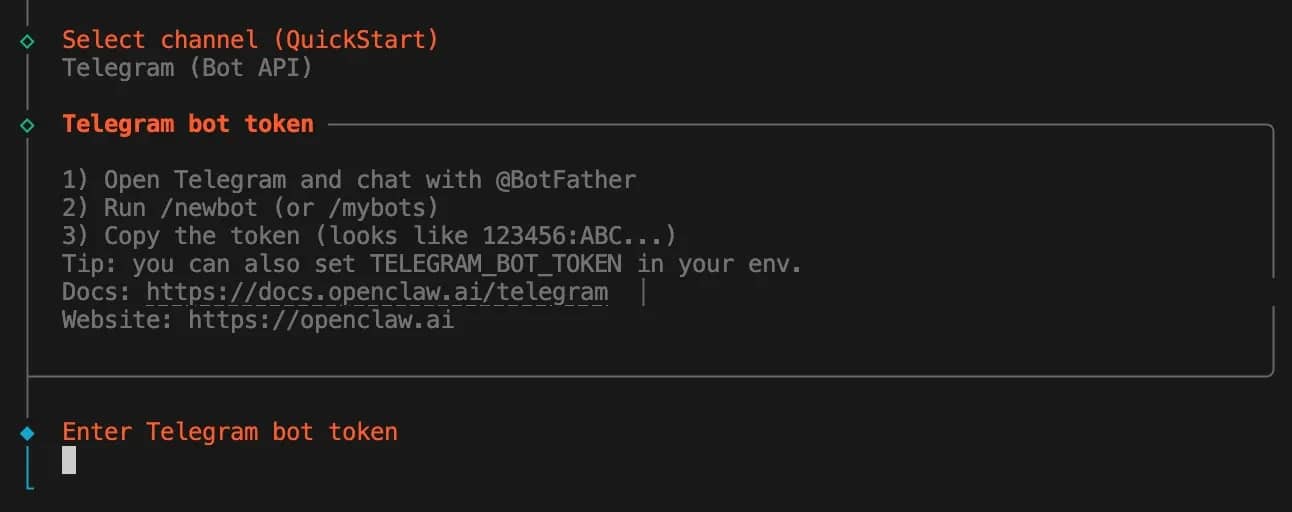
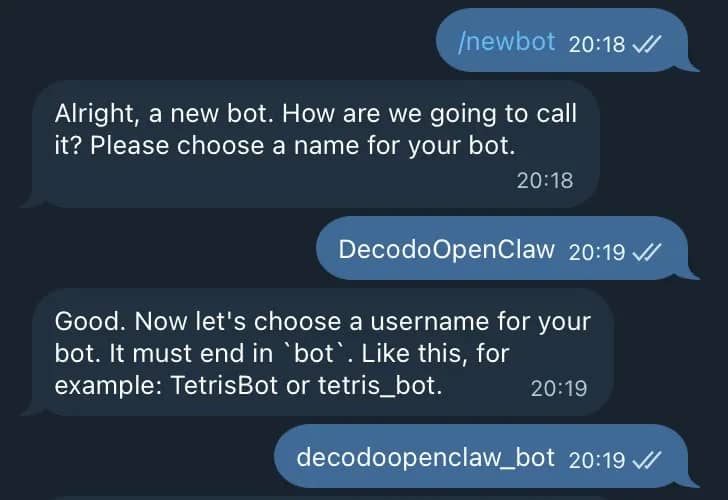
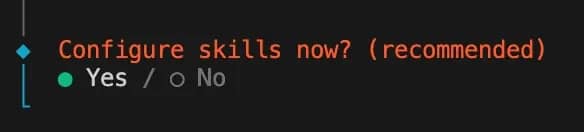
8. Configure skills now? (recommended) – click Yes. It's then recommended to get clawhub, as it will allow you to quickly install skills from the official database.

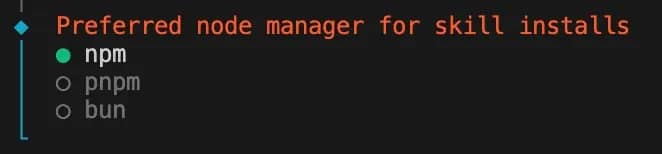
9. Preferred node manager for skill installs – choose npm.
10. Next, you'll be asked to set up various API keys for services such as Google Places, Nano Banana, Notion, etc. If you don't need them, choose No for all.
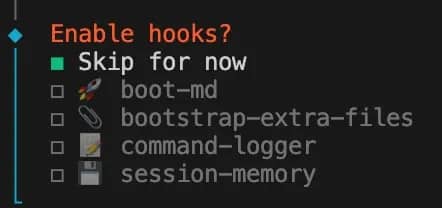
11. Enable hooks? – Skip for now.
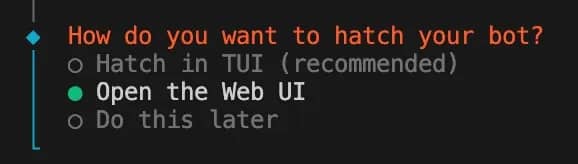
12. How do you want to hatch your bot? – Congratulations, this is the final step. Choose Open the Web UI if you want a visual interface to manage things or chat with your bot without external apps. You can always open the Web UI with a terminal command too.
Set up Decodo Scraper skill
Once your OpenClaw setup is complete, you can get the Decodo Scraper skill. It exposes these Web Scraping API tools that agents can call directly:
- google_search – query Google Search and receive structured JSON results
- universal – fetch and parse any public webpage, returning clean Markdown
- amazon – fetch parsed Amazon product-page data (e.g., ads, product info) by product URL
- amazon_search – search Amazon by query; get parsed results (e.g. results list, delivery_postcode)
- youtube_subtitles – fetch subtitles/transcript for a YouTube video (by video ID)
- reddit_post – fetch a Reddit post’s content (by post URL)
- reddit_subreddit – fetch a Reddit subreddit listing (by subreddit URL)
Here's how to do it:
1. Get the skill. Get it on GitHub, or run this command to download it straight from ClawHub. Keep note of where it's installed, as you'll need to access this directory.
2. Access the install directory. You can use the cd command (your path may differ):
3. Create a .env file. Do it manually or with:
4. Enter your authentication token. Get the basic auth token from the Decodo dashboard and paste it into the .env file and save it.
5. Confirm installation. Check the OpenClaw dashboard's Skills section, or run the following command to check if decodo-scraper appears on the list:
Test your bot setup with Telegram
If you followed this tutorial and set up the bot with Telegram, you can use the scraper through the app.
- Open the chat with the bot you created.
- Get the pairing code from the bot by sending /start. Then, paste it into the terminal on your computer:
3. Send a message on Telegram asking for results from either Google Search or content from a web page. The bot should reply with an answer to your query.
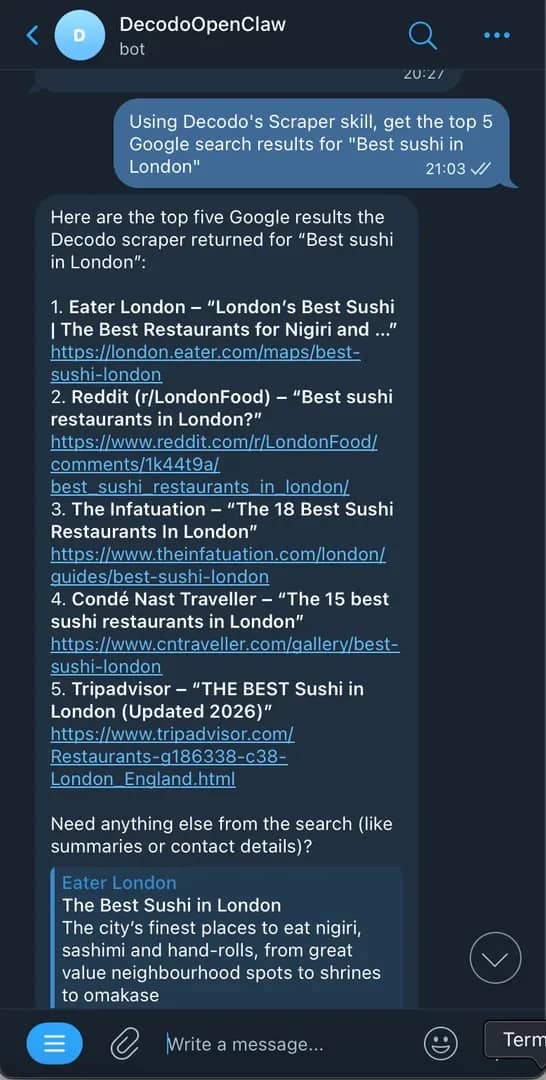
That's it! If you got a proper response, your setup works perfectly. For other channels, such as Discord, Slack, or WhatsApp, check the official documentation for setup instructions.
Best practices
Good scraping habits save you a lot of debugging time down the line. Here are the ones worth building into your workflow from the start:
- Match your request rate to the target site. Sending too many requests to a site can quickly lead to your IP being flagged. Add delays between requests, especially on repeat visits to the same domain.
- Don't ignore robots.txt. It won't block you technically, but it signals what the site owner considers off-limits. Factor it into your decisions, especially for commercial use cases.
- Sanitize and validate your output. Data coming back from scrapers is rarely clean by default. Build validation into your pipeline early – check for missing fields, unexpected formats, and encoding issues before the data goes anywhere downstream.
- Monitor your usage and set limits. API credits and proxy bandwidth aren't free. Know what a normal run costs and set alerts for anything that spikes.
- Cache aggressively where freshness doesn't matter. If you're scraping documentation, product descriptions, or anything that changes infrequently, caching responses reduces costs and load on the target. Save your live requests for data that actually needs to be current.
None of this is complicated, but skipping any of it tends to create problems that escalate into big headaches down the line.
Errors and how to handle them
Most OpenClaw issues follow predictable patterns. Here's what you're likely to run into and how to get past it quickly:
The Decodo skill isn't triggering
First check that your API key is correctly set – either in the .env file or as an environment variable. Then confirm the skill is actually enabled and not explicitly set to false somewhere in your config. If both look fine, test a direct command in the skill's directory and see if it returns results:
If the command returns data, then there's something wrong on the OpenClaw configuration end. If not, check Decodo's help and support options.
Gateway won't start, or the service isn't running
Usually one of three things on OpenClaw's end:
- Gateway mode isn't set to local
- The port is already in use (EADDRINUSE)
- You're trying to bind to a non-loopback address without auth configured
Run these commands to pinpoint the issue:
The gateway keeps dropping or going offline
You're likely running it on a laptop that sleeps or reboots. Move the gateway to a VPS or always-on machine. Use openclaw gateway install to set it up as a system service so it restarts automatically.
Sessions or memory aren't persisting between restarts
Confirm the gateway is pointing at the same state directory every time it starts. If you're in remote mode, the session store lives on the gateway host, not your local machine – so looking in the wrong place is a common source of confusion.
Conclusion
OpenClaw and Decodo's Web Scraping API cover the full stack – AI-powered automation, proxy routing, bot bypass, and clean data output. Set up Decodo's OpenClaw scraper up once, follow the best practices, and you've got a scraping workflow that actually holds up in production. No matter what walls the web puts up, you've got a decent set of tools to go through them.

Start scraping without the maintenance
Decodo's Web Scraping API handles proxies, bot detection, and JavaScript rendering out of the box. Free trial included.
About the author

Zilvinas Tamulis
Technical Copywriter
A technical writer with over 4 years of experience, Žilvinas blends his studies in Multimedia & Computer Design with practical expertise in creating user manuals, guides, and technical documentation. His work includes developing web projects used by hundreds daily, drawing from hands-on experience with JavaScript, PHP, and Python.
Connect with Žilvinas via LinkedIn
All information on Decodo Blog is provided on an as is basis and for informational purposes only. We make no representation and disclaim all liability with respect to your use of any information contained on Decodo Blog or any third-party websites that may belinked therein.