Playwright Get Cookies: How to Get, Save, and Load Cookies in Playwright
When you need to get cookies in Playwright and reuse them across runs, the key concept is the browser context. Cookies live in the context, not the page. Getting cookies in Playwright starts with the context.cookies() method, and returns every cookie stored in the browser context, which you can save and load from a file later. This guide walks through how to get, save, and load cookies in Playwright.

Mykolas Juodis
Last updated: Jul 14, 2026
5 min read

TL;DR
- Use context.cookies() to get cookies in Playwright. It returns an array of cookie objects for the whole context.
- Filter the returned cookie objects by name or URL context.cookies([url]) to find specific session data.
- Save cookies manually as JSON, or use context.storageState() for the full session.
- Load cookies with context.addCookies(), or pass storageState to browser.newContext() to restore a full session.
- Pair Paywright save cookies and Playwright load cookies functions with a consistent IP to keep sessions valid.
How Playwright handles cookies: the browser context model
A cookie is a small piece of data a site stores in the browser. It carries a name, a value, a domain, a path, an expiry date, and a few flags such as httpOnly, secure, and sameSite.
In Playwright, cookies don't belong to a page – they belong to the browser context. A browser context is an isolated browser session, similar to a fresh browser profile. Each context keeps its own cookie jar, separate from any other context running in the same script.
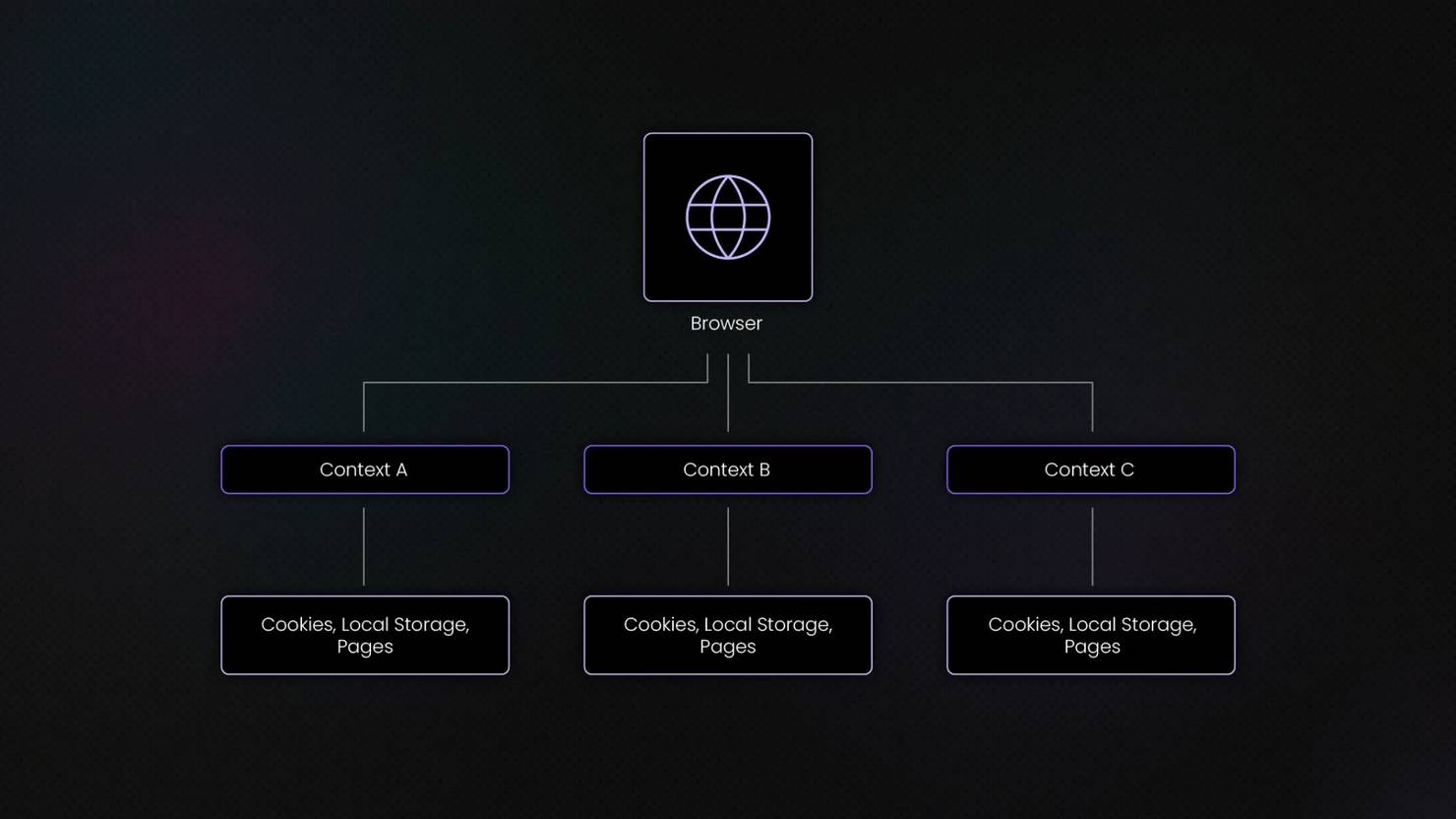
Multiple pages can exist inside a single context and automatically share the same cookies. However, cookies aren’t shared across contexts.
This separation matters for a few reasons:
- One context can open multiple pages, and all of them share the same cookies.
- Different contexts never mix cookies, even if they run in the same browser instance.
- You can log in to the same site with multiple accounts at once, each in its own context, with zero risk of cross-contamination.
This isolation is one of the reasons Playwright is popular for scraping and automation. You can run multiple accounts simultaneously without session leakage.
How to get cookies in Playwright
You can return all cookies stored in a context, filter individual cookies by name, or limit results to specific URLs using context.cookies(). You can then inspect the shape of the returned objects in both Node.js and Python.
Get all cookies
To get all cookies in Playwright, call:
This method returns an array of every cookie stored in the current context. Call it with no arguments, and Playwright hands back everything.
Each cookie object in that array has the same shape:
Node.js example
The following script visits quotes.toscrape.com and retrieves all cookies stored in the browser context in Node.js:
First, install Playwright if you haven’t yet:
Then create a file such as get-cookies.js and add the following script:
Run it with:
The output is a list (array in Node.js, list in Python) of cookie objects. The exact cookies depend on what the website sets at the time you run the script.
For example, if the site sets one cookie, you might see:
For Node.js or for Python:
If the site doesn't set any cookies, the output will be [] for both scripts.
The quotes.toscrape.com website doesn't set many cookies by default, so test against httpbin.org/cookies to see a populated response, since that endpoint reflects the cookies sent with the request.
An empty array is normal here, since quotes.toscrape.com doesn't set cookies on the homepage. The array structure is what matters – once a site does set cookies, each one appears as an object with the fields shown above.
Get specific cookies
Most of the time, you don't need every cookie. You need one, usually a session token or authentication cookie. You can handle this using 2 options:
Filtering by name:
Call context.cookies() as before, then use find() in Node.js or a list comprehension in Python to grab the cookie you want.
Scope cookies by URL:
Pass one or more URLs to context.cookies(), and Playwright will return only the cookies that apply to those URLs. This filters out third-party trackers and cookies set by other domains your context visited.
This URL-scoping is the cleanest way to avoid picking up cookies from ad networks or analytics scripts that piggyback on the page.
Syntax in both languages: Playwright get cookies in Node.js and Python
The core call is context.cookies() in both languages, but the calling convention differs slightly.
Node.js uses await context.cookies(), since Playwright's Node API is asynchronous throughout. Python's sync API drops the await entirely: context.cookies() runs and returns immediately.
If you only have a page object and not a context, you can still reach the context through page.context(). Every page belongs to exactly one context, and page.context() gives you a reference to it.
Note: Cookies travel between the browser and server inside HTTP headers, specifically the Cookie request header and the Set-Cookie response header. Playwright reads the resulting cookie jar for you, so you never have to parse those headers by hand.
If you need to move to a page before reading its cookies, our Playwright XPath guide covers locating and interacting with elements once you're there.
Full script:
Save this as get_cookies.py and run python get_cookies.py you’ll get:
httpbin.org/cookies doesn't set its own cookies on a plain visit, since it only reflects cookies you send it. The output confirms the calls work and return the expected array structure, ready for the next section where you'll set and then capture real cookie values.
How to save cookies to a file
Once you've got cookies, the next step is saving your scraped data. You can manually export cookies to JSON for full control or use Playwright's built-in storageState() feature to persist cookies, local storage, and other session-related information.
After you get cookies in Playwright, the next step is persisting them.
Manual approach: cookies only
The manual approach is straightforward. Call context.cookies(), then write the resulting array to a JSON file. This works well when you only care about cookies and want full control over the file's contents.
First, set a cookie so there's something to save. httpbin.org has an endpoint that sets a cookie directly: /cookies/set/<name>/<value>.
Node.js:
Python:
Create a new page within the browser context. This page is where navigation occurs. By visiting an endpoint that sets a cookie, the cookie is stored in the current browser context. Once the page has finished loading, context.cookies() returns all cookies associated with that context, making them easy to serialize and save as JSON.
After running this, open cookies.json and you'll see an array with one cookie object, containing session_id with the value abc123, plus the domain, path, and expiry Playwright filled in automatically.
This manual route is good when you only need cookies and don't care about local storage or other session data. For anything beyond that, the next method does more with less code.

Grow your scraping projects with residential proxies
Get past CAPTCHAs, geo-restrictions, and IP bans with 115M+ ethically-sourced residential proxies from 195 locations that deliver a 99.92% success rate and a <0.5s response time.
The storageState() approach
This is the recommended approach for saving cookies to a file. Unlike manual cookie exports, context.storageState() saves cookies and local storage or origin-bound data in a single official file, going a step beyond a basic Playwright get cookies call. This makes it the documented way Playwright recommends for persisting a session, and it captures more than the manual approach does.
Node.js:
Python:
Run either script, and state.json will appear in your working directory. Open it, and you'll see a structure with 2 top-level keys, namely cookies and origins. The cookies array looks just like the manual export, but origins holds local storage data for each domain your context visited, something the manual cookies() approach can't capture.
The storageState() method is usually the better choice. Most modern sites store session tokens in local storage alongside or instead of cookies, so a cookies-only export can miss part of what keeps you logged in.
There’s one, though. A saved state file contains live session tokens, so treat state.json the same way you'd treat a password. Don't commit it to version control, and don't share it. Anyone with that file can act as the logged-in user until the session expires.
Full script:
Save as save_state.py and run with python save_state.py.
Expected output:
Check your working directory afterward. state.json will contain the session_id cookie under the cookies key, with .httpbin.org as the domain.
How to load cookies to restore a session
Loading cookies is the reverse of saving them: read a file, then inject its contents into a fresh context so the browser starts already authenticated. It allows a new browser session to inherit previously saved authentication data. You can inject cookies directly using addCookies() or preload a complete Playwright session with storageState, depending on whether you need cookie-only or full-session restoration.
Load cookies with addCookies()
The context.addCookies() function takes an array of cookie objects and adds them to the current context. Read your saved JSON file, parse it, and pass the array straight in.
Node.js:
Python:
This loads the cookies.json file you created earlier with the manual export.
The new context starts empty, then addCookies() populates it before any page navigation happens. Once the context carries the session_id cookie, a visit to httpbin.org/cookies reflects it back in the response, confirming the cookie made the trip.
Load a full session with storageState
To restore everything captured by storageState(), including local storage, pass the saved file path directly to browser.newContext(). Playwright reads the file and pre-loads the context before you write a single line of navigation code.
Node.js:
Python:
This single storage_state argument replaces several lines of manual setup. The context comes into existence already carrying the cookies and local storage saved earlier.
So use addCookies() when you only need to inject cookies, and you're managing the rest of the context setup yourself. Use storageState at context creation when you want to restore a full session in one step, cookies and local storage included.
The common pattern looks like this:
- Log in once with a real browser run
- Save the state with storageState()
- Then every later run skips the login form entirely by passing that file to newContext()
This is what most production scraping and testing setups do, since logging in repeatedly wastes time and risks tripping rate limits or CAPTCHAs.
Full script:
Make sure state.json exists from the previous section, then run python load_state.py.
Expected output:
This session carries over without logging in again. If you're managing sessions at scale across multiple accounts, sticky and rotating sessions explain how proxy-level session persistence complements cookie-based restoration. Meanwhile, you can pair restored cookies with a stable IP via sticky residential proxies to keep that restored session valid for longer.
Setting, modifying, and deleting cookies
Playwright supports the complete cookie lifecycle. You can create new cookies, overwrite existing values, clear stored cookies, and manage consent-related cookies to reduce interruptions caused by cookie banners and privacy prompts during automation.
Add a cookie
Use context.addCookies() with an array containing one cookie object. Each object needs either a URL or both domain and path.
Node.js:
Python:
Modify a cookie
Playwright doesn't have a separate method for updating cookies. To modify a cookie, add a new one with the same name, domain, and path as the existing cookie. The new value overwrites the old one.
Run context.cookies() afterward, and you'll see session_id now holds new-value-456, with the old value gone.
Clear cookies
Use context.clearCookies() to remove every cookie from the context.
Recent Playwright versions support clearing by name or domain, so you can target specific cookies instead of wiping everything:
Cookie consent banners
Cookie consent banners exist because of privacy regulations like GDPR and the ePrivacy directive, which require sites to ask before setting non-essential cookies. For a script, these banners are an obstacle because they sit on top of the page and can block clicks or hide content until dismissed.
2 strategies can handle this. The direct route clicks the accept or reject button, the same way a person would.
Make sure the banner has rendered before clicking, since consent banners often load after the initial page content. Our guide to waiting for page load in Playwright covers waiting methods that handle this reliably.
The second route skips the banner entirely. Many sites check for a specific consent cookie before deciding whether to show the banner. Pre-load that cookie with addCookies() before navigating, and the banner never appears.
The exact cookie name and value depend on the site's consent management platform, so inspect the cookie set after manually accepting once, then reuse that value in your script.
Best practices and troubleshooting
A working code snippet and a reliable scraper aren't the same thing. These practices cover the gap, plus fixes for the cookie problems people run into most.
Use separate contexts to isolate cookies per account or task
Each browser.newContext() call creates an independent cookie jar, so running multiple accounts in parallel never risks cross-contamination. This also means you can test logged-in and logged-out states side by side in the same script.
Create a separate browser context for each account or task. This prevents cookies from mixing between sessions and reduces the risk of accidental account contamination. Isolated contexts also make debugging significantly easier.
Prefer storageState over manual cookie files for full session persistence
Use storageState() whenever possible. It stores cookies together with local storage and origin data, which manual exports miss entirely.
Many sites now store authentication tokens in local storage, so a cookies-only file can fail to restore a logged-in state. Default to storageState() for anything login-related to save debugging time later.
Keep the IP consistent with the saved session
Sites often bind sessions to the IP address that created them, alongside cookies and browser fingerprint signals. If you save a session from one IP and load it from another, some sites will flag or invalidate it.
Match the IP between the session that created the cookies and the session that uses them to keep restoration working.
Treat saved state files as secrets and refresh them before they expire
A state.json file contains live session tokens that grant access without a password. Store it outside version control, and rebuild it periodically, since cookies and tokens carry expiry dates that eventually invalidate the file.
Troubleshooting
Here are quick fixes to some of the issues you’ll encounter when getting cookies in Playwright:
- Cookies not persisting. You likely called cookies() on a page object instead of its context, or created a new context without saving or loading storageState. Check that you're calling context-level methods and that the file path matches between save and load.
- Session invalid after loading. The cookie may have expired between saving and loading, or the site ties the session to an IP or user agent that changed. Compare the expires field in your saved cookies against the current time, and check whether your IP changed.
- addCookies throws an error. This usually means a cookie object is missing URL or both domain and path, or one of the required fields has the wrong type. Double-check each object in the array matches the shape Playwright expects.
- Still getting blocked despite valid cookies? Cookies alone rarely bypass modern anti-bot systems, which also evaluate IP reputation, TLS fingerprints, browser characteristics, and automation signals. To reduce detection rates, combine cookie persistence with rotating residential proxies, realistic browser fingerprints, and proper session management.
If you're troubleshooting persistent blocks, our guide on web scraping without getting blocked covers the most common detection triggers and mitigation strategies. This is because anti-bot platforms use multiple layers of defense, as explained in anti-scraping techniques and how to outsmart them, making valid cookies just one piece of the puzzle.
Maintaining session stability also requires careful IP management. Use rotating proxies to preserve access and reduce the likelihood of reputation-based blocks.
Additionally, many websites rely heavily on browser fingerprinting rather than cookies alone, so hardening your browser profile is equally important. Our guide on bypassing CreepJS and browser fingerprinting explains how fingerprint-based detection works and why it often leads to blocks even when your cookies are valid.
Final thoughts
The complete Playwright get cookies workflow consists of 3 steps: retrieve cookies with context.cookies(), save them for future use, and load them again when you need to restore a session. Remember that cookies live in the browser context, not individual pages.
For most projects, storageState() is the cleanest and most reliable persistence method because it captures cookies alongside local storage and related session data. Combined with IP consistency and fingerprint stability, it helps keep authenticated sessions active for longer periods.
If you're building larger automation or scraping projects, then this Playwright web scraping guide might come in handy.

Get rotating residential proxies
Plug 115M+ IPs from 195 locations straight into your Playwright automation and scale in the most efficient way possible.
About the author

Mykolas Juodis
Head of Marketing
Mykolas is a seasoned digital marketing professional with over a decade of experience, currently leading Marketing department in the web data gathering industry. His extensive background in digital marketing, combined with his deep understanding of proxies and web scraping technologies, allows him to bridge the gap between technical solutions and practical business applications.
Connect with Mykolas via LinkedIn.
All information on Decodo Blog is provided on an as is basis and for informational purposes only. We make no representation and disclaim all liability with respect to your use of any information contained on Decodo Blog or any third-party websites that may belinked therein.