Tavily Alternatives: 7 Agentic Search APIs Compared
Tavily is an agentic search API that takes a natural-language query and returns ranked, LLM-ready content instead of raw search result HTML. Many LangChain projects use it by default, and teams compare Tavily alternatives when an agent gives an outdated price or can't read a bot-protected page. This guide shows which alternative fits which use case and how to migrate.

Justinas Tamasevicius
Last updated: Oct 20, 2026
10 min read
TL;DR: the best Tavily alternatives at a glance
- Pick by use case. Use Decodo's Web Data API for search plus full pages with one API key. Use Exa for semantic search, Perplexity for cited answers, Serper for low-cost search results, and Linkup for EU data residency.
- Search reaches only indexed pages. On 20 bot-protected sites in a benchmark, Decodo returned page content for 90%, and Tavily for 30%.
- Price per agent task. One task can trigger 5 to 15 calls, so compare credit-based and per-1K-request pricing per task.
- Keep the migration small. Put search and fetch behind one interface, then run the steps below on Decodo's free plan.
What Tavily does and why teams look for alternatives
The right alternative depends on which Tavily features you use, such as search, extraction, or crawling.
What Tavily returns and costs
Tavily's search endpoint takes a query and returns up to 20 ranked results, each with a title, a URL, a relevance score, and content snippets. With optional parameters, it also returns a short AI-generated answer and the cleaned full page.
Tavily also has extract, crawl, map, and research endpoints. Its langchain-tavily package connects it to LangChain, and its hosted Model Context Protocol (MCP) server lets AI agents call it as a tool. The older TavilySearchResults tool was the default in many LangChain templates.
The free plan gives 1K credits a month, and paid credits cost $0.005 to $0.008 each, depending on the plan. A basic search costs 1 credit and an advanced search costs 2. That keeps prototypes cheap, and costs grow quickly for high-volume production agents.
Why teams start evaluating alternatives
Teams give 4 common reasons.
- Ownership changed. Nebius announced its agreement to acquire Tavily in February 2026, and the deal closed the same month. Press reports said the price was $275M upfront, and up to $400M if performance targets are met. At the announcement, Nebius said Tavily would keep its brand and team. However, a new owner can change a product's priorities over time, so check how hard it would be to switch.
- Cost at agent scale. One user task can trigger 5 to 15 retrieval calls, a pattern called fan-out. The agent rewrites the query, searches again, and reads pages, so a price that looks small per search can become large per task.
- Extraction depth. By default, search results contain short snippets from the index. If an agent needs a whole page, a full documentation site, or a structured product record, it also needs extract or crawl calls.
- Access limits. An index can miss pages behind bot protection or logins, pages that load their content with JavaScript, and pages whose content changes by country. Tavily's country parameter ranks results from a chosen country higher, but the page content still comes from its index. The agent can then answer confidently from an outdated snippet or a price meant for another country.
Our retrieval-augmented generation (RAG) glossary entry explains how models use retrieved content, and our guide on what AI scraping is describes data collection for agents.
How to evaluate a Tavily alternative
Compare Tavily API alternatives on the 6 criteria below.
- Check which endpoints each API offers. Some APIs only search, and others can also fetch a single page, crawl a site, and map a domain's URLs. Ask whether your agent ever needs a page it didn't find through search. If it does, you also need a scraping API, which reads a page directly from its URL.
- Measure the success rate. Include pages that render with JavaScript, block bots, or change by country. Run your 5 hardest-to-scrape URLs through each free plan, and count how many return the content you need.
- Check the output format. APIs return markdown, structured JSON, or an AI-generated answer. Count the post-processing steps between the response and your vector store. Markdown also reduces token cost. On 11 pages fetched through Decodo's /scrape, markdown used 15x to 66x fewer tokens than the rendered HTML of the same pages.
- Test for outdated data and geo-targeting. Some APIs serve a cached copy by default, and some can't target a country. Compare a price in a search result with the live page, then request a page that changes by country, once from each of 2 countries. If both responses match, the API probably isn't fetching from the country you chose.
- Price a full agent task. Log 1 week of agent traffic, count searches and page fetches per completed task, and price that set of calls.
- Check framework support. Most vendors in this list offer a LangChain adapter or an MCP server, so this rarely changes the choice. Our guide to MCP servers for AI workflows lists more options. To pick the framework itself, see our comparison of AI agent frameworks.
Check whether the adapter is vendor-maintained or community-maintained, and when it was last released. Tools that exist only in the deprecated langchain-community package may not get new fixes.
The 7 best Tavily alternatives in 2026
Prices and features for these Tavily competitors come from each vendor's public pages. They change over time, so confirm them before you set a budget.
1. Decodo's Web Data API
Best for: Agents that need search plus full pages from bot-protected or country-specific sites, with one API key.
What it is: Decodo's Web Data API runs on the same network as Decodo's residential proxies and offers search, scrape, crawl, and map with one API key:
- The /search endpoint runs through the Google Search target and returns live results with URLs, titles, and snippets. It's the closest equivalent to a Tavily search call.
- The /scrape endpoint fetches one page as clean markdown or HTML, with optional JavaScript rendering and geo-targeting.
- The /crawl endpoint visits a site's pages automatically and returns their content. It can switch to JavaScript rendering for pages that need it.
- The /map endpoint discovers a site's pages in a single call, from the site and its sitemap.
The Web Data API replaces the earlier Web Scraping API and Fast Search API with one API, one key, and one subscription. Existing Web Scraping API setups continue to work, and new users start on the unified endpoints. Our introduction to the Web Data API explains each endpoint.
How it compares to Tavily: Both provide agent search, and the Web Data API can also fetch, crawl, and map with the same key, without a second vendor. Requests run on Decodo's residential proxy infrastructure and can render JavaScript. Pages that depend on JavaScript, block bots, or change by country then return full content where search-first APIs return snippets.
Benchmark against Tavily: On 50 pages, Decodo's Web Data API returned page content for 96%, and Tavily for 64%. Both returned all 10 documentation pages, so the gap came from protected sites and news.
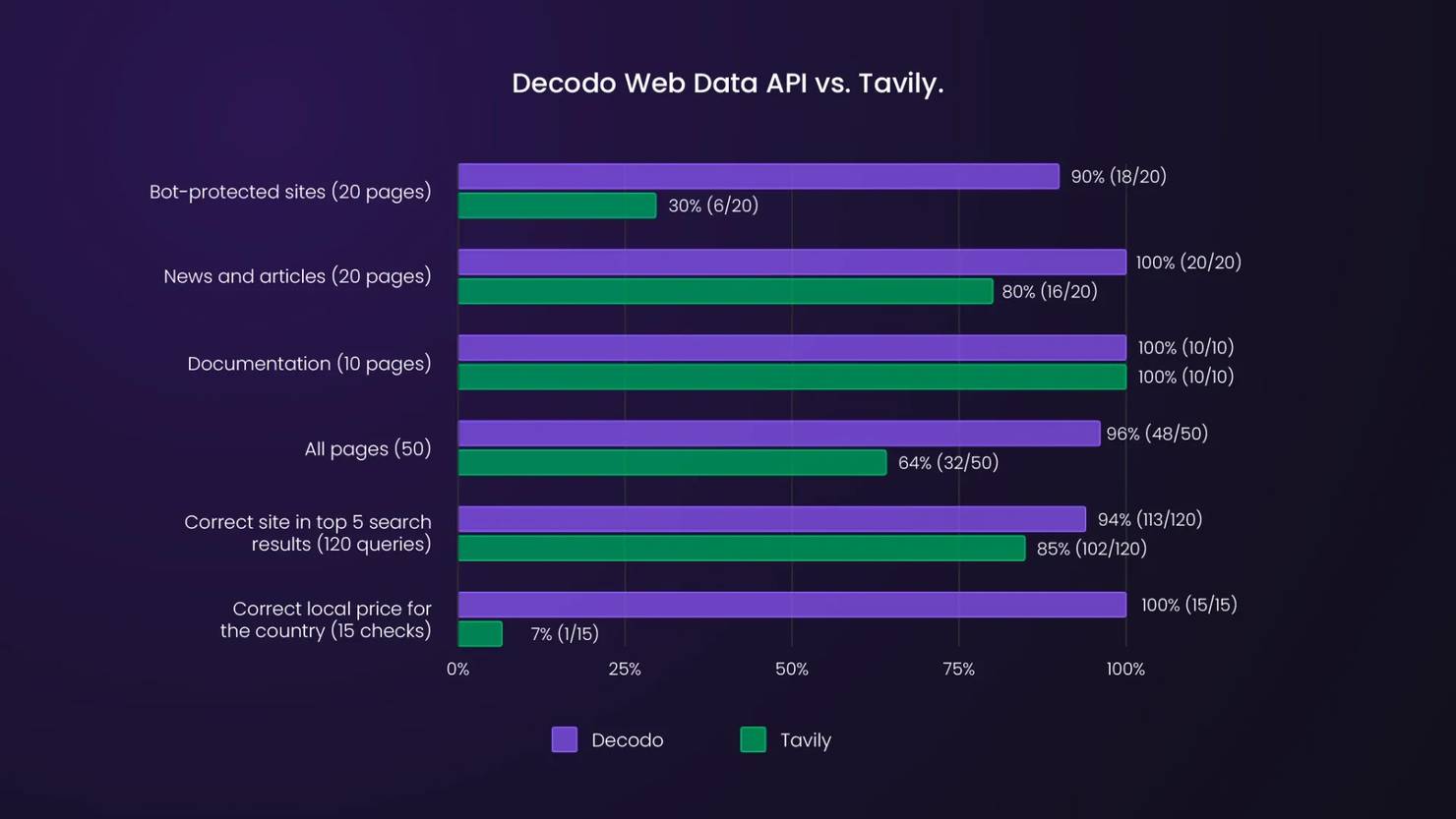
Both ran in October 2026 with API keys from the same machine, and the same quality check was applied to every response. Decodo's column uses this article's fetch() code, and Tavily's uses its Extract and Search endpoints in the best of their basic and advanced modes. Runs at other times of day showed the same pattern. You can repeat the test on your own URLs with the shadow evaluation in the migration steps.
What it costs: You can start on the free plan, and paid plans bill per 1K requests with a money-back option. Rates are lower on larger plans, and pages without bot protection can use the lowest-cost standard proxy pool, which this article's fetch() code tries first. The pricing page lists current rates by endpoint, and the billing documentation explains how each request, including each crawled page, is billed.
When a search-only API is enough: If your agent only needs a short ranked answer and never reads the page, a search-only API does that job.
Switch to this when: Your agent needs pages that search can't reach, or you use 2 vendors, one for search and one for extraction. The Web Data API fits these use cases well:
- Crawl a documentation site into clean markdown for a RAG pipeline, in one crawl job instead of a custom crawler.
- Map an archive site to find the relevant documents first, then crawl only those pages.
- Run live web search inside an IDE or agent through the Decodo MCP server, without a separate search vendor.
Add a callback_url to the crawl request, and Decodo notifies you when a crawl finishes, so your pipeline can collect the results without polling. The same API key works with Decodo's integrations for LangChain, LlamaIndex, n8n, and Zapier, listed under Integrations in the dashboard. In the Playground, Copy agent setup copies a prompt that installs and configures Decodo's CLI and agent skill in an AI coding agent. The AI data pipelines use case shows where these endpoints fit in a production pipeline.

Need more than search?
Scrape, crawl, map, and search from one API, with proxies and anti-bot handling already sorted.
2. Exa
Best for: Semantic search across large document collections.
What it is: Exa is a search API built on its own embeddings-based index, so it finds results by meaning, not only by keyword match. Its endpoints include search, page contents, answers, and longer research tasks for agents.
How it compares to Tavily: Exa is stronger at open-ended discovery and less suited to general page fetching. Like Tavily, it returns LLM-ready content. Exa serves page text from its own cache by default, and its max_age_hours setting controls when it fetches the live page.
What it costs: Search costs $7 per 1K requests with the default auto type, $4 with instant, and $15 with deep-reasoning. Page contents add $1 per 1K pages for each content type, and the free plan gives $10 in credits a month.
Switch to this when: Your agent needs to find the right documents, such as "find companies building X," not read a page it already knows.
3. Firecrawl
Best for: Structured data extraction from known sites.
What it is: Firecrawl is an API for scraping, crawling, mapping, and searching, with schema-based structured output and an agent endpoint. It renders JavaScript pages and offers a LangChain package, a LlamaIndex reader, and an MCP server.
How it compares to Tavily: Where Tavily answers a question from the web, Firecrawl converts a known site into clean data. Its schema extraction and framework adapters are well developed. Its focus is extraction quality rather than access to heavily protected sites, so test your hardest URLs before you choose it.
Firecrawl also caches scrapes by default. For prices and other fast-changing pages, set maxAge to 0.
What it costs: Firecrawl bills in credits, and a scrape, a crawled page, or a map costs 1 credit. A search costs 2 credits per 10 results, plus 1 credit for each result it scrapes. The free plan gives 1K credits a month, and the Hobby plan costs $19 a month for 5K credits.
Switch to this when: You need structured data extraction from known sites, and those sites aren't heavily protected.
4. Perplexity Search API and Agent API
Best for: Cited answers inside your product.
What it is: Perplexity's Search API returns ranked results with extracted page text, and the Agent API returns an AI-generated answer with citations. The Agent API replaced Sonar Chat Completions.
How it compares to Tavily: With the Agent API, Perplexity does more of the reasoning, so your pipeline does less work but controls less of what enters your context window. The Search API is the closer Tavily equivalent.
What it costs: The Search API costs $5 per 1K requests, or $1 per 1K in its Fast Search mode. The Agent API bills model tokens plus tool fees, such as $1 to $2.50 per 1K web searches. At high volume, that bill grows with answer length and search count, unlike a fixed credit cost per call.
Switch to this when: You want a cited answer in your product, and you accept that Perplexity handles search and answer generation.
5. Brave Search API
Best for: Search on an independent index with a privacy focus.
What it is. Brave Search API has web, news, image, video, and place endpoints, plus an LLM Context endpoint that returns page chunks for models.
How it compares to Tavily: Unlike Tavily's search, Brave's web endpoint returns standard search results, so you add cleaning and chunking yourself or use the LLM Context endpoint. Storing results long-term, for example to fine-tune a model, needs a plan that includes storage rights.
What it costs: Search costs $5 per 1K requests. Accounts get $5 in free credits a month, and Brave requires a credit card for identity checks.
Switch to this when: An independent index, a single per-request price, or privacy matters more than LLM-ready output. Its original LangChain tool was in the deprecated langchain-community package, so check whether a maintained one exists.
6. Linkup
Best for: Teams that need a European vendor or data residency.
What it is: Linkup is a French search API that focuses on fast responses, with search depths from flash to deep. It returns raw results, an answer with sources, or JSON in a schema you define.
How it compares to Tavily: Linkup does a similar job to Tavily, and it differs in jurisdiction and contract terms. Queries can run in any of its regions by default. Guaranteed processing in one region is an enterprise option.
What it costs: Standard search costs $5 per 1K requests, and deep search costs $50 to $55 per 1K. New accounts with a work email get $20 in credits, reset to $20 each month for eligible accounts.
Switch to this when: Your procurement or compliance team needs a European vendor, or data residency written into the contract.
7. Serper.dev
Best for: Low-cost Google result links for your own extraction stack.
What it is: Serper is a minimal Google results API. It returns Google search engine results pages (SERPs) as structured JSON for web, news, images, maps, shopping, and other result types.
How it compares to Tavily: Serper returns raw results, and your pipeline handles content cleaning, answer generation, and formatting for agents. Its per-query price is among the lowest in this list for search results alone, and its original LangChain wrapper was in the deprecated langchain-community package.
What it costs: Credit packs cost from $1.00 per 1K queries on the smallest pack to $0.30 on the largest. Credits expire after 6 months, and new accounts get 2.5K free queries.
Switch to this when: You already run your own extraction and cleaning stack and only need result links at a low cost. Include the engineering time for that stack in your budget.
To collect parsed Google results at scale, use the Google Search Scraper API. Our guide to AI data collection tools lists more options in this category.
Tavily alternatives compared
Tool
Endpoints
Protected and JavaScript pages
Output format
Pricing model
Best for
Tavily
Search, extract, crawl, map, research
Partly, through Extract
Ranked results with snippets, optional answer
Credits, by plan
General agent search with snippets
Decodo Web Data API
Search, scrape, crawl, map
Built-in, with rendering, residential proxies, and geo-targeting
Search results JSON, pages as markdown or HTML, parsed JSON for supported sites
Per 1K requests, by endpoint and plan
Search plus full pages from bot-protected or country-specific sites
Exa
Search, contents, answer, agent
Partly, with live page fetches
Results with text, highlights, summaries
Per 1K requests, by search type
Semantic search
Firecrawl
Scrape, crawl, map, search, agent
Built-in, with rendering and proxy modes
Markdown, HTML, schema-based JSON
Credits, by plan
Structured data extraction from known sites
Perplexity
Search API, Agent API
Partly, through an Agent API tool
Results with snippets, or a cited answer
Per 1K requests, or tokens plus tool fees
Cited answers
Brave Search API
Web, news, images, LLM Context
Not built in, returns index chunks
Search JSON or page chunks
Per 1K requests
Independent index
Linkup
Search, fetch, research
Partly, through its fetch endpoint
Results, answer with sources, or schema-based JSON
Per 1K requests, by search depth
European vendor, data residency
Serper
Google results by type (web, news, images, and more)
Not built in, returns result links
Raw Google results JSON
Prepaid credit packs
Result links for your own extraction stack
Prices in this article are list prices as of October 2026.
What none of these APIs solve on their own
Search results come from an index built before your query, whichever API you use. That's why the Web Data API combines search with /scrape, which reads the live page. When an agent gives a confident, wrong answer, check whether search or page fetching failed before you change vendors.
- Outdated index. For one Best Buy product page, the Google result snippet still showed a $1,099.99 price that the page no longer listed. Fetched live with Decodo's /scrape in the same test session, the page showed $764.99. Serving cached copies is a reasonable design choice, because keeping an index up to date is expensive. Exa, Firecrawl, and Tavily each let you set a maximum age for cached results. For price tracking, fetch the live page instead of trusting a cached snippet.
- Protected pages. Pages behind logins or strict bot detection, and single-page apps that render with JavaScript, can give search APIs partial content or nothing.
- Location-specific content. The same URL can return different content by country, and without geo-targeting, an agent can answer for the wrong market without any warning. Decodo's /scrape fetched the Steam store page for Stardew Valley with geo set to 4 countries. The game cost $10.49 in the US, 9,79€ in Germany, ₹ 335 in India, and ¥ 1,036 in Japan.
- Fan-out cost. When retrieval misses a page, an agent may search again. Each retry adds another billed call and more tokens, so per-call costs grow without a clear warning.
For outdated indexes, protected pages, and location-specific content, combine search with a scraping API that fetches the live page from the right country. Decodo's /scrape does this with JavaScript rendering and geo. Our guide on crawling vs. scraping explains how the 2 methods differ.
For fan-out cost, cache results in your agent with an expiry time per content type, and keep it short for prices and stock levels. A repeated question then doesn't trigger a new search.
How to scrape a website to markdown shows the fetch step in code. How to find all URLs on a domain shows how to list a site's pages first.
How to migrate off Tavily
The 5 steps below are designed so you can reverse each change.
Step 1. Abstract the dependency
Put retrieval behind one internal interface with 2 methods: search(query) for ranked results and fetch(url) for a full page. Changing the vendor then means changing a config value, not refactoring code.
Step 2. Replace the tool binding
In LangChain, TavilySearch is one entry in the list of tools that you pass to the agent. Replace it with 2 tools, web_search and fetch_page, that both call the interface.
The Tavily tool also lets the model filter by domain and by date. Keep those filters in the new tool, or answers that depended on them can get worse without any error. The full code at the end of this article maps each common Tavily option to its Web Data API equivalent.
Keep the tool descriptions short, because the model reads them on every call. The Web Data API documentation explains parameters and authentication, and the Decodo LangChain integration page describes Decodo's LangChain tools.
Treat fetched pages as untrusted input. A page can contain instructions written for the model, known as prompt injection. Don't let fetched content alone trigger tools that send messages or change data.
Step 3. Recalculate cost
Convert your credit usage into calls per completed task, because credit prices and per-1K prices don't compare directly. Then price that volume on the Web Data API pricing page.
Before you convert, check which search depth your Tavily calls use, because advanced search costs 2 credits and basic costs 1. The deprecated TavilySearchResults defaults to advanced, and the auto_parameters option can upgrade a basic search to advanced.
Step 4. Run a shadow evaluation
Send the same 100 production queries to both setups and compare which one returns the pages your agent needed. Then send the URLs that your agent fetched, and count how many returned a full page, a truncated snippet, or a block page.
On the Web Data API, you can start the shadow evaluation on the free plan. Measure completeness rather than latency, because a CAPTCHA page passed to the model as content can change the agent's answer.
Step 5. Keep a fallback
Keep the old provider behind the interface for 1 release cycle, so you can switch back with one config change if live results differ. Remove the old provider after live traffic confirms the shadow evaluation results.
For production patterns beyond the migration, see our guide to building a production RAG pipeline with LlamaIndex. The AI agent enablement use case shows where web access fits in an agent stack.
Full code for the migration example
You can run the 3 files below on the free Web Data API plan. They need Python 3.10 or later and a Web Data API key, which you get in the Decodo dashboard when you activate the free plan. Install the dependencies and set your key:
Set TAVILY_API_KEY only if you keep Tavily as a fallback. The same code, plus a script that checks your setup, is in the web-data-api-tavily-migration repo. If you prefer a typed client library, see our Python SDK.
The _post() helper adds retries with backoff, a standard pattern for any HTTP API. Save the retrieval interface as retrieval.py:
The tools in agent_tools.py keep the common Tavily options:
Tavily option
Web Data API equivalent
include_domains
site: operators in the query, with google_nfpr set to true so Google keeps the exact query
time_range
google_tbs, for example qdr:w for the past week
include_raw_content
A fetch_page call for the result URL
country
geo, which runs the search from that country instead of ranking its results higher
include_answer
The agent's own model, which writes the answer from full pages instead of snippets
Save the LangChain tools as agent_tools.py:
Pass [web_search, fetch_page] wherever your agent previously received [TavilySearch()]. Run python agent_tools.py to try both tools. The output starts like this:
Save the shadow evaluation as shadow_eval.py:
Put URLs in urls.txt, one per line, and run python shadow_eval.py urls.txt. The output looks like this:
Use 100 URLs from your own agent logs before you decide, because completeness depends on which sites your agent visits.
Final thoughts
Tavily is a capable default, and the right alternative depends on your use case. Use a search-only API when your agent answers questions from snippets, and a semantic search tool when it needs to find documents by meaning. When the agent needs the page and not only the snippet, Decodo's Web Data API provides search and page fetch with one API key.
Start by running your 5 hardest-to-scrape production URLs on the Web Data API free plan and counting how many return complete content. Whichever vendor you pick, price the full agent task and keep the retrieval layer replaceable.

10K requests on us
Test every endpoint with $5 in free credit and no credit card, then keep what works.
About the author

Justinas Tamasevicius
Director of Engineering
Justinas Tamaševičius is Director of Engineering with over two decades of expertise in software development. What started as a self-taught passion during his school years has evolved into a distinguished career spanning backend engineering, system architecture, and infrastructure development.
Connect with Justinas via LinkedIn.
All information on Decodo Blog is provided on an as is basis and for informational purposes only. We make no representation and disclaim all liability with respect to your use of any information contained on Decodo Blog or any third-party websites that may belinked therein.