Agentic Commerce: Why AI Shopping Agents Get Blocked
Agentic commerce means an AI agent does the shopping: it searches catalogs, compares prices, and sometimes checks out. Retailers are meant to expose a protocol for that. When none is published, the agent reads the product page like a person. We ran 10 US retailer pages through 4 clients, and the best one we built read 5 of them. Adding a real browser didn't help. Correcting its client hints did.

Mykolas Juodis
Last updated: Aug 26, 2026
16 min read

TL;DR
- Shoppers now delegate product research to AI assistants, and Adobe Analytics measured a 393% year-over-year rise in AI referral traffic to US retail sites in Q1 2026.
- Of 20 major US retailers we checked, all 19 with a readable robots.txt disallowed a buying path under User-agent: *, so reading and buying are separate problems.
- A self-identifying agent and a headless browser each read 2 of 10 product pages, a user agent override moved both to 3, and matching every client layer moved both to 5.
- Failures are silent: one retailer answered HTTP 200 with a challenge page, and another priced the same product at 8,196 INR and 81.99 USD at the same moment.
What is agentic commerce
An AI agent does the shopping for a person, either autonomously or with a confirmation step before payment.
Usually the assistant in ChatGPT, Gemini, or Perplexity describes products and hands the shopper a link. Sometimes checkout happens inside the conversation itself. OpenAI confirmed in March 2026 that it was ending Instant Checkout in favor of dedicated retailer apps inside ChatGPT. Walmart reported conversion rates 3 times lower for products sold directly in the chat than for products that sent the shopper to the retailer's site to check out.
Google did the opposite. As of August 2026, its Universal Commerce Protocol (UCP) powers checkout inside AI Mode and the Gemini app for eligible US retailers, including Nike, Target, Walmart, and Wayfair. Either way the answer depends on product data that the agent read somewhere. Prices move faster than any training cutoff and a search snippet may carry a cached fragment, so the agent has to open the page.
The protocols behind agentic commerce: MCP, ACP, and UCP
Opening the page is the fallback. An agent is supposed to reach a merchant through a protocol. In 2026 there were 3 specifications in play, and only 2 were commerce protocols.
- MCP (Model Context Protocol) – originally from Anthropic and donated to the Linux Foundation's Agentic AI Foundation in December 2025. At revision 2026-07-28, it connects agents to tools and data sources generally, not commerce specifically.
- ACP (Agentic Commerce Protocol) – from OpenAI and Stripe, and focused on the transaction: a checkout API, delegated payment tokens, cart, and orders. It was marked beta at the revision we read.
- UCP (Universal Commerce Protocol) – announced by Google at the National Retail Federation (NRF) conference on January 11, 2026, and co-developed with Shopify, Etsy, Wayfair, Target, and Walmart. At the revision we read, it spans discovery, cart, checkout, and post-purchase. It ships on GitHub under Apache 2.0.
All 3 assume that a merchant has implemented them, and an agent has to find out whether any given one has.
We probed 10 companies that had announced UCP or ACP support. UCP described merchants declaring their capabilities for discovery without naming a location, so we probed the conventional paths an agent would try cold, starting with /.well-known/ucp. Of the 10 domains, 9 answered and none served a manifest. The probe also covered /.well-known/ucp.json, /.well-known/acp, /.well-known/agentic-commerce, /.well-known/mcp.json, /.well-known/ai-plugin.json, /.well-known/http-message-signatures-directory, and /llms.txt. Best Buy timed out on every path, so we exclude it rather than count it as a domain that failed to publish. Shopify and Target served llms.txt, which indexes content instead of declaring capabilities. Shopify added a signature directory, which declares keys.
UCP put that manifest on the merchant's own domain, so being named in the coalition didn't place it there. On these domains, it wasn't published. A probe shows what's missing, not why, so a staged rollout and an unshipped integration look the same from outside. Either way, an agent couldn't ask a merchant what it supports.
What happens when a retailer doesn't support agent protocols yet
With no API and no protocol, an agent falls back to the method that a person would use. It requests the product page, renders it, and parses title, price, and availability. Then it works through the checkout flow one page at a time. Reading is the half you can fix. Buying meets 2 obstacles that have nothing to do with bot detection.
We pulled robots.txt from 20 major US retailers, and 19 returned a readable file. All 19 closed a buying path under User-agent: *.
- Amazon disallowed /gp/cart
- Nike disallowed */checkout/
- eBay disallowed /itm/addToCart
All but one of the 19 used a path literally named cart, checkout, basket, or order. Macy's User-agent: * group closed the buying path without using any of those 4 words:
A checker that greps for "cart" would have scored Macy's as open when it wasn't.
The cart rule isn't aimed at agents. It predates them. Whatever it was aimed at, an agent that respects robots.txt can read a product page and can't complete a purchase there.
Payment is the second closed door. ACP specifies delegated payment tokens because agents carry no card of their own. Machine-to-machine payment rails are arriving, but as of mid-2026 they were not operating at retail basket sizes. CoinDesk reported that x402, a protocol for paying per API call in stablecoins, carried about 75M payments worth roughly $24M in the 30 days to July 2026. That averages about 32 cents, which is a meaningful size for metered API calls and far below the $7.99 and $81.99 we measured in this run.
Robots.txt is drawing legal attention: the European Commission has consulted on opt-out protocols, and in 2026 EU courts were testing whether training is reproduction. That pressure is on model training, not on buying and not on an agent reading one page for a shopper.
Buying is a protocol problem rather than an infrastructure one, and for merchants outside a coalition, no compliant automated path to checkout existed in 2026. That's the structural reason why discover-in-AI, buy-on-your-own-site became a common 2026 pattern.
Why AI shopping agents get blocked, rate-limited, or served bad data
Reading stays open, and it fails in 4 ways: a refusal aimed at the user agent token, a refusal aimed at a client that contradicts itself, a challenge page served under HTTP 200, and a 429 that isn't a rate limit.
We ran 10 live US retailer product pages through 4 access paths. A cell counts as Product data only if the response came back 200, carried more than 1,000 characters of visible text, and held something parseable. That last part means any of 3 things: a schema.org Product node, at least 3 JSON keys named price or currentPrice, or an add-to-cart control. A 200 that fails the text gate counts as 200, challenge instead. All 3 are regular-expression matches over raw HTML rather than semantic extraction. That leaves no judgment call in any cell, and the function is in the code at the end.
The rule checks the status first, so a non-200 reads as blocked even when the body is fine. Each cell is also a single request, so individual cells are weaker evidence than the columns.
The 4 paths also don't get the same timeout, so we tested that difference. The 3 free clients time out between 40 and 45 seconds, and the managed endpoint gets 240 seconds, a budget that has to cover retries that the API performs on its own. Best Buy returned no status code in all 3 free columns: a timeout in the first 2 and an HTTP/2 stream reset in the third. eBay timed out in the first. We re-ran those 4 cells at the managed path's 240 seconds and none of them changed, so the budget doesn't explain them.
Retailer
Self-identifying agent
Browser UA only
Browser TLS
Managed access
amazon.com
Product data
200, challenge
Product data
Product data
walmart.com
200, challenge
Product data
Product data
Product data
target.com
Product data
Product data
Product data
Product data
bestbuy.com
No response
No response
No response
613
homedepot.com
403
403
200, challenge
Product data
etsy.com
403
403
Product data
Product data
ebay.com
No response
403
403
Product data
nike.com
403
Product data
Product data
Product data
wayfair.com
429
429
429
Product data
chewy.com
429
429
429
429, see note
Product data retrieved
2 of 10
3 of 10
5 of 10
8 of 10
The first 3 columns run from one host on one IP and differ only in the client. That host is a residential connection in India, and all 10 targets are US retailers, so those columns show what a US retail page returns to a client in another country. Column 4 is our Web Scraping API on its premium proxy pool, with browser rendering and a US exit, all set as request parameters. Its exits resolved to proxy and hosting networks rather than to a residential ISP, so read "managed access" as the bundle it is: a proxy pool, a renderer, and a chosen exit country.

Scraping shouldn't be this hard
Replace proxy configs, retry logic, and fingerprint workarounds with a single API call that returns clean data.
In this table, 2 things mean something other than what they show.
- The chewy.com cell is wrong. Under managed access, we scored it blocked on a 429, but that response carried 3.0 MB with 6 Product nodes and 8 price fields. By the data-presence rule, the column is 9 of 10. The error understates the paid column, and we keep the original figure.
- Another 2 rows carry no signal. The bestbuy.com row failed on every path, including 613 from the managed path, the API's code for a scrape that failed after its own retries. chewy.com returned 429 on every path. Neither can show movement, and the progression rests on the other 8.
4 ways the reading half fails
- An unverifiable agent token can cost you access. On nike.com, a request declaring itself an AI agent returned 403 in 5 of 5 trials. With a browser user agent, the same URL returned the 770 KB product page in 5 of 5. A bare Python-urllib client, claiming nothing at all, got the same 770 KB in 5 of 5. Nike wasn't refusing automation. It was refusing the token. If a site can't verify a token against the published IP ranges of the vendor that it names, the token is a claim rather than an identity, and refusing it is the correct behavior.
- A mismatched client can get refused. On etsy.com, a plain client sending a Chrome user agent got 403. The same request, carrying a TLS fingerprint that matched real Chrome, returned the full page. When a 403 arrives regardless of the user agent, the obvious explanation is IP reputation. Here it's wrong.
- A block can arrive as HTTP 200. On walmart.com, the self-identifying agent received a "Robot or human?" challenge page. A plain Python client with no agent token received the same body, so this refusal isn't about self-identification.
A status code and a page body can each be a lie, independently. An agent that checks the status code and parses the body will treat this as the product page:

All 3 requested the same URL:
Client
Status
Body
Price fields
self-identifying agent
200 in 5 of 5
15 KB
0
plain Python client
200 in 5 of 5
15 KB
0
browser user agent
200 in 5 of 5
516 KB
37
The small body came back at the same 15,195 bytes on all 5 trials, holding 220 characters of visible text.
We scored no managed cell this way, but the check belongs on every path: even ours, which clears challenges, can still return a 200 that carries one.
A 429 doesn't always mean you were too fast. Both wayfair.com and chewy.com returned 429. On wayfair.com, the 429 carried the same 6,025-byte body on the first request across 3 different clients, while a US exit got 2.3 MB at that moment.
That looks like an IP-based block until you re-test. Several hours later, free clients from that same host read the full page. The 429 wasn't caused by this client's own request rate, or by an existing block on the IP. On a shared residential IP, a reputation score that recovers will look like both, so re-test a 429 before you act on it.
The totals are ranges, not scores
Another 4 things apply to the totals rather than to individual cells.
- The paid column is a range. Read it as 7 to 8, and treat the table figure as a single run. It measured 8, 7, and 5 of 10 across runs on the same day. The 5 sits outside that range because 4 of those failures were on our side and only 1 was an actual refusal by the retailer.
- Exit country doesn't explain the columns. Geography looked like a serious alternative explanation. A free client can't choose its exit, so we re-ran the managed access path from an India exit instead and held everything else constant. It read 7 of 10 against the same-day US run's 5, and in a 3-trial repeat, India matched or beat the US exit on every site where the two disagreed. Geography is still what produces the currency difference.
- Request order moves the free columns and not the paid one. Reversing it moved 7 of the 40 cells but only 1 of the 4 totals, and none of the 7 were in the paid column. The browser user agent column measured 4 of 10 in 2 other runs, against the 3 in this table, so read it as 3 to 4.
- Version staleness limits the numbers, not the gaps. The Chrome versions in play, 141 and 142, were roughly 10 major versions behind the stable release at the time of the run, and a site that checks the version would see that. The progression measures the gaps.
The first 3 affect how precise the totals are. The last affects only their size.
The headless browser didn't help here, and one header did
The standard advice is to stop sending raw HTTP and to drive a real browser.
The same 10 pages through headless Chromium, from the same connection, with the plain client alongside:
Client
Product data
Headless Chromium, default
2 of 10
Headless Chromium, spoofed user agent
3 of 10
Plain HTTP client, matched TLS fingerprint, no JavaScript at all
5 of 10
The headless browser was refused at 4 sites, all with 403. At one of them, etsy.com, the client that can't run JavaScript at all was served instead. We interleaved the two there, alternating request by request from one IP. Etsy returned the full product page to the TLS-matched plain client in 3 of 3, and 403 to Chromium in 3 of 3.
That's the opposite of what "render it like a browser" predicts. The 4 layers, read off a fingerprinting endpoint (tls.peet.ws/api/all) for both clients rather than assumed:
- TLS fingerprint – identical. Both are JA4, a composite fingerprint over the ClientHello, at t13d1516h2_8daaf6152771_d8a2da3f94cd. JA4 sorts ciphers and extensions before hashing, so an equal JA4 means an equal sorted ClientHello rather than a byte-for-byte match.
- HTTP/2 fingerprint – identical, the same Akamai fingerprint down to the settings frame and window size.
- Pseudo-header order – identical.
- Header set – identical, the same 13 header names with none unique to either. The order differed too, and reordering the plain client to match Chromium changed nothing at 3 sites, 3 trials each.
Only 2 header values differed. The browser was announcing itself in sec-ch-ua:
The user agent override worked, and navigator.webdriver read false. The hints came from the browser's real brand list, and the user agent option didn't reach them.
Those 2 differences don't show which one mattered. We separated them with a 4-way run against etsy.com. Correcting accept-language alone changed nothing in 3 of 3 trials. Correcting sec-ch-ua alone reproduced the same reversal in 3 of 3. The 4-site run below corrects both hints rather than one, and we confirmed the override on the wire before reading any outcome:
Site
Headless, default
Headless, client hints corrected
etsy.com
403 in 3 of 3
200 with product data in 3 of 3
homedepot.com
403 in 3 of 3
200 in 3 of 3
chewy.com
403 in 3 of 3
429 in 3 of 3
ebay.com
403 in 3 of 3
403 in 3 of 3
The single-header isolation covers etsy.com. The other 3 rows change both hints.
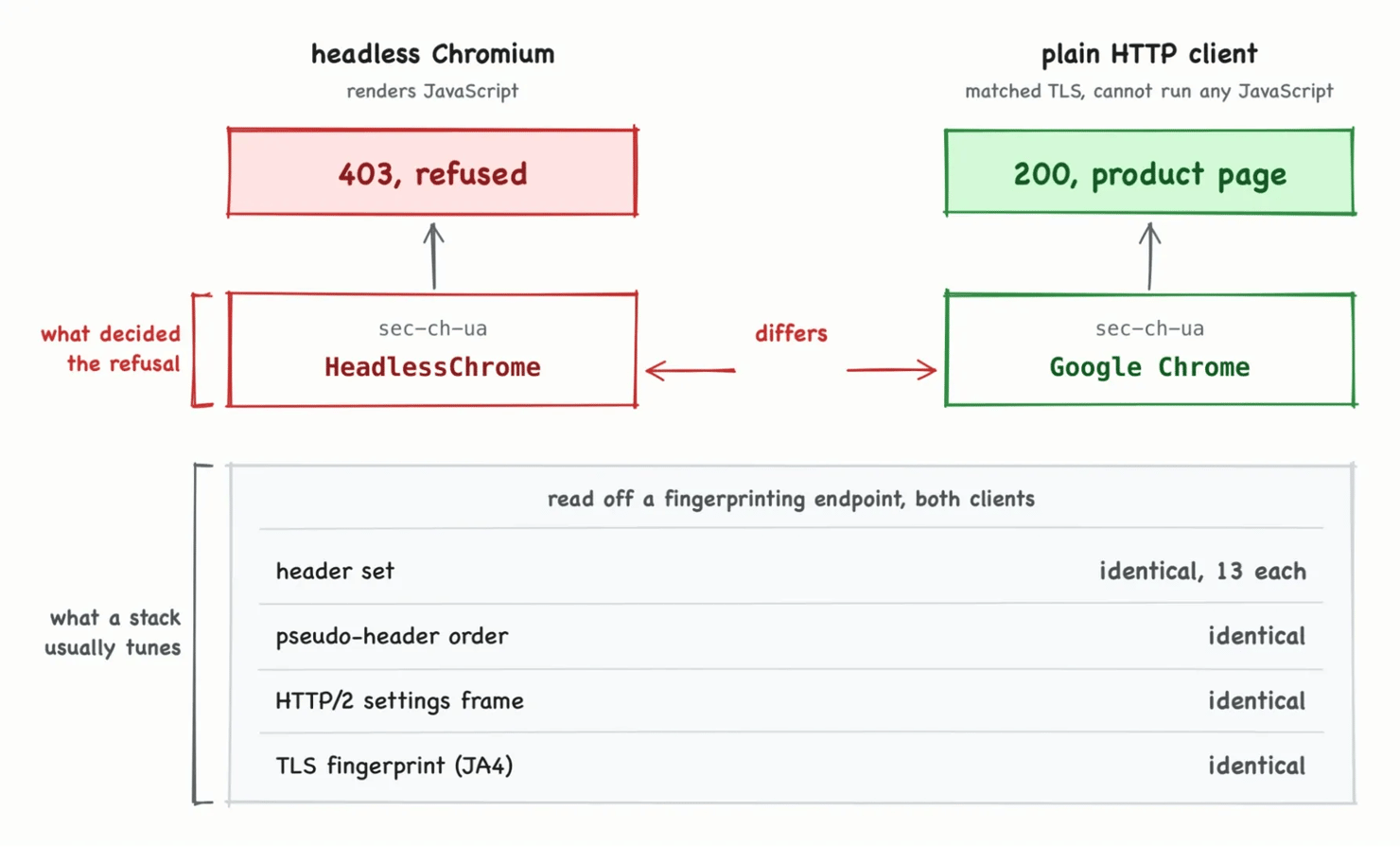
The alternating trials againstetsy.com:
Correcting the client hints changed the answer at 3 of 4 sites. Across all 10 pages, the corrected browser also reached 5 of 10.
The counts match, but the pages don't. The 2 paths overlap on 4 pages, and the browser's fifth is wayfair.com, whose 429 makes it unstable.
The plain client went 2, then 3, then 5. The browser went 2, then 3, then 5.
Adding a rendering engine moved nothing here. The counts illustrate that. The single-header isolation above establishes it. In both stacks, the first step overrode the user agent, and the second removed the mismatch between what the client claimed and what the wire showed.
In Playwright, the correction is one argument:
The argument corrects the request header. navigator.userAgentData still reports HeadlessChrome to any script that reads it, so a site checking the object rather than the header will see the same mismatch one layer up. The Chrome DevTools Protocol's Network.setUserAgentOverride sets both when called with a userAgentMetadata payload.
Read the version numbers as an example, not a constant. Chrome ships a new major version every few weeks, and a stack that still claims 141 next year will be announcing something the browser isn't. Generate the value from the browser you're actually running.
The effect reaches past product pages. Requesting macys.com/robots.txt, the default headless browser was refused with 403 in 3 of 3 trials. The same browser with corrected client hints was served the file in 3 of 3. At Macy's, the same signal decided whether you could read the stated rules and whether you could read prices.
The lesson isn't "spoof this header". It's that a stack can be wrong in a place nobody is watching, and the layer you tune isn't always the layer being read. The hit rate doesn't generalize far: 10 retailers from one vantage point, and eBay didn't move. sec-ch-ua is one check among several rather than a master key.
Reading the page isn't the same as reading the price
A page that loads still has to yield a number. Across the same 10 pages, 7 carried a schema.org Offer or AggregateOffer node that an agent could read directly. Amazon served no JSON-LD at all and published no price key anywhere on that page, so the number existed only as rendered text. That capture carried 46 currency amounts, 21 of them distinct. Walmart and Wayfair served JSON-LD without a Product or Offer node. Walmart published 35 price keys, but they were inside proprietary JSON rather than a schema.org node, so nothing constrains their shape.
Rendering can remove the Offer node you came for. Both captures of Target's product page came through the same service, and rendering removed 401 KB, including the exact markup that an agent needs.
Capture of the same URL
Size
JSON-LD blocks
raw HTML response
766 KB
2
after JavaScript rendering
365 KB
0
The node present in the first and absent from the second:
That's an easy way to report a wrong result. Target published price and priceCurrency in one Offer node, and a pipeline that only sees post-JavaScript HTML will record it as publishing neither. We counted the 7 above by crediting a retailer with an Offer node when any capture of its page carried one. Rendering didn't open access here. Keep the raw response beside the rendered DOM and parse whichever one holds the data.
A page that yields 21 numbers hasn't yielded a price. Those candidates are the operational problem, and the honest answer isn't to pick one. Position, proximity to a currency symbol, and a model call are all guesses. Build a check that refuses to guess. With no Offer node present, mark the price unresolved instead of returning the most confident-looking number.
In a separate run through the managed path, we extracted prices instead of detecting them. It reached 7 pages that day and pulled a machine-readable price from 3 of them: Home Depot, Etsy, and Nike. The 3 it couldn't reach were Best Buy, eBay, and Chewy. Best Buy and Chewy both carried a price in their Offer markup, and on the listing we measured, eBay's node had none. That run measures what the path could reach, not how many retailers publish a machine-readable price. It got no price from Target either, where the rendering step had removed the Offer node.
The number itself can also differ. Reading the same etsy.com product at the same moment, one path returned 8196.00 in INR and the other 81.99 in USD. The two exited in different countries.
An agent that reads price and ignores priceCurrency was silently about 100 times wrong on this pair, and wrong by some factor on any other. Both paths agreed exactly on nike.com, so this is per-retailer behavior. Check it rather than assume.
Stated policy and actual enforcement can disagree
Of the 19 robots.txt files we could read, only 5 named any AI agent token. Just 3 named a user-triggered one such as ChatGPT-User, so 16 of the 19 said nothing about agents acting for a shopper. Where the policy layer is silent, anti-bot systems make the decision by default.
The 5 that did speak showed 3 approaches rather than one norm. Amazon refused every token. eBay blocked training crawlers while leaving product paths open to user-triggered agents. Gap listed agents alongside Googlebot under Allow: /.
Retailers declare crawl rate in policy too. Macy's set Crawl-delay: 5 for ClaudeBot, and Sephora, which named no agent, set the same delay under User-agent: *. Both asked for a ceiling on how fast an agent compares a catalog. Crawl-delay isn't in RFC 9309, and major crawlers ignore it, so it states a preference rather than a limit.
Amazon's robots.txt had User-agent: ChatGPT-User and Disallow: /. We sent that token and received a 200 and 1.27 MB of product page. Policy and enforcement are separate systems. A robots.txt file instructs well-behaved clients, but it doesn't control access. It wasn't OpenAI that was asking, either. That token is a string that any client can send, and sending it was the only way to find out whether the file was enforced.
If a retailer states its agent policy only in robots.txt, it has expressed a preference, not imposed a control. Read the file as intent worth respecting, and never read a 200 as permission.
What reliable agent access actually requires
These measurements point to 5 requirements for agents that read retailer pages.
- A client that's consistent about itself at every layer. A Chrome user agent over Python's TLS is a mismatch, and so is a spoofed user agent over client hints that still say HeadlessChrome. Correcting either mismatch moved its own stack from 3 of 10 to 5 of 10 at no infrastructure cost. Point your client at a fingerprinting endpoint such as tls.peet.ws/api/all and compare all 4 layers: JA4, the HTTP/2 settings frame, pseudo-header order, and the header set.
- Rendering, but only where rendering is the actual problem. A renderer earns its place once access is solved, not before. It didn't get this sample onto more pages, and spending the compute before fixing consistency buys nothing.
- An exit in the shopper's country. Retail pages can localize price and currency by the IP that a request comes from, so a request leaving the wrong country can get a different number. Set the exit country explicitly instead of accepting a default, and read priceCurrency on every page, because the behavior is per-retailer.
- Failure handling that doesn't assume a status code. Bestbuy.com returned no status code at all, so a transport exception needs the same retry path as a 403. A 429 here carried a 3.0 MB product page, so a status-first check discards data it already holds.
- Validation of what came back. Treat a response as failed when product data is missing, whatever the status says. Visible text length is a usable first filter, and challenge pages here ranged from 32 to 220 characters. Don't port those bounds as constants: the smallest genuine product page was 1,149 characters, and a wider sample would narrow that gap from both ends.
In 2026, cryptographic agent identity had a draft standard and a working implementation, and it changes nothing until a verifier trusts your key. Web Bot Auth uses HTTP Message Signatures to sign requests with a registered algorithm, Ed25519 in the key we tested, so a site can check the caller against a key it already knows.
Cloudflare's signed agents program shipped reference libraries in TypeScript and Rust. Across 6 retailers, 3 trials each, requests with and without a signature behaved identically. That null result doesn't mean skip it: verification infrastructure lags adoption, and implementing now means being ready before a retailer starts checking.
Our Web Scraping API is the managed access path we measured. The request takes a target URL, a proxy pool, an exit country, and a rendering setting, all 4 visible in the fetch_via_api function below. It read 8 of 10, and 7 of 10 on an earlier run the same day. You can reproduce the other 3 columns with the script at the end. This one needs an account, and the comparison measures access, not latency, which is a separate question for an agent answering a shopper in real time. Site Unblocker is the same access layer without the parsing, for a client that already knows what to do with the HTML.

On their own, the 2 free fixes above closed half the gap to that column, from 2 of 10 to 5. One of the last 3 pages, wayfair.com, was read by free clients on 2 later runs, so the lasting margin is narrower than a single table shows. Here the margin was 3 sites, homedepot.com, ebay.com, and wayfair.com. The free path already read the other 5 at no cost.
What retailers can do today, regardless of protocol adoption
None of this fails loudly for the retailer. A blocked agent tells the shopper the product can't be found, and nothing in that exchange reaches a sales dashboard. Check whether yours would record the failure. It fails loudly for the shopper, who's watching an agent that can't answer.
Whether an agent arrives through a protocol or falls back to reading the page, the same short list helps.
- Publish structured product data. Amazon, Walmart, and Wayfair exposed no Product or Offer node on the pages we measured, leaving agents to infer the price from rendered text. The format is the schema.org Product vocabulary, which is free and already what search engines read.
- Check that your markup survives rendering. Target published price and priceCurrency in one Offer node, and the rendered capture of the same URL carried no JSON-LD at all. Validate the raw HTML response and the post-JavaScript DOM separately, because an agent may parse either one.
- KeeppriceCurrencyin the sameOffernode asprice. A page that changes currency by IP will be read by agents connecting from anywhere, so the unit has to travel with the number.
- Decide about agents deliberately. Only 3 of the 19 readable robots.txt files carried a rule for user-triggered agents. The rule that eBay used, allowing them while blocking training crawlers, is worth copying.
- Verify agents instead of trusting the string. ChatGPT-User is a user agent token that any client can send. Check signed requests against Web Bot Auth or published IP ranges, and treat the user agent as a hint.
- Audit what your bot rules block. Rules written for scrapers now catch agents acting for a shopper. Check whether your product pages need JavaScript to show a price, and whether the agent categories from your bot management vendor match what you actually want to allow.
- Watch the pattern Cloudflare set. In July 2026, the company announced that from September 15, new domains onboarding to it would block Training and Agent traffic by default on pages that show ads, while Search would stay allowed. Those categories are Cloudflare's own classification, and your traffic gets sorted into them by default.
Most of this list makes your pricing easier for everyone to read, including competitors and price tracking services. We sell tools in that market. That tradeoff is real. You already accepted the same one for search engines.
Full code
The script below reproduces the 4-path access check in the table above. Pass your own URLs as arguments to check a different list. Run it without credentials to see the first 3 paths:
Running it with no arguments reproduces 2 of the findings above:
The browser-UA refusal is a TLS mismatch, not a user agent problem. Those last 2 rows left from different countries, and the currency is the only thing that shows it. The rupee figure tracks the exchange rate, and page sizes move with rotating promotional content. Both drift between runs, while the dollar figure doesn't. Without credentials, a line reporting the 401 appears first, and the fourth row prints blocked(None). The first 3 rows still run.
Anti-bot configurations change without notice, so these results won't stay accurate for long. Re-run the check on the sites you care about.
Final thoughts
Reading a product page is an infrastructure problem, and the layer you tune isn't always the layer being read. The same 2 corrections did the work on both stacks: override the user agent, then match every layer.
A page that opens still isn't a price, because rendering can remove the markup that an agent came for, and because the same listing showed different currencies to different countries. Buying is closed for another reason: every retailer policy we could read closed the buying path under User-agent: *, so a retailer that wants agents to buy needs a protocol rather than a tuned client. Run the script against your own target list, compare your client's 4 layers at a fingerprinting endpoint, and fix the mismatch before you spend anything on infrastructure.

Try Web Scraping API for free
Activate your free plan with 1K requests and scrape structured public data at scale.
About the author

Mykolas Juodis
Head of Marketing
Mykolas is a seasoned digital marketing professional with over a decade of experience, currently leading Marketing department in the web data gathering industry. His extensive background in digital marketing, combined with his deep understanding of proxies and web scraping technologies, allows him to bridge the gap between technical solutions and practical business applications.
Connect with Mykolas via LinkedIn.
All information on Decodo Blog is provided on an as is basis and for informational purposes only. We make no representation and disclaim all liability with respect to your use of any information contained on Decodo Blog or any third-party websites that may belinked therein.