Scala Web Scraping: A Step-by-Step Guide for Developers
Scala web scraping fits naturally into JVM data pipelines, sharing types and libraries with your Spark, Akka, and Kafka code. This guide covers everything you need to ship a production scraper: environment setup, library selection, pagination, JavaScript rendering, anti-bot mitigation, and structured data export. Including when a managed scraping API is the smarter call.

Kipras Kalzanauskas
Last updated: Jun 12, 2026
14 min read

TL;DR
- Use Scala Scraper (backed by jsoup) for static HTML extraction; its >> and >?> operators give you type-safe selectors in far fewer lines than raw Java.
- Paginate with Future.traverse for numeric offsets or a recursive LazyList for "next" link discovery.
- For JavaScript-rendered pages, route requests through the Decodo Web Data API – feed the returned HTML straight into Scala Scraper without changing your extraction code.
- Export to CSV with kantan.csv, JSON Lines with circe, or a database with Doobie; pick based on whether you need one-off snapshots or a queryable, deduplicated history.
What is Scala?
Scala is a statically typed, multi-paradigm language that runs on the JVM and compiles to the same bytecode as Java. Every Java library is directly callable from Scala – no bindings, no wrappers.
The language blends object-oriented and functional programming: classes and inheritance from the OO side, plus immutable collections, pattern matching, higher-order functions, and for-comprehensions from the functional side. Two versions are actively maintained: Scala 2.13 (broadest library compatibility) and Scala 3 (improved type system, cleaner syntax). All libraries referenced in this guide work on both.
The default build tool is sbt, dependencies come from Maven Central, and IntelliJ IDEA or VS Code with Metals are the standard editors. Anyone already running a JVM environment can be productive in Scala within an afternoon.
Beyond scraping, Scala powers Apache Spark (data engineering), Play and Akka HTTP (backend services), and Flink and Kafka Streams (stream processing) – which is exactly why teams running JVM data platforms often keep their scrapers in Scala too.
Why choose Scala for web scraping
Scala brings several genuine advantages to web scraping when your stack is already JVM-based, and most of them compound as a project scales from a quick script to a production pipeline.
- Full JVM interop means the library problem is already solved. jsoup, Selenium, HtmlUnit, Apache HttpClient, OkHttp – over a decade of battle-tested HTTP and parsing tooling, all callable from Scala without bindings or wrappers. Teams already running Java services can share HTTP client configurations, authentication logic, and proxy setups between their application code and their scrapers without maintaining two ecosystems.
- Functional collections replace boilerplate with composition. In Java, extracting titles and URLs from parsed HTML means a loop, null checks, a mutable list, and inline trimming. In Scala, .map, .filter, .collect, and for-comprehensions express the same logic in 2–3 lines. That difference compounds fast when you're writing dozens of extraction functions across varied page templates.
- The type system catches structural mistakes before the crawl starts. Map extraction output into a case class, and the compiler enforces that every field is populated with the right type at every call site. In Python, a misnamed key surfaces as a runtime error hundreds of pages into a crawl. In Scala, it fails at compile time – the difference between catching a bug in your editor and catching it at 3 am when your pipeline writes malformed rows to production.
- Concurrency is native, not bolted on. Future.traverse handles straightforward parallel fetching, Akka provides actor-based concurrency with backpressure, and Cats Effect or ZIO offer resource-safe concurrency. Teams already using these stacks for backend services apply the same patterns, error handling, and monitoring to their scrapers without learning a new model.
- Keeping scrapers in the same language as the data pipeline eliminates integration friction. If your pipeline runs on Spark, your backend uses Play, and your stream processing runs Flink, writing scrapers in Scala means shared types, shared build tooling, shared CI/CD, and shared expertise. A List[Book] produced by the scraper feeds directly into a Spark DataFrame or a Doobie insert without serialization or schema translation. That integration cost is invisible on small projects and dominant on large ones.
Despite all these, Python still has a wider scraping ecosystem. There are more specialized libraries (Scrapy, Playwright, httpx), more tutorials, faster cold starts, and a shallower learning curve for developers new to functional programming. Scala web scraping makes the most sense when scraping is embedded in an existing JVM data platform, not as a first-language choice for standalone, one-off scrapers. See the best coding languages for web scraping for a full language comparison.
Setting up the Scala environment for web scraping
Install the JDK
Install JDK 17 (LTS) via SDKMAN, Coursier, or your system package manager, then verify the installation with:
Install Scala and sbt
Install Coursier with cs setup – it pulls in Scala 3.x and sbt in one step and configures your PATH automatically. Scala 3 is recommended for new projects, but everything in this guide works on 2.13.
Create an sbt project
Run the following command to scaffold a new project, then name it after the running example used throughout this guide – gutenberg-scraper works well:
Understand the project layout
The generated project follows a standard structure:
sbt rebuilds incrementally, which matters during scraper development – you don't want a full recompile every time you tweak a CSS selector.
Set up your editor
IntelliJ IDEA with the Scala plugin or VS Code with Metals both give jump-to-definition and inline error reporting. Working with HTML node trees is noticeably easier with an IDE than without.
Choosing the right Scala web scraping library
With the environment ready, the next decision is which library handles fetching and parsing. The JVM gives you several options at different abstraction levels.
Library
When to use it
Scala Scraper
Default for Scala projects – idiomatic >> and >?> operators, Option-returning selectors, pluggable browsers (JsoupBrowser for static HTML, HtmlUnitBrowser for basic JS)
jsoup (Java)
When you need the full Java Document API or are maintaining a mixed Scala/Java codebase where Java developers need to read the scraping layer
sttp + jsoup
When you need swappable HTTP backends (AsyncHttpClient for HTTP/2, OkHttp for connection pooling), custom TLS, or retry policies that Scala Scraper doesn't expose
Akka HTTP / Pekko HTTP
When scraping is embedded in an existing Akka actor system, and you want to reuse its connection pool and stream backpressure
The practical difference shows up in the extraction code. Let’s take a simple task like pulling titles and URLs from an <ol> list in both jsoup and Scala Scraper:
jsoup (Java-style):
Scala Scraper:
Both produce the same List[Book]. Scala Scraper is shorter because the >> operator handles element selection and content extraction in one expression, and elementList returns a native Scala List without the asScala conversion. For a single snippet, the difference is modest; across a project with dozens of selectors, it compounds.
Start with Scala Scraper for nearly all projects. Drop to raw jsoup when Java teammates need to maintain the scraping layer, and reach for sttp when you need backend-level HTTP control that Scala Scraper doesn't expose. See how to choose the best parser for a broader framework on evaluating parsing libraries.
Selecting and extracting data from HTML in Scala
The extractor operators
Scala Scraper exposes two operators for querying parsed HTML.
The >> operator applies a content extractor and returns the result directly, throwing if the selector matches nothing:
The >?> operator returns Option[...], so missing nodes stay silent instead of crashing the scraper. Use it whenever a page template might omit the element you're targeting:
For scrapers hitting varied page templates – product pages where some have reviews and some don't, listings where some entries have images and others don't – >?> is the safer default.
CSS selectors
Scala Scraper uses standard CSS selectors, the same ones you'd prototype in browser DevTools. The workflow is straightforward: right-click an element on the target page, select Inspect, identify the selector from the DOM tree, and paste it into your extractor call.
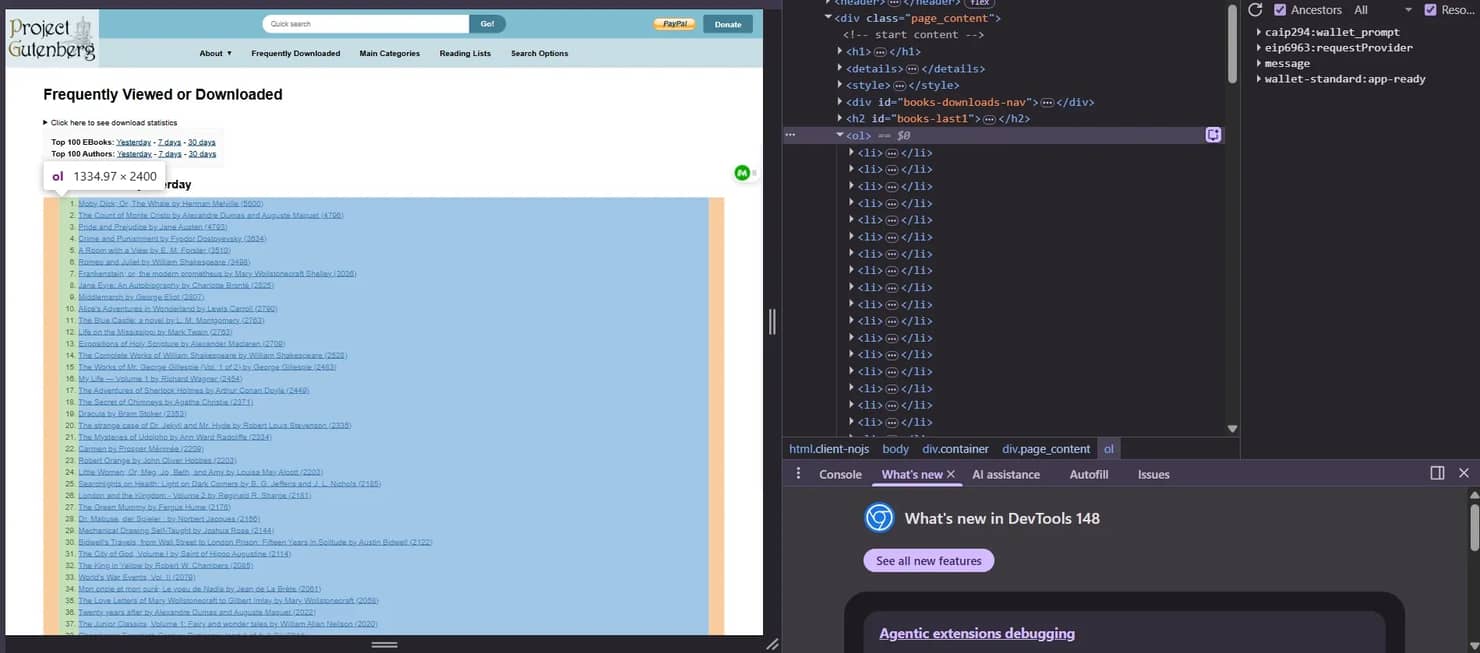
Common selector patterns include:
Built-in extractors
Extractor
Returns
text("selector")
First matched element's text
texts("selector")
All matched elements' text as Iterable[String]
attr("href")("selector")
Attribute value of the first match
attrs("href")("selector")
All attribute values
element("selector")
First matched Element
elementList("selector")
All matched elements as List[Element]
allText("selector")
All text nodes concatenated
Let’s see an example that targets Project Gutenberg's top books page, extracts each entry from the ranked list, and maps the results into a typed Book case class:
Here’s what the result would look like:

Why the case class matters
The case class isn't just for readability – it turns the compiler into a validation layer. If you later add a downloads: Int field to Book, every extraction site that doesn't populate it will fail at compile time. In a scraper with dozens of extraction functions across different page templates, that single change surfaces every incomplete mapping instantly. In Python or JavaScript, the same change would pass silently until the missing field breaks something downstream at runtime.
Common pitfalls
- Whitespace. HTML formatting injects \n and leading spaces. Always .trim extracted text fields.
- Relative URLs. Resolve against the base URL with java.net.URI.resolve before storing, otherwise you'll accumulate duplicate entries that differ only in path form.
See XPath vs. CSS selectors for selector strategy guidance – Scala Scraper also supports XPath via doc >> xpath(...).
With extraction working on a single page, the next step is scaling it across multiple pages and turning the scraper into a crawler.
Scraping multiple pages and building a simple web crawler in Scala
Most paginated sites follow one of three patterns: numeric offsets appended to the URL, a "next" link embedded in the page HTML, or a cursor token passed through headers or JSON. Each pattern requires a different stopping condition and a different recursion strategy. Let’s cover all three using Gutenberg as the running target, then extend the scraper into a domain-scoped crawler.
Pattern 1: Numeric page parameters
Project Gutenberg author pages paginate with ?start_index=N. The following example generates a range of indices, maps each to a URL, and stops when a page returns an empty result list:
One practical note on Gutenberg specifically: ?start_index=N on the top-100 page returns overlapping ranked lists, so fetching multiple offsets produces duplicate entries. Deduplicate on url before export:
The Doobie export option handles this automatically via ON CONFLICT (url) DO NOTHING, but CSV and JSON Lines exports need the explicit dedup step.
Pattern 2: "Next" link discovery
When the total page count is unknown, extract the next link, resolve it, and recurse. The >?> operator returns None cleanly when no next link exists, ending the recursion without a thrown exception:
Pattern 3: Cursor/token pagination
APIs and infinite-scroll pages pass a cursor in a response header or embedded JSON. Pull it out, attach it to the next request, and stop when it's absent. Infinite-scroll pages typically require JavaScript rendering, which is covered in the next section.
From scraper to crawler
The following example extends the scraper into a domain-scoped crawler. It tracks visited URLs in a mutable set, enforces same-domain scoping, and adds a randomized delay between requests to avoid triggering rate limits. For a fuller breakdown of how crawling differs from scraping conceptually, see web crawling vs web scraping.
For parallel fetching, wrap requests in Future.traverse with a bounded ExecutionContext, or use cats.effect.IO.parTraverseN to cap concurrency. Match the cap to your proxy pool size to avoid bans.
See how to handle web scraping pagination for a deeper treatment of pagination patterns, and getting started with web crawler development for a conceptual background on crawlers.
The patterns above work well for static HTML. Once a target starts rendering content client-side, JsoupBrowser returns empty results regardless of how cleanly your pagination logic runs – which is where the next section picks up.

Your Scala scraper needs better IPs
Akka streams handle concurrency beautifully. Decodo's residential proxies handle the part where every concurrent request comes from a different IP. 115M+ IPs, 195+ countries.
Handling JavaScript-rendered content in Scala web scraping
Why static requests fail
JsoupBrowser fetches and parses raw HTML without executing JavaScript. This causes pages that hydrate content client-side to return empty containers or skeleton loaders instead of the data visible in a browser. Three reliable signals that a page needs rendering:
- Empty result lists despite a 200 response
- Content that only appears after scrolling or interaction
- Data buried inside <script type="application/json"> tags
When any of these show up, you need something that executes JavaScript before your extraction code runs. The JVM offers two open-source paths, and one managed path – each with a meaningfully different operational cost.
Option #1: HtmlUnitBrowser
Scala Scraper ships HtmlUnitBrowser, which executes basic JavaScript without spawning a real browser. Swapping it in takes one line:
The appeal is simplicity – no external browser binary, no driver management, no new dependencies. In practice, that simplicity has a narrow shelf life. HtmlUnit's JavaScript engine struggles with modern frameworks: React hydration frequently produces incomplete DOM trees, Vue single-file components often fail silently, and any page relying on fetch() or dynamic imports may return partial or empty results.
You'll also hit false positives – pages that look like they rendered but are missing data that only appeared after a framework lifecycle hook fired. Debugging these failures is time-consuming because HtmlUnit's error output rarely maps to anything you can reproduce in a real browser.
HtmlUnit works for legacy sites with jQuery-era JavaScript. For anything built in the last 5 years, expect to spend more time debugging rendering failures than writing extraction logic.
Option #2: Selenium WebDriver from Scala
The next step up is driving a real browser. Use the official Java Selenium bindings, launch headless Chrome, and hand the rendered page source to jsoup for parsing:
Selenium solves the rendering problem, because a real Chromium instance executes JavaScript the same way a user's browser does. However, the cost shows up everywhere else.
Each browser instance consumes 200–400MB of RAM, so running 10 concurrent scrapers means provisioning 2–4GB just for Chrome processes. ChromeDriver versions must match your installed Chrome version exactly, and Chrome auto-updates break that pairing without warning. Headless Chrome also leaks memory on long-running jobs – the typical fix is killing and relaunching the browser every N pages, which adds complexity and slows throughput.
Then there's detection. Modern anti-bot systems (Cloudflare, Akamai, PerimeterX) fingerprint Selenium reliably through navigator.webdriver, CDP artifacts, and automation-specific JavaScript properties. You can patch some of these tells with undetected-chromedriver or stealth plugins, but each countermeasure is a moving target that breaks when the detection vendor updates.
Teams running Selenium at scale spend a significant share of their maintenance time on detection evasion rather than actual scraping.
Option 3 – Decodo Web Data API
Route requests through Decodo's Web Data API, and the rendering, proxy rotation, retry logic, and CAPTCHA solving happen on the API side. From Scala, the integration is one HTTP POST. The API returns a JSON envelope with the rendered HTML at results[0].content – unwrap it with circe, pass it to Scala Scraper, and the rest of your extraction code stays unchanged:
The practical difference is where the complexity lives. With HtmlUnit, you debug rendering failures. With Selenium, you maintain browser infrastructure and fight detection evasion. With the Decodo API, the rendering and evasion layers are managed infrastructure – your codebase stays a clean HTTP request followed by the same Scala Scraper extraction you'd write for a static page. Someone else handles Chrome, memory management, driver compatibility, and stealth updates.
For teams that need reliable JavaScript rendering across varied targets without scaling a browser fleet, this is the path that stays simple at volume.
For background on the underlying technology, see What is a headless browser?, and for a broader treatment of the problem space, see How to scrape websites with dynamic content for a broader treatment of the problem space.
Avoiding anti-bot measures in Scala web scraping
Push any scraper beyond a few hundred requests, and you'll encounter a predictable set of defenses:
- Rate limiting and IP blocks. Servers count requests per IP and return 429, 403, or silently serve degraded HTML after a threshold.
- User-agent fingerprinting. The default JVM user-agent is immediately identifiable as non-browser traffic.
- TLS/JA3 fingerprinting. Some targets inspect the TLS handshake cipher suite order and reject non-browser profiles – a genuine weakness for JVM HTTP stacks.
- CAPTCHA challenges. Triggered after sustained activity from a single IP or suspicious header patterns.
- Behavioral analysis. Server-side checks for missing headers (Accept-Language, Sec-Fetch-*, Referer), inhuman request cadence, and unusual navigation order.
Project Gutenberg is a practical example: the default JVM HttpClient and jsoup receive a 406 response or a truncated gzip body from Gutenberg's servers, even though a browser fetches the page cleanly. The extraction logic in this guide is validated against a local HTML fixture – for live fetching, use the header configuration below or route through the Decodo Web Data API.
Mitigation in Scala
Start by setting a realistic user-agent and a full browser header set. The following configures jsoup's underlying connection directly:
Randomize delays between requests – fixed intervals are easy to fingerprint:
Use HTTP/2 where the target supports it (sttp + AsyncHttpClient backend) – many bot detectors flag HTTP/1.1-only clients. Always respect robots.txt for both ethical and practical reasons.
Proxy rotation for IP-level blocks
When a single IP gets blocked, rotating through residential proxies is the most reliable fix – they route requests through real consumer IPs, making detection significantly harder than datacenter IPs. See What are rotating proxies? for a primer on how rotation works before configuring it.
The proxy setup via sttp's built-in option looks like this:
Residential proxies route requests through real consumer IPs, making detection significantly harder than datacenter IPs. For the hardest targets, Decodo Web Data API handles proxy rotation, header fingerprinting, and JavaScript rendering in a single call – with no pool management on your side.
Three Decodo products that fit different rotation strategies:
- Web Data API – managed proxy rotation + JS rendering
- Residential proxies – self-managed rotation
- Rotating proxies – datacenter rotation pool
See Web scraping prevention and how to bypass it and How to bypass anti-bot systems.
Exporting and storing scraped data in Scala
Option 1: CSV with kantan.csv
kantan.csv provides a HeaderEncoder for case classes, so a List[Book] writes to disk in a single expression. Stream output row-by-row rather than buffering the full crawl in memory – kantan.csv's asCsvWriter makes this the default path. Note that kantan.csv-generic 0.7.0 is published for Scala 2.13 only; if you need Scala 3, use circe (Option 2) for structured export instead.
Best for: One-off scrapes, BI tool imports, spreadsheet handoffs.
Option 2: JSON Lines with circe
Circe derives encoders from case classes with zero boilerplate. JSON Lines (one object per line) is streaming-friendly and pairs well with jq, Spark, or DuckDB:
Best for: feeding APIs, log-style append-only stores, analytics pipelines.
Option 3 – Database with Doobie
Doobie gives type-safe SQL access with cats-effect integration. The example below defines a books table, batch-inserts records, and deduplicates on a unique index over the source URL – so re-running the scraper never creates duplicate rows:
Best for: continuous scraping with deduplication, queryable history, and sharing data with downstream services.
Data quality checklist
- Trim whitespace on every text field – HTML formatting routinely injects \n and leading spaces.
- Normalize URLs to absolute form before storing to prevent duplicates that differ only in relative path resolution.
- Log validation failures instead of crashing the pipeline – one malformed page shouldn't stop a 10K-URL crawl.
See How to save scraped data to CSV, Excel, and databases for a broader overview, and What is data cleaning? for data quality fundamentals.
Full code reference
The following files contain the complete, validated code from all examples in this guide.
build.sbt
GutenbergScraper.scala
DecodoApiScraper.scala
Final thoughts on Scala web scraping
Scala combines JVM library depth with concise extraction syntax – that's what makes Scala web scraping a strong choice when scrapers need to live inside an existing JVM data platform. The practical path is straightforward: build with Scala Scraper for static sites, add pagination with Future.traverse or recursive link discovery, and escalate to a managed API when JavaScript rendering or anti-bot systems slow the project down.
If you hit that wall, try Decodo Web Data API free – your extraction code stays exactly the same.

Let the API handle the messy parts
CAPTCHAs, JS rendering, and fingerprint detection. Decodo's Web Data API returns clean data so your Scala code stays focused on processing, not bypassing.
About the author

Kipras Kalzanauskas
Senior Account Manager
Kipras is a strategic account expert with a strong background in sales, IT support, and data-driven solutions. Born and raised in Vilnius, he studied history at Vilnius University before spending time in the Lithuanian Military. For the past 3.5 years, he has been a key player at Decodo, working with Fortune 500 companies in eCommerce and Market Intelligence.
Connect with Kipras on LinkedIn.
All information on Decodo Blog is provided on an as is basis and for informational purposes only. We make no representation and disclaim all liability with respect to your use of any information contained on Decodo Blog or any third-party websites that may belinked therein.