How To Scrape Emails From a Website: Python Tutorial
Scraping emails from a website is essential for lead generation, partner research, and CRM enrichment. However, to reliably scrape emails from a website, you need to handle multiple formats, including mailto links, plain-text addresses, obfuscated strings, and JavaScript-rendered content. This guide shows how to safely build a Python email scraper and scale it into a multi-page crawling workflow.

Lukas Mikelionis
Last updated: Apr 20, 2026
14 min read

TL;DR
- There are 3 main approaches to email scraping: handling mailto links, regex, and obfuscation normalization.
- Check legalities such as Terms of Service, robots.txt, GDPR, and the CAN-SPAM Act before email scraping.
- Scrape a single webpage and crawl an entire domain for emails.
- Resolve scraping blocks, such as rotating residential proxies, Playwright for JS targets, and third-party scraping APIs.
- Create a pipeline that saves, cleans, and deduplicates the output using best practices, including normalization, syntax revalidation, and noise filtering.
- Automate your email scraper workflows using tools such as cron, Task Scheduler, and n8n.
- Build a custom scraper for niche domains with specialized crawling logic, but use a dedicated email finder for large lists with built-in CRM integrations.
Use cases and benefits of email scraping
- B2B lead generation and outreach. A developer who recently built a new product needs investors. However, instead of purchasing outdated bulk email lists for B2B outreach and lead generation, email scraping delivers higher-quality data by directly finding publicly listed contact addresses on potential companies' websites.
- CRM enrichment. Whether you use Zoho, HubSpot, or any other CRM tool, you can supplement existing contact databases by email scraping, especially those with missing email fields resulting from false positives from bulk email crawling.
- Academic and journalistic research. If the target outreach audience for your software solution is largely academic and editorial, access their readily available contact information on their publishing or institution's website.
- Competitive intelligence. Email scraping reveals competitive insights for website building. Web scraping competitors' email addresses exposes the layout of their websites and the roles they publicly advertise. This is handy information for developers when building or updating websites.
Note that domain-scoped targeted scraping, which involves scraping specific URLs of a site, produces better results – lower false-positive rate, higher deliverability, and less irrelevant data to filter than broad crawling, which focuses on retrieving all the pages of a particular site with lots of irrelevant data.
Legal and ethical considerations
Before writing a line of code, consider how web scraping legalities shape your engineering decisions; this will save you from being susceptible to unprecedented lawsuits in web scraping. Here's a practical compliance checklist.
- GDPR (EU). General Data Protection Regulation (GDPR) is the toughest privacy and security law that sets out the implications of collecting contact data from the web, the lawful requirements before processing the data, and the distinction between the careful usage of personal and B2B company contact data.
- Terms of service (ToS) and robots.txt. These pages contain the specific scraping permissions or authentication requirements for a target site before the scraper runs. Even though the web data is publicly available, developers risk legal violations by skipping ToS or robots.txt checks. The ToS can be found in the footer section of websites, while the robots.txt file can be found by adding /robots.txt to the end of the website's root domain. For example, /robots.txt if your target site uses a "www" subdomain. You can programmatically include robot.txt and ToS links in your scraping script to guide the scraper before scraping commences.
- CAN-SPAM Act (US). This prevents unintended post-scraping actions, such as spammy commercial messages, by setting rules for sending bulk emails and clarifying opt-out requirements for disinterested leads during outreach.
- Data Downstream Use. Scrape emails for targeted outreach, not blatantly harvesting emails with no legitimate use, but rather to spam contacts unnecessarily.
For a more robust knowledge on the legal coverage of web scraping, "Is web scraping legal?" is a helpful piece to help you. Once you're done with the safety compliance checks, you are ready to scrape.
Technical methods for email extraction
The appropriate methods for email extraction in your scraper depend on how emails are rendered on your target websites. Here are the 3 main approaches to displaying contacts on websites.
- mailto links. This is the most obvious approach on websites. It involves embedding a link in a Contact us statement or mail icon using an anchor tag (<a>) whose href starts with mailto, for example, <a href="mailto:contact@example.com">Contact</a>. If you encounter a more complex selector structure for emails, "How To Choose The Right Selector For Web Scraping" is a helpful article with great tips.
- regex on raw HTML. If your target website decides not to take the common approach but rather to render emails in plain-text paragraphs (<p>), footers, and div content, as is common on academic institution websites, use regex as a fallback for efficient scraping. In your Python code, use regex to bypass false positives, such as image filenames containing @, version strings like 2.0@stable, and to cover other filtering strategies helpful for parsing and retrieving emails rendered as plain text.
- Obfuscated email formats. This is when your target website has a mission to trick scrapers and thus decides to hide emails. It achieves this through rendering emails on web pages in non-obvious formats, for example, info[at]domain[dot]com instead of info@domain.com. They could go further by implementing HTML entity encoding, which renders emails in ASCII or Unicode characters; for example, 'e@mail.com'. Another level is using CSS-reversed text, such as moc.liame@drowssap, to display email addresses in reversed format on websites. So, when scraping at scale, normalize outputs to retrieve usable data.
- JavaScript-rendered emails. When target websites render their emails via JavaScript, your email scraper returns 'none'. Successfully scrape with a headless browser like Playwright for a single-page, one-time use, or a managed scraping API like Decodo's Web Data API if you are scraping at scale or across multiple pages with such a configuration.
Note. JavaScript-based email rendering or high email obfuscation might imply that the website doesn't want the data scraped, so it's worth double-checking their ToS or robot.txt before commencing.
Once everything is done, let's get started building our email scraper.
Setting up your Python environment
The first step in building an email scraper is to set up a Python development environment tailored towards efficiency and scalability.
Python environment
Create a project folder:
Install Python 3.9+ and core dependencies like:
- Requests. For making HTTP requests.
- Beautiful Soup 4 (bs4). Acts as your scraping driver for easily scrapable target websites, but use Playwright if you are scraping JavaScript-heavy sites. If you are new to Beautiful Soup, this article on Beautiful Soup web scraping covers the essentials.
- lxml. For parsing HTML or XML pages. Choose lxml over Python's built-in HTML parser because it's faster, has a low memory footprint during parsing, and excels at repairing broken HTML.
- Python-dotenv. For loading secrets (API keys, Decodo's proxy credentials) stored in your .env file.
Create and activate a virtual environment:
To retrieve your proxy credentials, first sign up for a Decodo account. In the dashboard, select Residential, and start a free trial.
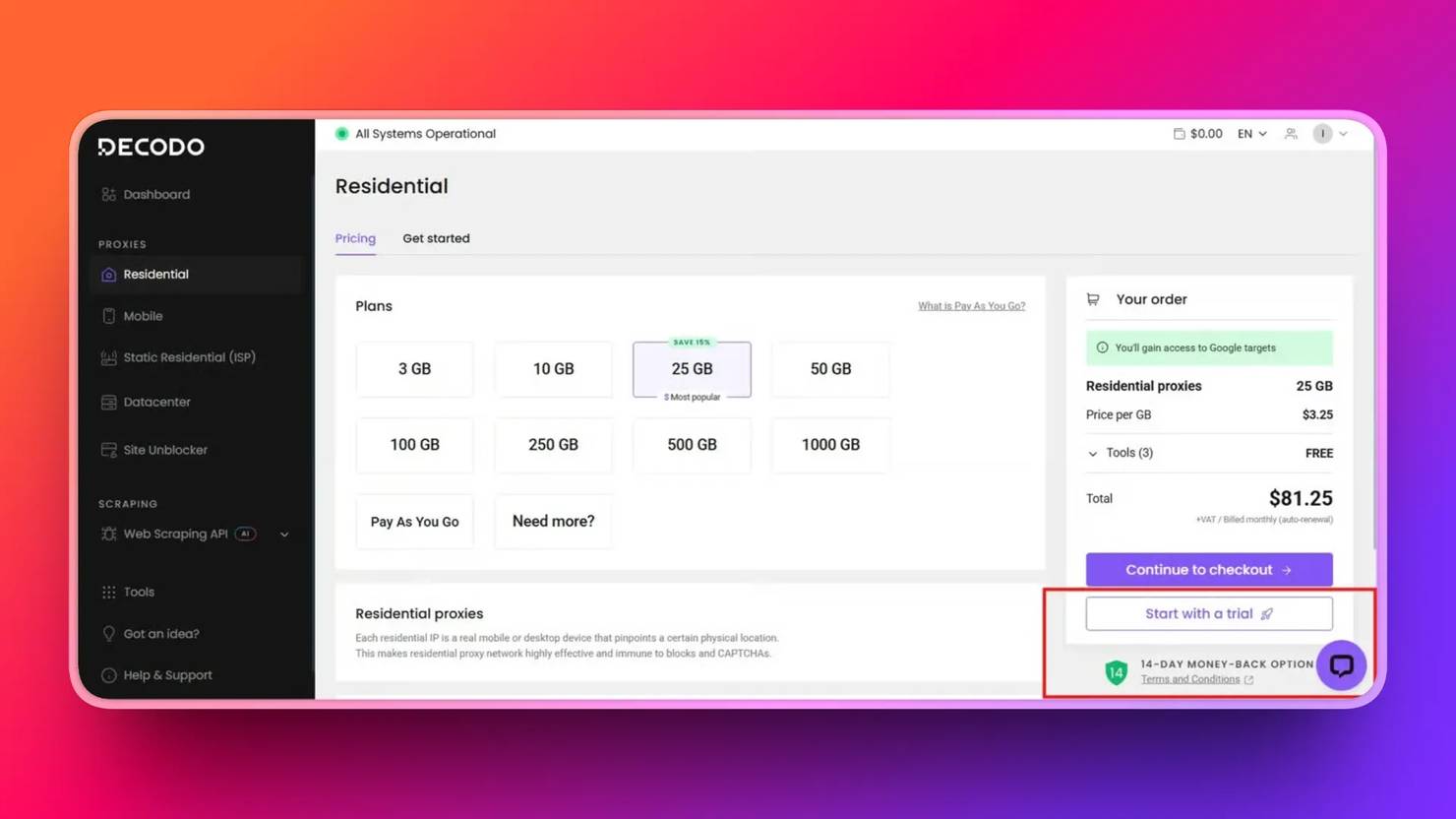
Once your free trial is activated, click Residential → Proxy setup page on your dashboard. Then click Authentication, where you will be asked to add a user or choose your whitelisted IP address. Choose 'Add User', copy your proxy credentials into your .env file, and you are good to go. Ensure the fields of the copied proxies match those below.
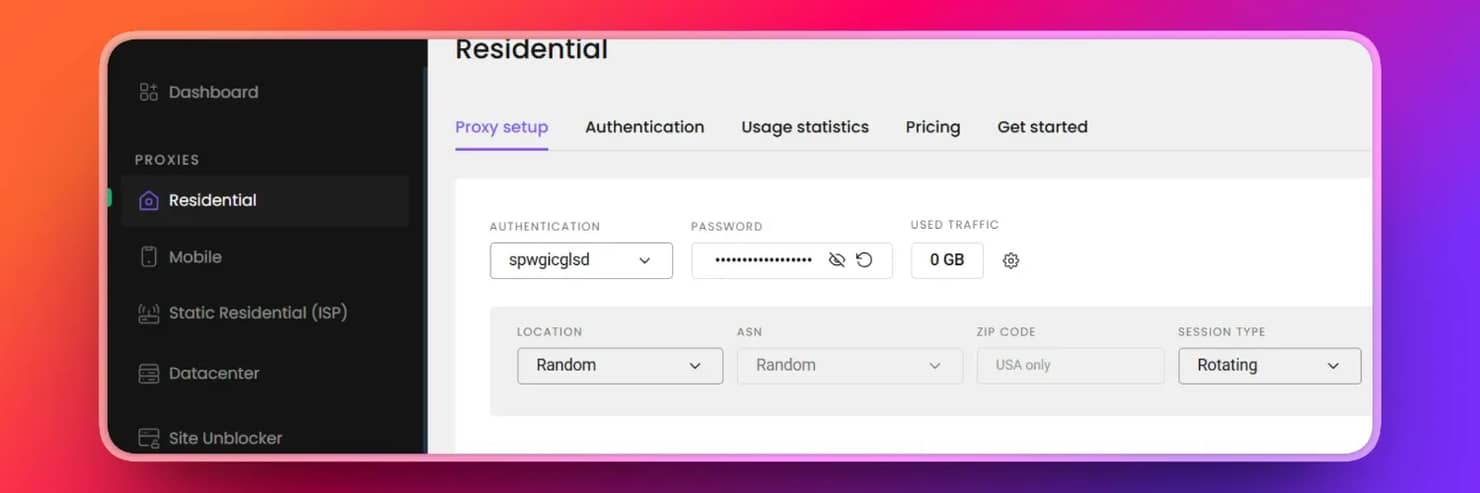
Include these fields in your .env file.
Residential proxies are often preferred for continuous scraping because datacenter proxies, offered by cloud providers, are more easily identified and blocked by anti-scraping systems.
Suggested file layout
If you are scraping at scale, here's a recommended project structure for scalability and modularity in your email_scraper folder.

Scale your scraping
Bypass all email scraping blocks with Decodo's elite residential proxy network.
Extracting emails from a single page
This section is a practical guide to extracting email addresses from a single webpage using 3 technical layers: mailto links, parsing raw HTML with regex, and handling obfuscated email addresses in our code. Fixing all layers in a single script makes your scraper more efficient by saving you time from adding other layers if one fails. We will use Decodo's About page URL for this tutorial. Since we have installed the dependencies, let's write our script.
1. Fetch the page HTML using requests. Set a realistic User-Agent to prevent the default Requests library user agent, which is highly recognizable to anti-bots. Then define a timeout and handle HTTP errors.
2. Layer 1. Extract mailto links. This code selects all anchor tags with href containing 'mailto' – <a href="mailto:...">, removes query strings, and normalizes emails to lowercase.
3. Layer 2. Extract emails with regex to capture emails rendered as plain text in the HTML.
Regex breakdown:
- [a-zA-Z0-9._%+-]+. The username part.
- @. The separator.
- [a-zA-Z0-9.-]+. The domain name.
- \.[a-zA-Z]{2,} . The top-level domain (e.g., .com, .org).
Remember to keep an eye out for common false positives, such as image file names like logo@2x.png. Depending on the site, you may need to apply additional filters.
4. Layer 3. Handle obfuscated emails. Normalize formats like john[at]company[dot]com or sales(at)example(dot)io before applying regex again. This improves coverage of hidden emails.
5. Combining results. Each method captures different cases. Combine results into a single set for deduplication – to avoid duplication.
6. Add Decodo's rotating residential proxy to your email scraper. This sets the stage for proxy rotation to prevent IP flagging by routing the request via multiple IP addresses.
7. Load Decodo proxy credentials from your .env file into your script. This keeps your credentials safe.
8. Build your proxy URL and use proxies in requests. Also, add the predefined timeout and headers in requests.
9. Verify your proxy setup. Confirm it’s working by comparing your proxy IP with your original IP.
10. Put it together. Here's the full working single-page email scraper script with proxies.
Run the script
The output is every email it finds listed on Decodo's About page
![Console showing [INFO] Verifying proxy... Fetching: https://decodo.com/aboutgref Found 1 unique email(s): sales@decodo.com](https://decodo.com/cdn-cgi/image/width=1480,quality=70,format=auto/https://images.decodo.com/scrape_emails_from_website_3_png_c49208737e/scrape_emails_from_website_3_png_c49208737e.webp)
For more context on Python web scraping, read Python Web Scraping: In-Depth Guide.
Crawling an entire domain for emails
Let's take our email scraper a step further by expanding it from a single-page scraper into a domain crawler that follows internal links and collects emails across all reachable pages. We'll build a simple domain crawler using the seed URL - https://decodo.com. This crawler discovers and processes multiple pages across Decodo's website.
1. Configuring Decodo's residential proxies at the session level. Route every request through a proxy without repeating the configuration. Using Decodo's Residential Proxies at the session level ensures requests automatically rotate IPs, reducing the risk of blocking during sustained crawling.
2. Domain scoping. Avoid crawling irrelevant or restricted resources by limiting the crawler to the same domain and excluding non-HTML files.
3. Visited URL tracking. Prevent processing the same page multiple times by maintaining a set of visited URLs while crawling.
4. Page prioritization. Prioritize pages that are more likely to contain email addresses before exploring the rest of the site.
5. Extract internal links with Beautiful Soup. The find_all() function finds the internal links.
6. Process pages iteratively using a queue. Continue the crawl loop until the queue is empty or a crawl limit is reached.
7. Randomize delays between requests (5 to 20 seconds)
8. Put it together. Here's the complete script.
Then, run the script.
The result is the combination of all emails found across all pages.
![Terminal window showing 'Total unique emails found: 3' and '[INFO] Found 1 email(s) on this page' during decodo.com scrape](https://decodo.com/cdn-cgi/image/width=1480,quality=70,format=auto/https://images.decodo.com/scrape_emails_from_website_4_png_0ab8f8534b/scrape_emails_from_website_4_png_0ab8f8534b.webp)
Remember that residential proxies are often preferred for continuous scraping because datacenter proxies, offered by cloud providers, are more easily identified and blocked by anti-scraping systems.
For a deeper look at crawling architecture, read Getting started with web crawler Python development.
Handling JavaScript-rendered emails and anti-bot measures
Identifying the JavaScript rendering gap
If your scraper returns no emails, but emails are visible on the browser, it means that JavaScript injects the address after page load. Confirm this by viewing the page source - view-source or DevTools inspector. Press Ctrl+U to view the page source; this renders the HTML returned from the server. If the email is missing here but visible on the page, then it is injected later by JavaScript.
Press F12 on Windows or Cmd+Option+I on Mac to open DevTools. This shows the rendered DOM – the final web structure after JavaScript has loaded. If DevTools shows the emails but view-source doesn't, then it's injected by JavaScript after the page loads. Your scraper only sees what the server sends, so it comes back empty. The gap is a signal to switch to a headless browser for scraping, such as Playwright.
Using Playwright in headless mode
Playwright launches a headless Chromium browser, executes JavaScript the way a real browser does, and gives you the fully rendered HTML. It loads the page, waits for the email element to appear, calls page.content() to retrieve the rendered HTML, and runs the same email-extraction functions used in the single-page section. Here's a simple setup:
For a deeper walkthrough, read Playwright web scraping: a practical tutorial.
Basic stealth configuration for Playwright
It's important to note that anti-bots easily detect headless browsers. Here are some steps to reduce Playwright's detection signal:
- Set a realistic User-Agent string that matches a current desktop browser.
- Configure viewport dimensions to a standard resolution (e.g., 1920×1080).
- Remove the navigator.webdriver flag that explicitly identifies automated sessions.
How to notice anti-bot systems
Here's how you can tell if anti-bots have detected your scraper:
- Sites return 403s on IP blocks or show empty pages after too many requests from a single address
- Experiencing CAPTCHA on contact forms when bot-like behavior is detected
- Honeypot links. These are links on web pages invisible to humans but visible to scrapers as a trap to detect scrapers, since only scrapers can locate such links, which are often irrelevant.
- Rate limiting that reduces request intervals to a nearly unusable pace.
For a more detailed breakdown of methods, check Anti-Scraping Methods and How to Outsmart Them.
Rotating residential proxies vs. site unblockers
Some target websites go beyond IP addresses; they check TLS (Transport Layer Security) handshake metadata, browser fingerprinting, or CAPTCHA-backed protection, and even with Playwright and rotating IP addresses alone, they can't be bypassed. That's where Decodo's Site Unblocker comes in. It's the right escalation for special targets that specifically identify and block automated browser environments, not the starting point for every scrape.
Saving, deduplicating, and validating results
Raw email-scraping output from a multi-page crawl can be messy, with duplicates, false positives, and noise from system addresses. This section outlines a pipeline that cleans the scraped data and sends it to your CRM, AI mailing tool, or spreadsheet.
- Normalization. Before deduplication, standardize every address by lowercasing, stripping surrounding whitespace, and unnecessary punctuation that regex sometimes captures at string boundaries. Stripping it at first contact, before output, prevents duplicates caused by formatting differences.
- Deduplicate across the full crawl. Use a Python set function – set(), not just per page but across the entire crawl loop, so that the same address on the contact and about page collapses into a single record.
- Syntax re-validation. Run the set output through a stricter regex to discard false positives, image filenames like image@2x.png or version strings like 3.0@beta that the initial extraction sometimes retrieves.
- Noise filtering. Skip role and system accounts while scraping unless your use case specifically needs them.
- CSV output. Write the results to CSV with header row fields, namely email, source_url, and scraped_at, and ensure each row corresponds to one email address, making it ready for direct import into CRM, LLM mailing tools, or spreadsheets. For expanded CSV, Excel, and database patterns, see How to save scraped data to CSV, Excel, and databases in Python.
- JSON output for pipeline integration. Wrap results in a metadata object. It ensures traceability and facilitates efficient parsing in automated workflows.
Automation and integration options
Although a single scraper run meets our testing requirements, the scraper requires automated scheduling operations to handle recurring tasks, including monitoring the contact page, entering CRM data, and managing the domain list.
- Scheduling with cron (Linux/macOS) or Task Scheduler (Windows). Scheduling email scraping for periodic runs on an already defined domain list is useful for tracking how contact pages change over time and reduces load on the target website. Achieve this on Linux/macOS by adding a cron entry to run the scraper on a defined interval.
On Windows, use Task Scheduler with a .bat file containing a script that points to your scraper:
The setup is covered in detail in this Python web scraping scheduling guide.
- n8n integration. If your team uses low-code options for scraping, like n8n, the scraper can run as a workflow node. From there, you can:
- Route new addresses to a CRM via webhook.
- Send a Slack notification when new emails are found.
- Filter results before export based on domain or prefix rules.
Read the complete guide to building n8n web scraping workflows for the full walkthrough of the integration.
- Google Sheets as an output destination. For teams that prefer a spreadsheet-based workflow, write results directly to Google Sheets using the gspread library or the Sheets API:
For more information on routing to a spreadsheet-based workflow, read the Google Sheets web scraping: ultimate guide.
- Replacing the proxy layer with the Web Data API. Managing rotating proxies and headless browser infrastructure adds maintenance overhead that compounds as scale increases. Decodo's Web Data API removes that layer: pass a URL, get back clean, rendered HTML, and run the same extraction functions. No proxy pool to maintain and no browser infrastructure to host. It's the right move for keeping scraping workflows simple when teams scraping at scale do not want to manage rotating proxies, headless browsers, or retry logic themselves.
Email scraping tools: When a dedicated solution makes sense
Building your own scraper isn't always the right call. The decision comes down to what you're targeting and what you need from the data.
When DIY scraping wins
- The domains you're targeting are niche or custom, not covered by commercial databases, and you're cost-sensitive at a moderate scale
- You need full control over data handling and storage
- Your use case requires domain-specific crawling logic
When a dedicated tool wins
- You need LinkedIn emails and other gated professional directories. LinkedIn requires authentication and explicitly prohibits automated collection; web scraping won't work there. You can retrieve only with dedicated tools.
- You need large-scale, verified data with built-in bounce rate reduction
- Compliance features like GDPR (EU) are already built into the email finder tool
- The tool already has built-in CRM integrations that eliminate the need for a custom output pipeline
Key criteria when evaluating tools
- Data freshness. This refers to how often dedicated email finder tools update their databases, whether weekly, biweekly, or monthly.
- Verification rates. Read the accuracy percentage claims for the tools and double-check them against customer reviews.
- CRM integrations and API access. Top tools offer CRM integrations with APIs to update their databases in real time.
- Pricing models (pay-as-you-go vs. subscription). Know which tool works best with your budget. Subscription works for large-scale continuous retrieval, while pay-as-you-go works for one-off or minimal use cases.
- GDPR and other ethical compliance postures. Choose tools that comply with the legal and ethical requirements of email scraping.
These factors will separate the tools that fit your use case from those that don't.
The hybrid approach
Many top-performing teams don't choose one option. They use a combination of Do It Yourself (DIY) scraping with rotating proxies and other scraping mechanisms for publicly crawlable web sources, and then verified email databases with email-finder tools like Hunter.io, Apollo.io, and Snov.io for gated or dataset-ready sources. This combination covers more ground than a single approach.
In case you are thinking about which email finder tools to use, here's an overview of email finder tools for various use cases.
Tool
Core Strength
Key Features
Accuracy in domain searches and robust email verification
Domain searches, email verification, and a Chrome extension.
All-in-one sales intelligence and engagement platform
Massive contact database, CRM integrations, and outreach automation.
Versatile, all-in-one cold outreach and lead generation.
Email finding, CRM features, cold outreach, and email deliverability management.
Final thoughts
Effective email extraction combines multiple techniques, including parsing mailto links, applying regex for plain-text addresses, normalizing obfuscated formats, and handling JavaScript-rendered content with Playwright. A reliable crawler builds on this by starting from a seed, prioritizing high-value pages, restricting traversal to the same domain, and maintaining deduplicated results. Always remember to pair technical implementation with compliance. Check robots.txt before crawling, introduce request delays, and evaluate how collected data will be used downstream.

Extract emails at scale
Decodo's Web Data API pulls structured data from any site without running into blocks, CAPTCHAs, or wasting IPs.
About the author

Lukas Mikelionis
Senior Account Manager
Lukas is a seasoned enterprise sales professional with extensive experience in the SaaS industry. Throughout his career, he has built strong relationships with Fortune 500 technology companies, developing a deep understanding of complex enterprise needs and strategic account management.
Connect with Lukas via LinkedIn.
All information on Decodo Blog is provided on an as is basis and for informational purposes only. We make no representation and disclaim all liability with respect to your use of any information contained on Decodo Blog or any third-party websites that may belinked therein.