How To Scrape Christie's Auction Data: A Complete Guide
Christie's has published more than 4 million sold-lot results online since the mid-1990s, and none of them come with a public API. A Christie's scraper pulls that lot data from christies.com into a structured format like JSON or CSV, using the endpoint that the site's own search calls. This guide shows you how to build it, then covers the buyer's premium, the 10,000-result cap, and the proxy costs.

Justinas Tamasevicius
Last updated: Aug 03, 2026
17 min read

TL;DR
- A Christie's scraper reads the site's internal JSON API rather than parsing HTML, then writes the lots to CSV or a database. Each record holds the title, estimate, price realized, and sale details.
- Use the scraper for price benchmarking, art-market trend analysis, provenance research, and auction databases.
- Two traps matter most. Estimates cover the hammer price only. Prices realized include the buyer's premium, so comparing the two directly makes every lot look like it sold for more than it did. That premium rate depends on when the lot sold and the amount. A single query is also capped at 10,000 results.
- Check your route against your own policy. Christie's API host disallows all crawlers in its robots.txt, but the lot sitemaps are published for discovery.
- Two paths work. Use a no-code scraper for a quick file, or your own Python script against the API for the full archive. Add residential proxies once the job reaches archive scale.
What is a Christie's scraper?
Christie's publishes its auction results as browsable catalog pages, 1 lot per page. A Christie's scraper collects that data in bulk, either by screen scraping the pages or by calling the site's own API. The sold-lot archive holds roughly 4.3M records, and the earliest are from the mid-1990s. The records cover paintings, jewelry, watches, wine, and decorative arts.
Why scrape Christie's?
Christie's reported $6.2B in global sales for 2025, up nearly 7% year on year.
- Price benchmarking and comparable sales. Appraisers and dealers value a piece against prices realized. A scraper provides every sold lot in a category rather than the few comparable sales they remember. That set is the evidence base behind any price tracking workflow.
- Art-market trend analysis. Analysts compare estimates against prices realized across categories and over time. A widening or narrowing gap can be a demand signal. That comparison is one use of web scraping for market research.
- Provenance and academic research. Art lots carry an ownership chain on their own lot pages. Collecting that chain as a second pass supports provenance tracing and attribution study. Coverage varies by category.
- Building an art-market database. An internal dataset lets you rank artists, track how hammer prices move against estimates, and flag outliers.
The same price-benchmarking workflow runs on collectibles markets outside the auction houses. For example, a TCGplayer scraper API covers secondary-market trading card pricing the same way.
One alternative matters here. Subscription databases such as Artnet, Artprice, and MutualArt already sell auction results. Those databases hold millions of records from the major houses, going back decades. If you need coverage across many houses, and someone else's normalization is fine for you, that's the faster route.
Scraping a single house does something different. You get the raw 27-field record rather than a curated view, every category rather than the ones that a vendor prioritized, your own schedule, and the hammer-versus-realized split under your control. That last one is what the correction later in this guide depends on.
Subscriptions and scraping also work together. You keep a subscription for coverage, and a scraper for the house you analyze most.
Route
Suits
You control
Billed on
No-code scraper
a one-off file, no code
nothing, you take its fields and cadence
results returned
Your own script
ongoing collection of 1 house
fields, schedule, cleanup, corrections
bandwidth used
Subscription database
coverage across many houses
nothing, you take the vendor's view
a subscription
What data can you extract from Christie's?
Christie's returns each lot as a structured record of 27 fields in 4 groups. The table below maps the ones that matter, with the real field names from the response.
Field
What it means
Why it's useful
object_id
Christie's internal ID for the lot
A stable key to de-duplicate and join records
lot_id_txt
Lot number within the sale, for example 112
Locates the lot in the printed and online catalogue
url
Direct link to the lot page
Lets you re-fetch full details later
sale.number, sale.location
Sale number and city, for example New York
Groups lots by sale and region
start_date, end_date
Sale open and close dates in ISO 8601 format
Builds time series and tracks when a price was set
is_auction_over, is_in_progress
Status flags that don't reliably track sale state. Some lots with a price realized still return is_in_progress as true and is_auction_over as false
Use the presence of price_realised as the signal that a sale is settled
title_primary_txt, title_secondary_txt
Heading lines. The primary carries the main heading, but the secondary is often blank
The main labels for search and grouping
description_txt
Physical catalog text, such as the medium, the dimensions, the signature, and the date painted
Feeds text analysis and matching, though provenance is on the lot page instead
image
Image URLs at several resolutions plus alt text
Supports condition checks and visual study
estimate_txt
Low to high estimate with currency, hyphen-separated, for example USD 40,000,000 - 60,000,000
The house's pre-sale opinion of value
price_realised_txt
Hammer price plus buyer's premium, for sold lots
The number the market actually paid
current_bid_txt
Live bid field, never populated on any lot sampled
Skip the parse, since the settled number is in price_realised
estimate_on_request, price_on_request
Flags for hidden values on top lots
Marks records where the number is withheld
The search page shows both the title split and the on-request estimates.
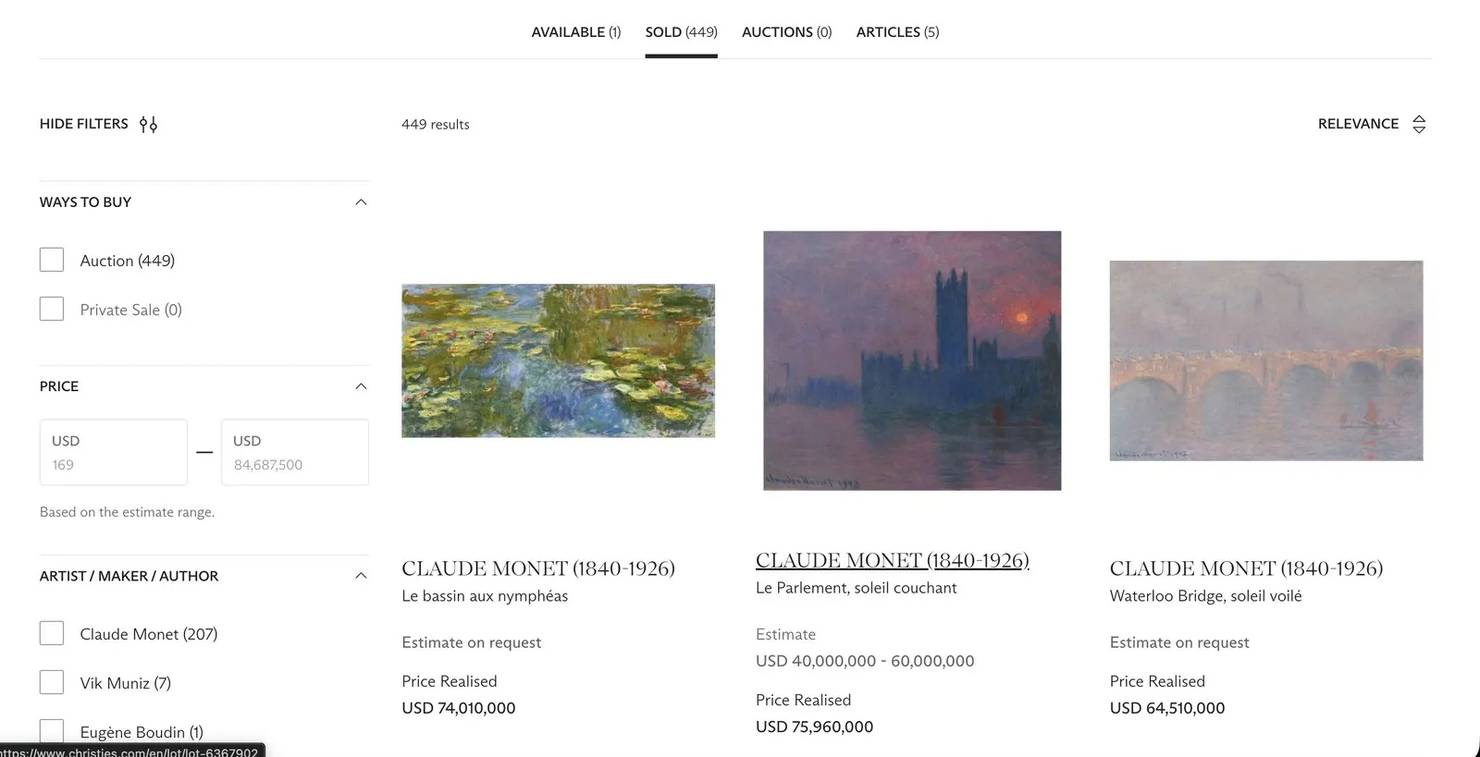
One flag decides the whole result set. Set is_past_lots to True, and you get sold auction lots and their prices realized. Set it to False, and you don't get upcoming auction lots. You get private-sale listings, where the Ways to Buy facet shows a count of zero for Auction and the records carry Price on request, with no dates and no bid.
Treat this endpoint as an archive, not a live bidding feed.
Is it legal to scrape Christie's?
Christie's robots directives point 2 different ways, and the API host's directive decides your route. The main site keeps crawlers off the search pages and the lot-image directory, while publishing lot sitemaps built for discovery. The API host, apim.christies.com, disallows everything in its own robots.txt. No robots directive is legally binding, so this is a policy question rather than a legal one.
If you follow robots.txt wherever it points, take the sitemap route. If you're testing a method or pulling a small set, take the API route that the site itself uses. Christie's terms of use are worth reading directly, since site terms change without notice.
Beyond that, any visitor can see lot titles, estimates, and prices. Reading those is different from signing into an account to reach gated content. Skip personal data too, since GDPR covers it even when it's publicly listed. Treat catalog text as something to analyze rather than republish, since it's Christie's copyrighted work.
What makes Christie's hard to scrape?
Three things about the site decide how you approach it.
- JavaScript-rendered results. The search page is client-side rendered, so it arrives almost empty and adds the lots after it loads. A plain HTTP request to the page returns no lot data, so you need the underlying JSON request or a browser that renders the JavaScript.
- Rate limiting and IP blocks. Christie's runs behind an API gateway. Ordinary collection volumes didn't trigger any throttling. The script below still applies exponential backoff on 429 and 5xx responses rather than assuming they won't happen. That retry policy is the standard practice for avoiding blocks.
- Pagination and currency normalization. Results span hundreds of pages. Prices arrive as strings with mixed currencies, and USD, GBP, and HKD can all appear inside a single result set.
The fetch method decides what those three cost you. Anti-bot systems can fingerprint the TLS handshake (the JA3 or JA4 signature), read HTTP/2 settings, and check browser signals like navigator.webdriver before a page loads. On Christie's, though, the JSON endpoint responds to a plain request that carries a browser User-Agent and the right Accept header. TLS impersonation and IP rotation matter at volume, not on the first call.
That leaves 2 practical paths. You point a no-code scraper at a search URL and take the returned file, or you call the JSON API yourself and keep control of the fields, the pagination, and the cleanup.
Method 1: Scrape Christie's without code
A no-code scraper suits a one-off pull or a non-engineer who needs a file, not a pipeline.
- Copy a Christie's search URL, for example a sold-lot search for a category or keyword.
- Paste it into a no-code scraper and set an item limit to cap the run.
- Run the scraper, then export the result to JSON, CSV, or Excel.
No-code Christie's scrapers exist on marketplaces, and those tools generally bill per result rather than per request or per gigabyte. Check the current rate on the listing before you plan the size of a run.
The tool decides which fields you get. You give up control. You take the fields and the cadence that the tool provides, and its author handles the maintenance when the site changes.
If you want the no-code route inside your own automations, you can build the same idea into n8n or a Playwright MCP setup.

Lot listings, cleanly extracted
Decodo's Web Data API handles JS rendering, anti-bot detection, and rotation so your Christie's scraper returns structured auction data in one call.
Method 2: Build your own Christie's scraper with Python
The lots come from an endpoint that the site calls internally, so you start by finding it. If you'd rather read the finished code first, skip to the full script.
Locate the search endpoint
Load the Christie's search page, then open your browser's developer tools and watch the Network tab while you change pages. The lots load from a single JSON call to Christie's search API. The request looks like this:
The request carries a set of query parameters. The ones you'll set are keyword, page, sortby, language, geocountrycode, and is_past_lots, which picks sold auction lots or private-sale listings. A datasourceId value routes the request and is required. You can read the current value from the search page config if it changes.
The call returns 200 with the lot JSON. The response headers mention Akamai, so the endpoint runs behind Akamai's edge. That matters at volume rather than on the first call.
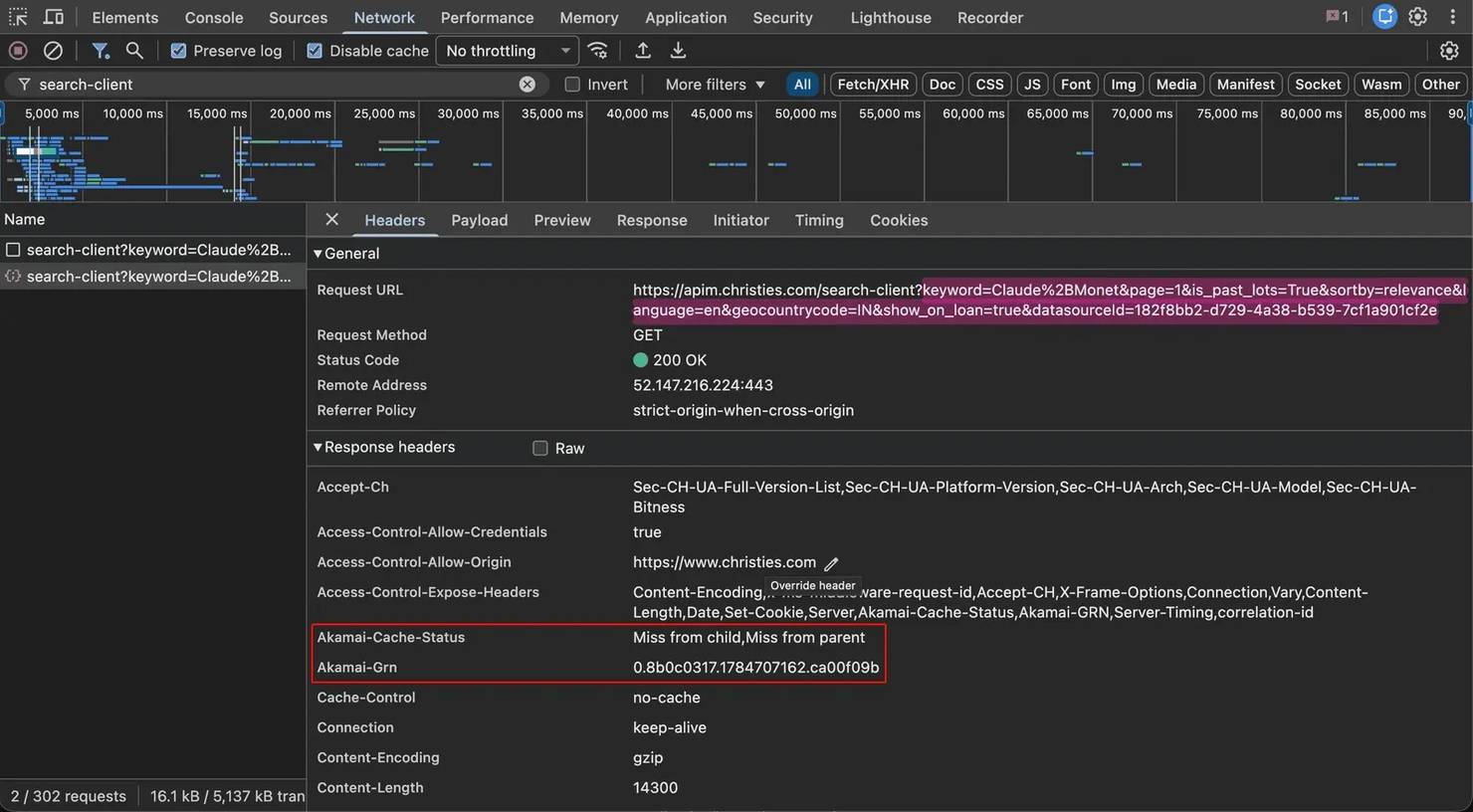
Two headers decide whether the call works at all. The request needs an Accept header of application/vnd.christies.v1+json. If you drop it, the same request returns 404.
The request also needs a browser User-Agent. A default User-Agent returned a 403 from the gateway, but a browser User-Agent returned the JSON. The script below sends both headers for that reason.
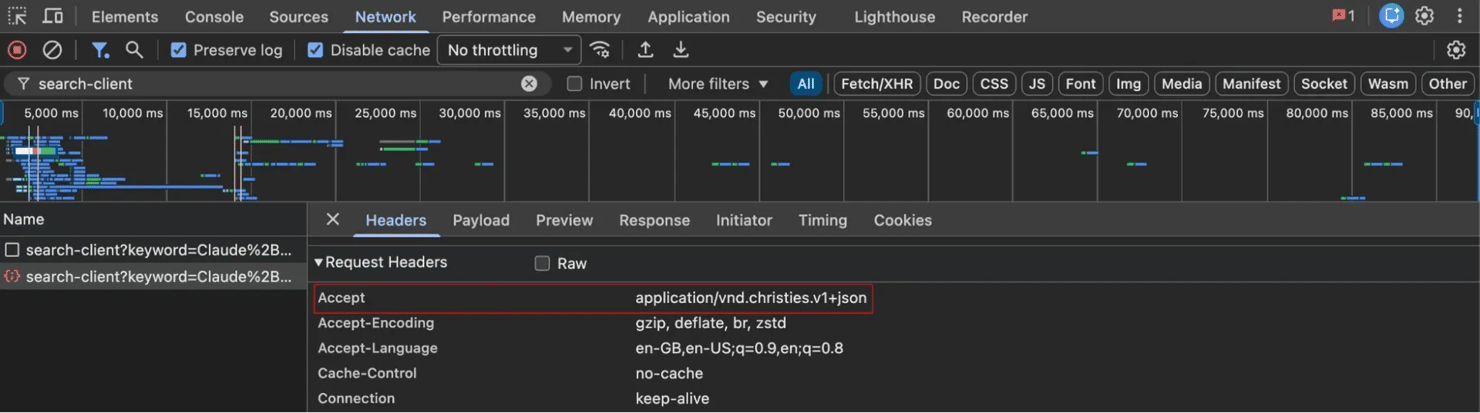
Calling this endpoint directly is better than driving a browser. You skip rendering, you get clean JSON instead of HTML that you have to parse, and you leave the site less to fingerprint. If Christie's ever retires the endpoint, a headless browser with Playwright is the fallback, since it drives the same search page that a person uses.
Send the request and parse the fields
Each response is a JSON object with a lots array, a filters block, and a total_pages count. Each lot in the array is the full 27-field record that the table above is based on. You parse the JSON, read the fields you need, strip the HTML from the description, and split the currency from the amount.
The title fields need care. The secondary line carries the work title for art. For ceramics, it carries the period and mark. It's blank often enough that you can't depend on it.
In 1 pull, the secondary line was empty on all 20 diamond ring lots and 6 of 20 watches, and on none of the paintings. The script keeps both as title_primary and title_secondary rather than guessing.
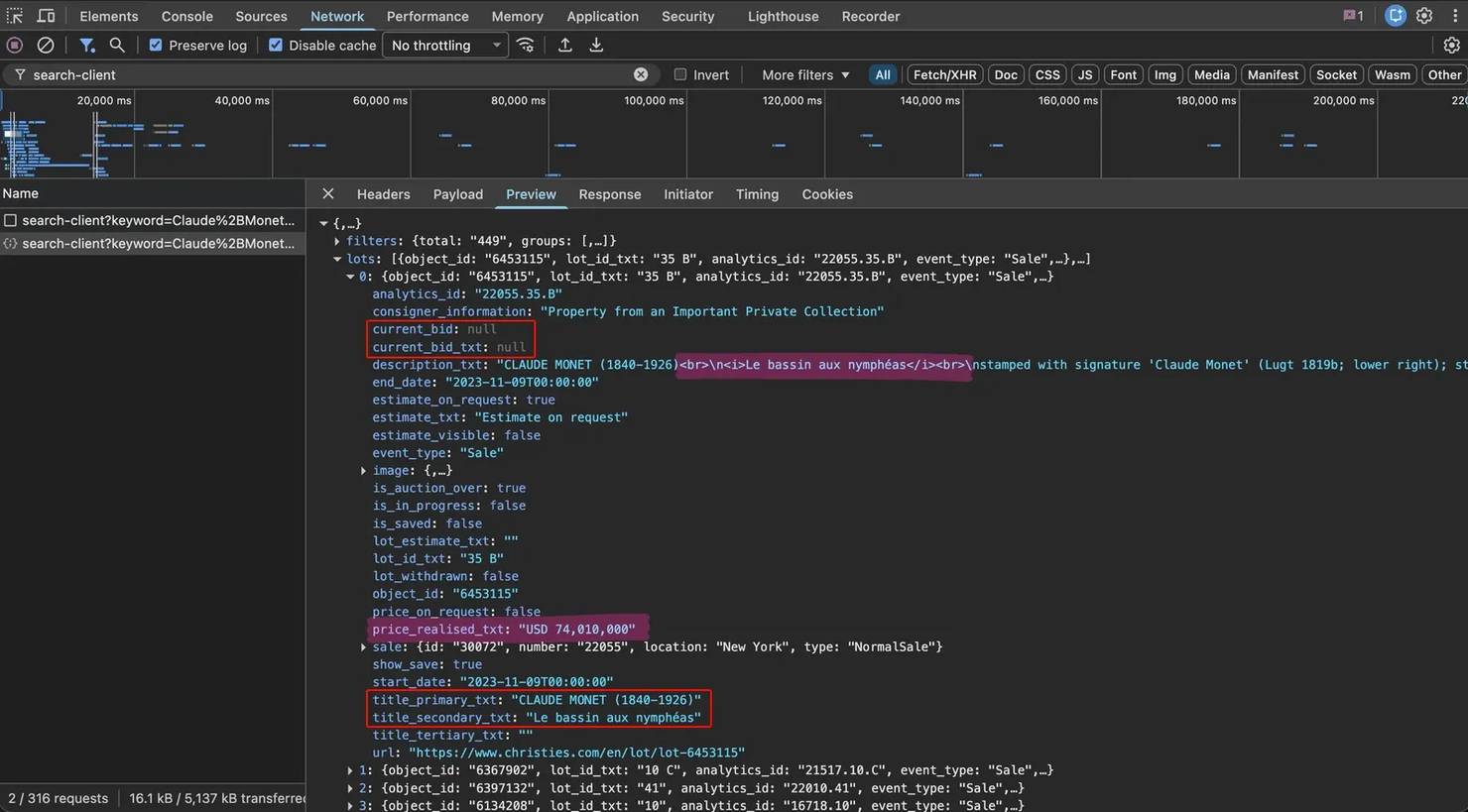
That's 1 lot. A keyword search has hundreds or thousands, so the next job is paging through them.
Loop the pages and write to a file
The total_pages value tells you how many pages the result set has. You request each page one at a time, handle the pagination, collect the lots, and save them to CSV or JSON. A short delay between requests spreads the load and keeps you under the rate limit. In testing, 30 sequential requests at about 1 per second all returned 200, so the 1-second delay in the script is conservative.
Proxies start to matter at a specific scale. A search for 1 artist returns a few hundred lots. A search for Claude Monet returns 449 across 23 pages, and that finishes in under a minute.
A full 10,000-result query is 500 requests, roughly 8 minutes at 1 per second. The whole past-lot archive is about 4.3M lots, or 215,000 requests. At this pace, that takes roughly 60 hours of continuous collection. The artist search and the 10,000-result query both run comfortably from 1 IP address.
The archive job is the one that outgrows a single address. Parallel bursts of up to 24 requests all return 200 with nothing refused, so no hard ceiling appears at that level.
Latency is what changes. It roughly doubles from 1.9 to 4.3 seconds at 24 concurrent requests, so adding more workers stops making the job faster.
Sustained parallel load over days is a different case from a short burst. An IP pool is the standard way to run that kind of load.
Run the full script
You need Python 3 and 1 package. No Christie's account, API key, or proxy credentials are required to run what follows. Install Requests:
The script below calls the endpoint, loops the pages, cleans the fields, and writes a CSV. It runs directly and reads a Decodo residential proxy URL from the PROXY line if you set one for a larger job.
The script also backs off and retries on rate limits, 5xx responses, and dropped connections. A long archive run can encounter all of them. Here's the full script:
Run the script from your terminal:
The script prints a count, then writes the rows to christies_lots.csv:
That's 3 pages of 20 results, the default in the call above. Raise max_pages to collect the whole set, 23 pages for Monet.
Each row in the file holds 1 lot across 17 columns. Here's 1 row from a watches pull, with the long description trimmed for space:
The title_secondary field is empty on this row. Build the pipeline around the Monet case, where the artist and the work sit in separate fields.
Every code block from here on extends that script rather than replacing it. Paste each one into the same file, below the script, so that scrape, SESSION, HEADERS, and the imports are already in scope.
Beyond keyword search: the full archive
Keyword search is capped at 10,000 results per query. The response stops at 500 pages of 20 results, and a broad query loses everything past that. A search for gold reports 187,936 lots but returns only 10,000.
The same response carries a filters block of 9 or 10 facet groups, depending on the query. Category, artist, material, origin, and date are among them, each with an id that you can pass back as filterids to narrow the search. That block is how you get past the cap.
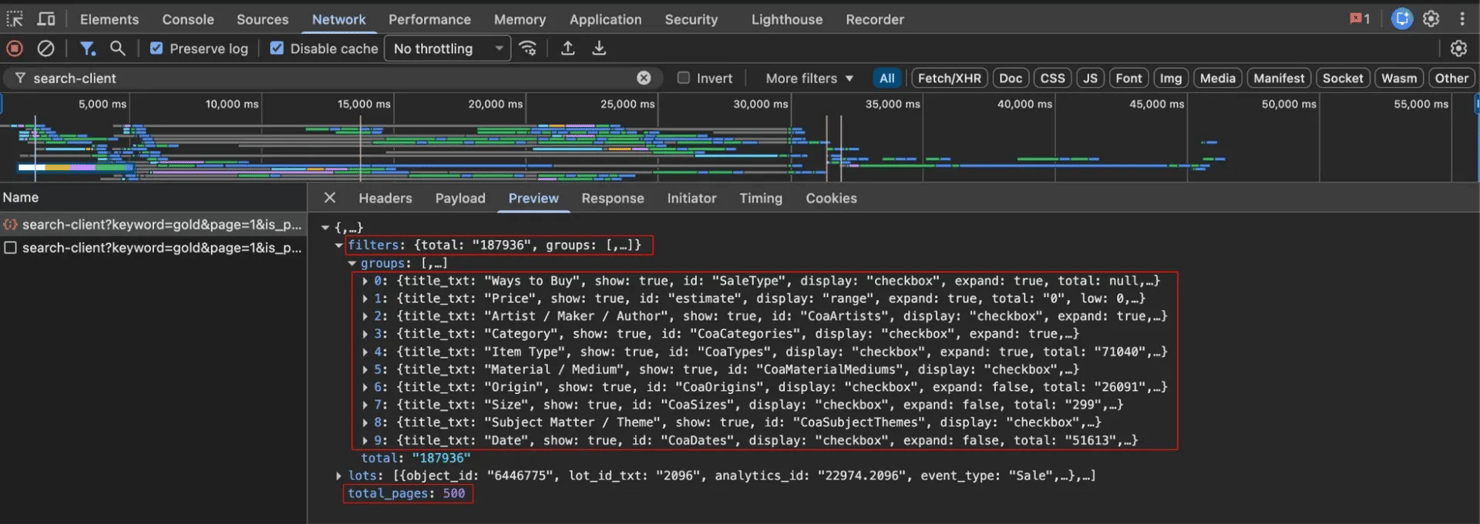
The cap fails silently. If you ask for page 501, the gateway still returns 200, the lots array is empty, and total_pages and the filter total both reset to 0. The response looks like the search itself found nothing.
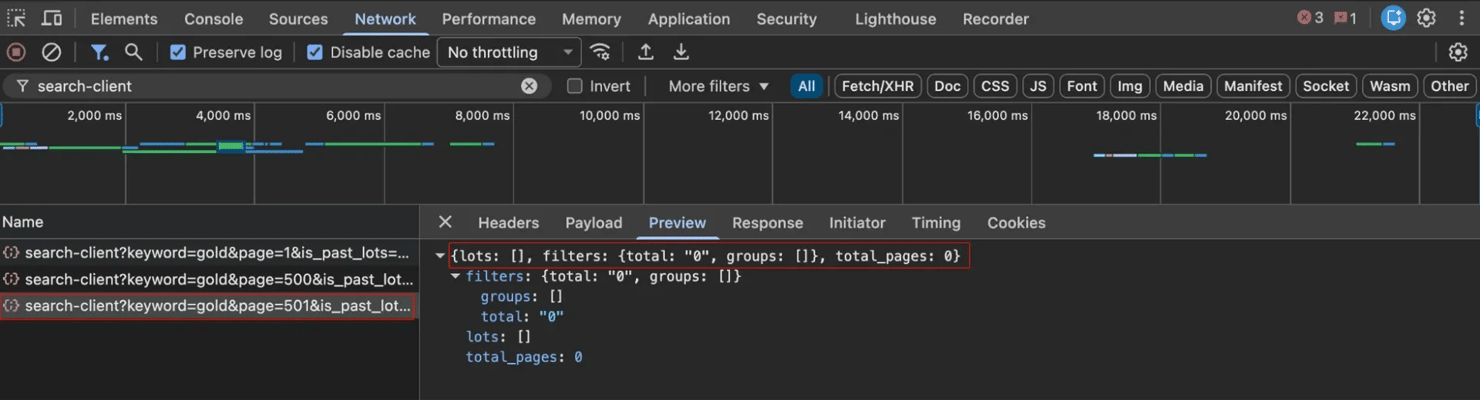
That's why the script reads the page count once, from the first response, and never again. If a loop re-reads total_pages on every page, it stops early at the cap.
Two routes recover the rest. The first stays on the search endpoint and uses those facet IDs. One facet is often not enough, since a whole category like watches still holds 48,657 lots. You combine facets with a pipe, filterids=id1|id2, and that returns a true union.
The paintings category holds 194,481 lots, and furniture holds 145,912. The combined query returns 340,393, the exact sum.
If you use a comma instead of the pipe, the gateway returns 200 and quietly ignores the filter. You get the entire unfiltered set instead of your slice, and that's easy to mistake for a working query. The IDs are URL-encoded, and some contain an encoded comma already. That's why the separator is a pipe.
You can also add an estimatelow and estimatehigh price band. Setting estimatehigh to 3,000 cuts watches from 48,657 lots to 4,760, comfortably under the cap. Setting it to 5,000 returns 9,670. That still fits, but it leaves barely 300 lots of margin.
The band narrows the set reliably, but it's not the price ceiling that the name suggests. The 3,000 slice included USD lots estimated at 4,000 to 6,000.
Use the band to cut a set to a size that you can page through. Then filter on the estimate yourself once you have the rows. Measure each slice before you page it, since these counts keep growing. filters.total in the first response reports that number.
Since scrape doesn't surface that number, call fetch_page once and read data["filters"]["total"] before you commit to the run. You keep slicing until each slice fits, then union and de-duplicate by object_id, since the same lot appears under more than one keyword.
The slice reuses the same scrape function, with the filters passed through extra. You read a facet ID from any response's filters block, then page the slice:
That returns about 4,760 lots, comfortably under the cap. A bare watches query would stop at 10,000.
The second route is the sitemaps, and it's also the one that stays within the robots directives. Christie's sitemap index, at christies.com/sitemap/sitemap_index.xml, lists 87 past-lot sitemaps of roughly 49,000 URLs each, about 4.3M lots in total. Together they enumerate every past-lot URL that Christie's publishes.
You read those sitemaps, collect the URLs, and fetch each lot page for its full catalog detail. That reaches every past lot instead of a capped keyword slice, and it uses the paths that Christie's publishes for discovery.
Each lot page also carries the same pricing fields as the search response in its embedded data. A strict-robots run can therefore assemble the full dataset from sitemaps and lot pages alone, trading the API host's clean fields for more bandwidth per lot.
A full archive crawl is production work, so a framework like Scrapy handles what a simple loop skips, including concurrency, retries, and sitemap parsing. The code below is short even so. You read the index, pull each past-lot sitemap, and yield the lot URLs to fetch:
That prints the first 5 lot URLs. Drop max_urls and the same generator walks all 4.3M.
For anything beyond a quick file, store the lots in SQLite with object_id as the primary key. INSERT OR IGNORE then keeps only new lots. The de-duplication costs nothing, since there's no growing in-memory set to scan. That approach is what keeps working as the store grows to the full archive:
Run it twice over the same keyword and the second run adds 0 rows, since every object_id is already in the table.
Keeping it current
Building the archive is the first run, not the whole job. Sold results usually appear in the endpoint within a few days after a sale closes. So you can track new sales with the same script that built the archive.
A recurring run still fetches the pages, but only new lots enter the store.
Plan the recurring run separately from the first run. In 1 pull, a single day had over 500 sold lots across all categories. If you poll your chosen categories once a week, that's hundreds of requests, compared with the 215,000 that a full archive walk takes.
The pattern is 1 large backfill and a small recurring run. The recurring run is what sets your ongoing volume rather than the archive figure.
Fetch the lot page
The search endpoint returns the summary record, 27 fields per lot across the whole result set. The full catalog entry is on each lot's own page, at the address in the url field. That page carries more detail than the summary record, including the provenance and the exhibition history.
For a benchmarking dataset, the search fields are enough. For provenance work, you read each url from the results and fetch the lot page as a second pass.
Unlike the search page, the lot page is server-rendered, so a plain request is enough. Each section is an accordion item with its own heading, so you get a dict of whatever sections that lot holds:
The category decides which sections you get, and the spread is wide. The Monet above returns 4 sections; a Patek Philippe lot returns Details and nothing else. Lots in other categories carry headings that neither of them has, such as Engraved.
Sample a handful of lots in your category first. That check costs 3 requests and tells you whether a run of tens of thousands of lots is worth starting.
Provenance is also the main field here that carries personal data. An ownership chain names private collectors and the cities they lived in, and data protection law generally covers living people. A 1904 gallery sale is out of scope. A recent or present owner isn't.
If your analysis needs the structure of the chain rather than the names, hash or drop the names at parse time and keep the rest.
Measure the compressed bandwidth on that second pass, because that's what a proxy actually bills. A lot page is about 30KB on the wire compared with roughly 1.5KB per lot from the JSON API. So the 2 routes differ by about 20x. Both figures vary by category, by as much as 5x on the JSON side, but the gap between them stays about the same.
Across the 4.3M lots in the past-lot sitemaps, the whole archive is around 6GB as JSON, compared with roughly 124GB to fetch every lot page. Pull the JSON for everything and fetch lot pages only for the subset where you need the deep detail.
The 2 methods in this guide are also priced differently. A no-code scraper charges per result, so cost depends on the number of lots. Proxies charge per gigabyte, so cost depends on the bytes. If you multiply the figures above by your plan's rate, you get the cost before you start rather than after.
The 48,657 lots in the watches category are about 73MB of JSON, a rounding error on any bandwidth plan and a real line item on a per-result one.
Working with the scraped data
The script already does most of the cleanup. It splits the currency from the amount, keeps the low and high estimates as separate numbers, and strips the HTML from the description. Two jobs are left. The end_date arrives in ISO 8601 format, so you parse it into a real date object for any time series.
And prices come in mixed currencies across sales that span decades, so a nominal comparison is misleading. For cross-sale work, you convert at the sale-date rate, not today's, and adjust for inflation before you compare an old result with a new one.
The next step is the main comparison: how a lot performed against its pre-sale estimate. Christie's estimates cover the hammer price only. The price_realised field includes the buyer's premium, and that premium has risen over the years.
Since 1 September 2025, the schedule is 27% up to $1.5M, 22% to $8M, and 15% above that. A decade earlier, it was lower. The rates are the same in every saleroom, but the thresholds aren't. So 22% starts at $1,500,001 in New York, £1,000,001 in London, and HK$10,000,001 in Hong Kong.
If you compare prices realized to estimates directly, every lot looks like it sold for more than it did. So you back out the premium with the schedule that was in force when the lot sold, then compare the hammer to the estimate.
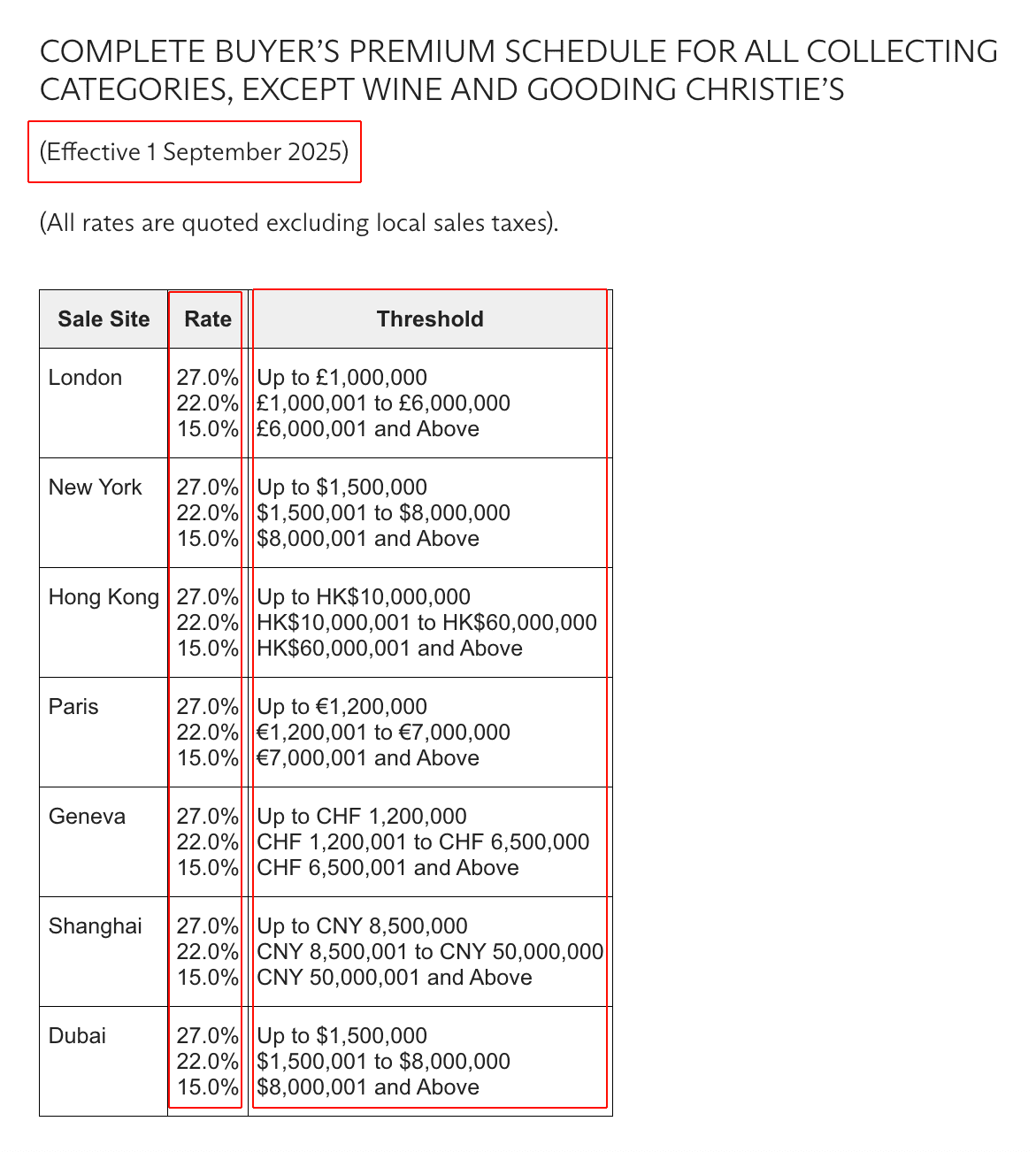
Backing out the premium takes a few lines. You keep 1 schedule per period, pick the one that was in force when the lot sold, then walk the tiers in reverse to recover the hammer.
Christie's publishes the current schedule on its site, and the older ones appear in the conditions of sale for each year. You look up the periods that your data covers. The date-keyed structure is what matters, and the rates are values that you supply:
The loop runs over whatever you collected, so a single-keyword pull like the Monet example shows only that artist. Your own lots will differ as new sales arrive. Across a mixed pull, the premium-stripped lines look like this:
The naive comparison shows those same lots at 1.52x, 7.38x, and 1.48x. It calls the Patek above estimate when the hammer price was inside the range. The premium produced that difference, not the market.
Two extensions make the loop general, and the first is currency. The schedule here is the USD one, and the loop keeps USD lots. That matters more outside paintings than you might expect.
Paintings sell largely in New York, but watches sell in Geneva and Hong Kong. In 1 pull, only 3 of 60 watch lots were priced in USD.
Extending the loop is straightforward, since the rates are the same 27%, 22%, and 15% in every saleroom and only the thresholds differ. You build 1 schedule per currency from the thresholds above, then key on the lot's currency as well as its sale date.
Wine is the second extension. Christie's charges wine on a separate schedule with no tiers at all, a flat 25% globally and 20% in Shanghai. A wine pull needs its own branch rather than this one.
Christie's publishes both on its financial information page, and each schedule carries its effective date. That date is the value that you key on.
This dataset is exactly the lots that sold, nothing else. Christie's sell-through rate is high, so roughly 1 in 8 lots typically go unsold, and those lots never enter the dataset. That boundary is worth knowing: you can measure prices realized, but not the sell-through rate itself.
Christie's also withholds the estimate on its highest-value lots and returns an on-request flag instead, which the parser keeps as estimate_on_request. These are precisely the lots that an estimate study needs, and that flag is how you separate them from the published-estimate lots. In 1 sample, the on-request lots had a median price realized of $60.9M, compared with $36.5M for the lots that carried a published estimate. Any estimate-accuracy study therefore excludes the most expensive works, and the dataset describes the lots that sold rather than the sale as a whole.
From here, the cleaned rows go into a spreadsheet, a chart, a database, or a valuation model. That's the same way this guide to scraping eCommerce sites treats product data.
How proxies scale a Christie's pull
Everything above runs from a single address. The archive is the point where that stops being enough.
For an auction job, residential IPs look like ordinary home connections rather than the datacenter ranges that anti-bot systems treat with the most suspicion. Decodo's residential proxies supply the IP pool and handle the rotation, and any residential provider with a rotating pool drops into the same proxy line.
If you poll only new sales after the first full run, the ongoing request count stays small.
You can also skip geo-targeting. In testing, the geocountrycode parameter didn't change the result. Sending US, GB, CN, or DE returned the same total, the same lots in the same order, and the same mix of per-sale currencies. For Christie's, there's no need to align your proxy country with that parameter.
Beyond the IP, that same TLS-handshake fingerprinting matters, since a plain HTTP client's signature isn't a browser's. No sign of it appeared on Christie's at these volumes, so impersonation is the next step rather than a requirement. If you do need it, a browser-impersonating client like curl_cffi or curl-impersonate sends a real browser TLS fingerprint. You pair the two, with proxies for the IP and impersonation for the handshake.
Switching to curl_cffi is a small change, since it mirrors most of the Requests API. Install it with pip install curl_cffi, then change the import, add the impersonate argument, and rename 1 exception. Current curl_cffi releases call it RequestsError rather than RequestException. Everything else in the script above works unchanged, including the session, raise_for_status, and the Retry-After header:
The call shape is identical, so Christie's sees a real Chrome TLS fingerprint instead of a Python client's.
Once you're handling rotation and retries yourself, the scraper has become infrastructure. That's the point where a managed scraping API takes over the rotation and block handling.
The job has 2 halves, and they need different treatment. The JSON collection is the light half, only a few gigabytes for the whole archive. At archive scale, it runs on rotating residential proxies. Bulk lot-page fetching is the heavy half, and that's the part where you price the gigabytes first.
Bottom line
A Christie's scraper turns catalog pages into a table of lots, prices, and dates that you can query. There are 2 paths: a no-code scraper for a quick file or a Python script for full control. Run the script directly while you're testing a keyword or a single artist, since that costs you nothing and works today.
When the job grows into the full archive, it becomes a run measured in days. Residential proxies spread that load across an IP pool rather than putting it all on a single address. If you'd rather not run rotation and retries at all, a managed option like Decodo's Web Data API takes over the anti-bot work instead. Either way, you own the pipeline, and scaling to the full archive is a scheduling problem rather than a coding one.

Bid data without the blocks
Christie's throttles repeat visitors fast. Decodo's 115M+ rotating residential proxies keep your auction scraper pulling lot data without getting flagged.
About the author

Justinas Tamasevicius
Director of Engineering
Justinas Tamaševičius is Director of Engineering with over two decades of expertise in software development. What started as a self-taught passion during his school years has evolved into a distinguished career spanning backend engineering, system architecture, and infrastructure development.
Connect with Justinas via LinkedIn.
All information on Decodo Blog is provided on an as is basis and for informational purposes only. We make no representation and disclaim all liability with respect to your use of any information contained on Decodo Blog or any third-party websites that may belinked therein.