How To Scrape JSON Data in Python: Complete Tutorial
JSON is the format that most web APIs and modern websites use to send their data. This tutorial shows how to scrape JSON data in Python – fetching it, parsing it, modifying it, and exporting clean files. You'll also learn about the tools for messy or oversized responses, and how to get data when sites block you with fingerprinting.

Justinas Tamasevicius
Last updated: Jul 03, 2026
19 min read

TL;DR
The built-in json module handles most JSON parsing and exporting. The hard part is getting clean access, since sites block based on your fingerprint and behavior, not just your IP.
- Parse JSON with Python's built-in json module – json.loads() reads a string, json.load() reads a file.
- Modify, validate, and export records with json.dumps() and json.dump(), and keep ensure_ascii=False for non-English text.
- Fetch JSON directly from APIs with Requests and response.json(), or read embedded JSON-LD (a page's built-in structured data) from its HTML.
- Use jmespath, chompjs, ijson, and orjson on nested, malformed, or very large responses.
- When sites block you, match a real browser fingerprint with curl_cffi (or a full browser like Playwright) behind rotating residential proxies – or hand the unblocking to a managed web scraping API like Decodo when CAPTCHAs and behavioral checks pile up.
- When a page has no clean JSON, an LLM with a schema can extract the data, and increasingly, scraped JSON feeds AI agents through an MCP server.
What is JSON, and why does it matter for web scraping?
JSON (JavaScript Object Notation) is a text format for storing and exchanging structured data. It's built from 2 structures: objects are written with curly braces and hold key-value pairs, while arrays are written with square brackets and hold ordered lists. Values can be strings, numbers, booleans, null, or more objects and arrays nested inside.
JSON became the standard on the web because it's lightweight, human-readable, and language-independent. Almost every REST API returns JSON, and most data-heavy sites now load their content from background JSON endpoints instead of placing it directly into the HTML. That shift matters for scraping, because the cleanest target is often the raw JSON that a site already sends to its own front end, not the rendered page.
JSON vs. Python dictionaries
JSON and Python dictionaries look almost identical, but they're different things. JSON is a string of plain text that you receive over the network or read from a file. A Python dictionary is a live object in memory that you can index and edit. What connects them is parsing, which turns a JSON string into Python objects you can work with, and then serializes them back when you're done.
JSON-to-Python type mapping
When you parse JSON, each type maps to a native Python equivalent.
JSON type
Python type
object
dict
array
list
string
str
number (integer)
int
number (decimal)
float
true or false
True or False
null
None
The mapping isn't perfectly symmetric, so a few details change when you round-trip data. JSON has a single number type that Python splits into int and float. JSON object keys are always strings, so a dictionary with integer keys comes back with string keys after a round-trip through JSON. Python tuples are also serialized as arrays, so they return as lists, not tuples.
If you're new to web scraping, start with what web scraping is, and then keep what JSON is open as a reference.
Before you start
The code needs Python 3.9 or newer. Create a virtual environment first, then install libraries as each section introduces them:
Every code block lists its own pip install line, so you add only what you use.
Reading and parsing JSON with the built-in json module
The json module comes with Python, so there's nothing to install. Once you import it, you have everything you need to read and write JSON.
The json.loads() function parses a JSON string into Python objects (the trailing s stands for "string"). Here's a product listing, the kind of payload that an eCommerce API returns:
Notice how true became a Python bool automatically. To access nested data, you chain dictionary keys and list indices, like data["product"]["specs"]["dpi"][-1].
When the JSON is in a file, use json.load() (no s) with a context manager so the file is closed automatically:
The difference between the two is the input type: json.loads() takes a string that you already have in memory, while json.load() takes a file-like object and reads it for you. For a refresher on the underlying idea, see what parsing is. If you're still setting up, running Python code in the terminal covers the basics.
Modifying JSON data: Adding, updating, and deleting elements
Once JSON is parsed into a dictionary, you edit it with plain Python. This is where you clean and enrich your records before saving them.
The del keyword raises KeyError if the key is missing, while pop() takes a default and won't raise when the key is missing. Use pop() whenever a field might be absent, which is the norm with scraped data.
Merging records from several endpoints is common, too. The {**a, **b} syntax combines 2 dictionaries, with the second one overriding any shared keys. On Python 3.9 and newer, base | extra is the cleaner equivalent:
For deeply nested structures, reach the parent before assigning: record["product"]["specs"]["weight_g"] = 90. When your cleanup grows into full pipelines, what data cleaning is goes deeper, and the Python pandas tutorial shows a table-first alternative for bulk edits.
Converting Python objects back to JSON
Once you have the JSON, no matter where it came from, the next step is serialization, which means turning Python objects back into a JSON string or file. After you've parsed, cleaned, and enriched your data, you serialize it for storage or for the next step in your pipeline.
The json.dumps() function returns a JSON string, and 3 options cover most cases:
The first and last lines differ only in that accented field:
The output escapes non-ASCII characters by default, so Café becomes Caf\u00e9. Setting ensure_ascii=False keeps human-readable accents and any non-Latin script intact. Use indent while developing to read the output, and sort_keys for stable, diff-friendly files.
To write straight to disk, json.dump() takes a file object:
For large or streaming datasets, write JSONL instead – one JSON object per line. It's append-friendly and streamable line by line, which is why data and LLM pipelines favor it:
Serializing custom objects
Scrapers often hold data in custom classes, which aren't part of JSON's standard types. If you call json.dumps() on one, it raises TypeError: Object of type ScrapedProduct is not JSON serializable. This means you should give it a JSONEncoder subclass that tells the module how to handle your types:
To rebuild the object when reading the data back, pass an object_hook to the decoder. It runs on every JSON object and lets you reconstruct your class. Run the encoder block above first, so encoded and ScrapedProduct exist:
If your objects hold mostly standard types, a Pydantic model removes the need for the encoder altogether. Its model_dump_json() serializes datetime and other common types for you. Keep a JSONEncoder subclass for the cases where you need full control over an unusual type.
JSON is rarely your only output format. Flattening nested records into rows for CSV, Excel, or a database is its own step – see how to save your scraped data and what CSV is.
Fetching JSON data from web APIs and web pages
To scrape JSON data in Python, almost everything you'll fetch comes from 2 sources: APIs that return JSON directly, and JSON embedded inside HTML pages.
Calling an API with Requests
Requests is the standard way to make HTTP(S) calls in Python. Its response.json() method parses the body for you, so you skip the manual json.loads() step. This live price feed is the kind of endpoint that any price-monitoring or market-intelligence scraper relies on:
The raise_for_status() call turns a failed request into a clear exception instead of letting bad data continue through your code. The value data["data"]["amount"] arrives as a string – a common API quirk – so you cast it to float_ before doing any math on it. For a deeper look at the library, read Mastering Python Requests. If you're choosing between async clients, [httpx vs. Requests vs. aiohttp_](/blog/httpx-vs-requests-vs-aiohttp) compares the options.
Find the hidden API first
Before you parse any HTML, check whether the site has its own JSON endpoint. Many modern pages render in the browser by fetching JSON in the background.
To find it:
- Open your browser's DevTools and switch to the Network tab.
- Filter by Fetch/XHR, so you only see data calls.
- Reload the page and watch the requests appear.
- Click any request that returns JSON to inspect its response.
- Copy its URL, headers, and query parameters, then replay the call with Requests for clean, structured data without any HTML parsing.
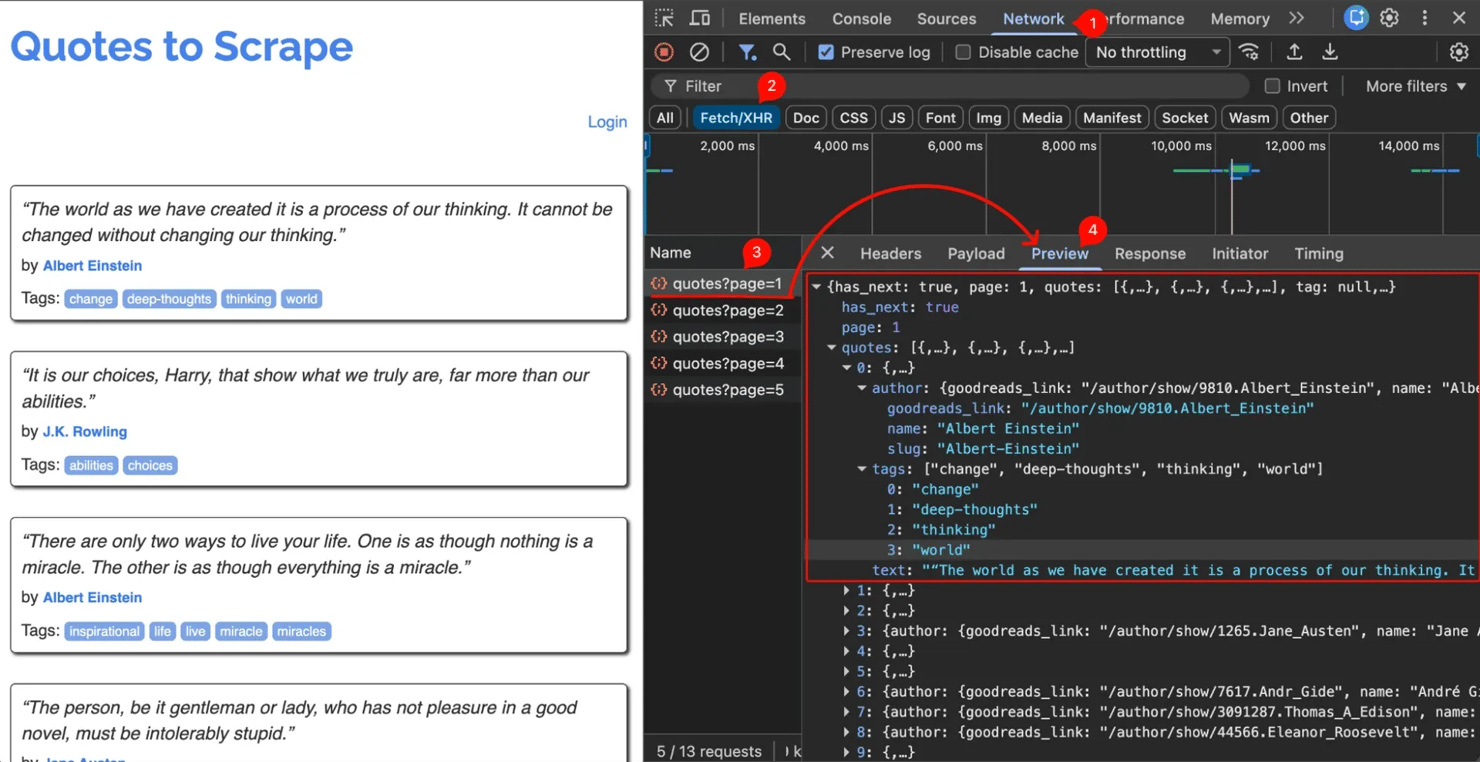
The guide to inspecting elements explains the DevTools workflow.
Capturing JSON responses with Playwright
When a site loads its JSON through calls that you can't easily replay – signed URLs, short-lived tokens, or heavy JavaScript – you can let a real browser load the page and capture the response as it arrives. Playwright drives a headless browser, and the page.on("response") listener gives you every response object, including the parsed JSON:
The quotes.toscrape.com/scroll page fetches the quotes API as you scroll, so the listener collects each batch of JSON without parsing the HTML. A plain Playwright browser still emits detectable automation signals. One well-known example is the Runtime.enable a call that it makes over the DevTools protocol, so a protected target can detect it. For this reason, you'd use a patched runtime like Patchright (an ordinary stealth plugin won't close the Runtime.enable leak), or you'd send the target to the Site Unblocker. To learn more about controlling the browser, see Playwright web scraping.
Handling authentication and pagination
Many APIs authenticate with a key, header, or bearer token. The headers argument carries them, and you read secrets from environment variables instead of hardcoding them:
APIs typically return data one page at a time. They paginate, and you follow the pages until there are none left. The examples below use the same open practice API (quotes.toscrape.com), which you can use without a key or rate limits. It exposes a has_next flag, which makes the loop simple:
A Session reuses the connection and shared headers across every page, which is faster and lighter than standalone calls. Your own API may use a different end signal – a total page count, an offset/limit pair, a cursor token, or a Link header. The same loop structure handles them all, because in every case, you fetch a page, accumulate the results, and stop on the end signal. For the API concepts behind this, see the characteristics of a REST API.
Making your scraper production-ready
The loops above call raise_for_status() and crash on the first failure. That's acceptable for a demo, but a serious problem for a real run, because a deep page eventually returns a 429, a 503, or a block page, and that single failure stops the whole job. A loop becomes production-ready with 3 small changes: retry transient failures, pace your requests, and save as you go.
First, wrap the request so transient errors retry with backoff instead of crashing, and respect Retry-After when the server sends it:
Then run the loop so that one bad page is skipped instead of stopping the run. Write each page to disk as you fetch it, so that a crash on page 500 doesn't lose pages 1 to 499:
That time.sleep is pacing – a small delay so a fast endpoint doesn't see a burst of requests. On restart, read the page numbers already written to quotes.jsonl and skip them, which lets you resume at no extra cost. You should also never run an unbounded while True against a target that you don't control. Cap it with for page in range(1, MAX_PAGES + 1) so a buggy end signal can't loop forever.
If you'd rather not write all of this yourself, the tenacity library wraps the retry logic in a decorator. Either way, every line here (retries, pacing, resume logic, and block handling), is code that you now have to maintain. A managed Web Scraping API does all of it in one call, which is worth considering once you depend on a scraper in production.
Scaling up: Fetch pages concurrently with asyncio
The loop above fetches one page at a time, so most of the run is spent waiting on the network. Once you're fetching hundreds of pages, the standard choice is httpx with asyncio: send many requests at once, capped by a semaphore so you don't overload the server.
There are 10 pages here. You'd read the total from the first response, then request the rest. The asyncio.Semaphore matters here because it stops you from sending 500 requests to a target at once, which is both rude and a fast way to get blocked. The speedup grows with the number of pages and the per-request latency. For resilience at scale, give fetch_page the same retry logic shown above (adapted to async, with await asyncio.sleep(…) instead of time.sleep and httpx's exception types). Also, pass return_exceptions=True to asyncio.gather so that one failed page doesn't stop the whole batch.

JSON endpoint blocked? Typical
Decodo's residential proxies rotate through 115M+ IPs so your Python requests hit the API from a fresh address every time. No rate limits, no bans.
Extracting embedded JSON from HTML
When a site has no public API, the data is often still JSON, hidden inside the page. The most common case is JSON-LD: a structured-data format that search engines read, found in a <script type="application/ld+json"> tag. Beautiful Soup selects the tag and json.loads() parses its contents:
If you want to avoid searching for the tag yourself, the extruct library (pip install extruct) extracts JSON-LD – plus microdata, OpenGraph, and RDFa – from a page in one call with extruct.extract(html, syntaxes=["json-ld"]).
Some pages instead store data in a plain JavaScript variable, like window.__DATA__ = {…}. That content often isn't valid JSON, so you need chompjs rather than json.loads(). For more on tag selection, see Beautiful Soup web scraping.
Getting past blocks: Proxies and browser fingerprints
Scraping now depends on your identity as much as on your proxy, because the block usually doesn't start with your IP. Instead, it starts with your fingerprint and your behavior. Every HTTPS request carries a TLS fingerprint (labeled JA4, which mostly replaced JA3 after browsers started randomizing their TLS extension order), and a plain Python client's fingerprint doesn't match any real browser. Recent browsers also send a post-quantum TLS key share by default, so a client that claims to be Chrome but leaves it out clearly isn't a real browser. Services like Cloudflare and DataDome score that mismatch before they ever look at your IP. They also check signals like mouse movement, scroll speed, and JavaScript challenges that they regenerate on every page load.
A proxy is an intermediary server that forwards your request, so the site sees its IP, not yours. Rotating residential proxies spreads requests across many real IP addresses, which fixes the IP reputation problem. curl_cffi handles the other part of the problem, because it impersonates a real browser's TLS and HTTP/2 handshake (a current version impersonates a recent Chrome build, post-quantum key share included) while keeping the Requests API that you already know:
To rotate the exit IP too, route it through residential proxies – add proxies={"http": PROXY, "https": PROXY} to the call, with PROXY = "http://USER:PASS@gate.decodo.com:7000". A real fingerprint plus rotating IPs clears most fingerprint- and IP-based blocks, but it doesn't clear all of them. The fingerprint checks, CAPTCHAs, and behavioral checks that guard commercial targets change constantly. To compare proxy types, read how residential proxies work, or browse the residential proxies plans.
When a site adds CAPTCHAs and behavioral checks on top of this, doing that ongoing work yourself is a constant maintenance cost. Decodo's Site Unblocker handles the fingerprints, CAPTCHAs, and rendering behind one endpoint, and the Web Scraping API goes a step further. You send it a URL, and it returns the page itself, as raw HTML or as parsed JSON for supported targets.
Scraping a real protected site end-to-end
The examples so far run on open endpoints, so you can reproduce them. A real target (an Amazon listing, a flight fare, a marketplace page) is protected by the anti-bot stack just described. A managed Web Scraping API is built for exactly this. You send a target and query, then it handles the proxies, fingerprint, CAPTCHAs, and JavaScript, and returns the data already parsed as JSON. The example below runs it against Amazon search:
Each line in products.jsonl is one clean record:
From start to finish, this gives you access to a protected site, the parsing, and a clean dataset, all from one call, plus the techniques in this tutorial. That single call replaced the unblocking stack and parsing that you'd otherwise build yourself, and the Web Scraping API provides pre-built targets like this for Amazon and Google. For a general site with no dedicated target, use "target": "universal" (add "headless": "html" to render JavaScript). The API then returns the page's HTML in content, which you parse with the JSON-LD technique shown earlier, or the JMESPath queries covered below.
Error handling and common pitfalls
Scraped JSON is never as clean as the documentation suggests, so a few failures appear again and again.
JSONDecodeError on invalid responses
json.JSONDecodeError is raised when the text isn't valid JSON: a truncated body, an empty response, or, most often in scraping, an HTML block page returned instead of data. The exception carries useful detail:
When a request gets blocked, the server often returns an HTML page with a CAPTCHA, and response.json() then raises this error. This is usually a signal that you should slow down or send your requests through proxies, and it isn't a bug in your parser. See what to do about parsing errors in Python for more patterns.
Missing keys and defensive access
Accessing a missing key with square brackets raises KeyError. Call .get() for a default instead, which keeps optional fields from crashing a long scrape:
This is the practical takeaway of EAFP (easier to ask forgiveness than permission): instead of checking every field first (LBYL, look before you leap), you try the access and catch failures, since you can't always predict a remote response.
Validating structure before you trust it
For production scrapers, validate the structure of every record before processing. The jsonschema library checks types and required fields against a schema:
Pydantic goes further than schema validation: it coerces real-world values into a typed model and raises a clear error when they don't fit:
Pick Pydantic when you want typed objects flowing through your pipeline, and jsonschema when you need a language-agnostic schema to share with non-Python services.
Encoding is the final detail that you need to get right. If a response arrives in a non-UTF-8 charset, set response.encoding before reading the text, and always write output with ensure_ascii=False to keep international characters readable. When invalid JSON comes from flaky endpoints, retrying failed Python requests is often the right answer.
Advanced JSON parsing: Querying, malformed JavaScript, and big files
The built-in json module covers most jobs, while a handful of libraries handle the rest. That means querying complex data, parsing malformed JavaScript, processing files too large for memory, decoding quickly, and aggregating folders of files.
Querying nested data with JMESPath
JMESPath is a query language for JSON, much like SQL is for tables. Instead of writing nested loops, you describe the data you want with a path expression and call jmespath.search():
On deeply nested API responses, JMESPath replaces manual indexing that would be fragile and hard to read, because filtering, projection, and reshaping all fit in a single string.
Parsing messy JavaScript objects with chompjs
Embedded JavaScript objects use single quotes, trailing commas, or unquoted keys, which is valid JavaScript but not valid in strict JSON, so you handle them with chompjs rather than json.loads(). The library reads them and returns a clean Python dictionary:
Use chompjs.parse_js_object() when you read data from an inline <script> tag during scraping, because its main strength is extracting the object from the surrounding code. For a relaxed object on its own, json5 and pyjson5 handle the same single quotes, trailing commas, and unquoted keys in one call. Both tools parse the object literal as written, so for values computed at runtime, like price: 10 * 2 you need a real browser engine such as Playwright. For the browser-side equivalent, see JSON.parse() in JavaScript, and for script-built pages, scraping JavaScript-rendered content.
Handling very large JSON files
Loading a multi-gigabyte file with json.load() reads the whole thing into memory at once, which can crash your process. The ijson library streams the file and yields items one at a time:
When files still fit in memory but speed matters, orjson is a near drop-in replacement that parses and serializes far faster than the standard module:
On large payloads, orjson.dumps() runs roughly 5–10x faster than json.dumps(). It also returns bytes rather than a string and keeps UTF-8 characters without escaping by default. For this reason, you stream with ijson when a file won't fit in memory, and you switch to orjson when throughput is the limit. When you're validating every record too, msgspec decodes JSON straight into typed structs and validates in one pass.
Querying a folder of scraped JSON
The tools above each work on one document. Once you've scraped many files, the next question is how to aggregate and query them. DuckDB answers it with plain SQL over a glob (a wildcard path like data/*.jsonl), with no schema setup and with larger-than-memory handling included by default:
The read_json_auto call reads every matching file, infers the schema, and streams from disk when the data won't fit in memory. If you'd rather stay in Python data frames, Polars (pip install polars) covers the same step: pl.read_ndjson("products.jsonl") reads one of those saved files into a typed columnar frame (column-oriented, fast for bulk operations) to clean, dedupe, and cast. It pairs with orjson or msgspec for decoding.
Pick the tool based on what "too big" means in your case: ijson for one massive document at fixed memory, DuckDB or Polars for a folder of files or millions of rows to aggregate, and msgspec when you also need validation on a known structure.
When to let an LLM extract the JSON
Everything above assumes the data is already JSON. When the data isn't JSON – which happens when the values are buried in unstructured HTML that changes shape from page to page – there's a different route: you send the page to an LLM with a schema and let it return the JSON. The model reads the content the way a person would, so it survives markup changes that break CSS selectors.
This complements parsing, and it doesn't replace it. An LLM call is far slower and more expensive per page than reading JSON that you already have. It can also invent fields, which is why you save it for pages whose structure varies too much to parse.
The pattern pairs a Pydantic schema with an LLM that supports structured outputs, so the response is validated against your types before you use it. Here, Claude extracts products from a page that has no public API:
The output_format=ProductList argument constrains the model to your schema at decode time, not just validating afterward, using Claude's structured outputs. The result, response.parsed_output, comes back as typed Pydantic objects, so a malformed field fails with a clear error instead of slipping into your dataset. A schema guarantees the shape, not the facts, which is why you still spot-check the values, as with any extracted data. The same pattern works with any LLM that supports structured outputs.
You still need a reliable way to fetch the page, either proxies or a Web Scraping API, before any model can read it, and you still validate the result. The LLM replaces the parser, but it doesn't replace the fetching layer. For most JSON scraping, the deterministic tools earlier in this tutorial are faster, cheaper, and exact. Use an LLM when the page structure varies too much for selectors.
The DIY path above means you own the prompt, the API key, the per-page cost, and the re-tuning each time a model version changes. Decodo's AI Parser is the no-code version: you describe the fields you want, and it returns structured JSON from the page, without managing your own prompt or API key.
Scraping JSON in the agent era
Much scraped JSON now isn't saved to a CSV file, because it feeds an AI agent or a RAG pipeline, and that changed the interface. The Model Context Protocol (MCP), an open standard created by Anthropic and now governed by the Linux Foundation, lets an AI agent call a scraping tool directly and get structured JSON back. Decodo's MCP server is one of these. It connects apps like Claude, Cursor, and Windsurf to the Web Scraping API, so an agent fetches and extracts on demand with no custom integration to build. With anti-bot systems now scoring behavior and regenerating their defenses per page load, running your own unblocking stack takes real effort, which turns the choice into a routing decision:
Situation
Approach
Data is already JSON on a stable target
Parse it yourself with the tools in this tutorial
Structure varies, or there's no clean source
LLM extraction with a schema
Target is heavily protected, or an agent needs it on demand
The Site Unblocker to keep your own parser, the Web Scraping API to get it parsed, or an MCP server to feed an agent
When the data feeds a model rather than a database, the format itself becomes part of the cost. You pay for every token, and JSON is verbose. TOON (Token-Oriented Object Notation) re-encodes the same data losslessly into a more compact form. Uniform record lists become a header plus CSV-style rows, which the project benchmarks at roughly 30–60% fewer input tokens than JSON:
Treat it as a conversion layer, not a storage format: keep your scraped data as JSON and encode to TOON only when you send it into a prompt. It helps most on the uniform record lists that scraping tends to produce. The format and its Python libraries are new and still pre-1.0, from late 2025, so the snippet installs the official implementation from source while it stabilizes. It's an early-adopter optimization. Pin a version you have tested, and use it deliberately rather than by default.
The fundamentals still hold. You still read JSON, handle errors, and validate output, whether the request came from your own script or an agent calling a tool.
Approaching a new target
When you start with a URL you haven't scraped before, work through it in this order:
- Look for a JSON endpoint first. Open DevTools, filter the Network tab to Fetch/XHR, and reload. If the page loads its data from a background JSON call, replay that call with Requests. It's faster and cleaner than parsing HTML.
- If the request gets blocked, fix the fingerprint before the IP. Match a real browser with curl_cffi (impersonate="chrome"), route through rotating residential proxies, and send the hardest, CAPTCHA-guarded targets to the Web Scraping API or Site Unblocker.
- If the JSON loads through calls that you can't replay, use Playwright. Drive a real browser to capture responses from Signed URLs or short-lived tokens as they arrive.
- If there's no JSON endpoint, check the HTML. Extract embedded JSON-LD with extruct. If the data is unstructured or its layout changes from page to page, send the text to an LLM with a Pydantic schema.
- Once you have the JSON, complete the work. Validate it with Pydantic or jsonschema, reshape it with JMESPath, and save it as JSON or JSONL – then query a folder of those files with DuckDB once the dataset grows.
Most of the time, the data is already JSON somewhere, and the rest of these steps are the fallback for when it isn't.
Best practices for scraping JSON
These habits separate a one-off script from a production scraper.
- Scrape responsibly – check the target's robots.txt and Terms of Service first, prefer an official or public API where one exists, honor rate limits, and collect only public data you're allowed to use.
- Validate before you process – check for expected keys, guard against None, and confirm types.
- Keep ensure_ascii=False when writing JSON that holds international characters.
- Pretty-print with indent during development, then switch to compact output for storage.
- Route requests through rotating residential proxies once you scale, to avoid rate limits and bans.
- Store the raw API response next to the parsed data, so you can debug and reprocess without re-scraping.
- Add a timestamp and source metadata to every saved file for easy versioning.
- Match a real browser fingerprint with curl_cffi before you assume you need a full browser, because it clears most TLS-based blocks on its own.
- Save large or streaming datasets as JSONL for append-friendly, pipeline-ready output.
For more on rotation, read why rotating proxies work best.
The complete script
Here's a working scraper that ties the pieces together. It pages through the quotes API, reshapes each record with JMESPath, enriches it with metadata, and saves a clean JSON file. Install the dependencies with pip install requests jmespath (a virtual environment keeps them isolated), save it as scraper.py, and run it. It works as-is, and the proxy turns on the moment you add your residential proxy credentials.
Run it from your terminal:
You'll see Saved 100 quotes to quotes.json, and a quotes.json file appears in the same folder. Each record looks like this, with scraped_at set to your run's UTC time:
That script fetches the pages sequentially with Requests for readability, so it leaves out the retry harness from earlier. On a real run, wrap each request in the get_json helper so a transient failure doesn't stop the job. Beyond that, 2 more changes adapt it to harder loads. For hundreds of pages, use the httpx + asyncio version from the scaling-up section, and on a fingerprint-protected site, install curl_cffi and change 2 lines. Swap the import for from curl_cffi import requests, then build the session with requests.Session(impersonate="chrome"). Both mirror the Requests API, so nothing else changes.
Bottom line
The part that breaks most often isn't your code. It's getting blocked by IP bans, TLS fingerprinting, and CAPTCHAs before the data arrives. Match the tool to the target: use rotating residential proxies for volume, and use the unblocking and agent options covered above when a site blocks you or an LLM needs the data on demand. The Web Scraping API has a free tier if you'd rather let it handle the unblocking stack entirely.

Skip the extraction pipeline
Decodo's Web Scraping API returns structured JSON from any page, even JS-rendered ones. No parsing, no proxy setup, no anti-bot workarounds in your Python code.
About the author

Justinas Tamasevicius
Director of Engineering
Justinas Tamaševičius is Director of Engineering with over two decades of expertise in software development. What started as a self-taught passion during his school years has evolved into a distinguished career spanning backend engineering, system architecture, and infrastructure development.
Connect with Justinas via LinkedIn.
All information on Decodo Blog is provided on an as is basis and for informational purposes only. We make no representation and disclaim all liability with respect to your use of any information contained on Decodo Blog or any third-party websites that may belinked therein.