Groovy Web Scraping: HTTP Requests, DOM Parsing, and Headless Browsers
Thanks to blending Java’s massive ecosystem with a scripting-friendly syntax, Groovy works as a practical alternative for web scraping on the JVM. This guide shows you how to scrape websites with the HTTP Jodd client, parse HTML documents, manage sessions, utilize Jodd Lagarto and Jerry, and use Selenium to automate browsers. You'll also learn how to configure proxies for real-world, block-resistant scraping.

Kipras Kalzanauskas
Last updated: Jun 10, 2026
12 min read
TL;DR
- Use Jodd HTTP to send GET and POST requests, manage sessions, and retrieve page content with minimal boilerplate.
- Parse HTML with Jodd Lagarto and Jerry to extract text, links, attributes, and paginated data using CSS selectors.
- Use Selenium and a headless browser when websites load content through JavaScript instead of returning it in the initial HTML response.
- Improve scraper reliability with residential proxies, request throttling, retries, structured data storage, and ongoing selector monitoring.
Prerequisites and environment setup
Before we start web scraping with Groovy, let’s prepare the tools. We need a Java runtime, the Groovy SDK, and libraries for making HTTP requests and parsing HTML.
Install Java and Groovy
First, install JDK 8 or later from Oracle and Groovy SDK from the Apache Groovy website. Then, verify the setup to make sure these two are installed correctly. You’ll get the version you installed if you open a terminal and run:
Manage dependencies with Grapes
Notably, Groovy resolves dependencies through Grapes (a built-in system that automatically downloads libraries), so you don’t have to create Maven or Gradle projects. Just use the @Grab annotation at the top of a script. This is very useful, as when the script runs, Groovy will resolve and download the dependencies that the project needs.
For example, here’s a brief @Grab example pulling in Jodd HTTP automatically:
Add Jodd HTTP and Lagarto
We’ve mentioned Jodd libraries, and you’ll need two of them for this process. The first is Jodd HTTP to send HTTP requests and handle responses, and the second is Jodd Lagarto to parse HTML and extract data from web pages.
Import both of these libraries directly with Grapes:
Choosing the right scraping approach
Task
Recommended tool
HTTP requests
Jodd HTTP
HTML parsing
Jodd Lagarto + Jerry
JSON APIs
JsonSlurper
Login-protected pages
Jodd HTTP + cookies
JavaScript-heavy sites
Selenium
Production scraping
Proxies / Web Data API
Configure proxies
At this point, you’re nearly ready. The last thing you’ll need is to set up proxy configuration for production scraping. Residential proxies are a must-have because they’ll spread out the traffic across numerous real IPs. This will prevent websites from limiting requests from a single IP and will help you bypass geo-restrictions. You can also choose between rotating and sticky sessions, for more details, see how residential proxies work.
As a residential proxy solution, we strongly recommend Decodo, which offers 115M+ ethically-sourced IPs in 195+ locations and the best response time in the market. Additionally, Decodo’s rotating proxies give your project new IPs for every request, helping you to bypass blocks, CAPTCHAs, and geo-limits, while also integrating with any Java HTTP client.
To set up Decodo residential proxies with rotating IPs:
- Register or log in to the Decodo dashboard.
- Navigate to find residential proxies, choose a subscription or start a 3-day free trial.
- Go to Proxy setup.
- Select a location or choose Random.
- Set the rotating session type and choose a protocol (HTTP(S) or SOCKS5).
- Choose the authentication type.
- Download the generated endpoint and credentials. Alternatively, copy them into your scraper, browser, or software.
You can also check out this video for step-by-step instructions on how to set up residential proxies.

Enhance your scraper with proxies
Claim your 3-day free trial of residential proxies and explore 115M+ ethically-sourced IPs, advanced geo-targeting options, a 99.92% success rate, an average response time under 0.6s, and more.
Don’t hardcode your Decodo credentials in scripts. Instead, store them in environment variables. This is how:
After that, you can access your credentials from Groovy:
Organize and run your scripts
Meanwhile, organizations can create separate scripts for each example, which are easier to learn. Another option is to keep everything inside a single Groovy class. The class works better if the organization is building a reusable scraping toolkit.
Finally, to run a script, save it as scraper.groovy and then execute with:
Sending GET and POST requests with Groovy and Jodd HTTP
HTTP requests are the basis for the majority of your web scraping projects. In this section, we’ll look into two request types in more detail. The first is a GET request, which retrieves data from a target page, and the second is a POST request, which sends data to a server. The latter will often go through APIs or forms.
You can send GET and POST requests very easily in Groovy by utilizing the Jodd HTTP library and its concise API. Jodd HTTP is a lightweight alternative to larger libraries, and you can combine it really well with Groovy's standard JSON tools.
Besides these, we’ll also use httpbin.org. This is a very useful, public testing service that developers use for learning and debugging HTTP clients.
First, let’s send a GET request. The example below requests a page and prints the response body. In it, HttpRequest.get() creates an HTTP GET request to httpbin.org. Then, the send() method executes that request and returns a response. That response body actually contains the content that the server returned. Meanwhile, statusCode() and header() provide more response details.
An output looks like this:
Note: Check the status code when scraping the website (before you try to parse the content) to confirm that the page loaded successfully.
Next, let’s send a POST request.
POST requests’ task is to send data to a server as part of the request. In our example below, the form() method adds two form fields, and both are submitted with the request. We can liken this action to filling out and submitting a form in a browser. On its part, the server receives all these values the POST request contained, and includes them in its response.
httpbin.org returns submitted data back to the client. This allows you to easily confirm that forms are being sent correctly before you begin working with real websites or APIs.
Finally, let’s parse JSON responses that APIs return, as most won't return them in HTML format.
Groovy’s JsonSlurper converts JSON into native objects, which you can then easily access. The best news here is that you don’t need to search through raw text manually, wasting your time. Simply reference individual fields directly, such as json.url or json.headers.Host. This way, it’s much easier and faster to extract specific values from API responses and then add them into scraping workflows.
Meanwhile, Jodd HTTP provides method chaining, which is a significant advantage, allowing multiple request options to be joined into one readable statement:
What this example does is join several request settings into one chain of method calls. The request sends form data and defines a custom User-Agent header. In turn, it identifies the client making the request. Method chaining improves readability and the overall process by keeping related configuration in one place. This feature is especially relevant as requests become more complex. It’s also very useful when adding authentication headers, cookies, proxy settings, or additional request parameters.
While Groovy removes much of that boilerplate, it’s interesting to note that this same workflow in Java becomes much more complex. It requires more object creation, type declarations, and exception handling, and generally has you focused on infrastructure code.
Analyzing the DOM tree and extracting data with Jodd Lagarto
In this section, we’ll learn how to parse fetched HTML into a navigable DOM and also how to extract specific elements we targeted.
Once you have finished fetching a page, you’ll move to extracting the data you need, and this is where DOM parsing comes in to save the day. The Document Object Model (DOM) is a tree representation of an HTML document that makes elements accessible through selectors.
Jodd Lagarto (one of the two libraries we’ve introduced above) includes Jerry, aka a jQuery for Java. It’s a jQuery-inspired API for navigating and querying HTML. It’ll be useful to us as we go.
If you've worked with Java-based scraping before, you may be familiar with Jsoup. Both libraries support HTML parsing and CSS selectors, but this guide uses Jodd Lagarto and Jerry because they integrate naturally with the Jodd ecosystem already used for HTTP requests. Jsoup remains a popular alternative and is often preferred in projects that don't rely on other Jodd components.
Start by converting raw HTML into a DOM object:
In this example, the first request retrieves the raw HTML source of the homepage. Then, it stores it in the html variable. Once it passes that HTML string to Jerry.of(), a DOM object is created that can be navigated and also queried using CSS selectors.
Here are some examples:
Use CSS selectors to locate specific elements you need based on their location and attributes within the document. It’s very convenient that most browser developer tools support CSS selectors directly. This allows you to inspect a page and test selectors before you add them to your scraper.
Instead of manually searching raw HTML, you can work directly with structured elements and their relationships.
Moving on, the text() method extracts text content, and attr() retrieves attribute values – here’s a snippet, which assumes the document object from the converting example already exists:
The selector .titleline a aims for the first article link on the page. Then, calling text() returns the visible text inside the element, and attr("href") extracts the URL stored in the link's href attribute. Most data appear as text content or as HTML attributes (e.g. links, image sources, IDs, and metadata), which means that these two methods cover many common scraping tasks.
If you find that multiple elements match a selector, you can use each() to go over them. The example below extracts article titles and URLs from a front page:
Notably, each() works to loop through every matching element, and it also executes the provided code block. Therefore, this method allows you to extract repetitive data structures such as product listings, search results, articles, or table rows.
You can also extract scores:
In the HTML structure, you’ll find that scores show separately from the article titles, so you can use a dedicated selector to collect them.
Moreover, many websites split results across multiple pages. You’ll see this pagination showing as a "next" link. When a scraper extracts these next-page URLs, it doesn’t stop after the first page, but simply continues gathering data automatically. This is especially important if you're scraping archives, search results, product catalogues, or similar content.
In our example, this is the selector:
Also, you can place this inside a loop, and you’ll continue scraping until there’s no next page.
Lastly, we should briefly mention that there’s a significant difference between CSS selectors and XPath. CSS selectors are concise, easy to read and simpler to maintain, which is why they’re widely used for web scraping tasks. On the other hand, use XPath when you need to move upward through the DOM hierarchy, as well as when you want to target elements based on complex relationships.
Managing authentication, session cookies, and form submissions
In this section, we’ll cover how to handle scraping processes that need login or session persistence.
Some websites ask for authentication before showing you data because the data you target is hidden behind login walls, needs authorization, or relies on user-specific sessions. At the same time, login-protected dashboards, account pages, and personalized content need sessions to identify users. A session is maintained through cookies that the server returns after a successful login. After that, session cookies act as proof of authentication for future requests.
Here’s an example of a login via POST request with username/password form data:
The username and password are loaded from environment variables where you’ve saved them. Not hardcoding them into the script keeps sensitive credentials out of the source code so that the risk of accidental exposure is lower.
For our example, the request is sent to httpbin.org, but the pattern is the same for real websites. When the request is done, you can check the response to verify that the authentication was successful.
Also, in real authentication, the response comes with session cookies. Jodd HTTP makes them available through cookies():
You can examine the returned cookies to decide which values you need to keep. Just keep in mind that maintaining cookies throughout the entire session is key for authenticated scraping.
Additionally, many websites have these specific hidden form fields you’ll come across, one of them being CSRF (Cross-Site Request Forgery) tokens. Websites use them to see whether a legitimate page is submitting the forms, or it’s a third party. However, CSRF tokens are one-time values, meaning that they change between sessions. And because they must be included with the rest of the form data, a scraper must grab them dynamically before a form is submitted.
Let’s look at an example. First, we’ll retrieve the page and extract the token:
The HTML is embedded directly in the script for this example. In a real workflow, it would actually come from a page retrieved with HttpRequest.get().
The selector will find the hidden input field and will extract its value attribute.
Then, include the token with the form when it’s time to submit it:
This request combines the extracted token with the form data expected by the server. Many modern websites validate both the session cookie and the token before accepting a submission, making both pieces of information necessary for successful automation.
The scraper attaches the cookies to a new request, so it just goes on within the same authenticated session. What the website sees is requests from a user who is already logged in.
Therefore, it’s clear how important the session cookies are for the scraping efforts. If you don’t have them, websites will likely send the request back to the login page or will send you to restricted content.
Here’s a visual of a typical authenticated workflow:
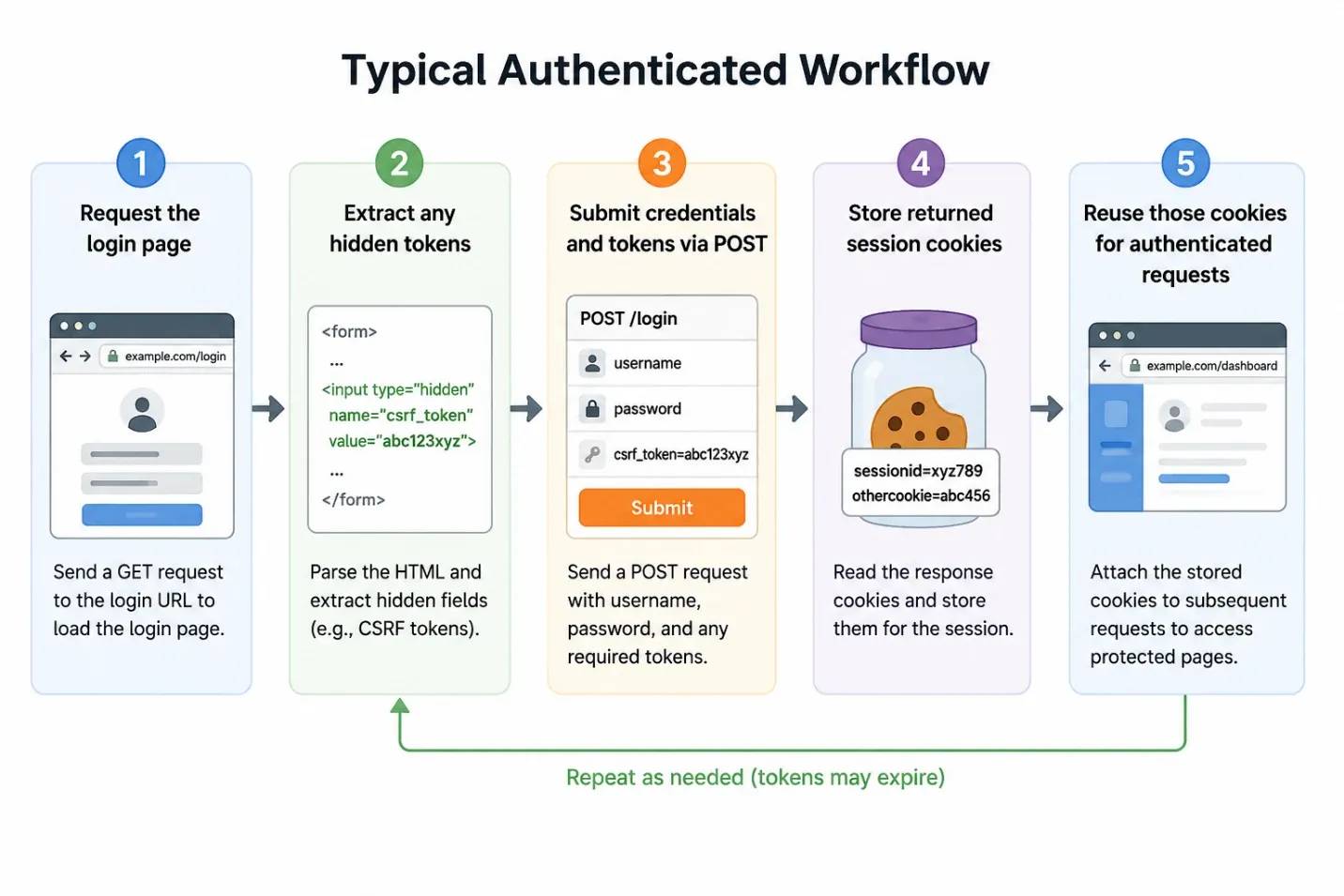
The exact process will be different between different websites, but most authenticated scraping workflows follow this general pattern.
Note: Never hardcode usernames, passwords, API keys, or proxy credentials directly in scripts to prevent possible security issues. It’s better to store them in environment variables. You can also keep them in configuration files that aren't committed to version control.
Scraping dynamic content with Selenium and headless browsers
When you decide you need to transition from static scraping (Jodd) to handling dynamic pages, you can use Selenium with a headless Chrome browser controlled from Groovy.
The Jodd-based approach works well for static websites where the server returns all content in the initial HTML response. But during web scraping of dynamic websites, there’s an issue: after the page renders, modern websites utilize JavaScript to load data. This means that an HTTP request gives us only the HTML skeleton, not the content we see in the browser and that we need.
If you want to identify this issue, take a look at the page source and compare it to what the browser shows. It’s likely that the JS is interfering if the source has only empty containers, loading spinners, or placeholder elements. You’ll often find this on modern eCommerce sites, social media platforms, dashboards, and single-page applications.
To solve this, we’ll add another tool to the mix. We’ll employ a browser automation tool to access the fully rendered page. A headless browser loads the page, executes JavaScript, and renders the final DOM before extraction, solving our scraping problem.
To use Selenium in Groovy, add the dependencies with Grapes:
While Jodd HTTP communicates directly with a web server, Selenium doesn’t. Instead, it controls a real browser through WebDriver, which allows your script to behave like a real human. This allows the scraper to interact with websites the same way a browser does, making it possible to access content unavailable through simple HTTP requests.
You'll also need to install Chrome and ChromeDriver. Ensure right away that the versions of these two installations match.
Let’s see an example that launches a headless Chrome browser:
The headless option runs Chrome without the need to open a visible browser window, speeding up the automation process. Also, the viewport size and user agent help us disguise our browser into a normal desktop user so that the scraper can see the same content a normal user would.
When the browser is running, go to the target page and wait for the dynamic content to load:
It’s actually better to wait for specific elements to appear than to use fixed sleep intervals. It’s a more reliable method, because the scraper gets to work as soon as the target element shows. This approach reduces unnecessary delays and makes scraping more reliable.
You can then extract data using CSS selectors or XPath expressions:
Given that Selenium returns a set of matching elements, you can process them one by one. Additional selectors can also target specific fields from each parent element. These include titles, descriptions, prices, ratings, or timestamps.
So, if you’re targeting elements based on their position or parent-child relationships, XPath is quite useful:
It’s true that CSS selectors are easier to read, as we’ve mentioned above, but for this purpose, XPath is a better choice because it provides flexibility for navigating complex document structures.
Meanwhile, infinite-scroll pages load new content only when a user scrolls to the bottom of the page, which is why they involve additional interaction. Send keyboard events and wait for new content to load:
However, you can automate these interactions so that the scraper can automatically proceed with requests and grab the data that doesn’t appear on the first page load.
The page at https://quotes.toscrape.com/js/ is JavaScript-rendered, so a simple HTTP client won't retrieve the content visible in the browser. If we use Selenium to load the page, it will execute the JavaScript and bring up the data we’re targeting for extraction.
Example output:
We can use this same workflow for JavaScript-rendered search results, product listings, reviews, news feeds, and more. As soon as the content loads in the browser, Selenium can interact with it using the selectors and extraction method utilized for static pages.
Saving and structuring your scraped data
This section will focus on the methods to export and store the extracted data in useful formats. After you’ve instructed your data, you need to store it in a format that can be easily analyzed, shared, or processed by other systems.
Importantly, before saving anything, do some basic validation and cleanup, because good data quality makes all the difference. Issues like missing values, duplicate records, deformed URLs, and inconsistent formatting can reduce data quality. This, in turn, makes downstream analysis unnecessarily difficult.
JSON is a common choice for storing data because it preserves nested structures and metadata. Groovy includes JsonOutput, making JSON export straightforward.
The following example writes scraped records to a JSON file:
The file we get holds data that’s structured in a way to be easily used by APIs or dashboards.
Meanwhile, instead of JSON, CSV is a better choice for spreadsheet analysis. You can generate a simple CSV file with Groovy's file APIs:
It’s good to keep in mind that CSV files work best when each record has the same structure, so it’s best to have a defined and consistent column order, and then add the missing values, even if some fields are optional, instead of just omitting columns.
It’s also helpful to include metadata with every record for long-term projects. This will make it a lot simpler to audit and reproduce results when the time comes. Useful fields include source URL, scrape timestamp, page number, search query, and country or proxy location. Metadata will also help us troubleshoot problems and compare results across many scraping sessions.
Moreover, timestamped filenames help separate scrape runs and prevent accidental overwrites:
You’ll also find timestamped files very helpful. If a scraper suddenly begins grabbing incomplete or incorrect data, you can roll back to previous datasets.
Moreover, you can choose to create a new file for each run, given that new files are easier to track. Alternatively, you can choose to attach records to an existing dataset, given that appending makes aggregation a lot simpler.
That said, if your projects are large, it’s probably best to store the results in a database. This is often seen as a more practical solution. Groovy connects to databases such as MySQL, PostgreSQL, and SQLite.
You’ll notice that databases are very beneficial if you’re scraping the same source over and over again. They’ll enable you to track any changes over time, compare various records, identify trends, and more. You won’t need to work with large collections of individual files.
Overall, when the data has been properly cleaned, validated, and stored, it reduces workload, and you can integrate it into a variety of workflows.
Avoiding blocks and best practices for production scraping
When web scraping, you’re bound to run into challenges that will mess with your scraper’s reliability. Just because your scraper worked once doesn’t mean it’s ready for production. Websites are constantly monitoring all the traffic coming to them, and they may restrict or block automated requests that seem suspicious at any time.
Some of the most common blocking methods you’ll face include CAPTCHAs and IP bans. Moreover, rate limiting limits the frequency with which an IP can access a site, and there’s also fingerprinting in your way, which analyzes characteristics of the browser in search of automation tools.
Any solution you decide upon should include residential proxies, because they distribute requests across many IP addresses to lower the chances of triggering the defenses we mentioned. We recommend Decodo residential proxies. You can route Jodd HTTP traffic through a proxy gateway and integrate it into Selenium browser options.

Enhance your scraper with proxies
Claim your 3-day free trial of residential proxies and access 115M+ ethically-sourced IPs, a 99.92% success rate, 195+ geo-targeting locations, and more.
Remember that rotating user agents can also help reduce repetitive request patterns:
Request timing matters as much as IP rotation. Sending requests at perfectly regular intervals often looks automated. Introduce randomized delays between requests:
Also, temporary failures are common, but retry logic with exponential backoff will help prevent one failed request from stopping everything.
It's also worth checking a website's robots.txt file and using reasonable request intervals. This reduces server load and helps avoid unnecessary blocks.
Another common issue is CSS selectors and XPath expressions breaking, which usually happens because websites update their layouts often. Keep an eye on the extraction results, and you also may want to add alerts to warn you when expected fields suddenly disappear.
However, there also comes a time when it’s best to hand over the majority of the work to someone else, so you can focus on the extracted data. As proxy rotation, retries, and anti-blocking logic become difficult to maintain, especially for large-scale projects, a Web Data API is the best solution by far.
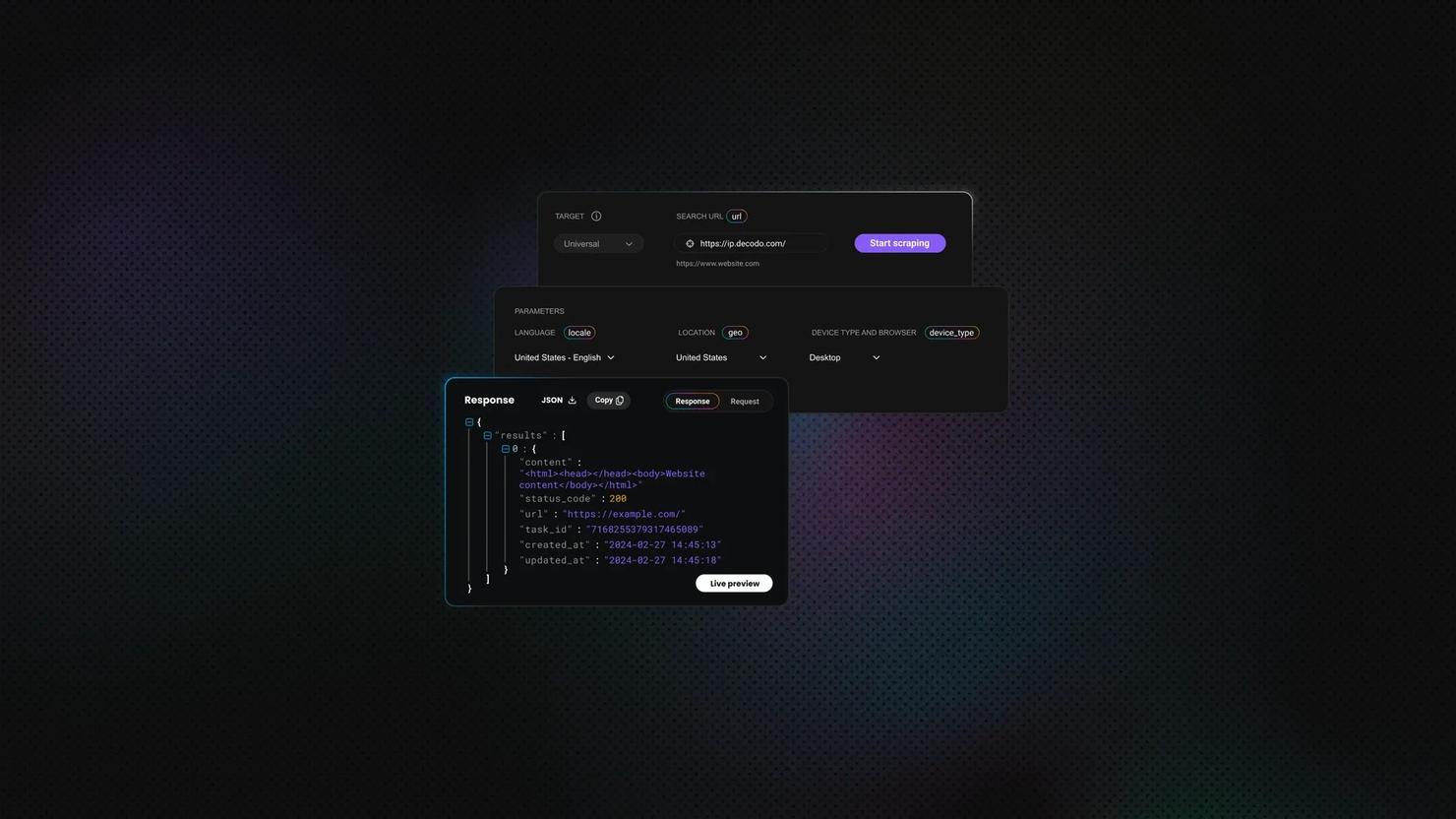
Use Decodo's Web Data API for sites with strong anti-bot technology and for browser rendering when you need a fast, all-in-one solution that manages parsing, browser rendering, anti-bot bypass, and proxy rotation. Alternatively, consider Decodo Site Unblocker that comes with a proven success rate for scraping targets with aggressive anti-bot protections, as it’s purpose-built for bypassing Cloudflare, DataDome, Akamai, and similar protections.

Skip the boilerplate
Decodo's Web Data API handles proxies, CAPTCHAs, and anti-bot detection so your code stays short and your requests actually land.
Final thoughts
Groovy is a highly useful toolkit for web scraping. It can be used to send simple HTTP requests, parse HTML with Jodd Lagarto, manage authenticated sessions, and even render JavaScript-heavy pages with Selenium. Moreover, its flexibility allows users to combine it with proper data storage, proxy management, and APIs, which in the end enables them to build reliable scrapers for both small automation tasks and larger data collection projects.
About the author

Kipras Kalzanauskas
Senior Account Manager
Kipras is a strategic account expert with a strong background in sales, IT support, and data-driven solutions. Born and raised in Vilnius, he studied history at Vilnius University before spending time in the Lithuanian Military. For the past 3.5 years, he has been a key player at Decodo, working with Fortune 500 companies in eCommerce and Market Intelligence.
Connect with Kipras on LinkedIn.
All information on Decodo Blog is provided on an as is basis and for informational purposes only. We make no representation and disclaim all liability with respect to your use of any information contained on Decodo Blog or any third-party websites that may belinked therein.