How to Parse HTML With Regex: A Practical Guide
Yes, you can parse HTML with regex – but only for specific tasks. Regex works well on flat targets like meta tags, sitemap URLs, or inline JSON-LD. But on nested or JavaScript-rendered markup, it fails silently, and you often don’t notice until the data is already wrong. This guide explains when regex works on HTML and when it breaks, includes working Python for the common extraction tasks (meta tags, JSON-LD, bulk extraction), and covers when to switch to a parser or get past a page that blocks you.

Justinas Tamasevicius
Last updated: Jun 15, 2026
7 min read

TL;DR
- A regular expression (regex) is a pattern-matching mechanism that compiles into a state machine to scan linear text. It can't parse infinitely nested structures like HTML, but it's fast and reliable for extracting flat, predictable substrings from a document.
- Before writing complex patterns against an HTML body, check for inline JSON-LD or framework hydration scripts like __NEXT_DATA__. A single regex match on these blocks can pull the entire page data model as a stable JSON payload that survives future layout changes.
- Use regex only on flat, predictable targets within markup you control or monitor, such as SEO meta tags, sitemap URLs, or script source attributes.
- Switch to a proper HTML parser like BeautifulSoup, lxml, or selectolax the moment you hit nested elements of the same tag, varying attribute orders, or frequently changing layouts.
- For stability at scale: compile patterns once at the module level, use named capture groups, favor strict character classes over the lazy dot wildcard (.*?), decode HTML entities after matching, and add canary patterns to catch silent layout changes early.
- For JavaScript-heavy sites or targets behind anti-bot walls, route requests through a managed scraping API to get raw rendered HTML. For millions of cached pages, use vectorized column operations via DuckDB or Polars instead of Python loops.
Parse HTML with regex: what regex and HTML actually are
People often use both regex and HTML loosely. Before we decide where regex fits, it helps to be clear about what each one really is.
The regex pieces that decide whether HTML extraction works
A regular expression compiles to a state machine that scans text for matches. Most of the syntax is well-covered in MDN's reference. But when you apply regex to HTML extraction specifically, 2 pieces matter more than the rest.
The first is the non-greedy quantifier. The pattern .*? matches as few characters as possible. Without it, <div>.*</div> matches everything from the first <div> to the last <div> on the page, which is usually not what you want. Inside attribute values, the character class form [^"]+ is safer, because it physically can’t go past the closing quote.
The second is the dotall flag (sometimes called single-line). Without it, . doesn’t match newlines. This matters because real HTML often wraps attributes across several lines, especially in pretty-printed pages and JSON-LD blocks. You turn it on with re.DOTALL (Python), the s flag (most other engines), or [\s\S] as the explicit "any character including newline" regular expression.
Named capture groups and possessive quantifiers also matter. Lookarounds are important too, but mostly for the engines that support them, and that is in the comparison table below.
The fundamental mismatch
Regex describes regular languages, while HTML is a context-free language with arbitrary nesting. Real-world HTML is also frequently malformed in ways browsers tolerate, but no spec endorses, for example, missing close tags, attributes without quotes, and scripts containing < characters. A regex can describe slices of that mess reliably, but not the structure as a whole.
When regex and HTML still meet productively
When your target is flat and predictable, the mismatch doesn't matter. A meta tag usually sits on one line, a sitemap <loc> element has no inner tags, and a <script src="..."> attribute is a fixed wrapper around the value you want. These all sit inside regex's comfort zone.
For tree-shaped data, switch to a proper parser. Data parsing the document into a tree and querying it with selectors stays correct as the markup changes, but regex breaks the first time someone reorders attributes. The same applies for any web scraping project where the markup itself is the data, not only the wrapper around it.
Step-by-step process to parse HTML with regex
Each step below is a decision point. So, the choices you make at, say, steps 3 and 5 cause more regex bugs in practice than any syntax mistake.
Step 1 – set up your environment
Start off by picking a language whose regex engine you trust, and whose escape rules you can remember. The defaults are all production-grade:
- Python's re module (and the richer third-party regex package, which has supported Unicode 17.0.0 since its October 2025 release). Current stable Python is 3.14+.
- JavaScript's built-in RegExp with the v flag for Unicode set notation. The flag is available since Node.js 20.12 and stable in the current 22 LTS and 24 LTS lines.
- PHP's PCRE2. PHP 8.4 raised the named-capture-group label limit from 32 to 128 characters by bundling PCRE2 10.44; PHP 8.5 and later inherit that ceiling.
- Go's regexp package, which uses RE2 and runs in linear time but doesn't support lookarounds or backreferences.
Engine
Lookarounds
Backreferences
Possessive quantifiers / atomic groups
Linear-time guarantee on hostile input
Python re (3.11+)
Yes
Yes
Yes
No
Python regex (third-party)
Yes
Yes
Yes
No
JavaScript RegExp
Yes
Yes
No
No
PHP PCRE2
Yes
Yes
Yes
No
Go regexp (RE2)
No
No
N/A (linear by design)
Yes
The trade-off matters mostly at scale. RE2-style engines (Go and Python through the re2 binding) refuse some patterns, but they guarantee the engine won't run forever on hostile input. PCRE-style engines (Python re, JavaScript RegExp, and PHP PCRE2) support more features, but they can hit catastrophic backtracking on adversarial input.
Also decide how you handle encoding, and do it early. HTML pages typically arrive as UTF-8, but Latin-1 and Windows-1252 still show up on older sites. If you get the encoding wrong, your pattern matches against garbled text (mojibake), and it silently corrupts any string with diacritics or currency symbols.
Step 2 – fetch the HTML
Use a real HTTP client. In Python, that is httpx or requests. httpx is recommended for new code, while requests, while widely used, works best in maintenance mode. In Node.js, it is fetch or undici, in PHP, it is Guzzle, and in Go, it is net/http. Don't read from raw sockets.
Set a realistic User-Agent and Accept-Language header. Stripped-down headers are one of the fastest ways to get rate-limited, served a mobile-only variant, or routed to a stripped HTML cache that is missing the tags you came for.
Wrap the fetch in retry-with-exponential-backoff, so transient timeouts and 503s retry instead of silently poisoning your data. A decorator fromtenacity or stamina (Python) handles this in a few lines.
Capture the raw response body before any parsing, and never send a partially decoded string to your regex. The encoding mismatch produces empty matches that look like a pattern bugwhen they aren’tt.
When the response itself comes back as a 403, a 429, or a CAPTCHA page, the bug is in the fetch layer, not the pattern.Dedicated site unblockers help mitigate these by handling rotation, fingerprinting, JavaScript rendering, and common CAPTCHA challenges. With an unblocker, you get back rendered HTML that your regex can read instead of a block page.
Step 3 – inspect the markup before writing the pattern
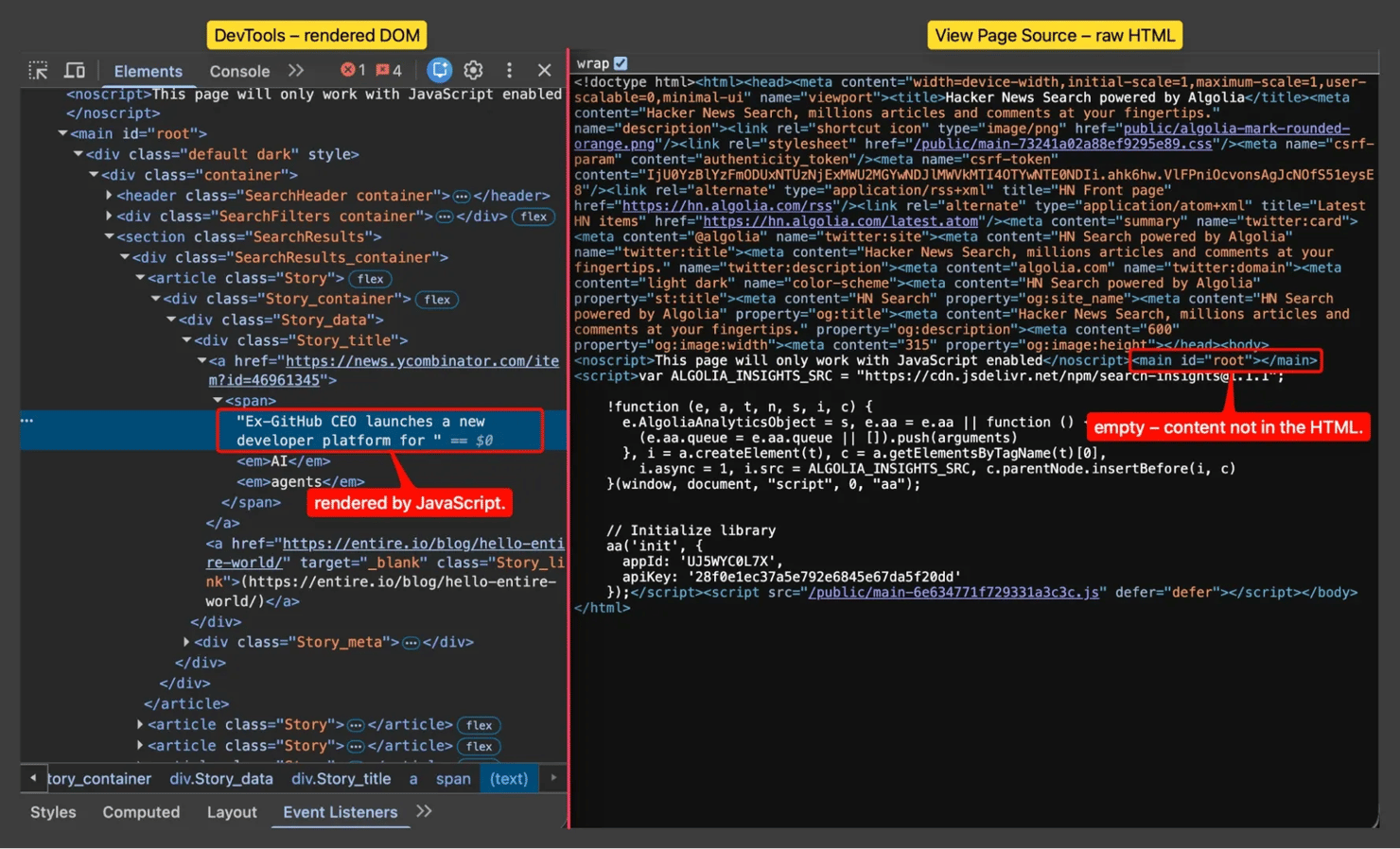
Open the page in DevTools (via the Inspect element menu) and copy the actual HTML around your target node. Then click View Page Source and copy the same area from the raw response. These 2 views differ on any site where JavaScript builds or changes the page: DevTools shows the rendered DOM, while View Page Source shows what your HTTP client actually receives.
The page a human sees and the HTML a scraper receives are different documents. The rendered DOM is full of results; the raw response is a near-empty shell. That is why a regex against it returns zero matches, and the signal to reach for a renderer or hydration data, not a smarter pattern.
Note the boundary of your target. Is the value always on one line, always lowercase, always quoted, and always with the same attribute order? Every "always" is a constraint you can put into the pattern, and that is what makes a regex narrow enough to survive.
Step 4 – craft the pattern
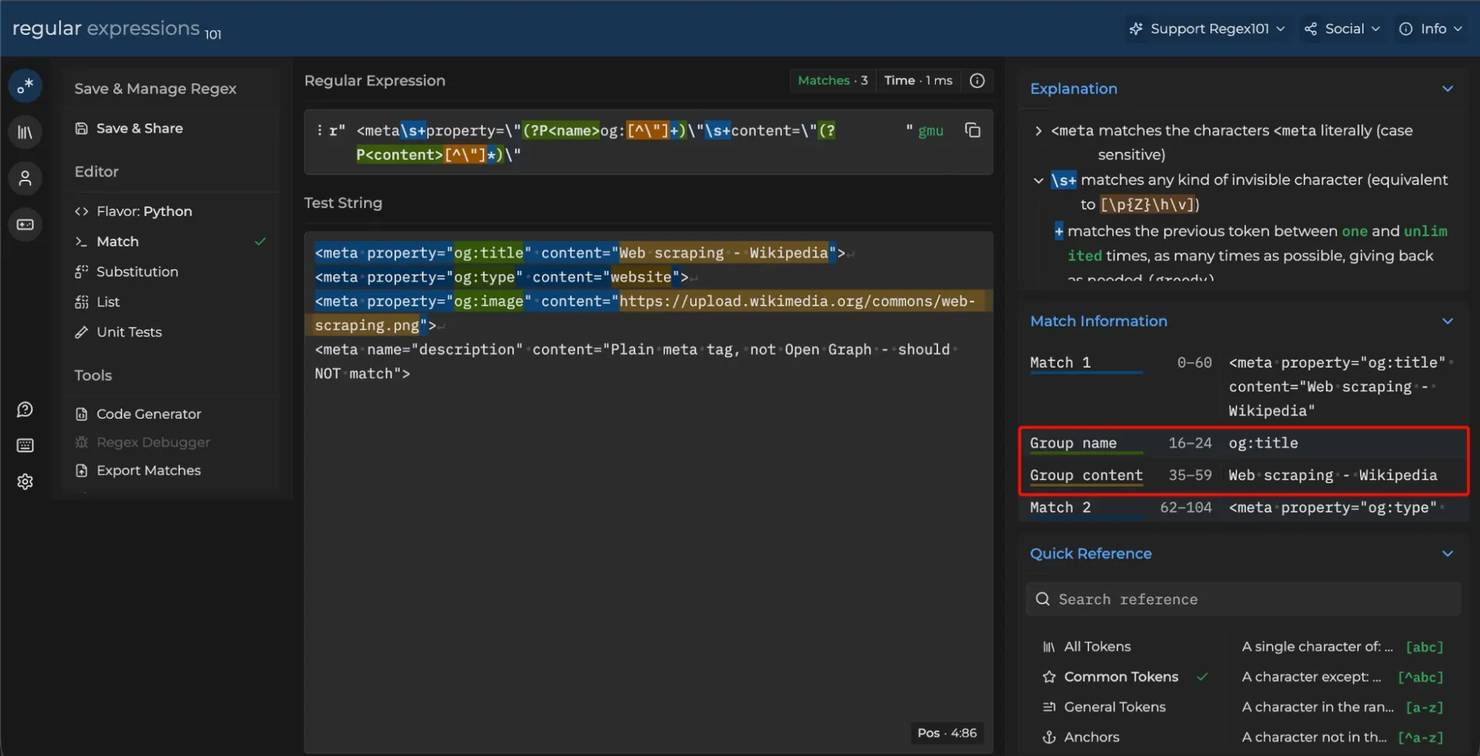
Start narrow, then widen. Lock the attributes you know are stable and leave only the variable slice as a capture group. A pattern like <meta property="og:title" content="([^"]+)"> extracts the title from a single meta tag in one line because it locks 5 tokens and only varies 1 value.
Inside attribute values, prefer a negated character class over the dot wildcard. The class [^"]+ is safer than .+? against unexpected quote nesting, because it can’t drift past the closing quote. Use the dotall flag if your target spans several lines.
Test against 3 samples: a happy-path page, a page with a known edge case (entity-encoded characters, or a different attribute order), and a deliberately broken snippet. If the third sample matches when it shouldn't, your pattern is too loose.
Testing the pattern on regex101 before it ships with: the won't og: tags – they should match and expose the name and content groups, while the unrelated description tag should beis correctly skipped.
Step 5 – extract and normalize the data
First, get rid of HTML entities like &, ' and yourself, because the match is the literal source text, and the engine doesn’t decode entities for you.
Also, cast types where it matters. For example, convert prices to numbers, dates to ISO 8601 strings, URLs to absolute form using the page's base URL. If you send a URL with a leading slash to a downstream system, nothing in that URL says which host it came from.
Step 6 – validate, store, and monitor
It’s important to validate every extracted record against a schema before you store it. An empty match is one of the most common failure modes, and if it fails, it should do it loudly.
Depending on your volume, save your results to CSV, JSON Lines, or a database. Also make sure to record the source URL and the timestamp alongside each row so you can reproduce the extraction when the site changes.
Finally, set an alert for when the daily record count drops by more than a small threshold. This catches markup changes before they turn into a silent data outage.
3 habits that decide whether regex extraction works
These 3 habits decide whether the use cases below work on the first try. The question is not which regex you write, but where you point it, and what you check around it.
Find the page's hydration data before writing any body pattern
Modern JavaScript frameworks ship a copy of the page's state as JSON inside the HTML, so the React or Vue runtime can hydrate the client without fetching again. Most engineers who write regex against the rendered body never check for this. These are the framework-specific markers worth looking for first:
- <script id="__NEXT_DATA__" type="application/json"> – Next.js Pages Router. Still used by many production sites (verified live on Notion at the time of writing).
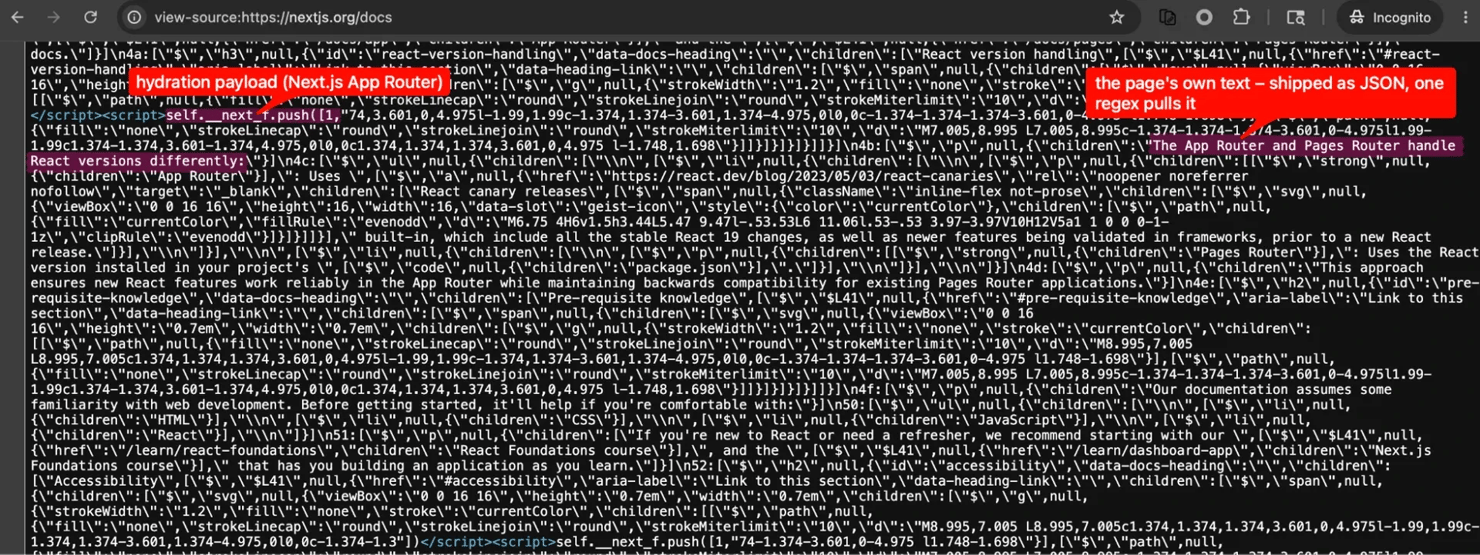
- self.__next_f.push([1, "..."]) – Next.js App Router. Streaming React Server Components payload chunks. Used by Next.js's own homepage, Vercel, Hashnode, Product Hunt.
- Nuxt's serialized payload script (the exact variable name has changed across major versions; search the page source for __NUXT__ or nuxt-payload).
- window.__remixContext= – Remix (an inline-script global, not an id-tagged block; React Router v7 moved it, so also scan for __staticRouterHydrationData).
- window.__INITIAL_STATE__= – generic SSR/SPA convention, common with Vue, Redux SSR, and custom setups.
The cleanest case is the Next.js Pages Router pattern. One regex pulls a single JSON blob that usually holds most of the page model, including the props the page was rendered with, the metadata,and even data fetched on the server that has not rendered yet.
Real output against notion.so at the time of writing:
That single regex returned 12 fields in one match, many of which you would otherwise chase with separate body patterns. On a Next.js commerce product page, the same block usually carries most of the page model. This includes elements like product fields, related products, pagination state, and data the framework fetched on the server but has not rendered yet.
The Next.js App Router pattern needs more work. The __next_f chunks are React Server Components payload fragments, not raw JSON, so you join them together and walk the result with a small parser (or use a maintained library like nextjs-hydration-parser). The extra work is worth it, because hydration data is more stable across redesigns than the rendered HTML.
A Next.js App Router page ships its content as JSON inside streaming script chunks. One regex on that block often returns most of the page model, and it survives redesigns better than the rendered HTML.
The remaining markers work the same way. You slice the serialized state out of its <script> block, or for the window.__X__= globals like Remix and __INITIAL_STATE__ you capture the text after the =. Then you parse it with json.loads for the JSON ones, and a format-specific decoder for the rest.
So, before you write any body pattern, search the page source for these markers. If one matches, your body regex only needs to cover the fields that the JSON doesn’t carry.
Carve away the noise, but not the signal
The default mental model is to write a pattern that captures what you want. The inverse is often more stable: write patterns that remove what you don't want, and then treat whatever is left as the signal.
This works when the boilerplate is more stable than the content. Headers, footers, navigation menus, and analytics scripts rarely change between releases, while the main content layout is reworked often. So, a carve-away pipeline often survives redesigns that would break a carve-out pattern. This is also the cleanup step most articles skip when they prepare HTML for an LLM ingestion pipeline. They write a fragile selector for the main content area, when removing the predictable noise would do the same job with a quarter of the maintenance.
For production-grade article-only extraction (boilerplate removal, language detection, metadata), trafilatura and readability-lxml are the mature Python libraries that ship this carve-away approach plus more.
Add a canary pattern that catches silent page changes
The most dangerous regex failure in production is not a thrown exception. It is the page changing just enough that a pattern returns wrong data instead of no data. A canary pattern catches this.
Pick something that should always be present, and always look the same on a healthy fetch: the site's copyright line, the logo image filename, the meta charset declaration, a known JSON-LD context. Compile it as a separate pattern. Run it on every fetch BEFORE the real patterns. If the canary fails, the page did not load correctly, or the structure changed – so flag and skip, instead of shipping corrupted records.
Pair the canary with the daily record-count alert. The canary catches fast structural breaks right away, while the count alert catches slow content degradation over time. But neither one catches plausible-but-poisoned values. So, when the data feeds something that matters, add a value-level sanity check too, such as flagging a field that never varies across a page, or a price outside a sane range.
Common use cases when you parse HTML with regex
Most regex on HTML patterns in production target one of 4 shapes. Each one has a reason why regex works there and a known point where it breaks.
Use case 1 – pulling Open Graph and meta tags for SEO audits
Marketing pages render og:title, og:image, og:description, twitter:card, and the basic meta name="description" tag as flat <meta> elements inside <head>. Each tag fits on one line, the attribute order is usually stable across crawls, and there is no nesting. So, regex web scraping is at its best on shapes like this.
Here’s a working pattern against a live Wikipedia page:
And here’s real output at the time of writing:
The reason why regex fits here is that the target is a single attribute value inside a wrapper that rarely changes between page loads. But there are also instance of it breaking when the site injects meta tags through JavaScript after page load and the static HTML comes back blank. Regex can’t tell the difference between a tag that is not there and a tag that has not been rendered yet.
Use case 2 – extracting URLs from sitemaps and RSS feeds
Sitemaps wrap URLs in <loc> tags with no inline attributes, and RSS items wrap them in <link> tags. A regex matching <loc>(.*?)</loc> handles thousands of entries in one pass and is a common first step for crawl budget audits and content-discovery pipelines.
The following is a working extraction against the live Python documentation sitemap:
And here’s the output:
Regex works well here because the wrapper is a fixed 2-token boundary with little variability. But keep an eye out for when feeds nest CDATA blocks (often inside RSS <description>) or wrap URLs in extra XML namespaces, as it will start breaking your scrape. To fix this, move to an XML parser. The line between crawling and scraping workflows is also where you decide if regex is the right layer at all.
Use case 3 – harvesting tracking pixels, analytics scripts, and inline JSON-LD
Security and privacy auditors often scan pages for third-party tracker URLs in script src and img src attributes. The patterns are tightly scoped, and the matches are easy to validate. The same approach extracts JSON-LD blocks (JSON for Linked Data, the schema.org structured-data format embedded in many modern pages for SEO and AI-search discoverability). You capture the contents of <script type="application/ld+json"> with regex, and then hand the JSON string to a real JSON parser.
Here’s a snippet for JSON-LD extraction against the live python.org homepage:
And the parsed JSON:
The shape here is the same as extracting email addresses or other contact patterns from a page – a known prefix, a variable middle, and a known suffix.
Using regex, the wrapper stays rigid even when the inner content varies. Notice that the script-block JSON itself goes to json.loads – regex only slices it out, and then a real JSON parser handles the structure. For teams that would rather not maintain the JSON-LD extraction pattern at all, Decodo's AI Parser packages the same extract-then-validate workflow as a managed service.
However, when the tracker tag is built by JavaScript at runtime, the static HTML is empty, and the regex returns nothing, this way breaking your workflow. For JSON-LD specifically, the break moves to the parse step with a literal </script> inside a JSON string cutting the lazy match short, and a malformed JSON making json.loads throw. So, wrap the parse in error handling, instead of trusting every block.
Use case 4 – cleaning HTML before sending it to an LLM or text pipeline
Stripping <script> and <style> blocks, HTML comments, and inline style attributes is a one-liner with regex. It cuts the token cost a lot when you are converting pages to markdown for an LLM pipeline. Use the dotall flag so that multi-line script and style blocks disappear in one pass.
After cleanup:
As a result, the tracking script and the style block are gone in one pass. Comments and inline style="..." attributes need their own patterns, but the principle is the same.
The upside of using regex here is that the cleanup target is anything inside a known tag pair, not the semantic structure of what is inside it. But issues appear when you need to keep the surrounding semantic structure (headings, lists, code blocks). The fix is to parse the document into a tree and run that instead.

An API built for scale
Simplify how you collect data by connecting our Web Scraping API into your workflows. Backed by 125M+ IPs across 195+ locations and 99.99% success rates.
Best practices and limitations of using regex to parse HTML
One of the most-cited Stack Overflow answers warns developers not to parse HTML with regex. That warning is correct at scale, and wrong for narrow tasks. Instead, here is a practical guide with clear rules on when regex does work, paired with the specific bugs and limitations that caused the warning in the first place.
Best practices
These rules apply whether you work in Python, PHP, Go, or JavaScript. The pattern of mistakes is the same across all engines.
- Compile patterns once and reuse them. Every regex engine has compile overhead. Re-compiling inside a loop wastes CPU power at scale. In Python, that means you should assign re.compile(...) to a module-level variable. In Go it, it’s regexp.MustCompile. In JavaScript, you hoist the RegExp literal out of the loop.
- Use named capture groups. For easeir tracking and troubleshooting, use meaningful names in your code. Named groups are (?P<url>...) in Python, and (?<url>...) in JavaScript and PHP.
- Prefer character classes over the dot wildcard. The class [^"]+ inside an attribute value is safer than .+?, because it can't drift past the closing quote.
- Anchor patterns to the surrounding markup. A pattern like <a\s+href= that ties href to its opening tag beats a free-floating href= that could match inside a comment or a JavaScript string literal.
- Decode HTML entities after extraction, not before pattern matching. This keeps the pattern predictable as decoding entities inside the regex mixes escaping rules with parsing rules, and makes debugging painful.
- Pin a sample-based regression test to every production pattern. When the source HTML changes, the test fails before your data does. A 30-line pytest file that runs the pattern against 3 pinned HTML samples is an effective habit for catching silent failures.
- Use possessive quantifiers or atomic groups where the engine supports them. The forms a++ (possessive) and (?>a+) (atomic) stop the engine from backtracking into the part it already matched, which removes a common source of catastrophic backtracking on adversarial input. They are available in PCRE, in Python 3.11+'s re module, in PHP's PCRE2, and in Java; but not in Go's RE2 (which is linear-time anyway) or in standard JavaScript engines.
- Compile patterns with the Unicode flag on multilingual pages. The class \w defaults to ASCII in some engines (Go's RE2, Python re on bytestrings), so the German ß or French é won't match without it.
- Save every public regex with a Regex101 or RegExr permalink in its code comment. The next maintainer (often your future self) can step through the pattern against test strings without leaving the diff.
Limitations and failure modes
Most regex extractors in production hit at least one of these. When you know the failure mode by name, the debugging goes much faster.
- Nested elements of the same tag. A <div> inside a <div> defeats <div>(.*?)</div>, because regex can’t count nesting depth.
- Attribute order or quoting style varies. ages might use single quotes or unquoted attributes, while others might reorder attributes between page loads (server-side templating sometimes does this).
- HTML entities inside attribute values. A class like [^"]+ captures an encoded entity such as " or & without trouble, because the entity holds no literal quote. The value content="A "quoted" thing" comes back whole, just still encoded, so decode it after extraction. The real trap is decoding the page before matching. This turns " into a literal " that truncates the next [^"]+ mid-value.
- Inline JavaScript and CSS contain text that looks like HTML. A naive <a href= pattern matches inside a string literal in a script tag, and returns useless data.
- Catastrophic backtracking. A poorly written pattern with overlapping quantifiers can run for too long (or effectively forever) on a single page. This is also a denial-of-service vector when the input is hostile, often called ReDoS (Regular expression Denial of Service). Recent ReDoS CVEs against minimatch, picomatch, and Symfony YAML are all variants of the same bug class, and new ones appear regularly.
- Encoding mismatches. Matching a UTF-8 byte stream with a pattern compiled for a Unicode string gives you silent mismatches on non-ASCII characters. Decode the response to text, and then compile the pattern as a string, not bytes.
- JavaScript-rendered DOM. The HTML you fetch is not always the HTML the user sees. As a result, a regex against the raw response returns empty matches with no warning.
- HTTP 200 is not a success signal. Anti-bot block pages, CAPTCHA pages, and JavaScript challenge landing pages frequently return 200 with HTML that contains zero of the data you asked for. Even managed unblocker APIs can return 200 for what is actually a CAPTCHA response. A regex pattern matched against that block page returns garbage – or empty matches that look like a legitimate "no results" page. Production scrapers verify they got the right kind of page: a quick check on script-to-text ratio (block pages are mostly script and almost no body text), a canary substring in the body, or a fingerprint of the expected response shape catches this before extraction runs.
Seeing the failures in code
2 of the above failure modes might seem abstract in the bullet list, but become more obvious code.
Nested elements break greedy and non-greedy alike:
Both matches are wrong in different ways:
In this particular case, neither match is what’s actually needed. The greedy version swallows the inner closing tag and the non-greedy version captures the inner opening tag as content. Regex can't see that the second <div> opens a new scope, so any pattern that matches <div> to <div> lies about the structure of the page.
Catastrophic backtracking looks innocent and isn't:
Real output on a typical computer will look something like this:
The pattern ^(a+)+$ looks harmless, but the runtime multiplies by roughly 16 every 4 characters – exponential growth from a single overlapping quantifier. If the input is user-controlled, this is a denial-of-service weapon. When reviewing your code, flag any pattern with nested quantifiers like (...+)+ or (...*)+, and go with the possessive quantifiers or atomic groups from best practice #7 when the engine supports them.
The decision rule, in one line
If the target is one flat substring inside well-formed markup that you control or monitor, regex is fine. But for everything else, use an HTML parser instead.
When you switch, the right parser depends on your stack:
- In Python, Beautiful Soup handles forgiving HTML well
- lxml is faster for large documents and supports XPath
- selectolax (a Rust-backed binding to the Lexbor engine) is even faster when you need to parse millions of pages and don’t need XPath
- In Node.js, Cheerio gives you jQuery-style selectors over a parsed tree
From there, pick the right selector strategy for your target's structure.
Beyond the basics: production-grade techniques
The decision rule above sends tree-shaped data to a parser. When regex is the right call, these 6 shifts decide whether the basics hold up once the page, the volume, or the pipeline gets messier.
Treat JSON-LD as the default extraction target
You can pull a JSON-LD block by matching the <script type="application/ld+json"> wrapper with regex and handing its contents to a JSON parser. This particular approach should be your first attempt on commerce, news, and content pages, not the fallback. AI search engines reward structured data, so publishers ship more of it and more reliably than they used to.
The schema types worth scanning for on first inspection are Product, Offer, AggregateRating, Article, NewsArticle, BreadcrumbList, FAQPage, Recipe, Event, Organization, Person. When one of these is present and matches your target, the JSON-LD block usually carries most of what you would otherwise build several body patterns to extract. Body patterns are only for the fields that the JSON-LD doesn’t cover.
Generate patterns with a language model, then validate against pinned samples
Writing a tricky regex by hand still works, but handing a representative HTML snippet to a strong AI model is more efficient. Give the LLM your snippet,, describe what to extract, get a pattern back, validate it against the same pinned samples (a happy-path page, a known edge case, and a deliberately broken snippet), and ship if it passes.
A prompt shape that works reliably:
Write a Python re pattern that captures the price from this HTML, allowing for variations in currency symbol position (before or after the number) and either dot or comma as the decimal separator. Use a named capture group called price. Return the pattern only.
Sample HTML:
<span class="product-price">$19.99</span>
<span class="product-price">19,99 €</span>
<span class="product-price">£1,299</span>
A useful habit is to store the original prompt next to the regex in code comments. When the markup changes, the next maintainer can regenerate the pattern with the same context, instead of reverse-engineering what the previous author was trying to capture.The same validate-against-pinned-samples discipline applies whether the pattern came from a prompt you wrote, or from a managed service running on your behalf.
You can automate that loop by setting up that a failed canary or regression test triggers regeneration from the stored prompt, then re-validation before the new pattern ships. That is the regex version of what the industry now calls a self-healing scraper.
Wrap matches in Pydantic models so silent failures fail loudly
Regex returns strings, while Pydantic v2 validates structure, types, and constraints. Putting them together is the anti-corruption pattern for scraped data whereby the regex extracts, and the model decides whether what came out is actually usable.
What the script prints:
The empty-content tag matches the regex, but fails validation. The right production behavior is to log the validation failure as a metric, and alert when the rate crosses a threshold, instead of letting silent empty strings flow into the database.
One more thing worth knowing is that Pydantic v2's own pattern validators use Rust's regex engine by default (non-backtracking, ReDoS-resistant). Switch the regex engine to python-re if you need lookarounds or backreferences in a Pydantic field.
Detect catastrophic backtracking before it ships, not after
The ReDoS demo earlier was harmless at 26 characters, but on user-supplied input of any length, the same pattern becomes a denial-of-service weapon. Several static analyzers catch vulnerable patterns at code review time.
- recheck (makenowjust-labs) – a well-known ReDoS detector, written in Scala with a JavaScript/TypeScript surface and an ESLint plugin. Available as a long-running RPC server for CI integration.
- redos-detector (tjenkinson) – CLI and library that scores how vulnerable a regex pattern is to ReDoS and runs in Node, the browser, and Deno. Ships its own ESLint plugin.
- GitHub CodeQL ships ReDoS queries for JavaScript (js/redos) and Python that flag patterns in code review.
- For Python projects specifically, bandit catches a basic set, and redos-analyzer walks Python's own sre_parse abstract syntax tree to detect vulnerable patterns and propose auto-fixes using atomic groups.
Add the check as a CI gate. Any new regex pattern that flags as vulnerable blocks the pull request. For patterns that come from an external source (like config files, user input, or language-model output), validate the pattern before re.compile() ever runs on it.
For mission-critical patterns, the safe migration is the same shadow-deploy idea used for service rewrites. You run the old pattern and the new pattern in parallel for a few days, log the difference between their outputs, and only promote the new pattern after a quiet period where the difference stays empty. While it is overkill for a one-off meta-tag fix, it is the right call when the output reaches a downstream system that you can’t easily reverse.
Extract in bulk with DuckDB or Polars instead of Python loops
When you have thousands or millions of HTML pages already on disk, the Python for loop you would write to apply a regex to each one is the slow path. The fast path is column-oriented bulk extraction with DuckDB or Polars. DuckDB is an in-process analytical database (think SQLite, but tuned for analytical queries); Polars is a Rust-based DataFrame library (think Pandas, but parallelized and faster). Both expose regex as a vectorized operation over a dataframe column.
DuckDB ships regexp_extract and regexp_extract_all as SQL functions backed by RE2, so you can run regex across a column of HTML strings in parallel without writing a loop at all:
Here’s the result:
Polars exposes the same shape through pl.col("html").str.extract(...) and str.extract_all(...) over a column. Both can run much faster than a Python iteration on corpora in the millions-of-pages range because the regex engine runs at native speed across the whole column.
For responses too large to load whole (in cases like Common Crawl shards, very large sitemaps, LLM-training data sources at 100+ MB per file), stream the response and run pattern.finditer() against a sliding buffer instead. httpx.stream("GET", url) with iter_text() is the Python idiom, but equivalents exist in every language. The principle is to not load the whole response into Python’s memory when the regex engine can scan it as it arrives.
In a typical pipeline, the scraper stores raw (or compressed) HTML as a column in Parquet, and then DuckDB or Polars runs extraction queries against that column whenever a new field is needed. The analytical layer replaces the scraper as the place where you change patterns. This separates the extraction logic from the crawl schedule, which matters when the markup changes and you need to rerun against historical data without crawling again.
Scale to thousands of patterns with Vectorscan
For large-scale pattern matching, including security scanning, content classification, and large-corpus filtering for LLM training data, Vectorscan is the right tool for the job. Vectorscan is a BSD-licensed community fork of Intel's Hyperscan that exists because Intel moved Hyperscan to a proprietary license in May 2024. The fork carries the last open-source version (5.4) forward and adds non-Intel platform support.
Vectorscan compiles patterns into a single automaton, and then matches them in parallel using SIMD instructions. It supports x86, ARM NEON, and Power VSX as production platforms, with ARM SVE2 support in active development. For Python, there are bindings, but for production-volume work, most teams use it from C++ or Rust.
When regex isn't enough: scaling with a Web Scraping API
There are 3 main problems that appear when data parsing scrales upwards: JavaScript-rendered content, anti-bot defenses, and markup that changes often. The fix is not a smarter pattern. It is a different request path, one designed to return rendered HTML your existing regex can still read.
3 signals it's time to escalate
Each signal points to a different infrastructure gap and none of them is a pattern-writing problem. First, rule out the simple cases like an increased amount of empty or blocked-looking responses that are just malformed URLs or 404s. Confirm the status code and the URL before you escalate. Escalate if:
- Your regex returns zero matches on a page that clearly contains the data when you open it in a browser. This is almost always a JavaScript-rendering issue,which you can fix in-house with a headless browser like Playwright, or escalate to a rendering API.
- You start seeing 403, 429, or CAPTCHA HTML in your responses. These are anti-bot tripwires triggered by your traffic pattern. Modern anti-bot stacks (Cloudflare, DataDome, and others) fingerprint the TLS handshake itself (the JA3/JA4 fingerprint), so rotating User-Agent strings or adding headers won't fix this. The main ways through are a TLS-impersonating HTTP client (such as curl_cffi or curl-impersonate, which copy a real browser's handshake), a real browser session, or a proxy endpoint designed to handle the fingerprinting.
- Your patterns need a rewrite every week because the source markup changes often. That is a sign that you should call a maintained extractor instead of bare HTML.
What you escalate to
3 deployment shapes cover almost every escalation path, and the choice between them depends mostly on how much of the fetching layer you want to own yourself.
- A managed scraping API. Stop running a fetch+render layer entirely. An API, like Decodo’s Web Scraping API, returns fully-rendered HTML in most cases, so your existing regex usually keeps working against the response body. The trade-off is a per-request cost, and a third-party dependency in your fetch path.
- An in-house scraper based on a residential proxy pool. Unlike the managed API, you keep running your own scraper. The code, the patterns, the rendering, and the retry logic all stay in your stack, and the only thing that changes is the egress IP your requests use. Decodo's residential proxies work with existing Python, Node, and Go HTTP clients over HTTP basic authentication. The trade-off is that JavaScript rendering, CAPTCHA handling, and retry logic stay your responsibility.
- LLM-based extraction. This one is work great with pages where the data is semantic rather than structural. Think of a product description with the shipping time buried in prose, or a review where the rating is implied rather than tagged. Language models handle these in a way regex can't, at the cost of per-page latency and per-token spend. The common pattern is to combine the 2: regex (or a parser) for the structured fields, and the LLM for the unstructured remainder. That way the structured fields stay deterministic and cheap, and the token spend goes only to the part of the page that actually needs reasoning.
Full working script
The script below extracts the <title> and every <meta name="..."> tag from a book product page on books.toscrape.com. It shows the 6 steps from this guide end to end: module-level compile, named capture groups, character classes inside attribute values, entity decoding after extraction, schema validation, and a pinned regression test. The proxy block is commented out, so the script runs without credentials; uncomment it to route through Decodo's gateway.
Run the script with:
Sample output (truncated):
Notice that the description value is decoded. That decoding happens after the match, not inside the pattern, and this is what keeps the pattern predictable across pages with different entities.
Bottom line
Regex is the right tool on flat, predictable targets, such as a meta tag, a sitemap URL, a script src attribute, or an inline JSON-LD block, all inside markup you control or monitor. The moment that markup nests, changes often, or only appears after JavaScript runs, stop tuning the pattern and switch to a parser. Decide which side your task is on before you write a single pattern.
On the regex side, writing the pattern is the easy part. The real work is around it. You fetch with a proper HTTP client such as httpx, match with Python's re, and back each pattern with a regression test, a Pydantic check, and a ReDoS scan, so nothing ships silently broken. Across millions of stored pages, DuckDB or Polars run the same patterns over a whole column at once. When the task belongs to a parser instead, Beautiful Soup, lxml, and selectolax are the equivalents.
A pattern like this costs little to run, and it fails loudly instead of writing silent empty strings. If you run it on the JSON-LD or hydration data a page already ships, it survives redesigns better than a hand-written body pattern. When a page renders with JavaScript or starts blocking you, it still doesn’t change. It runs against any response that comes back as rendered HTML, whether that response is from your own headless browser or a managed service like Decodo's Web Scraping API.

Get Web Scraping API
Plug our Web Scraping API straight into your pipelines to scale your projects instantly. Gain access to 125M+ IPs across 195+ locations with a 99.99% success rate.
About the author

Justinas Tamasevicius
Director of Engineering
Justinas Tamaševičius is Director of Engineering with over two decades of expertise in software development. What started as a self-taught passion during his school years has evolved into a distinguished career spanning backend engineering, system architecture, and infrastructure development.
Connect with Justinas via LinkedIn.
All information on Decodo Blog is provided on an as is basis and for informational purposes only. We make no representation and disclaim all liability with respect to your use of any information contained on Decodo Blog or any third-party websites that may belinked therein.