Back to blog

Web Scraping With Perl: A Step-by-Step Guide for 2026

Share article:

Web scraping with Perl is popular for elite text processing and superior execution speed. Perl has first-class regex built right into the language, no imports, no setup, which makes extracting structured data fast and precise. In this guide, you'll go from a Perl HTTP request to a scraper that fetches and parses web data, handles sessions, and exports data.

Two circles in a rounded square. Once circle covers the lower left part of the other

TL;DR

  • Perl's built-in regex engine and extensive CPAN ecosystem provide a lightweight, efficient foundation for text-heavy data extraction tasks.
  • Use standard modules like LWP::UserAgent for HTTP requests, HTML::TreeBuilder for DOM parsing, and WWW::Mechanize for robust session and form handling.
  • Integrate headless browsers such as WWW::Mechanize::Chrome or Selenium::Chrome to execute JavaScript and scrape modern, dynamic web pages.
  • Prevent site bans and rate-limiting by routing requests through Decodo's rotating residential proxies, implementing randomized request delays, and incorporating defensive error handling.

Why use Perl for web scraping, and the modules you need

Perl (Practical Extraction and Report Language) is a general-purpose scripting language. It was built from the ground up for text processing, string manipulation, regex pattern matching, and transforming raw data into structured output. That heritage makes it a genuinely strong choice for web scraping. Here's what sets Perl apart for scraping work:

  • Regex is a first-class feature. Perl's regex engine is one of the most powerful available, making it fast and expressive for extracting specific patterns from HTML. It isn't an imported library.
  • Lightweight scripts with minimal overhead. You can write a Perl scraper as a single file with no framework like Laravel or Django, easily deploy it to a remote server, or embed it in a larger pipeline.
  • A stable, mature ecosystem through CPAN. CPAN, which stands for the Comprehensive Perl Archive Network, is the central public repository of reusable Perl modules. Think of it as Perl's equivalent of Python's PyPI or Node's npm. CPAN has every scraping tool you need. It's tested, documented, and installable.

For more background on what web scraping is and how these concepts fit together, see What Is Web Scraping? A Complete Guide to Its Uses and Best Practices. Before writing any code, understand which module does what. This table gives you a clear map, so you can pick the right tool from the start.

Module

Category

What it does

Use case

LWP::UserAgent

HTTP client

Full-featured HTTP client, timeouts, redirects, cookies, and authentication

You need fine-grained control over requests

HTTP::Tiny

HTTP client

Lightweight, fast, and zero non-core dependencies

Simple GET requests without extra overhead

HTTP::Request / HTTP::Request::Common

HTTP client

Build custom request objects, set POST bodies, and control every header

You need to send custom headers or POST payloads

HTML::TreeBuilder (part of HTML::Tree)

Parser

Parses raw HTML into a traversable DOM tree

Extracting specific elements by tag, class, or id

WWW::Mechanize

Browser emulator

Handles forms, links, cookies, and session state automatically

Logging in, submitting forms, and navigating like a browser

WWW::Mechanize::Chrome

JS rendering

Drives a real headless Chrome instance

Scraping JavaScript-rendered content

Selenium (via Selenium::Chrome)

JS rendering

Browser automation via the WebDriver protocol

Scraping JS-heavy sites if Selenium is already in your stack

If you're coming from PHP or another language and want to compare approaches, Decodo's Comprehensive Guide to Web Scraping with PHP covers similar ground. When you're ready to understand how HTTP requests work under the hood, the HTTP Request glossary entry is a quick reference.

Setting up your environment and making your first request

The foundation of web scraping with Perl starts with configuring your development environment and sending your first HTTP request. 

1. Install Perl. macOS comes with Perl already installed. For Windows, download and install Strawberry Perl. It includes Perl, the CPAN package manager, and compilation tools needed for module installation. Then, open the Perl Command Line from your search bar to verify installation and set up your environment:

perl -v

2. Initialize your Perl project folder:

mkdir perl_scrape
cd perl_scrape

3. Install local::lib and cpanminus to create a virtual environment to keep project dependencies isolated:

# Default
cpan App::cpanminus local::lib
# Without sudo
curl -L https://cpanmin.us | perl - --local-lib=~/perl_env local::lib

Then, create and bootstrap the environment directory:

# Windows
perl -Mlocal::lib=C:\perl_env
# macOS
perl -I$HOME/perl_env/lib/perl5 -Mlocal::lib=$HOME/perl_env

4. Activate the environment:

# Windows
perl -Mlocal::lib=C:\perl_env | Out-String | Invoke-Expression
# macOS
eval "$(perl -I$HOME/perl_env/lib/perl5 -Mlocal::lib=$HOME/perl_env)"

Then, verify the activation:

# Windows
$env:PERL5LIB
# macOS
echo $PERL5LIB

The terminal will print out the path that points to your Perl version:

# Windows
C:\perl_env\lib\perl5
# macOS
/Users/user/perl_env/lib/perl5

5. Install required modules. The essential modules are:

  • LWP::UserAgent. HTTP client for fetching pages.
  • HTML::TreeBuilder. Parser for extracting data from HTML.
  • JSON. For parsing and encoding JSON responses.
cpanm LWP::UserAgent HTML::TreeBuilder JSON

6. Run your script. If you're running VS Code, you can create a .vscode folder and a tasks.json file in it with the code:

{
"version": "2.0.0",
"tasks": [
{
"label": "Run Perl Script",
"type": "shell",
"command": "perl",
"args": ["${file}"],
"group": {
"kind": "build",
"isDefault": true
}
}
]
}

This enables you to run your script with  “_perl name_of_your_script_”.

7. Make a simple GET request. Create a file called first_request.pl:

use strict;
use warnings;
use LWP::UserAgent;
my $ua = LWP::UserAgent->new(
agent => 'Mozilla/5.0 (Windows NT 10.0; Win64; x64)',
timeout => 10
);
my $url = 'https://quotes.toscrape.com/';
print "=" x 70 . "\n";
print "First Request with LWP::UserAgent\n";
print "=" x 70 . "\n\n";
print "Fetching: $url\n\n";
my $response = $ua->get($url);
if (!$response->is_success) {
print "Error: " . $response->status_line . "\n";
exit 1;
}
print "Response Properties:\n";
print " Status: " . $response->code . " " . $response->message . "\n";
print " Content-Type: " . $response->header('Content-Type') . "\n";
print " Body size: " . length($response->decoded_content) . " bytes\n\n";
my $content = $response->decoded_content;
print "First 300 characters:\n";
print "-" x 70 . "\n";
print substr($content, 0, 300);
print "\n" . "-" x 70 . "\n";
print "\nSuccess! Page fetched and ready for parsing.\n";

The agent string sets the user agent, which is the identifier sent with every request. Then, the $response->header() call reads individual HTTP headers such as Content-Type from the response.

Run with:

perl first_request.pl

Here's the output:

Fetching: https://quotes.toscrape.com/
Response Properties:
Status: 200 OK
Content-Type: text/html; charset=utf-8
Body size: 11021 bytes
First 300 characters:
----------------------------------------------------------------------
<!DOCTYPE html>
<html lang="en">
<head>
<meta charset="UTF-8">
<title>Quotes to Scrape</title>
<link rel="stylesheet" href="/static/bootstrap.min.css">
<link rel="stylesheet" href="/static/main.css">
</head>
<body>
<div class="container">
<div class="row header-box">
----------------------------------------------------------------------
Success! Page fetched and ready for parsing.

Now you are ready to scrape the web with Perl.

Parsing HTML and extracting data with HTML::TreeBuilder

HTML::TreeBuilder parses raw HTML into a traversable DOM tree, making it easy to extract specific data using structured selectors and then organize the results into Perl data structures. For a comparison of available parsers, see the How to choose the best parser guide.

1. Load HTML into a tree. Create a tree object and parse the HTML content:

use HTML::TreeBuilder;
my $tree = HTML::TreeBuilder->new();
$tree->parse_content($response->decoded_content);

2. Find elements by tag, id, or class. Use look_down() to search for elements. It accepts tag names and attribute filters. The _tag  parameter specifies the HTML tag. Use qr// for regex matching on class names:

my @quotes = $tree->look_down(_tag => 'div', class => qr/quote/);

3. Extract text and attributes. For each element, call as_text() to get text content or attr(name) for attributes:

foreach my $quote (@quotes) {
my $text = $quote->as_text;
my $link = $quote->attr('href');
}

4. Clean and organize extracted data. Parse defensively by checking that elements exist before accessing them. Then, push results into arrays for structured data so the data is ready for export:

my $element = $quote->look_down(_tag => 'span', class => 'text');
if ($element) {
my $text = $element->as_text;
$text =~ s/^\s+|\s+$//g; # trim whitespace
}
my @results;
push @results, {
quote => $text,
author => $author
};

Note: Like CSS selectors or XPath, look_down filters the tree by tag name, id, or class. For a full breakdown of selector patterns, see the How to choose the right selector for web scraping: XPath vs CSS guide.

Here's the full code:

use strict;
use warnings;
use LWP::UserAgent;
use HTML::TreeBuilder;
my $ua = LWP::UserAgent->new(
agent => 'Mozilla/5.0',
timeout => 10
);
print "=" x 70 . "\n";
print "Parsing HTML with HTML::TreeBuilder\n";
print "=" x 70 . "\n\n";
my $response = $ua->get('https://quotes.toscrape.com/');
die "Failed to fetch" unless $response->is_success;
my $tree = HTML::TreeBuilder->new();
$tree->parse_content($response->decoded_content);
my @quotes;
my @containers = $tree->look_down(_tag => 'div', class => qr/quote/);
print "Found " . scalar(@containers) . " quote containers\n\n";
foreach my $container (@containers) {
my $quote_elem = $container->look_down(_tag => 'span', class => 'text');
my $author_elem = $container->look_down(_tag => 'small', class => 'author');
if ($quote_elem && $author_elem) {
my $quote = $quote_elem->as_text;
my $author = $author_elem->as_text;
$author =~ s/^by\s+//; # Remove "by" prefix
push @quotes, { quote => $quote, author => $author };
}
}
print "Extracted " . scalar(@quotes) . " quotes:\n\n";
for my $i (0 .. $#quotes) {
print ($i + 1) . ". " . $quotes[$i]->{quote} . "\n";
print " -- " . $quotes[$i]->{author} . "\n\n";
}
$tree->delete();
print "=" x 70 . "\n";
print "Done! Data extracted and structured.\n";
print "=" x 70 . "\n";

Run with:

perl your_scraper_file_name

Here's the output:

======================================================================
Parsing HTML with HTML::TreeBuilder
======================================================================
Found 10 quote containers
Extracted 10 quotes:
1 -- Albert Einstein
2 -- J.K. Rowling
3 -- Albert Einstein
4 -- Jane Austen
5 -- Marilyn Monroe…
=======

Managing cookies and sessions with WWW::Mechanize

Session management is important because many sites require authentication or persist state across requests using cookies. WWW::Mechanize automates form submission, cookie handling, and session management across such sites to retrieve gated data easily:

1. Install WWW::Mechanize:

cpanm WWW::Mechanize

2. Create a Mechanize object. Mechanize wraps LWP::UserAgent and automatically handles cookies:

use WWW::Mechanize;
my $mech = WWW::Mechanize->new(
agent => 'Mozilla/5.0',
timeout => 10
);

3. Navigate to a page that requires authentication. Use get() to fetch pages, just like LWP::UserAgent:

$mech->get('https://news.ycombinator.com/login');
die "Failed to fetch login page" unless $mech->success;
  1. Fill and submit forms.submit_form()automates form submission. Then specify form fields and values:
$mech->submit_form(
form_number => 0,
fields => {
acct => 'username',
pw => 'password'
}
);

Mechanize stores cookies automatically, so subsequent requests reuse the session.

5. Access a protected page. After logging in, confirm cookies persist, then navigate to a restricted page. Enable a cookie jar explicitly via HTTP::Cookies when using LWP::UserAgent directly:

print "1. Fetching Hacker News login page...\n";
eval {
$mech->get('https://news.ycombinator.com/login');
print " Status: " . $mech->status . "\n";
print " Title: " . $mech->title . "\n\n";
};$mech->get('https://news.ycombinator.com/user?id=username');
if ($mech->success) {
print "Successfully accessed user profile\n";
}

Here's the full code:

use strict;
use warnings;
use WWW::Mechanize;
use HTTP::Cookies;
print "=" x 70 . "\n";
print "Session Management with WWW::Mechanize\n";
print "=" x 70 . "\n\n";
my $mech = WWW::Mechanize->new(
autocheck => 1,
agent => 'Mozilla/5.0'
);
my $cookie_jar = HTTP::Cookies->new();
$mech->cookie_jar($cookie_jar);
print "1. Fetching Hacker News login page...\n";
eval {
$mech->get('https://news.ycombinator.com/login');
print " Status: " . $mech->status . "\n";
print " Title: " . $mech->title . "\n\n";
};
if ($@) {
print " Note: Network unavailable for this demo\n";
print " The session code structure is valid for production use\n\n";
}
print "2. Submitting login form with credentials...\n";
eval {
$mech->submit_form(
form_number => 0,
fields => {
acct => 'demo_user',
pw => 'demo_pass'
}
);
print " Form submitted\n\n";
};
print "3. Session cookies stored:\n";
if ($cookie_jar) {
print " Cookie jar created and ready to maintain session\n";
print " Cookies will persist across subsequent requests\n";
} else {
print " Error creating cookie jar\n";
}
print "\n" . "=" x 70 . "\n";
print "Session maintained across multiple requests.\n";
print "=" x 70 . "\n";

Run with:

perl your_scraper_file_name

Here's the output:

======================================================================
Session Management with WWW::Mechanize
======================================================================
1. Fetching Hacker News login page...
Status: 200
Title: Hacker News
2. Submitting login form with credentials...
Form submitted
3. Session cookies stored:
Cookie jar created and ready to maintain session
Cookies will persist across subsequent requests
======================================================================
Session maintained across multiple requests.
===================================================================

Note: a sticky session keeps your requests assigned to the same proxy IP for the duration of a session, which matters when a site ties authentication state to an IP address. Proxies like Decodo's sticky residential proxies keep the same IP address across the login flow.

Scraping JavaScript-heavy sites with a headless browser

Plain HTTP clients like LWP::UserAgent fetch raw HTML, which is only what the server sends before any JavaScript runs. However, modern sites render content with JavaScript, such as quotes.toscrape.com/js/. Therefore, use JavaScript to first render an empty page and then inject data client-side. A plain HTTP client sees zero quotes; a headless browser sees all of them.

WWW::Mechanize::Chrome to drive a real headless Chrome

WWW::Mechanize::Chrome solves this by driving a real Chrome instance via the Chrome DevTools Protocol (CDP). It launches Chromium in the background, loads the page, lets JavaScript execute, then hands you the fully rendered DOM.

1. Install WWW::Mechanize::Chrome. It installs cleanly on macOS. However, on Windows and Linux, the module's C-level dependencies are harder to satisfy. The recommended approach for both platforms is Docker, which provides a consistent Linux environment with everything pre-installed. Ensure you download Docker first if you are using Windows/Linux. Then set up WWW::Mechanize::Chrome:

On macOS:

brew install chromium
cpanm WWW::Mechanize::Chrome HTML::TreeBuilder

On Windows/Linux, create a Dockerfile in your project folder:

FROM perl:5.38
RUN apt-get update && apt-get install -y \
chromium libssl-dev libexpat1-dev zlib1g-dev pkg-config \
&& rm -rf /var/lib/apt/lists/*
ENV CHROME_BIN=/usr/bin/chromium
RUN cpanm --notest Mojolicious
RUN cpanm --notest IO::Socket::SSL Net::SSLeay
RUN cpanm --notest WWW::Mechanize::Chrome
RUN cpanm --notest HTML::TreeBuilder

2. Create a Mechanize::Chrome instance in your script:

use WWW::Mechanize::Chrome;
# macOS
my $mech = WWW::Mechanize::Chrome->new(headless => 1, autodie => 1);
# Linux / Docker
my $mech = WWW::Mechanize::Chrome->new(
headless => 1,
autodie => 1,
launch_exe => '/usr/bin/chromium',
launch_arg => ['--no-sandbox', '--disable-dev-shm-usage'],
);

3. Load a page and wait for it to renderget() fetches the page and waits for the initial HTML to load. JavaScript runs asynchronously after page load, so call sleep before reading the DOM:

$mech->get('https://quotes.toscrape.com/js/');
sleep(2); # give Chrome time to execute JS and inject content

For pages with unpredictable load times, poll the rendered content until the target element appears:

my $deadline = time() + 10;
while (time() < $deadline) {
last if $mech->content() =~ /class="text"/;
sleep(1);
}

4. Extract rendered contentcontent() returns the live DOM. Then parse it with HTML::TreeBuilder:

my $html = $mech->content();
my $tree = HTML::TreeBuilder->new_from_content($html);
my @spans = $tree->look_down(_tag => 'span', class => 'text');
for my $span (@spans) {
print $span->as_text() . "\n";
}
$tree->delete();

5. Capture a screenshot. Save a PNG of the rendered viewport to verify the page loaded correctly:

my $png = $mech->content_as_png();
open(my $fh, '>', 'rendered_page.png') or die "Cannot save: $!";
binmode $fh;
print $fh $png;
close $fh;

Here's the full code:

use strict;
use warnings;
use Log::Log4perl qw(:easy);
use WWW::Mechanize::Chrome;
use HTML::TreeBuilder;
Log::Log4perl->easy_init($ERROR); # silence internal module logging
print "=" x 70 . "\n";
print "Scraping Dynamic Content with Headless Chrome\n";
print "=" x 70 . "\n\n";
print "1. Starting headless Chrome...\n";
my $mech = WWW::Mechanize::Chrome->new(
headless => 1,
autodie => 1,
launch_exe => '/usr/bin/chromium', # Linux/Docker path
launch_arg => ['--no-sandbox', '--disable-dev-shm-usage'],
);
print " Chrome started\n\n";
print "2. Navigating to JavaScript-heavy page...\n";
$mech->get('https://quotes.toscrape.com/js/');
print " Page loaded\n\n";
print "3. Waiting for JavaScript to render content...\n";
sleep(2);
print " Wait complete\n\n";
print "4. Capturing screenshot...\n";
my $png = $mech->content_as_png();
open(my $fh, '>', 'rendered_page.png') or die "Cannot save: $!";
binmode $fh;
print $fh $png;
close $fh;
print " Screenshot saved to rendered_page.png\n\n";
print "5. Extracting rendered HTML and parsing quotes...\n";
my $html = $mech->content();
my $tree = HTML::TreeBuilder->new_from_content($html);
my @spans = $tree->look_down(_tag => 'span', class => 'text');
print " Found " . scalar(@spans) . " quotes\n\n";
print "--- Extracted Quotes ---\n";
for my $span (@spans) {
print $span->as_text() . "\n";
}
$tree->delete();
print "\n" . "=" x 70 . "\n";
print "Dynamic content successfully scraped.\n";
print "=" x 70 . "\n";

6. Run on Docker. Docker Desktop needs to be open in the background. Save the script as scraper.pl in the same folder as your Dockerfile. Then build the image and run it:

# Build once - Docker caches each layer, so rebuilds after code changes are fast
docker build -t perl-scraper .
# Run -- the -v flag mounts your local folder so rendered_page.png lands on your machine
docker run --rm -v "$(pwd):/app" perl-scraper # macOS / Linux
docker run --rm -v "C:/path/to/project:/app" perl-scraper # Windows PowerShell

After it finishes, rendered_page.png will appear in your project folder:
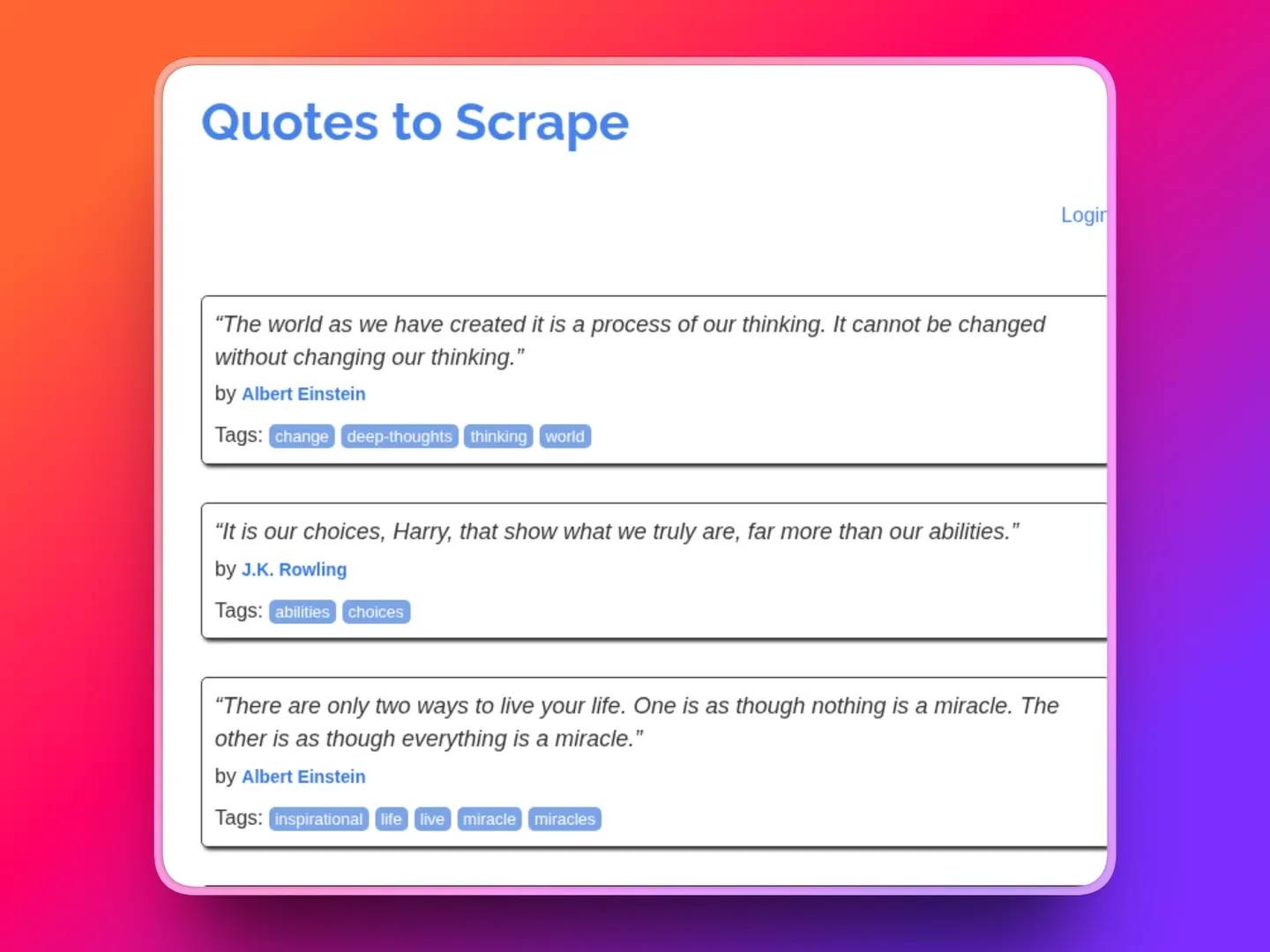
A pages showing quotes with authors and tags

Here's the terminal output:

======================================================================
Scraping Dynamic Content with Headless Chrome
======================================================================
1. Starting headless Chrome...
Chrome started
2. Navigating to JavaScript-heavy page...
Page loaded
3. Waiting for JavaScript to render content...
Wait complete
4. Capturing screenshot...
Screenshot saved to rendered_page.png
5. Extracting rendered HTML and parsing quotes...
Found 10 quotes
--- Extracted Quotes ---
"The world as we have created it is a process of our thinking..."
"It is our choices, Harry, that show what we truly are..."
"There are only two ways to live your life..."
...
======================================================================
Dynamic content successfully scraped.
======================================================================

Selenium::Chrome as an alternative

Selenium::Chrome is a solid alternative if Selenium is already in your stack. It uses WebDriver rather than CDP, which provides richer browser interactions, such as element clicks, multi-tab flows, and JavaScript injection. The key trade-off is that Selenium requires a ChromeDriver binary alongside Chromium for web scraping with Perl. For a step-by-step Selenium walkthrough, see the Scraping the web with Selenium and Python guide.

1. On Docker, open your Dockerfile and add chromium-driver to your apt-get install line:

RUN apt-get update && apt-get install -y \
chromium chromium-driver libssl-dev libexpat1-dev zlib1g-dev pkg-config \
&& rm -rf /var/lib/apt/lists/*

2. Install its Perl module:

cpanm Selenium::Remote::Driver HTML::TreeBuilder

3. Here's your Perl script:

use Selenium::Chrome;
use HTML::TreeBuilder;
my $driver = Selenium::Chrome->new(
extra_capabilities => {
'goog:chromeOptions' => {
args => [
'--headless',
'--no-sandbox',
'--disable-dev-shm-usage',
]
}
}
);
$driver->get('https://quotes.toscrape.com/js/');
# Implicit wait: find_element will poll for up to 10 seconds
# before throwing an error if the element is not yet in the DOM
$driver->set_implicit_wait_timeout(10_000);
my $html = $driver->get_page_source();
my $tree = HTML::TreeBuilder->new_from_content($html);
my @spans = $tree->look_down(_tag => 'span', class => 'text');
for my $span (@spans) {
print $span->as_text() . "\n";
}
$tree->delete();
$driver->quit();

Run it in your terminal. Docker Desktop needs to be open in the background:

//powershell// > docker build -t perl-scraper . && docker run --rm -v "C:/Users/NEW USER/Documents/perl_scrape:/app" perl-scraper perl selenium_chrome_example.pl

Here's the output:

--- Extracted Quotes ---
"The world as we have created it is a process of our thinking..."
"It is our choices, Harry, that show what we truly are..."
"There are only two ways to live your life..."
...
======================================================================
Dynamic content successfully scraped.
======================================================================

Note: Choose WWW::Mechanize::Chrome when you need page content and screenshots with minimal setup. However, choose Selenium::Chrome when you need to interact with elements, such as clicking, typing, or handling multi-step flows.

Avoiding blocks: Proxies, rate limiting, and anti-scraping measures

Getting your scraper to run is one thing. Keeping it running without hitting a wall is another. Most blocks don't happen because a site detected your parsing logic; they happen because your request patterns look automated. This section covers the practical fixes.

Proxies

When you make repeated requests from the same IP address, target sites quickly flag you. The fix is to route your requests through a proxy, an intermediary server that forwards your requests and passes back the response, so the target site sees the proxy's IP, not yours.

A single proxy IP address is still flagged if you send too many requests through it. However, rotating residential proxies solves this by distributing your requests across a pool of real residential IP addresses, so each request can appear to come from a different location and device. This prevents any single IP address from accumulating enough requests to trigger a ban.

This is where Decodo's rotating residential proxies come in. Decodo's network gives you access to 115M+ ethically sourced residential IPs across 195+ locations. Decodo handles the rotation; you don't maintain an IP list or write rotation logic.

How to retrieve your Decodo proxy credentials:

  1. Sign up for a Decodo account.
  2. In the dashboard, select Residential and start a free trial.
  3. Navigate to Residential → Proxy setup on your dashboard.
  4. Click Authentication, then select Add User to create proxy credentials.
  5. Copy your proxy username, password, host, and port into your script or into a .env config file. Your credential fields will look like this:
my $proxy_username = 'YOUR_PROXY_USERNAME';
my $proxy_password = 'YOUR_PROXY_PASSWORD';
my $proxy_host = 'gate.decodo.com';
my $proxy_port = '7000';
my $proxy_url = "http://$proxy_username:$proxy_password\@$proxy_host:$proxy_port";

Web scraping in Perl using proxies

Route LWP::UserAgent through a proxy using the proxy() method:

use LWP::UserAgent;
my $ua = LWP::UserAgent->new;
# Set a proxy for HTTP and HTTPS traffic
$ua->proxy(['http', 'https'], 'http://YOUR_PROXY_USERNAME:YOUR_PROXY_PASSWORD@gate.decodo.com:7000');
my $response = $ua->get('http://quotes.toscrape.com/');
print $response->decoded_content if $response->is_success;

Alternatively, you can set proxy configuration through environment variables before running the script. LWP::UserAgent picks these up automatically: 

# Set in your shell before running the script
# export http_proxy="http://YOUR_PROXY_USERNAME:YOUR_PROXY_PASSWORD@gate.decodo.com:7000"
# export https_proxy="http://YOUR_PROXY_USERNAME:YOUR_PROXY_PASSWORD@gate.decodo.com:7000"
use LWP::UserAgent;
my $ua = LWP::UserAgent->new;
$ua->env_proxy; # Reads http_proxy and https_proxy from environment
my $response = $ua->get('http://quotes.toscrape.com/');
print $response->decoded_content if $response->is_success;

You can also set them in a .env file, but you'll need the Dotenv module:

cpanm Dotenv

Here's the full code to web scrape in Perl with proxies by routing the LWP::UserAgent request through the proxy() method: 

use strict;
use warnings;
use LWP::UserAgent;
use JSON;
use HTML::TreeBuilder;
use Dotenv -load;
binmode(STDOUT, ':encoding(UTF-8)');
# Load credentials from environment variables or set directly
my $proxy_user = $ENV{PROXY_USERNAME} or "Set PROXY_USERNAME\n";
my $proxy_pass = $ENV{PROXY_PASSWORD} or "Set PROXY_PASSWORD\n";
my $proxy_host = $ENV{PROXY_HOST} || 'gate.decodo.com';
my $proxy_port = $ENV{PROXY_PORT} || '7000';
# Configure LWP::UserAgent with Decodo proxy
my $ua = LWP::UserAgent->new(
agent => 'Mozilla/5.0 (Windows NT 10.0; Win64; x64)',
timeout => 10,
);
$ua->proxy([qw(http https)] => "http://$proxy_user:$proxy_pass\@$proxy_host:$proxy_port");
# Verify proxy is active by checking the outbound IP
print "[ACTION] Checking IP through proxy...\n";
print "-" x 80 . "\n";
my $ip_resp = $ua->get('https://api.ipify.org?format=json');
die "IP check failed: " . $ip_resp->status_line unless $ip_resp->is_success;
my $proxy_ip = decode_json($ip_resp->decoded_content)->{ip};
print "[SUCCESS] IP through Decodo proxy: $proxy_ip\n";
print "-" x 80 . "\n\n";
# Scrape quotes
print "[ACTION] Scraping quotes from quotes.toscrape.com...\n";
print "-" x 80 . "\n";
my $resp = $ua->get('http://quotes.toscrape.com/');
die "Scrape failed: " . $resp->status_line unless $resp->is_success;
print "[SUCCESS] Fetched quotes page (Status: " . $resp->code . ")\n";
print "[INFO] Using IP: $proxy_ip for scraping\n\n";
# Parse HTML
print "[ACTION] Parsing HTML and extracting quotes...\n";
print "-" x 80 . "\n";
my $tree = HTML::TreeBuilder->new_from_content($resp->decoded_content);
my @quotes;
for my $div ($tree->look_down(_tag => 'div', class => qr/\bquote\b/)) {
my $text_el = $div->look_down(_tag => 'span', class => 'text');
my $author_el = $div->look_down(_tag => 'small', class => 'author');
next unless $text_el && $author_el;
my $text = $text_el->as_text;
$text =~ s/[\x{201C}\x{201D}]/"/g;
$text =~ s/[\x{2018}\x{2019}]/'/g;
push @quotes, { quote => $text, author => $author_el->as_text };
}
$tree->delete();
print "[SUCCESS] Extracted " . scalar(@quotes) . " quotes\n\n";
# Display results
print "=" x 80 . "\n";
print "SCRAPED QUOTES (using Decodo Proxy)\n";
print "=" x 80 . "\n\n";
for my $i (0 .. $#quotes) {
print "[$i] " . $quotes[$i]->{quote} . "\n";
print " -- " . $quotes[$i]->{author} . "\n\n";
}

Here's the output:

[SUCCESS] IP through Decodo proxy: XX.XXX.XX.XXX
--------------------------------------------------------------------------------
[ACTION] Scraping quotes from quotes.toscrape.com...
--------------------------------------------------------------------------------
[SUCCESS] Fetched quotes page (Status: 200)
[INFO] Using IP: XX.XXX.XX.XXX for scraping
[ACTION] Parsing HTML and extracting quotes...
--------------------------------------------------------------------------------
[SUCCESS] Extracted 10 quotes
================================================================================
SCRAPED QUOTES (using Decodo Proxy)
================================================================================
[0] "The world as we have created it is a process of our thinking. It cannot be changed without changing our thinking."
-- Albert Einstein
[1] "It is our choices, Harry, that show what we truly are, far more than our abilities."
-- J.K. Bowling…

For more on the mechanics of IP rotation and why it matters at scale, see What Are Rotating Proxies? Types, Benefits & Use Cases

Rate limiting

Beyond proxies, request timing matters also. Sending 50 requests per second from the same scraper looks like an attack, not a browser. Slow down and add randomness to fix it.

use Time::HiRes qw(sleep);
sub polite_request {
my ($ua, $url) = @_;
my $response = $ua->get($url);
# Sleep between 2 and 6 seconds to mimic human pacing
my $delay = 2 + rand(4);
sleep($delay);
return $response;
}

rand(4) generates a random float between 0 and 4. Adding 2 gives a range of 2-6 seconds. That randomness is important; fixed delays are easier for anti-bot systems to detect than variable ones.

Check the target site's robots.txt, usually at yourtargetsite.com/robots.txt, before scraping. It specifies which paths are off-limits and sometimes includes a Crawl-delay directive with a minimum wait time the site expects between requests. Perl's LWP::RobotUA module can read and enforce this automatically:

use LWP::RobotUA;
# LWP::RobotUA is a subclass of LWP::UserAgent that respects robots.txt
my $ua = LWP::RobotUA->new('MyScraperBot/1.0', 'my@email.com');
$ua->delay(10/60); # Minimum 10-second delay between requests to the same server
my $response = $ua->get('https://books.toscrape.com');

CAPTCHAs and detection

A CAPTCHA (Completely Automated Public Turing test to tell Computers and Humans Apart) is a challenge, typically an image puzzle or checkbox, that a site shows when it suspects automated traffic. For example, "click all the traffic lights" or "I'm not a robot" are obvious signs. The durable solution is to avoid triggers, use realistic user agents, proxy rotation, and request delays, and respect robots.txt.

When a target site is heavily protected with advanced fingerprinting or behavioral analysis, a third-party-managed scraping API that handles anti-bot measures, proxy management, and rendering at the infrastructure level is the practical escalation. Decodo's Web Scraping API handles this layer, so your Perl code deals only with the data, not the bypass logic.

For a full breakdown of detection techniques and countermeasures, see Anti-Scraping Techniques And How To Outsmart Them and How to Bypass CAPTCHA: The Ultimate Guide 2026.

Respecting Terms of Service (ToS)

Beyond robots.txt, always check the site's Terms of Service (ToS) before scraping. Some sites explicitly permit scraping of public data; others don't. Starting from a clear understanding of what's allowed keeps your operation on solid ground. For a deep dive on legality, Web Scraping Without Getting Blocked: A Practical Guide for 2026 covers both the technical and legal side.

Perl handles parsing, Decodo handles IPs

Route your LWP::UserAgent requests through 115M+ rotating residential IPs across 195+ countries. No proxy lists, no burned addresses.

Error handling and building a robust scraper

The difference between a scraper that works once and one that runs reliably for weeks is how it handles failure. Every real-world scraper hits errors, slow servers, blocked requests, malformed HTML, and network timeouts. A robust scraper plans for all of them.

Checking response codes

Every HTTP response includes a status code that tells you what happened. Don't assume success; always check it. LWP::UserAgent gives you is_success for a quick pass/fail check, and the code for the specific number.

use strict;
use warnings;
use LWP::UserAgent;
my $ua = LWP::UserAgent->new(timeout => 20);
my $response = $ua->get('https://books.toscrape.com');
my $status = $response->code;
if ($response->is_success) {
# 200 OK -- proceed with parsing
print "Success: got ". length($response->decoded_content) . " bytes\n";
}
elsif ($status == 404) {
# Page doesn't exist -- log it and move on
print "404: page not found, skipping\n";
}
elsif ($status == 429) {
# Too Many Requests -- the site is explicitly telling you to slow down
print "429: rate limited, backing off\n";
sleep(60);
}
elsif ($status >= 500) {
# Server error -- transient, worth retrying
print "5xx server error: $status\n";
}
else {
print "Unexpected status: $status\n";
}

Here's a quick reference for the status codes you'll encounter most:

Status code

Meaning

What to do

200

OK

Parse and continue

403

Forbidden

Your IP or session is blocked. Rotate the proxy and check the user agent

404

Not found

Log it and skip; retrying won't help

429

Too Many Requests

Back off immediately; check Retry-After header if present

5xx

Server error

Retry with backoff; the server-side issue is likely temporary

Retry logic with exponential backoff

For transient errors like 429 and 5xx, the right response is to retry, but not immediately. Exponential backoff means doubling the wait time between each retry attempt, so the server has room to recover. Hammering a rate-limited server with immediate retries makes the problem worse. Retry logic is the pattern of automatically re-attempting a failed request a set number of times before giving up.

sub fetch_with_retry {
my ($url, $max_retries) = @_;
$max_retries //= 3;
my $attempt = 0;
my $wait = 2; # Starting wait time in seconds
while ($attempt <= $max_retries) {
my $response = $ua->get($url);
my $status = $response->code;
if ($response->is_success) {
return $response;
}
elsif ($status == 429 || $status >= 500) {
$attempt++;
if ($attempt > $max_retries) {
warn "Giving up on $url after $max_retries retries\n";
return $response;
}
warn "Status $status on attempt $attempt -- retrying in ${wait}s\n";
sleep($wait);
$wait *= 2; # Double the wait: 2s → 4s → 8s
}
else {
# Non-retriable error (404, 403, etc.)
return $response;
}
}
}

For cross-language reference on retry patterns, Retry Failed Python Requests in 2026 covers the same concepts applied to Python's requests library.

Setting timeouts

A scraper without a timeout will hang indefinitely on a slow or unresponsive server. Set a timeout on LWP::UserAgent to put a ceiling on how long any single request can block your script. 15 - 30 seconds is a reasonable range for most scraping tasks.

my $ua = LWP::UserAgent->new(
timeout => 30, # Abort requests that take longer than 30 seconds
);

Wrapping parsing in eval

eval in Perl is the equivalent of a try/catch block in Python. It catches runtime errors and prevents them from crashing the whole script. Wrap your parsing logic in eval so a single malformed or unexpected page doesn't stop the entire job.

You can also use the Try::Tiny module for cleaner syntax if you prefer:

use strict;
use warnings;
use HTML::TreeBuilder;
use Try::Tiny; # Install with: cpanm Try::Tiny
sub parse_page {
my ($html) = @_;
my @results;
try {
my $tree = HTML::TreeBuilder->new_from_content($html);
# Extract book titles from books.toscrape.com
my @articles = $tree->look_down(_tag => 'article', class => 'product_pod');
for my $article (@articles) {
my $title_tag = $article->look_down(_tag => 'h3');
my $a_tag = $title_tag ? $title_tag->look_down(_tag => 'a') : undef;
my $title = $a_tag ? $a_tag->attr('title') : 'Unknown';
push @results, { title => $title };
}
$tree->delete; # Free memory -- always do this with TreeBuilder
}
catch {
warn "Parse error on this page: $_\n";
# results stay empty for this page; the loop continues
};
return @results;
}

Without the eval or Try::Tiny wrapper, a single page with broken HTML or an unexpected structure crashes everything you've collected so far.

Logging failures

Good logging turns a black-box failure into a debuggable event. At minimum, log the URL, the status code, and a timestamp. For larger jobs, write to a file rather than just printing to the terminal:

use strict;
use warnings;
use POSIX qw(strftime);
# Append-mode log file -- persists across runs
open(my $log_fh, '>>', 'scraper.log') or die "Cannot open log: $!";
sub log_event {
my ($level, $url, $message) = @_;
my $timestamp = strftime('%Y-%m-%d %H:%M:%S', localtime);
print $log_fh "[$timestamp] [$level] $url -- $message\n";
}
# Usage examples:
# log_event('INFO', 'https://books.toscrape.com/page-1', 'Fetched successfully');
# log_event('WARN', 'https://books.toscrape.com/page-2', 'Status 429 -- retrying');
# log_event('ERROR', 'https://books.toscrape.com/page-5', 'Parse failed: no product_pod elements found');
close($log_fh);

Logging 429 responses specifically helps you spot when a site's rate limiting is kicking in, a pattern worth reacting to before it escalates to a full block. For more on handling rate-limit responses, Web Scraping Without Getting Blocked: A Practical Guide for 2026 covers the strategy end-to-end.

Exporting scraped data to CSV, JSON, and XML

After scraping, saving your data is the next step. Perl has mature modules for all three standard formats, namely, CSVJSON, and XML.

  • CSV with Text::CSV. CSV is the right choice when the output goes into a spreadsheet (Excel, Google Sheets) or a data analysis tool. Each row in your array of hashes becomes a row in the file.

Install its required module:

cpanm Text::CSV

Then, store the data retrieved into a CSV:

use Text::CSV;
my $csv = Text::CSV->new({ binary => 1, eol => "\n" });
open my $fh, '>:encoding(UTF-8)', 'quotes.csv' or die "Cannot write CSV: $!";
# Write the header row first
$csv->print($fh, ['quote', 'author', 'tags']);
for my $row (@quotes) {
$csv->print($fh, [
$row->{quote},
$row->{author},
join(', ', @{ $row->{tags} }),
]);
}
close $fh;
  • JSON with the JSON module or JSON::PP. JSON outputs are ideal when the output is fed to an API, a JavaScript front-end, or a NoSQL database. For JSON outputs, the JSON::PP module ships with Perl core and works without installing anything, but the JSON module is faster and the better choice for larger datasets. Also, the JSON module preserves the nested structure, so tags can remain an array instead of being flattened into a string. 

Install the required module: 

cpanm JSON

Then store the data retrieved:

use JSON;
my $json = JSON->new->utf8->pretty->canonical;
open my $fh, '>', 'quotes.json' or die "Cannot write JSON: $!";
print $fh $json->encode(\@quotes);
close $fh;
  • XML with XML::Simple. XML is the right choice when a downstream system, a CMS, an enterprise data pipeline, or a SOAP service explicitly requires it. XML::Simple is straightforward for writing to XML. For a related XML parsing reference, see the lxml tutorial: parsing HTML and XML documents.

Install its required module: 

cpanm XML::Simple

Then store the data retrieved:

use XML::Simple;
my $xs = XML::Simple->new(
RootName => 'quotes',
NoAttr => 1,
XMLDecl => 1,
);
open my $fh, '>:encoding(UTF-8)', 'quotes.xml' or die "Cannot write XML: $!";
print $fh $xs->XMLout({ quote => \@quotes });
close $fh;

Decision guide: use JSON when output feeds an API, a front-end, or a document database (MongoDB). Use CSV when output goes into a spreadsheet or a data analysis tool (pandas, R, Excel). Use XML when a downstream system, such as a CMS import, SOAP services, or enterprise pipelines, requires it. For a full breakdown of storage options, see the How to save your scraped data guide.

However, if you are unsure, default to JSON; it handles nested data cleanly, is parseable by every language, and is the most common format for web data interchange today. Also, keep in mind that for large-scale or historical scraping, running the same scraper daily and keeping every version of the data in flat files becomes hard to manage. At that point, escalate to a database (SQL or NoSQL). 

Here's the full code for each use case:

use strict;
use warnings;
use LWP::UserAgent;
use HTML::TreeBuilder;
use Text::CSV;
use JSON;
use XML::Simple;
print "=" x 70 . "\n";
print "Scrape and Export to CSV, JSON, and XML\n";
print "=" x 70 . "\n\n";
# 1. Scrape quotes
my $ua = LWP::UserAgent->new(agent => 'Mozilla/5.0', timeout => 10);
my $response = $ua->get('https://quotes.toscrape.com/');
die "Failed: " . $response->status_line unless $response->is_success;
my $tree = HTML::TreeBuilder->new_from_content($response->decoded_content);
my @quotes;
for my $div ($tree->look_down(_tag => 'div', class => qr/\bquote\b/)) {
my $text_el = $div->look_down(_tag => 'span', class => 'text');
my $author_el = $div->look_down(_tag => 'small', class => 'author');
my @tag_els = $div->look_down(_tag => 'a', class => 'tag');
next unless $text_el && $author_el;
push @quotes, {
quote => $text_el->as_text,
author => $author_el->as_text,
tags => [ map { $_->as_text } @tag_els ],
};
}
$tree->delete();
print "Scraped " . scalar(@quotes) . " quotes\n\n";
# 2. Export to CSV
my $csv = Text::CSV->new({ binary => 1, eol => "\n" });
open my $csv_fh, '>:encoding(UTF-8)', 'quotes.csv' or die $!;
$csv->print($csv_fh, ['quote', 'author', 'tags']);
for my $row (@quotes) {
$csv->print($csv_fh, [
$row->{quote},
$row->{author},
join(', ', @{ $row->{tags} }),
]);
}
close $csv_fh;
print "CSV saved -> quotes.csv\n";
# 3. Export to JSON
my $json = JSON->new->utf8->pretty->canonical;
open my $json_fh, '>', 'quotes.json' or die $!;
print $json_fh $json->encode(\@quotes);
close $json_fh;
print "JSON saved -> quotes.json\n";
# 4. Export to XML
my $xs = XML::Simple->new(RootName => 'quotes', NoAttr => 1, XMLDecl => 1);
open my $xml_fh, '>:encoding(UTF-8)', 'quotes.xml' or die $!;
print $xml_fh $xs->XMLout({ quote => \@quotes });
close $xml_fh;
print "XML saved -> quotes.xml\n";
print "\n" . "=" x 70 . "\n";
print "All three files written successfully.\n";
print "=" x 70 . "\n";

Run with:

perl your_scraper_file_name

Here's the output:

======================================================================
Scrape and Export to CSV, JSON, and XML
======================================================================
Scraped 10 quotes
CSV saved → quotes.csv
JSON saved → quotes.json
XML saved → quotes.xml
======================================================================
All three files written successfully.
======================================================================

Conclusion

Perl's built-in regex engine and the CPAN module ecosystem give you everything you need to build a reliable scraper, from a simple GET request with LWP::UserAgent to full session handling with WWW::Mechanize and JavaScript rendering via WWW::Mechanize::Chrome.

The module you reach for depends on the target. If you're scraping fewer than 1,000 pages, start with LWP::UserAgent and HTML::TreeBuilder. If you're hitting blocks, add proxy rotation. If the target is JavaScript-heavy, add a headless browser. Start simple and escalate only when the target demands it.

At scale, the blocking layer becomes the real problem. Randomized delays, rotating residential proxies, and headless browsers cover most targets. However, when a target is heavily protected, Decodo's Web Scraping API handles anti-bot, rendering, and proxy rotation at the infrastructure level, so your Perl scraper stays focused on the data.

When regex meets a 403

Decodo's Web Scraping API handles proxy rotation, JS rendering, and anti-bot bypass, so your Perl script just parses the response instead of debugging blocked requests.

Share article:

About the author

Justinas Tamasevicius

Director of Engineering

Justinas Tamaševičius is Director of Engineering with over two decades of expertise in software development. What started as a self-taught passion during his school years has evolved into a distinguished career spanning backend engineering, system architecture, and infrastructure development.

Connect with Justinas via LinkedIn.

All information on Decodo Blog is provided on an as is basis and for informational purposes only. We make no representation and disclaim all liability with respect to your use of any information contained on Decodo Blog or any third-party websites that may belinked therein.


Frequently asked questions

Is Perl good for web scraping?

Yes. Perl's built-in regex support makes pattern matching on raw HTML fast and expressive, and CPAN (Comprehensive Perl Archive Network) provides a mature library ecosystem with stable, well-documented modules for HTTP, parsing, and browser emulation. Python has a larger community and more scraping-specific tooling today, but if you're already working in Perl or need regex power without extra dependencies, it's a strong, practical option. See What Is Web Scraping? for a full grounding in the fundamentals.

Which Perl module is best for web scraping?

It depends on the task. Use LWP::UserAgent for full HTTP control: headers, timeouts, and cookies. Use HTTP::Tiny for simple GET requests with no extra dependencies. Use HTML::TreeBuilder to parse HTML into a traversable tree and pull out elements by tag, class, or attribute. Use WWW::Mechanize when you need to handle forms, follow links, and maintain session state. The module comparison table in the "Why use Perl for web scraping" section above maps each tool to its use case. For selector strategy, see the XPath vs CSS guide.

Can Perl scrape JavaScript-rendered pages?

Yes, but not with a plain HTTP client. LWP::UserAgent and HTTP::Tiny only see the initial server HTML; they can't execute JavaScript. For pages that load content dynamically, use WWW::Mechanize::Chrome to drive a real headless Chrome instance, or Selenium::Remote::Driver if Selenium is already in your stack. Both execute JavaScript and return fully rendered HTML. The trade-off is speed: browser automation is slower and heavier than direct HTTP, so use it only when plain HTTP genuinely fails. See the What is a Headless Browser guide for more context.

How do I avoid getting blocked when scraping with Perl?

Start with a realistic User-Agent string in LWP::UserAgent; the default Perl agent is immediately recognizable to anti-bot systems. Add randomized delays between requests using sleep and rand so your timing doesn't look automated. Respect robots.txt manually or enforce it automatically wit&#x68;&#x20;LWP::RobotUA. At scale, route requests through Decodo's rotating residential proxies to distribute traffic across real IPs and avoid bans. For a full strategy covering headers, timing, and proxy setup, read “Web Scraping Without Getting Blocked.”

Is web scraping with Perl legal?

Legality depends on what you scrape, how you scrape it, and what you do with the data. The language doesn't factor in. Scraping publicly available data is generally permitted in most jurisdictions, but scraping behind authentication, ignoring robots.txt, or violating a site's Terms of Service creates legal exposure. GDPR adds another layer when scraped data includes personal information. This is general information, not legal advice. For a detailed breakdown of case law and compliance steps, read "Is web scraping legal?”

Comprehensive Guide to Web Scraping with PHP

PHP has been powering the server side of the web for decades, and all that HTTP handling experience makes it a surprisingly capable tool for web scraping. It's not the first language most people reach for – that's usually Python – but if PHP is already your daily driver, there's no reason to switch completely. In this article, you'll learn everything there is to know about web scraping with PHP.

JS logo overlaying a glowing blue code snippet on a dark abstract background

JavaScript Web Scraping Tutorial (2026)

Ever wished you could make the web work for you? JavaScript web scraping allows you to gather valuable information from websites in an automated way, unlocking insights that would be difficult to collect manually. In this guide, you'll learn the key tools, techniques, and best practices to scrape data efficiently, whether you're a beginner or a developer looking to streamline data collection.

Code panel showing HTML request beside 'Proxies enabled' and 'Your data is ready!' cards on dark gradient background

Web Scraping Without Getting Blocked: A Practical Guide for 2026

Web scraping without getting blocked is one of the hardest challenges you might face. Whether you’re a business conducting market research or a solopreneur working on your next big thing, most scrapers fail not because the code is wrong, but because websites now run layered detection that flags bots before a single byte of HTML is returned. This guide breaks down all the detection layers, including network, TLS, browser, and behavioral, and delivers the best techniques on how to overcome each.

© 2018-2026 decodo.com (formerly smartproxy.com). All Rights Reserved